2016 TOYOTA PRIUS V ABS
[x] Cancel search: ABSPage 491 of 620
4918-2. Steps to take in an emergency
PRIUS v_OM_OM47B12U_(U)
8
When trouble arises
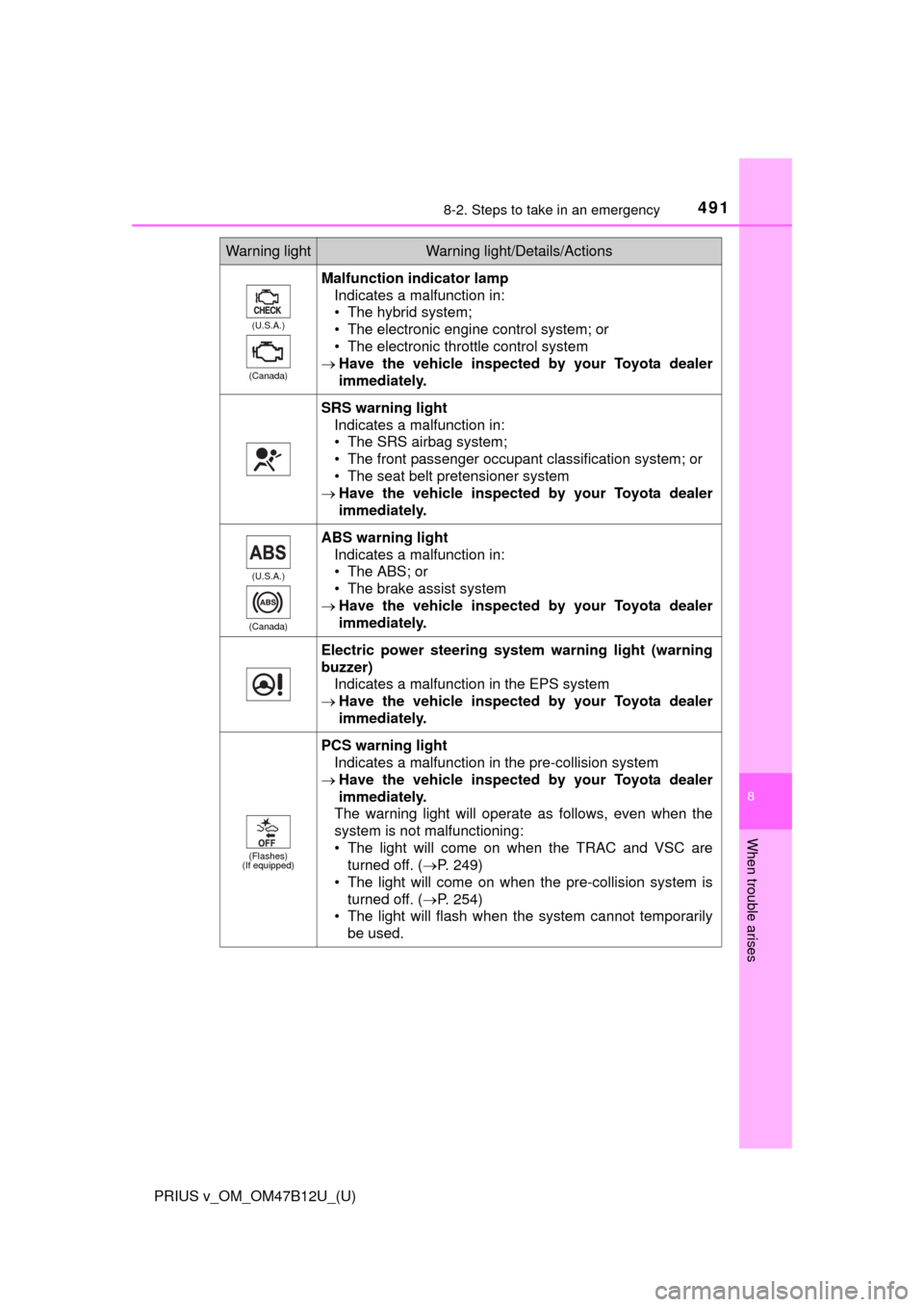
(U.S.A.)
(Canada)
Malfunction indicator lamp
Indicates a malfunction in:
• The hybrid system;
• The electronic engine control system; or
• The electronic throttle control system
Have the vehicle inspected by your Toyota dealer
immediately.
SRS warning light
Indicates a malfunction in:
• The SRS airbag system;
• The front passenger occupant classification system; or
• The seat belt pretensioner system
Have the vehicle inspected by your Toyota dealer
immediately.
(U.S.A.)
(Canada)
ABS warning light
Indicates a malfunction in:
• The ABS; or
• The brake assist system
Have the vehicle inspected by your Toyota dealer
immediately.
Electric power steering system warning light (warning
buzzer)
Indicates a malfunction in the EPS system
Have the vehicle inspected by your Toyota dealer
immediately.
(Flashes)
(If equipped)
PCS warning light
Indicates a malfunction in the pre-collision system
Have the vehicle inspected by your Toyota dealer
immediately.
The warning light will operate as follows, even when the
system is not malfunctioning:
• The light will come on when the TRAC and VSC are
turned off. (P. 249)
• The light will come on when the pre-collision system is
turned off. (P. 254)
• The light will flash when the system cannot temporarily
be used.
Warning lightWarning light/Details/Actions
Page 492 of 620
4928-2. Steps to take in an emergency
PRIUS v_OM_OM47B12U_(U)
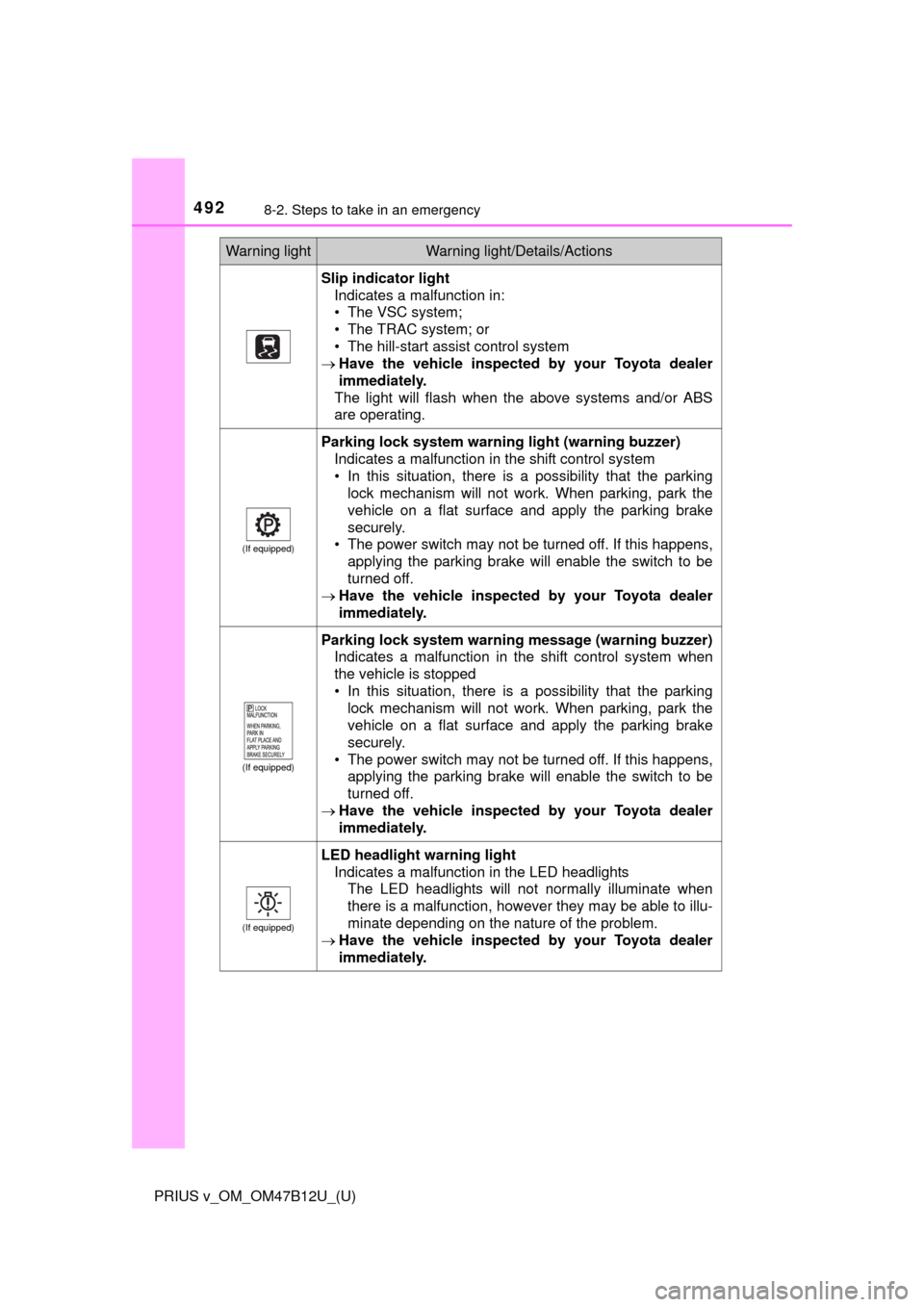
Slip indicator light
Indicates a malfunction in:
• The VSC system;
• The TRAC system; or
• The hill-start assist control system
Have the vehicle inspected by your Toyota dealer
immediately.
The light will flash when the above systems and/or ABS
are operating.
(If equipped)
Parking lock system warning light (warning buzzer)
Indicates a malfunction in the shift control system
• In this situation, there is a possibility that the parking
lock mechanism will not work. When parking, park the
vehicle on a flat surface and apply the parking brake
securely.
• The power switch may not be turned off. If this happens,
applying the parking brake will enable the switch to be
turned off.
Have the vehicle inspected by your Toyota dealer
immediately.
(If equipped)
Parking lock system warning message (warning buzzer)
Indicates a malfunction in the shift control system when
the vehicle is stopped
• In this situation, there is a possibility that the parking
lock mechanism will not work. When parking, park the
vehicle on a flat surface and apply the parking brake
securely.
• The power switch may not be turned off. If this happens,
applying the parking brake will enable the switch to be
turned off.
Have the vehicle inspected by your Toyota dealer
immediately.
(If equipped)
LED headlight warning light
Indicates a malfunction in the LED headlights
The LED headlights will not normally illuminate when
there is a malfunction, however they may be able to illu-
minate depending on the nature of the problem.
Have the vehicle inspected by your Toyota dealer
immediately.
Warning lightWarning light/Details/Actions
Page 498 of 620
4988-2. Steps to take in an emergency
PRIUS v_OM_OM47B12U_(U)
WARNING
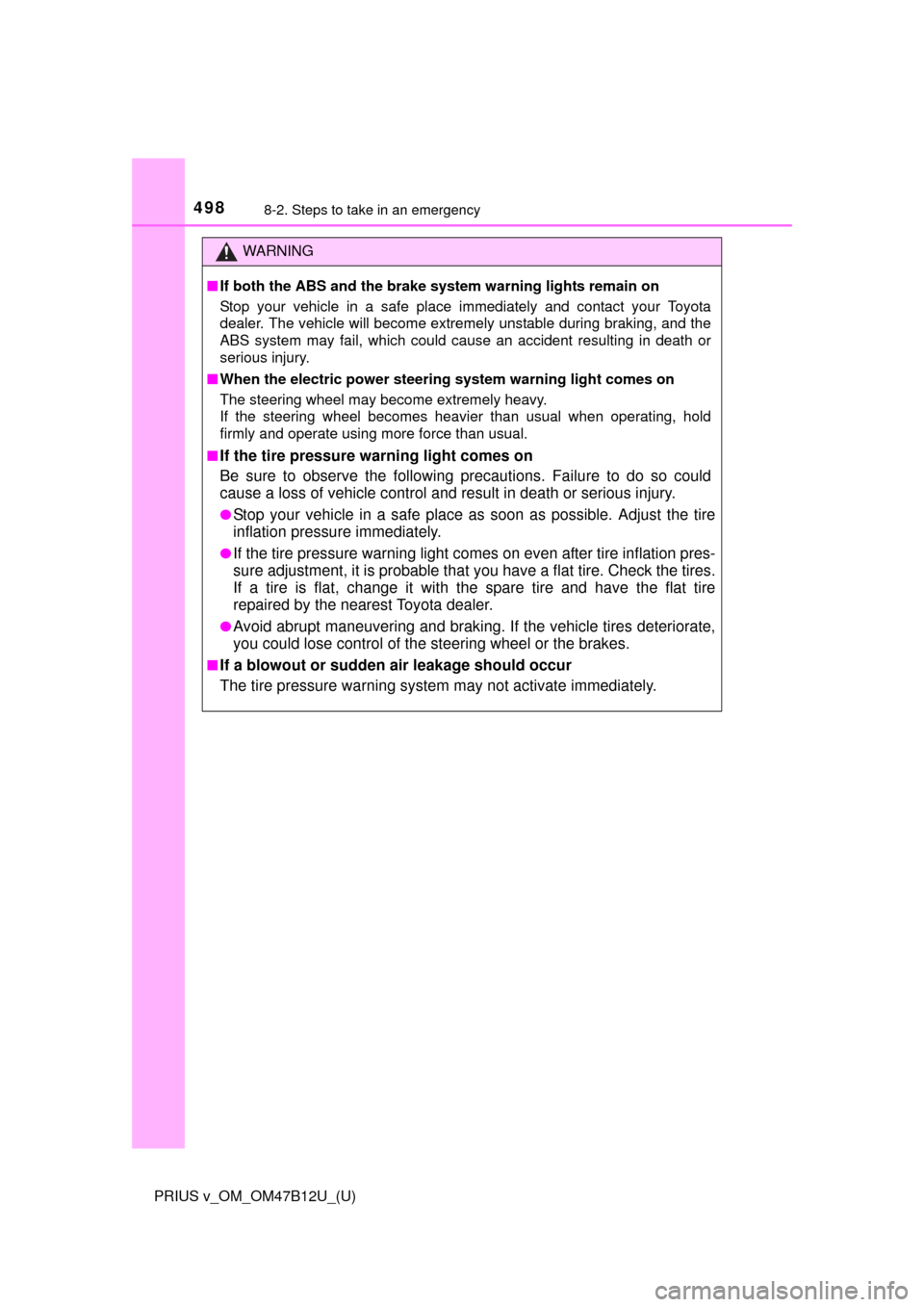
■If both the ABS and the brake system warning lights remain on
Stop your vehicle in a safe place immediately and contact your Toyota
dealer. The vehicle will become extremely unstable during braking, and the
ABS system may fail, which could cause an accident resulting in death or
serious injury.
■When the electric power steering system warning light comes on
The steering wheel may become extremely heavy.
If the steering wheel becomes heavier than usual when operating, hold
firmly and operate using more force than usual.
■
If the tire pressure warning light comes on
Be sure to observe the following precautions. Failure to do so could
cause a loss of vehicle control and result in death or serious injury.
●Stop your vehicle in a safe place as soon as possible. Adjust the tire
inflation pressure immediately.
●If the tire pressure warning light comes on even after tire inflation pres-
sure adjustment, it is probable that you have a flat tire. Check the tires.
If a tire is flat, change it with the spare tire and have the flat tire
repaired by the nearest Toyota dealer.
●Avoid abrupt maneuvering and braking. If the vehicle tires deteriorate,
you could lose control of the steering wheel or the brakes.
■If a blowout or sudden air leakage should occur
The tire pressure warning system may not activate immediately.
Page 532 of 620

5328-2. Steps to take in an emergency
PRIUS v_OM_OM47B12U_(U)
WARNING
■When using the compact spare tire
●Remember that the spare tire provided is specifically designed for use
with your vehicle. Do not use your spare tire on another vehicle.
●Do not use more than one compact spare tire simultaneously.
●Replace the spare tire with a standard tire as soon as possible.
●Avoid sudden acceleration, abrupt steering, sudden braking and shift-
ing operations that cause sudden engine braking.
■When the compact spare tire is attached
The vehicle speed may not be correctly detected, and the following sys-
tems may not operate correctly:
■Speed limit when using the compact spare tire
Do not drive at speeds in excess of 50 mph (80 km/h) when a compact
spare tire is installed on the vehicle.
The compact spare tire is not designed for driving at high speeds. Fail-
ure to observe this precaution may lead to an accident causing death or
serious injury.
■After using the tools and jack
Before driving, make sure all the tools and jack are securely in place in
their storage location to reduce the possibility of personal injury during a
collision or sudden braking.
• ABS & Brake assist
• VSC
•TRAC
• Cruise control
*
• Dynamic radar cruise control*
• Pre-collision system*
• EPS
• Rear view monitor system
*
• LDA (Lane Departure Alert)*
• Navigation system*
*
: If equipped
Page 538 of 620

538
PRIUS v_OM_OM47B12U_(U)
8-2. Steps to take in an emergency
If the 12-volt batter y is discharged
If you have a set of jumper (or booster) cables and a second vehicle
with a 12-volt battery, you can jump start your vehicle by following the
steps below.
Open the hood (P. 421) and
fuse box cover.
When closing, first hook the lid
onto the two rear tabs.
Open the exclusive jump start-
ing terminal cover.
The following procedures may be used to start the hybrid sys-
tem if the vehicle’s 12-volt battery is discharged.
You can also call your Toyota dealer or a qualified repair shop.
1
2
Page 540 of 620

5408-2. Steps to take in an emergency
PRIUS v_OM_OM47B12U_(U)
Make sure the “READY” indicator comes on. If the indicator light
does not come on, contact your Toyota dealer.
Once the hybrid system has started, remove the jumper cables in
the exact reverse order from which they were connected.
Close the exclusive jump starting terminal cover, and reinstall the
fuse box cover to its original position.
When installing, first hook the fuse box cover onto the two rear tabs.
Once the hybrid system starts, have the vehicle inspected at your
Toyota dealer as soon as possible.
■Starting the hybrid system when the 12-volt battery is discharged
The hybrid system cannot be started by push-starting.
■To prevent 12-volt battery discharge
●Turn off the headlights and the audio system while the hybrid system is off.
●Turn off any unnecessary electrical components when the vehicle is running
at a low speed for an extended period, such as in heavy traffic.
■When the 12-volt battery is removed or discharged
●The hybrid system may not start. (P. 440)
●If the 12-volt battery discharges while the shift position is in P, it may not be
possible to shift the shift position to other positions. In this case, the vehicle
cannot be towed without lifting both front wheels because the front wheels
will be locked. (P. 484)
●When the 12-volt battery is reconnected, start the hybrid system and con-
firm that the shift position can be changed to each position using the shift
position indicator.
■Charging the 12-volt battery
The electricity stored in the 12-volt battery will discharge gradually even when
the vehicle is not in use, due to natural discharge and the draining effects of
certain electrical appliances. If the vehicle is left for a long time, the 12-volt
battery may discharge, and the hybrid system may be unable to start. (The
12-volt battery recharges automatically while the hybrid system is operating.)
6
7
8
Page 603 of 620

603Alphabetical index
PRIUS v_OM_OM47B12U_(U)
Alphabetical index
A/C ............................................ 364
Air conditioning filter ............. 457
Automatic air conditioning
system ................................ 364
Climate remote control
switches.............................. 371
Micro dust and pollen filter .... 366
ABS
(Anti-lock Brake System)...... 246
Function ................................ 246
Warning light ......................... 491
Air conditioning filter .............. 457
Air conditioning system.......... 364
Air conditioning filter ............. 457
Automatic air conditioning
system ................................ 364
Climate remote control
switches.............................. 371
Micro dust and pollen filter .... 366
Air intake vent ............................ 78Airbags ....................................... 41
Airbag operating conditions .... 48
Airbag precautions for
your child .............................. 43
Airbag warning light .............. 491
Correct driving posture ........... 30
Curtain shield airbag
operating conditions ............. 48
Curtain shield airbag
precautions........................... 46
Front passenger occupant
classification system ............ 52
General airbag precautions .... 43
Locations of airbags ............... 41
Modification and disposal
of airbags ............................. 47
Side airbag operating
conditions ............................. 48
Side airbag precautions .......... 45
Side and curtain shield
airbags operating
conditions ............................. 48
Side and curtain shield
airbags precautions .............. 46
SRS airbag instructions for
Canadian owners ............... 589
SRS airbags ........................... 41
Anchor brackets ........................ 62
A
Page 604 of 620

604Alphabetical index
PRIUS v_OM_OM47B12U_(U)
Antenna
Smart key system ................. 130
Radio .................................... 291
Anti-lock brake system
(ABS) ...................................... 246
Function ................................ 246
Warning light ......................... 491
Approach warning ................... 219
Armrest ..................................... 387
Assist grips .............................. 388
Audio input............................... 273
Audio system
(Entune Audio) ...................... 269
Antenna ................................ 291
Audio input ............................ 273
AUX port ............................... 308
Basic operations ................... 274
Bluetooth
® audio................... 321
CD player .............................. 292
iPod....................................... 298
MP3/WMA disc ..................... 292
Optimal use........................... 288
Portable music player ........... 273
Radio .................................... 290
Steering wheel audio
switches.............................. 272
USB memory ........................ 303
Audio system (Entune Premium
Audio with Navigation)
*
Automatic air conditioning
system
Air conditioning filter ............. 457
Automatic air conditioning
system ................................ 364Automatic door locking
and unlocking systems ........ 123
Automatic headlight
leveling system ..................... 192
Automatic High Beam ............. 194
Automatic light control
system.................................... 192
AUX port ................................... 273
Auxiliary boxes ................ 380, 382
Back door ................................. 125
Back-up lights
Replacing light bulbs ............ 476
Wattage ................................ 560
Battery (12-volt battery)
Battery checking ................... 439
If the 12-volt battery is
discharged.......................... 538
Preparing and checking
before winter ...................... 263
Warning light......................... 490
Battery (traction battery) .......... 77
Bluetooth
®............................... 352
Audio system ........................ 321
Hands-free system
(for cellular phone) ............. 323
Registering/removing
a Bluetooth
® device ........... 315
Selecting a Bluetooth®
device ................................. 317
Wireless communication....... 310
B