Page 295 of 800
PRIUS_OM_OM47A29U_(U)
2954-5. Using the driving support systems
4
Driving
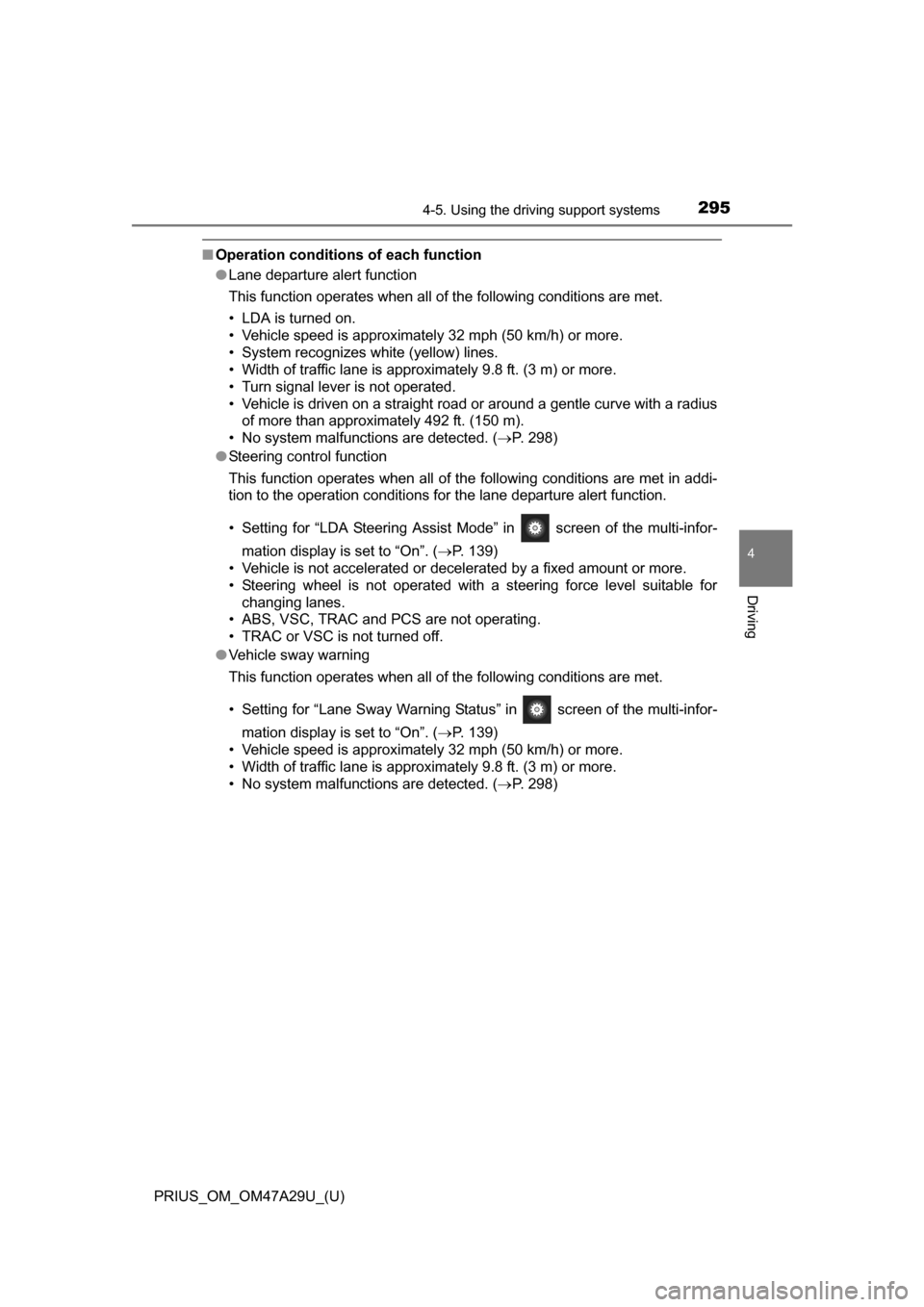
■Operation conditions of each function
●Lane departure alert function
This function operates when all of the following conditions are met.
• LDA is turned on.
• Vehicle speed is approximately 32 mph (50 km/h) or more.
• System recognizes white (yellow) lines.
• Width of traffic lane is approximately 9.8 ft. (3 m) or more.
• Turn signal lever is not operated.
• Vehicle is driven on a straight road or around a gentle curve with a radius
of more than approximately 492 ft. (150 m).
• No system malfunctions are detected. ( P. 298)
● Steering control function
This function operates when all of the following conditions are met in addi-
tion to the operation conditions for the lane departure alert function.
• Setting for “LDA Steering Assist Mode” in screen of the multi-infor-
mation display is set to “On”. ( P. 139)
• Vehicle is not accelerated or decelerated by a fixed amount or more.
• Steering wheel is not operated with a steering force level suitable for
changing lanes.
• ABS, VSC, TRAC and PCS are not operating.
• TRAC or VSC is not turned off.
● Vehicle sway warning
This function operates when all of the following conditions are met.
• Setting for “Lane Sway Warning Status” in screen of the multi-infor-
mation display is set to “On”. ( P. 139)
• Vehicle speed is approximately 32 mph (50 km/h) or more.
• Width of traffic lane is approximately 9.8 ft. (3 m) or more.
• No system malfunctions are detected. ( P. 298)
Page 296 of 800

4-5. Using the driving support systems
■Temporary cancellation of functions
When operation conditions are no longer met, a function may be temporarily\
canceled. However,")
296
PRIUS_OM_OM47A29U_(U)
4-5. Using the driving support systems
■Temporary cancellation of functions
When operation conditions are no longer met, a function may be temporarily\
canceled. However, when the operation conditions are met again, operation
of the function is automatically restored. (P. 295)
■ Steering control function
Depending on the vehicle speed, lane departure situation, road conditions,
etc., the operation of the functions may not be recognized or the functions
may not operate.
■ Lane departure alert function
The warning buzzer may be difficult to hear due to external noise, audio play-
back, etc.
■ Hands off steering wheel alert
When the system determines that the driver has removed their hands from
the steering wheel while the steering control function is operating, a warning
message is displayed on the multi-information display and the buzzer
sounds.
■ White (yellow) lines are only on one side of road
The LDA system will not operate for the side on which white (yellow) lines
could not be recognized.
Page 299 of 800
PRIUS_OM_OM47A29U_(U)
2994-5. Using the driving support systems
4
Driving
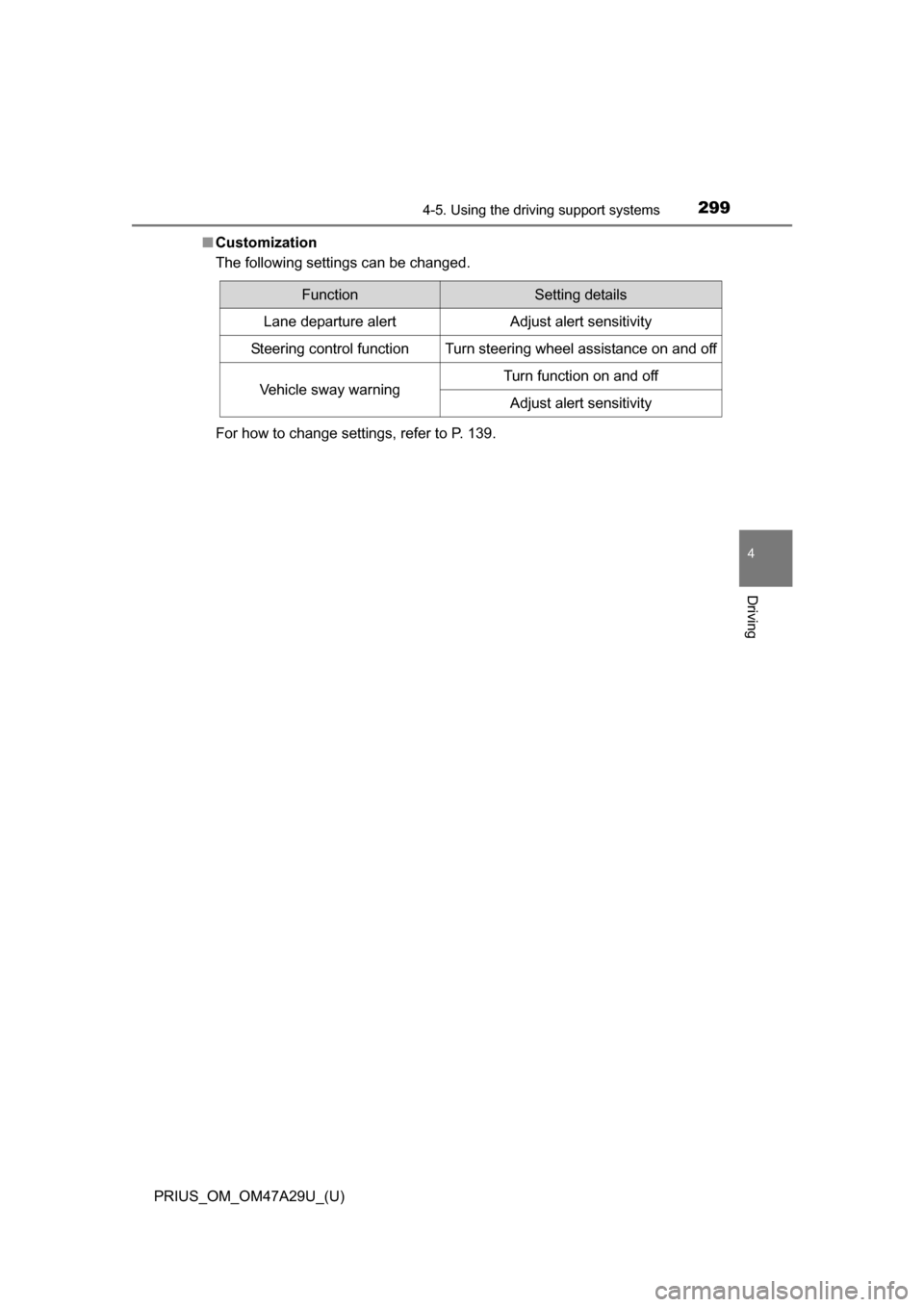
■Customization
The following settings can be changed.
For how to change settings, refer to P. 139.
FunctionSetting details
Lane departure alertAdjust alert sensitivity
Steering control functionTurn steering wheel assistance on and off
Vehicle sway warningTurn function on and off
Adjust alert sensitivity
Page 314 of 800
314
PRIUS_OM_OM47A29U_(U)
4-5. Using the driving support systems
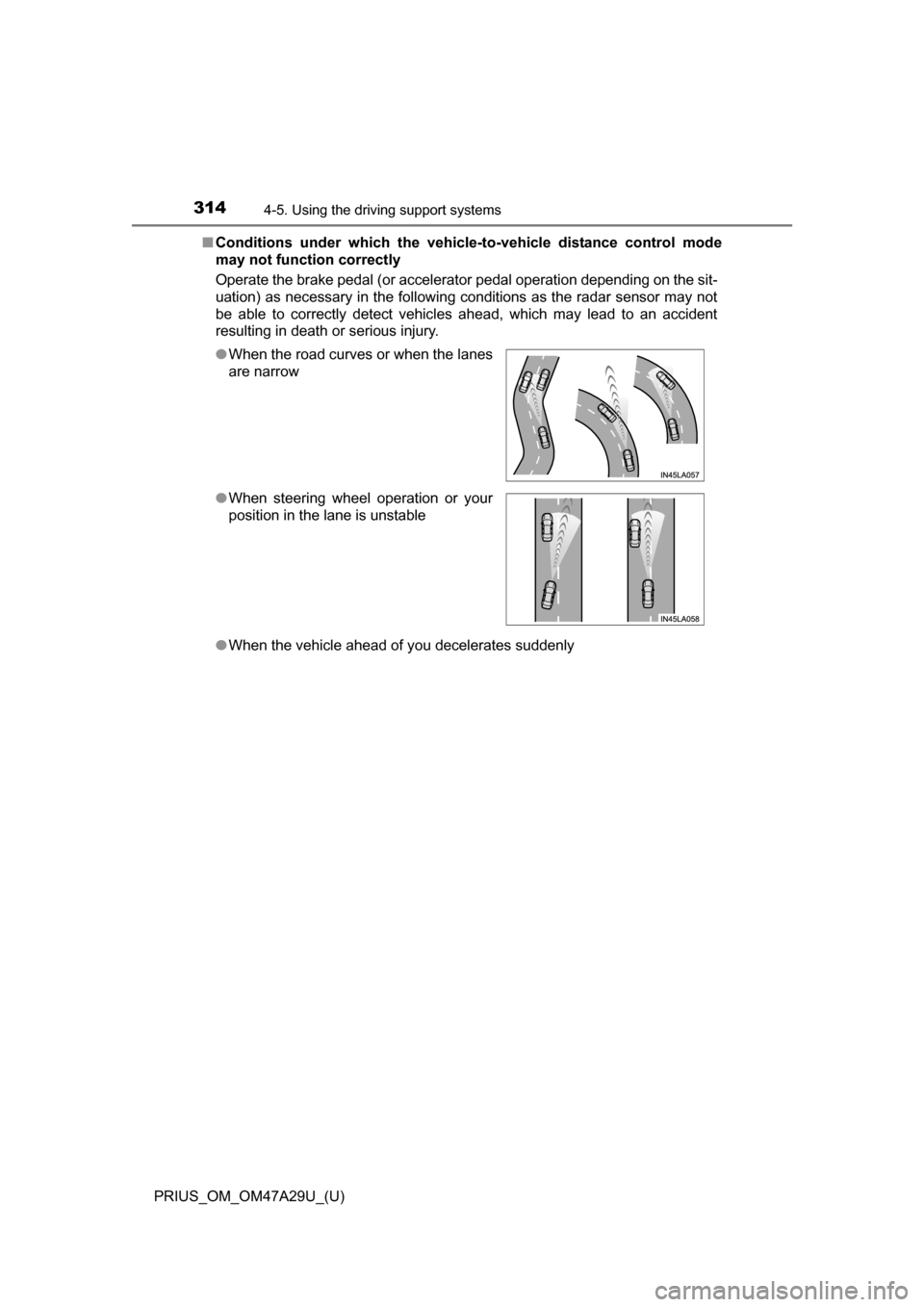
■Conditions under which the vehicle -to-vehicle distance control mode
may not function correctly
Operate the brake pedal (or accelerator pedal operation depending on the sit-
uation) as necessary in the following conditions as the radar sensor may not
be able to correctly detect vehicles ahead, which may lead to an accident
resulting in death or serious injury.
● When the vehicle ahead of you decelerates suddenly
●
When the road curves or when the lanes
are narrow
● When steering wheel operation or your
position in the lane is unstable
Page 340 of 800

340
PRIUS_OM_OM47A29U_(U)
4-5. Using the driving support systems
■Operation conditions
The power switch is turned on.
●Front corner sensors:
• Shift position is not in P
• Vehicle speed is approximately 6 mph (10 km/h) or less
● Front side sensors/rear side sensors:
• Shift position is not in P
• Vehicle speed is approximately 6 mph (10 km/h) or less
• Steering wheel is turned approximately 90 or more
● Front center sensors:
• Shift position is not in P or R
• Vehicle speed is approximately 6 mph (10 km/h) or less
● Rear corner sensors/rear center sensors:
Shift position is in R
■ Clearance sonar pop-up display
P. 364
■ Sensor detection information
●The sensor’s detection areas are limited to the areas around the vehicle’s
bumper.
● Depending on the shape of the obstacle and other factors, the detection dis-
tance may shorten, or detection may be impossible.
● Obstacles may not be detected if they are too close to the sensor.
● There will be a short delay between obstacle detection and display. Even
when traveling at a low speed, if you come too close to an obstacle before
the display and buzzer activate, the display and buzzer may not activate at
all.
● Thin posts or objects lower than the sensor may not be detected when
approached, even if they have been detected once.
● It might be difficult to hear beeps due to the volume of audio system or air
flow noise of the air conditioning system.
Page 359 of 800
359
PRIUS_OM_OM47A29U_(U)
4-5. Using the driving support systems
4
Driving
S-APGS (Simple Adva nced Parking Guidance
System)
■Function summary
The Simple Advanced Parking Guidance System automatically
operates the steering wheel to provide support when backing into
an area near a target parking spot, and when departing from a par-
allel parking spot. (Shift lever operations and speed adjustment
when moving forward or backing up are not performed automati-
cally.)
● The Simple Advanced Parking Guidance System does not park
the vehicle automatically. It is a system that provides support
when pulling out of a perpendicular or parallel parking spot.
● The Simple Advanced Parking Gu idance System provides steer-
ing wheel operation assistance to guide the vehicle toward the
selected intended parking spot. The selected intended parking
spot may not always be reach able, depending on road and vehi-
cle conditions at the time of pa rking, and the distance to the
intended parking spot.
■Linking with the Intelligent Clearance Sonar function
While the Simple Advanced Parking Guidance System is operating,
if the system detects an obstacle t hat could result in a collision, the
emergency brakes operat e, regardless of whether the Intelligent
Clearance Sonar function is ON or OFF. ( P. 361)
: If equipped
Simple Advanced Parking Guidance System
WARNING
●When backing up or proceeding forward, be sure to directly confirm the
safety of the area to the front or rear, and the area around the vehicle, and
slowly back up or proceed forward while adjusting the vehicle speed by
depressing the brake pedal.
● If it seems the vehicle may make contact with a pedestrian, another vehi-
cle or any other obstacles, stop the vehicle by depressing the brake pedal,
and then press the S-APGS switch ( P. 362) to turn the system OFF.
Page 363 of 800
PRIUS_OM_OM47A29U_(U)
3634-5. Using the driving support systems
4
Driving
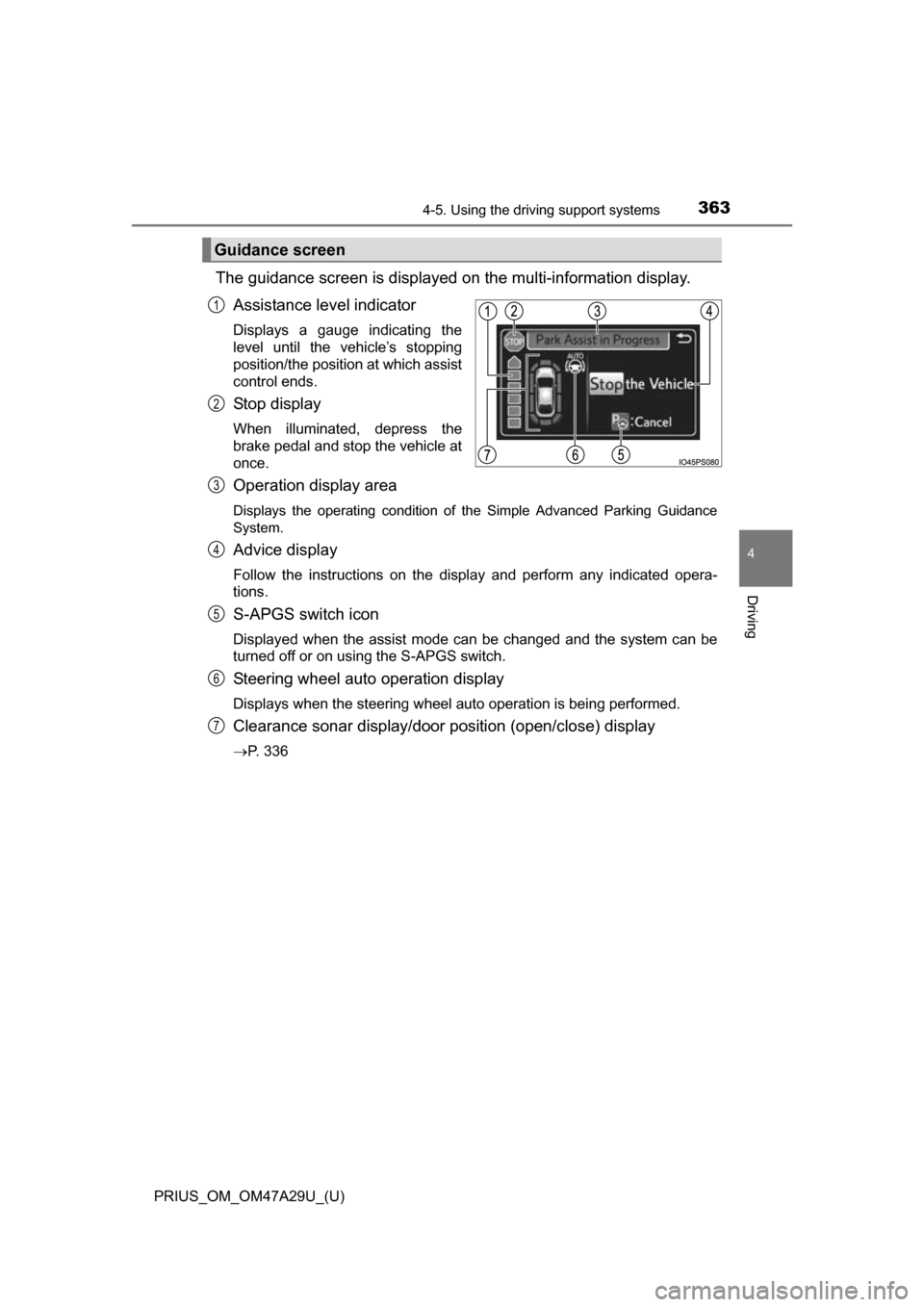
The guidance screen is displayed on the multi-information display.
Assistance level indicator
Displays a gauge indicating the
level until the vehicle’s stopping
position/the position at which assist
control ends.
St op d is pl ay
When illuminated, depress the
brake pedal and stop the vehicle at
once.
Operation display area
Displays the operating condition of the Simple Advanced Parking Guidance
System.
Advice display
Follow the instructions on the display and perform any indicated opera-
tions.
S-APGS switch icon
Displayed when the assist mode can be changed and the system can be
turned off or on using the S-APGS switch.
Steering wheel auto operation display
Displays when the steering wheel auto operation is being performed.
Clearance sonar display/door position (open/close) display
P. 336
Guidance screen
1
2
3
4
5
6
7
Page 364 of 800
364
PRIUS_OM_OM47A29U_(U)
4-5. Using the driving support systems
■S-APGS indicator inside the meter ( P. 104)
This indicator illuminates when the steering wheel auto operation is being
performed by the Simple Advanced Parking Guidance System. After control
ends, the indicator blinks for a short period of time and then turns off.
■ Clearance sonar pop-up display
While the Simple Advanced Parking Guidance System is operating, if the
clearance sonar function detects an obstacle, the clearance sonar display
automatically pops up on the guidance screen ( P. 336), regardless of
whether the clearance sonar function is ON or OFF ( P. 335).
Assist mode will be canceled or stopped in the following cases.
■Assist control is canceled when
●The system temperature preservation function operates
● There is a system malfunction
● System determined that the parking environment is not suitable
for assist to continue
When assist control is canceled, firmly grasp the steering wheel,
depress the brake pedal and stop the vehicle.
Start again from the beginning, as the system will already be can-
celed. When continuing to pa rk manually, operate the steering
wheel as you normally would.
■Assist control is stopped when
● The steering wheel is operated
● The vehicle speed is too high
● The Intelligent Clearance Sonar function operates
When assist control is stopped, it can be resumed by following the
guidance shown on the screen.
Canceling or stopping assist mode