Page 359 of 800
359
PRIUS_OM_OM47A29U_(U)
4-5. Using the driving support systems
4
Driving
S-APGS (Simple Adva nced Parking Guidance
System)
■Function summary
The Simple Advanced Parking Guidance System automatically
operates the steering wheel to provide support when backing into
an area near a target parking spot, and when departing from a par-
allel parking spot. (Shift lever operations and speed adjustment
when moving forward or backing up are not performed automati-
cally.)
● The Simple Advanced Parking Guidance System does not park
the vehicle automatically. It is a system that provides support
when pulling out of a perpendicular or parallel parking spot.
● The Simple Advanced Parking Gu idance System provides steer-
ing wheel operation assistance to guide the vehicle toward the
selected intended parking spot. The selected intended parking
spot may not always be reach able, depending on road and vehi-
cle conditions at the time of pa rking, and the distance to the
intended parking spot.
■Linking with the Intelligent Clearance Sonar function
While the Simple Advanced Parking Guidance System is operating,
if the system detects an obstacle t hat could result in a collision, the
emergency brakes operat e, regardless of whether the Intelligent
Clearance Sonar function is ON or OFF. ( P. 361)
: If equipped
Simple Advanced Parking Guidance System
WARNING
●When backing up or proceeding forward, be sure to directly confirm the
safety of the area to the front or rear, and the area around the vehicle, and
slowly back up or proceed forward while adjusting the vehicle speed by
depressing the brake pedal.
● If it seems the vehicle may make contact with a pedestrian, another vehi-
cle or any other obstacles, stop the vehicle by depressing the brake pedal,
and then press the S-APGS switch ( P. 362) to turn the system OFF.
Page 506 of 800
5065-11. Using the voice command system
PRIUS_OM_OM47A29U_(U)
■Microphone
P. 471
■ When using the microphone
●It is unnecessary to speak directly into the microphone when giving a com-
mand.
● When “Voice Prompt Interrupt” set to on, it is not necessary to wait for the
confirmation beep before speaking a command. ( P. 433)
● Voice commands may not be recognized if:
• Spoken too quickly.
• Spoken at a low or high volume.
• The windows are open.
• Passengers are talking while voice commands are spoken.
• The air conditioning speed is set high.
• The air conditioning vents are turned towards the microphone.
● In the following conditions, the system may not recognize the command
properly and using voice commands may not be possible:
• The command is incorrect or unclear. Note that certain words, accents or
speech patterns may be difficult for the system to recognize.
• There is excessive background noise, such as wind noise.
Page 531 of 800
PRIUS_OM_OM47A29U_(U)
5316-3. Using the storage features
6
Interior features
●When storing a bottle, close the cap.
● The bottle may not be stored depending on its size or shape.
WARNING
Do not place anything other than cups or aluminum cans in the cup holders.
Other items may be thrown out of the holders in the event of an accident or
sudden braking, causing injury. If possible, cover hot drinks to prevent
burns.
NOTICE
Put the cap on before stowing a bottle. Do not place open bottles or glass
and paper cups containing liquid in the bottle holders.
The contents may spill and glasses may break.
Page 535 of 800
PRIUS_OM_OM47A29U_(U)
5356-3. Using the storage features
6
Interior features
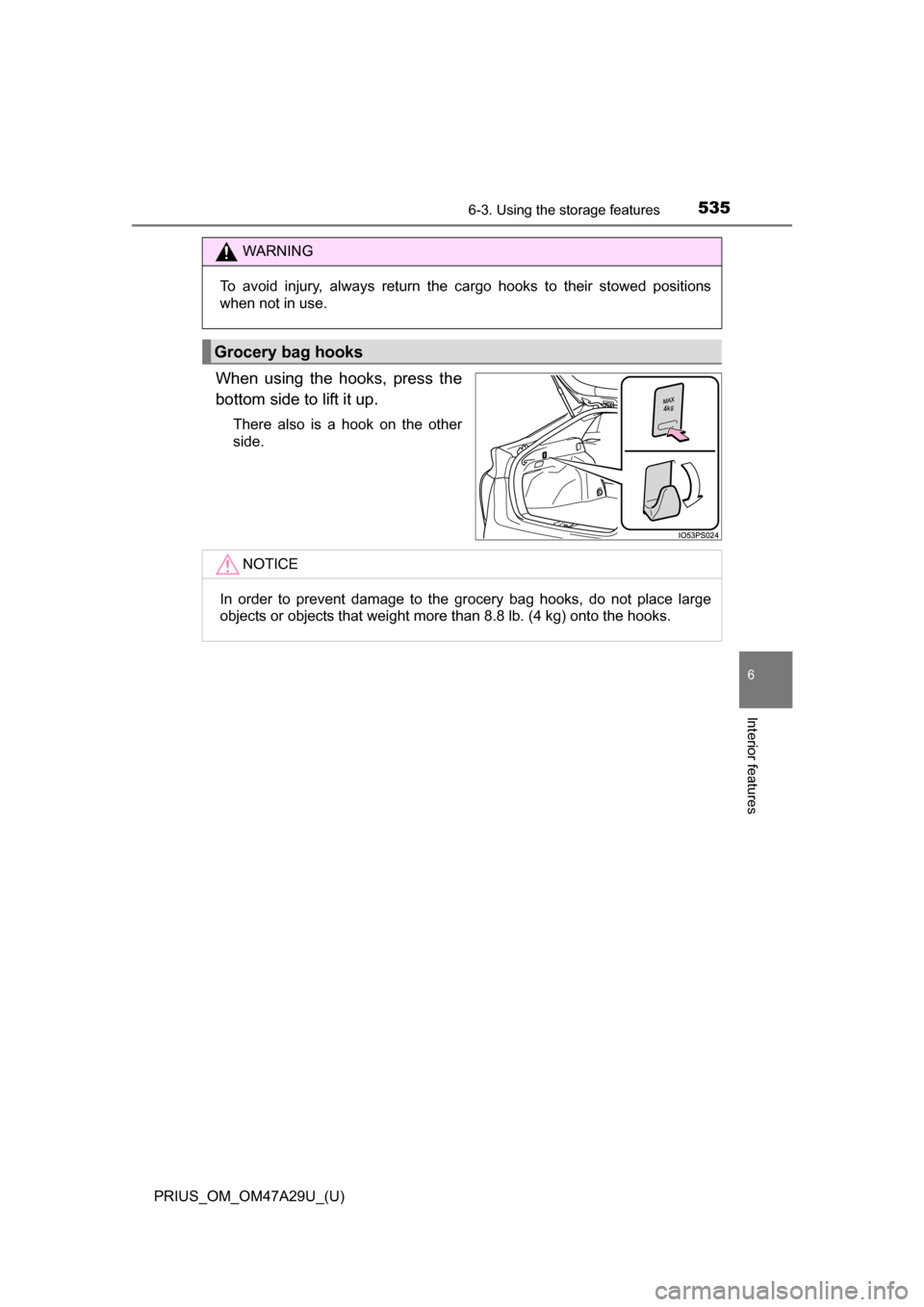
When using the hooks, press the
bottom side to lift it up.
There also is a hook on the other
side.
WARNING
To avoid injury, always return the cargo hooks to their stowed positions
when not in use.
Grocery bag hooks
NOTICE
In order to prevent damage to the grocery bag hooks, do not place large
objects or objects that weight more than 8.8 lb. (4 kg) onto the hooks.
Page 536 of 800
536
PRIUS_OM_OM47A29U_(U)
6-3. Using the storage features
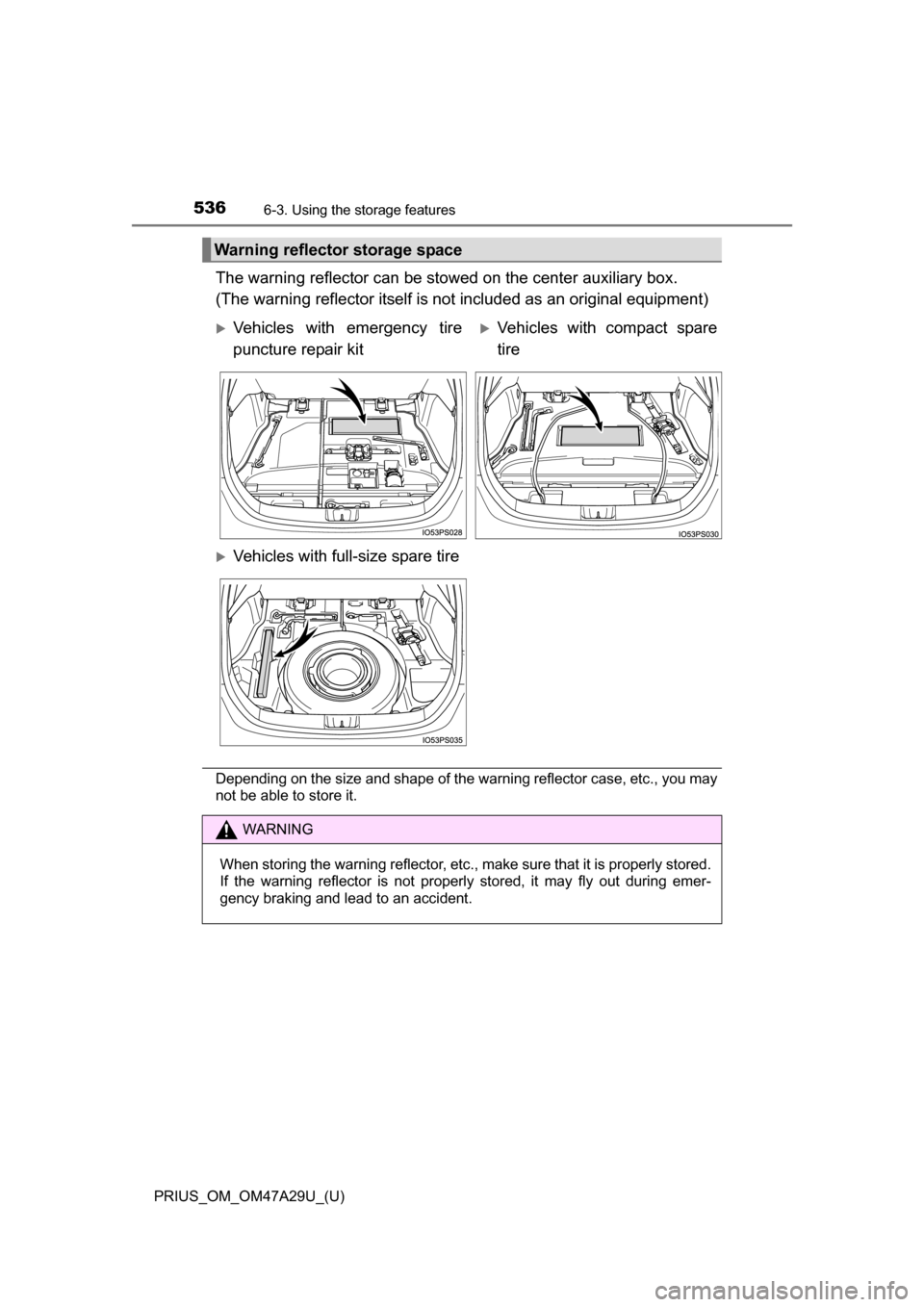
The warning reflector can be stowed on the center auxiliary box.
(The warning reflector itself is no t included as an original equipment)
Depending on the size and shape of the warning reflector case, etc., you may
not be able to store it.
Warning reflector storage space
Vehicles with emergency tire
puncture repair kitVehicles with compact spare
tire
Vehicles with full-size spare tire
WARNING
When storing the warning reflector, etc., make sure that it is properly stored.
If the warning reflector is not properly stored, it may fly out during emer-
gency braking and lead to an accident.
Page 538 of 800
538
PRIUS_OM_OM47A29U_(U)
6-3. Using the storage features
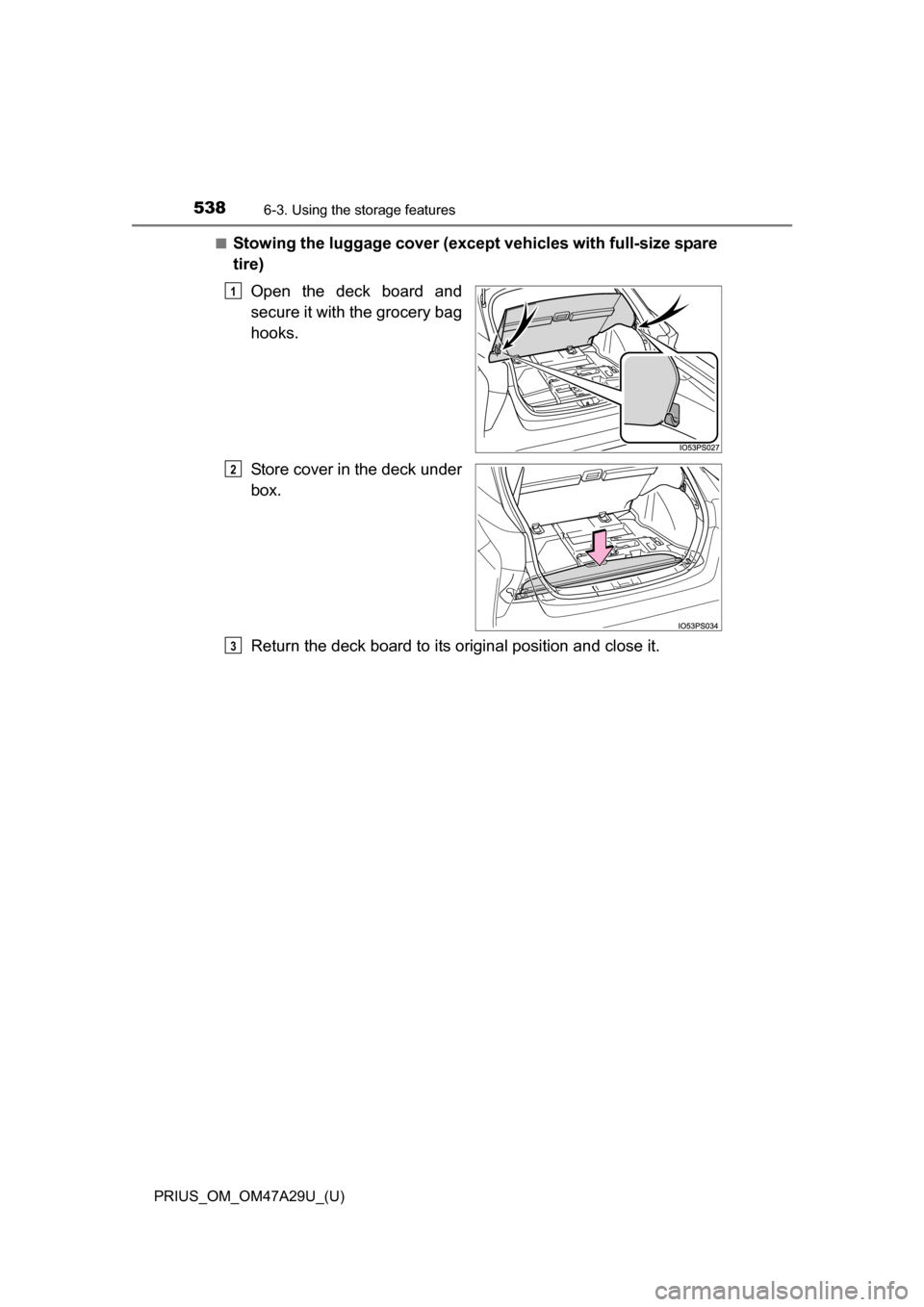
■Stowing the luggage cover (except vehicles with full-size spare
tire)
Open the deck board and
secure it with the grocery bag
hooks.
Store cover in the deck under
box.
Return the deck board to its or iginal position and close it.
1
2
3
Page 539 of 800
PRIUS_OM_OM47A29U_(U)
5396-3. Using the storage features
6
Interior features
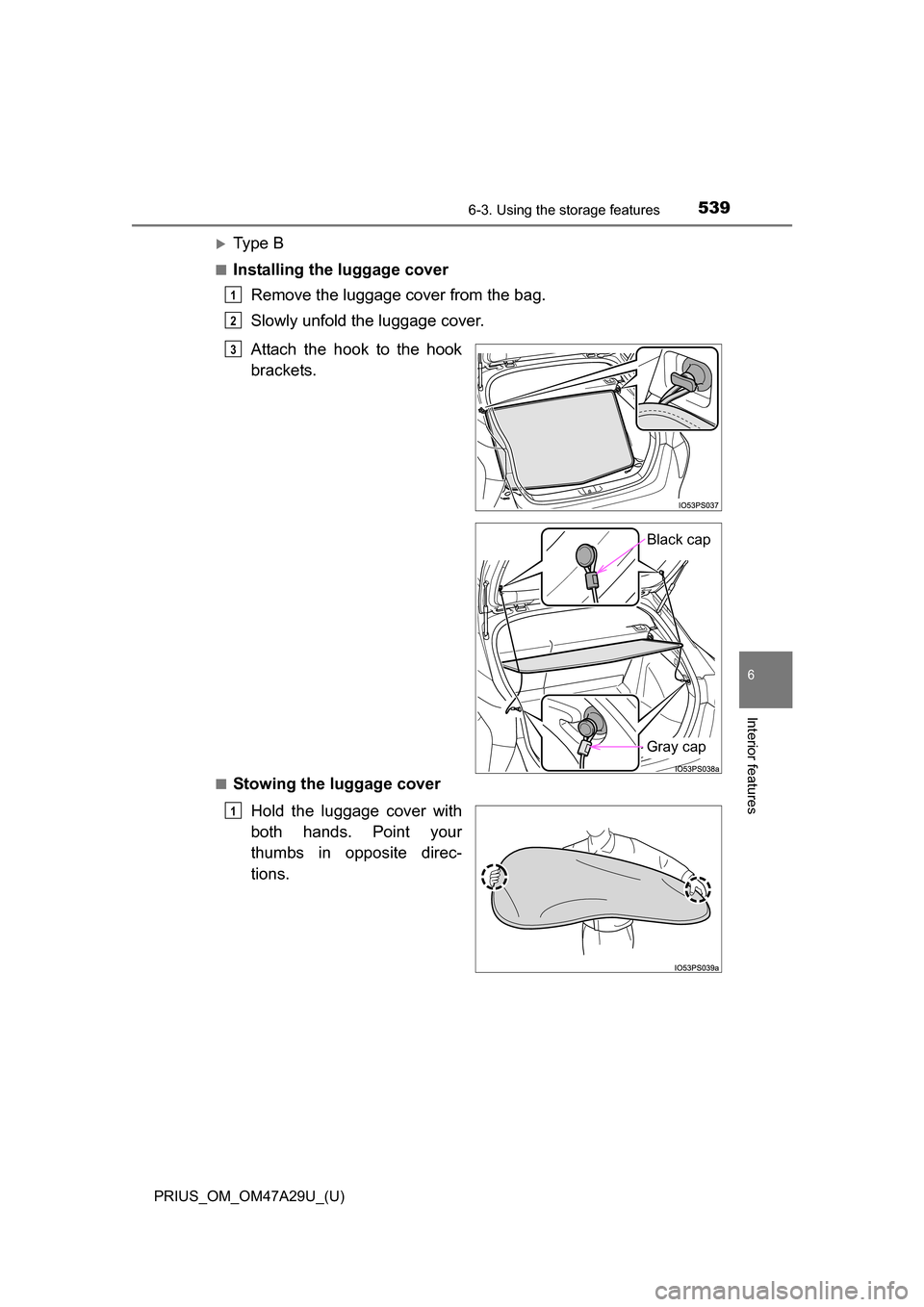
Ty p e B
■Installing the luggage coverRemove the luggage cover from the bag.
Slowly unfold the luggage cover.
■Stowing the luggage cover
Hold the luggage cover with
both hands. Point your
thumbs in opposite direc-
tions.
1
2
Attach the hook to the hook
brackets.3
Black cap
Gray cap
1
Page 540 of 800
540
PRIUS_OM_OM47A29U_(U)
6-3. Using the storage features
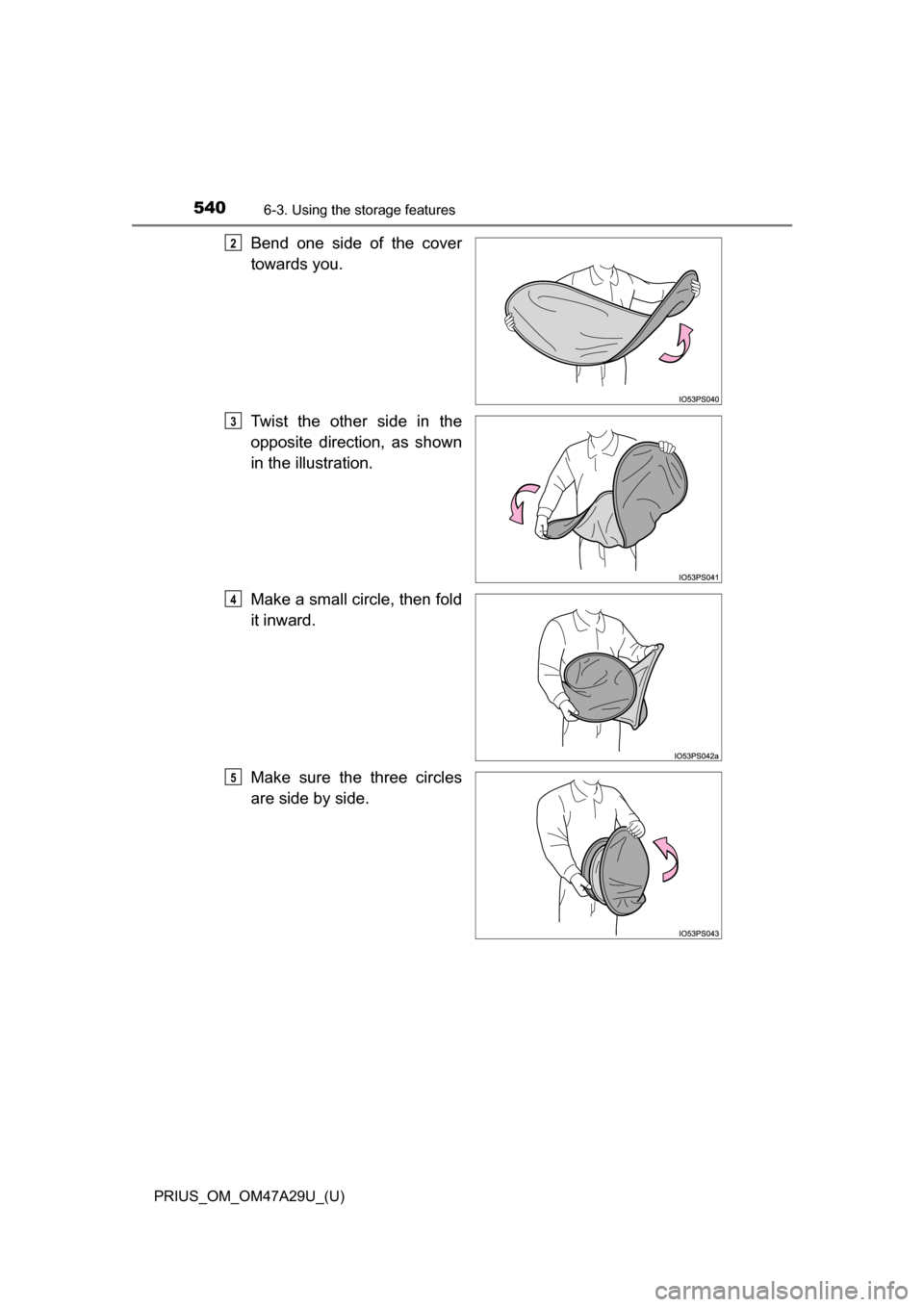
Bend one side of the cover
towards you.
Twist the other side in the
opposite direction, as shown
in the illustration.
Make a small circle, then fold
it inward.
Make sure the three circles
are side by side.2
3
4
5