Page 102 of 716

1022. Instrument cluster
HIGHLANDER_U (OM48F09U)■
Changing the settings
Select using the meter control switches.
Select an item and then set it with the center button.
■Customizable items
●Language
Select to change the language on the display.
● Units
Select to change the unit of measure for fuel consumption.
● Maintenance system (for U.S.A.)
Select to reset the maintenance data after the required mainte-
nance is performed. (
P. 496)
● Eco Driving Indicator Light
Select to activate/deactivate th e Eco Driving Indicator Light.
(
P. 105)
● switch settings
You can register 1 screen as the top screen. To register, press
and hold while the desired screen is displayed.
● Drive information 1 through 3
Select to select up to 2 items t hat will be displayed on a Drive
information screen, up to 3 Drive information screens can be set.
● Pop-up display
Select to set the following pop-up displays, which may appear in
some situations, on/off.
• Route guidance display of t he navigation system-linked sys-
tem (if equipped)
• Incoming call display of the hands-free phone system
• Cruise control operation display
• Instrument panel brightness adjustment display
● Accent color
Select to change the accent colors on the screen, such as the
cursor color.
Settings display
1
2
Page 103 of 716

1032. Instrument cluster
2
Instrument cluster
HIGHLANDER_U (OM48F09U)
●Speed limit display*
Select to set the display of speed limit information stored in the
navigation system to on with the speed limit caution indicator
(yellow) enabled, on with the sp eed limit caution not enabled, or
off. If enabled, the s peed limit caution indicator will come on if the
vehicle speed exceeds th e displayed speed limit.
● Initialization
Registered or changed meter settings will be deleted or returned
to their default setting.
Settings can be changed. (Customizable features: P. 669)
*: Speed limit display may not be available for some regions.
■Pop-up display
In some situations, such as when a switch operation is performed, a pop-up
display, such as the operating cruise control switch, will be temporarily dis-
played on the multi-information display.
The pop-up display function can be set on/off.
■ Setting display automatic cancelation
In the following situations, setting display in which the settings can b\
e
changed through the meter control switch will automatically be turned off.
●When a warning message appears while the setting display is displayed
● When the vehicle begins to move while the setting display is displayed
■ Liquid crystal display
Small spots or light spots may appear on the display. This phenomenon is
characteristic of liquid crystal displays, and there is no problem continuing to
use the display.
Page 105 of 716
1052. Instrument cluster
2
Instrument cluster
HIGHLANDER_U (OM48F09U)
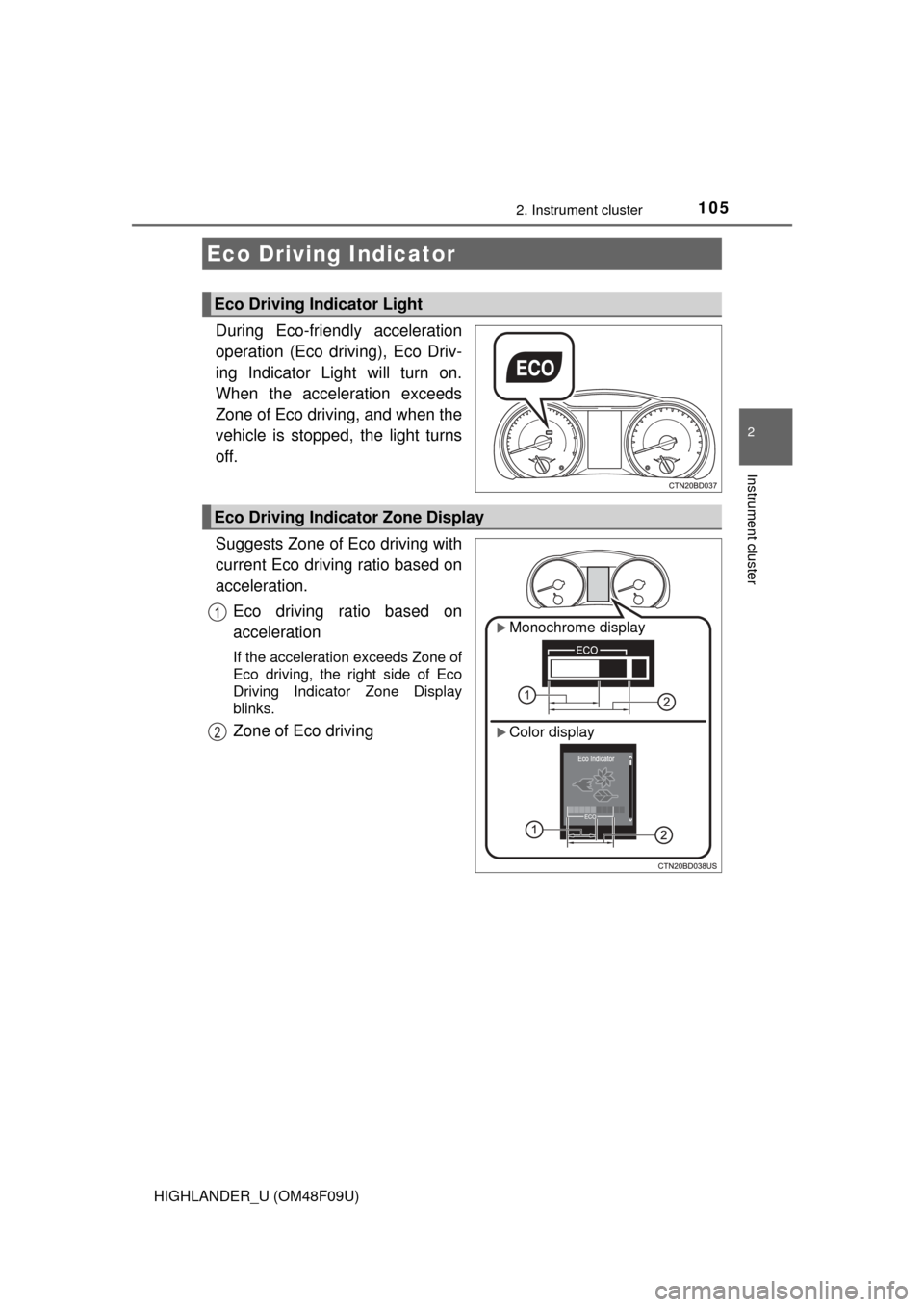
During Eco-friendly acceleration
operation (Eco driving), Eco Driv-
ing Indicator Light will turn on.
When the acceleration exceeds
Zone of Eco driving, and when the
vehicle is stopped, the light turns
off.
Suggests Zone of Eco driving with
current Eco driving ratio based on
acceleration.Eco driving ratio based on
acceleration
If the acceleration exceeds Zone of
Eco driving, the right side of Eco
Driving Indicator Zone Display
blinks.
Zone of Eco driving
Eco Driving Indicator
Eco Driving Indicator Light
Eco Driving Indicator Zone Display
Monochrome display
Color display
1
2
Page 106 of 716
1062. Instrument cluster
HIGHLANDER_U (OM48F09U)
■Operation of Eco Driving Indicator
Eco Driving Indicator will not operate in the following conditions:
●The shift lever is anything other than D.
● The vehicle speed is approximately 80 mph (130 km/h) or higher.
■ Eco Driving Indicator Light customization
Monochrome display
P. 9 7
Color display
P. 102
Page 114 of 716
1143-1. Key information
HIGHLANDER_U (OM48F09U)
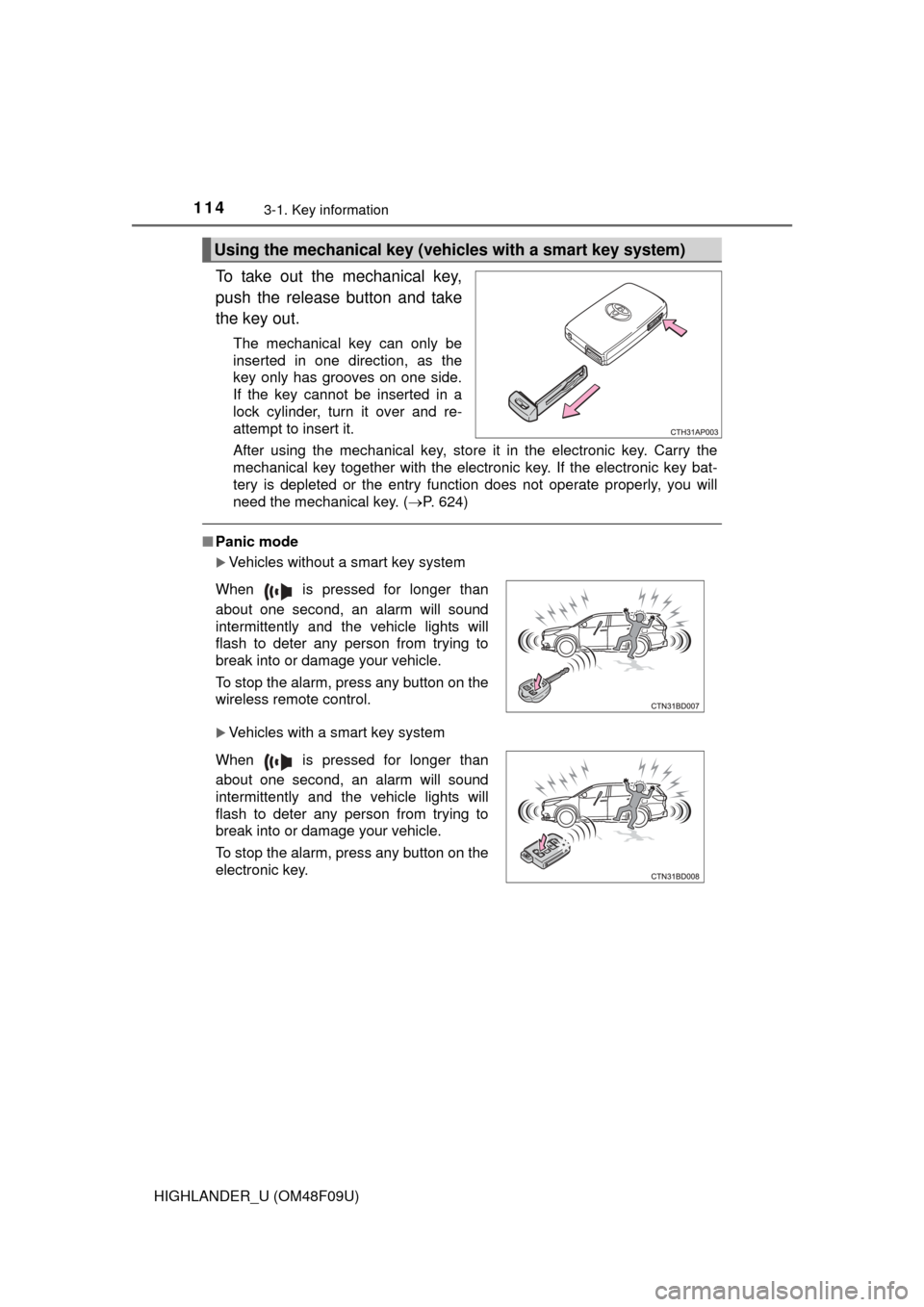
To take out the mechanical key,
push the release button and take
the key out.
The mechanical key can only be
inserted in one direction, as the
key only has grooves on one side.
If the key cannot be inserted in a
lock cylinder, turn it over and re-
attempt to insert it.
After using the mechanical key, store it in the electronic key. Carry the
mechanical key together with the electronic key. If the electronic key bat-
tery is depleted or the entry function does not operate properly, you will
need the mechanical key. (P. 624)
■Panic mode
Vehicles without a smart key system
Vehicles with a smart key system
Using the mechanical key (vehic les with a smart key system)
When is pressed for longer than
about one second, an alarm will sound
intermittently and the vehicle lights will
flash to deter any person from trying to
break into or damage your vehicle.
To stop the alarm, press any button on the
wireless remote control.
When is pressed for longer than
about one second, an alarm will sound
intermittently and the vehicle lights will
flash to deter any person from trying to
break into or damage your vehicle.
To stop the alarm, press any button on the
electronic key.
Page 125 of 716
1253-2. Opening, closing and locking the doors
3
Operation of each component
HIGHLANDER_U (OM48F09U)
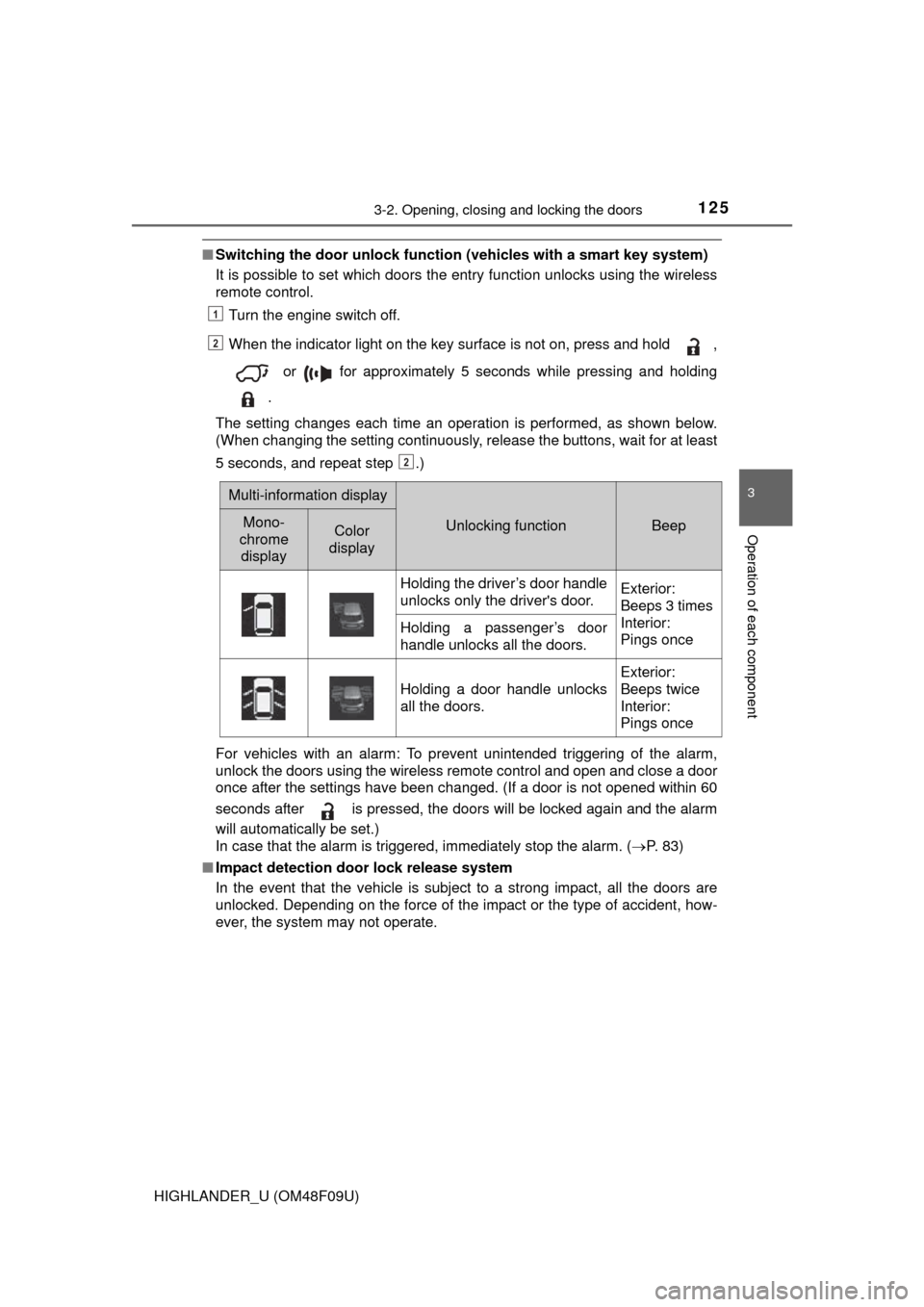
■Switching the door unlock functi on (vehicles with a smart key system)
It is possible to set which doors the entry function unlocks using the wireless
remote control.
Turn the engine switch off.
When the indicator light on the key surface is not on, press and hold ,
or for approximately 5 seconds while pressing and holding
.
The setting changes each time an operation is performed, as shown below.
(When changing the setting continuously, release the buttons, wait for at least
5 seconds, and repeat step .)
For vehicles with an alarm: To prevent unintended triggering of the alarm,
unlock the doors using the wireless remote control and open and close a door
once after the settings have been changed. (If a door is not opened within 60
seconds after is pressed, the doors will be locked again and the alarm
will automatically be set.)
In case that the alarm is triggered, immediately stop the alarm. ( P. 8 3 )
■ Impact detection door lock release system
In the event that the vehicle is subject to a strong impact, all the doors are
unlocked. Depending on the force of the impact or the type of accident, how-
ever, the system may not operate.
1
2
2
Multi-information display
Unlocking functionBeepMono-
chrome displayColor
display
Holding the driver’s door handle
unlocks only the driver's door.Exterior:
Beeps 3 times
Interior:
Pings once
Holding a passenger’s door
handle unlocks all the doors.
Holding a door handle unlocks
all the doors.
Exterior:
Beeps twice
Interior:
Pings once
Page 131 of 716
1313-2. Opening, closing and locking the doors
3
Operation of each component
HIGHLANDER_U (OM48F09U)
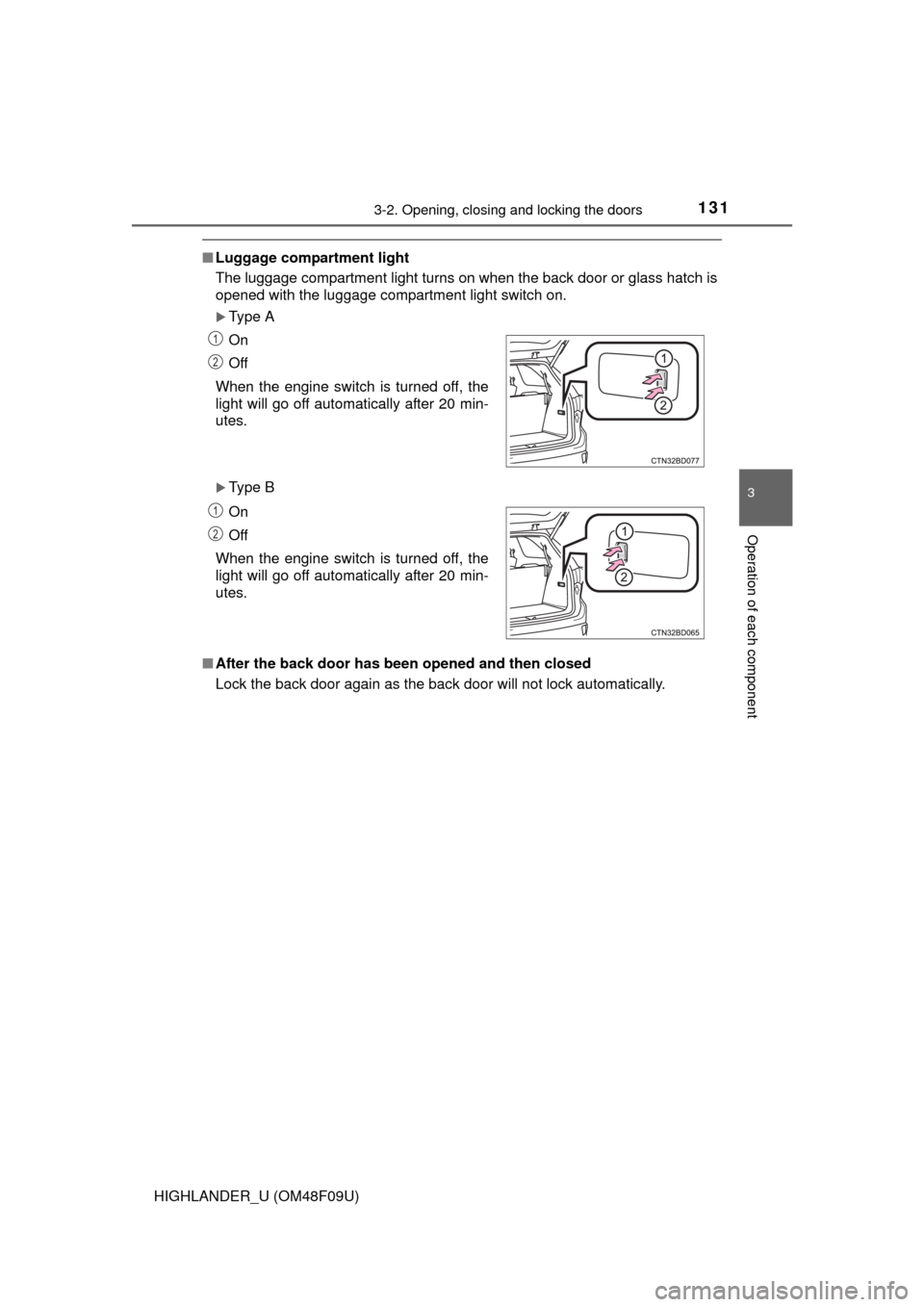
■Luggage compartment light
The luggage compartment light turns on when the back door or glass hatch is
opened with the luggage compartment light switch on.
Type A
Type B
■ After the back door has been opened and then closed
Lock the back door again as the back door will not lock automatically.On
Off
When the engine switch is turned off, the
light will go off automatically after 20 min-
utes.
On
Off
When the engine switch is turned off, the
light will go off automatically after 20 min-
utes.
1
2
1
2
Page 133 of 716
1333-2. Opening, closing and locking the doors
3
Operation of each component
HIGHLANDER_U (OM48F09U)■
The power back door can be operated when (vehicles with a power back
door)
The power back door main switch is turned on and the glass hatch is closed.
■ The power back door can be opened when (vehicles with a power back
door)
Vehicles without a smart key system
● The engine switch is in the “ON” position and the shift lever is in P.
● The engine switch is in the “ACC” or “LOCK” position.
Vehicles with a smart key system
● The engine switch is in IGNITION ON mode and the shift lever is in P.
● The engine switch is in ACCESSORY mode or off.
■ Back door closer (vehicl es with a power back door)
In the event that the back door is left slightly open, the back door closer will
automatically close it to the fully closed position.
● The back door closer will operate regardless of the engine switch mode.
● The back door can be opened while the back door closer is operating by
pressing the back door opener button.
■ Power back door oper ation (vehicles with a power back door)
● A buzzer sounds and the emergency flashers flash twice to indicate that the
back door is opening/closing.
● The back door can be opened and closed manually even when the power
back door main switch is off.
■ Power back door operation using th e entry function or wireless remote
control (vehicles with a power back door)
The back door can be opened even if it is locked. All the doors are unlo\
cked
when the power back door is operated. Make sure to lock all the doors again
when you leave the vehicle. The doors will not lock automatically after the
back door has been closed.
■ Back door closing assist (vehic les with a power back door)
If the back door is lowered manually when the back door is stopped at an
open position, the back door will fully close automatically.
■ Jam protection function (veh icles with a power back door)
● If anything obstructs the power back door while it is closing, the back door
will open slightly then stop.
● If anything obstructs the power back door while it is opening, the back door
will immediately stop.
■ Fall-down protection function ( vehicles with a power back door)
While the power back door is opening automatically, applying excessive force
to it will stop the opening operation to prevent the power back door from sud-
denly shutting.