Page 84 of 716
841-2. Theft deterrent system
HIGHLANDER_U (OM48F09U)■
Triggering of the alarm
The alarm may be triggered in the following situations:
(Stopping the alarm deactivates the alarm system.)
■ Alarm-operated door lock
In the following cases, depending on the situation, the door may automatically
lock to prevent improper entry into the vehicle:
●When a person remaining in the vehicle unlocks the door and the alarm is
activated.
● While the alarm is activated, a person remaining in the vehicle unlocks the
door.
● When recharging or replacing the battery.
●
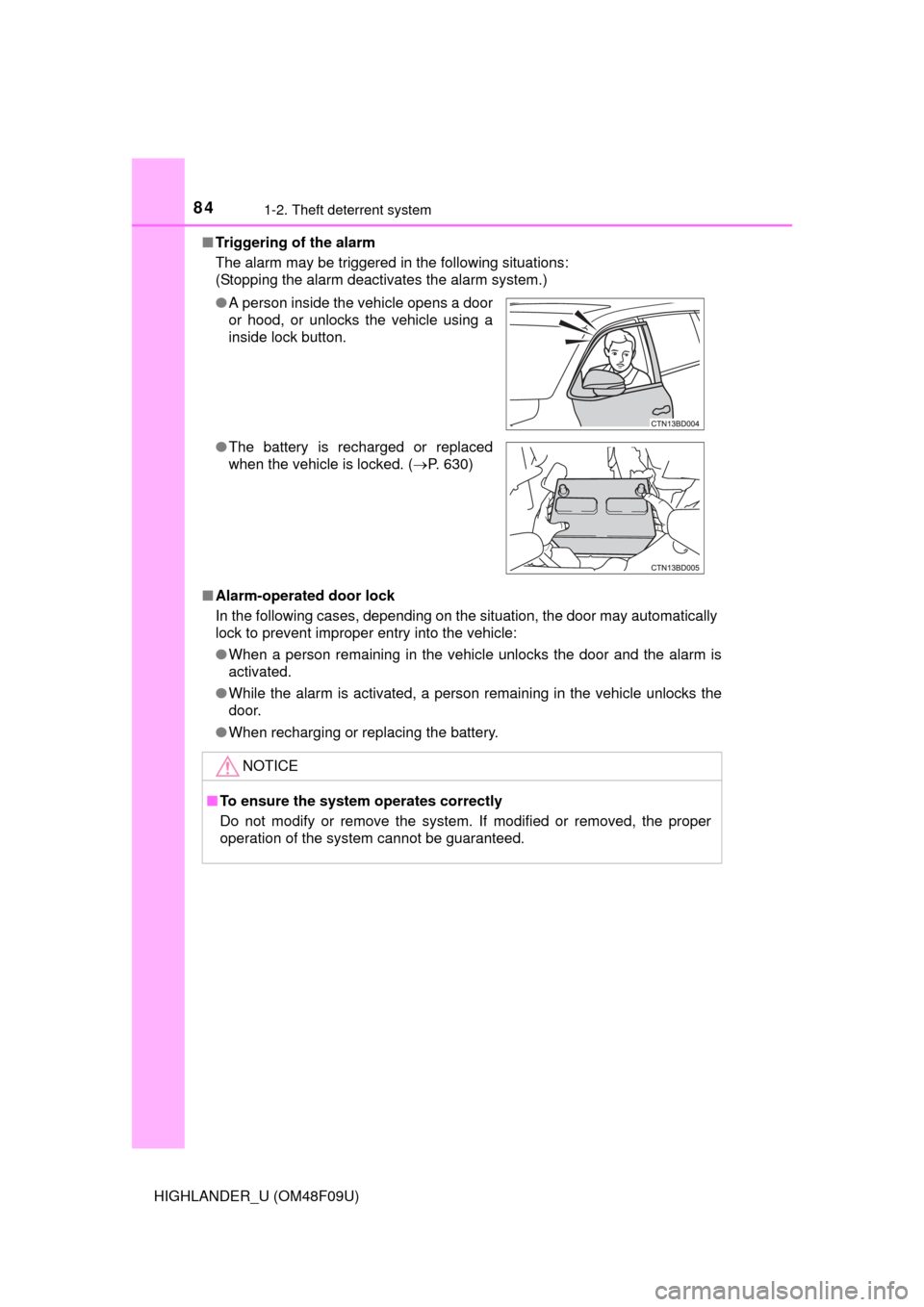
A person inside the vehicle opens a door
or hood, or unlocks the vehicle using a
inside lock button.
● The battery is recharged or replaced
when the vehicle is locked. ( P. 630)
NOTICE
■To ensure the system operates correctly
Do not modify or remove the system. If modified or removed, the proper
operation of the system cannot be guaranteed.
Page 89 of 716

892. Instrument cluster
2
Instrument cluster
HIGHLANDER_U (OM48F09U)
The indicators inform the driver of the operating state of the vehicle’s
various systems.
Indicators
Turn signal indicator
( P. 239)*1, 4 Slip indicator ( P. 303)
(U.S.A.)
Headlight indicator
(P. 241)*1VSC OFF indicator
(P. 303)
(Canada)
Tail light indicator
(P. 241) *1, 2, 5Pre-collision system
warning light ( P. 309)
Headlight high beam
indicator ( P. 242)
*1, 2All-wheel drive lock indi-
cator (P. 300)
*2Automatic High Beam
indicator (P. 246)*2Downhill assist control
system indicator
(P. 307)
*2Front fog light indicator
(P. 252)*2, 6, 7BSM (Blind Spot Moni-
tor) outside rear view
mirror indicators
(P. 316)
*2Cruise control indicator
(P. 263)*8Security indicator
(P. 80, 82)
*2Cruise control “SET”
indicator ( P. 263)*1, 9Eco Driving Indicator
Light (P. 105)
*2LDA (Lane Departure
Alert) indicator
(P. 283) Snow mode indicator
(
P. 235)
*2, 3 Intuitive parking assist
indicator*1, 8“AIR BAG ON/
OFF” indicator
(P. 53)
Page 111 of 716
111
3
Operation of
each component
HIGHLANDER_U (OM48F09U) 3-1. Key information
Keys .................................. 112
3-2. Opening, closing and locking the doors
Side doors ......................... 119
Back door .......................... 127
Glass hatch ....................... 141
Smart key system ............. 146
3-3. Adjusting the seats Front seats ........................ 154
Rear seats......................... 156
Driving position memory ........................... 163
Head restraints.................. 167
3-4. Adjusting the steering wheel and mirrors
Steering wheel .................. 171
Inside rear view mirror ...... 173
Outside rear view mirrors ............................. 175
3-5. Opening and closing the windows
Power windows ................. 177
Moon roof .......................... 181
Panoramic moon roof........ 185
Page 113 of 716
1133-1. Key information
3
Operation of each component
HIGHLANDER_U (OM48F09U)
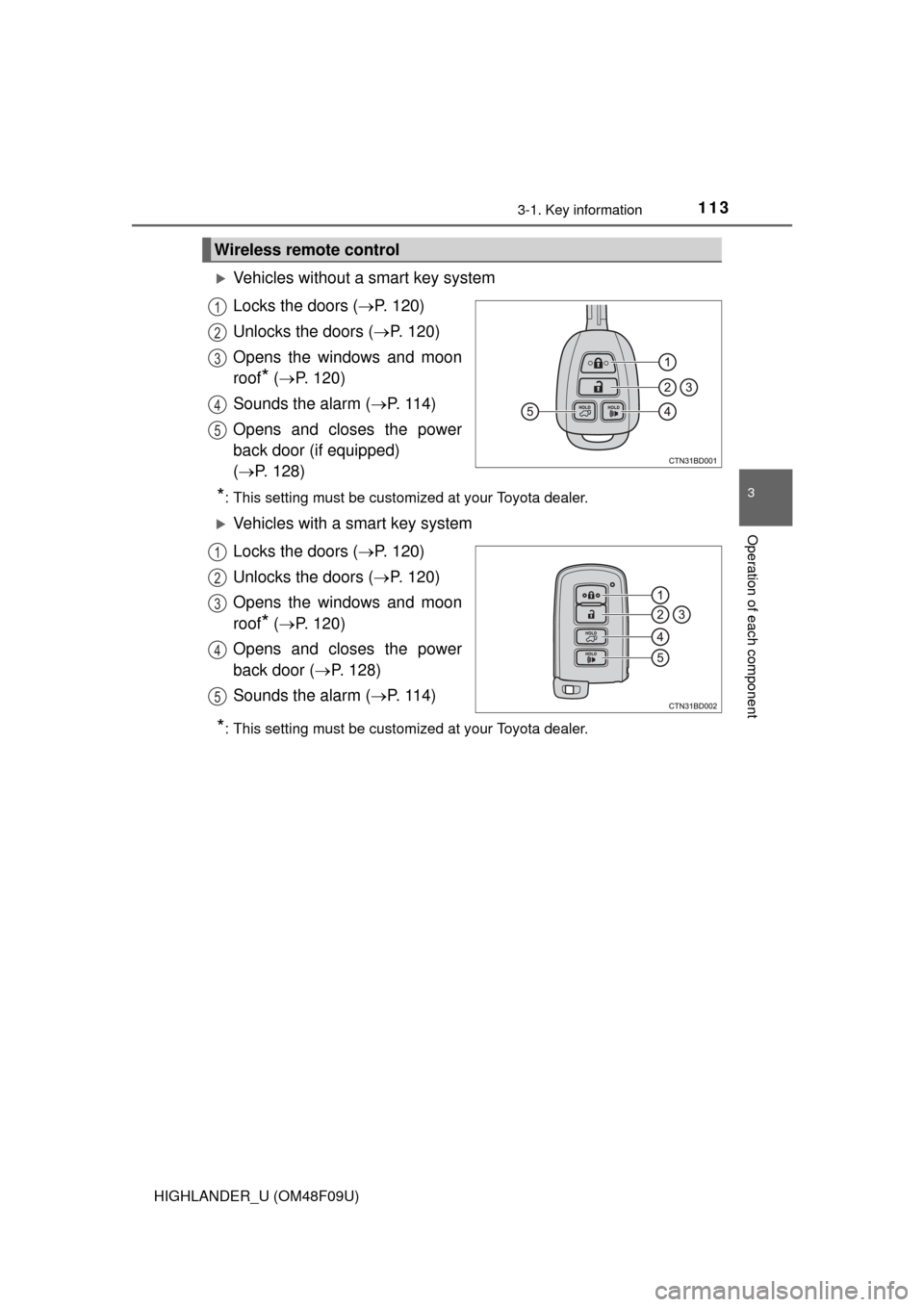
Vehicles without a smart key system
Locks the doors (P. 120)
Unlocks the doors ( P. 120)
Opens the windows and moon
roof
* ( P. 120)
Sounds the alarm ( P. 114)
Opens and closes the power
back door (if equipped)
( P. 128)
*: This setting must be customized at your Toyota dealer.
Vehicles with a smart key system
Locks the doors ( P. 120)
Unlocks the doors ( P. 120)
Opens the windows and moon
roof
* ( P. 120)
Opens and closes the power
back door ( P. 128)
Sounds the alarm ( P. 114)
*: This setting must be customized at your Toyota dealer.
Wireless remote control
1
2
3
4
5
1
2
3
4
5
Page 114 of 716
1143-1. Key information
HIGHLANDER_U (OM48F09U)
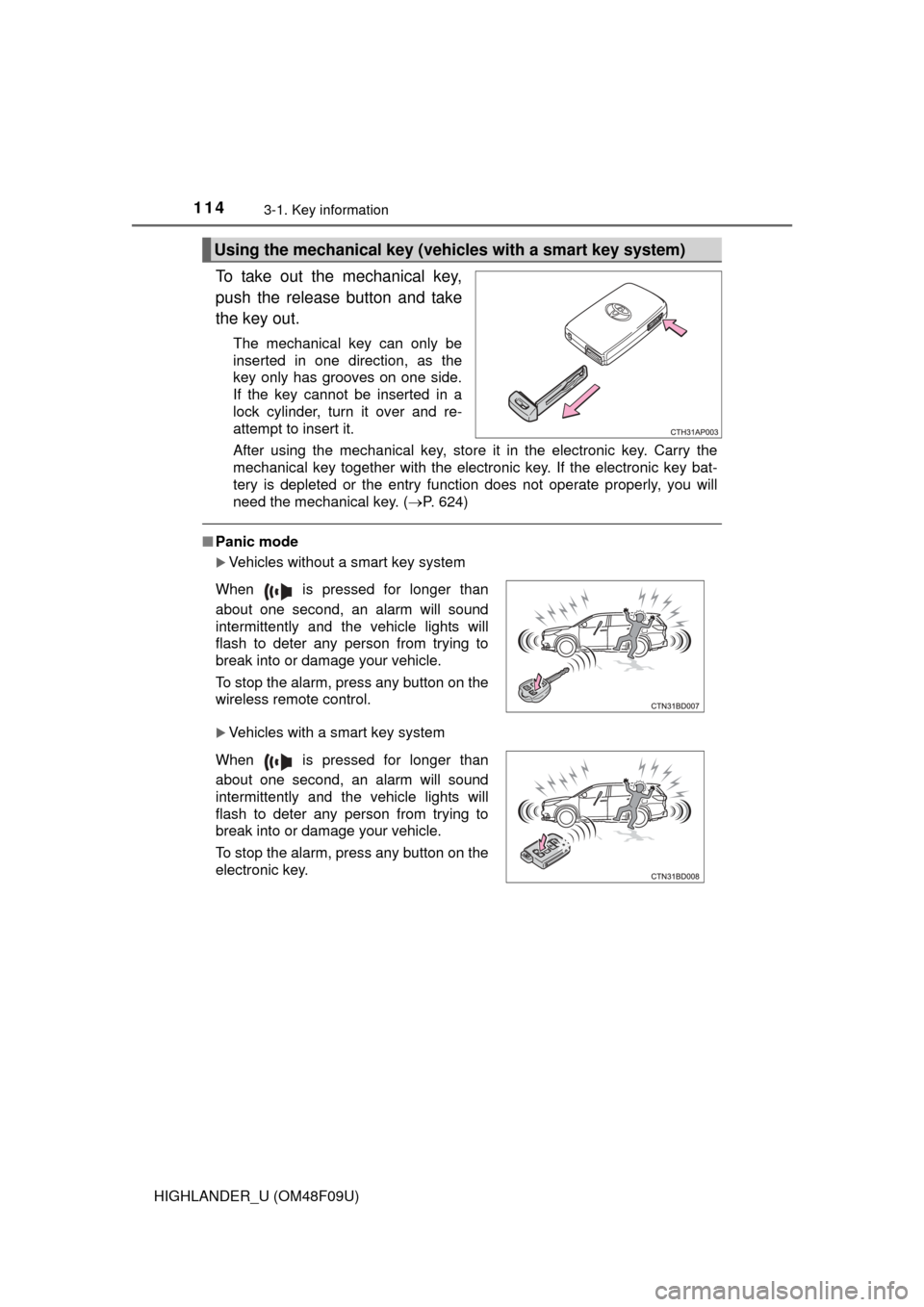
To take out the mechanical key,
push the release button and take
the key out.
The mechanical key can only be
inserted in one direction, as the
key only has grooves on one side.
If the key cannot be inserted in a
lock cylinder, turn it over and re-
attempt to insert it.
After using the mechanical key, store it in the electronic key. Carry the
mechanical key together with the electronic key. If the electronic key bat-
tery is depleted or the entry function does not operate properly, you will
need the mechanical key. (P. 624)
■Panic mode
Vehicles without a smart key system
Vehicles with a smart key system
Using the mechanical key (vehic les with a smart key system)
When is pressed for longer than
about one second, an alarm will sound
intermittently and the vehicle lights will
flash to deter any person from trying to
break into or damage your vehicle.
To stop the alarm, press any button on the
wireless remote control.
When is pressed for longer than
about one second, an alarm will sound
intermittently and the vehicle lights will
flash to deter any person from trying to
break into or damage your vehicle.
To stop the alarm, press any button on the
electronic key.
Page 115 of 716
1153-1. Key information
3
Operation of each component
HIGHLANDER_U (OM48F09U)■
When required to leave the vehicle’s key with a parking attendant
Lock the glove box as circumstances demand. ( P. 451)
Vehicles without a smart key system: Carry the master key for your own use
and provide the attendant with the valet key.
Vehicles with a smart key system: Remove the mechanical key for your own
use and provide the attendant with the electronic key only.
■ If you lose your keys
New genuine keys can be made by your Toyota dealer using a master key
(vehicles without a smart key system) or the other key (vehicles with a smart
key system) and the key number stam ped on your key number plate. Keep
the plate in a safe place such as your wallet, not in the vehicle.
■ When riding in an aircraft
When bringing a key with wireless remote control function onto an aircraft,
make sure you do not press any buttons on the key while inside the aircraft
cabin. If you are carrying the key in your bag etc., ensure that the buttons are
not likely to be pressed accidentally. Pressing a button may cause the key to
emit radio waves that could interfere with the operation of the aircraft.
■ Conditions affecting operation
Vehicles without a smart key system
The wireless remote control function may not operate normally in the follow-
ing situations:
● When the wireless key battery is depleted
● Near a TV tower, electric power plant, gas station, radio station, large dis-
play, airport or other facility that generates strong radio waves or electrical
noise
● When carrying a portable radio, cellular phone or other wireless communi-
cation device
● When multiple wireless keys are in the vicinity
● When the wireless key is in contact with, or is covered by a metallic object
● When a wireless key (that emits radio waves) is being used nearby
● When the wireless key has been left near an electrical appliance such as a
personal computer
● If window tint with a metallic content or metallic objects are attached to the
rear window
Vehicles with a smart key system
P. 149
Page 119 of 716
119
3
Operation of each component
HIGHLANDER_U (OM48F09U)
3-2. Opening, closing and locking the doors
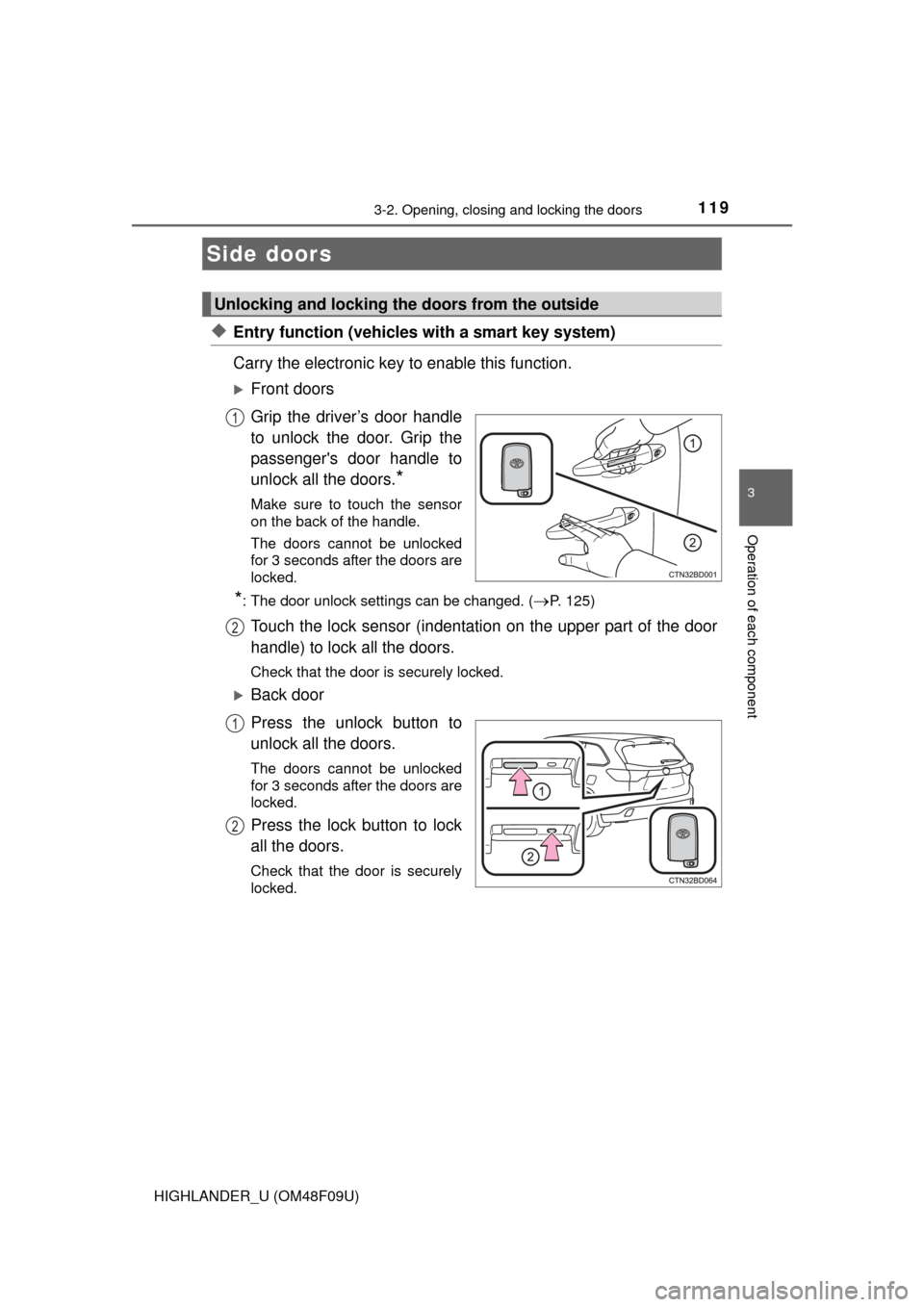
◆Entry function (vehicles with a smart key system)
Carry the electronic key to enable this function.
Front doors
Grip the driver’s door handle
to unlock the door. Grip the
passenger's door handle to
unlock all the doors.
*
Make sure to touch the sensor
on the back of the handle.
The doors cannot be unlocked
for 3 seconds after the doors are
locked.
*: The door unlock settings can be changed. (P. 125)
Touch the lock sensor (indentation on the upper part of the door
handle) to lock all the doors.
Check that the door is securely locked.
Back door
Press the unlock button to
unlock all the doors.
The doors cannot be unlocked
for 3 seconds after the doors are
locked.
Press the lock button to lock
all the doors.
Check that the door is securely
locked.
Side doors
Unlocking and locking the doors from the outside
1
2
1
2
Page 120 of 716
1203-2. Opening, closing and locking the doors
HIGHLANDER_U (OM48F09U)
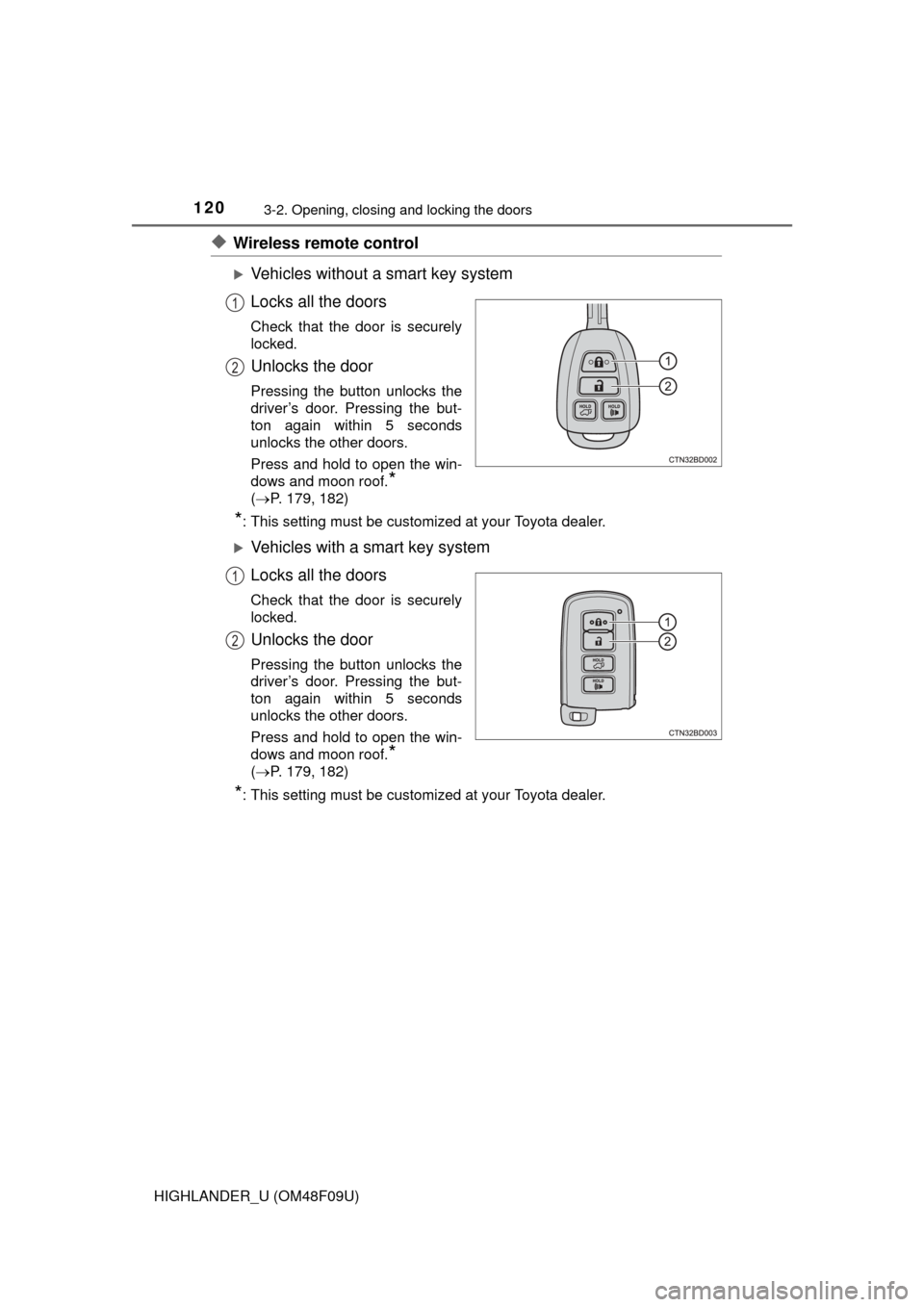
◆Wireless remote control
Vehicles without a smart key system
Locks all the doors
Check that the door is securely
locked.
Unlocks the door
Pressing the button unlocks the
driver’s door. Pressing the but-
ton again within 5 seconds
unlocks the other doors.
Press and hold to open the win-
dows and moon roof.
*
( P. 179, 182)
*: This setting must be customized at your Toyota dealer.
Vehicles with a smart key system
Locks all the doors
Check that the door is securely
locked.
Unlocks the door
Pressing the button unlocks the
driver’s door. Pressing the but-
ton again within 5 seconds
unlocks the other doors.
Press and hold to open the win-
dows and moon roof.
*
( P. 179, 182)
*: This setting must be customized at your Toyota dealer.
1
2
1
2