Page 335 of 716

335
5Audio system
HIGHLANDER_U (OM48F09U)5-5. Playing an audio CD and
MP3/WMA/AAC discs
CD player operation .......... 358
5-6. Using an external device Listening to an iPod .......... 364
Listening to a USB memory device................ 368
Using the AUX port ........... 372
5-7. Connecting Bluetooth
®
Preparations to use wireless
communication ................ 373
Registering a Bluetooth
®
audio player for
the first time .................... 377
Registering a Bluetooth
®
phone for the first time .... 378
Registering a Bluetooth
®
device.............................. 379
Connecting a Bluetooth
®
device.............................. 381
Displaying a Bluetooth
®
device details .................. 383
Detailed Bluetooth
®
system settings ............... 384 5-8. Bluetooth
® Audio
Listening to Bluetooth®
Audio ............................... 385
5-9. Bluetooth
® phone
Using a Bluetooth®
Phone ............................. 386
Making a call ..................... 388
Receiving a call ................. 391
Speaking on the phone ..... 392
Bluetooth
® phone
message function ............ 395
Using the steering wheel switches ................ 399
Bluetooth
® phone
settings ........................... 400
Contact/Call History Settings ........................... 401
What to do if... (Troubleshooting) ............ 410
5-10. Bluetooth
®
Bluetooth®......................... 414
5-11. Using the voice command system
Voice command system .... 419
Page 343 of 716
3435-1. Basic Operations
5
Audio system
HIGHLANDER_U (OM48F09U)
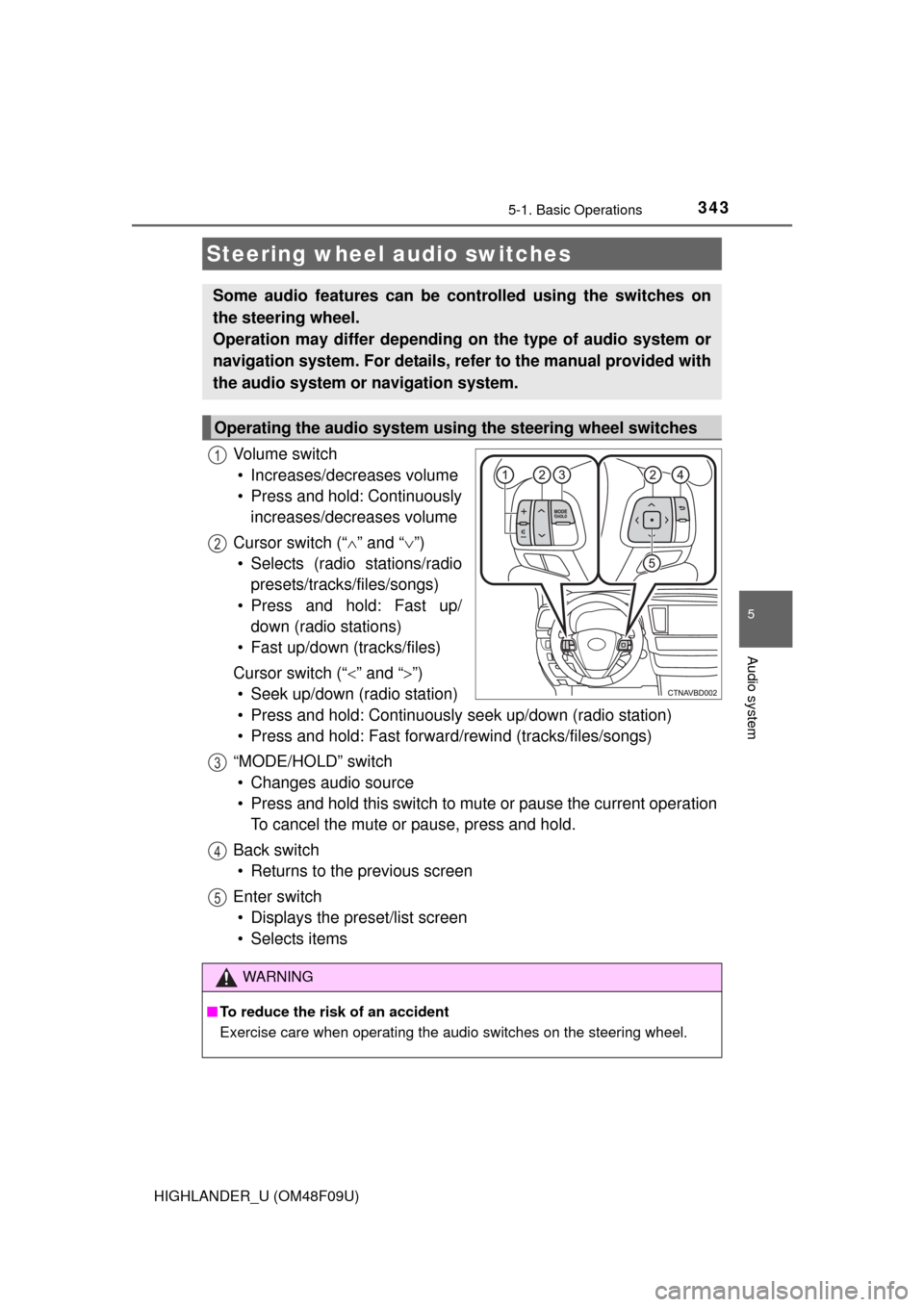
Vo l u m e s w i t c h• Increases/decreases volume
• Press and hold: Continuously increases/decreases volume
Cursor switch (“ ” and “ ”)
• Selects (radio stations/radio presets/tracks/files/songs)
• Press and hold: Fast up/ down (radio stations)
• Fast up/down (tracks/files)
Cursor switch (“ ” and “”)
• Seek up/down (radio station)
• Press and hold: Continuously seek up/down (radio station)
• Press and hold: Fast forwar d/rewind (tracks/files/songs)
“MODE/HOLD” switch • Changes audio source
• Press and hold this switch to mute or pause the current operation To cancel the mute or pause, press and hold.
Back switch • Returns to the previous screen
Enter switch • Displays the preset/list screen
• Selects items
Steering wheel audio switches
Some audio features can be c ontrolled using the switches on
the steering wheel.
Operation may differ depending on the type of audio system or
navigation system. For details, refer to the manual provided with
the audio system or navigation system.
Operating the audio system using the steering wheel switches
1
12
3
4
5
WARNING
■ To reduce the risk of an accident
Exercise care when operating the audio switches on the steering wheel.
Page 348 of 716
3485-2. Setup
HIGHLANDER_U (OM48F09U)
Press the “SETUP” button.
Select “General” on the “Setup”
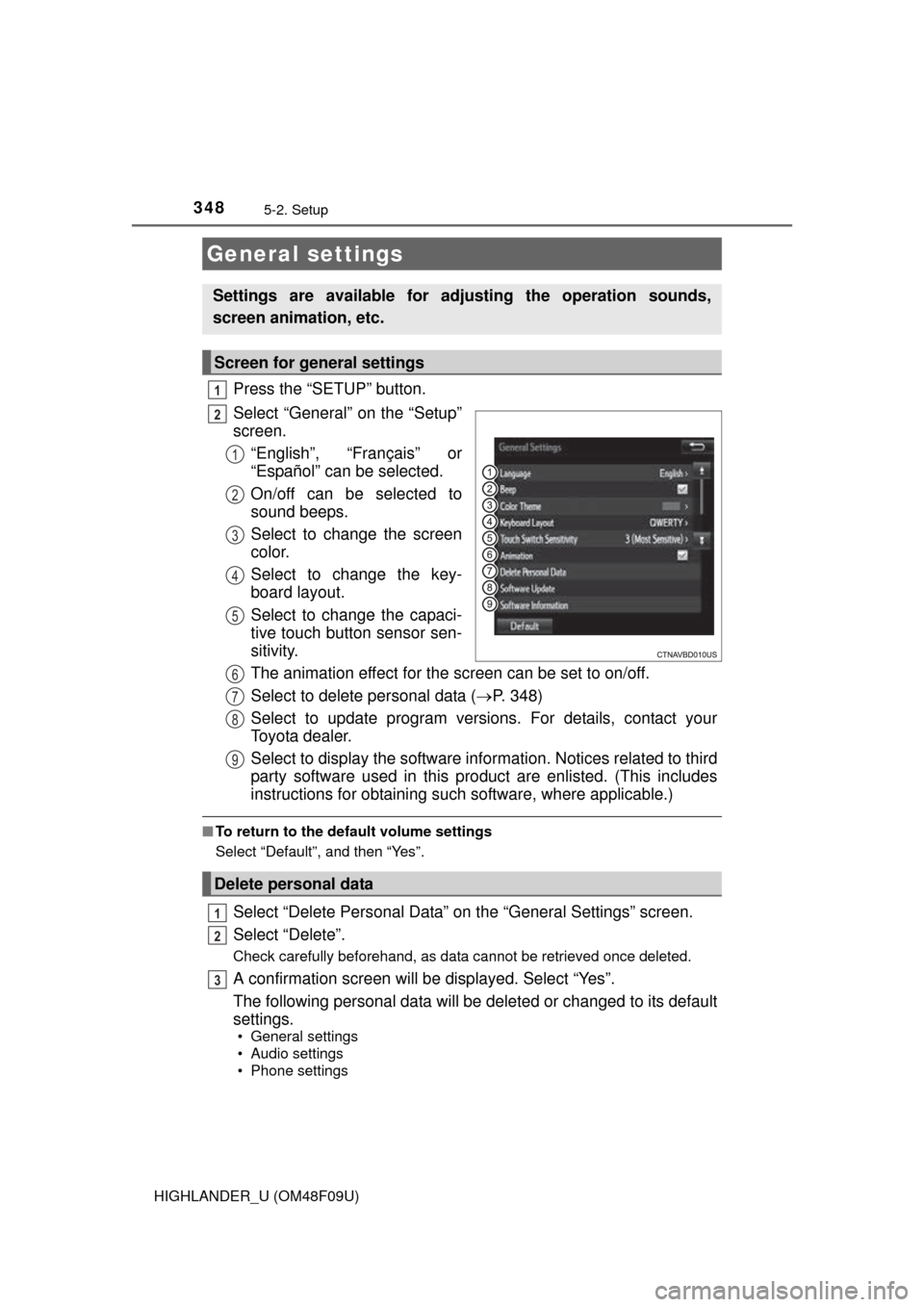
screen.“English”, “Français” or
“Español” can be selected.
On/off can be selected to
sound beeps.
Select to change the screen
color.
Select to change the key-
board layout.
Select to change the capaci-
tive touch button sensor sen-
sitivity.
The animation effect for the screen can be set to on/off.
Select to delete personal data ( P. 348)
Select to update program versions. For details, contact your
Toyota dealer.
Select to display the software info rmation. Notices related to third
party software used in this pr oduct are enlisted. (This includes
instructions for obtaining such software, where applicable.)
■ To return to the default volume settings
Select “Default”, and then “Yes”.
Select “Delete Personal Data” on the “General Settings” screen.
Select “Delete”.
Check carefully beforehand, as data cannot be retrieved once deleted.
A confirmation screen will be displayed. Select “Yes”.
The following personal data will be deleted or changed to its default
settings.
• General settings
• Audio settings
• Phone settings
General settings
Settings are available for adjusting the operation sounds,
screen animation, etc.
Screen for general settings
1
2
1
2
3
4
5
Delete personal data
6
7
8
9
1
2
3
Page 376 of 716
3765-7. Connecting Bluetooth®
HIGHLANDER_U (OM48F09U)
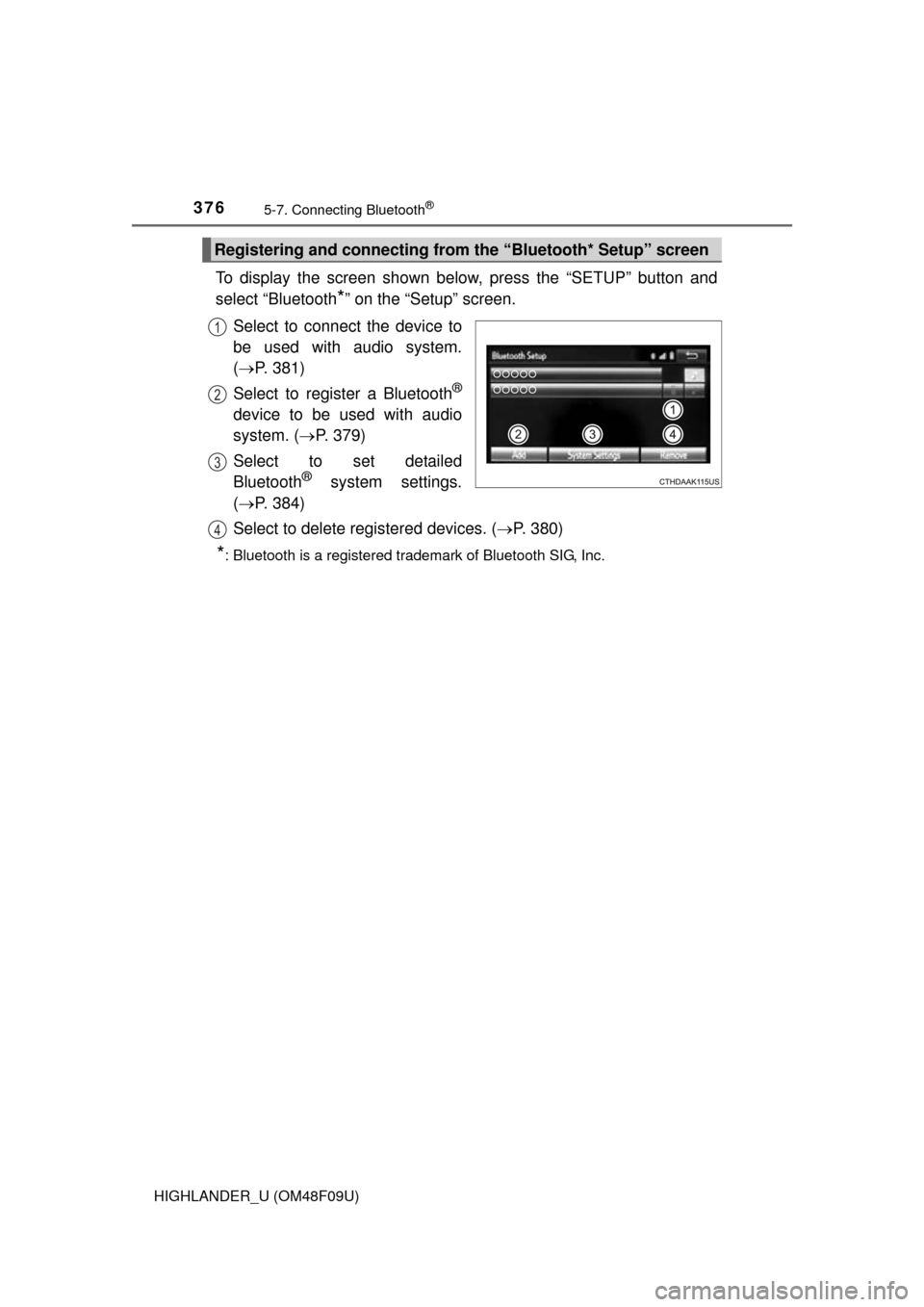
To display the screen shown below, press the “SETUP” button and
select “Bluetooth
*” on the “Setup” screen.
Select to connect the device to
be used with audio system.
( P. 381)
Select to register a Bluetooth
®
device to be used with audio
system. ( P. 379)
Select to set detailed
Bluetooth
® system settings.
( P. 384)
Select to delete registered devices. ( P. 380)
*: Bluetooth is a registered trademark of Bluetooth SIG, Inc.
Registering and connecting from the “Bluetooth* Setup” screen
1
2
3
4
Page 377 of 716
3775-7. Connecting Bluetooth®
5
Audio system
HIGHLANDER_U (OM48F09U)
Turn the Bluetooth® connection setting of your audio player on.
Press the “AUDIO” button.
Select “ Audio”.
Select “Select Device”.
Follow the steps in “How to registering a Bluetooth
® device” from
step . ( P. 379)
Registering a Bluetooth® audio player for
the first time
To use the Bluetooth® Audio, it is necessary to register an audio
player with the system.
Once the player has been registered, it is possible to use the
Bluetooth
® Audio.
For details about registering a Bluetooth
® device ( P. 379)
1
2
3
4
5
2
Page 378 of 716
3785-7. Connecting Bluetooth®
HIGHLANDER_U (OM48F09U)
Turn the Bluetooth® connection setting of your cellular phone on.
Press the “ ” button.
Select “OK” to register a phone.
Follow the steps in “How to registering a Bluetooth
® device” from
step . ( P. 379)
Registering a Bluetooth® phone for the first
time
To use the hands-free system, it is necessary to register a
Bluetooth® phone with the system.
Once the phone has been registered, it is possible to use the
hands-free system.
For details about registering a Bluetooth
® device ( P. 379)
1
2
3
4
3
Page 379 of 716
3795-7. Connecting Bluetooth®
5
Audio system
HIGHLANDER_U (OM48F09U)
Display the “Bluetooth* Setup” screen. (P. 376)
Select “Add”.
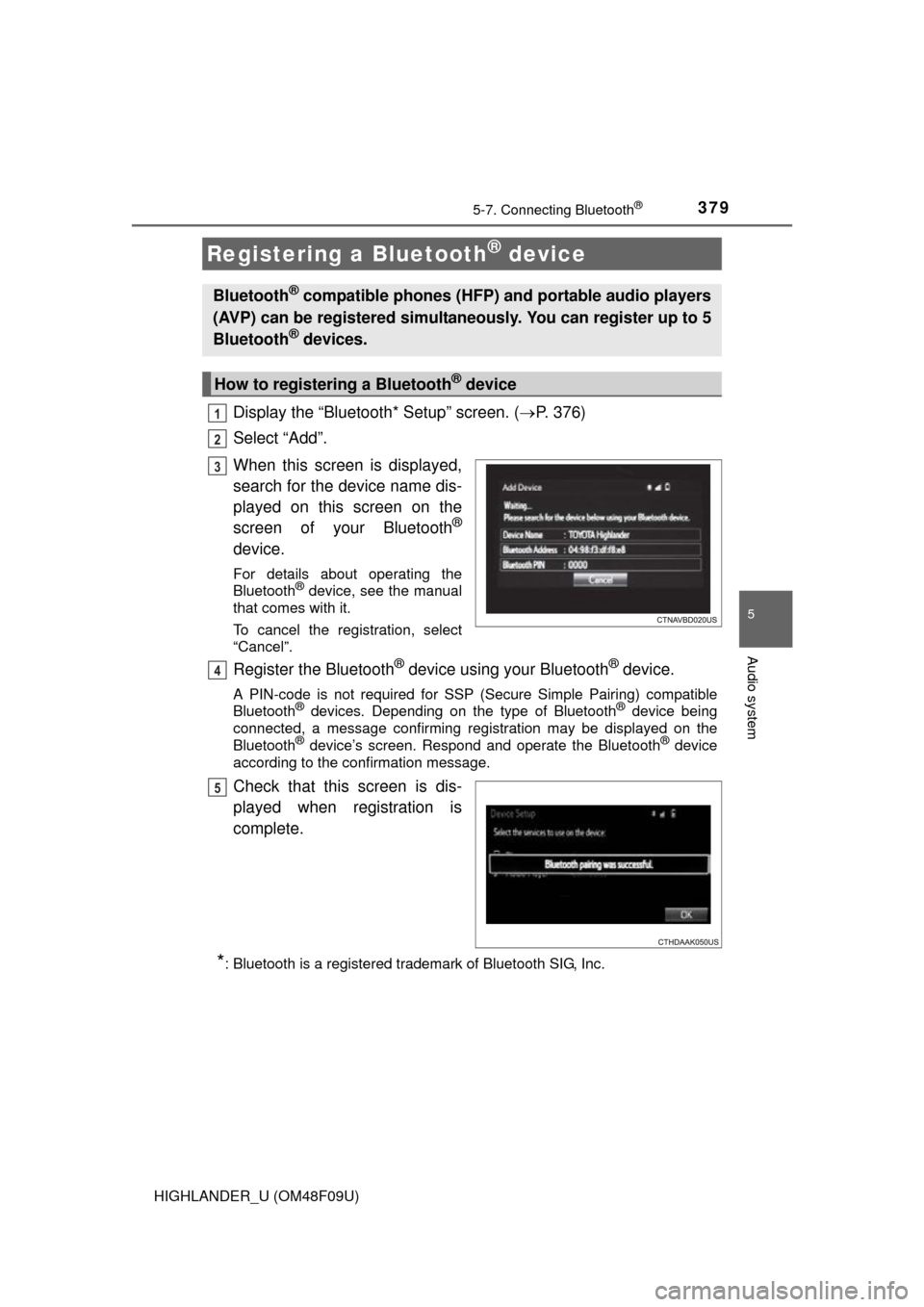
When this screen is displayed,
search for the device name dis-
played on this screen on the
screen of your Bluetooth
®
device.
For details about operating the
Bluetooth® device, see the manual
that comes with it.
To cancel the registration, select
“Cancel”.
Register the Bluetooth® device using your Bluetooth® device.
A PIN-code is not required for SSP (S ecure Simple Pairing) compatible
Bluetooth® devices. Depending on the type of Bluetooth® device being
connected, a message confirming registration may be displayed on the
Bluetooth
® device’s screen. Respond and operate the Bluetooth® device
according to the confirmation message.
Check that this screen is dis-
played when registration is
complete.
*: Bluetooth is a registered trademark of Bluetooth SIG, Inc.
Registering a Bluetooth® device
Bluetooth® compatible phones (HFP) and portable audio players
(AVP) can be registered simultaneously. You can register up to 5
Bluetooth
® devices.
How to registering a Bluetooth® device
1
2
3
4
5
Page 383 of 716
3835-7. Connecting Bluetooth®
5
Audio system
HIGHLANDER_U (OM48F09U)
Display the “Bluetooth* Setup” screen. (P. 376)
Select the device.
Select “Device Info”.
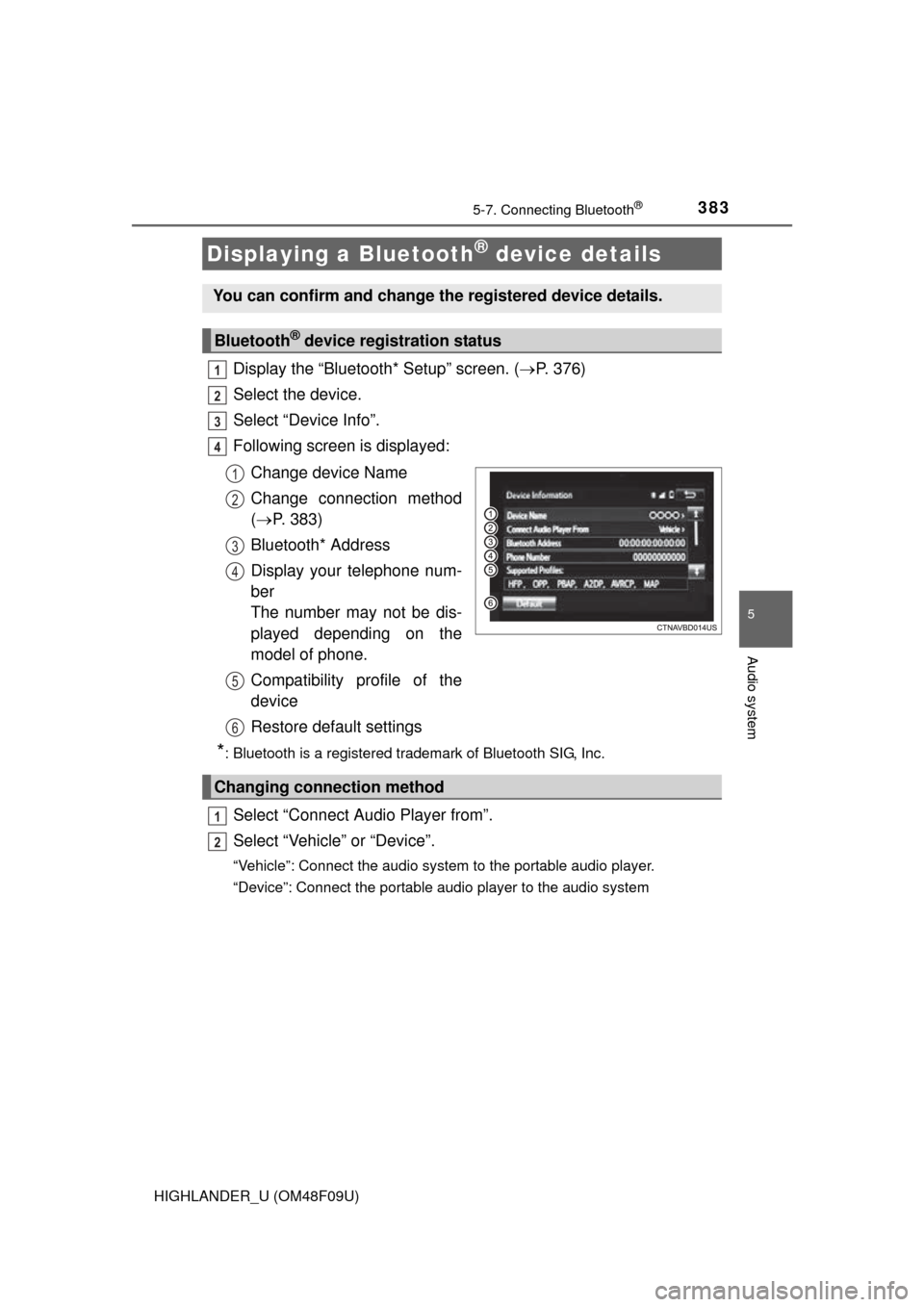
Following screen is displayed:
Change device Name
Change connection method
( P. 383)
Bluetooth* Address
Display your telephone num-
ber
The number may not be dis-
played depending on the
model of phone.
Compatibility profile of the
device
Restore default settings
*: Bluetooth is a registered trademark of Bluetooth SIG, Inc.
Select “Connect Audio Player from”.
Select “Vehicle ” or “Device”.
“Vehicle”: Connect the audio system to the portable audio player.
“Device”: Connect the portable audio player to the audio system
Displaying a Bluetooth® device details
You can confirm and change the registered device details.
Bluetooth® device registration status
1
2
3
4
1
2
3
4
5
6
Changing connection method
1
2