Page 384 of 716
3845-7. Connecting Bluetooth®
HIGHLANDER_U (OM48F09U)
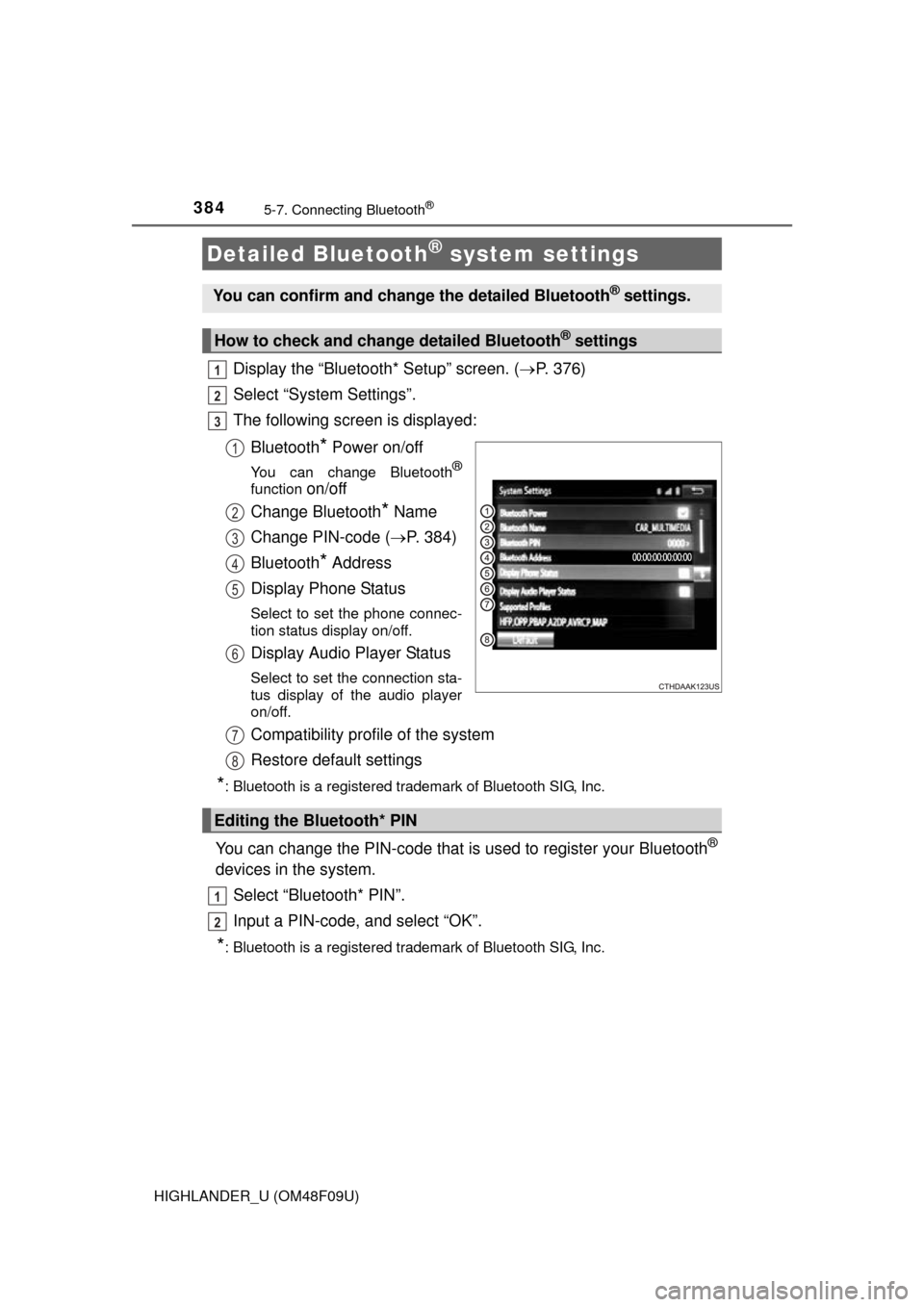
Display the “Bluetooth* Setup” screen. (P. 376)
Select “System Settings”.
The following screen is displayed:
Bluetooth
* Power on/off
You can change Bluetooth®
function on/off
Change Bluetooth
* Name
Change PIN-code ( P. 384)
Bluetooth
* Address
Display Phone Status
Select to set the phone connec-
tion status display on/off.
Display Audio Player Status
Select to set the connection sta-
tus display of the audio player
on/off.
Compatibility profile of the system
Restore default settings
*: Bluetooth is a registered trademark of Bluetooth SIG, Inc.
You can change the PIN-code that is used to register your Bluetooth®
devices in the system.
Select “Bluetooth* PIN”.
Input a PIN-code, and select “OK”.
*: Bluetooth is a registered trademark of Bluetooth SIG, Inc.
Detailed Bluetooth® system settings
You can confirm and change the detailed Bluetooth® settings.
How to check and change detailed Bluetooth® settings
1
2
3
1
2
3
4
5
6
Editing the Bluetooth* PIN
7
8
1
2
Page 385 of 716
385
5
Audio system
HIGHLANDER_U (OM48F09U)
5-8.Bluetooth® Audio
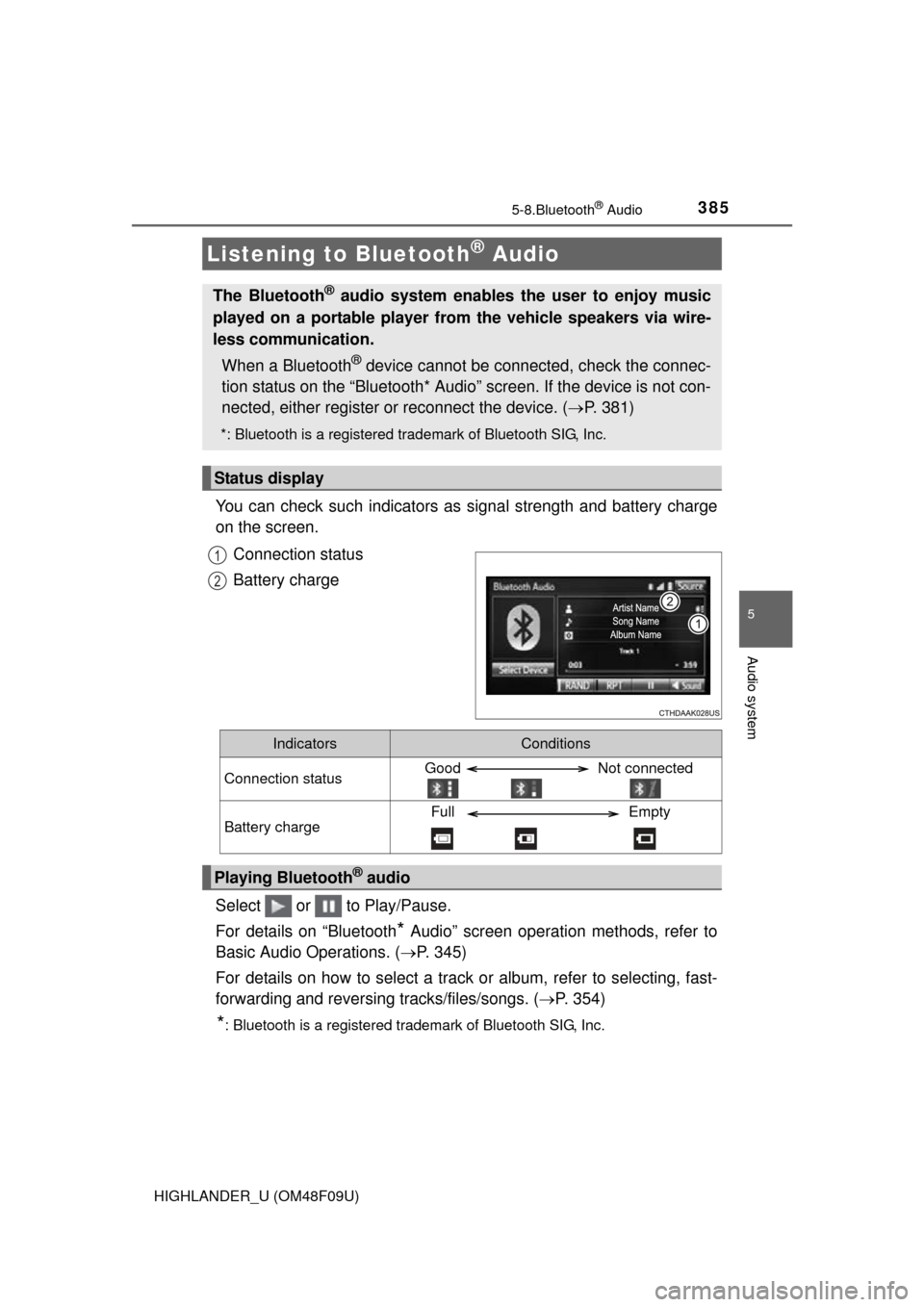
You can check such indicators as signal strength and battery charge
on the screen.
Connection status
Battery charge
Select or to Play/Pause.
For details on “Bluetooth
* Audio” screen operation methods, refer to
Basic Audio Operations. ( P. 345)
For details on how to select a track or album, refer to selecting, fast-
forwarding and reversing tracks/files/songs. ( P. 354)
*: Bluetooth is a registered trademark of Bluetooth SIG, Inc.
Listening to Bluetooth® Audio
The Bluetooth® audio system enables the user to enjoy music
played on a portable player from the vehicle speakers via wire-
less communication.
When a Bluetooth
® device cannot be connected, check the connec-
tion status on the “Bluetooth* Audio” screen. If the device is not con-
nected, either register or reconnect the device. ( P. 381)
*: Bluetooth is a registered trademark of Bluetooth SIG, Inc.
Status display
1
2
IndicatorsConditions
Connection statusGood Not connected
Battery chargeFull Empty
Playing Bluetooth® audio
Page 404 of 716
4045-9. Bluetooth® phone
HIGHLANDER_U (OM48F09U)
For PBAP compatible Bluetooth® phones, this function is available
when “Automatic Transfer” is set to off. ( P. 401)
Select “Edit Contact”.
Select the desired contact.
Select corresponding to the desired name or number.
For editing the name
Follow the steps in “Registering a new contact to the contacts list”
from step . ( P. 403)
For editing the number
Follow the steps in “Registering a new contact to the contacts list”
from step . ( P. 403)
■Editing the contacts in a different way (From the “Contact
Details” screen)
Display the phone screen. ( P. 386)
Select the “Contacts”, “Call History” tab or the “Favorites” tab and
select the desired contact.
Select “Edit Contact”.
“E-mail Addresses”: Select to display all registered e-mail addresses for
the contact.
Follow the steps in “Editing the contact data” from step .
Editing the contact data
1
2
3
4
3
4
4
1
2
3
44
Page 405 of 716
4055-9. Bluetooth® phone
5
Audio system
HIGHLANDER_U (OM48F09U)
For PBAP compatible Bluetooth® phones, this function is available
when “Automatic Transfer” is set to off. ( P. 401)
Select “Delete Contacts”.
Select the desired contact and select “Delete”.
Select “Yes” when the confirmation screen appears.
■Deleting the contact in a different way (From the “Contact
Details” screen) Display the phone screen. ( P. 386)
Select the “Contacts”, “Call History” tab or the “Favorites” tab and
select the desired contact.
Select “Edit Contact”.
Select “Yes” when the confirmation screen appears.
Up to 15 contacts (maximum of 4 numbers per contact) can be regis-
tered in the favorites list.
■Registering the contacts in the favorites list
Select “Add Favorite”.
Select the desired contact to add to the favorites list.
Dimmed contacts are already stored as a favorite.
Check that a confirmation scr een is displayed when the opera-
tion is complete.
Deleting the contact data
Favorites list setting
1
2
13
1
2
3
4
1
2
3
Page 406 of 716
4065-9. Bluetooth® phone
HIGHLANDER_U (OM48F09U)
When 15 contacts have already been registered to the favorites list
When 15 contacts have already been registered to the favorites list,
a registered contact needs to be replaced.
Select “Yes” when the confirmation screen appears to replace a
contact.
Select the contact to be replaced.
Check that a confirmation screen is displayed when the operation is
complete.
Registering contacts in the favorites list in a different way (from the
“Contacts” screen)
Display the phone screen. ( P. 386)
Select the “Contacts” tab.
Select at the beginning of the desired contact list name to be
registered in the favorites list.
When selected, is changed to , and the contact is registered in the
favorites list.
Registering contacts in the favorites list in a different way (from the
“Contact Details” screen)
Display the phone screen. ( P. 386)
Select the “Contacts” tab or the “Call History” tab and select the
desired contact.
Select “Add Favorite”.
Check that a confirmation screen is displayed when the operation is
complete.
1
2
3
1
2
3
1
2
3
4
Page 407 of 716

4075-9. Bluetooth® phone
5
Audio system
HIGHLANDER_U (OM48F09U)■
Deleting the contacts in the favorites list
Select “Remove Favorite”.
Select the desired contacts and select “Remove”.
Select “Yes” when the confirmation screen appears.
Check that a confirmation scr een is displayed when the opera-
tion is complete.
Deleting contacts in the favorites list in a different way (from the
“Contacts” screen)
Display the phone screen. ( P. 386)
Select the “Contacts” tab.
Select at the beginning of the contact list name to be deleted
from the favorites. list.
When selected, is changed to , and the data is deleted from the
list.
Deleting contacts in the favorites list in a different way (from the
“Contact Details” screen)
Display the phone screen. ( P. 386)
Select the “Contacts”, “Call History” tab or the “Favorites” tab and
select the desired contact to delete.
Select “Remove Favorite”.
Select “Yes” when the confirmation screen appears.
Check that a confirmation scr een is displayed when the opera-
tion is complete.
1
2
3
4
1
2
3
1
2
3
4
5
Page 472 of 716
4726-4. Using the other interior features
HIGHLANDER_U (OM48F09U)
Test the HomeLink® operation by pressing the newly pro-
grammed button and observing the indicator light:
● If the indicator light is solid/continuous, programming has been
completed and your device should activate when the
HomeLink
® button is pressed and released.
● If the indicator light blinks rapidly for 2 seconds and then turns
into a solid/continuous light, proceed to the heading “Program-
ming a rolling code system”.
Repeat the steps above to program another device for any of the
remaining HomeLink
® buttons.
■Programming a rolling code system
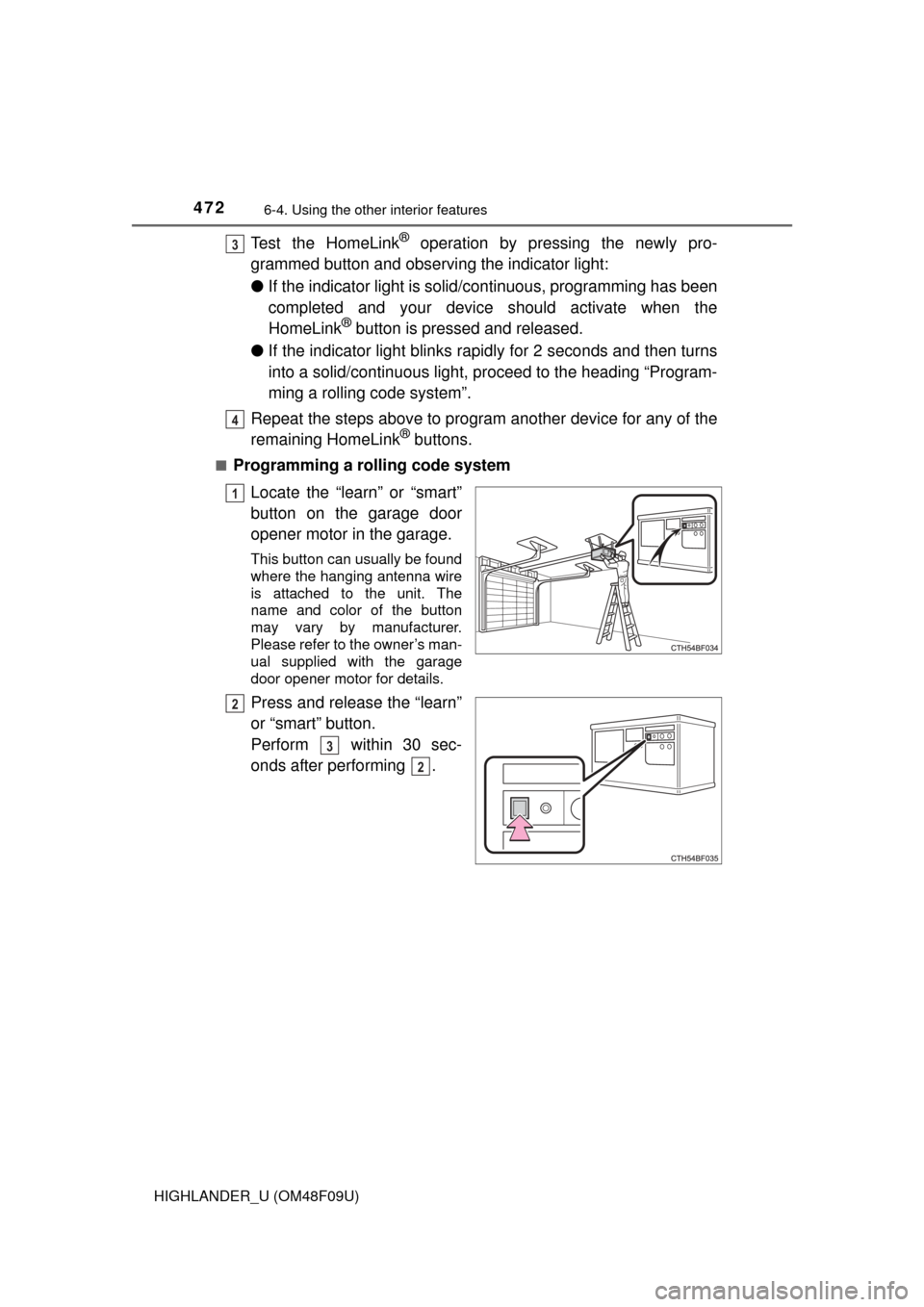
Locate the “learn” or “smart”
button on the garage door
opener motor in the garage.
This button can usually be found
where the hanging antenna wire
is attached to the unit. The
name and color of the button
may vary by manufacturer.
Please refer to the owner’s man-
ual supplied with the garage
door opener motor for details.
Press and release the “learn”
or “smart” button.
Perform within 30 sec-
onds after performing .
3
4
1
2
3
2
Page 478 of 716
4786-4. Using the other interior features
HIGHLANDER_U (OM48F09U)■
Services
Subscribers have the following Safe
ty Connect services available:
● Automatic Collision Notification
*
Helps drivers receive necessary response from emergency ser-
vice providers. ( P. 480)
*: U.S. Patent No. 7,508,298 B2
● Stolen Vehicle Location
Helps drivers in the event of vehicle theft. ( P. 481)
● Emergency Assistance Button (SOS)
Connects drivers to response-center support. ( P. 481)
● Enhanced Roadside Assistance
Provides drivers various on-road assistance. ( P. 481)
■Subscription
After you have signed the Telemati cs Subscription Service Agree-
ment and are enrolled, you c an begin receiving services.
A variety of subscription terms ar e available for purchase. Contact
your Toyota dealer, call 1-800-331-4331, or push the “SOS” button
in your vehicle for furt her subscription details.