Page 65 of 620

651-1. For safe use
1
For safety and security
COROLLA_TMMMS_TMMC_U (OM12J84U)
Exhaust gas precautions
Harmful substance to the human body is included in exhaust
gases if inhaled.
CAUTION
Exhaust gases include harmful carbon monoxide (CO), which is colorless and
odorless. Observe the following precautions.
Failure to do so may cause exhaust gases enter the vehicle and may lead to
an accident caused by light-headedness, or may lead to death or a serious
health hazard.
nImportant points while driving
lKeep the trunk lid closed.
l If you smell exhaust gases in the vehicle even when the trunk lid is closed,
open the windows and have the vehicle inspected at your Toyota dealer as
soon as possible.
n When parking
lIf the vehicle is in a poorly ventilated area or a closed area, such as a
garage, stop the engine.
l Do not leave the vehicle with the engine on for a long time.
If such a situation cannot be avoided, park the vehicle in an open space
and ensure that exhaust fumes do not enter the vehicle interior.
l Do not leave the engine running in an area with snow build-up, or where it
is snowing. If snowbanks build up around the vehicle while the engine is
running, exhaust gases may collect and enter the vehicle.
n Exhaust pipe
The exhaust system needs to be checked periodically. If there is a hole or
crack caused by corrosion, damage to a joint or abnormal exhaust noise, be
sure to have the vehicle inspected and repaired by your Toyota dealer.
Page 66 of 620
66
COROLLA_TMMMS_TMMC_U (OM12J84U)
1-2. Theft deterrent system
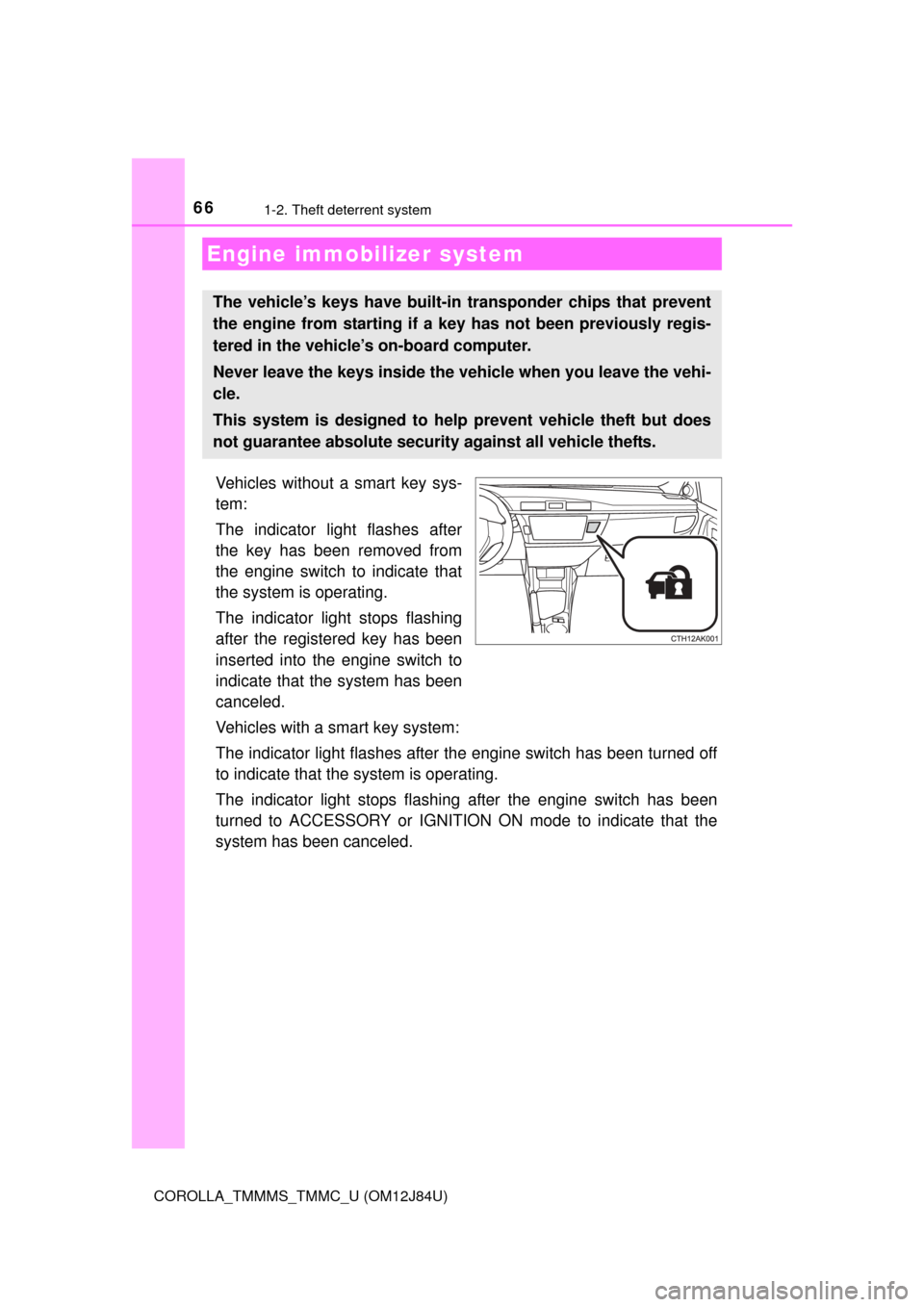
Vehicles without a smart key sys-
tem:
The indicator light flashes after
the key has been removed from
the engine switch to indicate that
the system is operating.
The indicator light stops flashing
after the registered key has been
inserted into the engine switch to
indicate that the system has been
canceled.
Vehicles with a smart key system:
The indicator light flashes after the engine switch has been turned off
to indicate that the system is operating.
The indicator light stops flashing after the engine switch has been
turned to ACCESSORY or IGNITION ON mode to indicate that the
system has been canceled.
Engine immobilizer system
The vehicle’s keys have built-in transponder chips that prevent
the engine from starting if a key has not been previously regis-
tered in the vehicle’s on-board computer.
Never leave the keys inside the vehicle when you leave the vehi-
cle.
This system is designed to help prevent vehicle theft but does
not guarantee absolute security against all vehicle thefts.
Page 69 of 620

691-2. Theft deterrent system
1
For safety and security
COROLLA_TMMMS_TMMC_U (OM12J84U)
nSystem maintenance
The vehicle has a maintenance-free type alarm system.
n Items to check before locking the vehicle
To prevent unexpected triggering of the alarm and vehicle theft, make sure of
the following:
lNobody is in the vehicle.
l The windows and moon roof are closed before the alarm is set.
l No valuables or other personal items are left in the vehicle.
n Triggering of the alarm
The alarm may be triggered in the following situations:
(Stopping the alarm deactivates the alarm system.)
n Alarm-operated door lock
In the following situations, the doors are locked automatically to prevent
intruders:
lThe doors are unlocked manually without the mechanical key and the alarm
is triggered.
l While the alarm is operating, the doors are unlocked manually without the
mechanical key.
l
A person inside the vehicle opens a
door, the trunk or hood, or unlocks the
vehicle using a door lock switch or inside
lock button.
l The battery is recharged or replaced
when the vehicle is locked. ( P. 541)
NOTICE
nTo ensure the system operates correctly
Do not modify or remove the system. If modified or removed, the proper
operation of the system cannot be guaranteed.
Page 81 of 620

812. Instrument cluster
2
Instrument cluster
COROLLA_TMMMS_TMMC_U (OM12J84U)
nThe meters and display illuminate when
Vehicles without a smart key system
The engine switch is in the “ON” position.
Vehicles with a smart key system
The engine switch is in IGNITION ON mode.
n When disconnecting and reco nnecting battery terminals
The following information data will be reset:
l Average fuel consumption
l Driving range
l Average vehicle speed
CAUTION
n The display at low temperatures
Allow the interior of the vehicle to warm up before using the display. At
extremely low temperatures, the display monitor may respond slowly, and
display changes may be delayed.
For example, there is a lag between the driver’s shifting and the new gear
number appearing on the display. This lag could cause the driver to down-
shift again, causing rapid and excessive engine braking and possibly an
accident resulting in death or injury.
n Cautions during setting up the display
As the engine needs to be running during setting up the display, ensure that
the vehicle is parked in a place with adequate ventilation. In a closed area
such as a garage, exhaust gases including harmful carbon monoxide (CO)
may collect and enter the vehicle. This may lead to death or a serious
health hazard.
NOTICE
nTo prevent damage to the engine and its components
lDo not let the indicator needle of the tachometer enter the red zone, which
indicates the maximum engine speed.
l The engine may be overheating if the high engine coolant temperature
warning light comes on. In this case, immediately stop the vehicle in a safe
place, and check the engine after it has cooled completely. (P. 543)
Page 88 of 620

882. Instrument cluster
COROLLA_TMMMS_TMMC_U (OM12J84U)
CAUTION
nThe display at low temperatures
Allow the interior of the vehicle to warm up before using the display. At
extremely low temperatures, the display monitor may respond slowly, and
display changes may be delayed.
For example, there is a lag between the driver’s shifting and the new gear
number appearing on the display. This lag could cause the driver to down-
shift again, causing rapid and excessive engine braking and possibly an
accident resulting in death or injury.
n Cautions during setting up the display
As the engine needs to be running during setting up the display, ensure that
the vehicle is parked in a place with adequate ventilation. In a closed area
such as a garage, exhaust gases including harmful carbon monoxide (CO)
may collect and enter the vehicle. This may lead to death or a serious
health hazard.
NOTICE
nTo prevent damage to the engine and its components
lDo not let the indicator needle of the tachometer enter the red zone, which
indicates the maximum engine speed.
l The engine may be overheating if the engine coolant temperature gauge
are in the red zone. In this case, immediately stop the vehicle in a safe
place, and check the engine after it has cooled completely. (P. 543)
Page 100 of 620

1003-1. Key information
COROLLA_TMMMS_TMMC_U (OM12J84U)
For Canada
NOTE:
This device complies with Industry Canada licence-exempt RSS standard(s).
Operation is subject to the following two conditions: (1) this device may not
cause interference, and (2) this device must accept any interference, includ-
ing interference that may cause undesired operation of the device.
For 12BEL/12BDP
The FCC ID/IC Certification number is affixed inside the equipment. You can
find the ID/number when replacing the battery.
NOTICE
n To prevent key damage
lDo not drop the keys, subject them to strong shocks or bend them.
l Do not expose the keys to high temperatures for long periods of time.
l Do not get the keys wet or wash them in an ultrasonic washer etc.
l Do not attach metallic or magnetic materials to the keys or place the keys
close to such materials.
l Do not disassemble the keys.
l Do not attach a sticker or anything else to the surface of the electronic key
and key (with a wireless remote control function).
l Vehicles with a smart key system: Do not place the keys near objects that
produce magnetic fields, such as TVs, audio systems and induction cook-
ers, or medical electrical equipment, such as low-frequency therapy equip-
ment.
n Carrying the electronic key on your person (vehicles with a smart key
system)
Carry the electronic key 3.9 in. (10 cm) or more away from electric appli-
ances that are turned on. Radio waves emitted from electric appliances
within 3.9 in. (10 cm) of the electronic key may interfere with the key, caus-
ing the key to not function properly.
n In case of a smart key system malfunction or other key-related prob-
lems (vehicles with a smart key system)
Take your vehicle with all the electronic keys provided with your vehicle to
your Toyota dealer.
n When an electronic key is lost (vehicles with a smart key system)
If the electronic key remains lost, the risk of vehicle theft increases signifi-
cantly. Visit your Toyota dealer imm ediately with all remaining electronic
keys that was provided with your vehicle.
Page 105 of 620
1053-2. Opening, closing and locking the doors
3
Operation of each component
COROLLA_TMMMS_TMMC_U (OM12J84U)
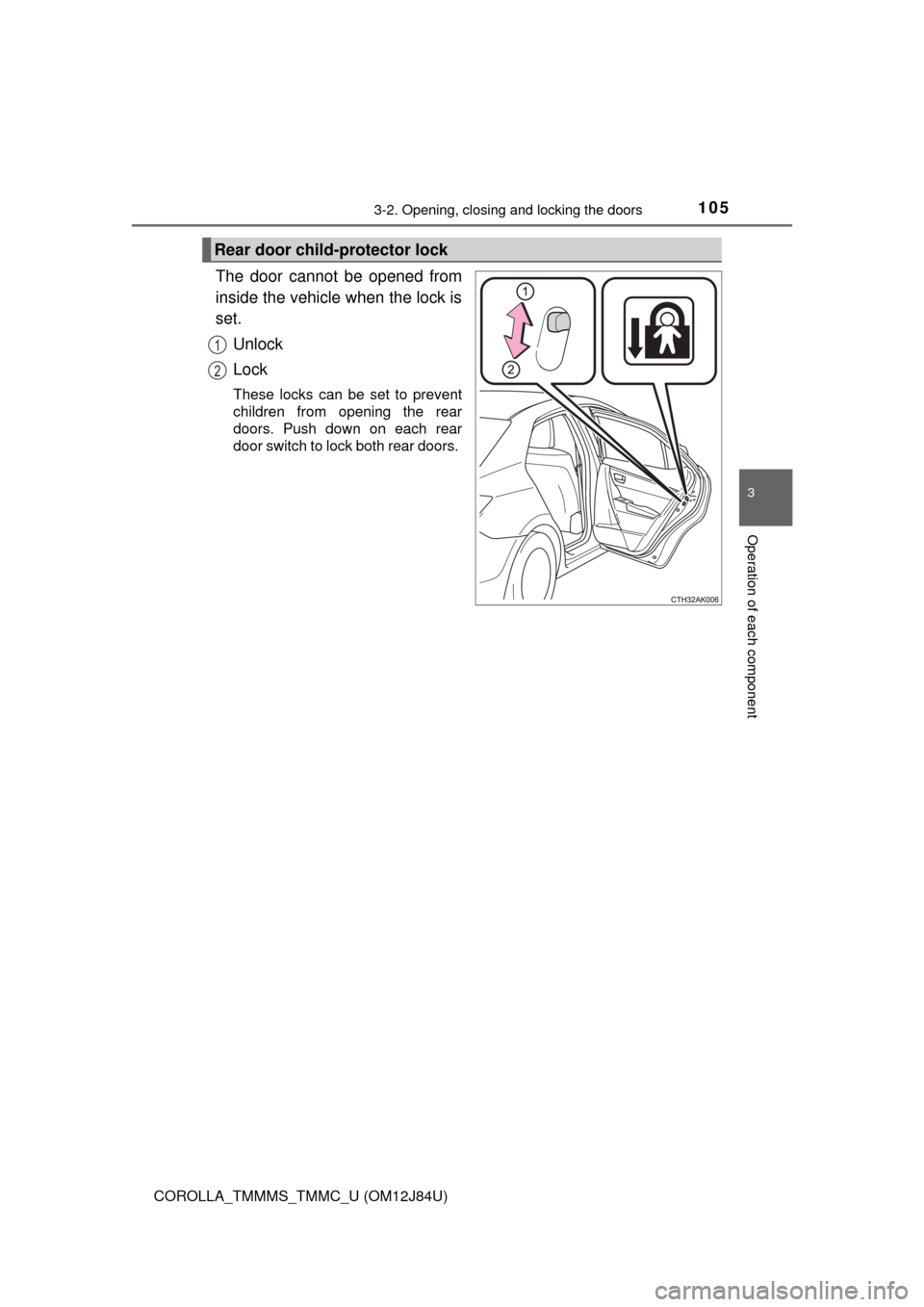
The door cannot be opened from
inside the vehicle when the lock is
set.Unlock
Lock
These locks can be set to prevent
children from opening the rear
doors. Push down on each rear
door switch to lock both rear doors.
Rear door child-protector lock
1
2
Page 108 of 620

1083-2. Opening, closing and locking the doors
COROLLA_TMMMS_TMMC_U (OM12J84U)
nSwitching the door unlock functi on (vehicles with a smart key system)
It is possible to set which doors the entry function unlocks using the wireless
remote control.
Turn the engine switch off.
When the indicator light on the key surface is not on, press and hold ,
or for approximately 5 seconds while pressing and holding
.
The setting changes each time an operation is performed, as shown below.
(When changing the setting continuously, release the buttons, wait for at least
5 seconds, and repeat step .)
Vehicles with an alarm: To prevent un intended triggering of the alarm, unlock
the doors using the wireless remote control and open and close a door once
after the settings have been changed. (If a door is not opened within 60 sec-
onds after is pressed, the doors will be locked again and the alarm will
automatically be set.)
In case that the alarm is triggered, immediately stop the alarm. ( P. 6 8 )
1
2
2
Multi-information
display
(if equipped)
Unlocking functionBeep
Holding the driver’s door
handle unlocks only the
driver’s door.
Exterior: Beeps 3
times
Interior: Pings once
Holding the front passen-
ger’s door handle unlocks
all the doors.
Holding either front door
handle unlocks all the
doors.Exterior: Beeps
twice
Interior: Pings once