2016 TOYOTA AVALON approximate 60
[x] Cancel search: approximate 60Page 8 of 492

8
AVALON (U)_(01999-07001)Please note that this manual applies to all models and explains all equipment,
including options. Therefore, you may find some explanations for equipment
not installed on your vehicle.
All specifications provided in this manual are current at the time of printing.
However, because of the Toyota policy of continual product improvement, we
reserve the right to make changes at any time without notice.
Depending on specifications, the vehicle shown in the illustrations may differ
from your vehicle in terms of color and equipment.
Approximately five hours after the engine is turned off, you may hear sound
coming from under the vehicle for several minutes. This is the sound of a fuel
evaporation leakage check and, it does not indicate a malfunction.
A wide variety of non-genuine spare parts and accessories for Toyota vehi-
cles are currently available in the market. You should know that Toyota does
not warrant these products and is not responsible for their performance,
repair, or replacement, or for any damage they may cause to, or adverse
effect they may have on, your Toyota vehicle.
This vehicle should not be modified with non-genuine Toyota products. Modi-
fication with non-genuine Toyota products could affect its performance, safety
or durability, and may even violate governmental regulations. In addition,
damage or performance problems resulting from the modification may not be
covered under warranty.
For your infor mation
Main Owner’s Manual
Noise from under vehicle after turning off the engine
Accessories, spare parts and modification of your Toyota
Page 42 of 492

421-1. For safe use
AVALON (U)_(01999-07001)■
SRS airbag deployment conditions (SRS front airbags)
●The SRS front airbags will deploy in the event of an impact that exceeds the
set threshold level (the level of force corresponding to an approximately 12 -
18 mph [20 - 30 km/h] frontal collision with a fixed wall that does not move or
deform).
However, this threshold velocity will be considerably higher in the following
situations:
• If the vehicle strikes an object, such as a parked vehicle or sign pole,
which can move or deform on impact
• If the vehicle is involved in an underride collision, such as a collision in which the front of the vehicle “underrides”, or goes under, the bed of a
truck
● Depending on the type of collision, it is possible that only the seat belt pre-
tensioners will activate.
● The SRS front airbags for the front pass enger will not activate if there is no
passenger sitting in the front passenger seat. However, the SRS front air-
bags for the front passenger may deploy if luggage is put in the seat, even if
the seat is unoccupied. ( P. 46)
■ SRS airbag deployment conditions (SRS side and curtain shield airbags)
● The SRS side and curtain shield airbags will deploy in the event of an
impact that exceeds the set threshold level (the level of force corresponding
to the impact force produced by an approximately 3300 lb. [1500 kg] vehicle
colliding with the vehicle cabin from a direction perpendicular to the vehicle
orientation at an approximate speed of 12 - 18 mph [20 - 30 km/h]).
● The SRS curtain shield airbags will deploy in the event of vehicle rollover.
● The SRS side and curtain shield airbags will deploy in the event of a severe
frontal collision.
Page 81 of 492

812. Instrument cluster
2
Instrument cluster
AVALON (U)_(01999-07001)
■Eco-friendly driving
■ The meters and display illuminate when
The engine switch is in IGNITION ON mode.
■ The brightness of the in strument panel lights
● When the headlight switch is turned to on, the brightness will be reduced
slightly unless the control knob is turned fully clockwise.
● When the knob is turned fully clockwise, the display audio/navigation sys-
tem screen will always be in day mode regardless of the headlight switch
position.
■ Customization
The instrument panel light auto dimmer control can be changed.
(Customizable feature: P. 449)
During Eco-friendly acceleration (Eco
driving), Eco Driving Indicator Light will
turn on. If the acceleration exceeds the
Eco driving accelerator upper limit, or the
vehicle is stopped, the light turns off.
Eco Driving Indicator Light will not operate
in the following conditions:
●
The shift lever is in anything other than
D.
● The paddle shift switch is used.
● The vehicle is in sport mode.
● The vehicle speed is approximately 80
mph (130 km/h) or higher.
NOTICE
■ To prevent damage to the engine and its components
●Do not let the indicator needle of the tachometer enter the red zone, which
indicates the maximum engine speed.
● The engine may be overheating if the engine coolant temperature gauge is
in the red zone (H). In this case, immediately stop the vehicle in a safe
place, and check the engine after it has cooled completely. (P. 417)
Page 98 of 492

983-2. Opening, closing and locking the doors
AVALON (U)_(01999-07001)
■Operation signals
A buzzer sounds and the emergency flashers flash to indicate that the doors
have been locked/unlocked. (Locked: Once; Unlocked: Twice)
■ Security feature
If a door is not opened within approximately 60 seconds after the vehicle is
unlocked, the security feature automatically locks the vehicle again.
■ When the door cannot be locked by the lock sensor on the upper part of
the door handle
■ Door lock buzzer
If an attempt to lock the doors is made when a door is not fully closed, a
buzzer sounds continuously for 5 seconds. Fully close the door to stop the
buzzer, and lock the vehicle once more.
■ Alarm
Locking the doors will set the alarm system. ( P. 70)
■ If the smart key system or the wireless remote control does not operate
properly
Use the mechanical key to lock and unlock the doors. ( P. 410)
Replace the battery with a new one if it is depleted. ( P. 358)
If the door will not lock even when the top-
side sensor area is touched, try touching
both the topside and underside sensor
areas at the same time.
Page 100 of 492
1003-2. Opening, closing and locking the doors
AVALON (U)_(01999-07001)
Move the inside lock button to the lock position.
Close the door.
The door cannot be locked if the engine switch is in ACCESSORY or
IGNITION ON mode, or the electronic key is left inside the vehicle.
The key may not be detected correctly and the door may be locked.
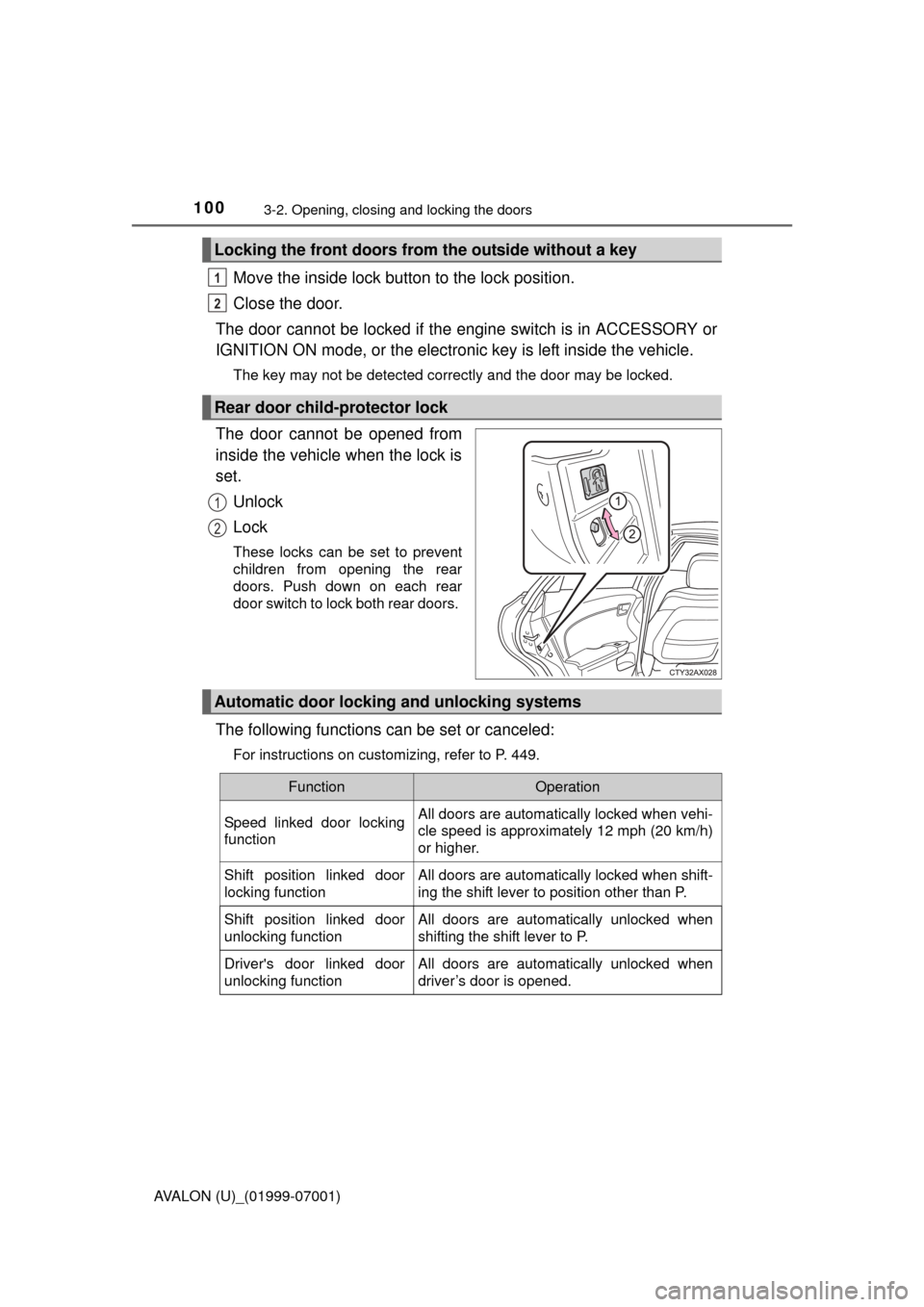
The door cannot be opened from
inside the vehicle when the lock is
set.
Unlock
Lock
These locks can be set to prevent
children from opening the rear
doors. Push down on each rear
door switch to lock both rear doors.
The following functions can be set or canceled:
For instructions on customizing, refer to P. 449.
Locking the front doors from the outside without a key
Rear door child-protector lock
1
2
1
2
Automatic door lockin g and unlocking systems
FunctionOperation
Speed linked door locking
functionAll doors are automatically locked when vehi-
cle speed is approximately 12 mph (20 km/h)
or higher.
Shift position linked door
locking functionAll doors are automatically locked when shift-
ing the shift lever to position other than P.
Shift position linked door
unlocking functionAll doors are automatically unlocked when
shifting the shift lever to P.
Driver's door linked door
unlocking functionAll doors are automatically unlocked when
driver’s door is opened.
Page 101 of 492

1013-2. Opening, closing and locking the doors
3
Operation of each component
AVALON (U)_(01999-07001)
■Switching the door unlock function (some models)
It is possible to set which doors the entry function unlocks using the wireless
remote control.
Turn the engine switch off.
When the indicator light on the key surface is not on, press and hold ,
or for approximately 5 seconds while pressing and holding
.
The setting changes each time an operation is performed, as shown below.
(When changing the setting continuously, release the buttons, wait for at least
5 seconds, and repeat step .)
To prevent unintended triggering of the alarm, unlock the doors using the
wireless remote control and open and close a door once after the settings
have been changed. (If a door is not opened within 60 seconds after is
pressed, the doors will be locked again and the alarm will automatically be
set.)
In case that the alarm is triggered, immediately stop the alarm. ( P. 7 0 )
■ Using the mechanical key
The doors can also be locked and unlocked with the mechanical key.
( P. 410)
■ Conditions affecting the operation of the smart key system or wireless
remote control
P. 1 1 4
■ Customization
Settings (e.g. unlocking function using a key) can be changed.
(Customizable features: P. 449)
1
2
2
Multi-information
displayUnlocking functionBeep
Holding the driver’s door han-
dle unlocks only the driver’s
door.
Exterior: Beeps 3
times
Interior: Pings once
Holding a passenger’s door
handle unlocks all the doors.
Holding either front door han-
dle unlocks all the doors.Exterior: Beeps twice
Interior: Pings once
Page 113 of 492
1133-2. Opening, closing and locking the doors
3
Operation of each component
AVALON (U)_(01999-07001)■
Battery-saving function
The battery-saving function will be activated in order to prevent the electronic
key battery and the vehicle battery from being discharged while the vehicle is
not in operation for a long time.
●In the following situations, the smart key system may take some time to
unlock the doors.
• The electronic key has been left in an area of approximately 6 ft. (2 m) of
the outside of the vehicle for 10 minutes or longer.
• The smart key system has not been used for 5 days or longer.
● If the smart key system has not been used for 14 days or longer, the doors
cannot be unlocked at any doors except the driver’s door. In this case, take
hold of the driver’s door handle, or use the wireless remote control or the
mechanical key, to unlock the doors.
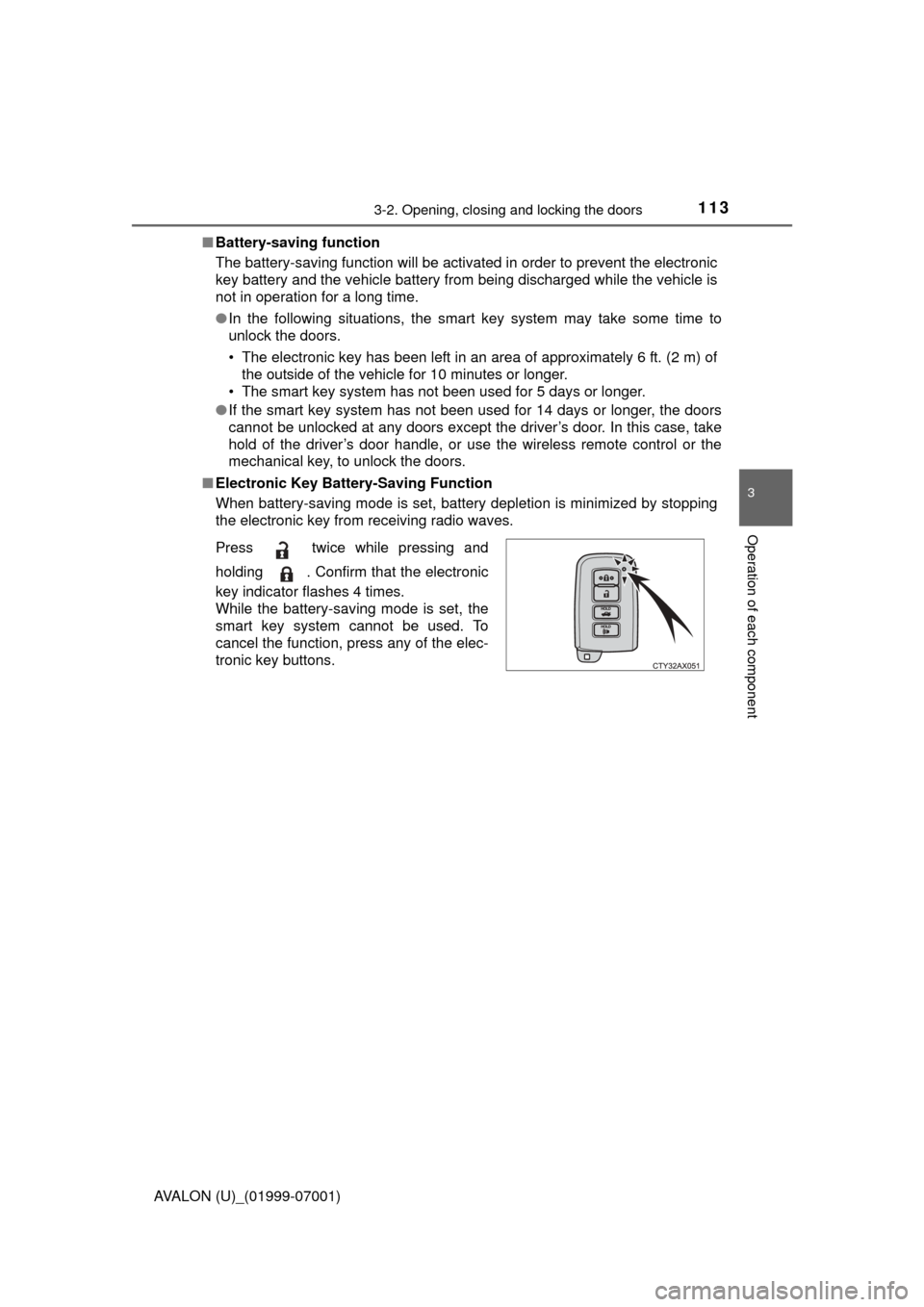
■ Electronic Key Battery-Saving Function
When battery-saving mode is set, battery depletion is minimized by stopping
the electronic key from receiving radio waves.
Press twice while pressing and
holding . Confirm that the electronic
key indicator flashes 4 times.
While the battery-saving mode is set, the
smart key system cannot be used. To
cancel the function, press any of the elec-
tronic key buttons.
Page 115 of 492

1153-2. Opening, closing and locking the doors
3
Operation of each component
AVALON (U)_(01999-07001)■
Note for the entry function
●Even when the electronic key is within the effective range (detection areas),
the system may not operate properly in the following cases:
• The electronic key is too close to the window or outside door handle, near
the ground, or in a high place when the doors are locked or unlocked.
• The electronic key is near the ground or in a high place, or too close to
the rear bumper center when the trunk is opened.
• The electronic key is on the instrument panel, rear package tray or floor, or in the door pockets or glove box when the engine is started or engine
switch modes are changed.
● Do not leave the electronic key on top of the instrument panel or near the
door pockets when exiting the vehicle. Depending on the radio wave recep-
tion conditions, it may be detected by the antenna outside the cabin and the
door will become lockable from the outside, possibly trapping the electronic
key inside the vehicle.
● As long as the electronic key is within the effective range, the doors may be
locked or unlocked by anyone. However, only the doors detecting the elec-
tronic key can be used to unlock the vehicle.
● Even if the electronic key is not inside the vehicle, it may be possible to start
the engine if the electronic key is near the window.
● The doors may unlock or lock if a large amount of water splashes on the
door handle, such as in the rain or in a car wash when the electronic key is
within the effective range. (The doors will automatically be locked after
approximately 60 seconds if the doors are not opened and closed.)
● If the wireless remote control is used to lock the doors when the electronic
key is near the vehicle, there is a possibility that the door may not be
unlocked by the entry function. (Use the wireless remote control to unlock
the doors.)