Page 290 of 528
2905-1. Using the air conditioning system and defogger
4RUNNER (U)_(OM35B23U)
CAUTION
■To prevent the windshield from fogging up
●Do not use during cool air operation in extremely humid weather.
The difference between the temperature of the outside air and that of the
windshield can cause the outer surface of the windshield to fog up, block-
ing your vision.
■To prevent burns
●Do not touch the rear view mirror surfaces when the outside rear view mir-
ror defoggers are on.
●Do not touch the glass at lower part of the windshield or to the side of the
front pillars when the windshield wiper de-icer is on.
NOTICE
■To prevent battery discharge
Do not leave the air conditioning system on longer than necessary when the
engine is stopped.
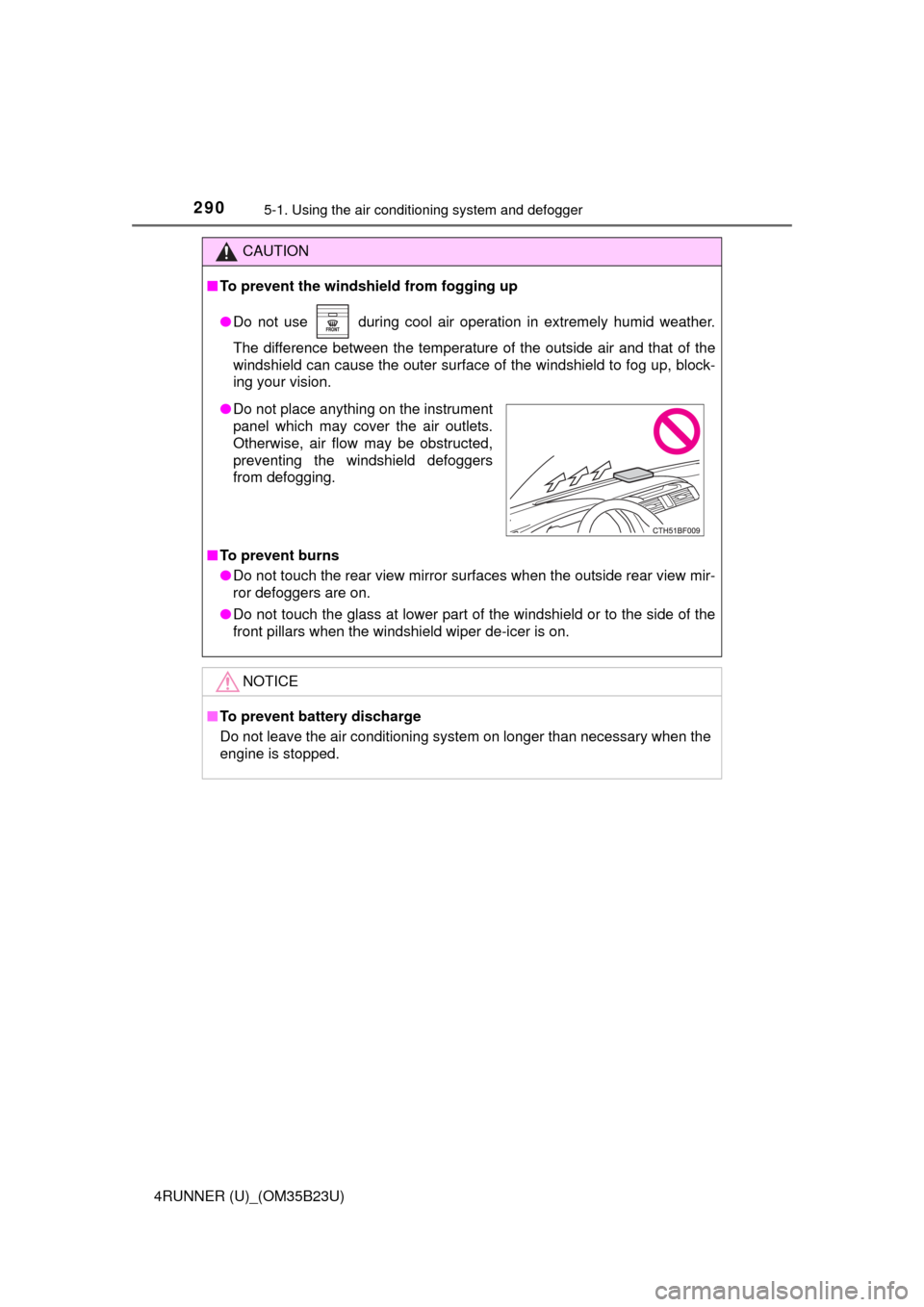
●Do not place anything on the instrument
panel which may cover the air outlets.
Otherwise, air flow may be obstructed,
preventing the windshield defoggers
from defogging.
Page 291 of 528
2915-1. Using the air conditioning system and defogger
5
Interior features
4RUNNER (U)_(OM35B23U)
Seat heaters/seat ventilators
: If equipped
The seat heaters warm the seats and the seat ventilators main-
tain good airflow by blowing air through the seats.
CAUTION
●Care should be taken to prevent injury if anyone in the following categories
comes in contact with the seats when the heater is on:
• Babies, small children, the elderly, the sick and the physically chal-
lenged
• Persons with sensitive skin
• Persons who are fatigued
• Persons who have taken alcohol or drugs that induce sleep (sleeping
drugs, cold remedies, etc.)
●Observe the following precautions to prevent the minor burns or overheat-
ing
• Do not cover the seat with a blanket or cushion when using the seat
heater.
• Do not use seat heater more than necessary.
NOTICE
●Do not put heavy objects that have an uneven surface on the seat and do
not stick sharp objects (needles, nails, etc.) into the seat.
●To prevent battery discharge, do not use the functions when the engine is
off.
Page 295 of 528
2955-2. Using the interior lights
5
Interior features
4RUNNER (U)_(OM35B23U)
■Illuminated entry system
Vehicles without a smart key system
The lights automatically turn on/off according to the engine switch position,
whether the doors are locked/unlocked, and whether the doors are open/
closed.
Vehicles with a smart key system
The lights automatically turn on/off according to engine switch mode, the
presence of the electronic key, whether the doors are locked/unlocked, and
whether the doors are opened/closed.
■To prevent battery discharge
If the following lights remain on, the lights will go off automatically after 20
minutes:
●Engine switch light
●Front interior light
●Rear interior light
●Personal lights
●Footwell lights
●Inside door handle lights
●Door courtesy lights
■Customization
Setting (e.g. the time elapsed before lights turn off) can be changed.
(Customizable features: P. 485)
NOTICE
■To prevent battery discharge
Do not leave the lights on longer than necessary when the engine is not
running.
Page 308 of 528
308
4RUNNER (U)_(OM35B23U)
5-4. Other interior features
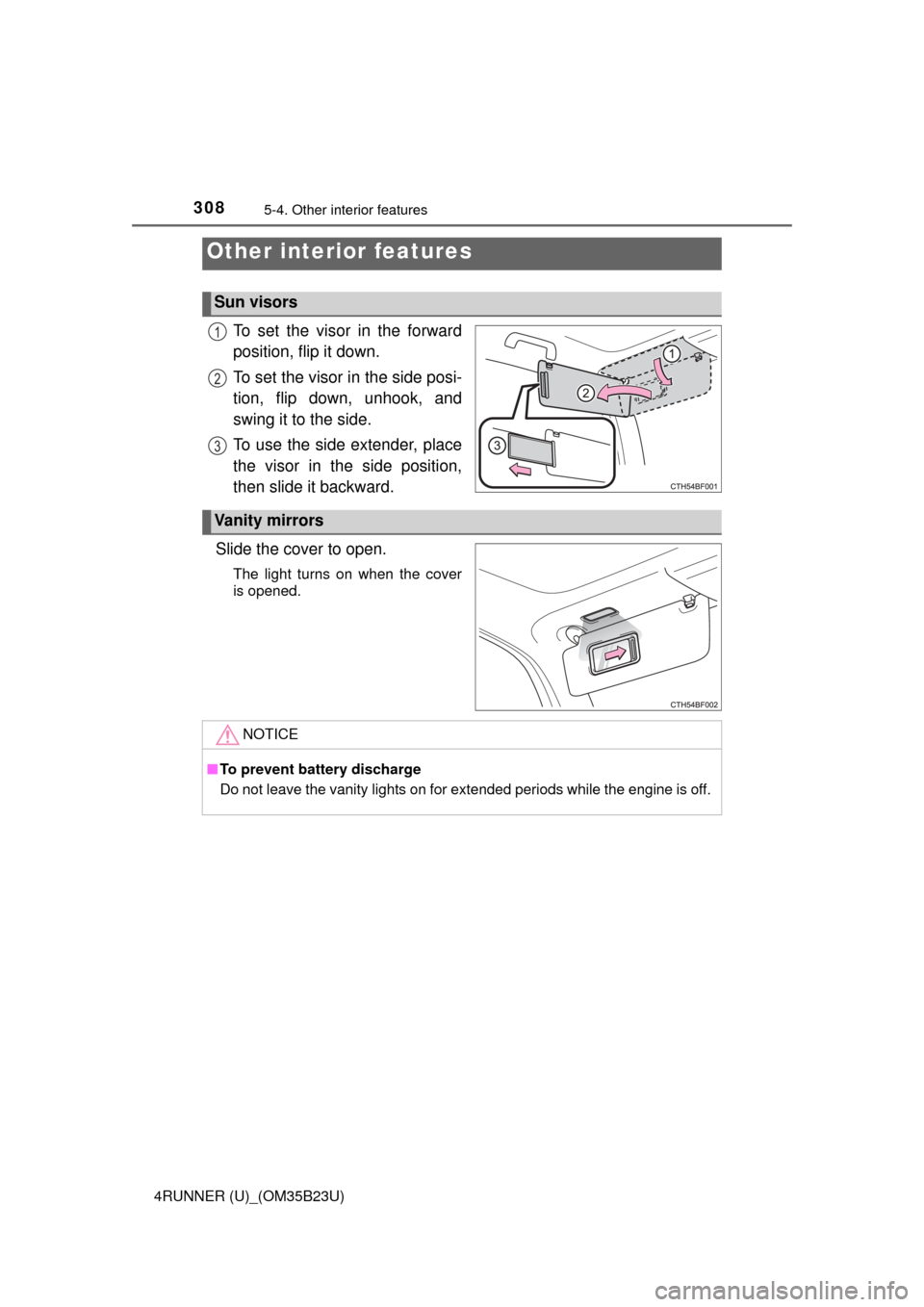
To set the visor in the forward
position, flip it down.
To set the visor in the side posi-
tion, flip down, unhook, and
swing it to the side.
To use the side extender, place
the visor in the side position,
then slide it backward.
Slide the cover to open.
The light turns on when the cover
is opened.
Other interior features
Sun visors
1
2
3
Vanity mirrors
NOTICE
■To prevent battery discharge
Do not leave the vanity lights on for extended periods while the engine is off.
Page 309 of 528
3095-4. Other interior features
5
Interior features
4RUNNER (U)_(OM35B23U)
The clock can be adjusted by pressing the buttons.
Adjusts the hours
Adjusts the minutes
■The clock is displayed when
Vehicles without a smart key system
The engine switch is in the “ACC” or “ON” position.
Vehicles with a smart key system
The engine switch is in ACCESSORY or IGNITION ON mode.
■When disconnecting and reconnecting battery terminals
The clock data will be reset.
Clock
1
2
Page 315 of 528
3155-4. Other interior features
5
Interior features
4RUNNER (U)_(OM35B23U)
NOTICE
■To avoid damaging the power outlet and the plug
●Close the power outlet lid when not in use.
●Do not allow foreign objects or liquids to enter the power outlet, as this
may cause a short circuit.
●Do not use plug adaptors to connect too many plugs to the power outlet.
●After removing a plug, gently close the power outlet lid.
■To prevent the fuse from being blown
Do not use a 120 V AC appliance that requires more than the maximum
capacity of the power outlet. If a 120 V AC appliance that consumes more
than the maximum capacity is used, the protection circuit will cut the power
supply.
■Appliances that may not operate properly (120 V AC)
The following 120 V AC appliances may not operate even if their power con-
sumption is under maximum capacity.
●Appliances with high initial peak wattage
●Measuring devices that process precise data.
●Other appliances that require an extremely stable power supply
■To prevent battery discharge
Turn off all the vehicle's electronic equipment and accessories, such as the
headlights and air conditioning, when electrical appliances that consume in
excess of 100 W are used continuously for long periods of time.
■To prevent any damage caused by heat
●Do not use any electrical appliances that give off intense heat, such as
toasters, in any locations including the internal or external trim, seats and
deck.
●Do not use any electrical appliances that are easily affected by vibration or
heat inside the vehicle. Vibration while driving, or the heat of the sun while
parking, may result in damage to those electrical appliances.
Page 318 of 528
3185-4. Other interior features
4RUNNER (U)_(OM35B23U)
■The power outlets can be used when
Vehicles without a smart key system
The engine switch is in the “ACC” or “ON” position.
Vehicles with a smart key system
The engine switch is in ACCESSORY or IGNITION ON mode.
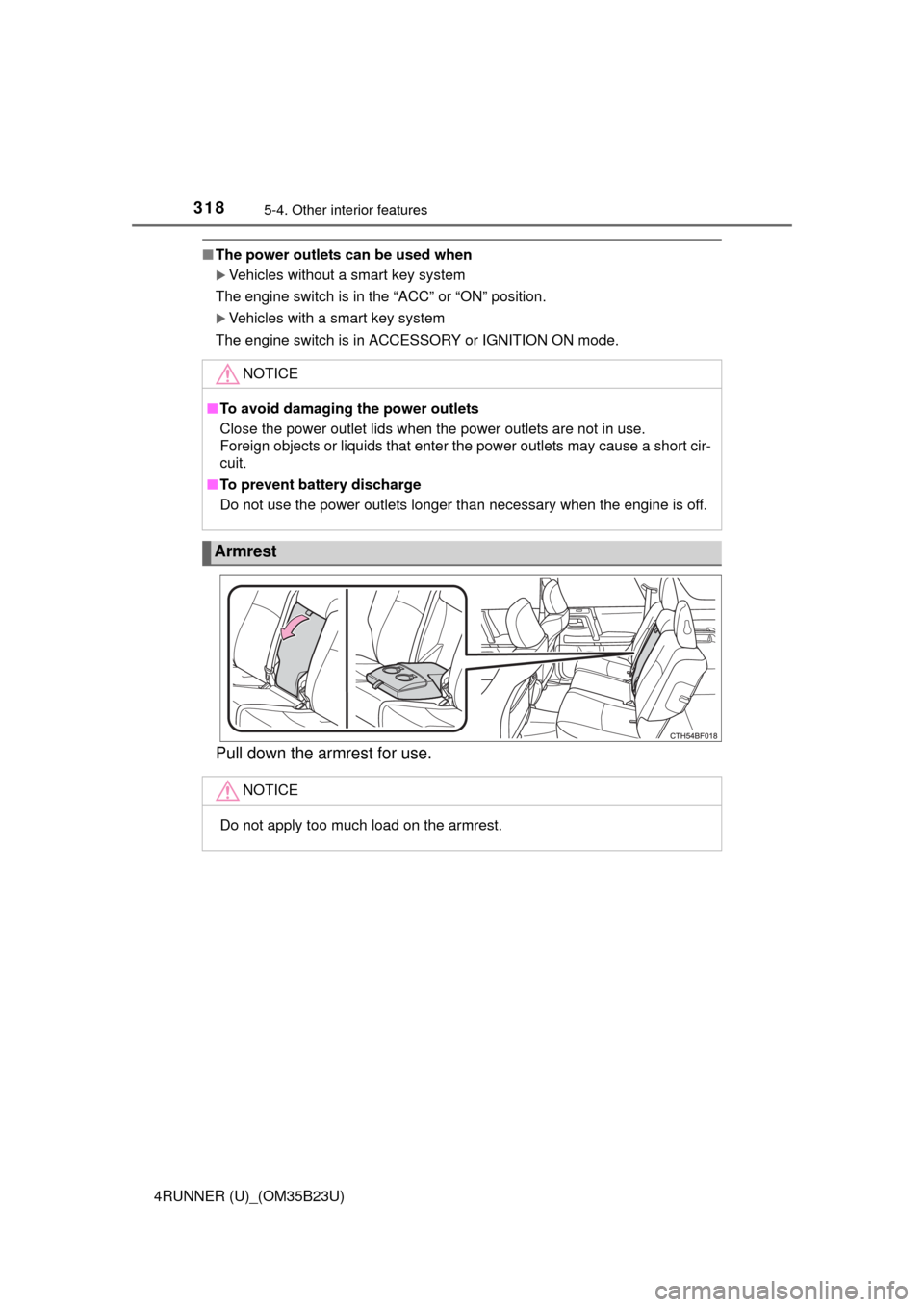
Pull down the armrest for use.
NOTICE
■To avoid damaging the power outlets
Close the power outlet lids when the power outlets are not in use.
Foreign objects or liquids that enter the power outlets may cause a short cir-
cuit.
■To prevent battery discharge
Do not use the power outlets longer than necessary when the engine is off.
Armrest
NOTICE
Do not apply too much load on the armrest.
Page 320 of 528
3205-4. Other interior features
4RUNNER (U)_(OM35B23U)
The garage door opener (HomeLink Universal Transceiver) is manu-
factured under license from HomeLink.
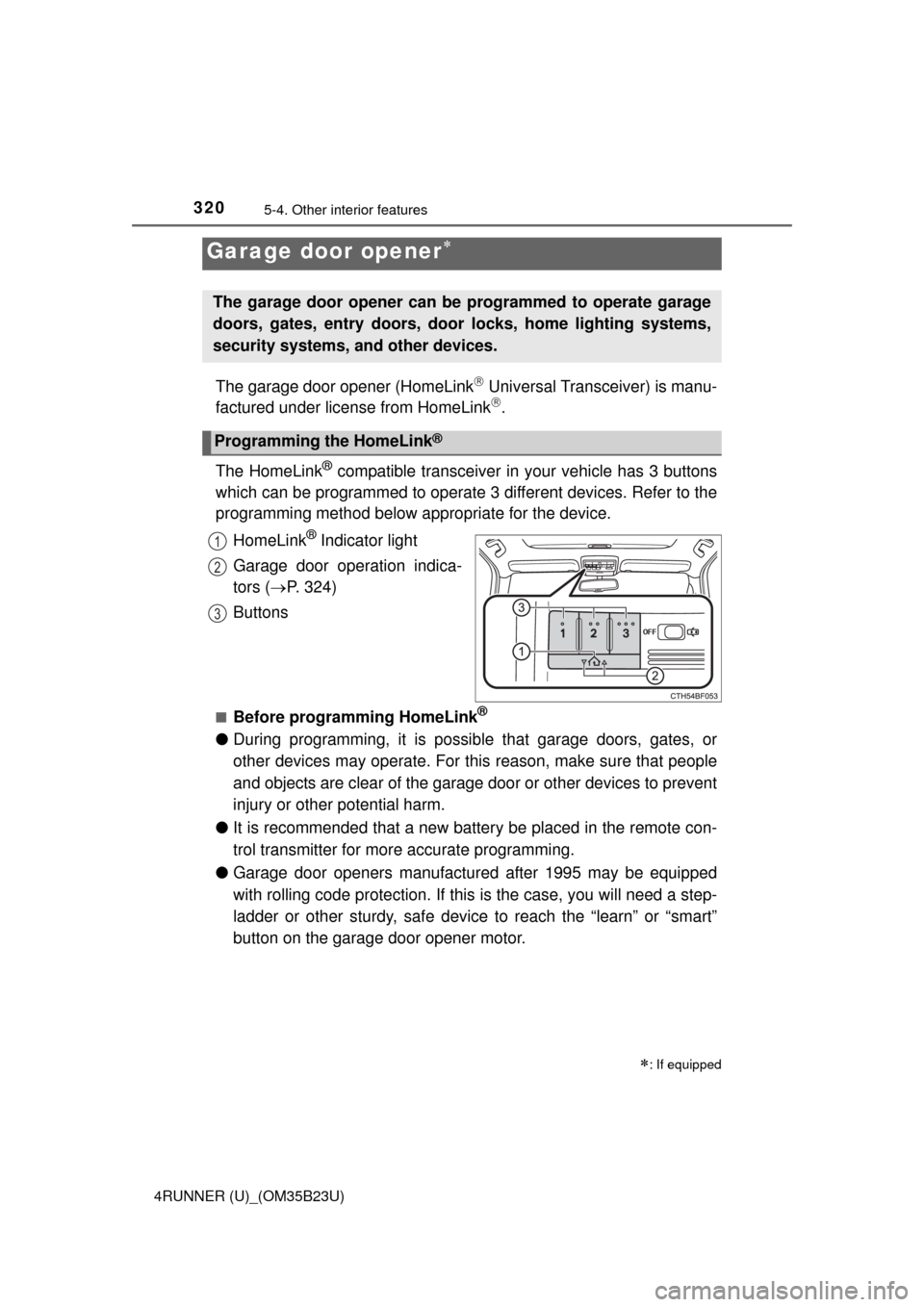
The HomeLink
® compatible transceiver in your vehicle has 3 buttons
which can be programmed to operate 3 different devices. Refer to the
programming method below appropriate for the device.
HomeLink
® Indicator light
Garage door operation indica-
tors (P. 324)
Buttons
■Before programming HomeLink®
●During programming, it is possible that garage doors, gates, or
other devices may operate. For this reason, make sure that people
and objects are clear of the garage door or other devices to prevent
injury or other potential harm.
●It is recommended that a new battery be placed in the remote con-
trol transmitter for more accurate programming.
●Garage door openers manufactured after 1995 may be equipped
with rolling code protection. If this is the case, you will need a step-
ladder or other sturdy, safe device to reach the “learn” or “smart”
button on the garage door opener motor.
Garage door opener
: If equipped
The garage door opener can be programmed to operate garage
doors, gates, entry doors, door locks, home lighting systems,
security systems, and other devices.
Programming the HomeLink®
1
2
3