Page 31 of 179
restrained in the rear seating positions
than in the front seating positions.Warning: Do not use a forward facing child safety seat until your child weighs
over 9 kg and can sit independently. Up
to the age of two, a child
Page 32 of 179
Location of AirbagsAirbags are located in the approximate areas shown here. Airbag warning information is printed
on the sun visors.
Model X is equipped with an air bag and lap/shoulder belt at both front outboard seating
positions. The air bag is a supplemental restraint at those seating positions. All occupants,
including the driver, should always wear their seat belts whether or not an air bag is also provided at their seating position to minimize the risk of severe injury or death in the event of a crash.
Note: On RHD (Right Hand Drive) vehicles, the locations of the passenger and driver airbags are reversed.
Airbags
32Model X Owner
Page 34 of 179

Disabling the Passenger Front
Airbags
When a child is seated in the front passenger
seat (even when the child is seated in a child safety seat or booster seat), you must disable
the passenger front airbags to prevent them
from injuring the child if a collision occurs.
Note: Rear seats are the preferred location for
seating children in child safety seats.
To turn
off the front and side airbags on the
passenger side of the vehicle, touch Controls >
Settings > Safety & Security > Passenger
Front Airbag.
The ON/OFF status of the passenger front
airbags displays in the upper right corner of
the touchscreen. You can also turn the
passenger airbags on or
off by touching this
indicator.
If the status shows the airbags as on, even if
you have turned it off (or vice versa), contact
Tesla immediately.
Note: Model X has a capacitive touchscreen and may not respond to your touch if you are
wearing standard gloves. If the touchscreen is
not responding, remove gloves or wear gloves
with conductive
fingertips for use with
capacitive touchscreens.
Warning: Never seat a child in a child
safety seat or a booster seat on the front
passenger seat when the airbag is
activated. Doing so can cause serious injury or death.Warning: If the passenger airbag control
does not appear to be functioning, do not
seat a passenger in the front seat.
Contact Tesla immediately to have the
vehicle inspected and if necessary,
repaired.Warning: Do not use seat covers on
Model X. Doing so could restrict
deployment of the side air bags if an
accident occurs.
Inflation Effects
When airbags inflate, a fine powder is
released. This powder can irritate the skin and
should be thoroughly
flushed from the eyes
and from any cuts or abrasions.
After
inflation, the airbags deflate to provide a
gradual cushioning effect for the occupants
and to ensure the driver
Page 35 of 179

Airbag Warning IndicatorThe airbag indicator on the
instrument panel remains lit if the airbag system is malfunctioning. The
only time this indicator should light
up is
briefly when Model X firstpowers up, in which case it turns offwithin a few seconds. If it remains lit,
contact Tesla immediately and do
not drive.
Airbag Warnings
Warning: No objects should be placed
over or near the air bag on the instrument panel, because any such objects couldcause harm if the vehicle is in a crash
severe enough to cause the air bag to
inflate.
Warning: All occupants, including the driver, should always wear their seat belts,
whether or not an airbag is also provided
at their seating position, to minimize the
risk of severe injury or death in the event
of a collision.Warning: Front seat occupants should not
place their arms over the airbag module,
as an
inflating bag can cause fractures or
other injuries.
Warning: Do not use seat covers on
Model X. Doing so could restrict
deployment of the side air bags if an
accident occurs. It can also reduce the
accuracy of the occupant detection
system.Warning: Airbags inflate with
considerable speed and force, which can
cause injury. To limit injuries, ensure that occupants are wearing seat belts and are
correctly seated, with the seat positioned as far back as possible.Warning: Do not use a child safety seat or
seat young children on a seat with an
operational airbag in front of it. Doing so
can cause injury or death if the airbag
inflates.
Warning: To ensure correct inflation of the
side airbags, maintain an unobstructed
gap between an occupant
Page 45 of 179
IndicatorDescriptionTire pressure warning. The pressure of a tire is out of range. If a fault with the
Tire Pressure Monitoring System (TPMS) is detected, the indicator flashes.For a TPMS fault, contact Tesla. See Tire Care and Maintenance on page 133.A door or trunk is open. See Front doors.A seat belt for an occupied seat is not fastened. See Seat Belts on page 21.The front passenger
Page 49 of 179
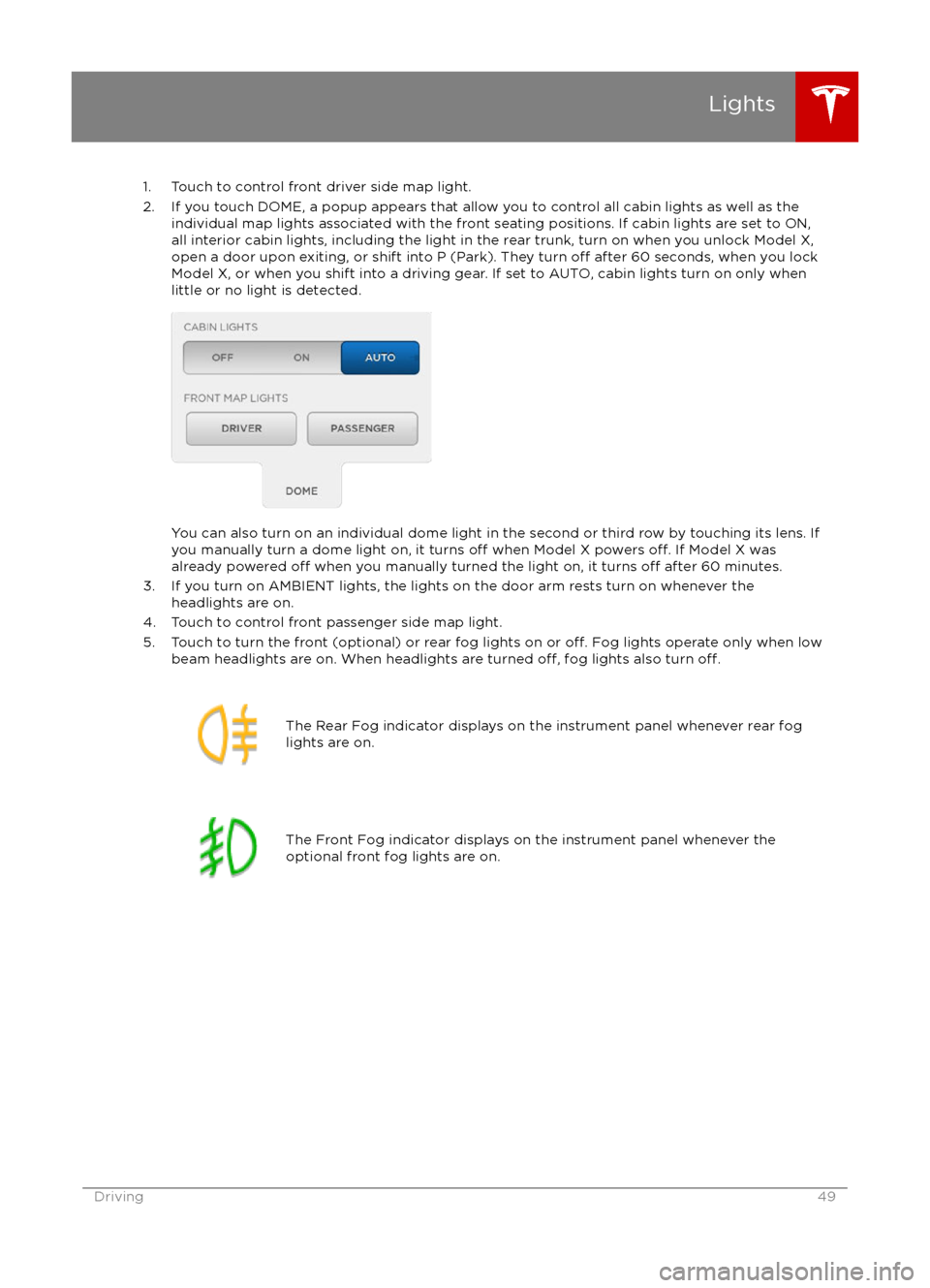
1. Touch to control front driver side map light.
2. If you touch DOME, a popup appears that allow you to control all cabin lights as well as the individual map lights associated with the front seating positions. If cabin lights are set to ON,all interior cabin lights, including the light in the rear trunk, turn on when you unlock Model X,open a door upon exiting, or shift into P (Park). They turn
off after 60 seconds, when you lock
Model X, or when you shift into a driving gear. If set to AUTO, cabin lights turn on only when
little or no light is detected.
You can also turn on an individual dome light in the second or third row by touching its lens. If
you manually turn a dome light on, it turns off when Model X powers off. If Model X was
already powered off when you manually turned the light on, it turns off after 60 minutes.
3. If you turn on AMBIENT lights, the lights on the door arm rests turn on whenever the headlights are on.
4. Touch to control front passenger side map light.
5. Touch to turn the front (optional) or rear fog lights on or
off. Fog lights operate only when low
beam headlights are on. When headlights are turned off, fog lights also turn off.
The Rear Fog indicator displays on the instrument panel whenever rear fog
lights are on.The Front Fog indicator displays on the instrument panel whenever the
optional front fog lights are on.Lights
Driving49
Page 100 of 179
5. Cold WeatherIf Model X is equipped with the optional cold weather package, you can control all seatheaters as well as the heated wipers and steering wheel. Heaters that are turned on are displayed in red. To turn
off all seat heaters, touch All Off. Note that you can also control the
front driver and passenger seats using the main climate control panel located on the bottom
of the touchscreen (see Climate Controls on page 105).
6. Trips
View and reset the trip meters that summarize how far you have driven (see Trip Information
on page 62).
7. Displays
Manually control the touchscreen
Page 105 of 179
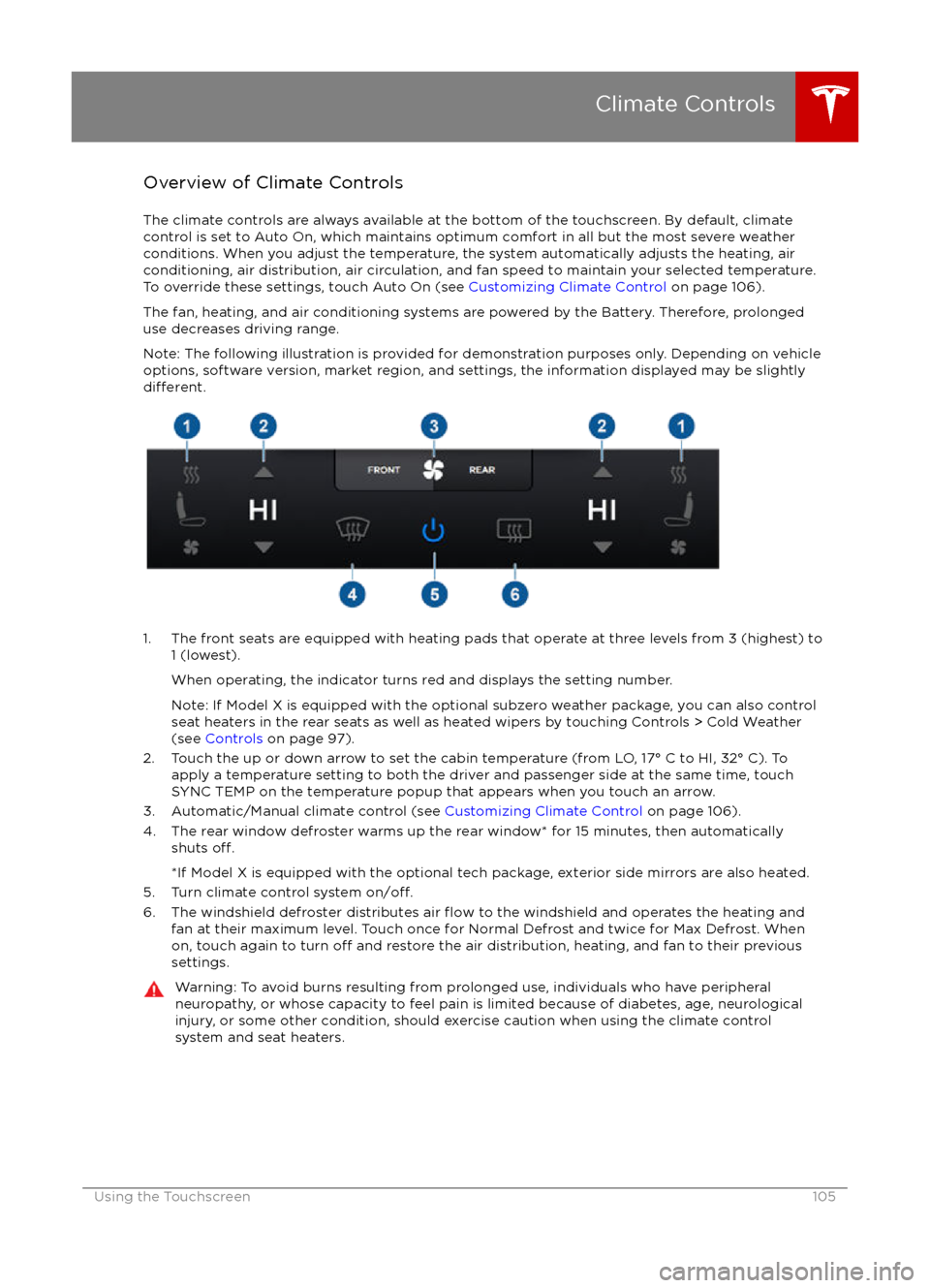
Overview of Climate Controls
The climate controls are always available at the bottom of the touchscreen. By default, climate control is set to Auto On, which maintains optimum comfort in all but the most severe weather conditions. When you adjust the temperature, the system automatically adjusts the heating, air
conditioning, air distribution, air circulation, and fan speed to maintain your selected temperature. To override these settings, touch Auto On (see Customizing Climate Control on page 106).
The fan, heating, and air conditioning systems are powered by the Battery. Therefore, prolonged use decreases driving range.
Note: The following illustration is provided for demonstration purposes only. Depending on vehicle
options, software version, market region, and settings, the information displayed may be slightly
different.
1. The front seats are equipped with heating pads that operate at three levels from 3 (highest) to 1 (lowest).
When operating, the indicator turns red and displays the setting number.
Note: If Model X is equipped with the optional subzero weather package, you can also control seat heaters in the rear seats as well as heated wipers by touching Controls > Cold Weather
(see Controls on page 97).
2. Touch the up or down arrow to set the cabin temperature (from LO, 17


