2016 SUBARU WRX steering wheel
[x] Cancel search: steering wheelPage 353 of 594

Audio/Phone operation (Hands – free system for cellular phones)
! By off hook switch
1. Press the
switch on the steering
wheel to display the phone top screen.
2. Check that the “ Call (Call) ” screen is
displayed.
& Receiving on the Bluetooth
phone! Incoming calls
When a call is received, the incoming call
screen is displayed with a sound.
. When you are on the Outgoing Call
screen, the screen changes to the Call
screen when the other party answers the
call.
. The “ Mute ” , “ Speaker ” , and “ Bluetooth ”
keys are disabled on the Outgoing Call
screen.
. When you receive a phone call while
the cellular phone is connected, the
screen changes to the Incoming Call
screen. Incoming Call screen
Unable to put call on hold screen
No. Function
& 1
“ Option ” key: Opens the Options
(volume settings) screen. No. Function
& 2
“ Hold ” key: Puts the incoming call on
hold. This function may not work on
some cell phone models. This func-
tion is the same as pressing the
“ ON_Hook ” switch on the steering
wheel for a short period of time.
& 3
“ OFF_Hook ” key: Opens the Call
screen. This function is the same as
pressing the “ OFF_Hook ” switch on
the steering wheel.
& 4
“ ON_Hook ” key: Rejects the incoming
call. This function is the same as
pressing and holding the “ ON_Hook ”
switch on the steering wheel.
NOTE . During international phone calls, the
other party ’ s name or number may not
be displayed correctly depending on
the type of cellular phone you have.
. The call and ringtone volume that
has been adjusted in the
Sound Set-
tings (Sound Settings) screen sounds
when there is an incoming call. De-
pending on the type of Bluetooth
phone, both the system and Bluetooth
phone may sound simultaneously
when there is an incoming call. Refer
to ““ Sound Settings (Sound Settings) ”
screen ” F 5-101.5-98
Page 355 of 594

Audio/Phone operation (Hands – free system for cellular phones)
No. Function
& 2
“ Mute ” key: Mutes your voice to the
other party. Press the “ Mute ” key
again to deactivate the Mute mode.
This key is disabled in the Private
mode.
& 3
“ Speaker ” key: Changes the mode to
Private mode. The other party ’ s voice
emits from the cell phone. Press the
“ Speaker ” key again to deactivate the
Private mode.
& 4
“ ON_Hook ” key: Ends the call. You
return to the Phone (Menu) screen
when ending outgoing calls and the
previous screen when ending incom-
ing calls. This function is the same as
pressing and holding the “ ON_Hook ”
switch on the steering wheel.
& 5
“ Dialpad ” key: Opens the Call (Dia-
lpad) screen.
& 6
“ Switch Screen ” key: Switches the
screen to the Phone (Menu) screen.
& 7
“ Dialpad ” key: Allows you to make
DTMF (Dual Tone Multi Frequency)
calls. The numbers you enter are sent
as tone signals.
NOTE . When cellular phone call is changed
to hands-free call, the hands-free
screen will be displayed and its func-
tions can be operated on the screen.
. Changing between cellular phone
call and hands-free call can be per- formed by operating the cellular phone
directly.
. Transferring methods and opera-
tions will be different depending on
the type of cellular phone you have.
. For the operation of the cellular
phone, see the manual that comes with
it.
. On the PHONE (Menu) screen, the
screen changes to the Phone (Dialpad)
screen when you select “ Dialpad ” .
. After entering the phone number on the
keypad, the call is made when you select
the “ OFF_Hook ” key.
Phone (Dialpad) screen No. Function
& 1
“ Dialpad ” keys: Allows you to enter
numbers from 0 to 9 and *, #, and +.
To enter “ + ” , press and hold the “ 0 ”
key.
& 2
“ Delete ” key: Deletes one character
from the entered characters.
& 3
“ Switch Screen ” key: Switches the
screen to the Phone (Menu) screen.
& 4
“ OFF_Hook ” key: Opens the Outgoing
Calls screen and dials the entered
phone number. This is the same as
pressing the “ OFF_Hook ” switch on
the steering wheel. This key is cross-
hatched and cannot be selected until
the phone number is entered.
& 5
“ Option ” key: Opens the Options
(volume settings) screen.
& 6
“ Bluetooth Setting ” key: Opens the BT
Devices Connection screen.
NOTE The sound quality of the voice heard
from the other party ’ s speaker may be
negatively impacted.5-100
Page 364 of 594

“
Call a contact ” say the name of a
contact. For example:
“ Call a contact ” ,
“
John Smith ” or“ Call a contact ” ,
“
Mary Davis ”
. Short or abbreviated names in the
contacts list may not be recognized.
Change names in the contacts list to
full names.
. Sometimes a voice recognition re-
sult confirmation screen will be dis-
played. After confirming the result, say
“ Ye s ” or“ No ” .
. When the system recognizes multi-
ple names from the contacts list, a
name candidate list will be displayed
on the screen. If the desired name is
not displayed on the top of the screen,
say or select the number of the name
from the candidate list (number 1,
number 2, etc.) to select a name from
the candidate list.
. When a contact has multiple phone
numbers registered in the contacts list,
a candidate list will be displayed. If the
desired phone number is not displayed
on the top of the screen, say or select
the number of the desired phone
number from the candidate list (num-
ber 1, number 2, etc.) to select a phone
number from the candidate list. ! Voice command example: Dial
number
1. Press the talk switch.
2. Say the phone number.
. In the same manner as it is dis-
played on the screen, “ Dial
(Dial
“ Dial a
number ”
say the phone number.
. Say the phone number one digit at a
time.
For example, if the phone number is
2345678:
Say
“ two three four five six seven
eight ”
Do not say“ twenty three forty five
sixty seven eight ”
Calling to the following phone numbers
– 3 digit numbers (911, 411, 611)
– 7 digit numbers (Local phone num-
bers)
– 10 digit numbers (Area code +
Local phone number)
– 11 digit phone numbers (1 + Area
code + Local phone number)
. As the system cannot recognize
additional numbers, say the complete
number without stopping. Calling to other phone numbers
3. Say
“ Call ” or press the switch on
the steering wheel.
. When the system recognizes multi-
ple phone numbers, a phone number
candidate list will be displayed on the
screen. Pressing the
switch on the
steering wheel makes a call to the top
entry on the list. If the desired phone
number is not displayed on the top of
the screen, say the number of the
desired phone number from the candi-
date list to select a phone number from
the candidate list.
! Casual speech recognition
Due to natural language speech recogni-
tion technology, this system enables re-
cognition of a command when spoken
naturally. However, the system cannot
recognize every variation of each com-
mand. In some situations, it is possible to
omit the command for the procedure and
directly state the desired operation. Not all
voice commands are displayed in the
function menu. Audio/Voice command system operation
– CONTINUED –5-109
Page 400 of 594

position and check the operation of the
warning and indicator lights. Refer to
“ Warning and indicator lights ” F 3-13.
5. Turn the ignition switch to the “ START ”
position without depressing the accelera-
tor pedal. Release the key immediately
after the engine has started.
If the engine does not start, try the
following.
(1) Turn the ignition switch to the
“ LOCK ” position and wait for at least
10 seconds. After checking that the
parking brake is firmly set, turn the
ignition switch to the “ START ” position
while depressing the accelerator pedal
slightly (approximately a quarter of the
full stroke). Release the accelerator
pedal as soon as the engine starts.
(2) If this fails to start the engine, turn
the ignition switch back to the “ LOCK ”
position and wait for at least 10
seconds. Then fully depress the accel-
erator pedal and turn the ignition
switch to the “ START ” position. If the
engine starts, quickly release the
accelerator pedal.
(3) If this fails to start the engine, turn
the ignition switch again to the “ LOCK ”
position. After waiting for 10 seconds
or longer, turn the ignition switch to the
“ START ” position without depressing
the accelerator pedal. (4) If the engine still refuses to start,
contact your nearest SUBARU dealer
for assistance.
6. Confirm that all warning and indicator
lights have turned off after the engine has
started. The fuel injection system auto-
matically lowers the idle speed as the
engine warms up.
While the engine is warming up, make
sure that the select lever is at the “ P ” or
“ N ” position and that the parking brake is
applied.
CAUTIONIf you restart the engine while the
vehicle is moving, shift the select
lever into the “ N ” position. Do not
attempt to place the select lever of a
moving vehicle into the “ P ” posi-
tion.
& Stopping the engine The ignition switch should be turned off
only when the vehicle is stopped and the
engine is idling.
WARNING
Do not stop the engine when the
vehicle is moving. This will cause
loss of power to the power steering and the brake booster, making steer-
ing and braking more difficult. It
could also result in accidental acti-
vation of the “ LOCK ” position on the
ignition switch, causing the steering
wheel to lock.Starting and operating/Starting and stopping the engine (models without push – button start system)
7-11
Page 401 of 594

Starting and operating/Starting and stopping engine (models with push – button start system)
Starting and stopping engine
(models with push-button
start system) & Safety precautionsRefer to “ Safety precautions ” F 2-10.
& Operating range for push-
button start systemRefer to “ Operating range for push-button
start system ” F 3-6.
& Starting engine
WARNING. There are some general precau-
tions when starting the engine.
Carefully read the precautions
described in “ General precau-
tions when starting engine ” F 7-
9.
. If the indicator on the push-
button ignition switch flashes in
green after the engine has
started, never drive the vehicle.
The steering is still locked, and it
may result in an accident. CAUTION. When the operation indicator on
the push-button ignition switch is
flashing in orange, there may be
a malfunction with the vehicle.
Contact a SUBARU dealer imme-
diately.
. If the indicator on the push-
button ignition switch is flashing
in green after the engine has
started, it means that the steering
is still locked. Depress the brake
pedal while moving the steering
wheel to the right and left, and
press the push-button ignition
switch.
. Do not continue pushing the
push-button ignition switch for
more than 10 seconds. Doing so
could cause a malfunction. If the
engine does not start, stop push-
ing the push-button ignition
switch and turn off the engine.
Wait 10 seconds, and then push
the push-button ignition switch
to start the engine.
NOTE
. When the push-button ignition
switch is pressed while depressing the clutch pedal (MT models) or the
brake pedal (CVT models), the engine
starter operates for a maximum of 10
seconds and after starting the engine,
the starter stops automatically.
. When the push-button ignition
switch is pressed while depressing
the clutch pedal (MT models) or the
brake pedal (CVT models), the engine
can be started regardless of the status
of the push-button ignition switch.
. If the security indicator light illumi-
nates when you attempt to start the
engine but the engine does not start,
press the push-button ignition switch
to switch the power to “ OFF ” and then
try to start the engine again.
. If the engine does not start, press
the push-button ignition switch without
depressing the clutch pedal (MT mod-
els) or the brake pedal (CVT models) to
switch the power to “ OFF ” . Then, while
depressing the clutch pedal (MT mod-
els) or the brake pedal (CVT models)
more forcefully, press the push-button
ignition switch.
. The engine start procedures may
not function depending on the radio
wave conditions around the vehicle. In
such a case, refer to “ Starting engine ”
F 9-17.
. If the vehicle battery is discharged,
the steering cannot be unlocked.7-12
Page 409 of 594

Starting and operating/Driver ’ s Control Center Differential (C.DIFF/DCCD) (STI)
1) LSD torque
2) Traction torque
3) Initial LSD torque (maximum)
4) Initial LSD torque (minimum)
A) Initial LSD torque (adjustable)
B) Mechanical LSD torque
The driver ’ s control center differential has
an auto mode and a manual mode. In the
auto mode, the system automatically
adjusts the initial LSD torque. In the
manual mode, you can change to the
desired mode manually by using the
center differential control switch.
NOTE If you rapidly depress and release the
accelerator pedal while driving at low
speed, you may hear a knocking sound
from the vicinity of the center differen- tial and rear differential. This sound
occurs because of the structure of the
center differential. It does not indicate a
problem.
& To change mode of driver ’ s
control center differential
Press the “ AUTO-MANU ” switch on the
center console to switch from auto mode
to manual mode or vice versa. When you
select the auto mode, the “ AUTO ” indica-
tor appears. When you select the manual
mode, the “ AUTO ” indicator disappears. & Auto mode
In the auto mode, the system estimates
the driving and road conditions using
signals from the wheel speed sensor,
throttle position sensor, steering angle
sensor and brake switch, etc. According
to the result, it electronically and auto-
matically controls the degree of limitation
of the differential action (LSD torque) to
optimize the differential action of the
center differential. When the ignition
switch is turned ON, the “ AUTO ” indicator
on the combination meter appears.7-20
Page 410 of 594
![SUBARU WRX 2016 Owners Manual The auto mode has 3 modes as follows. Mode Operation
AUTO [+] This mode emphasizes traction
control and strengthens the
limitation of differential action
that is suitable for driving on
slippery roads](/manual-img/17/59229/w960_59229-409.png "SUBARU WRX 2016 Owners Manual The auto mode has 3 modes as follows. Mode Operation
AUTO [+] This mode emphasizes traction
control and strengthens the
limitation of differential action
that is suitable for driving on
slippery roads")
The auto mode has 3 modes as follows. Mode Operation
AUTO [+] This mode emphasizes traction
control and strengthens the
limitation of differential action
that is suitable for driving on
slippery roads for vehicle stabi-
lity.
AUTO This mode is suitable for most
driving situations.
AUTO [ − ] This mode is suitable when you
seek quick response from the
steering wheel and smooth
driving.
! Mode setting method
In most situations, it is recommended that
the “ AUTO ” mode is selected.
Push the control switch forward to select the “ AUTO [+] ” mode. After setting the
mode, “ AUTO [+] ” appears.
Pull the control switch rearward to select
the “ AUTO [ − ] ” mode. After setting the
mode, “ AUTO [ − ] ” appears.
When the “ AUTO [+] ” mode is selected,
pull the control switch rearward to change
to the “ AUTO ” mode. When the “ AUTO
[ − ] ” mode is set, push the control switch
forward to change to the “ AUTO ” mode.& Manual mode
In the manual mode, you can use the
center differential control switch to adjust
the initial LSD torque as desired. When
this mode is selected, the “ AUTO ” indica-
tor disappears.Starting and operating/Driver ’ s Control Center Differential (C.DIFF/DCCD) (STI)
– CONTINUED –7-21
Page 415 of 594
Starting and operating/Continuously variable transmission
! D (Drive)
This position is for normal driving. The
transmission shifts automatically and con-
tinuously into a suitable gear according to
the vehicle speed and the acceleration
you require. Also, while driving up and
down a hill, the transmission assists and
controls the driving performance and
engine braking while corresponding to
the road grade.
When more acceleration is required in the
“ D ” position, depress the accelerator
pedal fully to the floor and hold that
position. The transmission will automati-
cally downshift. If the Intelligent (I) mode
or the Sport (S) mode has been selected,
the transmission will operate like a con-
ventional automatic transmission. When
you release the pedal, the transmission
will return to the original gear position.
If one of the shift paddles behind the
steering wheel is operated while driving in
the “ D ” position, the transmission will
temporarily switch to the manual mode.
In this mode, you can shift into any gear
position using the shift paddles. For de-
tails about the manual mode, refer to
“ Selection of manual mode ” F 7-26. Once
the vehicle speed stabilizes, the transmis-
sion will switch from the manual mode
back to the “ D ” position for normal driving. & Selection of manual mode
With the vehicle either moving or station-
ary, move the select lever from the “ D ”
position to the “ M ” position to select the
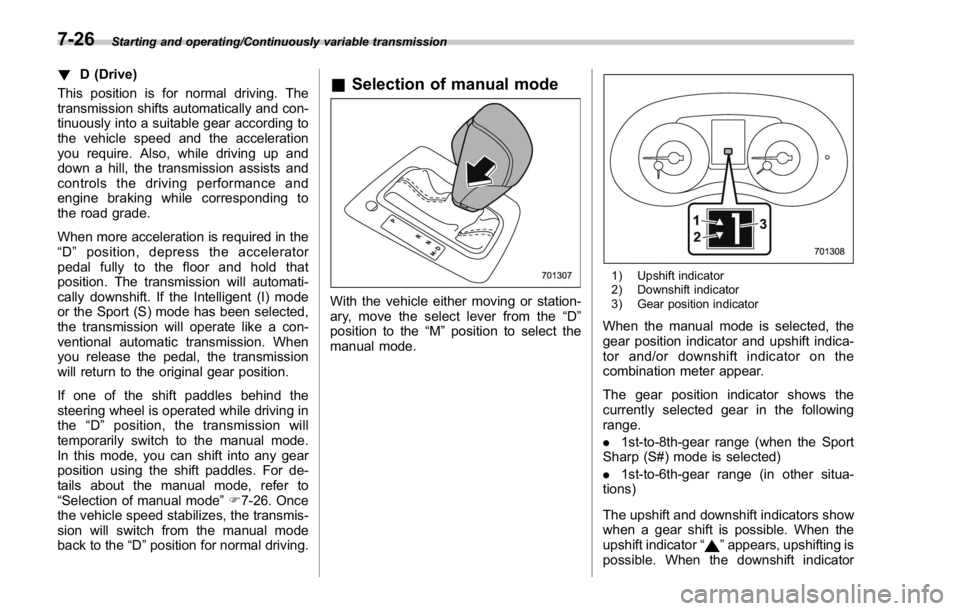
manual mode. 1) Upshift indicator
2) Downshift indicator
3) Gear position indicator
When the manual mode is selected, the
gear position indicator and upshift indica-
tor and/or downshift indicator on the
combination meter appear.
The gear position indicator shows the
currently selected gear in the following
range.
. 1st-to-8th-gear range (when the Sport
Sharp (S#) mode is selected)
. 1st-to-6th-gear range (in other situa-
tions)
The upshift and downshift indicators show
when a gear shift is possible. When the
upshift indicator “
” appears, upshifting is
possible. When the downshift indicator7-26