2016 SUBARU WRX battery
[x] Cancel search: batteryPage 161 of 594

Instruments and controls/Warning and indicator lights
Inside warning
chime Outside warning
chime Operation indicator
on push-button igni-
tion switch Status Action
Long beep
(continuous) —— Select lever position warning:
The driver ’ s door was opened while the
push-button ignition switch is in a posi-
tion other than “ OFF ” and the select
lever is in a position other than the “ P ”
position. Shift the select lever to the “ P ” position,
switch the push-button ignition switch to
“ OFF ” and exit the vehicle.
Ding —— The battery of the access key is low. Replace the battery of the access key.
Ding — Flashes in green (15
seconds max.) Steering lock warning:
The engine start procedure was per-
formed, but the steering is still locked. While turning the steering wheel right
and left lightly, depress the brake pedal
and press the push-button ignition
switch.
Ding — Flashes in orange System malfunction warning:
A malfunction was detected in the power
system or steering lock. Contact a SUBARU dealer immediately
and have the vehicle inspected.
NOTE An electronic chirp will sound while the select lever is in the “ R ” position. In this case, the select lever position warning chime
will not sound.3-32
Page 171 of 594

Instruments and controls/Multi information display
Item Icon “ ” information reminder Refer to page
Automatic headlight beam leveler system malfunction warning
(models with LED headlights) Yellow 3-35
LED low beam headlight system malfunction warning (if equipped) Yellow 3-25
The keyless access with push-button start system malfunction
warning* ——
Low battery warning of the access key* — 3-28
Driver ’ s control center differential system malfunction warning Yellow 3-35
Deactivation of switching SI-DRIVE mode — 7-29, 7-31
Windshield washer fluid warning Yellow 11-38
BSD/RCTA halt or warning (if equipped) Yellow 7-56
*: Models with keyless access with push-button start system3-42
Page 182 of 594

Icy road surface warning screen
When the outside temperature becomes
37 8 F(3 8 C) or less, the icy road surface
warning screen interrupts to inform the
driver that the road surface may be frozen.
NOTE . The outside temperature indicator
shows the temperature around the
sensor. Therefore, the temperature in-
dication may differ from the actual
outside air temperature.
. The icy road surface warning screen
should be treated only as a guide. Be
sure to check the condition of the road
surface before driving.
. Once the icy road surface warning
screen is displayed, it will not be
displayed again unless the outside temperature has increased to 41 8 F
(5 8 C) or higher.
! Top display
One of the following items can be dis-
played on the top display.
. Average fuel consumption correspond-
ing to the driving distance of each trip
meter
. Current fuel consumption (This may
not be displayed when driving at a low
speed.)
. Driving range on remaining fuel
For details about the setting of the top
display, refer to “ Top display setting ” F 3-
71.
NOTE The driving range on the remaining fuel
is calculated using the average fuel
consumption of the last 19 miles (30
km) driven. This value may be different
from the values calculated using the
average fuel consumption correspond-
ing to the driving distance of each trip
meter or the current fuel consumption.
! Clock
The clock can be displayed in either 12-
hour display or 24-hour display. For details
about the setting, refer to “ Current date and time setting ” F 3-62.
NOTE If the vehicle battery is disconnected,
the clock shown in the information bar
will be reset. Set the time again after
the vehicle battery is connected. For
details about the setting, refer to “ To p
display setting ” F 3-71.Instruments and controls/Multi function display
– CONTINUED –3-53
Page 223 of 594

Instruments and controls/Light control switch
5. Reconfirmation will be displayed. If
you are sure you want to proceed, select
“ Ye s ” by operating the “
” switch.
6. Confirm the setting again by pushing
the
button. 7. The system will notify you that the
setting is complete. Light control switch CAUTION. Use of any lights for a long period
of time while the engine is not
running can cause the battery to
discharge.
. Before leaving the vehicle, make
sure that the lights are turned off.
If the vehicle is left unattended
for a long time with the lights
illuminated, the battery may be
discharged.
Models with “ keyless access with
push-button start system ” :
The light control switch operates when the
push-button ignition switch is in the “ ACC ”
or “ ON ” position.
Regardless of the position of the light
control switch, the illuminated lights are
turned off when the push-button ignition
switch is turned off.
Models without “ keyless access with
push-button start system ” :
The light control switch operates when the
key is inserted in the ignition switch.
Regardless of the position of the light
control switch, the illuminated lights are3-94
Page 237 of 594

Instruments and controls/Mirrors
. It is recommended that you insert a
new battery in the hand-held transmit-
ter of a device to ensure correct
programming.
! Garage door opener program-
ming in the U.S.A.
NOTE When programming the HomeLink ®
Wireless Control System for a garage
door opener, it is suggested that you
park the vehicle outside the garage.
1. Unplug the motor of the garage door
opener from the outlet.
NOTE If any of the HomeLink ®
buttons are
already programmed for other devices,
skip step 2 because it clears the
memory of all three buttons. 1) HomeLink ®
button 1
2) HomeLink ®
button 2
3) HomeLink ®
button 3
2. Press and hold the two outer
HomeLink ®
buttons (button 1 and button
3) until the indicator light begins to flash
(after approximately 20 seconds). Then
release both buttons.
3. Hold the end of the garage door
opener ’ s hand-held transmitter between
1 and 3 inches (25 and 76 mm) away from
the HomeLink ®
button you wish to pro-
gram.
4. Simultaneously press and hold both
the hand-held transmitter button and the
desired HomeLink ®
button. DO NOT re-
lease the buttons until step 5 has been
completed. NOTE Some gate operators and garage door
openers may require you to replace
this programming step 4 with proce-
dures in “ Programming for entrance
gates and garage door openers in
Canada ” F 3-109.
5. Hold down both buttons until the
HomeLink ®
indicator light flashes, first
slowly then rapidly. When the indicator
light flashes rapidly, both buttons may be
released. (The rapidly flashing light indi-
cates successful programming of the new
frequency signal.)
6. Press and hold the programmed but-
ton and check the HomeLink ®
indicator
light. If the indicator light stays on con-
tinuously, your garage door should acti-
vate and the programming is completed.
If the indicator light flashes rapidly for 2
seconds and then stays on continuously,
your garage door opener may be pro-
tected by a rolling code feature. In this
case you need to perform the additional
steps that are described in “ Programming
rolling-code-protected garage door open-
ers in the U.S.A. ” F 3-109.3-108
Page 241 of 594

Instruments and controls/Defogger and deicer
Defogger and deicer
1) Rear window defogger
2) Outside mirror defogger (if equipped)
3) Windshield wiper deicer (if equipped)
The defogger and deicer system is acti- vated only when the ignition switch is in
the “ ON ” position.
To activate the defogger and deicer
system, press the control switch that is
located on the climate control panel. The
rear window defogger, outside mirror
defogger and windshield wiper deicer are
activated simultaneously. The indicator
light on the control switch illuminates while
the defogger and deicer system is acti-
vated.
To turn them off, press the control switch
again. They also turn off when the ignition
switch is turned to the “ ACC ” or “ LOCK ” /
“ OFF ” position.
The defogger and deicer system will
automatically shut off after approximately
15 minutes. If the rear window and the outside mirrors have been cleared and the
windshield wiper blades have been deiced
completely before that time, press the
control switch to turn them off. If defrost-
ing, defogging or deicing is not complete,
you have to press the control switch to
turn them on again.
It is possible for the defogger and deicer
system to be set to continuous operation
mode by a SUBARU dealer. Consult your
SUBARU dealer for details. Also, for
models with a multi function display, the
setting can be changed using the display.
For details, refer to “ Multi function display ”
F 3-48.
If the battery voltage drops below the
permissible level, continuous operation of
the defogger and deicer system is can-
celed and the system stops operating.
CAUTION
. To prevent the battery from being
discharged, do not operate the
defogger and deicer system con-
tinuously for any longer than
necessary.
. Do not use sharp instruments or
window cleaner containing abra-
sives to clean the inner surface
of the rear window. They may3-112
Page 242 of 594
damage the conductors printed
on the window.
NOTE . Turn on the defogger and deicer
system if the wipers are frozen to the
windshield.
. If the windshield is covered with
snow, remove the snow so that the
windshield wiper deicer works effec-
tively.
. While the defogger and deicer sys-
tem is in the continuous operation
mode, if the vehicle speed remains at
9mph(15km/h)orlowerfor15
minutes, the windshield wiper deicer
automatically stops operating, though
the rear window defogger and outside
mirror defogger maintain continuous
operation in this condition.
. While the defogger and deicer sys-
tem is in the continuous operation
mode, if the battery voltage drops
below the permissible level, continu-
ous operation of the defogger and
deicer system is canceled and the
system stops operating. Tilt/telescopic steering wheel WARNING. Do not adjust the steering wheel
tilt/telescopic position while driv-
ing. This may cause loss of
vehicle control and result in
personal injury.
. If the lever cannot be raised to
the fixed position, adjust the
steering wheel again. It is dan-
gerous to drive without locking
the steering wheel. This may
cause loss of vehicle control
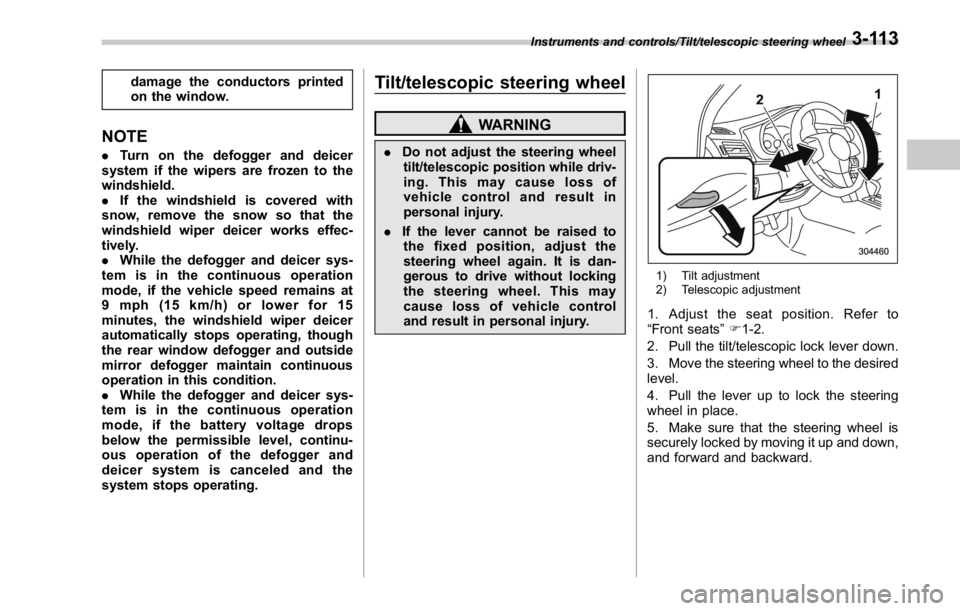
and result in personal injury. 1) Tilt adjustment
2) Telescopic adjustment
1. Adjust the seat position. Refer to
“ Front seats ” F 1-2.
2. Pull the tilt/telescopic lock lever down.
3. Move the steering wheel to the desired
level.
4. Pull the lever up to lock the steering
wheel in place.
5. Make sure that the steering wheel is
securely locked by moving it up and down,
and forward and backward.Instruments and controls/Tilt/telescopic steering wheel
3-113
Page 251 of 594

Climate control/Manual climate control operation
. Turn the passenger ’ s side temperature
control dial
The “ DUAL ” mode can be canceled by
pressing the “ DUAL ” button.
When the “ DUAL ” mode is selected:
Turn the driver ’ ssidedialtosetthe
driver ’ s side temperature. Turn the front
passenger ’ ssidedialtosetthefront
passenger ’ s side temperature.
When the “ DUAL ” mode is canceled:
Set the desired temperature by turning the
driver ’ s side dial.
When the “ DUAL ” mode is canceled, only
the driver ’ s side temperature is displayed.
& Fan speed controlThe fan operates only when the ignition
switch is in the “ ON ” position. Select the
preferred fan speed by turning the fan
speed control dial.
& Air conditioner controlThe air conditioner operates only when
the engine is running.
Press the air conditioner button while the
fan is in operation to turn on the air
conditioner. When the air conditioner is
on, the “ A/C ” indicator light illuminates.
To turn off the air conditioner, press the button again.
NOTE For efficient defogging or dehumidify-
ing in cold weather, turn on the air
conditioner. However, if the ambient
temperature decreases to approxi-
mately 32 8 F(0 8 C), the air conditioner
compressor will stop operating.
& Air inlet selection Select the air inlet by pressing the air inlet
selection button.
ON position (recirculation): Interior air is
recirculated inside the vehicle. Press the
air inlet selection button to the ON position
for fast cooling with the air conditioner or
when driving on a dusty road.
OFF position (outside air): Outside air is
drawn into the passenger compartment.
Press the air inlet selection button to the
OFF position when the interior has cooled
to a comfortable temperature and the road
is no longer dusty.
WARNING
Continued operation in the ON posi-
tion may fog up the windows. Switch
to the OFF position as soon as the
outside conditions are no longer dusty.
NOTE When the battery is disconnected or
the battery voltage drops, the air inlet
selection operation indicator light may
blink. This does not indicate a malfunc-
tion. However, if the indicator light
blinks every time you start the engine,
a malfunction may occur in the elec-
trical circuit. Have the vehicle in-
spected at the nearest SUBARU dealer.4-8