key of another vehicle
–When carrying more than one
access key
–When the access key is placed
near wireless communication
equipment such as a cell phone
–When the access key is placed
near a metallic object
–When metallic accessories are
attached to the access key
–When carrying the access key
with electronic appliances such as
a laptop computer
–When the battery of the access
key is discharged
.The access key is always commu-
nicating with the vehicle and is con-
tinuously using the battery. Although
the life of the battery varies depending
on the operating conditions, it is ap-
proximately 1 to 2 years. If the battery
becomes fully discharged, replace it
with a new one.
.If an access key is lost, it is
recommended that the access key be
reregistered. For reregistration of an
access key, contact a SUBARU dealer.
.For a spare access key, contact a
SUBARU dealer.
.Up to 7 access keys can be regis-
tered for one vehicle.
.Carefully store the key number platesupplied with the access key. It is
necessary for vehicle repair.
.Do not leave the access key in the
storage spaces inside the vehicle, such
as the door pocket, dashboard and the
corner of the cargo area. Vibrations
may damage the key or turn on the
switch, possibly resulting in a lockout.
.After the vehicle battery is dis-
charged or replaced, initialization of
the steering lock system may be re-
quired to start the engine. In this case,
perform the following procedure to
initialize the steering lock.
(1) Turn the push-button ignition
switch to the“OFF”position. For
details, refer to“Switching power”
F3-6.
(2) Open and close the driver’s
door.
(3) Wait for approximately 10 sec-
onds.
When the steering is locked, the initi-
alization is completed.&Locking and unlocking with
“keyless access”entry func-
tion
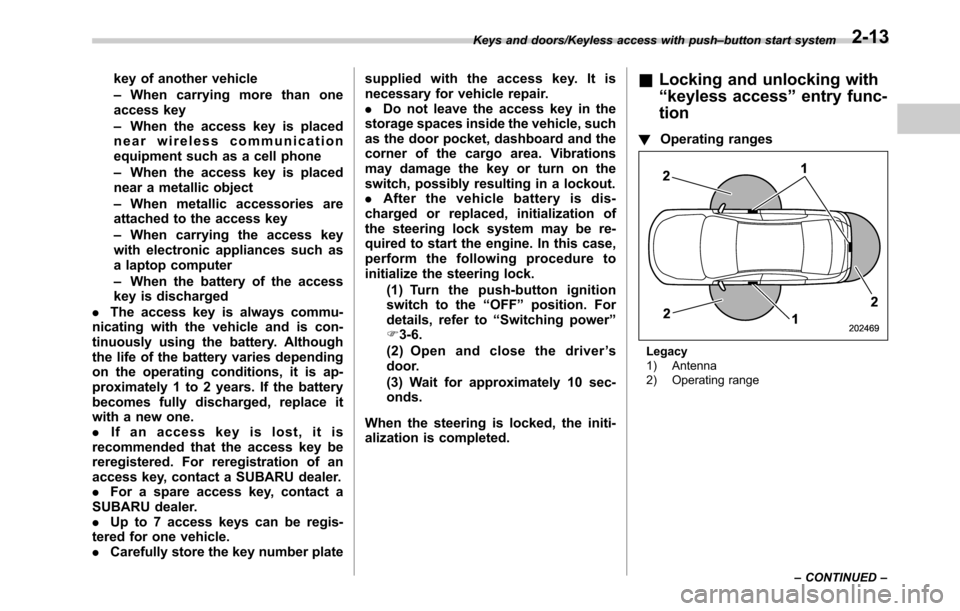
!Operating ranges
Legacy
1) Antenna
2) Operating range Keys and doors/Keyless access with push–button start system
–CONTINUED–
2-13
Instruments and controls/Warning and indicator lights
Inside warning
chimeOutside warning
chimeOperation indicator
on push-button
ignition switchStatus Action
Ding,
ding ...
(intermittent)——The driver’s door was opened while the
push-button ignition switch is“ACC”and the
select lever is in the“P”position.Switch the push-button ignition switch to
“OFF”, or close the driver’s door.
*When exiting the vehicle, be sure to switch
the push-button ignition switch to“OFF”.
The push-button ignition switch was
switched to“OFF”while the driver’s door is
open.Close the driver’s door.
DingShort beep
(2 seconds)—Lockout warning:
An attempt was made to lock all doors while
the access key is left inside the vehicle.Take out the access key from the vehicle,
and lock the doors.
*The doors cannot be locked while the
access key is inside the vehicle.
*A chirp sound will be heard, and all doors
will be unlocked.
—Short beep
(2 seconds)—Access key lock-in warning:
The door lock sensor was touched while the
push-button ignition switch is“OFF”and the
access key is inside the vehicle.Take out the access key from the vehicle,
and lock the doors.
*If the access key is inside the vehicle, the
doors cannot be locked.
—Beep, beep,
beep, beep,
beep
(5 times)—Door ajar warning:
The door lock sensor is touched while the
ignition switch is in the“OFF”position and
one of the doors including the rear gate is
opened.Close the doors securely and lock them.
*If one of the doors including the rear gate is
opened, the doors cannot be locked.
DingLong beep (60
seconds max.)—Power warning:
The door lock sensor was touched while
carrying the access key, the push-button
ignition switch is in a position other than
“OFF”and the select lever is in the“P”
position.Return the access key inside the vehicle, or
switch the push-button ignition switch to
“OFF”.
*If the push-button ignition switch is not
switched to“OFF”, the doors cannot be
locked.
Ding,
ding ...
(7 seconds)——Access key warning:
The vehicle was driven while the access key
is not inside the vehicle.Carry the access key, and drive the vehicle.
3-26