2016 SUBARU OUTBACK Power
[x] Cancel search: PowerPage 333 of 572

CAUTION
.Do not attempt to use a cigarette
lighter in the accessory power
outlet.
.Do not place any foreign objects,
especially metal ones such as
coins or aluminum foil, into the
accessory power outlet. That
could cause a short circuit. Al-
ways put the cap on the acces-
sory power outlet when it is not
in use.
.Use only electrical appliances
which are designed for 12V DC.
The maximum power rating of an
appliance that can be connected
is 120W. Do not use an appliance
which exceeds the indicated wat-
tage for each outlet.
When using appliances con-
nected to two or more outlets
simultaneously, the total power
consumed by them must not
exceed 120W. Overloading the
accessory power outlet can
cause a short circuit. Do not use
double adapters or more than
one electrical appliance.
.If the plug on your electric appli-
ance is either too loose or tootight for the accessory power
outlet, this can result in a poor
contact or cause the plug to get
stuck. Only use plugs that fit
properly.
.Use of an electric appliance in the
accessory power outlet for a long
period of time while the engine is
not running can cause battery
discharge.
.Before driving your vehicle, make
sure that the plug and the cord
on your electrical appliance will
not interfere with your shifting
gears and operating the accel-
erator and brake pedals. If they
do, do not use the electrical
appliance while driving.
Upper compartment
Lower compartment
NOTE
When the lid of the center console is
closed, a gap remains between the
center console and the lid to allow the
Interior equipment/Accessory power outlets
–CONTINUED–6-11
Page 334 of 572

Interior equipment/Ashtray
power outlet in the center console to be
used. Pass the cord of the electrical
appliance through this gap.Ashtray (if equipped)
CAUTION
.Do not use ashtrays as waste
receptacles or leave a lighted
cigarette in an ashtray. This
could cause a fire.
.Always extinguish matches and
cigarettes before putting them
into the ashtray, and then close
the ashtray securely. If you keep
the ashtray open, the fire of the
cigarette may spread to another
cigarette butt and start a fire.
.Do not put flammable material in
the ashtray.
.Do not leave a lot of cigarette
butts in the ashtray.
The portable ashtray can be installed in
each cup holder. For the locations of the
cup holders, refer to“Cup holder”F6-8.
When using the ashtray, open the lid of the
ashtray. When removing the ashtray from
a cup holder, pull the ashtray upwards.
Fully close the lid after using the ashtray to
help reduce residual smoke.
NOTE
Particles of ash and tobacco will accu-
mulate around the hinges of the ash-
tray’s inner lid. Clean them off using a
toothbrush or another narrow-ended
implement.
6-12
Page 349 of 572

Fuel...................................................................... 7-3
Fuel requirements............................................... 7-3
Fuel filler lid and cap........................................... 7-4
State emission testing (U.S. only)...................... 7-7
Preparing to drive............................................... 7-8
Starting and stopping the engine (models
without push-button ignition switch).............. 7-9
Starting engine.................................................... 7-9
Stopping the engine........................................... 7-11
Steering lock (models without“keyless access
with push-button start system”)........................ 7-11
Starting and stopping engine (models with
push-button start system).............................. 7-12
Safety precautions............................................. 7-12
Operating range for push-button start
system............................................................. 7-12
Starting engine................................................... 7-12
Stopping engine................................................. 7-14
When access key does not operate properly....... 7-14
Steering lock (models with“keyless access with
push-button start system”) ............................... 7-15
Remote engine start system (dealer
option).............................................................. 7-15
Models with“keyless access with push-button
start system”................................................... 7-16
Models without“keyless access with push-button
start system”................................................... 7-17
Entering the vehicle while it is running via remote
start................................................................. 7-20
Entering the vehicle following remote engine start
shutdown......................................................... 7-20Pre-heating or pre-cooling the interior of the
vehicle............................................................ 7-20
Service mode (models without“keyless access
with push-button start system”) ....................... 7-20
Remote transmitter program (models without
“keyless access with push-button start
system”).......................................................... 7-20
System maintenance.......................................... 7-21
Manual transmission......................................... 7-23Selecting reverse gear....................................... 7-23
Shifting speeds.................................................. 7-23
Driving tips........................................................ 7-24
Continuously variable transmission................. 7-25Select lever....................................................... 7-26
Shift lock function............................................. 7-27
Selection of manual mode.................................. 7-29
Driving tips........................................................ 7-30
Power steering................................................... 7-31
Braking............................................................... 7-32
Braking tips....................................................... 7-32
Brake system.................................................... 7-32
Disc brake pad wear warning indicators............. 7-33
ABS (Anti-lock Brake System).......................... 7-33
ABS self-check.................................................. 7-33
ABS warning light.............................................. 7-33
Electronic Brake Force Distribution (EBD)
system............................................................. 7-34
Steps to take if EBD system malfunctions.......... 7-34
Vehicle Dynamics Control system.................... 7-35Vehicle Dynamics Control system monitor.......... 7-36
Vehicle Dynamics Control OFF switch................ 7-37
Starting and operating
7
Page 359 of 572
1. Apply the parking brake.
2. Turn off unnecessary lights and ac-
cessories.
3. Shift the select lever to the“P”or“N”
position (preferably“P”position). The
starter will only operate when the select
lever is at the“P”or“N”position.
4. Turn the ignition switch to the“ON”
position and check the operation of the
warning and indicator lights. Refer to
“Warning and indicator lights”F3-12.
5. Turn the ignition switch to the“START”
positionwithoutdepressing the accelera-
tor pedal. Release the key immediately
after the engine has started.
If the engine does not start, perform the
following procedure.
(1) Turn the ignition switch to the
“LOCK”position and wait for at least
10 seconds. After checking that the
parking brake is applied, turn the
ignition switch to the“START”position
while depressing the accelerator pedal
slightly (approximately a quarter of the
full stroke). Release the accelerator
pedal as soon as the engine starts.
(2) If this fails to start the engine, turn
the ignition switch back to the“LOCK”
position and wait for at least 10
seconds. Then fully depress the accel-
erator pedal and turn the ignition
switch to the“START”position. If theengine starts, quickly release the
accelerator pedal.
(3) If this fails to start the engine, turn
the ignition switch again to the“LOCK”
position. After waiting for 10 seconds
or longer, turn the ignition switch to the
“START”position without depressing
the accelerator pedal.
(4) If the engine still refuses to start,
contact your nearest SUBARU dealer
for assistance.
6. Confirm that all warning and indicator
lights have turned off after the engine has
started. The fuel injection system auto-
matically lowers the idle speed as the
engine warms up.
While the engine is warming up, make
sure that the select lever is at the“P”or
“N”position and that the parking brake is
applied.
&Stopping the engine
WARNING
Do not stop the engine when the
vehicle is moving. This will cause
loss of power to the power steering
and the brake booster, making steer-
ing and braking more difficult. It
could also result in accidental acti-
vation of the“LOCK”position on theignition switch, causing the steering
wheel to lock.
The ignition switch should be turned off
only when the vehicle is stopped and the
engine is idling.
&Steering lock (models with-
out“keyless access with
push-button start system”)
After stopping the engine and the key is
removed from ignition switch, the steering
wheel will be locked due to the steering
lock function.
When the engine is restarted, the steering
lock will be automatically canceled.
!When the steering lock cannot be
released
When you cannot restart the engine due to
the steering lock, perform the following
steps.
!MT models
1. Check that the parking brake is ap-
plied.
2. Turn off unnecessary lights and ac-
cessories.
3. Depress the clutch pedal to the floor
and shift the shift lever into neutral. Hold
the clutch pedal to the floor while starting
the engine.
Starting and operating/Starting and stopping the engine (models without push–button ignition switch)
–CONTINUED–7-11
Page 361 of 572
CAUTION
.When the operation indicator on
the push-button ignition switch is
flashing in orange, there may be
a malfunction with the vehicle.
Contact a SUBARU dealer imme-
diately.
.If the indicator on the push-
button ignition switch is flashing
in green after the engine has
started, it means that the steering
is still locked. While moving the
steering wheel right and left,
depress the brake pedal, and
press the push-button ignition
switch.
.Do not continue pushing the
push-button ignition switch for
more than 10 seconds. Doing so
could cause a malfunction. If the
engine does not start, stop push-
ing the push-button ignition
switch and turn off the engine.
Wait 10 seconds, and then push
the push-button ignition switch
to start the engine.
NOTE
.When the push-button ignition
switch is pressed while depressing
thebrakepedal,theenginestarter
operates for a maximum of 10 seconds
and after starting the engine, the starter
stops automatically.
.When the push-button ignition
switch is pressed while depressing
the brake pedal, the engine can be
started regardless of the power status.
.If the security indicator light illumi-
nates when you attempt to start the
engine but the engine does not start,
press the push-button ignition switch
to switch the power to“OFF”and then
try to start the engine again.
.If the engine does not start, press
the push-button ignition switch without
depressing the brake pedal to switch
the power to“OFF”. Then, while de-
pressing the brake pedal more force-
fully, press the push-button ignition
switch.
.The engine start procedures may
not function depending on the radio
wave conditions around the vehicle. In
such a case, refer to“Starting engine”
F9-19.
.If the vehicle battery is discharged,
the steering cannot be unlocked.
Charge the battery.
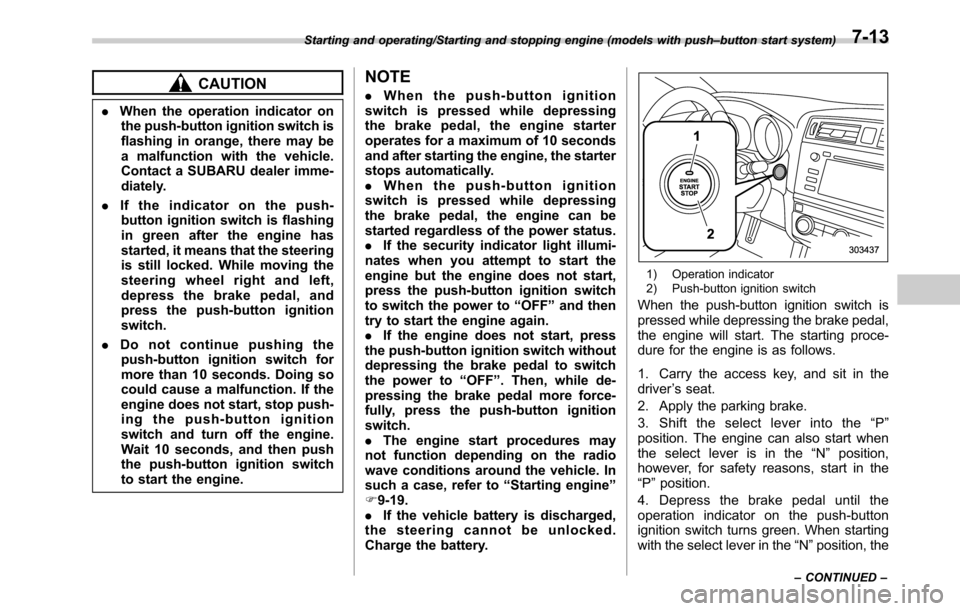
1) Operation indicator
2) Push-button ignition switch
When the push-button ignition switch is
pressed while depressing the brake pedal,
the engine will start. The starting proce-
dure for the engine is as follows.
1. Carry the access key, and sit in the
driver’s seat.
2. Apply the parking brake.
3. Shift the select lever into the“P”
position. The engine can also start when
the select lever is in the“N”position,
however, for safety reasons, start in the
“P”position.
4. Depress the brake pedal until the
operation indicator on the push-button
ignition switch turns green. When starting
with the select lever in the“N”position, the
Starting and operating/Starting and stopping engine (models with push–button start system)
–CONTINUED–7-13
Page 362 of 572
Starting and operating/Starting and stopping engine (models with push–button start system)
indicator does not turn green.
5. While depressing the brake pedal,
press the push-button ignition switch.
NOTE
.While pressing the select lever but-
ton in, the indicator on the push-button
ignition switch will not turn green even
when the select lever is in the“P”
position.
.In case the engine does not start by
the normal engine start procedure,
move the select lever to the“P”posi-
tion, and switch the power to“ACC”.
Depress the brake pedal, and press the
push-button ignition switch for at least
15 seconds. The engine may start. Only
use this engine start procedure in case
of emergency.
.When the engine is not started, the
brake pedal may feel stiff. In such a
case, depress the brake pedal more
forcefully than usual. Check that the
operation indicator on the push-button
ignition switch turns green, and press
the push-button ignition switch to start
the engine.
&Stopping engine
1. Stop the vehicle completely.
2. Move the select lever to the“P”
position.
3. Press the push-button ignition switch.
The engine will stop, and the power will be
switched off.
WARNING
.Do not touch the push-button
ignition switch during driving.
When the push-button ignition
switch is operated as follows,
the engine will stop.
–The switch is pressed and held
for 3 seconds or longer.
–The switch is pressed briefly 3
times or more in succession.
When the engine stops, the brake
booster will not function. A great-
er foot pressure will be required
on the brake pedal.
The power steering system will
not operate either. A greater
force will be required to steer,
and it may result in an accident.
.If the engine stops during driving,
do not operate the push-button
ignition switch or open any of thedoors until the vehicle is stopped
in a safe location. It is dangerous
because the steering lock may be
activated. Stop the vehicle in a
safe place, and contact a
SUBARU dealer immediately.
CAUTION
.Do not stop the engine while the
select lever is in a position other
than the“P”position.
.If the engine is stopped while the
select lever is in a position other
than the“P”position, the power
will be in“ACC”. If the vehicle is
left in this condition, the battery
may be discharged.
NOTE
Although you can stop the engine by
operating the push-button ignition
switch, do not stop the engine during
driving except in an emergency.
&When access key does not
operate properly
Refer to“Access key–if access key does
not operate properly”F9-18.
7-14
Page 365 of 572
!Automatic engine shutdown
The remote engine start system will
automatically shut down or will not start
the engine under the following conditions.
.The total run-time has exceeded 20
minutes.
.Any door or the rear gate is opened.
.The select lever is moved to any
position other than“P”.
.The engine hood is opened.
.Thepush-buttonignitionswitchis
pressed.
.The brake pedal is depressed.
.The engine speed is 3,000 rpm or
more.
The time until the engine automatically
stops differs according to the setting.
To change the time until the engine
automatically stops, contact your
SUBARU dealer. However, local laws
and regulations may prohibit changing
this time.&Models without“keyless ac-
cess with push-button start
system”
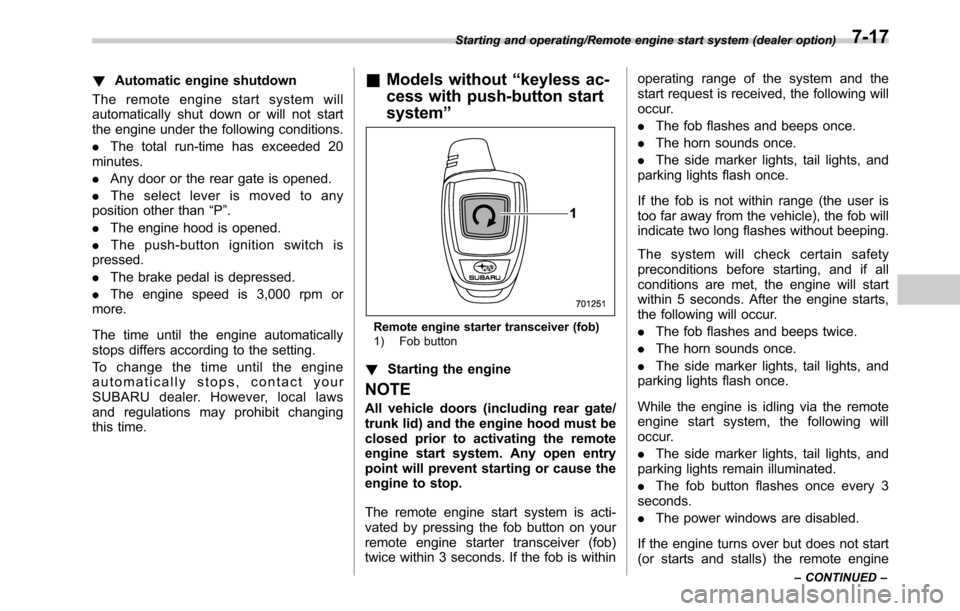
Remote engine starter transceiver (fob)
1) Fob button
!Starting the engine
NOTE
All vehicle doors (including rear gate/
trunk lid) and the engine hood must be
closed prior to activating the remote
engine start system. Any open entry
point will prevent starting or cause the
engine to stop.
The remote engine start system is acti-
vated by pressing the fob button on your
remote engine starter transceiver (fob)
twice within 3 seconds. If the fob is withinoperating range of the system and the
start request is received, the following will
occur.
.The fob flashes and beeps once.
.The horn sounds once.
.The side marker lights, tail lights, and
parking lights flash once.
If the fob is not within range (the user is
too far away from the vehicle), the fob will
indicate two long flashes without beeping.
The system will check certain safety
preconditions before starting, and if all
conditions are met, the engine will start
within 5 seconds. After the engine starts,
the following will occur.
.The fob flashes and beeps twice.
.The horn sounds once.
.The side marker lights, tail lights, and
parking lights flash once.
While the engine is idling via the remote
engine start system, the following will
occur.
.The side marker lights, tail lights, and
parking lights remain illuminated.
.The fob button flashes once every 3
seconds.
.The power windows are disabled.
If the engine turns over but does not start
(or starts and stalls) the remote engine
Starting and operating/Remote engine start system (dealer option)
–CONTINUED–7-17
Page 366 of 572

Starting and operating/Remote engine start system (dealer option)
start system will power off and then
attempt to start the engine 3 additional
times. The system will not attempt to
restart the engine if it determines a vehicle
malfunction is preventing starting. If the
engine does not start after 3 additional
attempts, the remote engine start request
will be aborted.
!Stopping the engine
Press and hold the fob button for at least 2
seconds to stop the engine. The fob will
flash and beep three times, indicating the
engine has stopped. If the stop request is
not received (for example, if the user is too
far away from the vehicle), the fob will
continue to flash once every 3 seconds.
The system will automatically stop the
engine after 15 minutes.
!Remote start safety features
For safety and security reasons, the
remote engine start system will prevent
starting (or stop the engine if running) and
sound the horn twice if any of the following
conditions is detected. In addition, the fob
will flash and beep 3 times.
.The brake pedal is depressed
.A key is in the ignition switch
.The engine hood is open
.The remote start system“Service
mode”is engaged
.The engine idle speed exceeds 3,500RPM
.The security alarm is triggered
.The select lever is not in the“P”
position
If the system detects any door (including
the rear gate/trunk lid) open during opera-
tion, it will prevent starting or stop the
engine, and sound the horn and flash side
marker lights, tail lights, and parking lights
6 times.
In addition to the items above, if the
vehicle’s engine management system
determines there is a safety risk due to a
vehicle-related problem, the vehicle will
power down and the horn will sound 3
times.
NOTE
.If the alarm system is armed at the
time of remote engine starter activation
(the security indicator light on the
combination meter is flashing), the
alarm system will remain armed
throughout the remote start run cycle.
.If the alarm system is disarmed at
the time of remote engine starter
activation (the security indicator light
on the combination meter is not flash-
ing), the alarm system will remain
disarmed throughout the remote start
run cycle.!Remote start operation - fob con-
firmation
Your remote engine starter fob is a
bidirectional transceiver that can confirm
system operation with several different
visual and audible indications. The fob’s
LED-backlit button and internal piezo
buzzer will indicate status of the system
using the following flash and beep se-
quences, provided the fob is within opera-
tional range of the system.
7-18