2016 SUBARU OUTBACK arm
[x] Cancel search: armPage 143 of 572
2. Press and hold the rear gate opener
button. The rear gate will open slightly.
3. Hold the rear gate and lift it up slowly.
NOTE
If the rear gate cannot be opened due
to a discharged vehicle battery, a
malfunction in the door locking/unlock-
ing system or other causes, you can
unlock it by manually operating the
rear gate lock release lever. For the
procedure, refer to“Rear gate
(Outback)–if the rear gate cannot be
opened”F9-20.
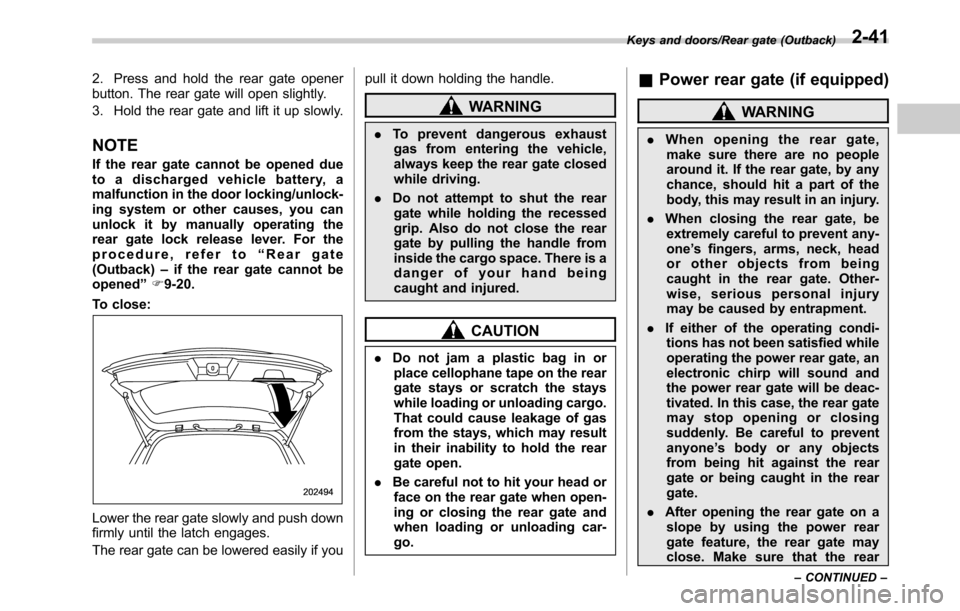
To close:
Lower the rear gate slowly and push down
firmly until the latch engages.
The rear gate can be lowered easily if youpull it down holding the handle.
WARNING
.To prevent dangerous exhaust
gas from entering the vehicle,
always keep the rear gate closed
while driving.
.Do not attempt to shut the rear
gate while holding the recessed
grip. Also do not close the rear
gate by pulling the handle from
inside the cargo space. There is a
danger of your hand being
caught and injured.
CAUTION
.Do not jam a plastic bag in or
place cellophane tape on the rear
gate stays or scratch the stays
while loading or unloading cargo.
That could cause leakage of gas
from the stays, which may result
in their inability to hold the rear
gate open.
.Be careful not to hit your head or
face on the rear gate when open-
ing or closing the rear gate and
when loading or unloading car-
go.
&Power rear gate (if equipped)
WARNING
.When opening the rear gate,
make sure there are no people
around it. If the rear gate, by any
chance, should hit a part of the
body, this may result in an injury.
.When closing the rear gate, be
extremely careful to prevent any-
one’s fingers, arms, neck, head
or other objects from being
caught in the rear gate. Other-
wise, serious personal injury
may be caused by entrapment.
.If either of the operating condi-
tions has not been satisfied while
operating the power rear gate, an
electronic chirp will sound and
the power rear gate will be deac-
tivated. In this case, the rear gate
may stop opening or closing
suddenly. Be careful to prevent
anyone’s body or any objects
from being hit against the rear
gate or being caught in the rear
gate.
.After opening the rear gate on a
slope by using the power rear
gate feature, the rear gate may
close. Make sure that the rear
Keys and doors/Rear gate (Outback)
–CONTINUED–2-41
Page 150 of 572
Keys and doors/Moonroof
to“Keyless Entry System”F3-42.
The ON/OFF setting of the audible signal
also works as the audible signal settings
for the“remote keyless entry system”and
the“keyless access with push-button start
system”. However, for the warning chime
such as that caused by“Reverse function”
F2-46 or“Rear gate drop prevention
function”F2-47, it cannot be set as non-
operational.Moonroof (if equipped)
WARNING
Never let anyone’s hands, arms,
head or any objects protrude from
the moonroof. A person could be
seriously injured if the vehicle stops
suddenly or turns sharply or if the
vehicle is involved in an accident.
To avoid serious personal injury
caused by entrapment, you must
conform to the following instruc-
tions without exception.
.Before closing the moonroof,
make sure that no one’s hands,
arms, head or other objects will
be accidentally caught in the
moonroof.
.Before leaving the vehicle, al-
ways remove the key from the
ignition switch for safety (models
without“keyless access with
push-button start system”) and
never allow an unattended child
to remain in the vehicle. Failure
to follow this procedure could
result in injury to a child operat-
ing the moonroof..Never try to check the anti-en-
trapment function by deliberately
placing part of your body in the
moonroof.CAUTION
.Do not sit on the edge of the open
moonroof.
.Do not operate the moonroof if
falling snow or extremely cold
conditions have caused it to
freeze shut.
.The anti-entrapment function
does not operate when the moon-
roof is being tilted down. Be sure
to confirm that it is safe to do so
before tilting the moonroof down.
.If the moonroof does not close,
we recommend that you have the
system checked by a SUBARU
dealer.
The moonroof has both tilting and sliding
functions.
The moonroof operates only when the
ignition switch is in the“ON”position.
2-48
Page 163 of 572

&Temperature gauge
1) Normal operating range
The temperature gauge shows engine
coolant temperature when the ignition
switch is in the“ON”position.
The coolant temperature will vary in
accordance with the outside temperature
and driving conditions.
We recommend that you drive moderately
until the pointer of the temperature gauge
reaches near the middle of the range.
Engine operation is optimum with the
engine coolant at this temperature range
and high revving operation when the
engine is not warmed up enough should
be avoided.
CAUTION
If the pointer exceeds the normal
operating range, safely stop the
vehicle as soon as possible.
Refer to“Engine overheating”F9-
13.
&ECO gauge
1) U.S. spec. models
2) Except U.S. spec. models
The ECO gauge shows the difference
between the average rate of fuel con-
sumption since the trip meter was last
reset and the current rate of fuel con-
sumption.
The ECO gauge indicates the current fuelefficiency as shown in the following chart.
Displayed unitNeedle position
“+”side“-”side
MPG Better Poorer
l/100km PoorerBetter
NOTE
.The ECO gauge shows only an
approximate indication.
.After resetting the trip meter, the
average rate of fuel consumption is not
shown until driving 0.6 mile (1 km).
Until that time, the ECO gauge does not
operate.
Instruments and controls/Meters and gauges3-11
Page 175 of 572

assist limitation to occur too fre-
quently, that may result in a malfunc-
tion of the power steering control
system.
&Vehicle Dynamics
Control warning light/
Vehicle Dynamics Con-
trol operation indicator
light
!Vehicle Dynamics Control warning
light
CAUTION
The Vehicle Dynamics Control sys-
tem provides its ABS control
through the electrical circuit of the
ABS. Accordingly, if the ABS is
inoperative, the Vehicle Dynamics
Control system becomes unable to
provide ABS control. As a result, the
Vehicle Dynamics Control system
becomes inoperative, causing the
warning light to illuminate. Although
both the Vehicle Dynamics Control
and ABS are inoperative in this
case, the ordinary functions of the
brake system are still available. You
will be safe while driving in thiscondition, but drive carefully and
have your vehicle checked at a
SUBARU dealer as soon as possi-
ble.
NOTE
.If the electrical circuit of the Vehicle
Dynamics Control system itself mal-
functions, the warning light only illumi-
nates. At this time, the ABS (Anti-lock
Brake System) remains fully opera-
tional.
.The warning light illuminates when
the electronic control system of the
ABS/Vehicle Dynamics Control system
malfunctions.
The Vehicle Dynamics Control system is
probably inoperative under any of the
following conditions. Have your vehicle
checked at a SUBARU dealer immedi-
ately.
.The warning light does not illuminate
when the ignition switch is turned to the
“ON”position.
.The warning light illuminates while the
vehicle is running.
NOTE
If the warning light behavior is as
described in the following examples,
the Vehicle Dynamics Control systemmay be considered normal.
.The warning light illuminates right
after the engine is started but turns off
immediately and remains off.
.The warning light illuminates after
the engine has started and turns off
while the vehicle is subsequently being
driven.
.The warning light illuminates during
driving, but turns off immediately and
remains off.
!Vehicle Dynamics Control opera-
tion indicator light
The indicator light flashes during activa-
tion of the skid suppression function and
during activation of the traction control
function.
NOTE
.The light may remain illuminated for
a short period of time after the engine
has been started, especially in cold
weather. This does not indicate the
existence of a problem. The light
should turn off as soon as the engine
has warmed up.
.The indicator light illuminates when
the engine has developed a problem
and the CHECK ENGINE warning light/
malfunction indicator light is on.
The Vehicle Dynamics Control system is
Instruments and controls/Warning and indicator lights
–CONTINUED–3-23
Page 176 of 572
Instruments and controls/Warning and indicator lights
probably malfunctioning under the follow-
ing condition. Have your vehicle checked
at a SUBARU dealer as soon as possible.
.The light does not turn off even after
the lapse of several minutes (the engine
has warmed up) after the engine has
started.
&Vehicle Dynamics
Control OFF indicator
light
The light illuminates when the Vehicle
Dynamics Control OFF switch is pressed
to deactivate the Vehicle Dynamics Con-
trol system.
The Vehicle Dynamics Control system is
probably malfunctioning under any of the
following conditions. Have your vehicle
checked at a SUBARU dealer immedi-
ately.
.The light does not illuminate when the
ignition switch is turned to the“ON”
position.
.The light does not turn off even after a
period of approximately 2 seconds after
the ignition switch has been turned to the
“ON”position.
&Warning chimes and warning
indicator of the keyless ac-
cess with push-button start
system (if equipped)
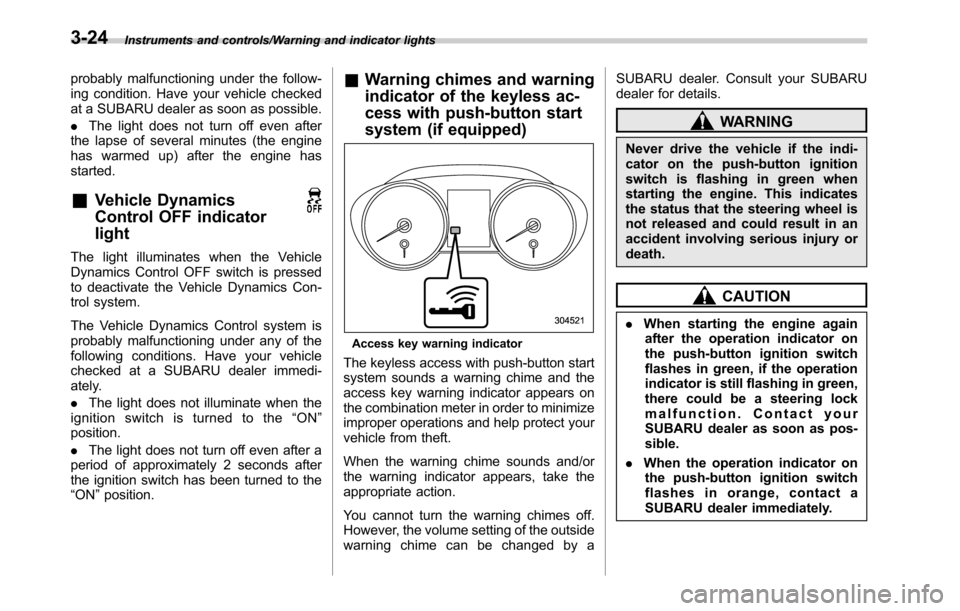
Access key warning indicator
The keyless access with push-button start
system sounds a warning chime and the
access key warning indicator appears on
the combination meter in order to minimize
improper operations and help protect your
vehicle from theft.
When the warning chime sounds and/or
the warning indicator appears, take the
appropriate action.
You cannot turn the warning chimes off.
However, the volume setting of the outside
warning chime can be changed by aSUBARU dealer. Consult your SUBARU
dealer for details.
WARNING
Never drive the vehicle if the indi-
cator on the push-button ignition
switch is flashing in green when
starting the engine. This indicates
the status that the steering wheel is
not released and could result in an
accident involving serious injury or
death.
CAUTION
.When starting the engine again
after the operation indicator on
the push-button ignition switch
flashes in green, if the operation
indicator is still flashing in green,
there could be a steering lock
malfunction. Contact your
SUBARU dealer as soon as pos-
sible.
.When the operation indicator on
the push-button ignition switch
flashes in orange, contact a
SUBARU dealer immediately.
3-24
Page 181 of 572

&Security indicator light
This indicator light shows the status of the
alarm system. It also indicates operation
of the immobilizer system.
!Alarm system
It blinks to show the driver the operational
status of the alarm system. For detailed
information, refer to“Alarm system”F2-
28.
!Immobilizer system
The security indicator light starts blinking
in the following conditions.
For models with“keyless access with
push-button start system”:
.Immediately after the push-button igni-
tion switch is turned to the“OFF”position.
.Immediately after the driver’s door is
opened or closed when all of the following
conditions are met.
–The push-button ignition switch is in
the“ON”or“ACC”position.
–The access key is outside the
vehicle.
–The engine is not running.
–In the event that an unauthorized
key is used (for example, the key is
unregistered or the ID code does not
match), the power is not switched to
“ON”and the security indicator lightcontinues blinking.
For models without“keyless access
with push-button start system”:
.Approximately 60 seconds after the
ignition switch is turned from the“ON”
position to the“ACC”or“LOCK”position.
.Immediately after the key is pulled out.
If the indicator light does not blink in the
above conditions, it may indicate that
immobilizer system may be malfunction-
ing. Contact your nearest SUBARU dealer
immediately.
In the event that an unauthorized key (for
example, an unauthorized duplicate) is
used, the security indicator light illumi-
nates. For details about the immobilizer
system, refer to“Immobilizer”F2-4.
NOTE
.The security indicator light remains
off in the following conditions. It means
that the matching of the ID code is
completed and the immobilizer system
is deactivated, and it does not indicate
a malfunction.
Models with“keyless access with
push-button start system”:
–while the engine is running
–the push-button ignition switchhas been turned to the“ON”or
“ACC”position and the driver’s
door has not been opened or closed
Models without“keyless access
with push-button start system”:
–while the engine is running
–for approximately 60 seconds
after the ignition switch is turned
from the“ON”position to the
“ACC”or“LOCK”position
–when the ignition switch is in the
“ON”position.
.Even if a malfunction occurs, such
as the security indicator light flashes
irregularly, it will not affect the func-
tionality of the immobilizer system.
Instruments and controls/Warning and indicator lights
–CONTINUED–3-29
Page 202 of 572
Instruments and controls/Wiper and washer
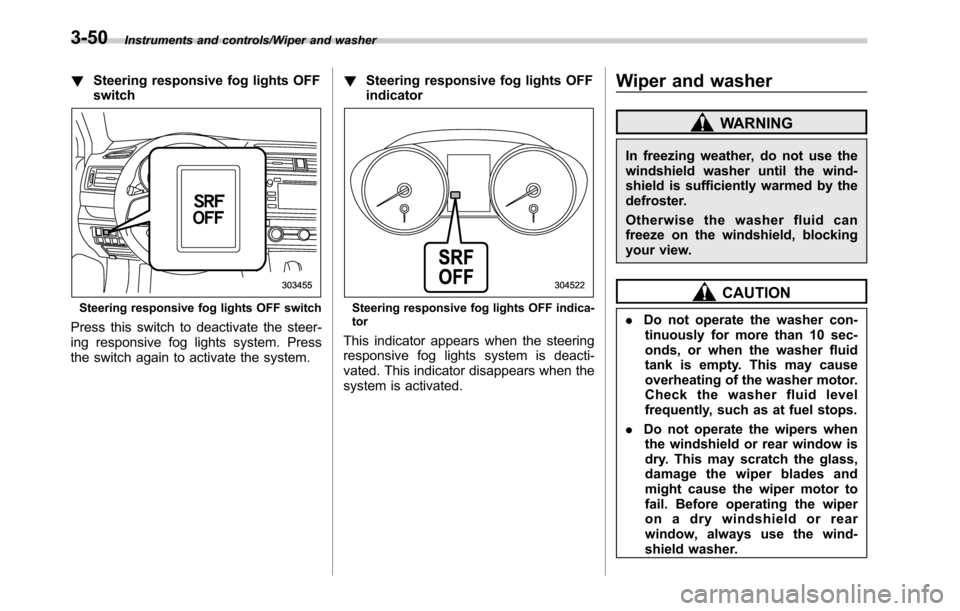
!Steering responsive fog lights OFF
switch
Steering responsive fog lights OFF switch
Press this switch to deactivate the steer-
ing responsive fog lights system. Press
the switch again to activate the system.!Steering responsive fog lights OFF
indicator
Steering responsive fog lights OFF indica-
tor
This indicator appears when the steering
responsive fog lights system is deacti-
vated. This indicator disappears when the
system is activated.
Wiper and washer
WARNING
In freezing weather, do not use the
windshield washer until the wind-
shield is sufficiently warmed by the
defroster.
Otherwise the washer fluid can
freeze on the windshield, blocking
your view.
CAUTION
.Do not operate the washer con-
tinuously for more than 10 sec-
onds, or when the washer fluid
tank is empty. This may cause
overheating of the washer motor.
Check the washer fluid level
frequently, such as at fuel stops.
.Do not operate the wipers when
the windshield or rear window is
dry. This may scratch the glass,
damage the wiper blades and
might cause the wiper motor to
fail. Before operating the wiper
on a dry windshield or rear
window, always use the wind-
shield washer.
3-50
Page 210 of 572

Instruments and controls/Mirrors
www.homelink.com or call 1-800-355-
3515.
.U.S.-spec. models
FCC ID: NZLPZLHL4
CAUTION
FCC WARNING
Changes or modifications not ex-
pressly approved by the party re-
sponsible for compliance could void
the user’s authority to operate the
equipment.
This device complies with part 15 of the
FCC Rules. Operation is subject to the
following two conditions: (1) This de-
vice may not cause harmful interfer-
ence, and (2) this device must accept
any interference received, including
interference that may cause undesired
operation.
.Canada-spec. models
NOTE
This device complies with Industry
Canada licence-exempt RSS standard
(s). Operation is subject to the follow-
ing two conditions: (1) this device may
not cause interference, and (2) this
device must accept any interference,including interference that may cause
undesired operation of the device.
NOTE
Le présent appareil est conforme aux
CNR d’Industrie Canada applicables
aux appareils radio exempts de licence.
L’exploitation est autorisée aux deux
conditions suivantes: (1) l’appareil ne
doit pas produire de brouillage, et (2)
l’utilisateur de l’appareil doit accepter
tout brouillage radioélectrique subi,
même si le brouillage est susceptible
d’en compromettre le fonctionnement.
HomeLink
®and the HomeLink®house are
registered trademarks of Johnson Con-
trols, Inc.
WARNING
.When programming the
HomeLink®Wireless Control Sys-
tem, you may be operating a
garage door opener or other
device. Make sure that people
and objects are out of the way
ofthegaragedoororother
device to prevent potential harm
or damage.
.Do not use the HomeLink
®Wire-
less Control System with a gar-age door opener that lacks the
safety stop and reverse feature
as required by applicable safety
standards. A garage door opener
which cannot detect an object,
signaling the door to stop and
reverse, does not meet these
safety standards. Using a garage
door opener without these fea-
tures increases risk of serious
injury or death. For more infor-
mation, consult the HomeLink
®website at www.homelink.com or
call 1-800-355-3515.
CAUTION
When programming the HomeLink®Wireless Control System to operate
a garage door opener or an entrance
gate, unplug the device’s motor
from the outlet during programming
to prevent motor burnout.
NOTE
.After programming your HomeLink®Wireless Control System for the de-
sired devices, retain the hand-held
transmitters for further programming
or device testing in the event of a
problem.
3-58