2016 SUBARU OUTBACK Acc switch
[x] Cancel search: Acc switchPage 115 of 572
key of another vehicle
–When carrying more than one
access key
–When the access key is placed
near wireless communication
equipment such as a cell phone
–When the access key is placed
near a metallic object
–When metallic accessories are
attached to the access key
–When carrying the access key
with electronic appliances such as
a laptop computer
–When the battery of the access
key is discharged
.The access key is always commu-
nicating with the vehicle and is con-
tinuously using the battery. Although
the life of the battery varies depending
on the operating conditions, it is ap-
proximately 1 to 2 years. If the battery
becomes fully discharged, replace it
with a new one.
.If an access key is lost, it is
recommended that the access key be
reregistered. For reregistration of an
access key, contact a SUBARU dealer.
.For a spare access key, contact a
SUBARU dealer.
.Up to 7 access keys can be regis-
tered for one vehicle.
.Carefully store the key number platesupplied with the access key. It is
necessary for vehicle repair.
.Do not leave the access key in the
storage spaces inside the vehicle, such
as the door pocket, dashboard and the
corner of the cargo area. Vibrations
may damage the key or turn on the
switch, possibly resulting in a lockout.
.After the vehicle battery is dis-
charged or replaced, initialization of
the steering lock system may be re-
quired to start the engine. In this case,
perform the following procedure to
initialize the steering lock.
(1) Turn the push-button ignition
switch to the“OFF”position. For
details, refer to“Switching power”
F3-6.
(2) Open and close the driver’s
door.
(3) Wait for approximately 10 sec-
onds.
When the steering is locked, the initi-
alization is completed.&Locking and unlocking with
“keyless access”entry func-
tion
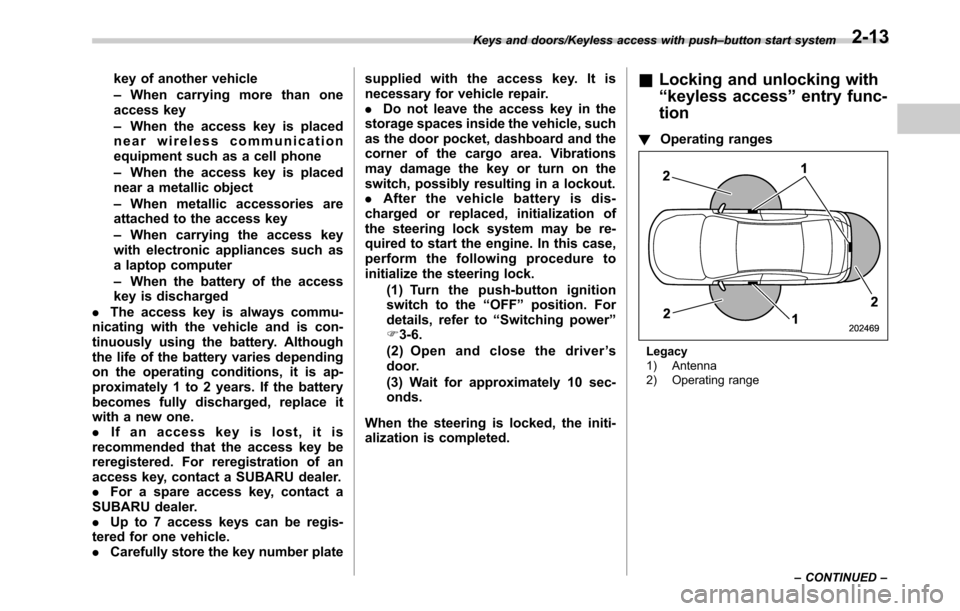
!Operating ranges
Legacy
1) Antenna
2) Operating range Keys and doors/Keyless access with push–button start system
–CONTINUED–
2-13
Page 117 of 572

less equipment is used), or while talking
on a cell phone, the operating ranges may
be reduced, or the keyless access func-
tion may not operate.
In such a case, perform the procedure
described in“Locking and unlocking”F9-
18.
.When an access key is in the operating
range, if the door handle becomes wet
due to exposure to a significant amount of
water when the vehicle is washed or
during heavy rain, the doors may be
locked or unlocked.
.The keyless access function may not
operate properly depending on the status
of the access key and the radio wave
conditions around the vehicle. In such a
case, perform the procedure described in
“Locking and unlocking”F9-18.
!How to use keyless access func-
tions
!Keyless access function tips
.When you lock the doors and rear gate
using the keyless access function, turn the
push-button ignition switch off. It is not
possible to lock the doors and rear gate
using the keyless access function when
the push-button ignition switch is on the
“ACC”or“ON”position. Refer to“Switch-
ing power”F3-6.
.If the door handle is gripped with agloved hand, the door lock may not be
released.
.If the door lock sensor is touched three
times or more repeatedly, the system will
ignore the sensor operation.
.When performing the locking proce-
dure too quickly, locking may not have
been completed. After locking the doors, it
is recommended to pull the REAR door
handles to confirm that the doors have
been locked.
.It is possible to lock the doors even
when one of the doors is open. After
performing the locking procedure, close
the opened door or rear gate to lock it.
.Within 3 seconds after locking the
doors and the rear gate by using the
keyless access function, it is not possible
to unlock doors and/or the rear gate by
using the keyless access function.
.When locking, be sure to carry the
access key to prevent locking the access
key in the vehicle.!Unlocking
Carry the access key, and grip the door
handle.
.When the driver’s door handle is
gripped, only the driver’s door will be
unlocked.
.When the front passenger’s door han-
dle is gripped, all doors (for Outback,
including the rear gate) will be unlocked.
Also, an electronic chirp will sound twice
and the hazard warning flashers will flash
twice.
Keys and doors/Keyless access with push–button start system
–CONTINUED–2-15
Page 119 of 572

perform the unlocking operation once
first. You can then touch the door lock
sensor to lock the doors.
!Locking with the rear lock button
(Outback)
1) Rear lock button
Carry the access key, close all doors
including the rear gate and press the rear
lock button. The rear gate and all doors
will be locked. Also, an electronic chirp will
sound once and the hazard warning
flashers will flash once.
!Power saving function
To protect the access key battery and the
vehicle battery, the keyless access func-
tion will be disabled as follows.
.When the keyless access function andthe remote keyless entry system have not
been used:
(1) 5 days after the push-button igni-
tion switch has been turned off, com-
munication between the antennas and
the access key will be stopped.
(2) 9 days after step (1), the sensors
(both lock sensor and unlock sensor)
on the front passenger’s door will be
disabled.
.When the access key has been left in
the operating range for 10 minutes or
longer while all doors are locked, the
keyless access function will be disabled.
!Recovery from power saving
mode
When one of the following operations is
performed, the keyless access function
will be recovered.
.Unlock by gripping the door handle
(only when the sensors on the front
passenger’s door are not disabled) or
pressing the rear gate opener button on
the rear gate (Outback)/trunk opener
button on the trunk lid (Legacy)
.Lock or unlock by the remote keyless
entry system
.Open a door and then close it
.Turn the push-button ignition switch to
the“ON”position!Door unlock selection function
The door unlock selection function makes
the following operations possible.
.Unlocking the driver’s door without
unlocking any other doors (including the
rear gate) when gripping the driver’s door
handle
.For Outback, opening the rear gate
without unlocking any doors when press-
ing the rear gate opener button
The operational/non-operational setting
for this function can be changed by
operating the multi information display.
For details, refer to“Keyless Entry Sys-
tem”F3-42. The setting can also be
changed by a SUBARU dealer. Consult
your SUBARU dealer for details.
Operational:
.Only the driver’s door will be unlocked
when the driver’s door handle is gripped.
.For Outback, the rear gate will open,
but the other doors will remain locked
when the rear gate opener button is
pressed.
Non-operational:
.All doors and the rear gate will be
unlocked when the driver’s door handle is
gripped.
.For Outback, the rear gate will open
and all doors will be unlocked when the
Keys and doors/Keyless access with push–button start system
–CONTINUED–2-17
Page 121 of 572
–When the keyless access func-
tions are not going to be used
!Disabling functions
!By operating the access key
If you have registered a PIN code for PIN
Code Access, you can disable the keyless
access function by operating the access
key. For details about registering a PIN
code, refer to“Registering a PIN code”
F2-22.
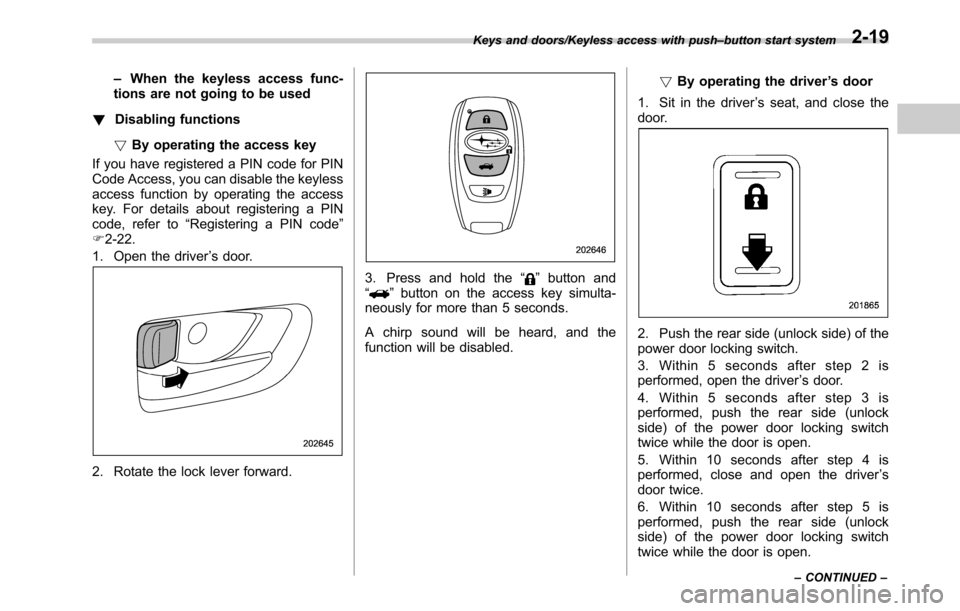
1. Open the driver’s door.
2. Rotate the lock lever forward.
3. Press and hold the“”button and
“”button on the access key simulta-
neously for more than 5 seconds.
A chirp sound will be heard, and the
function will be disabled.!By operating the driver’s door
1. Sit in the driver’s seat, and close the
door.
2. Push the rear side (unlock side) of the
power door locking switch.
3. Within 5 seconds after step 2 is
performed, open the driver’s door.
4. Within 5 seconds after step 3 is
performed, push the rear side (unlock
side) of the power door locking switch
twice while the door is open.
5. Within 10 seconds after step 4 is
performed, close and open the driver’s
door twice.
6. Within 10 seconds after step 5 is
performed, push the rear side (unlock
side) of the power door locking switch
twice while the door is open.
Keys and doors/Keyless access with push–button start system
–CONTINUED–2-19
Page 122 of 572

Keys and doors/Keyless access with push–button start system
7. Within 10 seconds after step 6 is
performed, close and open the driver’s
door once.
8. Within 5 seconds after step 7 is
performed, close the door.
A chirp sound will be heard, and the
functions will be disabled.
NOTE
In steps 4 and 6, press the power door
locking switch slowly. If the switch is
pressed quickly, the functions may not
be disabled.
!Enabling functions
When the procedure to disable the func-
tions is performed again, a chirp sound will
be heard, and the functions are enabled.
NOTE
.The keyless access function will be
enabled only if you perform the proce-
dure in the same manner you disabled
the function (for example, when dis-
abling by operating the driver’s door,
the function will not be enabled even if
you operate the access key).
.Press the push-button ignition
switch if you do not know the proce-
dure in which the keyless access
function was disabled.
–When disabling by operating thedriver’s door: a chirp will not be
heard
–When disabling by operating the
access key: a chirp will be heard
&When access key does not
operate properly
Refer to“Access key–if access key does
not operate properly”F9-18.
&Replacing battery of access
key
Refer to“Replacing battery of access key”
F11-50.
&Replacing access key
Access keys can be replaced at SUBARU
dealers. For more details, contact a
SUBARU dealer.
&Certification for keyless ac-
cess with push-button start
system
.U.S.-spec. models
FCC ID: HYQ14AHC
FCC ID: Y8PFJ14–2
FCC ID: Y8PSSPIMB02
CAUTION
FCC WARNING
Changes or modifications not ex-
pressly approved by the party re-
sponsible for compliance could void
the user’s authority to operate the
equipment.
This device complies with part 15 of the
FCC Rules. Operation is subject to the
following two conditions: (1) This device
may not cause harmful interference, and
(2) this device must accept any interfer-
ence received, including interference that
may cause undesired operation.
.Canada-spec. models
This device complies with Industry
Canada licence-exempt RSS standard
(s). Operation is subject to the following
two conditions: (1) this device may not
cause interference, and (2) this device
must accept any interference, including
interference that may cause undesired
operation of the device.
Le présent appareil est conforme aux
CNR d’Industrie Canada applicables aux
appareils radio exempts de licence. L’ex-
ploitation est autorisée aux deux condi-
tions suivantes: (1) l’appareil ne doit pas
produire de brouillage, et (2) l’utilisateur
2-20
Page 124 of 572

Keys and doors/PIN Code Access (models with“keyless access with push–button start system”)
&Registering a PIN code
!Preparation
1. Turn off the ignition switch.
2. Close all doors (including trunk/rear
gate).
3. Press and hold the“
”button on the
access key. Then all doors (including rear
gate) will be locked.
4. Keep the“
”button pressed, and
press the following button within 5 sec-
onds after step 3.
.Legacy: the trunk opener button
.Outback: the rear lock button
5. Press and hold the above button for
more than 5 seconds. Then a chirp will
sound.
6. Press the“
”button on the access key
while the chirp sounds.
Then the chirp will stop and the prepara-
tion is complete.
NOTE
If you do not press the“”button on
the access key, the chirp will sound for
30 seconds. In this case, the prepara-
tion for registering a PIN code does not
complete even if the chirp stops.!Registration
For example, to register“32468”as the
PIN code, perform the following proce-
dure.
Legacy:
1. Press the trunk opener button three
times.
2. After a buzzer (ding) sounds once,
press the trunk opener button twice.
3. After a buzzer (ding) sounds once,
press the trunk opener button four times.
4. After a buzzer (ding) sounds once,
press the trunk opener button six times.
5. After a buzzer (ding) sounds once,
press the trunk opener button eight times.
6. Perform steps 1 to 5 again within
approximately 30 seconds after the buz-
zer starts sounding intermittently.
7. All doors will be unlocked and locked.
Then the PIN code will be registered.
Outback:
1. Press the rear lock button three times.
2. After a buzzer (ding) sounds once,
press the rear lock button twice.
3. After a buzzer (ding) sounds once,
press the rear lock button four times.
4. After a buzzer (ding) sounds once,
press the rear lock button six times.
5. After a buzzer (ding) sounds once,press the rear lock button eight times.
6. Perform steps 1 to 5 again within
approximately 30 seconds after the buz-
zer starts sounding intermittently.
7. All doors (including rear gate) will be
unlocked and locked. Then the PIN code
will be registered.
NOTE
.Press the trunk opener button/rear
lock button ten times to enter“0”.
.Change the PIN code frequently to
protect your vehicle from theft.
.If you have lent your vehicle to
another person, confirm that the PIN
code has not been changed or deleted.
If the PIN code has been changed or
deleted, reregister a new PIN code.
.If you make an error during the
registration procedure, press the“
”
or“”button on the access key.
Then, start over from the procedure
described in“Preparation”.
.To protect your vehicle from theft,
you cannot register“00000”to“99999”
or“12345”as a PIN code.
.Do not register your vehicle license
plate number or simple numbers such
as“11122”or“12121”as a PIN code.
Doing so will increase the risk of
vehicle theft.
.When you try to register“22222”,
2-22
Page 125 of 572

the registered PIN code will be deleted.
You cannot unlock the doors by PIN
Code Access until a new code is
registered.
.After registering a new PIN code,
make sure that you can unlock the
doors using the PIN code.
.The PIN code cannot be deleted
while the keyless access function is
disabled by operating the access key.
.Reregister the PIN code in the
following case.
–when you forget the PIN code
–when you want to change the PIN
code
&Unlocking
Perform steps 1 to 5 described in“Regis-
tration”.
NOTE
.You cannot unlock by PIN Code
Access in the following cases.
–when the access key is within the
operating ranges
–when the ignition switch is in the
“ACC”or“ON”position
.If you make an operation error
during the unlocking procedure, start
over with the unlocking procedure after
waiting for 5 seconds or longer.
.To protect your vehicle from theft, abuzzer will sound if incorrect PIN codes
are entered five times continuously. If
this occurs, you cannot unlock the
doors by PIN Code Access for 5
minutes.
Remote keyless entry system
CAUTION
.Do not expose the remote trans-
mitter to severe shocks, such as
those experienced as a result of
dropping or throwing.
.Do not take the remote transmit-
ter apart except when replacing
the battery.
.Do not get the remote transmitter
wet. If it gets wet, wipe it dry with
a cloth immediately.
.When you carry the remote trans-
mitteronanairplane,donot
press the button of the remote
transmitter while in the airplane.
When any button of the remote
transmitter is pressed, radio
waves are sent and may affect
the operation of the airplane.
When you carry the remote trans-
mitter in a bag on an airplane,
take measures to prevent the
buttons of the remote transmitter
from being pressed.
For models with“keyless access with
push-button start system”, the access
Keys and doors/Remote keyless entry system
–CONTINUED–2-23
Page 126 of 572
Keys and doors/Remote keyless entry system
key is used as the transmitter for the
remote keyless entry system. For models
without“keyless access with push-button
start system”, the transmitter for the
remote keyless entry system is located
inside the key head.
The remote keyless entry system has the
following functions.
.Locking and unlocking the doors (and
rear gate for Outback) without a key
.Opening the trunk lid (Legacy) without
key
.Sounding a panic alarm
.Arming and disarming the alarm sys-
tem. For detailed information, refer to
“Alarm system”F2-28.
The operable distance of the remote
keyless entry system is approximately 30
feet (10 meters). However, this distance
will vary depending on environmental
conditions. The system’s operable dis-
tance will be shorter in areas near a
facility or electronic equipment emitting
strong radio waves such as a power plant,
broadcast station, TV tower, or remote
controller of home electronic appliances.&Operating the access key
NOTE
The remote keyless entry system will
not be activated when the push-button
ignition switch is in any position other
than the“OFF”position.
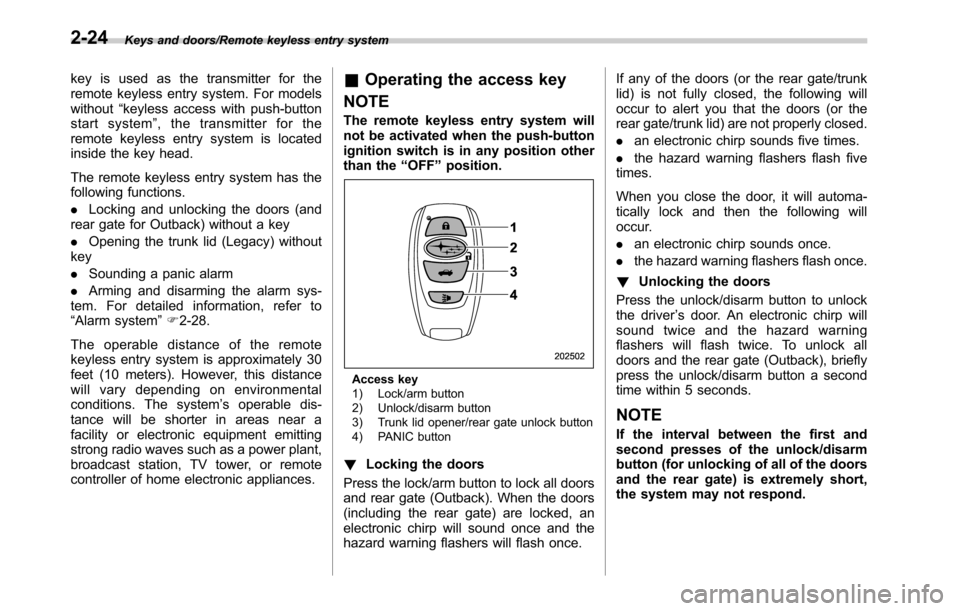
Access key
1) Lock/arm button
2) Unlock/disarm button
3) Trunk lid opener/rear gate unlock button
4) PANIC button
!Locking the doors
Press the lock/arm button to lock all doors
and rear gate (Outback). When the doors
(including the rear gate) are locked, an
electronic chirp will sound once and the
hazard warning flashers will flash once.If any of the doors (or the rear gate/trunk
lid) is not fully closed, the following will
occur to alert you that the doors (or the
rear gate/trunk lid) are not properly closed.
.an electronic chirp sounds five times.
.the hazard warning flashers flash five
times.
When you close the door, it will automa-
tically lock and then the following will
occur.
.an electronic chirp sounds once.
.the hazard warning flashers flash once.
!Unlocking the doors
Press the unlock/disarm button to unlock
the driver’s door. An electronic chirp will
sound twice and the hazard warning
flashers will flash twice. To unlock all
doors and the rear gate (Outback), briefly
press the unlock/disarm button a second
time within 5 seconds.
NOTE
If the interval between the first and
second presses of the unlock/disarm
button (for unlocking of all of the doors
and the rear gate) is extremely short,
the system may not respond.
2-24