2016 SUBARU IMPREZA key battery
[x] Cancel search: key batteryPage 30 of 594

ItemFunction Possible settingsDefault setting
Key lock-in prevention Key lock-in prevention Operation/Non-operationOperation
Defogger and deicer system for
models with the automatic climate
control system Rear window defogger, outside
mirror defogger and windshield wi-
per deicer Operation for 15 minutes/
Continuous operation
Operation for 15 minutes
Dome light Operation of dome light/map light/
cargo area light OFF delay timer OFF/10 seconds/20 seconds/30
seconds30 seconds
Map light for models with a moon-
roof
Cargo area light (5-door)
Battery drainage prevention func-
tion Battery drainage prevention func-
tion Operation/Non-operation
Operation
Seatbelt warning Sounds a chime while driving Operation/Non-operation Operation
Auto on/off headlights (if equipped) Sensitivity of the operation of the auto on/off headlights Low/Normal/High/Very high Normal
Welcome lighting function (if
equipped) Welcome lighting function (when
approaching) OFF/30 seconds/60 seconds/90
seconds30 seconds
Welcome lighting function (when
exiting) OFF/30 seconds/60 seconds/90
seconds30 seconds
Reverse gear interlocked rear wiper
(5-door) Reverse gear interlocked rear wiper
operation Operation/Non-operation
U.S.-spec. models: Non-operation
Other models: Operation
One-touch lane changer Operation of the one-touch lane
changer Operation/Non-operation
Operation
25
Page 102 of 594

Keys..................................................................... 2-3Key number plate ................................................ 2-3
Immobilizer.......................................................... 2-3Security indicator light ........................................ 2-4
Key replacement ................................................. 2-4
Certification for immobilizer system ..................... 2-4
Door locks........................................................... 2-5Locking and unlocking from the outside .. ............ 2-5
Locking and unlocking from the inside ................ 2-7
Battery drainage prevention function ................... 2-7
Power door locking switches............................. 2-8Key lock-in prevention function ........................... 2-9
Keyless access with push-button start
system (if equipped) ........................................ 2-9
Safety precautions............................................. 2-10
Locking and unlocking with “keyless access”
entry function. .................................................. 2-13
Selecting audible signal operation ...................... 2-18
Warning chimes and warning indicator ............... 2-18
Disabling keyless access function ...................... 2-18
When access key does not operate properly ....... 2-20
Replacing battery of access key ......................... 2-20
Replacing access key ......................................... 2-20
Certification for keyless access with push-button start system ..................................................... 2-20
PIN Code Access (models with “keyless
access with push-button start system ”)........ 2-21
Registering a PIN code ....................................... 2-22
Unlocking .......................................................... 2-23
Remote keyless entry system ........................... 2-23Locking the doors.............................................. 2-25 Unlocking the doors
.......................................... 2-25
Opening the trunk lid (4-door) .. .......................... 2-25
Unlocking the rear gate (5-door) ......................... 2-25
Vehicle finder function ....................................... 2-25
Sounding a panic alarm ..................................... 2-25
Selecting audible signal operation (models without “keyless access with push-button start
system ”).......................................................... 2-26
Replacing the battery ......................................... 2-26
Replacing lost transmitters ................................ 2-26
Certification for remote keyless entry system ..... 2-26
Alarm system..................................................... 2-27System operation ............................................... 2-28
Activating and deactivating the alarm system ..... 2-28
If you have accidentally triggered the alarm system ............................................................ 2-28
Arming the system ............................................ 2-29
Disarming the system ........................................ 2-32
Valet mode ........................................................ 2-32
Passive arming (models without “keyless access
with push-button start system ”) ....................... 2-32
Tripped sensor identification .............................. 2-34
Shock sensors (dealer option).. .......................... 2-34
Child safety locks.............................................. 2-35
Windows ............................................................. 2-35
Power window operation by driver ..................... 2-35
Power window operation by passengers ............. 2-37
Initialization of power window .. .......................... 2-38
Trunk lid (4-door)............................................... 2-38To open and close the trunk lid from outside . ..... 2-39
To open the trunk lid from inside. ....................... 2-39
Keys and doors
2
Page 106 of 594

–Canada-spec. models–Mexico-spec. modelsDoor locks
& Locking and unlocking from
the outside
NOTE
If you unlock the driver ’s door with a
key (including a mechanical key) and
open the door while the alarm system
is armed, the alarm system is triggered
and the vehicle ’s horn sounds. In this
case, perform any of the following
operations:
Models with “keyless access with
push-button start system ”:
. Press any button on the access key
(except when the access key battery is
discharged).
. Press the push-button ignition
switch to “ACC”.
. Carry the access key and perform
either of the following procedures.
–Grip the front door handle
– Press the rear gate opener button
Models without “keyless access with
push-button start system ”:
. Press any button on the remote
transmitter (except when the transmit-
ter battery is discharged).
. Insert the key into the ignition
switch and turn the ignition switch to
Keys and doors/Door locks
–CONTINUED –2-5
Page 108 of 594
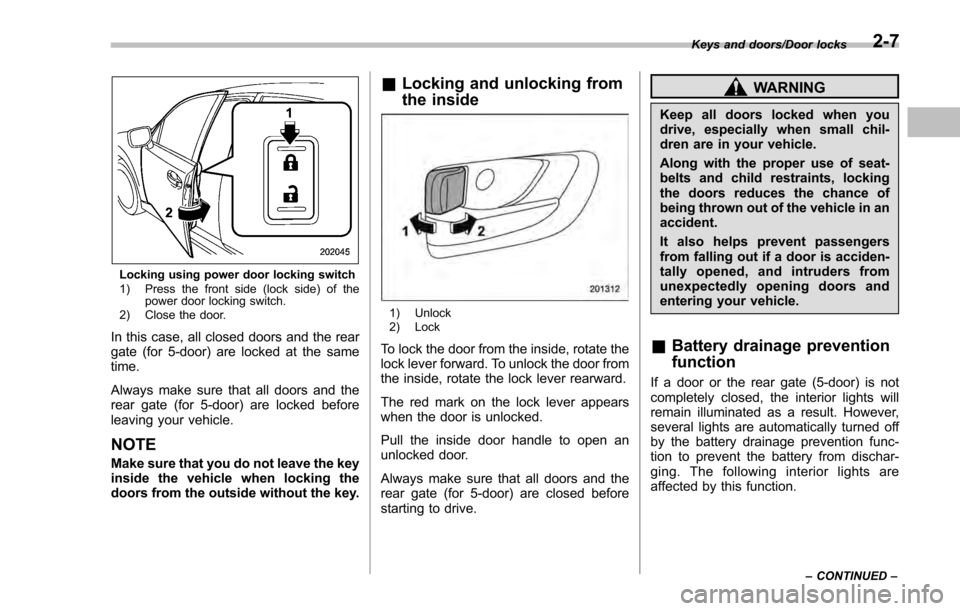
Locking using power door locking switch
1) Press the front side (lock side) of thepower door locking switch.
2) Close the door.
In this case, all closed doors and the rear
gate (for 5-door) are locked at the same
time.
Always make sure that all doors and the
rear gate (for 5-door) are locked before
leaving your vehicle.
NOTE
Make sure that you do not leave the key
inside the vehicle when locking the
doors from the outside without the key.
& Locking and unlocking from
the inside
1) Unlock
2) Lock
To lock the door from the inside, rotate the
lock lever forward. To unlock the door from
the inside, rotate the lock lever rearward.
The red mark on the lock lever appears
when the door is unlocked.
Pull the inside door handle to open an
unlocked door.
Always make sure that all doors and the
rear gate (for 5-door) are closed before
starting to drive.
WARNING
Keep all doors locked when you
drive, especially when small chil-
dren are in your vehicle.
Along with the proper use of seat-
belts and child restraints, locking
the doors reduces the chance of
being thrown out of the vehicle in an
accident.
It also helps prevent passengers
from falling out if a door is acciden-
tally opened, and intruders from
unexpectedly opening doors and
entering your vehicle.
&Battery drainage prevention
function
If a door or the rear gate (5-door) is not
completely closed, the interior lights will
remain illuminated as a result. However,
several lights are automatically turned off
by the battery drainage prevention func-
tion to prevent the battery from dischar-
ging. The following interior lights are
affected by this function.
Keys and doors/Door locks
–CONTINUED –2-7
Page 109 of 594

Keys and doors/Power door locking switches
ItemSwitch
position Automatically turning
off
Map
lights
*1OFF*1Approximately 20 minutes later
Dome light DOOR Approximately 20
minutes later
Ignition
switch light —Approximately 20
minutes later
Cargo area
light DOORApproximately 20
minutes later
*1: The battery drainage prevention function
affects only the map lights on models with the
moonroof, and only when the map light
switches are in the OFF position. The map
lights on models without the moonroof do not
turn off automatically, so push the light switches
manually to turn them off.
The operational/non-operational setting of
this function can be changed by a
SUBARU dealer. Contact your SUBARU
dealer to change the setting.
NOTE
. The factory setting (default setting)
for this function is set as “operational”.
. When leaving the vehicle, please
make sure that all doors and the rear
gate (5-door) are completely closed.
. The battery drainage prevention
function does not operate while the key is in the ignition switch.
Power door locking switches
1) Lock
2) Unlock
All doors and the rear gate (for 5-door) can
be locked and unlocked by the power door
locking switches located at the driver
’s
side and the front passenger ’s side doors.
To lock the doors, push the front side of
the switch.
To unlock the doors, push the rear side of
the switch.
When you close the doors after you set
the door locks, the doors remain locked.
2-8
Page 112 of 594

4-door
1) Antenna5-door
1) Antenna
CAUTION
.Never leave or store the access
key inside the vehicle or within 6.6 ft (2 m) around the vehicle (e.
g., in the garage). The access key
may be locked inside the vehicle,
or the battery may discharge
rapidly.
. The access key contains electro-
nic components. Observe the
following precautions to prevent
malfunctions.
– Although you can replace the
battery of the access key
yourself, it is recommended
that the battery be replaced by
a SUBARU dealer to avoid the
risk of damage at the time of
replacement.
– Do not get the access key wet.
If the access key gets wet,
wipe it off immediately and let
it dry completely.
– Do not apply strong impacts
to the access key.
– Keep the access key away
from magnetic sources.
– Never leave the access key in
direct sunlight or anywhere
that may become hot, such
as on the dashboard. It may
damage the battery or cause
circuit malfunctions.
Keys and doors/Keyless access with push –button start system
–CONTINUED –2-11
Page 113 of 594

Keys and doors/Keyless access with push–button start system
– Do not wash the access key in
an ultrasonic washer.
– Do not leave the access key in
humid or dusty locations.
Doing so may cause malfunc-
tions.
– Do not leave the access key
near personal computers or
home electric appliances.
Doing so may cause the ac-
cess key to malfunction, re-
sulting in battery discharge.
. If the access key is dropped, the
integrated mechanical key inside
may become loose. Be careful
not to lose the mechanical key.
. When you carry the access key
on an airplane, do not press the
button of the access key while in
the airplane. When any button of
the access key is pressed, radio
waves are sent and may affect
the operation of the airplane.
When you carry the access key
in a bag on an airplane, take
measures to prevent the buttons
of the access key from being
pressed.NOTE
. The operational/non-operational
setting for the keyless access function
can be changed. For the setting proce-
dure, refer to “Disabling keyless ac-
cess function” F2-18. The setting can
also be changed by a SUBARU dealer.
For more details, contact a SUBARU
dealer.
. For detailed information about the
operation method for the push-button
ignition switch while the keyless ac-
cess function is switched to the non-
operational mode, refer to “Access key
– if access key does not operate
properly ”F 9-18.
. The keyless access with push-but-
ton start system uses weak radio
waves. The status of the access key
and environmental conditions may in-
terfere with the communication be-
tween the access key and the vehicle
under the following conditions, and it
may not be possible to lock or unlock
the doors or start the engine.
–When operating near a facility
where strong radio waves are trans-
mitted, such as a broadcast station
and power transmission lines
– When products that transmit
radio waves are used, such as an
access key or a remote transmitter key of another vehicle
–
When carrying more than one
access key
– When the access key is placed
near wireless communication
equipment such as a cell phone
– When the access key is placed
near a metallic object
– When metallic accessories are
attached to the access key
– When carrying the access key
with electronic appliances such as
a laptop computer
– When the battery of the access
key is discharged
. The access key is always commu-
nicating with the vehicle and is con-
tinuously using the battery. Although
the life of the battery varies depending
on the operating conditions, it is ap-
proximately 1 to 2 years. If the battery
becomes fully discharged, replace it
with a new one.
. If an access key is lost, it is
recommended that all of the remaining
access keys be reregistered. For rere-
gistration of an access key, contact a
SUBARU dealer.
. For a spare access key, contact a
SUBARU dealer.
. Up to 7 access keys can be regis-
tered for one vehicle.
2-12
Page 114 of 594
.Carefully store the key number plate
supplied with the access key. It is
necessary for vehicle repair.
. Do not leave the access key in the
storage spaces inside the vehicle, such
as the door pocket, dashboard and the
corner of the cargo area. Vibrations
may damage the key or turn on the
switch, possibly resulting in a lockout.
. After the vehicle battery is dis-
charged or replaced, initialization of
the steering lock system may be re-
quired to start the engine. In this case,
perform the following procedure to
initialize the steering lock.
(1) Turn the push-button ignition
switch to the “OFF”position. For
details, refer to “Switching power ”
F 3-7.
(2) Open and close the driver ’s
door.
(3) Wait for approximately 10 sec-
onds.
When the steering is locked, the initi-
alization is completed.
. Do not leave the access key in the
following places.
–On the instrument panel
– On the floor
– Inside the glove box
– Inside the door trim pocket –
On the rear seat
– On the rear shelf (4-door)
– Inside the trunk (4-door)
– In the cargo area (5-door)
If you do, the following situations
may occur. – The access key is mistakenly
locked inside the vehicle.
– A false warning issues although
no malfunction actually occurs.
– No warning issues even when
any malfunction occurs.& Locking and unlocking with
“keyless access ”entry func-
tion
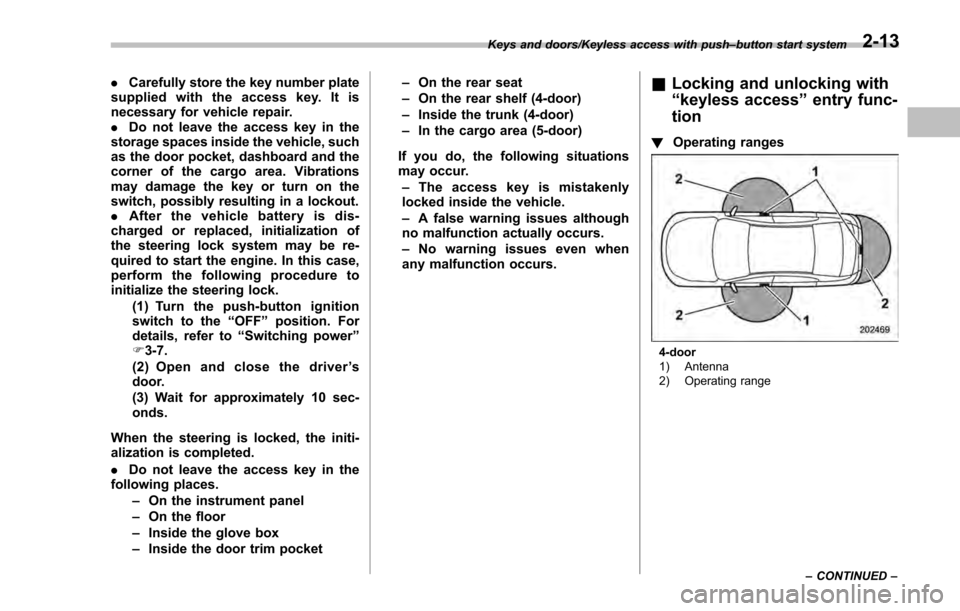
! Operating ranges
4-door
1) Antenna
2) Operating range
Keys and doors/Keyless access with push
–button start system
–CONTINUED –
2-13