2016 SUBARU IMPREZA battery
[x] Cancel search: batteryPage 397 of 594
Starting and operating/Starting and stopping engine (models with push–button start system)
Starting and stopping engine
(models with push-button
start system)
& Safety precautions
Refer to “Safety precautions ”F 2-10.
& Operating range for push-
button start system
Refer to “Operating range for push-button
start system ”F 3-6.
& Starting engine
WARNING
. There are some general precau-
tions when starting the engine.
Carefully read the precautions
described in “Starting engine ”
F 7-9.
. If the indicator on the push-
button ignition switch flashes in
green after the engine has
started, never drive the vehicle.
The steering is still locked, and it
may result in an accident.
CAUTION
. When the operation indicator on
the push-button ignition switch is
flashing in orange, there may be
a malfunction with the vehicle.
Contact a SUBARU dealer imme-
diately.
. If the indicator on the push-
button ignition switch is flashing
in green after the engine has
started, it means that the steering
is still locked. Depress the brake
pedal while moving the steering
wheel to the right and left, and
press the push-button ignition
switch.
. Do not continue pushing the
push-button ignition switch for
more than 10 seconds. Doing so
could cause a malfunction. If the
engine does not start, stop push-
ing the push-button ignition
switch and turn off the engine.
Wait 10 seconds, and then push
the push-button ignition switch
to start the engine.
NOTE
. When the push-button ignition
switch is pressed while depressing the brake pedal, the engine starter
operates for a maximum of 10 seconds
and after starting the engine, the starter
stops automatically.
.
When the push-button ignition
switch is pressed while depressing
the brake pedal, the engine can be
started regardless of the status of the
push-button ignition switch.
. If the security indicator light illumi-
nates when you attempt to start the
engine but the engine does not start,
press the push-button ignition switch
to switch the power to “OFF”and then
try to start the engine again.
. If the engine does not start, press
the push-button ignition switch without
depressing the brake pedal to switch
the power to “OFF”. Then, while de-
pressing the brake pedal more force-
fully, press the push-button ignition
switch.
. The engine start procedures may
not function depending on the radio
wave conditions around the vehicle. In
such a case, refer to “Starting engine”
F 9-19.
. If the vehicle battery is discharged,
the steering cannot be unlocked.
Charge the battery.
7-12
Page 399 of 594
Starting and operating/Remote engine start system (dealer option)
doors until the vehicle is stopped
in a safe location. It is dangerous
because the steering lock may be
activated. Stop the vehicle in a
safe place, and contact a
SUBARU dealer immediately.
CAUTION
.Do not stop the engine while the
select lever is in a position other
than the “P”position.
. If the engine is stopped while the
select lever is in a position other
than the “P”position, the power
will be in “ACC”. If the vehicle is
left in this condition, the battery
may be discharged.
NOTE
Although you can stop the engine by
operating the push-button ignition
switch, do not stop the engine during
driving except in an emergency.
& When access key does not
operate properly
Refer to “Access key –if access key does
not operate properly ”F 9-18.
Remote engine start system
(dealer option)
WARNING
. There are some general precau-
tions when starting the engine.
Carefully read the precautions
described in “General precau-
tions when starting engine ”F 7-
9.
. Do not remote start a vehicle in
an enclosed environment (e.g.
closed garage). Prolonged opera-
tion of a motor vehicle in an
enclosed environment can cause
a harmful build-up of Carbon
Monoxide. Carbon Monoxide is
harmful to your health. Exposure
to high levels of Carbon Monox-
ide can cause headaches, dizzi-
ness or in extreme cases uncon-
sciousness and/or death.
. Before performing any servicing
of the vehicle, temporarily place
the remote engine start system in
service mode to prevent the
system from unexpectedly start-
ing the engine.
The remote engine start system allows you to start the engine from outside the
vehicle. In addition, the remote engine
start system can activate the heater or air
conditioner, providing you with a comfor-
table cabin upon entry.NOTE
The length of time for which it is
acceptable to allow the engine to
remain idling may be bound by local
laws and regulations. Check the local
rules when using the remote engine
start system.
7-14
Page 405 of 594
Starting and operating/Remote engine start system (dealer option)
ing to the following procedure.
1. Open the driver’s door (the driver ’s
door must remain opened throughout the
entire process).
2. Depress and hold the brake pedal.
3. Turn the ignition switch to “ON”then
“LOCK” /“OFF ”, back to “ON”then “LOCK”/
“OFF ”, back to “ON”then “LOCK” /“OFF ”,
then back to “ON”again and leave the
ignition “ON”throughout the programming
process.
4. The system will flash the side marker
lights, tail lights and parking lights and
honk the horn three times, indicating that
the system has entered the transmitter
learn mode.
5. Press and release the “
”button on
the transmitter that you want to program.
6. The system will flash the side marker
lights, tail lights and parking lights and
honk the horn one time, indicating that the
system has learned the transmitter. Upon
successful programming, the remote start
confirmation transmitter button will flash
one time.
7. Repeat step 5 for any additional
transmitters (the system will accept up to
eight transmitters).
8. The system will exit the transmitter
learn mode if the key is turned to the
“LOCK”/ “OFF ”position, the door is closed or after 2 minutes.
&
System maintenance
NOTE
For models without “keyless access
with push-button start system”:
In the event that the vehicle ’s battery is
replaced, discharged or disconnected,
it will be necessary to start the vehicle
a minimum of one time using the key
prior to activating the remote engine
start system. This is required to allow
the vehicle electronic systems to re-
synchronize.
! Changing the batteries
CAUTION
.Do not let dust, oil or water get on
or in the remote engine start
transmitter when replacing the
battery.
. Be careful not to damage the
printed circuit board in the re-
mote engine start transmitter
when replacing the battery.
. Be careful not to allow children to
touch the battery and any re-
moved parts; children could
swallow them. .
There is a danger of explosion if
an incorrect replacement battery
is used. Replace only with the
same or equivalent type of bat-
tery.
. Batteries should not be exposed
to excessive heat such as sun-
shine, fire or the like.
For models with “keyless access with
push-button start system ”:
Perform the procedure described in “Re-
placing battery of access key ”F 11-44.
For models without “keyless access
with push-button start system”:
The two 3-volt lithium batteries (model
CR-2032) supplied in your remote engine
start transmitter should last approximately
one year, depending on usage. When the
batteries begin to weaken, you will notice
a decrease in range (distance from the
vehicle that your remote control operates).
Follow the instructions below to change
the remote engine start transmitter bat-
teries.
7-20
Page 406 of 594
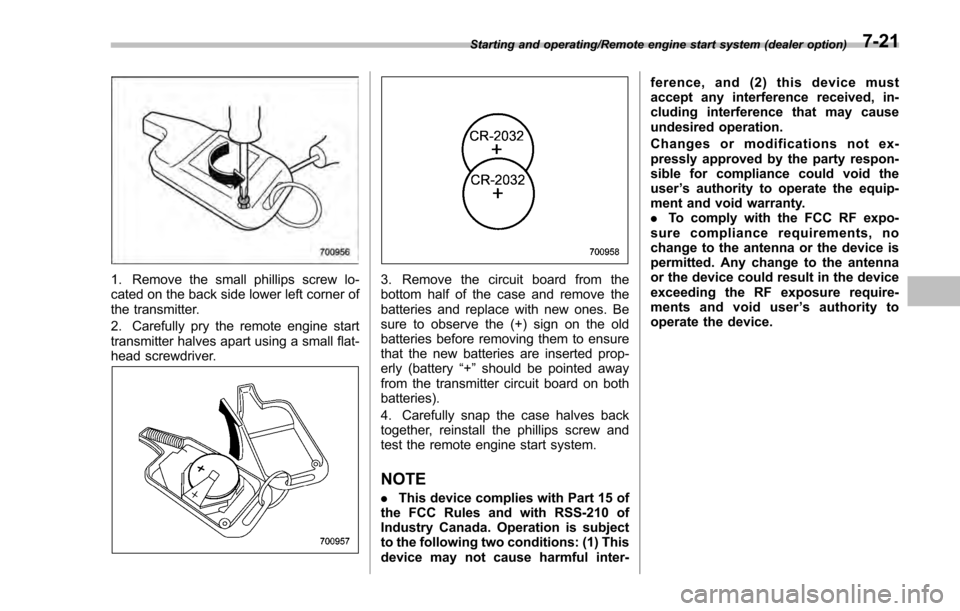
1. Remove the small phillips screw lo-
cated on the back side lower left corner of
the transmitter.
2. Carefully pry the remote engine start
transmitter halves apart using a small flat-
head screwdriver.3. Remove the circuit board from the
bottom half of the case and remove the
batteries and replace with new ones. Be
sure to observe the (+) sign on the old
batteries before removing them to ensure
that the new batteries are inserted prop-
erly (battery“+”should be pointed away
from the transmitter circuit board on both
batteries).
4. Carefully snap the case halves back
together, reinstall the phillips screw and
test the remote engine start system.
NOTE
. This device complies with Part 15 of
the FCC Rules and with RSS-210 of
Industry Canada. Operation is subject
to the following two conditions: (1) This
device may not cause harmful inter- ference, and (2) this device must
accept any interference received, in-
cluding interference that may cause
undesired operation.
Changes or modifications not ex-
pressly approved by the party respon-
sible for compliance could void the
user
’s authority to operate the equip-
ment and void warranty.
. To comply with the FCC RF expo-
sure compliance requirements, no
change to the antenna or the device is
permitted. Any change to the antenna
or the device could result in the device
exceeding the RF exposure require-
ments and void user ’s authority to
operate the device.
Starting and operating/Remote engine start system (dealer option)7-21
Page 409 of 594
Starting and operating/Continuously variable transmission
mission.
. When parking the vehicle, first
securely apply the parking brake
and then place the select lever in
the “P”position. Do not park for
a long time with the select lever
in any other position as doing so
could result in a dead battery.
& Continuously variable trans-
mission features
The continuously variable transmission is
electronically controlled and provides an
infinite number of forward speeds and 1
reverse speed. For some models, it also
has a manual mode or an “L”position.
NOTE
. When the engine coolant tempera-
ture is still low, the transmission will
upshift or downshift at higher engine
speeds than when the coolant tempera-
ture is sufficiently high in order to
shorten the warm-up time and improve
driveability. The gearshift timing will
automatically shift to the normal timing
after the engine has warmed up.
. Immediately after transmission fluid
is replaced, you may feel that the
transmission operation is somewhat
unusual. This results from invalidation of data which the on-board computer
has collected and stored in memory to
allow the transmission to shift at the
most appropriate times for the current
condition of your vehicle. Optimized
shifting will be restored as the vehicle
continues to be driven for a while.
.
When driving a CVT model under
continuous heavy load conditions such
as when towing a camper or climbing a
long, steep hill, the engine speed or the
vehicle speed may automatically be
reduced. This is not a malfunction. This
phenomenon results from the engine
control function maintaining the cool-
ing performance of the vehicle. The
engine and vehicle speed will return to
a normal speed when the engine is able
to maintain the optimum cooling per-
formance after the heavy load de-
creases. Driving under a heavy load
must be performed with extreme care.
Do not try to pass a vehicle in front
when driving on an uphill slope while
towing. .
The continuously variable transmis-
sion is a chain type system that
provides superior transmission effi-
ciency for maximum fuel economy. At
times, depending on varying driving
conditions, a chain operating sound
may be heard that is characteristic of
this type of system.
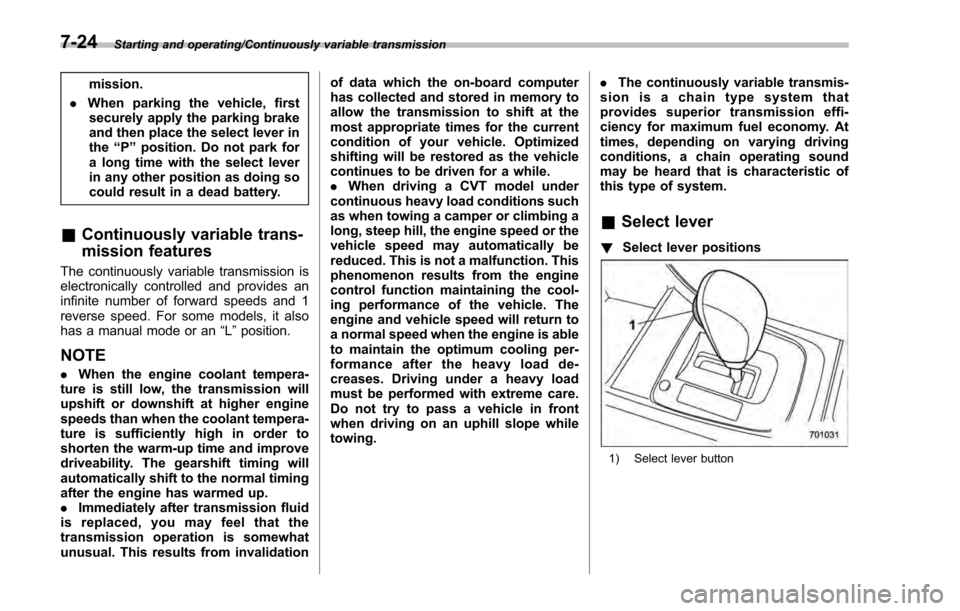
& Select lever
! Select lever positions
1) Select lever button
7-24
Page 438 of 594
.In the following cases, the BSD/
RCTA will temporarily stop operating
(or may stop operating) and the BSD/
RCTA warning indicator will appear.
–When the radar sensor becomes
significantly misaligned (If the or-
ientation of the radar sensor is
shifted for any reason, readjust-
ment is required. Have the sensor
adjusted at a SUBARU dealer.)
– When a large amount of snow or
ice sticks to the rear bumper sur-
face around the radar sensors
– When the vehicle is driven on a
snow-covered road or in an envir-
onment in which there are no
objects around (such as in a desert)
for a long time
– When the temperature around
the radar sensors increased exces-
sively due to long driving on uphill
grades in summer, etc.
– When the temperature around
the radar sensors becomes extre-
mely low
– When the vehicle battery voltage
lowers
– When the vehicle battery be-
comes overvoltage
When the above conditions are cor-
rected, the BSD/RCTA will resume operation and the BSD/RCTA warning
indicator will disappear. However, if the
BSD/RCTA warning indicator has ap-
peared for a prolonged time, have the
system inspected at a SUBARU dealer
as soon as possible.
.
The detectability of the radar sen-
sors is restricted. The BSD/RCTA de-
tection may be impaired and the sys-
tem may not operate properly under the
following conditions.
–When the rear bumper around
the radar sensors is distorted
– When ice, snow or mud adheres
to the rear bumper surface around
the radar sensors
– When stickers, etc. are affixed on
the areas of the radar sensors on
the rear bumper
– During adverse weather condi-
tions such as rain, snow or fog
– When driving on wet roads such
as snow-covered roads and
through puddles
. The radar sensors may not detect or
may have difficulty detecting the fol-
lowing.
–Small motorcycles, bicycles, pe-
destrians, stationary objects on the
road or road side, etc.
– Vehicles with body shapes that
the radar may not reflect (vehicles with a low body height such as
sports cars or a trailer with no
cargo)
–
Vehicles that are not approach-
ing your vehicle even though they
are in the detection area (either on a
neighboring lane to the rear or
beside your vehicle when rever-
sing) (The system determines the
presence of approaching vehicles
based on data detected by the radar
sensors.)
– Vehicles traveling at significantly
different speeds
– Vehicles driving in parallel at
almost the same speed as your
vehicle for a prolonged time
– Oncoming vehicles
– Vehicles in a lane beyond the
neighboring lane
– Vehicles travelling at a signifi-
cantly lower speed that you are
trying to overtake
. On a road with extremely narrow
lanes, the system may detect vehicles
driving in a lane next to the neighbor-
ing lane.
Starting and operating/BSD/RCTA (5 –door models —if equipped)
–CONTINUED –7-53
Page 440 of 594
activated by pressing the BSD/RCTA
OFF switch
–Immediately after the shift lever/
select lever is shifted to the “R ”
position
– When extremely heavy cargo is
loaded in the trunk or cargo area
. During reversing, operation of the BSD/
RCTA approach indicator light and the
warning buzzer may be delayed or the
system may fail to issue these warnings
under the following conditions.
–When backing out of an angled
parking space
– When a large-sized vehicle is
parked next to your vehicle (That
vehicle prevents the propagation of
radar waves.)
– When reversing on sloped roads
– When reversing at a high speed
. The BSD/RCTA approach indicator
light may illuminate when driving close to
solid objects on the road or road side
(such as guardrails, tunnels and side-
walls).
. The BSD/RCTA approach indicator
light may flash when turning at an inter-
section in urban areas or a multilane
intersection.
. The BSD/RCTA approach indicator
light may flash and the warning buzzer
may sound if a building or a wall exists in
the reversing direction.
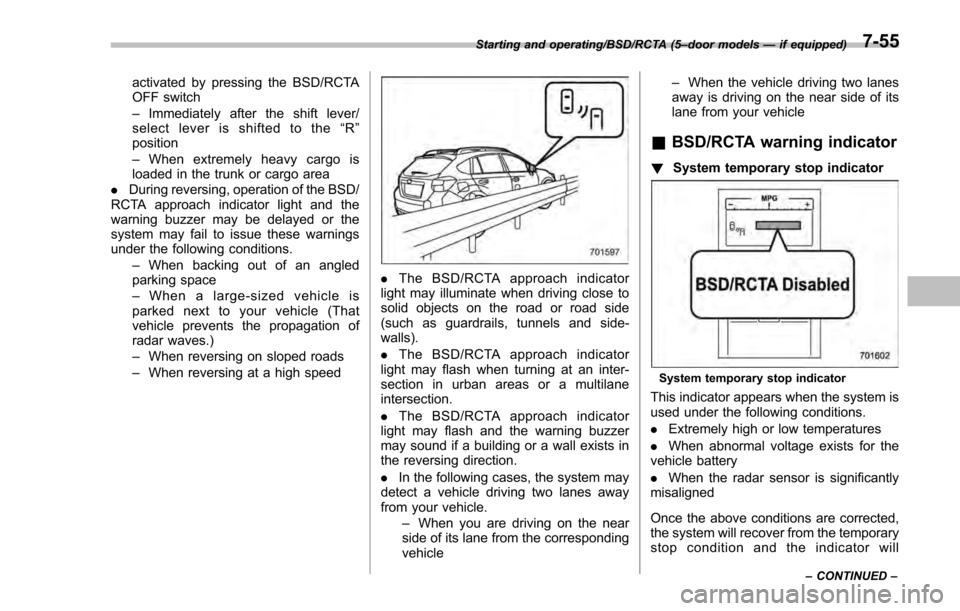
. In the following cases, the system may
detect a vehicle driving two lanes away
from your vehicle.
–When you are driving on the near
side of its lane from the corresponding
vehicle –
When the vehicle driving two lanes
away is driving on the near side of its
lane from your vehicle
& BSD/RCTA warning indicator
! System temporary stop indicator
System temporary stop indicator
This indicator appears when the system is
used under the following conditions.
.Extremely high or low temperatures
. When abnormal voltage exists for the
vehicle battery
. When the radar sensor is significantly
misaligned
Once the above conditions are corrected,
the system will recover from the temporary
stop condition and the indicator will
Starting and operating/BSD/RCTA (5 –door models —if equipped)
–CONTINUED –7-55
Page 442 of 594
nation meter, and the BSD/RCTA is
deactivated.
Press the switch again to activate the
BSD/RCTA. The BSD/RCTA OFF indica-
tor will disappear.
NOTE
.In the following cases, the system
may not operate properly due to
blocked radar waves. Press the BSD/
RCTA OFF switch to deactivate the
system.
–When towing a trailer
– When a bicycle carrier or other
item is fitted to the rear of the
vehicle
– When using a chassis dynam-
ometer or free roller device, etc.
– When running the engine and
makingthewheelsrotatewhile
lifting up the vehicle
. If the ignition switch is turned to the
“LOCK ”/“OFF ”position, the last known
status of the system is maintained. For
example, if the ignition switch is turned
to the “LOCK ”/“OFF ”position with the
BSD/RCTA deactivated, the BSD/RCTA
will remain deactivated the next time
the ignition switch is turned to the
“ON ”position.
. If the vehicle battery is disconnected
due to situations such as battery terminal or fuse replacement, after the
battery is reconnected, the BSD/RCTA
will be activated.
&
Certification for the BSD/
RCTA
FCC ID: OAYSRR2A
CAUTION
FCC WARNING
Changes or modifications not ex-
pressly approved by the party re-
sponsible for compliance could void
the user ’s authority to operate the
equipment.
This device complies with part 15 of the
FCC Rules. Operation is subject to the
following two conditions: (1) This device
may not cause harmful interference, and
(2) this device must accept any interfer-
ence received, including interference that
may cause undesired operation.
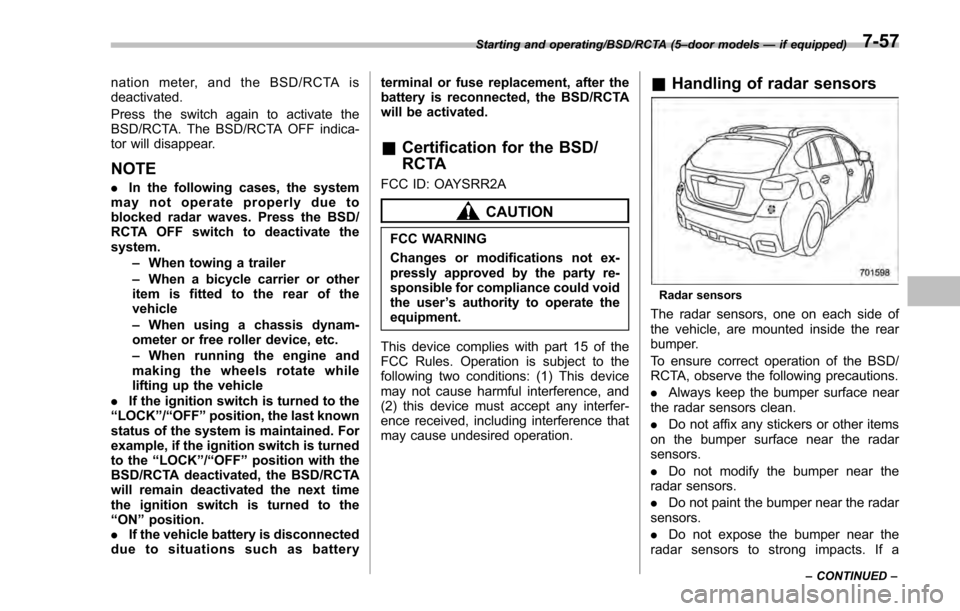
& Handling of radar sensors
Radar sensors
The radar sensors, one on each side of
the vehicle, are mounted inside the rear
bumper.
To ensure correct operation of the BSD/
RCTA, observe the following precautions.
. Always keep the bumper surface near
the radar sensors clean.
. Do not affix any stickers or other items
on the bumper surface near the radar
sensors.
. Do not modify the bumper near the
radar sensors.
. Do not paint the bumper near the radar
sensors.
. Do not expose the bumper near the
radar sensors to strong impacts. If a
Starting and operating/BSD/RCTA (5 –door models —if equipped)
–CONTINUED –7-57