Page 194 of 594
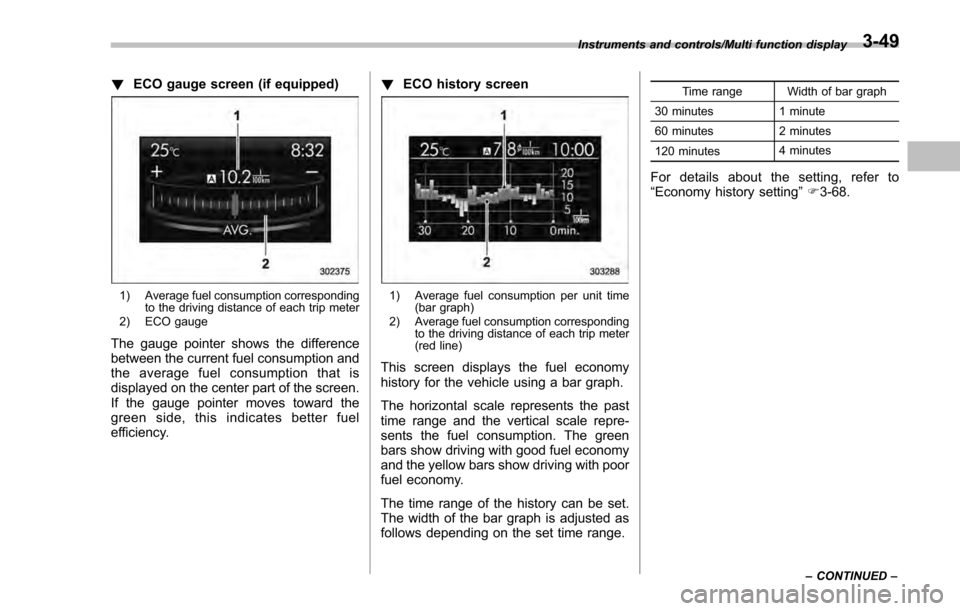
!ECO gauge screen (if equipped)
1) Average fuel consumption corresponding
to the driving distance of each trip meter
2) ECO gauge
The gauge pointer shows the difference
between the current fuel consumption and
the average fuel consumption that is
displayed on the center part of the screen.
If the gauge pointer moves toward the
green side, this indicates better fuel
efficiency. !
ECO history screen
1) Average fuel consumption per unit time
(bar graph)
2) Average fuel consumption corresponding to the driving distance of each trip meter
(red line)
This screen displays the fuel economy
history for the vehicle using a bar graph.
The horizontal scale represents the past
time range and the vertical scale repre-
sents the fuel consumption. The green
bars show driving with good fuel economy
and the yellow bars show driving with poor
fuel economy.
The time range of the history can be set.
The width of the bar graph is adjusted as
follows depending on the set time range.
Time range Width of bar graph
30 minutes 1 minute
60 minutes 2 minutes
120 minutes 4 minutes
For details about the setting, refer to
“
Economy history setting ”F 3-68.
Instruments and controls/Multi function display
–CONTINUED –3-49
Page 197 of 594
Instruments and controls/Multi function display
ItemDetails
Average vehicle speed (Average
vehicle speed for the entire driving
time from when the trip meter was
reset)
Lifetime fuel consumption
Engine oil temperature
Accelerator opening ratio
Journey time (the time that has
elapsed since the ignition switch
was turned to the“ON ”position) (if
equipped)
Journey distance (the distance
that has been driven since the
ignition switch was turned to the
“ ON ”position)
Average fuel consumption for the
entire driving distance from when
the ignition switch was turned to
the “ON ”position
Boost pressure
! Guidance screen
When thebutton is pressed and held,
the selection screen can be displayed.
The displayed contents can be set or
customized from the selection screen. For
details, refer to “Selection screen” F3-54. !
Clock/calendar screenClock (analog format)
Clock (digital format)
3-52
Page 199 of 594

Instruments and controls/Multi function display
&Selection screen
When thebutton is pushed and held, the setting screen for each menu can be displayed. Select the preferred menu by operating
the “”or “”switch.
Top menu Menu option DescriptionPage
Time/Date Time/Date Set and adjust the time and date. 12h or 24h format can be selected. 3-57
Birthday Set a birthday. 3-58
Anniversary Set an anniversary day. 3-60
Daylight Saving Time Turn the daylight saving time on or off 3-63
Go Back Return to the top menu. —
Display Contrast Adjust the contrast. +5↔−53 -6 4
Screen Off Turn the screen on or off. On or Off3-64
Beep Adjust the beep sound volume. High, Low or Off3-65
Go Back Return to the top menu. —
Screen Setting Top Display Set and customize the top display information
contents. Avg Cons, Inst Cons, Range or
Off
3-66
Cons Customize the fuel consumption information display. 3-67
Eco History Set and customize the time of logging fuel
consumption history. 30 min, 60 min or 120 min 3-68
Triple Meter Set and customize the triple meter. 3-70
Clock Select the clock format. Analog, Digital, Calendar or Off 3-71
Bypass Screen Set the bypass screen for each item. On or Off3-72
Languages Select the display language. English or French3-73
Go Back Return to the top menu. —
3-54
Page 201 of 594
Instruments and controls/Multi function display
Top menuMenu option DescriptionPage
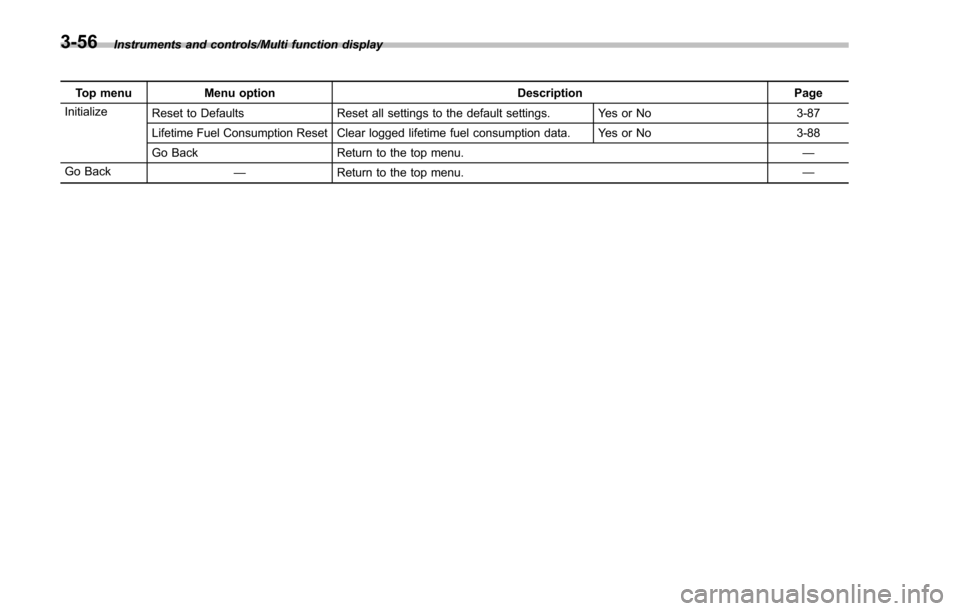
Initialize Reset to Defaults Reset all settings to the default settings. Yes or No 3-87
Lifetime Fuel Consumption Reset Clear logged lifetime fuel consumption data. Yes or No 3-88
Go Back Return to the top menu. —
Go Back —Return to the top menu. —
3-56
Page 212 of 594
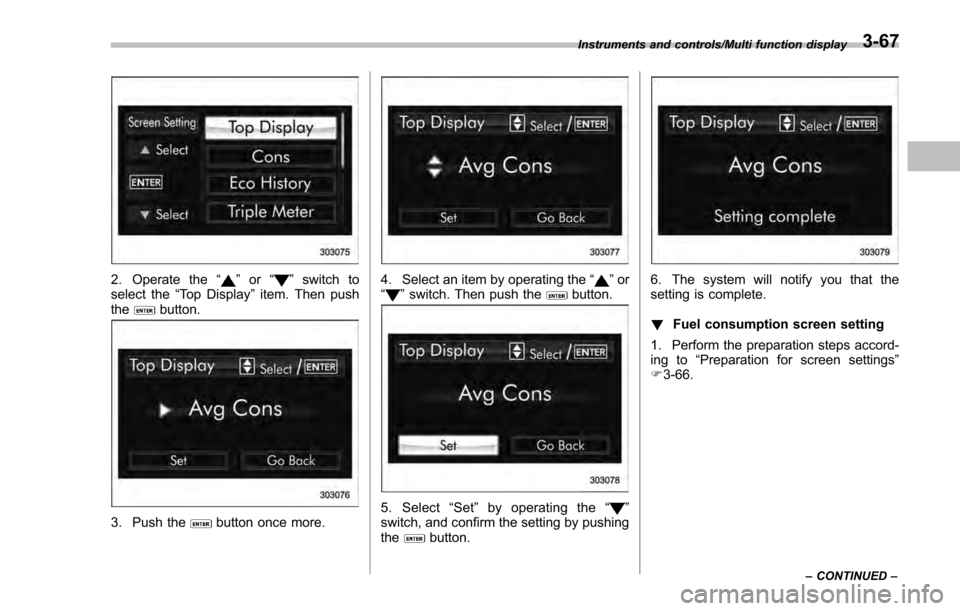
2. Operate the“”or “”switch to
select the “Top Display ”item. Then push
the
button.
3. Push thebutton once more.
4. Select an item by operating the “”or
“” switch. Then push thebutton.
5. Select “Set ”by operating the “”
switch, and confirm the setting by pushing
the
button.
6. The system will notify you that the
setting is complete.
! Fuel consumption screen setting
1. Perform the preparation steps accord-
ing to “Preparation for screen settings”
F 3-66.
Instruments and controls/Multi function display
–CONTINUED –3-67
Page 214 of 594
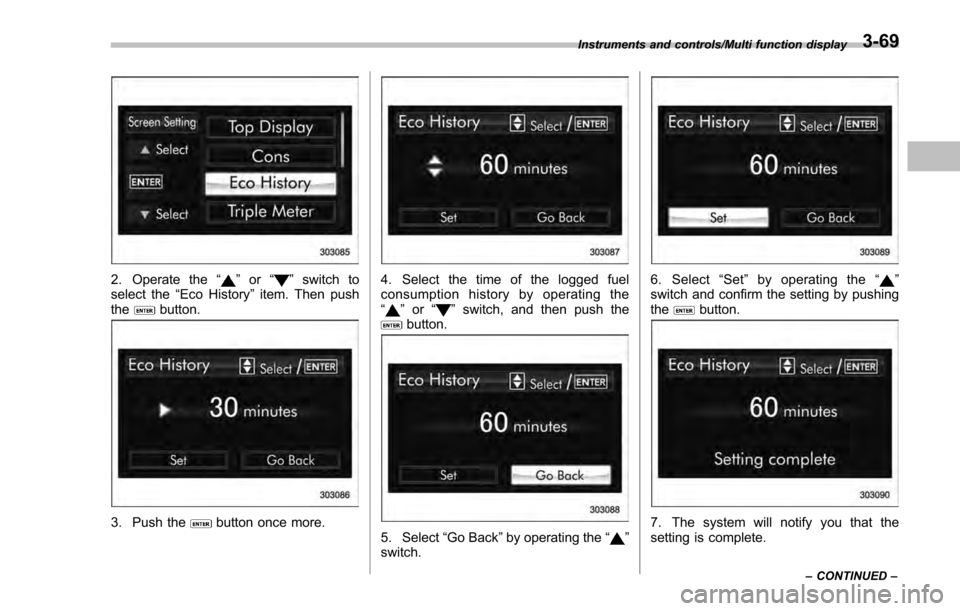
2. Operate the“”or “”switch to
select the “Eco History ”item. Then push
the
button.
3. Push thebutton once more.
4. Select the time of the logged fuel
consumption history by operating the
“
” or “”switch, and then push thebutton.
5. Select “Go Back”by operating the “”
switch.
6. Select “Set ”by operating the “”
switch and confirm the setting by pushing
the
button.
7. The system will notify you that the
setting is complete.
Instruments and controls/Multi function display
–CONTINUED –3-69
Page 233 of 594
Instruments and controls/Multi function display
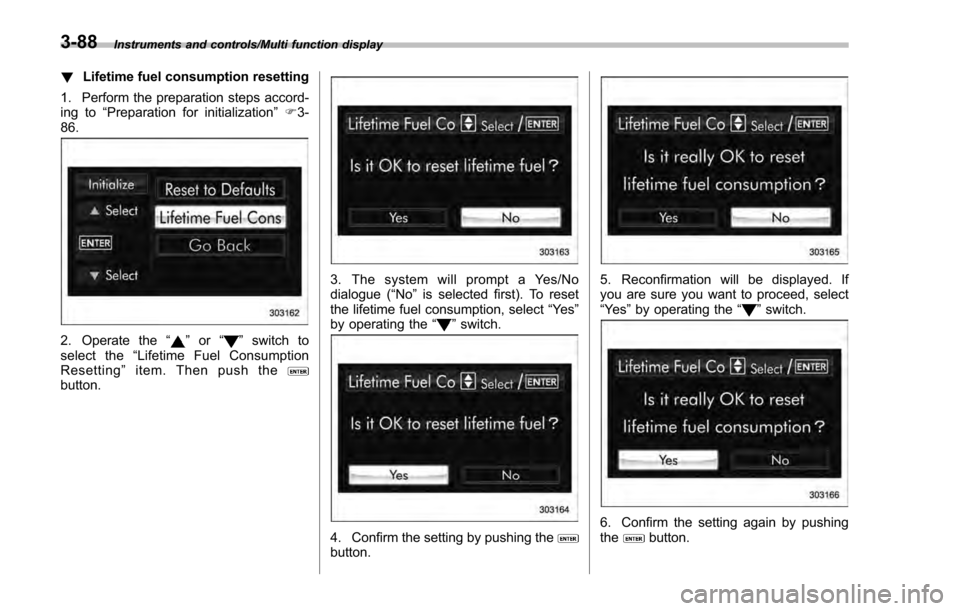
!Lifetime fuel consumption resetting
1. Perform the preparation steps accord-
ing to “Preparation for initialization ”F 3-
86.
2. Operate the “”or “”switch to
select the “Lifetime Fuel Consumption
Resetting ”item. Then push the
button.
3. The system will prompt a Yes/No
dialogue ( “No”is selected first). To reset
the lifetime fuel consumption, select “Ye s”
by operating the “
”switch.
4. Confirm the setting by pushing thebutton.
5. Reconfirmation will be displayed. If
you are sure you want to proceed, select
“Ye s ”by operating the “
”switch.
6. Confirm the setting again by pushing
thebutton.
3-88
Page 445 of 594
Driving tips/New vehicle break–in driving –the first 1,000 miles (1,600 km)
New vehicle break-in driving
– the first 1,000 miles (1,600
km)
The performance and long life of your
vehicle are dependent on how you handle
and care for your vehicle while it is new.
Follow these instructions during the first
1,000 miles (1,600 km):
. Do not race the engine. And do not
allow engine speed to exceed 4,000 rpm
except in an emergency.
. Do not drive at one constant engine or
vehicle speed for a long time, either fast or
slow.
. Avoid starting suddenly and rapid
acceleration, except in an emergency.
. Avoid hard braking, except in an
emergency.
The same break-in procedures should be
applied to an overhauled engine, newly
mounted engine or when brake pads or
brake linings are replaced with new ones.
Fuel economy hints
The following suggestions will help to save
fuel.
. Select the proper gear position for the
speed and road conditions.
. Avoid sudden acceleration or decelera-
tion. Always accelerate gently until you
reach the desired speed. Then try to
maintain that speed for as long as
possible.
. Do not pump the accelerator and avoid
racing the engine.
. Avoid unnecessary engine idling.
. Keep the engine properly tuned.
. Keep the tires inflated to the correct
pressure shown on the tire placard, which
is located under the door latch on the
driver ’s side. Low pressure will increase
tire wear and fuel consumption.
. Use the air conditioner only when
necessary.
. Keep the front and rear wheels in
proper alignment.
. Avoid carrying unnecessary luggage or
cargo.
Engine exhaust gas (carbon
monoxide)
WARNING
. Never inhale engine exhaust gas.
Engine exhaust gas contains
carbon monoxide, a colorless
and odorless gas which is dan-
gerous, or even lethal, if inhaled.
. Always properly maintain the en-
gine exhaust system to prevent
engine exhaust gas from enter-
ing the vehicle.
. Never run the engine in a closed
space, such as a garage, except
for the brief time needed to drive
the vehicle in or out of it.
. Avoid remaining in a parked
vehicle for a lengthy time while
the engine is running. If that is
unavoidable, then use the venti-
lation fan to force fresh air into
the vehicle.
. Always keep the front ventilator
inlet grille free from snow, leaves
or other obstructions to ensure
that the ventilation system al-
ways works properly.
. If at any time you suspect that
8-2