2016 SUBARU IMPREZA buttons
[x] Cancel search: buttonsPage 252 of 594
6. When the indicator light flashes slowly
and then rapidly after several seconds,
release both buttons.
7. Plug the motor of the entrance gate/
garage door opener to the outlet.
8. Test your entrance gate/garage door
opener by pressing the programmed
HomeLink
®button.
! Operating the HomeLink
®Wire-
less Control System
Once programmed, the HomeLink
®Wire-
less Control System can be used to
remote-control the devices to which its
buttons are programmed. To activate a
device, simply press the appropriate but-
ton. The indicator light illuminates, indicat-
ing that the signal is being transmitted.
!Programming other devices
To program other devices such as door
locks, home lighting and security systems,
contact HomeLink
®at www.homelink.com
or call 1-800-355-3515.
! Reprogramming a single
HomeLink
®button
1. Press and hold the HomeLink
®button
you wish to reprogram. DO NOT release
the button until step 4 has been com-
pleted.
2. When the HomeLink
®indicator light begins to flash slowly (after approximately
20 seconds), position the hand-held trans-
mitter of the device between 1 to 3 inches
(25 to 76 mm) away from the HomeLink
®button you wish to program.
3. Press and hold the hand-held trans-
mitter button. The HomeLink
®indicator
light will flash, first slowly and then rapidly.
4. When the indicator light begins to flash
rapidly, release both buttons.
The programming for the previous device
is now erased and the new device can be
operated by pressing the HomeLink
®button.
!Erasing HomeLink
®button mem-
ory
NOTE
. Performing this procedure erases
the memory of all the preprogrammed
buttons simultaneously. The memory
of individual buttons cannot be erased.
. It is recommended that upon the
sale of the vehicle, the memory of all
programmed HomeLink
®buttons be
erased for security purposes.
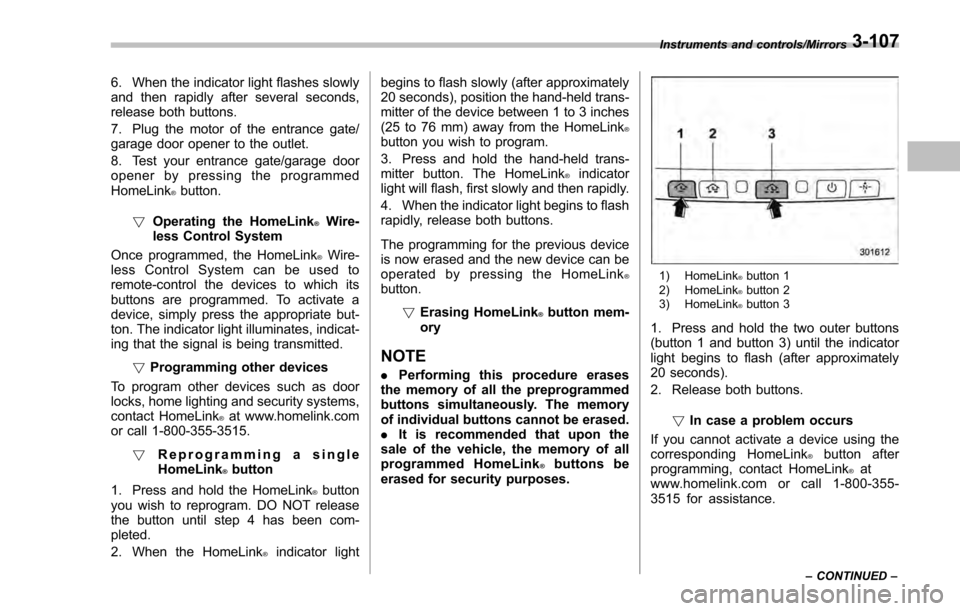
1) HomeLink®button 1
2) HomeLink®button 2
3) HomeLink®button 3
1. Press and hold the two outer buttons
(button 1 and button 3) until the indicator
light begins to flash (after approximately
20 seconds).
2. Release both buttons.
!In case a problem occurs
If you cannot activate a device using the
corresponding HomeLink
®button after
programming, contact HomeLink®at
www.homelink.com or call 1-800-355-
3515 for assistance.
Instruments and controls/Mirrors
–CONTINUED –3-107
Page 264 of 594

Automatic climate control
operation (type B, C and D)
When this mode is selected, the fan
speed, airflow distribution, air-inlet control,
and air conditioner compressor operation
are automatically controlled. To activate
this mode, perform the following.
&Type B
1. Turn the airflow mode selection dial
and fan speed control dial to the “AUTO”
position.
2. Set the preferred temperature using
the temperature control dial.
NOTE
. Each function can be individually
set to the AUTO mode independently of
the other functions. Any function set to
the AUTO mode is controlled automa-
tically. Any function not set to the
AUTO mode can be manually adjusted
as desired.
. The controllable temperature range
may vary depending on the regional
specifications of the vehicle.
To turn off the climate control system, turn
the fan speed control dial to the “OFF ”
position. Then the air inlet selection will be set as follows.
.
when the AUTO mode is selected: OFF
(outside air)
. when the AUTO mode is not selected:
the mode that was selected when turning
off the climate system will be selected.
& Type C and D
1. Depress the “AUTO ”button. The
indicator light “FULL AUTO ”on the display
illuminates.
2. Set the preferred temperature using
the temperature control dial.
NOTE
. The controllable temperature range
may vary depending on the regional
specifications of the vehicle.
. If you operate any of the buttons on
the control panel other than the “OFF”
button, rear window defogger button
and temperature control dial(s) during
FULL AUTO mode operation, the
“FULL ”indicator light on the control
panel will turn off and the “AUTO ”
indicator light will remain illuminated.
You can then manually control the
system as desired using the button
you operated. To change the system
back to the FULL AUTO mode, press
the “AUTO ”button. To turn off the climate control system,
press the
“OFF ”button. Then the air inlet
selection will be set to OFF (outside air).
& Operation tips
. Operate the automatic climate control
system when the engine is running.
. Even when cooling is not necessary,
setting the temperature much lower than
the current outlet air temperature turns on
the air conditioner compressor automati-
cally and the “A/C”indicator light on the
control panel illuminates.
Climate control/Automatic climate control operation (type B, C and D)
–CONTINUED –4-7
Page 275 of 594

Audio/Audio set
&Base display audio set (if equipped)
1) Power/VOLUME knob
2) Eject button
3) AUDIO/TUNE knob
4) HOME button 5) APPS button
6) Display
7) SEEK/TRACK buttons
The audio set will operate only when the
ignition switch is in the
“ACC ”or “ON ”
position.
. Power and audio controls: refer to
“Basic operation ”F 5-18.
. SUBARU STARLINK (if equipped):
refer to “SUBARU STARLINK ”F 5-26.
. Radio operation: refer to “AM/FM radio”
F 5-28.
. Satellite radio operation (if equipped):
refer to “SiriusXM Satellite Radio” F5-37.
. aha
TM: refer to “ahaTMby HARMAN ”
F 5-44.
. Pandora
®(if equipped): refer to “Pan-
dora®” F 5-50.
. CD (compact disc) player operation:
refer to “CD”F 5-53.
. USB storage device: refer to “USB
memory ”F 5-55.
. iPod operation: refer to “iPod”F 5-56.
. Bluetooth
®audio: refer to “Bluetooth
audio ”F 5-58.
. Auxiliary input jack: refer to “AUX”F 5-
61.
. Hands-free phone system: refer to
“Hands-free phone system ”F 5-71.
5-4
Page 487 of 594
In case of emergency/Access key–if access key does not operate properly
Access key –if access key
does not operate properly
CAUTION
Keep metallic objects, magnetic
sources and signal transmitters
away from the area between the
access key and the push-button
ignition switch. They may interfere
with the communication between
the access key and the push-button
ignition switch.
If the locking/unlocking procedures, power
switch procedures or engine start proce-
dures cannot be operated because of
strong radio signals in the surrounding
area or a low battery condition of the
access key, perform the following proce-
dure. When the battery of the access key
is discharged, replace it with a new one.
Refer to “Replacing battery of access key ”
F 11-44.
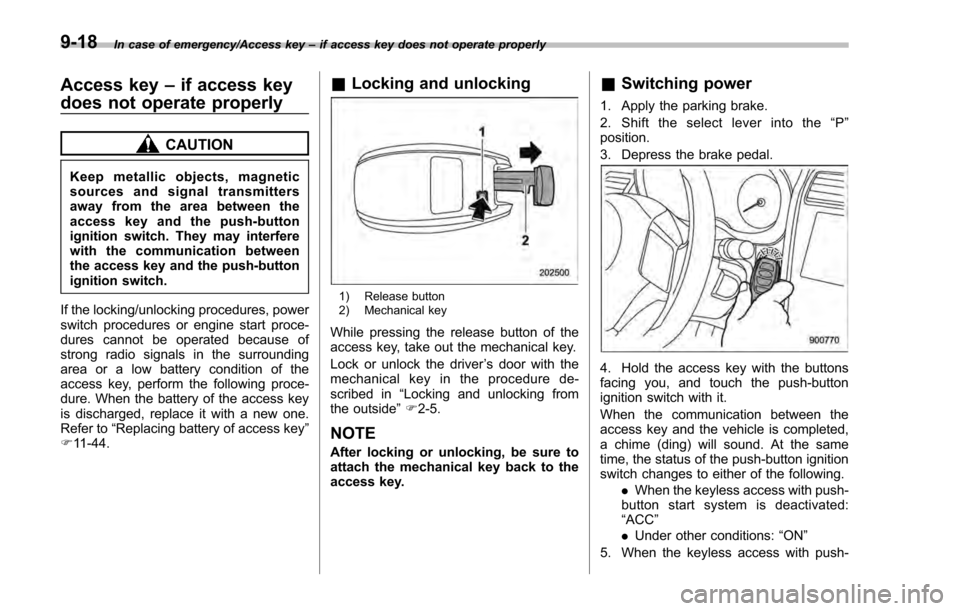
& Locking and unlocking
1) Release button
2) Mechanical key
While pressing the release button of the
access key, take out the mechanical key.
Lock or unlock the driver ’s door with the
mechanical key in the procedure de-
scribed in “Locking and unlocking from
the outside ”F 2-5.
NOTE
After locking or unlocking, be sure to
attach the mechanical key back to the
access key.
& Switching power
1. Apply the parking brake.
2. Shift the select lever into the “P ”
position.
3. Depress the brake pedal.
4. Hold the access key with the buttons
facing you, and touch the push-button
ignition switch with it.
When the communication between the
access key and the vehicle is completed,
a chime (ding) will sound. At the same
time, the status of the push-button ignition
switch changes to either of the following.
.When the keyless access with push-
button start system is deactivated:
“ACC ”
. Under other conditions: “ON ”
5. When the keyless access with push-
9-18
Page 488 of 594
button start system is deactivated, press
the push-button ignition switch with the
brake pedal released. The status of the
push-button ignition switch then changes
to“ON ”.
NOTE
If the power does not switch even
though the above procedure was fol-
lowed precisely, contact your SUBARU
dealer.
&Starting engine
1. Apply the parking brake.
2. Shift the select lever into the “P ”
position.
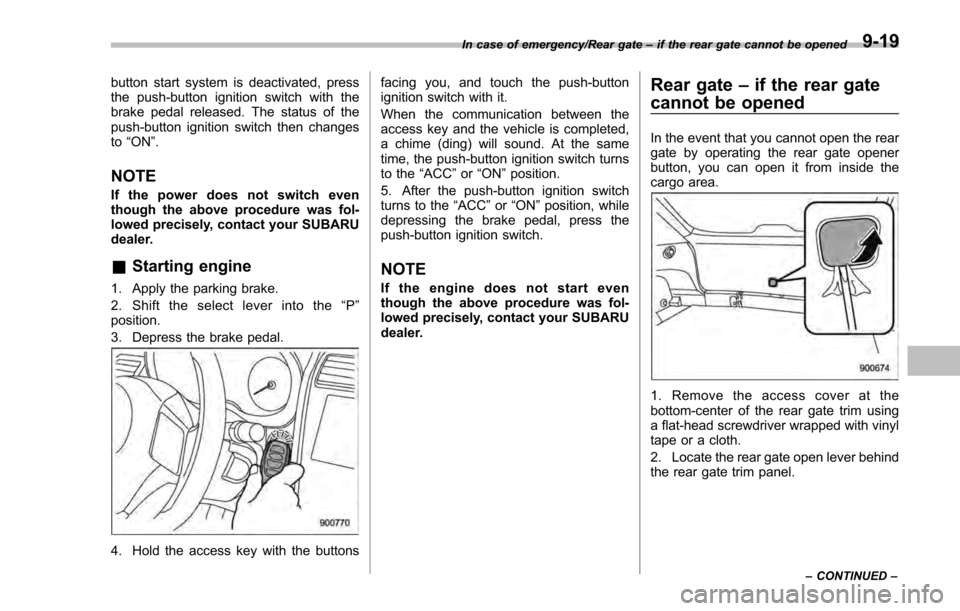
3. Depress the brake pedal.
4. Hold the access key with the buttons facing you, and touch the push-button
ignition switch with it.
When the communication between the
access key and the vehicle is completed,
a chime (ding) will sound. At the same
time, the push-button ignition switch turns
to the
“ACC”or “ON ”position.
5. After the push-button ignition switch
turns to the “ACC ”or “ON ”position, while
depressing the brake pedal, press the
push-button ignition switch.
NOTE
If the engine does not start even
though the above procedure was fol-
lowed precisely, contact your SUBARU
dealer.
Rear gate –if the rear gate
cannot be opened
In the event that you cannot open the rear
gate by operating the rear gate opener
button, you can open it from inside the
cargo area.
1. Remove the access cover at the
bottom-center of the rear gate trim using
a flat-head screwdriver wrapped with vinyl
tape or a cloth.
2. Locate the rear gate open lever behind
the rear gate trim panel.
In case of emergency/Rear gate –if the rear gate cannot be opened
–CONTINUED –9-19