2016 SKODA SUPERB long
[x] Cancel search: longPage 205 of 336

Brakes and Parking
Introduction
This chapter contains information on the following subjects:
Electric parking brake
203
Auto Hold function
204
Parking
205
The wear of the brake pads is dependent on the operating conditions and driv-
ing style. Under difficult conditions (e.g. urban, sporty driving style) the condi-
tion of the brakes should also be checked by a specialist garage between the
service intervals.
The performance of the brakes can be delayed if the brakes are damp, iced up
in winter or if covered in a layer of salt . The brakes are cleaned and dried by
applying the brakes several times »
.
Corrosion on the brake discs and dirt on the brake pads occur if the vehicle has
been parked for a long period and if you do not make much use of the braking
system. The brakes are cleaned by applying the brakes several times »
.
Before travelling a long distance with a steep gradient , reduce speed and
shift into the next lowest gear. As a result, the braking effect of the engine will
be used, reducing the load on the brakes. If you do have to brake, this should
be carried out at intervals.
Emergency braking display - when an emergency braking is performed, the
automatic flashing of the brake lights are used to alert the traffic behind.
New brake pads must first be “worn in” because these do not initially have the
best possible braking effect. Drive especially carefully for the first 200 km or
so.
A too low brake fluid level can cause faults in the braking system , the warn-
ing light illuminates in the instrument cluster
» page 35,
Brake system
. If
the warning light does not illuminate and an extended stopping distance is re-
quired, then driving should be adapted according to the unknown cause of
fault and restricted braking effect - seek the assistance of a specialist garage
immediately.
The brake booster increases the pressure generated with the brake pedal. The
brake booster only operates when the engine is running.
WARNING■ Greater physical effort is required for braking when the engine is switch-
ed off – risk of accident!■
During the braking procedure on a vehicle with manual transmission,
when the vehicle is in gear and at low revs, press the clutch pedal. Other-
wise, the functionality of the brake system may be impaired – risk of acci-
dent!
■
Do not press the brake pedal if braking is now required. This causes the
brakes to overheat and can also result in a longer braking distance and ex-
cessive wear - risk of accident!
■
Braking for the purpose of drying and cleaning the brake discs should be
carried out only if the traffic conditions permit. Do not place any other road
users in jeopardy.
■
Recommendations for new brake pads have to be observed.
■
When stopping and parking, the parking brake should always be on, oth-
erwise the vehicle could move off - there is the risk of an accident!
■
If a front spoiler, full wheel trim, etc. is mounted retrospectively, it must
be ensured that the air supply to the front wheel brakes is not reduced.
Otherwise, the functionality of the brake system may be impaired – risk of
accident!
Electric parking brake
Fig. 255
Parking brake button
203Starting-off and Driving
Page 206 of 336

Fig. 256
Parking brake operation
Read and observe
on page 203 first.
The electric parking brake (hereinafter referred as a parking brake) replaces the handbrake. This secures the vehicle when stopping and parking against
unwanted movement.
The parking brake can be used when the ignition is on or off.
Switching on
›
Pull the button in the direction of arrow
1
» Fig. 256 and hold until the
symbol in the button and warning light illuminate in the instrument clus-
ter.
Automatic shut-off
The parking brake switches off automatically when starting, as long as the
driver's door is closed and the driver has fastened the seat belt.
Should the vehicle start to roll away when starting on a downhill slope, step on
the accelerator or switch on the parking brake.
Turning off the parking brake can be prevented if, before starting, the but-
ton is pulled and held in the direction of arrow
1
» Fig. 256 . The parking brake
turns off after releasing the button.
Manual shut-down
›
With the ignition switched on , press the brake pedal and at the same time
push the button in the direction of arrow
2
» Fig. 256 .
›
With the engine running , press either the brake or accelerator pedal and
press the button in the direction of arrow
2
.
The symbol in the button and the warning light
in the instrument cluster
go out.
Emergency braking function
If, while driving, a fault occurs in the brake system, the parking brake can be
used as an emergency brake »
.
›
Pull the
button in the direction of arrow
1
and » Fig. 256 hold (you hear
an audible signal), the vehicle starts to brake strongly.
The braking process is interrupted when the key is released or the accelerator
pedal is actuated.
WARNING■ The emergency brake is to be used only in an emergency when the vehi-
cle cannot be stopped with the brake pedal.■
Do not place any objects in the recessed grip for the finger in front of the
parking brake key - the parking brake button could be blocked!
Note
■ If the vehicle battery is discharged, it is not possible to release the parking
brake. First connect the vehicle first to a power source, such as the battery of
another vehicle » page 287, Jump-starting and then turn off the parking
brake.■
Noise when switching on and off the parking brake is normal and therefore
harmless.
Auto Hold function
Fig. 257
The Auto-Hold function button
Read and observe on page 203 first.
The Auto Hold function (hereinafter referred to only as system) prevents the
vehicle from rolling unintentionally when stopped. It is, for example, not nec-
essary to secure the vehicle with the brake pedal or parking brake at traffic
lights.
204Driving
Page 211 of 336

When approaching maximum speed (launch control function)1)
The launch control function is available in mode S or Tiptronic.›
Disable the TCS » page 212, Braking and stabilisation systems .
›
START STOP deactivate » page 202, Manually disable / enable system .
›
Fully depress and hold the brake pedal with your left foot.
›
Fully depress the accelerator pedal with your right foot.
›
Release the brake pedal - the vehicle is running at maximum acceleration.
Driving in neutral (“coasting”)
When releasing the accelerator pedal, the vehicle moves without the braking
effect of the engine.
Operating conditions
▶ The selector lever is in the D/S position.
▶ Driving mode Eco or Individual (Drive - Eco) is selected » page 240, Select the
driving mode (Driving Mode Selection) .
▶ The vehicle is travelling at more than 20 km/h.
▶ No trailer or other accessory is connected to the trailer socket.
The gear is selected again automatically, when you depress the accelerator or
brake pedal or pull the left rocker switch
-
towards the steering wheel
» page 208 , Manual shifting of gears (Tiptronic) .
WARNINGRapid acceleration, particularly on slippery roads, can lead to loss of control
of the vehicle – risk of accident!
Running in the engine and economical driving
Introduction
This chapter contains information on the following subjects:
Running in the engine
209
Tips for economical driving
209
DriveGreen function
210
Radiator shutters
210Running in the engine
During the first 1,500 km, the driving manner determines the quality of the
running in process on a new engine.
During the first 1,000 km , the engine should not be charged with more than
3/4 of the maximum permitted engine revs and without the trailer.
In the area of 1,000 to 1,500 kilometres , the engine load can be increased up
to the maximum permitted engine speed.
Tips for economical driving
The fuel consumption depends on the driving style, road condition, weather
conditions and the like.
For an economical driving style, the following instructions must be observed. ▶ Avoid unnecessary acceleration and braking.
▶ Observe the recommended gear » page 44.
▶ Avoid full throttle and high speeds.
▶ Reduce idling.
▶ Avoid short distances.
▶ Ensure the correct tyre inflation pressure is maintained » page 277.
▶ Avoid unnecessary ballast.
▶ Remove the roof rack when it is not needed.
▶ Only switch on electrical consumers (e.g. seat heating) for as long as they are
needed. In the Infotainment menu
→
→
conv. Consumers,
, up to three
consumers who currently have the largest share of fuel consumption, can be
displayed.
▶ Before switching on, ventilate the cooling system briefly and do not use the
cooling system with open windows.
▶ Do not leave windows open at high speed.
1)
This function is only valid for some engines.
209Starting-off and Driving
Page 222 of 336

Wizard for “Blind Spot”Monitoring - OperationRead and observe
and on page 219 first.
At a speed over 15 km/h, the area alongside and behind the vehicle is moni-
tored by the system. At the same time, the distance and the difference in
speed between your vehicle and the other vehicles in the monitored area can
be measured.
When driving, the sensors monitor an area to the left and right to the extent of
a normal lane width.
If a vehicle is detected in the “blind spot” area, the system indicates this vehi-
cle by the indicator light in the exterior mirror.
System constraint
The system is unable to recognise the specific lane width by means of sensors.
Therefore this can e.g. in the following cases respond to a vehicle in a further
lane.
▶ When driving on a road with narrow lanes or on the lane edge.
▶ Driving around a bend.
The system may also respond to objects on the roadside such as crash barriers,
noise barriers or similar objects.
Wizard for “Blind Spot”Monitoring - driving situations and
warnings
Fig. 273
Driving situation / indicator light in the left outside mirror indi-
cates the driving situation
Fig. 274
Driving situation / indicator light in the right outside mirror indi-
cates the driving situation
Read and observe
and on page 219 first.
In the following situations, the indicator light in the outside mirror indicates avehicle in the “blind spot”.
▶ You vehicle
B
is being overtaken by vehicle
A
» Fig. 273 .
▶ Your vehicle
C
overtakes the vehicle
D
at a greater speed of max. 10
km » Fig. 274 . If the speed during the overtaking is even higher, then there is
no warning by the warning light.
The warning display is always in the exterior mirror on the side of the vehicle where a vehicle is detected in the “blind spot”.
The greater the speed difference between the two vehicles, the earlier the
warning (by means of the warning light) regarding the vehicle that is overtak-
ing you takes place.
Two warning levels
light up - a vehicle has been detected in the “blind spot”.
flash - a vehicle has been detected in the “blind spot” and the turn signal is
switched on .
An advanced warning for vehicles with Lane Assist
flash also if the steering wheel is turned in the direction of the vehicle in
the “blind spot” . Therefore the Lane Assist » page 243 must be enabled and
the boundary line between the vehicles detected.
If in this case your vehicle indicates crossing the boundary line, with a short vi-
bration of the steering wheel.
220Driving
Page 236 of 336

OperationFig. 294
Instrument cluster display: Examples of ACC displays
Fig. 295
Instrument cluster display: Examples of ACC status displays
Read and observe
on page 233 first.
The ACC allows you to set a speed of 30 - 160 or 210 km / h (depending on
equipment) and the distance to the vehicle ahead in the range of a very short
to a very long distance.
The ACC adjusts the set speed with respect to the detected vehicle ahead,
thus maintaining the selected proximity.
The ACC can detect a vehicle that is up to approx. 150 m ahead using the radar
sensor.
ACC displays » Fig. 294
Vehicle detected (control active)
Line showing the displacement of the distance when setting » page 236,
Set the clearance level
12Set distance to the vehicle ahead
Vehicle detected (control deactivated)
ACC status displays » Fig. 295
Regulation is inactive (in the colour display the digits of speed limits is
shown in grey).
Regulation active - no vehicle detected (in the colour display the digits of
the speed limits are highlighted).
Regulation deactivated - no speed stored.
Regulation active - vehicle detected (in the colour display the digits of the
speed limits are highlighted).
Note to reduce speed
If the delay of the ACC is insufficient in relation to the vehicle in front, the
warning light lights up in the instrument cluster and the display shows a
message to engage the brake pedal.
Regulation according to the vehicle in the adjacent lane
During regulation your vehicle may be regulated according to the vehicle in the
adjacent lane.
This could occur at speeds above about 80 km/h when your vehicle is moving
faster than the vehicle in the adjacent lane on the driver's side. The display
shows the detected vehicle is in the adjacent lane.
Note
Some ACC notifications in the display of the instrument cluster may be hidden
by notifications for other functions. An ACC notification automatically appears
for a brief moment when there is a change in status of the ACC.
Automatic stopping and starting
Read and observe
on page 233 first.
Vehicles with an automatic transmission can decelerate to a standstill and
start moving again using the ACC.
Decelerate to a standstill
If a vehicle ahead decelerates to a standstill, the ACC will also decelerate your
vehicle to a standstill.
Starting to drive again after a holding period
As soon as the vehicle ahead starts moving again after a holding period, your
vehicle will also move and the speed will continue to be regulated.
34234Driving
Page 237 of 336

If the preceding vehicle starts moving again after a long break, then to contin-
ue the regulation press the accelerator pedal or lever to set the lever in
» page 235 position.
Operation overview
Fig. 296
Operating lever
Read and observe
on page 233 first.
Overview of ACC functions operated with the lever » Fig. 2961Activate ACC (regulation deactivated)2Start control (resume) / increase speed by 1 km/h at a time
(sprung position)3Interrupt control (sprung position)4Deactivate ACC5 Increase speed by 10 km/h at a time6 Decrease speed by 10 km/h at a timeA Set proximity levelBStart control / reduce speed in increments of 1 km/h
If the lever is set from the position
directly into the sprung position
the current speed is stored and the control process is started.
Start control
Read and observe
on page 233 first.
Basic requirements for start of control The ACC is activated.
On vehicles with manual transmission , the second gear or a higher gear is
selected and the current speed is greater than 25 km/h.
On vehicles with automatic transmission , the selector lever is in the D/S
position or in the Tiptronic position.
Start control
›
Press the button
» Fig. 296 on page 235 .
›
OrSet the lever into the sprung position
» Fig. 296 on page 235 .
The ACC takes the current driving speed and performs the control, the warning light illuminates in the instrument cluster.
If the control is started by moving the lever to the position and should
the speed be stored already, the ACC adopts this speed and executes control.
Note
If control is started at a speed of less than 30 km/h on vehicles with an auto-
matic transmission, the speed of 30 km/h is stored. The speed increases auto-
matically to 30 km/h or is regulated with respect to the speed of the vehicle
ahead.
Stop/resume control
Read and observe
on page 233 first.
Stop control
›
Set the lever into the sprung position
» Fig. 296 on page 235 .
›
Or apply the brake.
Control stops, the speed remains stored.
Resume control
›
Start control » page 235, Start control .
Note
Control is also stopped when the clutch pedal is held down for longer than 30
s or the TCS is deactivated.235Assist systems
Page 239 of 336

When cornering
When driving into or driving out of long corners, it could be that a vehicle is
travelling in the adjacent lane and is scanned by the radar » Fig. 297 -
. The
host vehicle is then controlled according to this vehicle.
Narrow vehicles or vehicles travelling side by side
A narrow or offset vehicle driving can only be recognized by the ACC if this is
located in the scanning range of the radar » Fig. 297 -
.
Other vehicles changing lanes
Vehicles that change onto the lane with a small distance » Fig. 298 -
may not
be detected by ACC in good time.
Stationary vehicles
The ACC does not detect stationary objects! When a vehicle detected by the
ACC turns or sheers off and there is a stationary vehicle in front of this vehi-
cle, » Fig. 298 -
the ACC does not respond to the stationary vehicle.
Vehicles with special load or special body parts
Other vehicles with a load or with body parts protruding from the sides, back
or top of the vehicle contour may not be detected by the ACC.
Overtaking and towing
Read and observe
on page 233 first.
When overtaking
When your vehicle is being controlled at a speed that is lower than the set
speed and the turn signal is operated, ACC assesses this situation as meaning
that the driver wishes to overtake. The ACC automatically accelerates the vehi-
cle, thereby reducing the proximity to a vehicle ahead.
If your vehicle changes to the overtaking lane and no vehicle is detected
ahead, ACC accelerates until the set speed is reached and then keeps it con-
stant.
Acceleration can be cancelled at any time by touch on the brake pedal or
pressing the button on the lever
» Fig. 296 on page 235 .
Towing a trailer
When towing, or if another accessory is connected to the trailer socket, ACC
control is set with a lower rate. The manner of driving should therefore be
adapted to this limitation.
Malfunctions
Read and observe
on page 233 first.
If, for some unknown reason, ACC is not available, the warning light
appears
in the display of the instrument cluster and an appropriate message is shown.
Sensor covered / dirty
If the sensor cover or the sensor is dirty or covered, a message appears on the
instrument cluster display stating there is no sensor view. Clean the sensor
cover or remove the obstacles » Fig. 264 on page 212 .
If there is no sensor view in the winter, the snow on the sensor under the cov- er could be the reason. The ACC is functional again after the snow melts away
from the sensor.
ACC not available
If the ACC is currently unavailable, a message concerning the unavailability ap-
pears. Stop the vehicle, switch off the engine and then start it again. If ACC
continues to be unavailable, seek the assistance of a specialist garage.
ACC fault
With an ACC fault, an error message appears. Seek help from a specialist ga-
rage.
Front Assist
Introduction
This chapter contains information on the following subjects:
Settings in Infotainment
238
Operation
238
Distance warning
238
Warning and automatic braking
238
Deactivation/activation
239
Malfunctions
240
The Front Assist (hereinafter referred to as the system) warns you of the dan-
ger of a collision with a vehicle or another obstacle in front of the vehicle, and
tries to avoid a collision or mitigate its consequences by automatically applying
the brakes where necessary.
The area in front of the vehicle is monitored by a radar sensor » page 212.
237Assist systems
Page 241 of 336
Advance warning
If the system detects a risk of collision, the warning light appears on the dis-
play
» Fig. 300 and an audible signal is emitted.
The pre-warning display can occur in the following situations.
▶ If there is a risk of collision with a moving obstacle at a driving speed range
of approx. 30 km/h to approx. 210 km/h.
▶ If there is a risk of collision with a stationary obstacle at a driving speed
range of approx. 30 km/h to approx. 85 km/h.
With a warning the brake pedal must be pressed or the moving obstacle is to
be avoided!
Acute alert
If the driver does not react to the advance warning when in danger of a colli-
sion with a moving obstacle, the system briefly applies the brake automatically
via an active brake intervention to draw attention to the potential danger of a
collision again.
Automatic Braking
If the driver does not respond to acute warning, the system begins to auto-
matically brake the vehicle.
If an automatic brake intervention is triggered by the system, the pressure in
the brake system increases and the brake pedal cannot be operated with the
normal pedal stroke.
The automatic braking interventions can be cancelled by pressing the acceler-
ator pedal or by means of a steering intervention.
Brake assist
If the driver brakes inadequate with an impending collision, the system auto-
matically increases braking force.
The braking assistance only occurs as long as the brake pedal is being firmly
pressed down.Deactivation/activationFig. 301
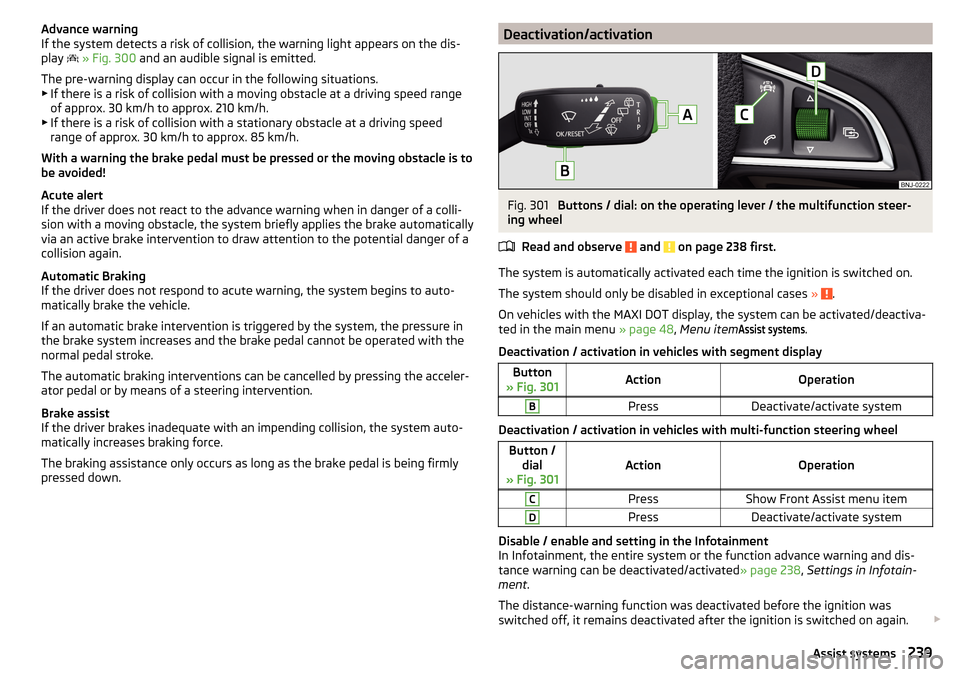
Buttons / dial: on the operating lever / the multifunction steer-
ing wheel
Read and observe
and on page 238 first.
The system is automatically activated each time the ignition is switched on.
The system should only be disabled in exceptional cases »
.
On vehicles with the MAXI DOT display, the system can be activated/deactiva- ted in the main menu » page 48, Menu item
Assist systems
.
Deactivation / activation in vehicles with segment display
Button
» Fig. 301ActionOperationBPressDeactivate/activate system
Deactivation / activation in vehicles with multi-function steering wheel
Button / dial
» Fig. 301ActionOperation
CPressShow Front Assist menu itemDPressDeactivate/activate system
Disable / enable and setting in the Infotainment
In Infotainment, the entire system or the function advance warning and dis-
tance warning can be deactivated/activated » page 238, Settings in Infotain-
ment .
The distance-warning function was deactivated before the ignition was
switched off, it remains deactivated after the ignition is switched on again.
239Assist systems