2016 SKODA SUPERB long
[x] Cancel search: longPage 71 of 336

CAUTIONPoorer visibility is evaluated by a sensor mounted below the windscreen in the
holder of the rear-view mirror. Do not cover the sensor - the system can be af-
fected.
Note
The setting (activate/deactivate) of the automatic driving light control during
rain is stored (depending on the Infotainment type) in the active user account
personalisation » page 49.
Xenon headlight
Read and observe
on page 66 first.
The Xenon headlights (hereinafter referred to as just system) use the drivingdata to automatically ensure the for the best possible light cone in front of the
vehicle.
The system will automatically operate in the following modes: urban, extra-ur-
ban, motorway, rain, fog, adjusting the lighting direction of the headlights for
road illumination on bends.
The system works as long as the light switch is in position
.
WARNINGIf there is a system malfunction the headlights are automatically lowered
to the emergency position, which prevents a possible dazzling of oncoming
traffic. This reduces the cone of light in front of the vehicle. Seek help from
a specialist garage.Fog lights/rear fog lightFig. 51
Light switch – switch on front
and rear fog lights
Read and observe on page 66 first.
Switching on the fog lights/rear fog lights is possible under the following
conditions.
The lights switch is in position ,
or
» Fig. 51 .
›
To switch on the fog lights , turn the light switch to position
1
; the warning
light illuminates in the instrument cluster.
›
To
switch on the rear fog lights , pull the light switch to position
2
; the
warning light illuminates in the instrument cluster.
If the vehicle is not equipped with fog lights, the rear fog lights can be switch-
ed on by pulling the light switch to the only possible setting.
Switch off the fog lights/rear fog lights in reverse order.
Note
While driving with an accessory connected to the trailer socket (e.g. trailer,
bike carrier) only the equipment is illuminated by the fog light. The towing de-
vice must be installed at the factory or from the ŠKODA original accessories.69Lights and visibility
Page 82 of 336

Seats and head restraints
Front seats
Introduction
This chapter contains information on the following subjects:
Manual adjustment
80
Electrical adjustment
80
Convenience operation of the front passenger seat
81
Memory Function of the electrically adjustable seat
81
Memory function of the remote control key
81
Folding front passenger seat
82
Armrest setting
82WARNING■ Only adjust the driver's seat when the vehicle is stationary – risk of acci-
dent!■
Caution when adjusting the seat! You may suffer injuries or bruises as a
result of adjusting the seat without paying proper attention.
Manual adjustment
Fig. 68
Control elements on the seat
Read and observe on page 80 first.
The seats can be adjusted by the respective operating element being pulled,
pressed or turned in the direction of the arrows » Fig. 68.
Adjusting the seat in the longitudinal direction (after releasing the control
lever must lock audibly)
Adjusting height of seat
ABAdjust the tilt of the backrest (do not lean on the backrest when adjusting)
Setting the extent of the curvature of the lumbar support
Note
After a certain time, play can develop within the adjustment mechanism of the
backrest angle.
Electrical adjustment
Fig. 69
Control elements on the seat
Read and observe
on page 80 first.
The seats can be adjusted by the respective operating element being pressed in the direction of area of the arrow » Fig. 69.
seat adjustment
▶ 1 - Move in the longitudinal direction
▶ 2 - Change in inclination
▶ 3 - Change in height
Adjusting the seat backrest
▶ 4 - Change in inclination
Adjusting lumbar support
▶ 5 - Change curvature
▶ 6 - The degree of curvature change
WARNINGThe electric front seat adjustment is functional even with the ignition off.
Therefore, when leaving the vehicle, never leave people who are not com-
pletely independent, such as children, unattended in the vehicle - there is a
danger of injury! CDABC80Using the system
Page 87 of 336
Seat heating and ventilation
Introduction
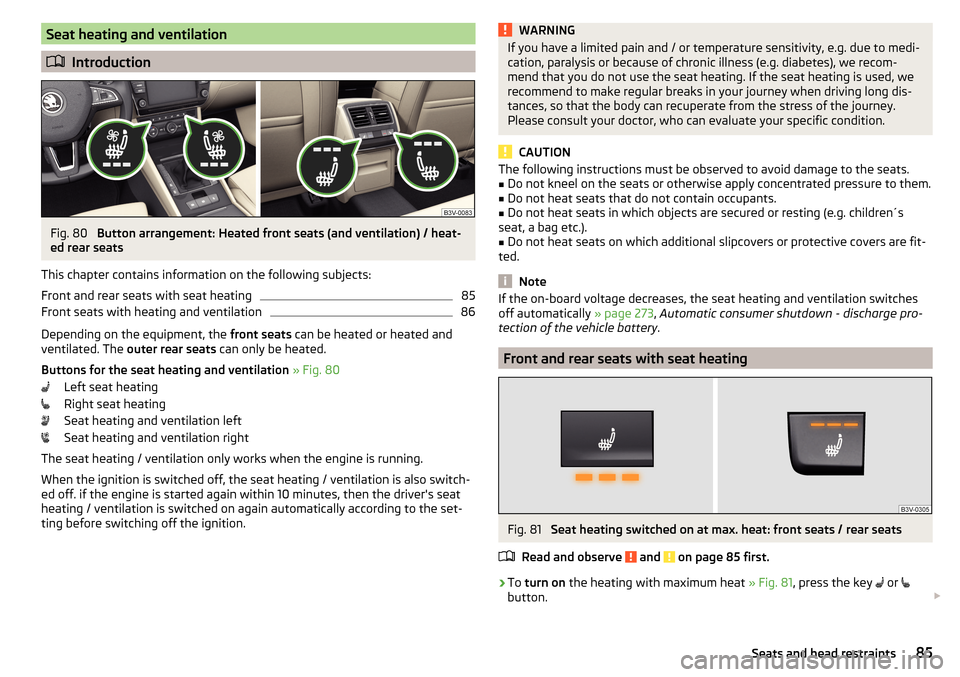
Fig. 80
Button arrangement: Heated front seats (and ventilation) / heat-
ed rear seats
This chapter contains information on the following subjects:
Front and rear seats with seat heating
85
Front seats with heating and ventilation
86
Depending on the equipment, the front seats can be heated or heated and
ventilated. The outer rear seats can only be heated.
Buttons for the seat heating and ventilation » Fig. 80
Left seat heating
Right seat heating
Seat heating and ventilation left
Seat heating and ventilation right
The seat heating / ventilation only works when the engine is running. When the ignition is switched off, the seat heating / ventilation is also switch-ed off. if the engine is started again within 10 minutes, then the driver's seat
heating / ventilation is switched on again automatically according to the set-
ting before switching off the ignition.
WARNINGIf you have a limited pain and / or temperature sensitivity, e.g. due to medi-
cation, paralysis or because of chronic illness (e.g. diabetes), we recom-
mend that you do not use the seat heating. If the seat heating is used, we
recommend to make regular breaks in your journey when driving long dis-
tances, so that the body can recuperate from the stress of the journey.
Please consult your doctor, who can evaluate your specific condition.
CAUTION
The following instructions must be observed to avoid damage to the seats.■Do not kneel on the seats or otherwise apply concentrated pressure to them.■
Do not heat seats that do not contain occupants.
■
Do not heat seats in which objects are secured or resting (e.g. children´s
seat, a bag etc.).
■
Do not heat seats on which additional slipcovers or protective covers are fit-
ted.
Note
If the on-board voltage decreases, the seat heating and ventilation switches
off automatically » page 273, Automatic consumer shutdown - discharge pro-
tection of the vehicle battery .
Front and rear seats with seat heating
Fig. 81
Seat heating switched on at max. heat: front seats / rear seats
Read and observe
and on page 85 first.
›
To turn on the heating with maximum heat » Fig. 81, press the key
or
button.
85Seats and head restraints
Page 88 of 336

With repeated pressing of the button, the level is down-regulated until it
switches off . The level of the seat heating is indicated by the number of illu-
minated warning lights underneath / in the button.
Increasing in heating power of the rear seats can be locked / unlocked , to do
this, press button
on the Climatronic → Tap the function surfaces
/
on
the Infotainment screen. In the locked heating power increase, the heating
power can only be adjusted down to turn off.
Front seats with heating and ventilation
Fig. 82
Heating switched on / cooling switched on / heating and cooling
are switched on simultaneously
Fig. 83
Infotainment screen: Front seat heating and ventilation with
maximum heating / ventilation level switched on
Read and observe
and on page 85 first.
›
Press the button
or
on the control panel of the air conditioner, a menu
for operating the front seat heating and ventilation is displayed on the Info-
tainment screen » Fig. 83,
Function surfaces for setting the ventilation level
Function surfaces for setting the heating power
Functional surfaces for switching off the ventilation (in addition to the
function surfaces A
) or for switching off the heating (in addition to the
function surfaces
B
)
If the seat heating was switched on before the ignition was switched off, then,
by pressing the buttons
and
, the seat heating will » Fig. 82 - switch on
with maximum output
.
If the seat cooling was switched on before the ignition was switched off, then,
by pressing the buttons
and
, the seat cooling will » Fig. 82 - switch on with
maximum output .
By repeatedly pressing the button or.
, the heating or cooling output is con-
trolled down to off. The power of the seat heating is indicated by the number
of illuminated warning lights underneath the switch.
Only the heating or ventilation can be operated using the buttons or.
.
If ventilation and heating are switched on simultaneously on the infotainment
screen, under each button or.
the blue and red light warning illuminates
» Fig. 82 -
, the button
or.
is not functioning (as long as the ventilation
and the heating is switched on simultaneously).
Heated steering wheel
Fig. 84
Button for steering wheel heat-
ing
Switching steering wheel heating on/off using Infotainment
›
To switch on / off press the button
on the Climatronic
→ Tap on the
function area on the Infotainment screen. When the heating is switched
on, the symbol in the function surface
A
is green » Fig. 84 .
AB86Using the system
Page 89 of 336

Heated steering wheel, along with the driver's seat heating›To activate / deactivate the heated steering wheel with the driver's seat
heating, press the button
on the Climatronic, then tap on the function
surface
→
Link seats and steering wheel heating
in the Infotainment screen.
›
To switch on / off the heated steering wheel, press the button for the driver
seat heating.
Setting the heat output of the steering wheel heater
›
Press the button
on the Climatronic, then tap the function surface
→
intensity
on the Infotainment screen.
›
Select one of the three heating levels (this remains stored even after switch-
ing off the engine).
The selected heat output of the heated steering wheel is shown on the Info- tainment screen
B
» Fig. 84 ,
Note
■
The heated steering wheel only works when the engine is running.■If the on-board voltage decreases, the heated steering wheel switches off
automatically.Practical features
Interior equipment
Introduction
This chapter contains information on the following subjects:
Parking ticket holder
88
Storage compartment on the driver's side
88
stowage compartments in the doors
88
Storage compartment in the front centre console
89
Phonebox
89
USB and AUX inputs
90
Cup holders
90
Waste container
91
Storage compartment under the front arm rest
91
Glasses compartment
92
Storage compartment on the front passenger side
92
Storage compartment under the front passenger seat
93
Storage compartments for umbrella
93
Clothes hook
93
Storage pockets on the backs of the front seats
94
Storage pockets at the inner sides of the front seats
94
Storage compartment in the rear centre console
94
Storage compartment in the rear armrest
94
Long cargo channel
95
Removable through-loading bag
95WARNING■ Do not place anything on the dashboard. These objects might slide or fall
down when driving and may distract you from concentrating on the traffic –
risk of accident!■
Make sure that while driving no objects can enter the driver's footwell -
cause an accident!
■
Do not carry any objects on the front passenger seat except objects de-
signed for this purpose (e.g. child seats) – risk of accident!
87Practical features
Page 97 of 336

Long cargo channelFig. 106
Open the cover: from the passenger compartment / from the
luggage compartment
Read and observe
and on page 87 first.
After folding-up the rear armrest and cover, an opening in the seat backrest
becomes visible through which the through-loading bag with skis can be push-
ed.
›
To open from the passenger compartment , fold down the rear armrest
slightly » page 83 .
›
Pull handle
A
in the direction of arrow
1
and fold down the cover in the
direction of arrow
2
» Fig. 106 .
›
To open from the luggage compartment , push the securing tab
B
in the di-
rection of the arrow and fold the cover with the armrest forwards.
›
To close , fold the cover and the rear armrest upwards until the stop. This
should audibly click into place.
The cover must be secured after the closing process. Ensure that the red field
above the securing tab
B
is not visible.
WARNINGThe through-loading channel is only intended for transporting skis that are
placed in a properly secured, through-loading bag.Removable through-loading bagFig. 107
Tighten ribbon / secure through-loading bag
Read and observe
and on page 87 first.
The removable through-loading bag (hereinafter referred to as through-load-
ing bag) is used exclusively for transporting skis and poles (max. 4 pairs).
Stowing through-loading bag and skis
›
Fold the rear armrest and the cover in the seat backrest down-
wards » Fig. 106 on page 95 .
›
Place the empty through-loading bag in such a way that the end of the bag
with the zip is in the boot.
›
Place the skis with the tips facing to the front and the sticks with the tips
facing to the rear. into the through-loading bag and close the bag.
Securing through-loading bag and skis
›
Tighten the strap
A
around the skis in front of the bindings » Fig. 107. The
strap must hold the skis tight.
›
Fold the seat backrest a little forward » page 83.
›
Guide the securing strap
B
through the opening in the seat backrest around
the upper part of the seat backrest.
›
Then, fold the seat backrests back until the locking button clicks into place.
Check this by pulling on the seat backrest.
›
Insert the securing strap
B
into the lock
C
until it clicks into place.
WARNING■ The total weight of the skis which are transported must not exceed 24
kg.■
Always stow and secure the skis and the bag securely - otherwise there is
a risk of injury or accident!
95Practical features
Page 99 of 336

Fig. 110
Open storage compartment / cover of the 12 volt power outlet
Read and observe
and on page 96 first.
›
To use , fold the cover in the direction of arrow » Fig. 109.
›
or: open the storage compartment and remove the cover of the 12-volt sock-
et » Fig. 110 .
›
Connect the plug for the electrical appliance to the socket.
12 volt socket in luggage compartment
Fig. 111
Cover of the 12 volt power outlet
Read and observe and on page 96 first.
›
To use , open the cover of the socket » Fig. 111 and plug the electrical appli-
ance plug into the socket.
230-volt socket in the rear centre consoleFig. 112
Open the cover of the 230 volt outlet / 230 volt outlet
Read and observe
and on page 96 first.
The 230-volt socket has a child safety lock. When inserting the plug, the fuse
is released, the socket is activated and the warning light above the socket is
illuminates green (if this flashes red, then the socket is deactivated).
The socket works with the engine running (in STOP mode in vehicles with the
START-STOP system) and for about 10 minutes after the engine is switched
off, provided an appliance was still connected prior to switching off the engine
(the warning light flashes green)).
›
To use , fold up the cover of the socket in the direction of arrow » Fig. 112 and
plug the electrical appliance plug into the socket.
An automatic deactivation of the socket can take place, for example, for the
following reasons. ▶ Excessive current.
▶ Low state of charge of the battery.
▶ High outlet temperature.
If disabling reasons no longer exist, the automatic activation of the socket can
be done.
Should no automatic activation of the socket take place, the connected devi-
ces must be disconnected from the power outlet and reconnect after a short
time.
97Practical features
Page 119 of 336

Operating modes
Automatic mode works in three modes - moderate, medium, and intensive.
Setting of the different modes takes place via the functional surface D
» Fig. 150 on page 116 or » Fig. 151 on page 116 .
After the automatic mode is switched on, Climatronic works in the last selec-
ted mode. The currently selected mode is displayed in the Infotainment dis-
play.
Air distribution control
Read and observe
on page 114 first.
The recirculation mode prevents contaminated outside air getting into the In-terior of the vehicle. In recirculated air mode air is sucked out of the interior of
the vehicle and then fed back into the interior.
›
To switch on , press the
button. The warning light below the button lights
up.
›
To switch off , press the
button again. The warning light below the button
goes out.
Heating and manual air conditioning system
If the air distribution control is set to position when the recirculation modes
is switched on, the recirculated-air mode is switched off. By pressing the
button, the air recirculation also in this position can be switched on again.
When the cooling system ( button) is switched on and the temperature reg-
ulator is “turned” to the left, the recirculated-air mode is switched on.
Climatronic
The Climatronic can have a sensor that measures the air recirculation mode
and automatically turns on if there is an increased concentration of pollutants
in the incoming air.
When the pollutant concentration decreases to the normal level, the recircula-
ted air mode is automatically switched off.
Automatically switching the air recirculation function on/off can be adjusted by pressing the button on the Climatronic and by subsequently pressing the
function surfaces
→
automatic air recirculation
in the Infotainment screen. Au-
tomatic switching on / off works at a temperature above 2 ° C.
A shut-off of the air recirculation function takes place automatically by press-
ing the button, possibly depending on the moisture conditions in the vehi-
cle interior.
WARNINGThe air recirculation cannot be switched on for a longer period of time be-
cause there is no supply of fresh air from the outside. “Stale air” may result
in fatigue in the driver and occupants, reduce attention levels and also
cause the windows to mist up. As soon as the windows mist up, turn the air
recirculation mode off immediately - there is a risk of accident!
CAUTION
We recommend not smoking in the vehicle when the recirculating air operation
is switched on. The smoke sucked from inside the vehicle is deposited on the
evaporator of the air conditioner. This produces a permanent odour when the
air conditioning system is operating which can only be eliminated through con-
siderable effort and expense (replacement of compressor).
Air outlet vents
Fig. 152
Air vents at the front
117Heating and ventilation