2016 SKODA SUPERB long
[x] Cancel search: longPage 121 of 336

Switch on / offFig. 154
Button for switching on / off (Climatronic / manual air condition-
ing)
Read and observe
and on page 118 first.
Functional requirements of the auxiliary heating. The charge state of the vehicle battery is sufficient.
The fuel supply is adequate (the warning light is not illuminated in the
instrument cluster).
Manual on / off ▶ Using the button on the operating part of the air conditioning
» Fig. 154.
▶ Using the (switch on) /
(switch off) button on the remote control opera-
tion.
Automatic on / off ▶ Via an automatically programmed and activated pre-set time in Infotainment.
▶ According to the environmental conditions.
Switching off the auxiliary heating takes place automatically when there is a
lack of fuel (warning light in the instrument cluster lights up).
After switching off the system, the coolant pump and the auxiliary heating will
continue running a little while longer in order to burn the remaining fuel in the
heating.
Setting automatic on / off
Climatronic: on the Climatronic, press the
button
→ Tap on the function
surface in the Infotainment screen. There will be a display of the last set op-
erating mode with the option to change this.
Manual air conditioning: on infotainment press the
button
→ tap on the
function surface .
Then follow the instructions in the Infotainment screen.
When automatic switching on is activated, the warning light in the
symbol
button lights up for about 10 seconds after the ignition is turned off » Fig. 154.
Operation in Infotainment
Fig. 155
Aux. heating: Main menu/set preset time
Read and observe
and on page 118 first.
Call up the main menu
›
On the Climatronic, press the button
→ Tap on the function surface
in
the Infotainment screen.
Or vehicles with manual air conditioning:
›
On Infotainment press the button
→ tap on the function surface
.
Function surfaces and display » Fig. 155
Departure time - Day and time when the vehicle is to be ready for use
Setting the operating mode (heating / ventilation)
List of pre-selected times, activation / deactivation of the preset time
Set the preset times 1-3 and the duration (10-60 minutes)
When heating the windows are shown in red / with continuous aeration,
the windows are shown in blue
Currently displayed preset time
Activation of the currently displayed preset time
Setting the departure time: day, hour, minute
Only one preset time can be active. The activated preset time will be deactiva-
ted again after it has started automatically. For the next start, activate one of
the preset times.
ABCDEFGH119Heating and ventilation
Page 123 of 336

Infotainment
Introductory information
Important information
Introduction to the subject
WARNING■Only use Infotainment in such a way that you have control of the vehicle
in every traffic situation (e.g. Do not write text messages while driving, do
not couple or connect the telephone, do not work with the contact list, do
not enter any destinations, do not connect WLAN or SmartLink etc.)- Other-
wise there is a risk of an accident!■
Always route the connection cable of the external device in such a way
that it does not restrict you when driving.
WARNING■ Adjust the volume to ensure that acoustic signals from outside the vehi-
cle, e.g. sirens from emergency vehicles, can be heard at all times.■
High volumes can cause hearing damage!
CAUTION
In some countries, some Infotainment features can no longer be selected
when the vehicle is running faster than a certain speed. This is not a malfunc-
tion, but complies with the national legal regulations.
Mobile telephones and applications
Fig. 157
QR code with reference to web
pages for checking the compati-
bility of devices
The availability of some of the functions described in this Owner's Manual
depends on the type of device to be connected and the applications installed
in it.
Mobile telephones
On the ŠKODA pages, check to see if Infotainment is compatible with the se-
lected mobile telephones. This check takes place by reading the QR code
» Fig. 157 or after typing the following address into the web browser.
http://go.skoda.eu/compatibility
Due to the multitude of mobile telephones as well as the ongoing develop-
ment of these devices, ŠKODA AUTO cannot always ensure compatibility with
Infotainment unconditionally. It is always recommended to physically check
the function on the associated vehicle, including the ŠKODA Partners, before-
hand.
Only those versions of the selected telephones will be tested and supported
which originate from the official distribution network. The same also applies to
their firmware and software.
The functions of the mobile telephone to be tested may differ from the same
type of mobile telephone depending on the specification for the respective
country or the specific service.
Mobile telephones with the operating system and in the version available at
the time of these tests will be tested. In this regard, it could be the case that
the functions of a mobile telephone may differ with a different operating sys-
tem version compared to the one used with the tested telephone.
ŠKODA AUTO can accept no responsibility for the continuous changes made by the mobile telephone manufacturers and application vendors.
ŠKODA AUTO does not accept any liability for any damage to Infotainment or
the vehicle due to the use of incorrect or illegal applications or the improper or
unauthorized use of mobile telephones.
Applications
Applications can be installed in external devices (e.g. Mobile, tablet) making it
possible to display additional information in the Infotainment screen or to op-
erate Infotainment.
Due to the variety of applications as well as their ongoing development, the
available applications may not work in all external devices. ŠKODA AUTO can
accept no liability for their proper function.
Applications, their use and the required data connection may be chargeable. 121Introductory information
Page 128 of 336
Operating the menusFig. 166
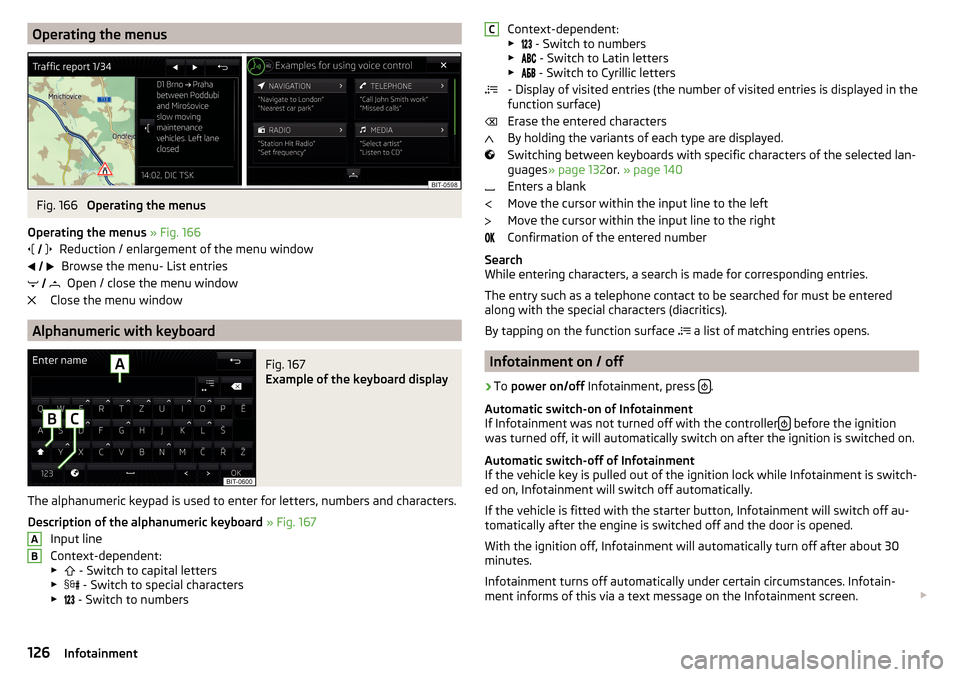
Operating the menus
Operating the menus » Fig. 166
Reduction / enlargement of the menu window Browse the menu- List entries Open / close the menu window
Close the menu window
Alphanumeric with keyboard
Fig. 167
Example of the keyboard display
The alphanumeric keypad is used to enter for letters, numbers and characters.
Description of the alphanumeric keyboard » Fig. 167
Input line
Context-dependent: ▶ - Switch to capital letters
▶ - Switch to special characters
▶ - Switch to numbers
ABContext-dependent:
▶ - Switch to numbers
▶ - Switch to Latin letters
▶
- Switch to Cyrillic letters
- Display of visited entries (the number of visited entries is displayed in the
function surface)
Erase the entered characters
By holding the variants of each type are displayed.
Switching between keyboards with specific characters of the selected lan-
guages » page 132 or. » page 140
Enters a blank
Move the cursor within the input line to the left
Move the cursor within the input line to the right
Confirmation of the entered number
Search
While entering characters, a search is made for corresponding entries.
The entry such as a telephone contact to be searched for must be entered
along with the special characters (diacritics).
By tapping on the function surface a list of matching entries opens.
Infotainment on / off
›
To
power on/off Infotainment, press .
Automatic switch-on of Infotainment
If Infotainment was not turned off with the controller
before the ignition
was turned off, it will automatically switch on after the ignition is switched on.
Automatic switch-off of Infotainment
If the vehicle key is pulled out of the ignition lock while Infotainment is switch-
ed on, Infotainment will switch off automatically.
If the vehicle is fitted with the starter button, Infotainment will switch off au-
tomatically after the engine is switched off and the door is opened.
With the ignition off, Infotainment will automatically turn off after about 30
minutes.
Infotainment turns off automatically under certain circumstances. Infotain-
ment informs of this via a text message on the Infotainment screen.
C126Infotainment
Page 129 of 336

Restart Infotainment
If Infotainment does not respond (if it “freezes”) This can be restarted by hold-
ing
for longer than 10 s.
Adjusting the volume
Every change in volume is displayed on the screen.
›
To increase the volume , turn the controller clockwise.
›
To
reduce volume , turn the controller anticlockwise.
›
To
mute , turn the controller to the left to 0.
›
or:
Press the button (applies to Infotainment Swing).
The following symbol appears in the display when the sound is muted .
If, at the time of muting, sound is played from the source in the media menu,
then the playback is interrupted (pause) 1)
.
CAUTION
■ High volumes can cause sound resonance in the vehicle.■When changing or connecting an audio source, this may cause sudden
changes in volume. Reduce the volume before changing or connecting an au-
dio source.
Infotainment menus
Applies to Infotainment Columbus, Amundsen, Bolero.
Fig. 168
Overview of Infotainment menus
›
To display the Infotainment menu overview press the button .
Overview of Infotainment menus
» Fig. 168
Menu Radio » page 142
Menu Media » page 146
Menu Images » page 153
Sound settings » page 131
Infotainment settings
Vehicle system settings » page 198
List of traffic messages (TMC) » page 196 (Applies to Infotainment Colum-
bus, Amundsen)
Navigation » page 180 menu (applies to Infotainment Columbus, Amund-
sen)
Menu Telephone » page 160
TV tuner » page 156 menu (applies to Infotainment Columbus)
Media Command » page 158 menu (applies to Infotainment Amundsen)
Menu SmartLink » page 176
When connecting a supported external device instead of the symbol
the actual connection is shown instead of a symbol ▶ -Android Auto
» page 177
▶ -
Apple CarPlay
» page 178
▶ -
MirrorLink®
» page 178
Configuration wizard
Fig. 169
Infotainment Columbus, Amund-
sen, Bolero: Configuration wizard
1)
Does not apply for AUX.
127Infotainment operation
Page 130 of 336

Fig. 170
Infotainment Swing: Configura-
tion wizard
The Configuration wizard is automatically displayed if there are at least two
non-selected menu items after turning on Infotainment, or if a new user ac-
count in personalisation is selected.
Deactivate the automatic display of the Configuration wizard by tapping the
function surface
Don´t show again
.
›
For manual display in Infotainment Columbus, Amundsen, Bolero, press
the button, then the function surface
Tap
→
Configuration wizard
.
›
For manual display in Infotainment Swing, press the button, then tap the
function surface
Configuration wizard
.
The Configuration wizard allows you to set the following menu items in se-
quence.
Identification of the personalisation user account » page 49
Time and date format (valid for Infotainment Columbus, Amundsen, Bo-
lero)
Time Format (applies to Infotainment Swing)
Date format (valid for Infotainment Swing)
Storing the radio stations with the currently strongest reception signal
in the first memory group of each individual broadcast area
Pairing and connecting a telephone to Infotainment
Home Address provided (valid for Infotainment Columbus, Amundsen)
The selected menu item is with the symbol or.
.
Menu items which can be set by tapping on the respective function surface in the
A
» Fig. 169 » Fig. 170 area.
Operating using an application in the external device
Applies to Infotainment Columbus, Amundsen.
Some Infotainment functions can be operated using an application in the sup-
ported external device.›
Enable the data transfer in Infotainment. To do this, press and then
Tap →
Mobile device data transfer
→
Enable data transmission for ŠKODA Apps
.
›
Release Infotainment operation using the application. To do this, press
and then
Tap on →
Mobile device data transfer
→
Use apps to operate:
→
Con-firm
/
Allow
.
›
Connect Infotainment to an external device via WLAN » page 174.
›
In the external device, install an application for Infotainment operation (e.g.
Start ŠKODA Media Command).
Note
The description of Infotainment operation ŠKODA Media Command is part of
the application.
Voice control
Introduction to the subject
Applies to Infotainment Columbus, Amundsen, Bolero.
The navigation, telephone, radio and media menu can be operated by voice
commands.
The voice control system can be used either by the driver or by the front pas-
senger.
Function requirements for voice control Infotainment is switched on.
There will be no telephone call using a telephone connected to Infotain-
ment.
The parking aid is not active.
Requirements for optimum voice command recognition
▶ Speak at your normal volume without intonation and long breaks.
▶ Avoid poor pronunciation.
▶ Close the doors and window in order to avoid disturbing environmental influ-
ences on the function of the voice control.
128Infotainment
Page 132 of 336

Voice commands
Enter
The voice command must only be issued when the symbol
is displayed in
the Infotainment screen and the input tone has completely faded . The input
tone can be switched on / off. To do this, press
and then
Tap →
Voice con-trol
.
It is not necessary to wait for the end of message playback when Infotainment
is playing a message. The infotainment message can be terminated by press-
ing the
button or the button
on the multifunction steering wheel. Then
a voice command can be issued. The voice control is hereby much faster.
Stop
This allows you more time for the voice command input.
The process for voice command input can be stopped turning the dial .
When stopping, the symbol changes from
.
Restore
The procedure for voice command input can be restarted in one of the follow-
ing ways.
▶ By tapping on the function surface .
▶ by pressing the button
on Infotainment.
▶ By pressing the key on the multifunction steering wheel.
Not recognising a voice command
If a voice command is not detected three times in succession by Infotainment,
then the voice control is stopped.
Correction of a voice command input
A voice command can be corrected, modified or re-entered by pressing the
button
or the button
on the multifunction steering wheel. However,
this is only possible as long as the symbol appears on the screen.
You do not have to wait until the voice command is recognised by Infotain-
ment.
Voice commands can be used any time during voice control
Voice commandOperation“ Back ”Return to the previous menu“Help ”reproducing and displaying possible voice com-
mandsVoice commands that can be used while browsing the list entriesVoice commandOperation“ Next page ”
Browse menu / list / directory
“Previous page ”“First page ”“Last page ”
Additional Information
Navigation - applies to Infotainment Columbus
If the set Infotainment language matches the language of currently selected
country when entering the destination, then the destination address can be
entered in one step .
The voice command “ Navigate” can be issued and straight away, the city,
street and street number (if it is included in the navigation data) Interest (POI)
or a contact with the previously stored address.
Navigation - applies to Infotainment Amundsen, Bolero
To the destination, you are first required to issue the command “enter ad-
dress” and then follow Infotainment instructions.
You can say the house number and a further additional address in the form of
a number where necessary. Infotainment will then offer the number combina-
tion it has found if the house number and the further address supplement,
where appropriate, exists in the street entered.
It is not necessary to spell city and street names if the entered destination is
located in a country that has no voice control available for the language.
Radio
In order for a radio station can be selected by means of voice command, the
station must be stored in the list of available stations » page 143.
130Infotainment
Page 145 of 336

Main menu » Fig. 174 or. » Fig. 175
The selected radio station (description or frequency)
Radio Text (FM) / Description of the group (DAB)
Preset station buttons for favourite channels
Choice of radio range (FM / AM / DAB)
Choice of storage group for the preferred station Changing the station
List of available stations
Manual / semi-automatic station search
Radio text display / image presentation (DAB) (does not apply to Infotain-
ment Swing)
Radio menu settings
Information symbol in the status lineSymbolMeaningTraffic signal is available Traffic signal is not available RDS function is switched off (FM) AF Alternative frequency is switched off (FM)Signal is not available (DAB)
If the displayed station name continuously changes (dynamic text), then it is
possible to fix the current text by holding your finger on the device screen in
the station name area. By holding your finger in the area of the station name
again, the station name is displayed in its entirety again.
Show DAB main menu (does not apply to Infotainment Swing)
In DAB broadcasting, the display of additional information and images (Slide- show) is possible as long as the currently tuned station is broadcasting this in-
formation.
The display variant can be selected from the menu that appears as follows. ▶ In the Radio menu press the function surface in the
DAB
area
.
Search stations and select frequency
Find stations
›
Tap the Radio main menu function surface
or
.
ABCDE
Depending on the setting Arrow buttons: will set an available station from the
Stations list or a station of the current broadcast range on the Station but-
tons .
Select frequency›
To display the value of the currently chosen frequency, tap the functional
surface in the Radio main menu
surface.
›
To set the desired frequency value in Infotainment Columbus, Amundsen,
Bolero, use the slider or the function surfaces
Turn the controller if nec-
essary
.
›
To set the desired frequency value in Infotainment Swing, use the slider or
the function surfaces
At the bottom of the screen, turn the controller if
necessary .
The frequency selection is terminated by pressing the controller.
Scan through the stations one after the other (scan)
The function scans through all the available stations in the current frequency range in succession, for a few seconds each.
›
To start/finish the automatic play of the available stations in Infotainment
Columbus, Amundsen, Bolero, press the function surface in the Radio main
menu Tap on
→
Scan
.
›
To end autoplay, tap the function
surface.
›
To
start/finish the automatic play of the available stations in Infotainment
Swing, press the controller in the Radio main menu
.
List of available stations
Fig. 176
Infotainment Columbus, Amundsen, Bolero: For the list of availa-
ble FM / DAB stations
143Radio
Page 157 of 336

Video DVD
Video player
Main menu
Only applies to Infotainment Columbus.
Fig. 190
DVD: Main menu
›
To display the main menu, insert a CD / DVD in the corresponding slot in the
external module.
›
or: In the Media main menu, select the desired video source, display the fold-
er / track list and start the video file.
Main menu » Fig. 190
Select a video source
Playback time axis
Information for the selected video file (e.g., video title, chapter)
Display the video DVD menu
Video DVD menu settings
Note
For safety reasons, the image display is switched off at speeds over 5 km/h.
Only the sound continues. The respective message appears on the screen.
Control playback
OperationActionPlay / PauseTap /Play the previous videoTap (within 3 seconds after the
start of playback)ABCOperationActionPlay the current video from the startTap after 3 s from the start of the
playbackFast rewindPress and hold a)Play the next videoTap
Fast forwardPress and hold a)Forward / rewind the video at the de-
sired timeTapping the playback time axis B
» Fig. 190 on page 155
a)
The longer the function surface is held, the faster the fast forward/reverse.
DVD menu
Fig. 191
DVD menu
›
to display the DVD menu in the Video DVD main menu, tap on the function
surface
» Fig. 190 on page 155 surface.
Description of the DVD menu » Fig. 191
Operating surface
Example of the displayed menu
Function surfaces on the operating surface
SymbolOperation / Move the operating surface left / right / Show / hide full screen display of the control sur-
faceClose the control surface Movement in the EPG/teletextConfirmationMain menuReturn to Video DVD main menuAB155Video DVD