2016 SKODA OCTAVIA warning lights
[x] Cancel search: warning lightsPage 70 of 324

NoteWhile driving with an accessory connected to the trailer socket (e.g. trailer,
bike carrier) only the equipment is illuminated by the fog light. The towing de-
vice must be installed at the factory or from the ŠKODA original accessories.
Fog lights with CORNER function
Read and observe
on page 64 first.
The CORNER function automatically switches on the fog lights on the respec-tive side of the vehicle (e.g. when cornering), if the following conditions are
met.
The turn signal is switched on or the front wheels are turned sharply 1)
.
The vehicle speed is below 40 km/h.
The low beam is switched on.
The fog lights are not switched on.
The two fog lights are switched on when you shift into the reverse gear.
COMING HOME / LEAVING HOME
Read and observe
on page 64 first.
The function COMING HOME ensures that the vehicle's environment is illumi-
nated after switching off the ignition and opening the driver's door.
The function LEAVING HOME ensures that the vehicle's environment is illumi-
nated after unlocking the vehicle with the radio remote control unit.
The function switches the light on only if there is poorer visibility and the light
switch is in the position .
The two functions can be activated/deactivated and set in the Infotainment
menu
→
→
Light
.
CAUTION
■
Poorer visibility is evaluated by a sensor mounted below the windscreen in
the holder of the rear-view mirror. Do not cover the sensor - the system can be
affected.■
If this option is always enabled, then the battery is heavily loaded.
Hazard warning light systemFig. 51
Button for hazard warning light
system
Read and observe on page 64 first.
›
To switch on/off , press the
button
» Fig. 51 .
When first switched on, the turn signal lights and the warning light buttons
all flash at the same time as the warning lights
in the instrument cluster.
The hazard warning light system can also be operated if the ignition is switch-
ed off.
If one of the airbags is deployed, the hazard warning light system will switch
on automatically.
The automatic activation of hazard warning lights can take place during a
heavy braking. After starting or accelerating the hazard warning system is au-
tomatically switched off.
When the hazard warning system is on and the indicator light is switched on
(e.g. when turning), the hazard warning lights are switched off temporarily and
only the turn signal flashes on the relevant side of the vehicle.
Parking light
Read and observe
on page 64 first.
The side light is provided for lighting of the parked vehicle.
Switching on the side light on one side
›
Switch off the ignition.
1)
If the two switch-on variants are conflicting (e.g. if the front wheels are turned to the left and the right
turn signal light is switched on), the turn signal light has the higher priority.
68Using the system
Page 71 of 324

›Press the control lever all the way into position
or until it stops » Fig. 47
on page 65 .
The parking light is illuminated on the relevant side of the vehicle.
Switching on the side light on both sides ›
Switch on the ignition and turn the light switch into position
» page 64 ,
the parking lights are turned on.
›
Switch off the ignition and lock the vehicle.
After pulling out the ignition key and opening the driver's door, an audible
warning sounds. After a few seconds or after closing the driver's door, the au-
dible warning is turned off.
CAUTION
■ Turning on the parking light means the battery is heavily loaded.■The parking lights may switch off automatically due to a low battery charge.
If the two-sided parking lights are switched on when the ignition is off, the
parking lights will not switch on automatically!
Entry space lighting
Read and observe
on page 64 first.
The lighting is positioned on the lower edge of the exterior mirror and illumi-nates the entry area of the front door.
The lighting switches on after unlocking or opening the vehicle door (depend-
ing on the lighting conditions).
The lighting switches off after around 30 seconds after closing the front door
or switching on the ignition.
Driving abroad
Read and observe
on page 64 first.
When driving in countries with opposing traffic system (traffic on the
left/right), your headlights may dazzle oncoming traffic. Therefore, it is neces-
sary to have the headlights adapted by a specialist garage.
You can set the xenon headlights yourself by activating travel mode in the In-
fotainment menu
→
→
Light
. In this mode, no automatic beam adjust-
ment is made ahead of the vehicle.
Interior lighting
Introduction
This chapter contains information on the following subjects:
interior light, front
69
Interior light, rear
70
The inner lighting also works if the ignition is switched off. With the ignition
switched off, the lights will automatically switch off after approximately after
10 minutes.
interior light, front
Fig. 52
Operation of the front light: Version 1 / version 2
Positions of the rocker switch
A
» Fig. 52
Switching on
Automatic operation (centre position)
Switching off
There is no icon available for the centre position (automatic operation) in Ver-
sion 2.
Switch on / off (by pressing the relevant switch
B
) » Fig. 52
Reading lamp left
Reading lamp right
69Lights and visibility
Page 72 of 324
Automatic operation - position
The system is turned on when any of the following is present.
▶ The vehicle is unlocked.
▶ One of the doors is opened.
▶ The ignition key is removed.
The system is turned off when any of the following is present.
▶ The vehicle is locked.
▶ The ignition is switched on.
▶ About 30 seconds after all the doors have been closed.
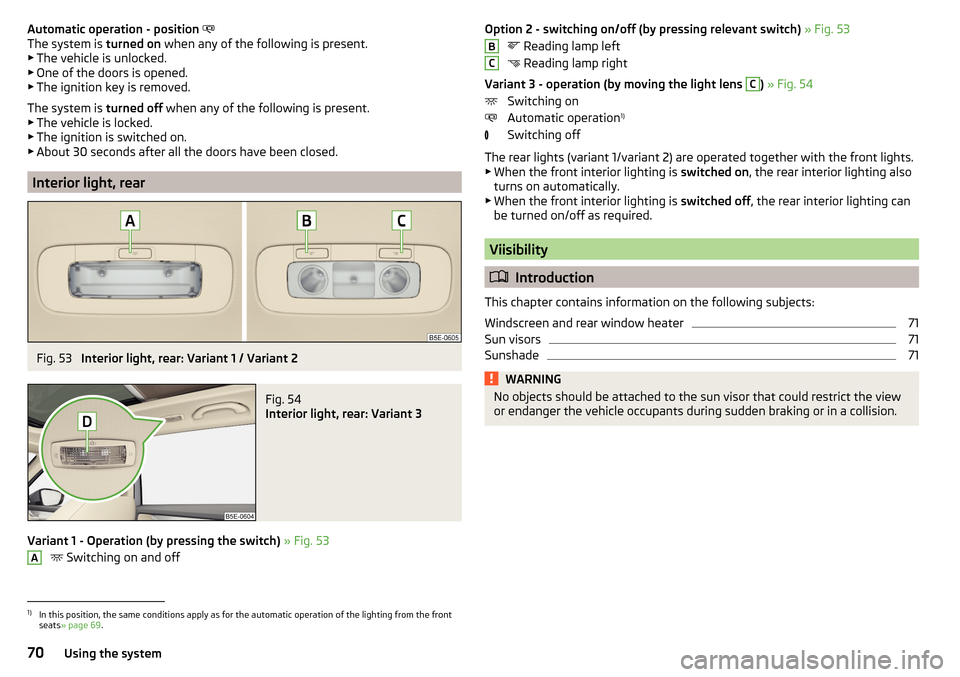
Interior light, rear
Fig. 53
Interior light, rear: Variant 1 / Variant 2
Fig. 54
Interior light, rear: Variant 3
Variant 1 - Operation (by pressing the switch) » Fig. 53
Switching on and off
AOption 2 - switching on/off (by pressing relevant switch)
» Fig. 53
Reading lamp left
Reading lamp right
Variant 3 - operation (by moving the light lens C
) » Fig. 54
Switching on
Automatic operation 1)
Switching off
The rear lights (variant 1/variant 2) are operated together with the front lights.
▶ When the front interior lighting is switched on, the rear interior lighting also
turns on automatically.
▶ When the front interior lighting is switched off, the rear interior lighting can
be turned on/off as required.
Viisibility
Introduction
This chapter contains information on the following subjects:
Windscreen and rear window heater
71
Sun visors
71
Sunshade
71WARNINGNo objects should be attached to the sun visor that could restrict the view
or endanger the vehicle occupants during sudden braking or in a collision.BC1)
In this position, the same conditions apply as for the automatic operation of the lighting from the front
seats » page 69 .
70Using the system
Page 75 of 324

Automatic windscreen wiping during rain can be in the Infotainment menu
→ →
Mirrors and wipers
activated/ deactivated .WARNINGAutomatic wiping during rain is only a support. The driver is still responsible
for setting the function of the windscreen wipers manually depending on
the visibility conditions.
Note
If the wiping is carried out without interruption, the wiping speed varies de-
pending on the vehicle speed.
Rear wipers and washers / reversing camera cleaning system
Fig. 59
Operating the windscreen wipers
and washing system
Read and observe and on page 72 first.
The lever can be moved to the following positions » Fig. 59
Spraying and wiping the windscreen (sprung position) - after releasing the
control stalk, the wipers perform another 2 to 3 wiper strokes
Spraying the rear view camera (sprung position)
Rear screen wiping
Wipers and washers off
Automatic rear wiper
If the windscreen wiping is performed without interruption, then the automat-
ic regular intermittent wiping of the rear window takes place.
This function can be activated / deactivated in the Infotainment menu
→
→
Mirrors and wipers
.
NoteThe rear window is wiped automatically if the windscreen wipers are on when
reverse gear is selected.
Headlight cleaning system
Read and observe
and on page 72 first.
The headlights are cleaned with every first and after every tenth spraying of
the windscreen under the following conditions.
The ignition is switched on.
The low beam is switched on.
The outside temperature is about -12° C to +39° C.
To ensure the correct functioning of the system, even in winter, this needs to
be regularly cleared of snow and ice (e.g. using the de-icing spray).
Rear view mirror
Introduction
This chapter contains information on the following subjects:
Interior mirror dimming
74
Exterior mirrors
74WARNINGExterior mirrors increase the field of view, however, they make objects ap-
pear smaller and further away. Therefore, use the interior mirror whenever
possible for assessing the distances to the vehicles following behind.WARNING■ The mirrors with automatic dimming contain electrolyte fluid which may
leak if the mirror glass is broken - this can irritate skin, eyes and the respi-
ratory system.■
If your eyes or skin come into contact with the electrolytic fluid, immedi-
ately wash the affected area for a few minutes long with a lot of water. If
necessary get medical assistance.
73Lights and visibility
Page 76 of 324

Interior mirror dimmingFig. 60
Interior mirror: manual dimming / auto-dimming- Variant 1
Fig. 61
Interior mirror with auto-dim-
ming - Variant 2
Read and observe on page 73 first.
Mirrors with manual dimming » Fig. 60 -
Basic mirror position (not dimmed)
Mirror blackout
Mirrors with auto-dimming - Variant 1
The mirror dimming » Fig. 60 -
is automatically controlled after the engine
start.
When the interior lights are switched on or the reverse gear is engaged, the
mirror moves back into the basic position (not dimmed).
Mirrors with auto-dimming - Variant 2 » Fig. 61
Warning light - lights when dimming is activated
Switch for the activation of the automatic mirror dimming
Light sensor
12ABCWARNING■ Attach external devices (e.g. navigation system) not in the vicinity of the
mirror with automatic dimming . The illuminated display of an external de-
vice can affect the function of the rear-view mirror - This is a risk of an acci-
dent.■
The automatic dimming mirror only functions smoothly if the light falling
on the sensors is not compromised (e.g. by the sunshade at the back). The
sensors are located on the front and back of the mirror.
Exterior mirrors
Fig. 62
Exterior mirror operation
Read and observe on page 73 first.
The exterior mirrors can (depending on vehicle equipment) have a manual or
electric fold-in function, automatic dimming and memory function.
The rotary knob can be moved into the following positions (depending on ve- hicle equipment)
Adjust the left-hand exterior mirror
Switch off mirror control
Adjust the right-hand exterior mirror
Exterior mirror heater (only operates when the engine is running)
Folding in the mirrors electrically (to fold back, move the rotary knob to an-
other position) »
Setting the mirror area
›
Move the rotary knob in the direction of arrows » Fig. 62.
If the mirror setting fails at any time, the mirrors can be adjusted manually by
pressing on the edge of the mirror area.
74Using the system
Page 77 of 324

Setting the mirror surfaces synchronously
This function allows the simultaneous adjustment of the two mirror areas. The
function can be activated / deactivated in the Infotainment menu
→
→
Mirrors and wipers
.
›
Turn the knob for the mirror control to the position for the driver mirror ad-
justment.
›
Adjust the mirror areas to the desired position.
Manual folding mirrors
The mirror can be manually folded in towards the side window. To restore it to
its original position, fold back from the side window until it audibly clicks into
place.
Automatic folding in/back of both mirrors
The exterior mirrors are automatically collapsed after locking the vehicle in the park position. After unlocking the vehicle, the mirrors are folded back to the
driving position »
.
This function can be activated / deactivated in the Infotainment menu
→
→
Mirrors and wipers
.
Mirror with auto-dimming
The exterior mirror dimming is controlled together with auto rear-view mirror
dimming » page 74 .
Memory function for mirror (vehicles with electrically adjustable driver's
seat)
It is possible to save the current setting of the exterior mirror when saving the
driver's seat position with » page 77, Memory Function of the electrically ad-
justable seat or » page 78 , Memory function of the remote control key .
Tilting the mirror area of the front passenger mirror (vehicles with
electrically adjustable driver's seat)
The front passenger mirror area can be tilted to the stored position to improve
the view to the curb when reversing.
Operating conditions. The function is activated in the Infotainment menu
→
→
Mirrors andwipers
.
The setting of the mirror area has been previously stored » page 77,
Memory Function of the electrically adjustable seat or. » page 78 , Memo-
ry function of the remote control key .
The reverse gear is engaged.
The knob for the mirror control is in the position for the passenger mirror
adjustment.
The mirror area returns to its initial position after the rotary knob is set to an-
other position or if the speed is greater than 15 km/h.WARNINGDo not touch the exterior mirror surfaces, if the exterior mirror heating is
switched on - hazard of burning.
CAUTION
■ Never manually fold in/out the electrically folding exterior mirrors - there is a
risk of damage to the mirror!■
When the mirror is swung by external influences (due to impact during ma-
noeuvring, for example), then first fold-in the mirror by turning the knob and
wait for a loud clapping noise.
75Lights and visibility
Page 83 of 324

›To
adjust the height , hold the locking button A and move the rest in the de-
sired direction » Fig. 71.
Setting the height of the rear headrests
Fig. 72
Setting the height of the back headrest
›
Grasp the headrest and move upwards in the direction of arrow
1
» Fig. 72 .
›
To move the headrest down, press the securing button
A
in the direction of
arrow
2
and hold it down while pressing the headrest in the direction of ar-
row
3
.
Removing/inserting the rear headrests
Fig. 73
Removing/inserting the rear headrests
Before removing/inserting the headrests, fold the corresponding seat backrest
slightly forward » page 79.
›
To remove the headrest, pull it out of the seat backrest up to the stop.
›Hold the locking button A in the direction of arrow 1, at the same time us-
ing a flat screwdriver with a max. width of 5 mm to press the locking button
in the opening B
in the direction of arrow
2
and pull out the rest in the di-
rection of arrow
3
» Fig. 73 .
›
To insert the headrest, push the headrest into the seat backrest in the direc-
tion of arrow
4
until the locking button clicks into place.
Seat heaters
Fig. 74
Buttons for heating the front seats/rear seats
The seat backrests and surfaces of the front seats and the outer rear seats
can be heated electrically.
Seat heating buttons » Fig. 74
Left seat heating
Right seat heating
›
To turn on the heating to max, press the key
or
button.
By repeatedly pressing the button, the heat is turned down until it is com-
pletely switched off . The level of the seat heating is indicated by the number
of illuminated warning lights underneath / in the button.
The seat heating only operates when the engine is running.
When the ignition is switched off, the seat heating / ventilation is also switch-
ed off. if the engine is started again within 10 minutes, then the driver's seat
heating / ventilation is switched on again automatically according to the set-
ting before switching off the ignition.
81Seats and head restraints
Page 108 of 324

Adjust fan speed (the setting is indicated by the number of illuminated
control lamps shown in the knob)
Adjust the temperature for the left side (or for both sides) 1)
▶ Reduce the temperature /
Increase the temperature
Adjust the temperature for the right side (or for both sides) 2)
▶ Reduce the temperature /
Increase the temperature
Depending on equipment fitted:
▶ Auxiliary heating and ventilation on / switch off » page 109
▶ Switch off Climatronic
Interior temperature sensor
Switch recirculation on/off » page 107
Intense air flow to the windscreen on / off (when switching on, the air
flow to the windows and
is also switched on)
Switch on/off the rear window heater » page 71
Switch on/off the windscreen heating » page 71
Setting Climatronic in Infotainment (also operate with some functions)
Synchronize the temperature inside the entire vehicle according to the
temperature setting on the driver's side
Switching automatic mode on » page 107
Switch the cooling system on/off
When the function is switched on, a warning light lights up within or below the
button.
Setting temperature
The temperature can be set on the Climatronic control unit or in Infotain-
ment » page 106 . In the range between 16 ° C to 29.5 ° C, an automatic tem-
perature control takes place.
At a temperature setting below 16 ° C, lights up in the temperature display,
the Climatronic functions with maximum cooling performance .
At a temperature setting over 29.5 ° C, lights up in the temperature display,
the Climatronic functions with maximum heating output.
CAUTION
Do not cover the interior temperature sensor H » Fig. 129 - the function of the
Climatronic could be affected.DEFGHNoteIn order to ensure adequate thermal comfort, there may be an increase in en-
gine idle speed during operation of the Climatronic in some circumstances.
Operate Climatronic in Infotainment
Fig. 130
Infotainment Columbus, Amund-
sen, Bolero:Climatronic main
menu
Fig. 131
Infotainment Swing: Climatronic
main menu
Read and observe on page 105 first.
›
To display the main menupress the button
on the Climatronic control
unit.
Function surfaces and screen display » Fig. 130 and. » Fig. 131ADisplays the current operation mode (or set the operation mode) of
the ClimatronicBSet the desired temperature, front - left sideCSet the desired temperature, front - right sideDSetting the power in operation 1)
Applies to left-hand drive vehicles.
2)
Applies to right-hand drive vehicles.
106Using the system