2016 SKODA OCTAVIA Seat
[x] Cancel search: SeatPage 34 of 324

Warning lights
Introduction
This chapter contains information on the following subjects:
Handbrake
33
Braking system
33
Front seat belt warning light
33
Adaptive cruise control (ACC)
33
Power steering / steering lock (KESSY system)
33
Stability control (ESC) / Traction control (TCS)
34
Traction control (TCS) disabled
34
Anti-lock braking system (ABS)
34
Rear fog light
34
Emission control system
35
Preheating unit (diesel)
35
EPC warning light (petrol)
35
Safety systems
35
Tyre pressure
35
Brake linings
36
Low fuel - petrol / diesel
36
Lane assist (Lane Assist)
36
Turn signal system
36
Trailer turn signal lights
36
Fog lights
37
Cruise control
37
Brake pedal (automatic gearbox)
37
Natural gas operation
37
Main beam
37
Automatic gearbox
37
Rear seat belt warning light
37
Generator
37
Coolant
38
Engine oil pressure
38
Engine oil level
38
Lamp failure
39
Diesel particle filter (diesel)
39
Windscreen washer fluid level39High beam assistant39
START-STOPsystem
39
Display a low temperature
39
Water in the fuel filter (diesel)
40
Adaptive cruise control (ACC)
40
Distance warning (Front Assist)
40
Front assist
40
OFF ROAD mode
40
Adaptive Chassis Control (DCC)
40
Service
40
The warning lights in the instrument cluster indicate certain functions or
faults.
Some warning lights can be accompanied by acoustic signals and messages in
the display of the instrument cluster.
After switching on the ignition, some warning lights light up briefly as a func-
tion test. If the tested systems are OK, the corresponding warning lights go
out a few seconds after switching on the ignition or after starting the engine.
The warning lights are located at the following positions in the instrument
cluster » Fig. 17 on page 30 .
▶ Tachometer
1
▶Display
2
▶Speedometer
3
▶Bar with warning lights
5
Warning lights in the display
Depending on the importance the warning light (danger) or
(warning) illu-
minate along with some of the warning lights in the list with the warning
lights.
Depending on vehicle equipment, some warning lights can be displayed in col-
our on the display. For example. the coolant warning lamp may be represented
as follows.
▶ - Segment display / monochromatic (“black and white”) MAXI DOT display
▶ - Coloured MAXI DOT display
32Using the system
Page 35 of 324

WARNING■Ignoring illuminated warning lights and related messages or instructions
in the display of the instrument cluster may lead to serious personal injury
or damage to the vehicle.■
If you have to stop for technical reasons, then park the vehicle at a safe
distance from the traffic, switch off the engine and activate the hazard
warning light system » page 68. Place the warning triangle at the prescri-
bed distance.
■
The engine compartment of your car is a hazardous area. While working in
the engine compartment, be sure to observe the following warnings
» page 252 .
Handbrake
Read and observe
on page 33 first.
lights up – the handbrake has been applied.
An acoustic signal will sound if you drive the vehicle above 5 km/h while the
handbrake is still on.
▶ Release the handbrake.
Braking system
Read and observe
on page 33 first.
illuminates – the brake fluid level in the brake system is too low.
▶ Park the vehicle,
stop driving! Seek help from a specialist garage.
WARNINGA fault to the braking system can increase the vehicle’s braking distance -
There is a risk of an accident!
Front seat belt warning light
Read and observe
on page 33 first.
lights up - the driver or front passenger has not fastened their seat belt.
At a speed of over 30 km/h the warning light
flashes and an audible warning
sounds at the same time.
If the seat belt is not fastened by the driver or front passenger during the next
approx. 2 minutes, the warning signal is deactivated and the warning light il-
luminates permanently.
Adaptive cruise control (ACC)
Read and observe
on page 33 first.
illuminates - the ACC delay is not sufficient.
▶ Apply the brake.
For more information about the ACC system » page 214.
Power steering / steering lock (KESSY system)
Read and observe
on page 33 first.
Fault in the power steering
lights up – this indicates a complete failure of the power steering and the
steering assist is no longer working (significantly higher steering forces).
lights up – this indicates a partial failure of the power steering and the
steering forces can be greater.
▶ Switch off the ignition, start the engine again and travel a short distance.
▶ If the warning light does not go off, stop the vehicle,
stop driving
. Seek
help from a specialist garage.
▶ If the warning light does not go off, you can drive on, exercising appropriate
caution. Seek assistance from a specialist garage immediately.
Steering lock defect (KESSY system)
An audible signal sounds as a warning.
flashes
Steering column lock faulty. Stop!STOP VEHICLE STEERING FAULTY
▶ Park the vehicle,
stop driving . After switching off the ignition, it is no lon-
ger possible to lock the steering, to activate the electrical components (e.g.
Infotainment ), to switch on the ignition again and to start the engine. Seek
help from a specialist garage.
flashes
Steering lock: Workshop!STEERING WORKSHOP
▶ You can drive on, exercising appropriate caution. Seek assistance from a spe-
cialist garage immediately.
33Instruments and warning lights
Page 37 of 324

Emission control systemRead and observe
on page 33 first.
lights up – there is a fault in the emission control system. The system
makes it possible to drive on in emergency mode - there may be a noticeable
reduction in engine performance.
▶ You can drive on, exercising appropriate caution. Seek assistance from a spe-
cialist garage immediately.
Preheating unit (diesel)
Read and observe
on page 33 first.
flashes – there is a fault in the engine management system. The system
makes possible operation emergency mode - there may be a noticeable reduc-
tion in engine performance.
There is a fault in the glow plug system if the warning light does not come
on or illuminates continuously.
▶ You can drive on, exercising appropriate caution. Seek assistance from a spe-
cialist garage immediately.
EPC warning light (petrol)
Read and observe
on page 33 first.
lights up – there is a fault in the engine management system. The system
makes it possible to drive on in emergency mode - there may be a noticeable
reduction in engine performance.
▶ You can drive on, exercising appropriate caution. Seek assistance from a spe-
cialist garage immediately.
Safety systems
Read and observe
on page 33 first.
System fault
lights up - there is a fault in the airbag system.
Error: AirbagAIRBAG ERROR▶
Seek help from a specialist garage.
The front passenger airbag has been disabled with the key switch
illuminates for around 4 seconds after the ignition has been switched on.
One of the airbags or a belt tensioner has been disabled by the diagnostic
tool
illuminates for around 4 seconds after the ignition is switched on and then
flashes for approximately 12 seconds.Airbag/ belt tensioner deactivated.AIRBAG/ BELT TENSIONER OFF
ProActive passenger protection
illuminates and the following message is shown in the information cluster
display.
Proactive passenger protection not available.PROACTIVE PASSENGER PROTECT NOT AVAIL
or
Proactive passenger protection: function restricted.LIMITED PROACTIVE PASSENGER PROTECT
The seat belt for the driver and front passenger needs to be replaced.
▶ Seek help from a specialist garage.
WARNINGWhen a fault in the airbag system occurs, there is a risk of the system not
being triggered in the event of an accident. Therefore, this must be
checked immediately by a specialized garage.
Tyre pressure
Read and observe
on page 33 first.
Change of tyre pressure values
lights up - there was a pressure change in one of the tyres.
An audible signal sounds as a warning. ▶ Immediately reduce speed and avoid sudden steering and braking manoeu-
vres.
▶ Stop the vehicle, turn the ignition off and check the tyres and their inflation
pressure » page 261 .
35Instruments and warning lights
Page 39 of 324

▶Check the trailer bulbs.
Fog lights
Read and observe
on page 33 first.
illuminates – the fog lights are switched on.
Cruise control
Read and observe
on page 33 first.
illuminates - the vehicle speed is limited by the speed regulator system
and/or the automatic distance control.
Brake pedal (automatic gearbox)
Read and observe
on page 33 first.
lights up – apply the brake.
Natural gas operation
Read and observe
on page 33 first.
illuminates - the vehicle is running on natural gas.
Main beam
Read and observe
on page 33 first.
lights up – the main beam or the headlight flasher is switched on.
Automatic gearbox
Read and observe
on page 33 first.
Gearbox overheated
The warning light is only shown in the MAXI DOTdisplay.
Illumi-
nates
Gearbox overheated. You can drive on.GEARBOX OVERHEATED
Transmission overheated. You can drive on, exercising appropriate caution.
Illumi-
nates
Gearbox overheated. Stop! Log book!STOP VEHICLE GEARBOX OVERHEAT
▶ Stop driving! Stop the vehicle and turn off the engine.
You can continue your journey as soon as the warning light disappears.
▶ If the warning light does not go off,
stop driving! Seek help from a special-
ist garage.
Transmission problem
The warning light
is only shown in the MAXI DOTdisplay.
Illumi-
nates
Gearbox faulty. Stop the vehicle safely!GEARBOX FAULTY WORKSHOP
▶ Park the vehicle,
stop driving! Seek help from a specialist garage.
Illumi-
nates
Gearbox in emergency mode. No reverse gear.GEARBOX ERROR REV_ GEAR NOT AVAIL Illumi-
nates
Error: gearbox. Speed is limited.GEARBOX ERROR
▶ You can drive on, exercising appropriate caution. Seek assistance from a spe-
cialist garage immediately.
Rear seat belt warning light
Read and observe
on page 33 first.
lights up – a rear seat belt is not fastened.
lights up – a rear seat belt is fastened.
When the seat belt is fastened/unfastened, the particular light lights up briefly
and indicates the current belt status!
Generator
Read and observe
on page 33 first.
lights up – the battery is not being charged whilst the engine is running.
▶ As the vehicle battery during your journey, are all non-essential electrical
loads (e.g. Infotainment) must be switched off.
▶ You can drive on, exercising appropriate caution. Seek assistance from a spe-
cialist garage immediately.
37Instruments and warning lights
Page 61 of 324

Description of the malfunc-
tionPossible solutionsThe lid remains in the top
position
Manual closing of the lid
The lid is open and the bat-
tery was disconnected
Close manually
Close the door slowly, push down the lid, push in the lock on the centre of the
edge, above the ŠKODA logo.
Window operation
Introduction
This chapter contains information on the following subjects:
Mechanical windows
59
Electric Windows
60
Opening/closing the windows in the front passenger door and in the rear
doors
60
Force limiter
60
Window convenience operation
61
Malfunctions
61
The windows can be operated mechanically by means of the handle attached
to the respective door panel.
The windows can be operated electrically from the following locations; all win-
dows from the driver's seat and also via the buttons for the windows in the
passenger door or the rear doors.
WARNING■ Always close the window carefully and in a controlled manner. Otherwise,
you may cause considerable crushing injuries to yourself or fellow passen-
gers.■
The system is fitted with a force limiter » page 60. If there is an obstacle
(e.g. If a body part gets trapped), the closing process is stopped and the
window goes down by several centimetres. The windows should neverthe-
less be closed carefully – risk of injury!
CAUTION■ Keep the windows clean (free of ice and similar) to ensure the correct func-
tionality of the electric windows.■
Always close the electric windows before disconnecting the battery.
Note
If the windows are opened, dust as well as other dirt can get into the vehicle
and in addition the wind noise is more at certain speeds.
Mechanical windows
Fig. 40
Window operation: left/right
Read and observe
and on page 59 first.
›
To open , turn the crank in the direction of arrow
A
» Fig. 40 .
›
To close , turn the crank in the direction of arrow
B
.
59Unlocking and opening
Page 62 of 324

Electric WindowsFig. 41
Buttons for window levers
Read and observe and on page 59 first.
All windows can be operated from the driver's seat. The window in the front
passenger door and the windows in the rear doors are operated via the button
in each door.
Electric window buttons » Fig. 41
Left front door
Right front door
Left rear door
Right rear door:
Deactivate/activate the buttons in the rear doors (the deactivation may be
advantageous if, for example, children are transported on the rear seats)
Opening/closing window
›
To open , lightly press the appropriate button down and hold it until the win-
dow has moved into the desired position.
›
or: press the button to the stop, the window automatically opens fully. Re-
newed pressing of the button causes the window to stop.
›
To close , pull gently on the top edge of the corresponding button and hold
until the window has moved into the desired position.
›
or: pull the button briefly to the stop, the window automatically closes fully.
Renewed pulling of the button causes the window to stop immediately.
Disable / enable buttons in the rear doors
›
To deactivate/activate the buttons in the rear doors, press the
E
button. If
the buttons in the rear doors are deactivated, the warning light illuminates
in the
E
button.
ABCDENote■ After switching off the ignition, the windows can still open and close for
about 10 minutes.■
After the driver or front passenger door is opened, the operation of the win-
dow is only possible with the button
A
» Fig. 41 , in which case this is pressed
or pulled for approx. 2 seconds.
Opening/closing the windows in the front passenger door and in
the rear doors
Fig. 42
Power window button
Read and observe and on page 59 first.
There is a button in the front passenger door and in the rear doors for that
window.
›
To open , lightly press the appropriate button underneath and hold it until
the window has moved into the desired position.
›
or: press the button underneath to the stop, the window automatically
opens fully. Renewed pressing of the button causes the window to stop.
›
To close , push the corresponding button above briefly and hold until the win-
dow has moved into the desired position.
›
or: press the button above to the stop, the window automatically opens fully.
Renewed pressing of the button causes the window to stop.
Force limiter
Read and observe
and on page 59 first.
The electrical power windows are fitted with a force limiter.
If there is an obstacle, the closing process is stopped and the window goes
down by several centimetres.
60Using the system
Page 66 of 324

Lights and visibility
Light
Introduction
This chapter contains information on the following subjects:
Operating the lights
64
Daytime running lights(DAY LIGHT)
65
Turn signal and main beam
65
Automatic driving light control
66
Xenon headlight
66
High-beam assistant (Light Assist)
67
Fog lights/rear fog light
67
Fog lights with CORNER function
68
COMING HOME / LEAVING HOME
68
Hazard warning light system
68
Parking light
68
Entry space lighting
69
Driving abroad
69
The lights work only with the ignition on, unless otherwise stated.
The layout of the controls on right-hand drive vehicles differs partially from
that shown in this layout » Fig. 46 on page 64 .
WARNINGThe automatic driving lamp control only operates as a support and
does not release the driver from his responsibility to check the light and, if
necessary, to switch on the light depending on the light conditions.
Note
The headlights may mist up temporarily. When the light is on, the light-emit-
ting surface demists after a short time.Operating the lightsFig. 46
Light switch and control dial for
the headlight beam range regu-
lation
Read and observe on page 64 first.
To switch the lights on/off ,turn the
A
» Fig. 46 switch to one of the following
positions (equipment-dependent).
Switching off lights (except daytime running lights)Switching lights on/off automatically » page 66
Switching on the parking lights or parking lights on both sides » page 68
Switching on the low beam
To adjust the headlight range control , turn dial
B
» Fig. 46 in line with the
vehicle load » .
Front seats occupied, boot empty
All seats occupied, boot empty
All seats occupied, boot loaded
Driver seat occupied, boot loaded
The Xenon headlights feature no manual headlight range control. After
switching on the ignition, adjust these automatically to the load and driving
condition of the vehicle.
WARNINGAlways adjust the headlight beam to meet the following conditions - other-
wise there is a risk of an accident.■
The vehicle does not dazzle other road users, especially oncoming vehi-
cles.
■
The beam range is sufficient for safe driving.
64Using the system
Page 72 of 324
Automatic operation - position
The system is turned on when any of the following is present.
▶ The vehicle is unlocked.
▶ One of the doors is opened.
▶ The ignition key is removed.
The system is turned off when any of the following is present.
▶ The vehicle is locked.
▶ The ignition is switched on.
▶ About 30 seconds after all the doors have been closed.
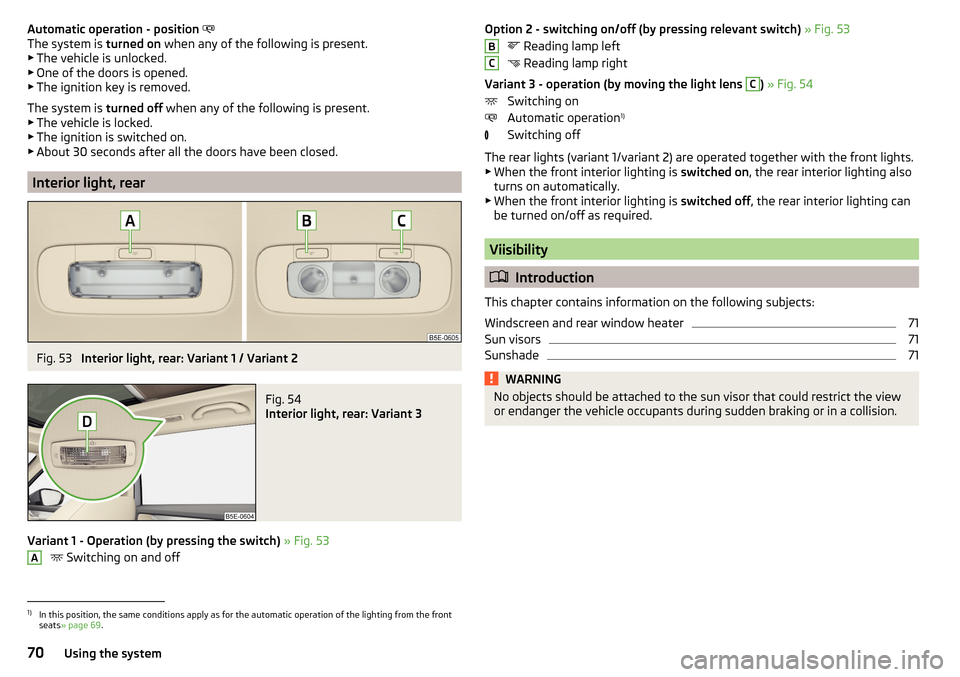
Interior light, rear
Fig. 53
Interior light, rear: Variant 1 / Variant 2
Fig. 54
Interior light, rear: Variant 3
Variant 1 - Operation (by pressing the switch) » Fig. 53
Switching on and off
AOption 2 - switching on/off (by pressing relevant switch)
» Fig. 53
Reading lamp left
Reading lamp right
Variant 3 - operation (by moving the light lens C
) » Fig. 54
Switching on
Automatic operation 1)
Switching off
The rear lights (variant 1/variant 2) are operated together with the front lights.
▶ When the front interior lighting is switched on, the rear interior lighting also
turns on automatically.
▶ When the front interior lighting is switched off, the rear interior lighting can
be turned on/off as required.
Viisibility
Introduction
This chapter contains information on the following subjects:
Windscreen and rear window heater
71
Sun visors
71
Sunshade
71WARNINGNo objects should be attached to the sun visor that could restrict the view
or endanger the vehicle occupants during sudden braking or in a collision.BC1)
In this position, the same conditions apply as for the automatic operation of the lighting from the front
seats » page 69 .
70Using the system