2016 SKODA KODIAQ phone
[x] Cancel search: phonePage 179 of 344
Read in the QR code» Fig. 217orenter the following address in the web brows-
er to open the website with information on the SmartLink system.
http://go.skoda.eu/infotainment
For the full functionality of the ŠKODA One App, data transmission of external
devices must be switched on in the infotainment.
Applies to Infotainment Columbus, Amundsen, Bolero
▶ To Open the list of received messages tap on the button
, then the func-
tion surface
Tap →
Mobile device data transfer
→
Activate data transfer for ŠKODAApps
.
Applies to Infotainment Swing ▶ To the Switched data transmission external devices the key
press, then
the function surface →
Data transfer mobile devices
Tap.
Note
Some features of the application may not be available in all countries, there
may possibly exist a functional impairment while driving » page 120, Mobile
phones and applications ,
Connecting to Infotainment
The mobile phone can be connected to the infotainment using the function
SmartLink or via Wi-Fi.
Connection by SmartLink
›
Switch on the ignition.
›
The connection means SmartLink (e.g.. MirrorLink ®
) build up » page 172 ,
›
In the list of available applications, the application ŠKODA One App choose.
Depending on the model of the connected external device, some applications
can be started using voice activation, via the Infotainment screen, using the
operating elements on Infotainment, or using the buttons on the multi-func-
tion steering wheel.
Once connected, the contents of the application in the infotainment screen
may be displayed.
A possible connection of the mobile phone to the Infotainment via Wi-Fi will be
terminated after the connection using SmartLink.
Navigation menu (Applies to Infotainment Columbus, Amundsen)
›
Switch on the ignition.
›
Build up the Wi-Fi connection » page 170,
›In the tablet, start the application ŠKODA Media Command.
Disconnect the connection
The connection can be switched off in one of the following ways.›
Switch off the ignition for longer than 5 seconds (for vehicles with a starter
button, switch off the engine and open the driver's door).
›
The connection in the application ŠKODA One App break up.
›
The mobile phone from the USB input disconnect or terminate the Wi-Fi con-
nection.
177SmartLink
Page 187 of 344
Last destinations menu for destination / POI searchIn the destination search menu, a short list of last destinations is show in the
areaD
» Fig. 223 on page 182 .
Function surfaces in the list of last destinations - Destination search by name (the function surface is displayed with
more than 5 entries available)
- Display the details of the selected destination » page 192
target memory
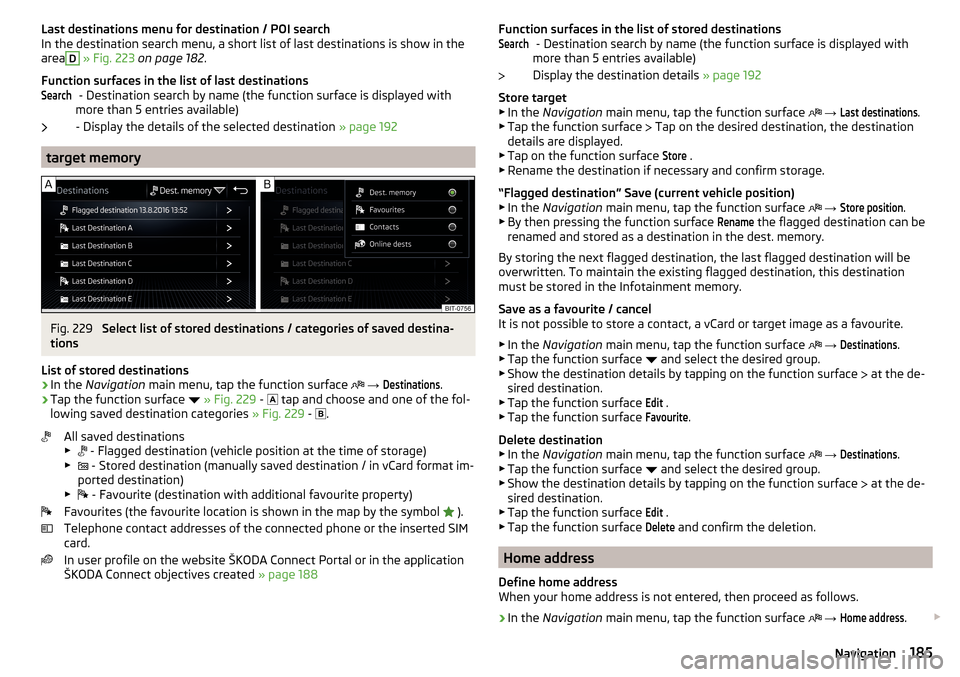
Fig. 229
Select list of stored destinations / categories of saved destina-
tions
List of stored destinations
›
In the Navigation main menu, tap the function surface
→
Destinations
.
›
Tap the function surface
» Fig. 229 -
tap and choose and one of the fol-
lowing saved destination categories » Fig. 229 -
.
All saved destinations
▶ - Flagged destination (vehicle position at the time of storage)
▶ - Stored destination (manually saved destination / in vCard format im-
ported destination)
▶ - Favourite (destination with additional favourite property)
Favourites (the favourite location is shown in the map by the symbol ).
Telephone contact addresses of the connected phone or the inserted SIM
card.
In user profile on the website ŠKODA Connect Portal or in the application
ŠKODA Connect objectives created » page 188
SearchFunction surfaces in the list of stored destinations
- Destination search by name (the function surface is displayed with
more than 5 entries available)
Display the destination details » page 192
Store target
▶ In the Navigation main menu, tap the function surface
→ Last destinations
.
▶ Tap the function surface
Tap on the desired destination, the destination
details are displayed.
▶ Tap on the function surface
Store
.
▶ Rename the destination if necessary and confirm storage.
“Flagged destination” Save (current vehicle position) ▶ In the Navigation main menu, tap the function surface
→
Store position
.
▶ By then pressing the function surface
Rename
the flagged destination can be
renamed and stored as a destination in the dest. memory.
By storing the next flagged destination, the last flagged destination will be
overwritten. To maintain the existing flagged destination, this destination
must be stored in the Infotainment memory.
Save as a favourite / cancel
It is not possible to store a contact, a vCard or target image as a favourite.
▶ In the Navigation main menu, tap the function surface
→
Destinations
.
▶ Tap the function surface and select the desired group.
▶ Show the destination details by tapping on the function surface at the de-
sired destination.
▶ Tap the function surface
Edit
.
▶ Tap the function surface
Favourite
.
Delete destination ▶ In the Navigation main menu, tap the function surface
→
Destinations
.
▶ Tap the function surface and select the desired group.
▶ Show the destination details by tapping on the function surface at the de-
sired destination.
▶ Tap the function surface
Edit
.
▶ Tap the function surface
Delete
and confirm the deletion.
Home address
Define home address
When your home address is not entered, then proceed as follows.
›
In the Navigation main menu, tap the function surface
→
Home address
.
Search185Navigation
Page 194 of 344

For trailer towing , We recommend that you activate recognition of road signs
relevant to trailers.›
Press the button, then tap on the function surface
→
Driver assistance
→
Show road signs relevant to trailers
.
Route guidance
Introduction to the subject
A route is created by starting route guidance to a destination. Additional inter-
mediate destinations can be added to the route.
The route guidance takes place as follows
▶ Through graphical driving instructions on the Infotainment screen and in the
display of the instrument cluster.
▶ With nav. announcements.
Infotainment tries to allow for continued guidance even if the navigation data
is incomplete or there is no data at all for the given area.
The route is recalculated each time if you ignore driving recommendations or change the route.
CAUTION
The nav. announcements provided may vary from the actual situations, e.g.
due to out-of-date navigation data.
Destination details
Fig. 239
Details of: in the navigation data / online visited destination
The following menu items and information are displayed in the destination de-
tails » Fig. 239 .
Area with function surfaces
Detailed destination information
Destination position in the map
Detailed target information (if available)
Signal strength of the data services and ongoing data transmission
Google Street View ™
-Display » page 180
Display the destination details
The destination details can be displayed in one of the following ways.
▶ While entering a destination.
▶ By tapping on the function surface
in the destination list.
▶ By pressing
From the main menu
Navigation (The details of the last tar-
get indicated is shown, to where route guidance is carried out or was carried
out).
Functional surfaces
Using function surfaces in the field
A
the following functions can be per-
formed, depending on the context.
▶ Start / stop route guidance.
▶ Searching for a nearby destination » page 182.
▶ Setting route options.
▶ Store destination.
▶ Edit destination (the object can be deleted, renamed or saved).
▶ Dial the POI phone number (if Infotainment is connected to a
phone » page 159 , Pairing and connecting ).
Route calculation and start route guidance
Fig. 240
Alternative routes
Route calculation is done on the basis of the set route options. The route op-
tions can be set:
→
Route options
.
ABCDE192Infotainment
Page 308 of 344

Fuses in the dashboard - RHDFig. 369
Storage compartment on the front passenger side
Read and observe
and on page 305 first.
In right-hand drive, the fuse box is located on the passenger side behind the storage compartment.
Fold down the storage compartment and replace the fuse
›
Remove the ignition key, turn off the lights and all electrical consumers.
›
Open the storage compartment on the front passenger side.
›
Unlock the brake rod in the direction of arrow
1
and remove in the direction
of arrow
2
» Fig. 369 .
›
Unlock the stop pad
A
in the direction of arrow
3
and fold down the stor-
age compartment.
›
Remove the plastic clip under the cover of the fuse box in the engine com-
partment » Fig. 371 on page 307 .
›
Use the clip to pull out the faulty fuse and then insert a new fuse.
›
Stow the clip back in the original position.
Fold back the storage compartment
›
Raise the storage compartment in the direction of the arrow
4
.
›
Overcome resistance of stop pad
A
.
›
Insert the brake rod against the direction of arrow
2
and lock against the
direction of arrow
1
.
›
The compartment closes (increased force is required to close it) until it clicks
into place.
Fuse assignment in the dashboardFig. 370
Fuses
Read and observe and on page 305 first.
No.Consumer1Not assigned2Not assigned3Not assigned4Heated steering wheel5Databus6Automatic gearbox7Air conditioning, receiver for the remote control for the auxiliary
heating, heated rear window, heated windscreen, rear air condi-
tioning system8Light switch, rain sensor, parking brake, ambient lighting, sensor of
the alarm system, headlight9Operating lever underneath the steering wheel10Infotainment screen11Light - left12Infotainment, ExBoxM2 (applies to South Korea)13Left side belt tensioner14Air blower for air conditioning,heating15Electric steering lock16USB port, diagnostic connector, Phonebox17Instrument cluster, emergency call18Reversing camera 306Do-it-yourself
Page 323 of 344

Index
A
A2DP/AVRCP
160
Abort route guidance194
ABS36, 216
ACC
42
see Automatic Distance Control243
Acceptance and recycling of used vehicles268
Accessories266
Activation of online services117
Active steering assist (DSR)217
Adaptive Chassis Control (DCC)42, 251
Adaptive cruise control Set/change desired speed
246
Warning light35
Adaptive Cruise Control42
automatic stopping and starting245
Malfunctions248
Operation244
Operation overview245
Overtaking247
Radar sensor215
Set the clearance level246
Special driving conditions247
Start control246
Stop/resume control246
Trailer towing247
AdBlue277
Check level277
refill277
Warning light40
Additional keyboard languages131, 139
additional window181
Additional windows Manoeuvre
193
Adjusting Steering wheel
13
Adjusting seats manually78
Adjusting the seats12
Advice on tyre/wheel usage285
aim Favourite
185
Flagged destination185
Online goals185
own goal187
saved destination185
search182
Telephone contact185
vCard185
Air-conditioning system Air outlet vents
113
Airbag19
Adjustments and impairments on the airbag system
267
Deactivation22
Deployment20
Warning light37
Airbag system19
Air conditioning109
Air distribution control113
Climatronic110
Manual air conditioning110
Air conditioning system120
Air distribution control113
Air outlet vents113
Alarm57
Trailer265
All season tyres288
Alphanumeric keyboard125
Alternative routes136
Ambient lighting72
Amundsen external module
123
infotainment Description121
Android Auto173
Anti-blocking system (ABS)216
Anti-theft alarm system57
Trailer265
Anti-theft wheel bolts294
APN132
Apple CarPlay174
applications Disclaimer
120
Application ŠKODA One App176
Area view230
Operating principle231
View of the front camera233
View of the rear camera back233
View of the side cameras233
Views and functional surfaces232
AreaView230
Armrest Front
80
Second seat row83
Ashtray98
ASR36 , 217
Assistant for emergencies257
Assist systems215
AT THE141, 142
Audio source146
Auto Check Control Vehicle condition
45
Auto Hold39, 207
Auto Hold function39, 207
Automatic consumer shutdown283
Automatic Distance Control243
Settings in Infotainment244
Automatic drive Selector lever
210
Automatic driving light control67
Automatic gearbox Disengage selector lever
210
Kickdown211
Launch control212
Malfunction39
321Index
Page 324 of 344

Manual shifting on the multifunction steeringwheel211
Selector lever lock210
Start and drive211
Tiptronic211
Warning light39
Automatic switch-off of Infotainment125
Automatic transmission209
Selector lever emergency release303
AUX90, 148
Settings134
Auxiliary heating (auxiliary heating and ventila- tion)
114
In infotainment115
set to115
Auxiliary heating (heating and ventilation) Radio remote control
116
Avoiding damage to your vehicle213
B
Basstöner
130
Battery Changing batteries for the removable light
302
Changing in key300, 301
Replace the battery in the remote control in the auxiliary heating
301
Belts15
Belt tensioners18
reversible18
Blanket96
Bluetooth A2DP / AVRCP
132
Name132
on / off132
Paired external devices132
Profile160
rSAP163
Set139
set to132, 134
Set to132
Switch on/off139
Update129, 133
Updates139
Visibility132, 139
Bluetooth Player149
Bluetooth® update160
bolero external module
123
infotainment Description122
Bonnet279
Boot Class N1 vehicles
106
Boot lid59
Automatic locking59
Contactless open/close61
Open/close58, 60
See boot lid58
Boot lid contactless open/close61
Brake Assist (HBA)217
Brake booster206
Brake fluid282
Check282
specification282
Brake linings Warning light
38
Brake pads new
206
Brake pedal (automatic gearbox) Warning light
38
Brakes Brake booster
206
Brake fluid282
Braking and stabilisation systems215
Information on braking206
Parking brake206
Run in212
Warning light35
Brake system215
breakdown call118
Breakdown call164
Broadcasting141, 142
Bulbs Replacing
308
Buttons on the driver door Electric windows
62
C
Call list Call list
166
CAR201
Car battery Automatic consumer shutdown
283
Check condition284
Cover284
Disconnecting and reconnecting285
Replacing285
Winter operation284
Car care Exterior
273
Interior273
Car cleaning Exterior
273
Windscreens273
Car computer see multifunction display
46
Care and maintenance266
Care Connect118
breakdown call118
emergency call118
information call118
Cargo element105
Carrier108
Carstick171
CD147
cellphone Disclaimer
120
Central locking52
Problems57
Central locking button54
322Index
Page 326 of 344

Destination managementDestination details192
Favourite192
Storage192
Destination on the map Destinationentered in map
183
Diesel276
Diesel fuel276
Diesel particle filter (DPF)41
Digital Clock44
Digital Service Plan270
Dipped beam66
Dipstick281
Disclaimer applications
120
external devices120
Mobile phones120
Display Coolant temperature
32
Fuel level33
Gear changes44
In the instrument cluster43
MAXI DOT48
Rear centre console33
Display of a low temperature42
Disposal Acceptance and recycling of used vehicles
268
Distance warning249
Diverting calls134
Door Child safety lock
56
Door edge protection55
Emergency locking303
Emergency locking of the driver's door302
Opening/ Closing55
Door alarm43
Door edge protection55
Drive Driving through water
214
DriveGreen213
Driver information system43
Driving Emissions
315
Fuel consumption315
Maximum speed318
through water214
Driving mode251
Adaptive Chassis Control (DCC)251
Comfort252
Eco251
Individual252
Individual mode settings253
Mode selection and Infotainment display252
Normal252
Snow252
Sports252
Driving Mode Selection251
DSR217
DVD147
DVD-Video main menu
153
menu153
Select video source153
DVD video Compatible sources
154
Supported file formats154
Dynamic Road Sign Display Additional display
259
Operation258
Dynamic route200
E
Easy Entry
81
Economical driving212
Economy mode Warning light
42
Edit route194
EDS217
Electrical boot lid set the top position of the lid60
Electrical power windows63
Electric boot lid Force limiter
59
Manual operation59
Open/close60
Electric parking brake206
Electric power windows61
Malfunctions63
Electric tailgate Malfunctions
61
Electric windows Buttons on the driver door
62
Electronic Differential Lock (EDL, XDS)217
Electronic immobiliser202
Elevation178
emergency Jump-starting
298
Starting the engine / stopping at the push of a button
204
Emergency Changing a wheel
291
Hazard warning light system70
Jump-starting297
selector lever release303
Starting the engine / stopping the push of a button
203
Towing the using the tow hitch300
Towing the vehicle298
Tyre repair295
Unlocking/locking the door302
Unlocking / locking the door303
emergency call14, 118
see emergency14
see emergency call14
Emergency call164
Emergency equipment Fire extinguisher
290
First aid kit290
324Index
Page 329 of 344

L
L-band
134
Lamp failure41
Lamps Warning light
41
Lane Assist38, 254
Malfunctions256
Settings in Infotainment254
Lane Departure Warning Activation / deactivation
232, 256
Operation255
Lane recommendation193
Language characters131
Last destinations184
Latitude178
LEAVING HOME69
LED headlights68
Lever ACC
245
Cruise control240
Front Assist250
Operation of the information system45
Speed limiter with ACC243
Speed limiter with CCS242
Speed limiter with GRA242
Turn signal/main beam67
Windscreen wipers74, 75
Liability for defects5
Light65
Cockpit71
COMING HOME / LEAVING HOME69
Daytime running lights66
Flash67
Fog lights/rear fog light69
Fog lights with CORNER function69
Hazard warning light system70
Headlight cleaning system75
LED headlights68
Light Assist68
Parking light70
Replacing bulbs308
Turn signal/main beam67
Light Assist68
See Light Assist68
Lighting Ambient lighting
72
Entry space70
Interior lighting71
Luggage compartment100
Lights Automatic driving light control
67
Dipped beam66
Driving abroad70
Headlight range control66
Parking lights66
Switching on and off66
Warning lights33
List of available stations
142
of telephone contacts165
With folder / track list146
Liste gekoppelter externer Geräte160
List of traffic reports199
Load314
Lock Individual settings
54
KESSY53
Locking Central locking button
54
in case of emergency303
Remote control52
Lock steering lock202
Longitude178
Luggage compartment100
Cargo Elements105
Fastening elements101
Fastening the flooring103
Fixing nets101
Floor covering on both sides103
foldable hook102
Lighting100
Net partition104
Removable light106
Side pockets105
unlock manually303
Unlock the boot lid303
Variable loading floor106
Luggage compartment cover103
Luggage Storage Roll-up cover
103
M
Main beam
67
Warning light39
main menu Android car
174
Apple carplay174
Images151
infotainment online119
MirrorLink®175
radio141
Video DVD153
WIRELESS INTERNET ACCESS170
Main menu Media
144
Media Command154
Navigation179
SmartLink173
SMS168
Waypoint mode197
Make up mirror73
Manage favourites140
Manage Favourites134
Manage memory137
Management of online services ŠKODA Connect 133, 139
Managing saved routes
196
Manoeuvre Graphical driving recommendations
193
Nav. announcements194
327Index