2016 Seat Toledo turn signal
[x] Cancel search: turn signalPage 122 of 248
Operation
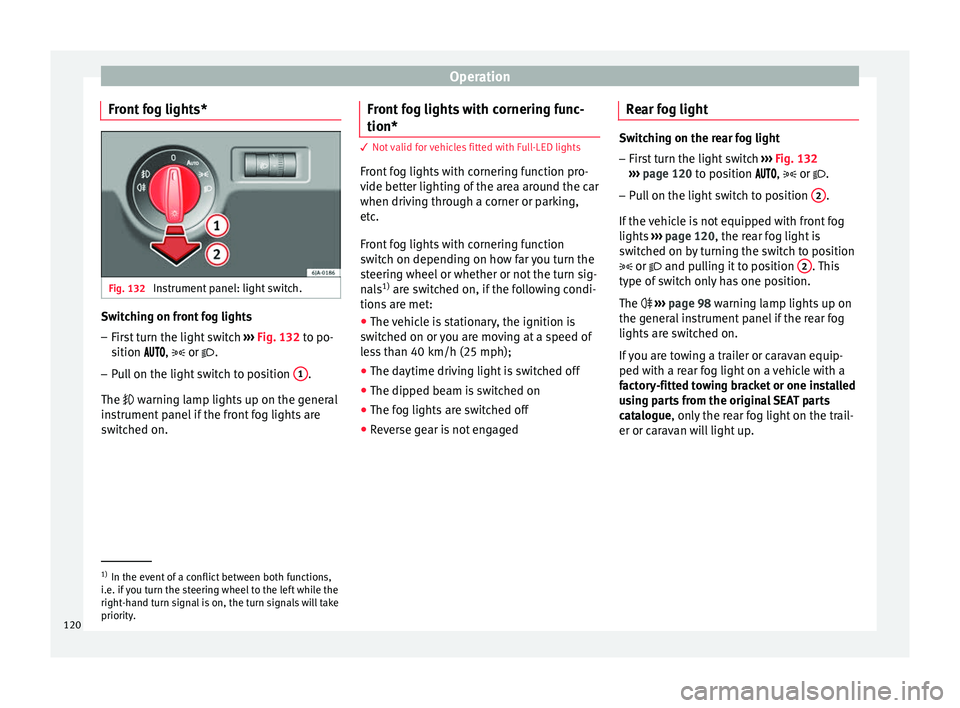
Front fog lights* Fig. 132
Instrument panel: light switch. Switching on front fog lights
– First turn the light switch ››
› Fig. 132 to po-
sition , or .
– Pull on the light switch to position 1 .
The w arnin
g l
amp lights up on the general
instrument panel if the front fog lights are
switched on. Front fog lights with cornering func-
tion* 3 Not valid for vehicles fitted with Full-LED lights
Fr
ont
fog lights with cornering function pro-
vide better lighting of the area around the car
when driving through a corner or parking,
etc.
Front fog lights with cornering function
switch on depending on how far you turn the
steering wheel or whether or not the turn sig-
nals 1)
are switched on, if the following condi-
tions are met:
● The vehicle is stationary, the ignition is
swit c
hed on or you are moving at a speed of
less than 40 km/h (25 mph);
● The daytime driving light is switched off
● The dipped beam is switched on
● The fog lights are switched off
● Reverse gear is not engaged Rear fog light Switching on the rear fog light
– First turn the light switch ›››
Fig. 132
››› page 120 to position , or .
– Pull on the light switch to position 2 .
If the v
ehicle is not equipped with front fog
lights ››› page 120, the rear fog light is
switched on by turning the switch to position
or and pulling it to position 2 . This
type of sw it
ch only has one position.
The ››› page 98 warning lamp lights up on
the general instrument panel if the rear fog
lights are switched on.
If you are towing a trailer or caravan equip-
ped with a rear fog light on a vehicle with a
factory-fitted towing bracket or one installed
using parts from the original SEAT parts
catalogue, only the rear fog light on the trail-
er or caravan will light up. 1)
In the event of a conflict between both functions,
i.e. if
you turn the steering wheel to the left while the
right-hand turn signal is on, the turn signals will take
priority.
120
Page 123 of 248

Lights and visibility
Function “Coming Home”/“Leaving
Home”* This function makes it possible, under poor
vi
s
ibility conditions, to automatically turn on
the lights for a brief period of time after the
vehicle has been parked or when approach-
ing the vehicle.
The function is automatically turned on if the
following conditions are met:
● The light switch is in position
››
› page 119.
● The visibility around the vehicle is reduced.
● The ignition is switched off.
To t urn on thi
s function, switch on the head-
light flasher prior to exiting the vehicle.
The light is adjusted according to the data re-
corded by the light sensor that is installed
between the windscreen and the inside rear
view mirror.
The function automatically turns on the side
lights and headlights, the lighting for the en-
try area on the exterior mirrors and the num-
ber plate light.
“Coming Home” function
The light is automatically switched on when
the driver door is opened (for 60 seconds af-
ter the ignition is switched off). The lights is switched off when all the doors
and the boot lid are c
losed.
If a door or the boot lid remains open, the
light will switch off after 60 seconds.
“Leaving Home” function
The light is automatically switched on when
the vehicle is unlocked using the remote con-
trol.
The light is switched off after 10 seconds or
when the vehicle is locked.
Hazard warning lights switch Fig. 133
Instrument panel: switch for hazard
w arnin
g lights. –
Press the button ›
››
Fig. 133 to switch
the hazard warning lights on or off.
The warning lamps on the instrument panel
and the warning lamp on the switch will flash at the same time as the turn signals when
the hazar
d warning lights are switched on.
The hazard warning lights also work when
the ignition is switched off.
The hazard warning lights come on automati-
cally in the event of an accident in which an
airbag is triggered. Note
Switch on the hazard warning lights to warn
other ro a
d users, for example:
● When reaching the tail end of a traffic jam
● if the vehicle has a technical fault or you
are inv
olved in an emergency situation. Parking lights*
Parking lights
– Switch the ignition off.
– Move the turn signal lever ››
›
Fig. 131
››› page 118 up or down to turn on the right
or left-hand parking lights respectively.
Parking light on both sides
– Turn the light switch ›››
Fig. 129
››› page 117 to position and engage the
steering lock. »
121
Technical data
Advice
Operation
Emergencies
Safety
Page 124 of 248

Operation
Note
● The park in
g lights can only be activated
with the ignition disconnected.
● The parking light will not come on automat-
ical
ly after switching off the ignition if the
left- or right-hand turn signal is left on. Adjusting the headlights
The light beam of the dipped beam lights is
asymmetric: the s
ide of
the road on which
you are driving is lit more intensely.
When a car that is manufactured in a country
that drives on the right travels to a country
that drives on the left (or vice versa), it is nor-
mally necessary to cover part of the headlight
bulbs with stickers or to change the adjust-
ment of the headlights to avoid dazzling oth-
er drivers.
In such cases, the regulations specify certain
light values that must be complied with for
designated points of the light distribution.
This is known as “Tourist light”.
The light distribution of the halogen and full-
LED headlights of the SEAT Toledo allows the
specific “tourist light” values to be met with-
out the need for stickers or changes in the
settings. Note
“Tourist light” is only allowed temporarily. If
you ar e p
lanning a long stay in a country that
drives on the other side, you should take the
vehicle to an Authorised Technical Service to
change the headlights. Interior lights
Interior lightin g Fig. 134
Interior lighting – version 1. Fig. 135
Interior lighting – version 2. Read the additional information carefully
› ›
›
page 20
Where the courtesy light is on (switch A ›››
Fig. 134 in pos ition
), the light will come
on if:
● the vehicle is unlocked,
● one of the doors is opened,
● The key is removed from the ignition
When the cour t
esy light is on (switch A in
po s
ition
), the light will switch off if:
● the vehicle is locked,
● the ignition is switched on,
● 30 seconds after all of the doors have been
closed
If
a door is left open or if switch A is in the
po s
ition, the int
erior lighting switches off
after about 10 minutes to prevent the battery
from running flat.
122
Page 171 of 248

Driver assistance systems
The approximate measurement range of the
sen sor
s
is:
1.20 m
0.90 m
1.60 m
0.90 m
As you approach the obstacle, the time inter-
val between the audible warnings will be re-
duced. When you reach around 0.30 m the
warning will be constant: do not continue to
move forward (or backward)!
If you maintain separation from the obstacle,
the volume of the warning begins to reduce
after four seconds (does not affect the tone
of the constant warning).
Parking Aid Operation Fig. 182
Centre console: parking aid button. A
B
C
D Manual connection of Parking Aid
●
Press the butt
on
once.
Manual disconnection of Parking Aid
● Press the button
again.
Manual disconnection of Parking Aid display
(the audible sounds remain active)
● Press a button on the main menu of the fac-
tory
-assembled infotainment system.
● OR: press the BACK fu
nction button.
Automatic connection of Parking Aid ● Engage reverse gear or turn the selector
lever t
o position R.
● OR: If the vehicle approaches an obstacle
that
is in its forwards path at a speed below
10 km/h (6 mph) ››› page 169, Automatic ac-
tivation. The obstacle is detected as of a dis-
tance of approx. 95 cm if the automatic con-
nection is activated in the infotainment sys-
tem. A reduced display is shown.
Automatic disconnection of Parking Aid
● Move the selector lever to position P.
● OR: accelerate to more than approx.
10 km/h (6 mph) for
ward.
Temporary suppression of sound in Parking
Aid
● Press the function b
utton. Change from reduced view to full view
●
Engage reverse gear or turn the selector
lever t
o position R.
● OR: press the car icon in reduced view.
If nec
essary, switch to the rear-assist image
(Rear View Camera “RVC”)
● Engage reverse gear or turn the selector
lever t
o position R.
● OR: Press the RVC fu
nction button.
A short confirmation signal will be heard and
the button symbol will light up yellow when
the system is switched on.
Automatic activation Fig. 183
Miniature indication of automatic ac-
tiv ation When the Parking System Plus is switched on
aut
om
atic
ally, a miniature of the vehicle will »
169
Technical data
Advice
Operation
Emergencies
Safety
Page 173 of 248

Driver assistance systems
Adjusting the display and audible
w arnin
g
s The settings for the display and audible
warnin
g
s are controlled via the Easy Con-
nect*.
Automatic activation
on – activates the Automatic activa-
tion option ››› page 169.
off – deactivates the Automatic ac-
tivation option ››› page 169.
Front volume*
Volume in the front and rear area.
Front sound settings/sharpness*
Frequency (tone) of the sound in the front
area.
Rear volume*
Volume in the rear area.
Rear sound settings/sharpness*
Frequency (tone) of the sound in the rear
area.
Adjust volume
With the parking aid switched on, the active
audio/video source volume will be reduced
to the intensity of the selected setting. Error messages When the Parking Aid is activated or when it
is
sw
itched on, if a continuous warning can
be heard for several seconds (additionally, in
the case of Parking system Plus, the LED of
the button flashes), there is a fault in the
system.
Parking System Plus*
If there is a fault in a sensor, the symbol is
displayed on the Easy Connect display in
front of/behind the vehicle. If a rear sensor is
faulty, only the obstacles in the areas A and
B are displayed
››
›
Fig. 181. If a front sensor
is faulty, only the obstacles in the areas C and
D are displayed.
Hav e the f
au
lt corrected by a specialised
workshop without delay.
Towing bracket In vehicles equipped with a towing bracket
dev
ic
e fr
om the factory, when the trailer is
connected electrically, the Parking Aid rear
sensors will not be activated when reverse
gear is engaged, when the selector lever is
turned to position R or when the button is
pressed. Parking System Plus
The dist
ance to possible obstacles at the rear
of the vehicle will not be displayed on the
screen and nor will it be indicated by means
of audible sound signals.
The Easy Connect system screen will only dis-
play objects detected at the front, and the ve-
hicle's trajectory will be hidden.
Rear Assist “Rear View Cam-
era”*
Operatin
g and safety warnings WARNING
● The Re ar As
sist does not make it possible
to precisely calculate the distance from ob-
stacles (people, vehicles, etc.) and nor can it
overcome the system's own limits, hence us-
ing it may cause serious accidents and inju-
ries if used negligently or without due care.
The driver should be aware of his/her sur-
roundings at all times to ensure safe driving.
● The camera lens expands and distorts the
field of
vision and displays the objects on the
screen in a different, vague manner. The per-
ception of distances is also distorted by this
effect. » 171
Technical data
Advice
Operation
Emergencies
Safety
Page 177 of 248

Driver assistance systems
use the brake pedal in good time to slow the
vehic
l
e. Note
● In vehic
les with an automatic gearbox, the
cruise control system cannot be switched on
if the selector lever is in position P, N or R.
● In vehicles with a manual gearbox, the
cruise c
ontrol cannot be switched on if first
gear or reverse gear is engaged. Setting the speed
Fig. 187
Turn signal and main beam head-
light l
ev
er: cruise control buttons. Setting speed
– Move knob 1
› ›
› Fig. 187
to the ON posi-
tion. –
Briefly pre
ss rocker switch 2 in S
ET posi-
tion when y
ou have reached the speed you
wish to set.
On releasing rocker switch 2 from S
ET, the
c urr
ent speed is stored and will remain con-
stant without having to press the accelerator
pedal.
Adjust the stored speed Increasing speed by pressing the accelerator
ped
a
l
– Pr
ess the accelerator to increase the speed
of the v
ehicle.
– Release the accelerator and the previously
programmed s
peed will be resumed.
If, when pressing the accelerator, the vehicle
exceeds the programmed speed by more
than 10 km/h (6 mph) for more than 3 mi-
nutes, the set speed will be deleted. The
speed will have to be stored again.
Increasing speed by pressing switch 2 –
Press rocker switch 2
› ›
›
Fig. 187
››› page 175 in RES.
– If the button is held down in the RES po
si-
tion, the speed increases continuously. Re-
lease the switch when the required speed
is reached. The speed is stored. Setting a lower speed
– The set speed can be reduced
by pressing
switch 2
› ››
Fig. 187
››› page 175 in SET.
– If the button is held down in the SET po
si-
tion, the speed decreases continuously. Re-
lease the switch when the required speed
is reached. The speed is stored.
– On releasing the switch at speeds of less
than 30 km/h (19 mph), no speed w
ill be
set and the memory will be deleted. The ve-
hicle must be moving at a speed of over
30 km/h (19 mph) and switch 2 pressed
ag ain t
o
SET for it to be set.
The speed can be reduced by pressing the
brake pedal, which temporarily switches off
the cruise control.
Temporary deactivation of cruise con-
trol Cruise control
is
sw
itched off temporarily by
pressing switch 1
› ›
›
Fig. 187 ›››
page 175 in
CANCEL or by pressing the brake or clutch
pedal.
The set speed is stored.
To recover the set speed, briefly press switch 2 in RE
S once you have released the brake
or c lut
ch pedal.
175
Technical data
Advice
Operation
Emergencies
Safety
Page 180 of 248

Operation
Front Assist operation may be affected by a
s tr
on
g radar reverse reflection. This may oc-
cur, for example, in a closed car park or due
to the presence of metallic objects (e.g. rails
on the road or sheets used in road works).
The area in front of and around the radar sen-
sor should not be covered with adhesives,
additional or similar headlights, as this may
negatively affect Front Assist operation.
If structural modifications are made to the ve-
hicle, for example, if the suspension is low-
ered or the front spoiler is modified, Front As-
sist operation may be affected. So structural
modifications should only be made by speci-
alised workshops. SEAT recommends visiting
a SEAT dealership for this purpose.
If work is done incorrectly on the front of the
vehicle, the radar sensor could be damaged
or lose its settings, and Front Assist opera-
tion may be affected. So repair work should
only be made by specialised workshops.
SEAT recommends visiting a SEAT dealership
for this purpose. CAUTION
If you have the sensation that the radar sen-
sor is d
amaged or has lost its settings, dis-
connect the Front Assist. This will avoid pos-
sible damage. If this occurs have it adjusted.
● The sensor may become damaged or lose
its settin
gs when knocked, for example, dur- ing a parking manoeuvre. This may compro-
mise the sy
s
tem's efficacy or disconnect it.
● Repairs to the radar sensor require special-
ist
knowledge and special tools. SEAT recom-
mends visiting a SEAT dealership for this pur-
pose.
● Clean away the snow with a brush and the
ice pref
erably with a solvent-free de-icer
spray. Operating the Front Assist monitoring
sys
t
em Fig. 190
On the instrument panel display:
Fr ont
As
sist switched off message. Fig. 191
On the turn signal and main beam
hea dlight
lever: button for the driver assis-
tance systems The Front Assist monitoring system is active
whenev
er the ignition i
s
switched on.
When the Front Assist is switched off, so too
are the advance warning function (pre warn-
ing) and the distance warning.
SEAT recommends leaving the Front Assist al-
ways switched on. Exceptions ››› page 179,
Switching the Front Assist Monitoring Sys-
tem off in the following situations .
Switching the Front Assist monitoring sys-
tem on and off
With the ignition switched on, the Front As-
sist can be switched on and off as follows:
● Select the corresponding menu option us-
ing the butt
on for the driver assistance sys-
tems ››› Fig. 191.
178
Page 236 of 248

Index
Boot hook . . . . . . . . . . . . . . . . . . . . . . . . . . . . . . . . .
139
r et
aining elements . . . . . . . . . . . . . . . . . . . . . . 139
retaining nets . . . . . . . . . . . . . . . . . . . . . . . . . . 139
Brake assist . . . . . . . . . . . . . . . . . . . . . . . . . . . . . 154
Brake fluid . . . . . . . . . . . . . . . . . . . . . . . . . . . . . . . 41 checking . . . . . . . . . . . . . . . . . . . . . . . . . . . . . . 209
Brakes brake fluid . . . . . . . . . . . . . . . . . . . . . . . . . . . . . 209
control lamp . . . . . . . . . . . . . . . . . . . . . . . . . . . 153
handbrake . . . . . . . . . . . . . . . . . . . . . . . . . . . . . 154
running in . . . . . . . . . . . . . . . . . . . . . . . . . . . . . 161
Brake servo . . . . . . . . . . . . . . . . . . . . . . . . . . . . . . 154
Braking brake assist . . . . . . . . . . . . . . . . . . . . . . . . . . . . 154
Bulb failure control lamp . . . . . . . . . . . . . . . . . . . . . . . . . . . 116
C Capacities . . . . . . . . . . . . . . . . . . . . . . . . . . . . . . . . 39
Car-care products . . . . . . . . . . . . . . . . . . . . . . . . . 193
Care of vehicle door lock cylinder . . . . . . . . . . . . . . . . . . . . . . . 196
leatherette . . . . . . . . . . . . . . . . . . . . . . . . . . . . . 197
natural leather . . . . . . . . . . . . . . . . . . . . . . . . . 198
seat belts . . . . . . . . . . . . . . . . . . . . . . . . . . . . . 198
upholstery . . . . . . . . . . . . . . . . . . . . . . . . . . . . . 197
washing by hand . . . . . . . . . . . . . . . . . . . . . . . 194
Carrier system . . . . . . . . . . . . . . . . . . . . . . . . . . . . 141
Catalytic converter . . . . . . . . . . . . . . . . . . . . . . . . 164 malfunction . . . . . . . . . . . . . . . . . . . . . . . . . . . . 164
CCS . . . . . . . . . . . . . . . . . . . . . . . . . . . . . . . . . . . . . 31
Central locking . . . . . . . . . . . . . . . . . . . . . . . . . . . 104 anti-theft alarm . . . . . . . . . . . . . . . . . . . . . . . . . 112
central locking button . . . . . . . . . . . . . . . . . . . 109
closing . . . . . . . . . . . . . . . . . . . . . . . . . . . . . . . . 108
individualised settings . . . . . . . . . . . . . . . . . . 107 keyless Access . . . . . . . . . . . . . . . . . . . . . . . . . 110
lockin
g . . . . . . . . . . . . . . . . . . . . . . . . . . . . . . . . 108
locking manually . . . . . . . . . . . . . . . . . . . . . . . . 10
opening . . . . . . . . . . . . . . . . . . . . . . . . . . . . . . . 108
unlocking . . . . . . . . . . . . . . . . . . . . . . . . . . . . . 108
Central locking system . . . . . . . . . . . . . . . . . . . . . 107
Cetane number (diesel fuel) . . . . . . . . . . . . . . . . 201
Change a bulb . . . . . . . . . . . . . . . . . . . . . . . . . . . . 83
Changing a wheel . . . . . . . . . . . . . . . . . . . . . . 46, 75 subsequent work . . . . . . . . . . . . . . . . . . . . . . . . 49
Changing bulbs daytime driving light . . . . . . . . . . . . . . . . . . . . . 86
dipped beam . . . . . . . . . . . . . . . . . . . . . . . . . . . 85
double headlight bulbs . . . . . . . . . . . . . . . . . . . 84
main beam headlight . . . . . . . . . . . . . . . . . . . . . 85
side light . . . . . . . . . . . . . . . . . . . . . . . . . . . . . . . 85
turn signal . . . . . . . . . . . . . . . . . . . . . . . . . . . . . . 86
Changing bulbs on the number plate . . . . . . . . . . 91 removing the bulb holder . . . . . . . . . . . . . . . . . 91
Changing bulbs on the side panel . . . . . . . . . . . . 88 fitting the rear light . . . . . . . . . . . . . . . . . . . . . . 89
removing the bulb holder . . . . . . . . . . . . . . . . . 88
removing the rear light . . . . . . . . . . . . . . . . . . . . 87
Changing lights on the side panel . . . . . . . . . . . . 87
Changing oil . . . . . . . . . . . . . . . . . . . . . . . . . . . . . 208
Changing rear lights on the rear lid changing bulbs . . . . . . . . . . . . . . . . . . . . . . . . . . 90
fitting the bulb-holder . . . . . . . . . . . . . . . . . . . . 90
Changing settings CAR menu . . . . . . . . . . . . . . . . . . . . . . . . . . . . . . 21
Changing tail lights (on the rear lid . . . . . . . . . . . 89
Changing the bulbs fog light . . . . . . . . . . . . . . . . . . . . . . . . . . . . . . . . 86
Changing the rear lights on the rear lid removing the bulb holder . . . . . . . . . . . . . . . . . 89
Charging the battery . . . . . . . . . . . . . . . . . . . . . . . 51 Checking levels
engine comp artment . . . . . . . . . . . . . . . . . . . . 205
Child-proof locking . . . . . . . . . . . . . . . . . . . . . . . . 112 electric windows . . . . . . . . . . . . . . . . . . . . . . . . 115
Child seat categorisation in groups . . . . . . . . . . . . . . . . . . 74
Child seats . . . . . . . . . . . . . . . . . . . . . . . . . . . . 16, 74 ISOFIX system . . . . . . . . . . . . . . . . . . . . . . . . . . . 17
safety instructions . . . . . . . . . . . . . . . . . . . . 16, 73
securing with the seat belt . . . . . . . . . . . . . . . . 16
Top Tether system . . . . . . . . . . . . . . . . . . . . . . . . 17
Cigarette lighter . . . . . . . . . . . . . . . . . . . . . . . . . . 133
City Emergency braking function . . . . . . . . . . . . . 180
Cleaning . . . . . . . . . . . . . . . . . . . . . . . . . . . . . . . . 193 chromed parts . . . . . . . . . . . . . . . . . . . . . . . . . 195
headlights . . . . . . . . . . . . . . . . . . . . . . . . . . . . . 196
leatherette . . . . . . . . . . . . . . . . . . . . . . . . . . . . . 197
natural leather . . . . . . . . . . . . . . . . . . . . . . . . . 198
plastic parts . . . . . . . . . . . . . . . . . . . . . . . . . . . 196
upholstery . . . . . . . . . . . . . . . . . . . . . . . . 197, 198
washing the vehicle . . . . . . . . . . . . . . . . . . . . . 194
wheels . . . . . . . . . . . . . . . . . . . . . . . . . . . . . . . . 197
windows . . . . . . . . . . . . . . . . . . . . . . . . . . . . . . 196
Cleaning and thawing windows . . . . . . . . . . . . . 196
Climatronic . . . . . . . . . . . . . . . . . . . . . . . . . . . . . . . 36 adjusting the temperature . . . . . . . . . . . . . . . . 148
air recirculation . . . . . . . . . . . . . . . . . . . . . . . . . 148
automatic mode . . . . . . . . . . . . . . . . . . . . . . . . 148
blower selection . . . . . . . . . . . . . . . . . . . . . . . . 148
windscreen defrost . . . . . . . . . . . . . . . . . . . . . . 149
Close . . . . . . . . . . . . . . . . . . . . . . . . . . . . . . . . . . . 104
Closing central locking . . . . . . . . . . . . . . . . . . . . . . . . . 108
vehicle with Keyless Access . . . . . . . . . . . . . . . 110
windows . . . . . . . . . . . . . . . . . . . . . . . . . . . . . . 115
Coat hooks . . . . . . . . . . . . . . . . . . . . . . . . . . . . . . 135
Coming Home and Leaving Home . . . . . . . . . . . . 121
234