2016 Seat Ibiza ST esp
[x] Cancel search: espPage 80 of 252

Emergencies
The anti-puncture kit is located underneath
the floor c o
verin
g in the luggage compart-
ment. It includes the following components
››› Fig. 89:
Tyre valve remover
Sticker indicating maximum speed “max.
80 km/h” or “max. 50 mph”
Filler tube with cap
Air compressor
Tube for inflating tyres
Warning provided by tyre pressure moni-
toring system (it can also be integrated in
the compressor).
Air bleed screw (in its place, the compres-
sor may have a button).
ON/OFF switch
12 volt connector
Bottle of sealant
Spare tyre valve
The valve insert remover 1 has a gap at the
lo w
er end f or a
valve insert. The valve insert
can only be screwed or unscrewed in this
way. This also applies to its replacement part 11 .
WARNING
When inflating the wheel, the air compressor
and the inflator t ube m
ay become hot.
● Protect hands and skin from hot parts. 1
2
3
4
5
6
7
8
9
10
11 ●
Do not pl ac
e the hot flexible inflator tube or
hot air compressor on flammable material.
● Allow them to cool before storing the de-
vice.
● If it
is not possible to inflate the tyre to at
leas
t 2.0 bars (29 psi / 200 kPa), the tyre is
too badly damaged. The sealant is not in a
good condition to seal the tyre. Do not con-
tinue driving. Seek specialist assistance. CAUTION
Switch off the air compressor after a maxi-
mum of 8 operation a
l minutes to avoid over-
heating! Before switching on the air compres-
sor again, let it cool for several minutes. Check after 10 minutes of driving
Screw in the inflator tube
››
›
Fig. 89
5 again
and c hec
k the pr
essure on the gauge 6 .
1.3 b ar (19 p
si / 130 kP
a) and lower:
● Stop the vehicle! The tyre cannot
be sealed
sufficiently with the tyre mobility set.
● You should obtain professional assistance
››› .
1.4 b ar (20 p
si / 140 kP
a) and higher:
● Set the tyre pressure to the correct value
again. ●
Carefu
lly resume your journey, without ex-
ceeding 80 km/h (50 mph), until you reach
the nearest specialised workshop and re-
place the tyre. WARNING
Driving with an unsealed tyre is dangerous
and can cau se ac
cidents and serious injury.
● Do not continue driving if the tyre pressure
is 1.3 b
ar (19 psi / 130 kPa) and lower.
● Seek specialist assistance. Changing the windscreen wiper
b
l
a de
s
Changing the windscreen and rear
window wiper blades Read the additional information carefully
› ›
›
p
age 54.
Perfect wiper blade condition is essential for
clear vision. Damaged wiper blades should
be replaced immediately.
The windscreen wiper blades are supplied as
standard with a layer of graphite. This layer is
responsible for ensuring that the wipe is si-
lent. If the graphite layer is damaged, the
noise of the water as it is wiped across the
windscreen will be louder.
78
Page 85 of 252

Fuses and bulbs
Fuse arrangement in engine compart-
ment Read the additional information carefully
›››
p
age 44
Only replace fuses with a fuse of the same
amperage (same colour and markings) and
size.
No.Consumer/Amps
1Fan, condenser40
TK8 fan, condenser50
2Glow plugs50
3ABS Pump40
EMBOX2-13 (TA8)20
4PTC glow phase 250
5PTC glow phase 350
6BDM, 30 ReF5
7MSG (KL30)7.5
8Windscreen wipers30
9Automatic gear box control, AQ 160
Control box30
10ABS Ventil25
EMBOX2-11 (TA8)5
No.Consumer/Amps
12
Injectors
10TDI fuel metering adjuster, TA8 ex-
haust temperature sensor
13Servo sensor5
14coolant pump high/low temperature,
gauge (relay EKP)10
1550 controls motor diag5
16Starter motor30
17Controls motor (MSG KL87)20
18PTC Relays, TOG sensor, engine
valves, PWM fan10
19Interior AUX Fuses30
20Glow plug relay, Heizrohr5
Ignition coil20 Changing bulbs
Gener al
not
es Read the additional information carefully
› ›
›
p
age 45
Before changing any bulb, first turn off the
failed device. Do not touch the glass part of the bulb with
your bare h
ands. The fingerprints left on the
glass will vaporise as a result of the heat gen-
erated by the bulb, reducing bulb life and
causing condensation on the reflector sur-
face, thus reducing effectiveness.
A bulb must only be replaced by one of the
same type. The type is indicated on the bulb,
either on the glass part or on the base.
Xenon headlights
With this type of headlight, the user can re-
place the turn signal bulb. Replacement of
the dipped/main beam bulb must be done by
Technical Services, given that complex ele-
ments must be removed from the vehicle and
the automatic control system that incorpo-
rates it must be reset.
The Xenon bulbs discharge 2.5 times the
light flux and have an average lifespan of 5
times more than that of halogen bulbs, this
means that, except due to unusual circum-
stances, there is no need to change the bulbs
for the whole life of the vehicle. WARNING
● Take p ar
ticular care when working on com-
ponents in the engine compartment if the en-
gine is warm, there is a risk of burns.
● Bulbs are highly sensitive to pressure. The
glass
can break when you touch the bulb,
causing injury. » 83
Technical data
Advice
Operation
Emergencies
Safety
Page 86 of 252

Emergencies
●
The high vo lt
age element of gas discharge
bulbs* (xenon light) must be handled correct-
ly. Otherwise, there is a risk of death.
● When changing bulbs, please take care not
to injure y
ourself on sharp parts in the head-
light housing. CAUTION
● Remov e the ignition k
ey before working on
the electric system. Otherwise, a short circuit
could occur.
● Switch off the lights or parking lights be-
fore y
ou change a bulb. For the sake of the environment
Please ask your specialist retailer how to dis-
pose of u sed b
ulbs in the proper manner. Note
● Depending on w e
ather conditions (cold or
wet), the front lights, the fog lights, the tail
lights and the turn signals may be temporari-
ly misted. This has no influence on the useful
life of the lighting system. By switching on
the lights, the area through which the beam
of light is projected will quickly be demisted.
However, the edges may continue to be mis-
ted.
● Please check at regular intervals that all
lighting (espec
ially the exterior lighting) on
your vehicle is functioning properly. This is not only in the interest of your own safety,
but a
l
so that of all other road users.
● Before changing a bulb, make sure you
have the corr
ect new bulb.
● Do not touch the glass part of the bulb with
your bare h
ands, use a cloth or paper towel
instead. The residue left by the fingerprints
would vaporise as a result of the heat gener-
ated by the bulb, they will be deposited on
the reflector and will impair its surface. Single headlight bulb change
P o
sition of
the bulbs Fig. 91
Single headlight. Side lights - Dipped beam/main beam.
T
urn s
ignal
light.
DRL (day light)
A B
C Turn signal and DRL (day light) light
Fig. 92
Single headlight DRL light (day light). Fig. 93
Single turn signal lamp. –
Raise the bonnet.
– Turn the bulb holder ››
›
Fig. 92
1 or
› ›
›
Fig. 93
2 to the left and pull.
– Remove the bulb by pressing on the bulb
ho l
der and t urnin
g it anti-clockwise at the
same time.
84
Page 100 of 252

Operation
Time
● To set the time, keep the button ››
›
Fig. 121
4 pressed for more than 3 seconds to select
the hour or minut e di
sp
lay.
● To continue setting the time, press the up-
per or lower par
t of the button 4 . Hold but-
t on do
wn to s
croll through the numbers
quickly.
● Press the button 4 again in order to finish
settin g the time.
The time c an also be set
via the key and
Set up function button in the Easy Connect
sy s
tem
›
›› page 101.
Compass
With the ignition on and the navigation sys-
tem on, the cardinal point corresponding to
the direction of travel of the vehicle is dis-
played on the instrument panel.
Selector lever position
The selected gear is displayed on the side of
the selector lever and on the instrument pan-
el display. In positions D and S, and with the
Tiptronic, the corresponding gear is also dis-
played.
Recommended gear (manual gearbox)
The recommended gear in order to save fuel
is displayed on the instrument panel while
you are driving ›››
page 28. Second speed display (mph or km/h)
In addition to the s
peedometer, the speed
can also be displayed in a different unit of
measurement (in miles or in km per hour).
This option cannot be deactivated in models
destined for countries in which the second
speed must always be visible.
The second speed display can be adjusted in
the Easy Connect system via the key and
the Set
up function button
››
›
p
age 101.
Speed warning
When the speed setting is exceeded, this will
be indicated on the instrument panel display.
This is very useful, for example when using
winter tyres that are not designed for driving
at the maximum speed of the vehicle
››› page 32.
The speed warning settings can be adjusted
in the Easy Connect system via the key
and the Set
up function button
››
›
p
age 101.
Start-Stop operating display
Updated information relating to the status is
displayed on the instrument panel
››› page 172.
Low consumption driving status (ECO)*
Depending on the equipment, when driving,
the “ECO ” display appears on the instrument
panel when the vehicle is in low consump- tion status due to active cylinder manage-
ment (ACT
®
)* ›
›› page 30.
Identifying letters on engine (MKB)
Hold the button ››› Fig. 121 4 down for more
th an 15 sec
onds
to display the identifying
letters of the vehicle engine (MKB). To do
this, the ignition must be switched on and
the engine switched off. WARNING
Observe the safety warnings ››› in Warning
symbols on p ag
e 101. WARNING
Even though outside temperatures are above
freezin g, some r
oads and bridges may be icy.
● At outside temperatures above +4°C
(+39°F), even when the “ice cr
ystal symbol”
is not visible, there may still be patches of ice
on the road.
● Do not rely on the outside temperature in-
dicator! Note
● Different
versions of the instrument panel
are available and therefore the versions and
instructions on the display may vary. In the
case of displays without warning or informa-
tion texts, faults are indicated exclusively by
the warning lamps. 98
Page 102 of 252

Operation
●
Additiona l
lights and other accessories in
front of the air inlet reduce the cooling effect
of the coolant. At high outside temperatures
and high engine loads, there is a risk of the
engine overheating.
● The front spoiler also ensures proper distri-
bution of the coo
ling air when the vehicle is
moving. If the spoiler is damaged this can re-
duce the cooling effect, which could cause
the engine to overheat. Seek specialist assis-
tance. Fuel level
Fig. 123
Fuel gauge. The display
6
› ›
› Fig. 121 on
ly works when
the ignition is switched on. When the display
reaches the reserve mark, the lower diode
lights up in red and the control lamp ap-
pears ››› page 96. When the fuel level is very
low, the lower diode flashes in red. The distance to empty fuel level is displayed
on the instrument p
anel 3
› ››
Fig. 121
.
Y ou c
an consult the tank capacity of your ve-
hicle in the ›››
page 40 section. CAUTION
Never run the fuel tank completely dry. An ir-
regu l
ar fuel supply could cause misfiring. In
this way the unburned fuel can reach the ex-
haust system, which could cause the catalytic
converter to overheat resulting in damage. Warning and control lamps
W arnin
g symbo l
s Read the additional information carefully
› ›
›
p
age 35
There are red warning symbols (priority 1)
and yellow warning symbols (priority 2).
Warning messages, Priority 1 (red)
If one of these faults occurs, the warning
lamp will light up or flash and will be accom-
panied by three audible warnings. This is a
danger warning. Stop the vehicle and switch
off the engine. Check the fault and correct it.
Obtain professional assistance if necessary.
If several priority 1 faults are detected at the
same time, the symbols will be displayed one after the other for about 2 seconds at a time
and will
continue until the fault is corrected.
No menus will be shown in the display for the
duration of a priority 1 warning message.
Examples of priority 1 warning messages
(red)
● Brake system symbol with the warning
me
ssage STOP BRAKE FLUID INSTRUC-
TION MANUAL or STOP BRAKE FAULT IN-
STRUCTION MANUAL .
● Coolant symbol with the warning me
s-
sage STOP SEE COOLANT INSTRUCTION
MANUAL .
● Engine oil pressure symbol with the
warning me
ssage STOP ENGINE OIL
PRESSURE LOW! INSTRUCTION MANUAL .
Warning messages, Priority 2 (yellow)
If one of these faults occurs, the correspond-
ing warning lamp lights up and is accompa-
nied by an audible warning. Check the corre-
sponding function as soon as possible al-
though the vehicle may be used without risk.
If several priority 2 warning messages are de-
tected at the same time, the symbols are dis-
played one after the other for about 2 sec-
onds at a time. After a set time, the informa-
tion text will disappear and the symbol will
be shown as a reminder at the side of the
display.
100
Page 121 of 252

Lights and visibility
Switching lights on and off Read the additional information carefully
›››
p
age 21
The legal requirements regarding the use of
vehicle lights in each country must be ob-
served.
The driver is personally responsible for the
correct use and adjustment of the lights in all
situations. WARNING
Never drive with just the side lights on, there
is a ri sk
of accident. The side lights are not
bright enough to illuminate the road ahead
and to ensure that other road users are able
to see you. Always use your dipped beam
headlights if it is dark or if visibility is poor. Note
● The dipped beam he a
dlights will only work
with the ignition on. The side lights come on
automatically when the ignition is turned off.
● If the lights are left on after the key has
been taken out of
the ignition lock, an audi-
ble warning sounds while the driver door re-
mains open. This is a reminder to switch the
lights off.
● The rear fog light is so bright that it can
dazzle driv
ers behind you. You should use
the rear fog light only when visibility is very
poor. ●
The use of the lightin g de
scribed here is
subject to the relevant statutory require-
ments. Automatic lighting*
Activation
– Rotate the switch to the po s
ition, this
indication will light up.
Deactivation
– Turn the light switch to .
Automatic lightin
g
If automatic headlight control is switched on,
dipped beam headlights are automatically
switched on by a photosensor if you drive in-
to a tunnel, for example. WARNING
● Even if the aut
omatic headlight control is
switched on, the dipped beam headlights will
not be switched on with fog. Therefore, the
dipped beam must be switched on manually. Note
● For those v
ehicles with the automatic head-
light system, when the key is removed from
the ignition, the audible warning will only
sound if the light knob is in position or . ●
If the da ylight
driving automatic light func-
tion is switched on, the front fog lights or
rear fog light cannot be switched on in addi-
tion.
● The use of the lighting described here is
subject
to the relevant statutory require-
ments.
● Do not put stickers on the windscreen in
front of the sen
sor. This may cause disrup-
tions or faults in the automatic lighting sys-
tem.
● The rain sensor switches on the dipped
beam headlight
s when the windscreen wipers
have been operating continuously for a few
seconds and it switches the lights off when
the continuous or interval wipe is switched
off for some minutes. Daytime running lights
››› t
able on page 2
The daytime running lights are enabled auto-
matically when the ignition is switched on.
Daytime running lights are signalling devices
for improving road safety. The lights are built
into the headlights and come on each time
the ignition is turned on if the light switch is
in position 0 or . It is automatically
switched off when the dipped beam lights
are turned on. »
119
Technical data
Advice
Operation
Emergencies
Safety
Page 122 of 252

Operation
WARNING
The side lights or daytime driving lights are
not bright enough t o i
lluminate the road
ahead and to ensure that other road users are
able to see you.
● Always use your dipped beam head lights if
it is r
aining or if visibility is poor.
● The rear lights do not come on with the
daytime drivin
g light. A vehicle which does
not have the rear lights on may not be visible
to other drivers in the darkness, if it is rain-
ing or in conditions of poor visibility. Note
See legal requirements for each country. Fog lights
Fig. 133
Dash panel: light control. Switching on the front fog lights*
● Turn the switch from position
or
to the first stop and pull it. The symbol in
the light switch lights up.
Switching on the rear fog light (vehicles with
front fog lights)
● Turn the lights control from position
or
to the second stop and pull it ››› in
Sw it
chin
g lights on and off on page 119. A
lamp on the control and warning lamps panel
lights up.
Switching on the rear fog light (vehicles with
no front fog lights)
● Turn the light control to the end from posi-
tion or and pull
it. A lamp on the con-
trol and warning lamps panel lights up.
Turn signal and main beam lever Read the additional information carefully
› ›
›
p
age 22
Parking lights ● Switch the ignition off and remove the key
from the lock.
● Mov
e the turn signal lever up or down to
turn the right or lef
t-hand parking lights on,
respectively. Convenience turn signals
For the conv
enience turn signals, move the
lever as far as possible upwards or down-
wards and release the lever. The turn signal
will flash three times.
The convenience turn signals are activated
and deactivated in the Easy Connect system
via the key and the
Set
up function button
› ›
›
p
age 101.
In vehicles that do not have the correspond-
ing menu, this function can be deactivated in
a specialised workshop. WARNING
The main beam can dazzle other drivers. Risk
of acc ident! Nev
er use the main beam head-
lights or the headlight flasher if they could
dazzle other drivers. Note
● If the con v
enience turn signals are operat-
ing (three flashes) and the other convenience
turn signals are switched on, the active part
stops flashing and only flashes once in the
new part selected.
● The turn signals only w
ork when the igni-
tion is switched on. The corresponding warn-
ing lamp or flashes in the instrument
panel. The control lamp flashes when the
turn signals are operated, provided a trailer is 120
Page 127 of 252
Lights and visibility
Windscreen wiper and rear win-
do w w
iper sy s
tems
Control lamp*
It lights up
Windscreen wiper fluid level too low
This serves as a reminder to fill up the reser-
voir at the e
arlie
st opportunity ››› page 210.
Windscreen wipers Read the additional information carefully
› ›
›
p
age 23 WARNING
● Worn and dirty w
iper blades reduce visibili-
ty and safety levels while driving.
● In cold conditions you should not use the
wash/wipe sy
stem unless you have warmed
the windscreen with the heating and ventila-
tion system. The windscreen washer fluid
could otherwise freeze on the windscreen and
obscure your view of the road.
● Always note the corresponding warnings
››› p
age 54. WARNING
The rain sensor* may not detect enough rain
to swit c
h on the wipers.
● If necessary, switch on the wipers manually
when water on the wind
screen obstructs visi-
bility. CAUTION
In icy conditions, always check that the wiper
bla de
s are not frozen to the glass before us-
ing the wipers for the first time. If you switch
on the windscreen wipers when the wiper
blades are frozen to the windscreen, you
could damage both the wiper blades and the
wiper motor. Note
● The winds c
reen wipers will only work when
the ignition is switched on.
● The heat output of the heated jets* is con-
troll
ed automatically when the ignition is
switched on, depending upon the outside
temperature.
● In certain versions of vehicles with alarms,
the windsc
reen wiper will only work in inter-
val/rain sensor mode when the ignition is on
and the bonnet closed.
● When the interval wipe function is on, the
interva
ls are directly proportional to the
speed. This way, the higher the vehicle speed
the shorter the intervals. ●
If y ou s
top the vehicle with the windscreen
wiper in position 1 or 2, it will automatically
change to a lower position speed. The set
speed will be resumed when the vehicle pulls
away.
● The windscreen will be wiped again after
approx
imately five seconds once the “auto-
matic wash/wipe system” has been activa-
ted, provided the vehicle is moving (drip func-
tion). If you activate the wipers less than 3
seconds after the drip function, a new wash
sequence will begin without performing the
last wipe. For the “drip” function to work
again, you have to turn the ignition off and
then on again.
● Do not put stickers on the windscreen in
front of the
rain sensor*. This may cause sen-
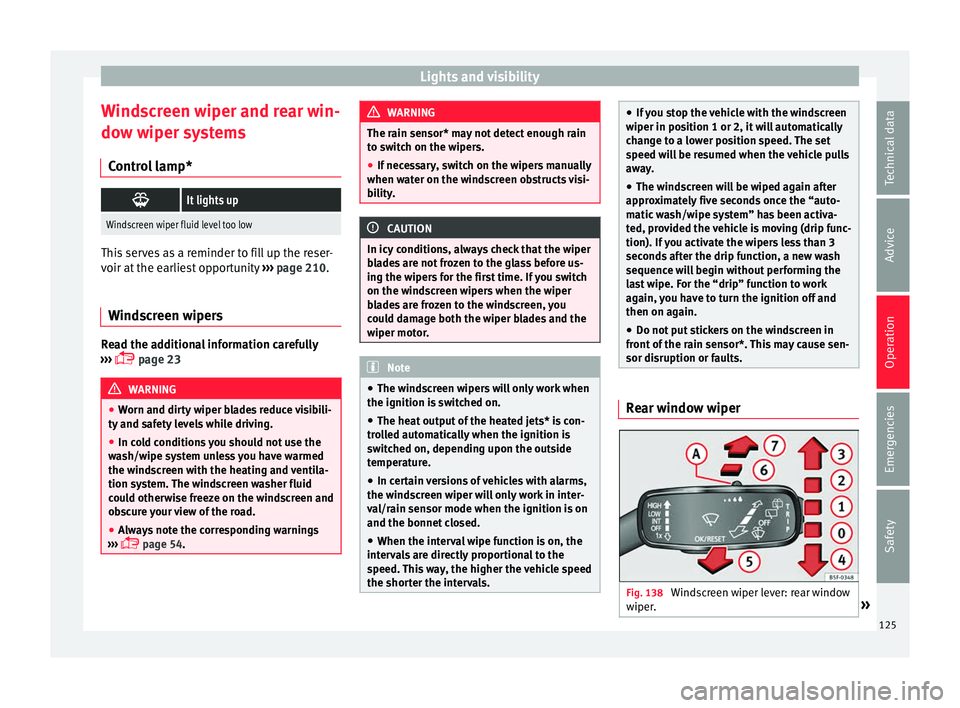
sor disruption or faults. Rear window wiper
Fig. 138
Windscreen wiper lever: rear window
w iper
. » 125
Technical data
Advice
Operation
Emergencies
Safety