2016 Seat Alhambra ESP
[x] Cancel search: ESPPage 161 of 324

Transport and practical equipment
● Hook in the net
p
artition on the rear right-
hand side roof support by pressing on the
rod.
● Secure the net partition hooks into the
strap
s in the front of the boot ››› Fig. 168 then
tighten the belts.
Installing the net partition behind the front
seats
● Hook in the net partition on the front left-
hand side r
oof support ››› Fig. 168. To do this,
guide the rod from up to down.
● Hook in the net partition on the rear right-
hand side r
oof support by pressing on the
rod.
● Secure the hooks of the net partition to the
attachment
rings in the left and right hand
side footwells on the second row of seats
then tighten the straps.
Removing the net partition
● Loosen the net partition straps.
● Release the net partition hooks from the
rings
››› Fig. 168.
● Unhook the net partition on the right-hand
side roof
support ››› Fig. 168 by pressing on
the rod.
● Unhook the net partition from the left-hand
side roof
support. Folding in the net partition
●
Press on the release button ›››
Fig. 167 2 and bend the rod
A in the direction of the
arr o
w w
ith the release button pressed.
● Press on the release button ›››
Fig. 167 3 and bend the rod
B in the direction of the
arr o
w w
ith the release button pressed.
● Store the net partition securely in the vehi-
cle. WARNING
Loose objects in the vehicle interior can be vi-
ol ently
thrown in case of a sudden manoeu-
vre or braking and especially in accidents
causing serious injury.
● Ensure that the rods are correctly locked in
plac
e.
● Even when the net partition is correctly fit-
ted, ob
jects must be secured.
● When driving with the net partition, no pas-
senger
s should be behind it. Fastening rings*
Fig. 169
In the luggage compartment: fasten-
in g rin
g
s To the front and rear of the luggage compart-
ment, ther
e ar
e f
astening rings for securing
objects ››› Fig. 169 (arrows). On some mod-
els, the fastening rings are located right at
the back, in the area of the lock carrier plate.
There are other fastening rings located to the
left and right hand side of the second row
footrests.
Some models of fastening rings must be lif-
ted to use them. WARNING
Unsuitable or damaged ropes or straps may
be rel e
ased in case of sudden braking or an
accident. As a result, objects may be fired
through the vehicle interior causing serious
injury or death. » 159
Technical data
Advice
Operation
Emergencies
Safety
Page 178 of 324

Operation
Air conditioning
Air c onditionin
g
Intr
oduction Viewing Climatronic information
The fact
or
y-fitted radio or navigation system
screen briefly displays information relating to
Climatronic.
The units of temperature measurement is dis-
played on the factory-installed radio or navi-
gation system and, depending on the vehicle
equipment, can be set using the Configu-
ration menu on the instrument panel. WARNING
Reduced visibility through the windows in-
cr e
ases the risk of serious accidents.
● Ensure that all windows are free of ice and
snow and th
at they are not fogged up pre-
venting a clear view of everything outside.
● The maximum heat output required to de-
fros
t windows quickly is only available when
the engine has reached its normal running
temperature. Only drive when you have good
visibility.
● Always ensure that you use the air condi-
tioner and heated r
ear window to maintain
good visibility.
● Never leave the air recirculation on for a
long period of time. If
the cooling system is switched off and air recirculation mode
swit
c
hed on, the windows can mist over very
quickly, considerably limiting visibility.
● Switch air recirculation mode off when it is
not requir
ed. WARNING
Stuffy or used air will increase fatigue and re-
duc e driv er c
oncentration possibly resulting
in a serious accident.
● Never leave the fresh air fan turned off or
use the air rec
irculation for long periods of
time; the air in the vehicle interior will not be
refreshed. CAUTION
● Swit c
h the air conditioner off if you think it
may be broken. This will avoid additional
damage. Have the air conditioner checked by
a specialised workshop.
● Repairs to the air conditioner require spe-
cia
list knowledge and special tools. SEAT rec-
ommends taking your car in for technical
service.
● Do not smoke when air recirculation is
switc
hed on in vehicles with an air condition-
er. The smoke taken in could lie on the cool-
ing system vaporiser and on the activated
charcoal cartridge of the dust and pollen fil-
ter, leading to a permanently unpleasant
smell. Note
● When the coo lin
g system is turned off, air
coming from the outside will not be dried. To
avoid fogging up the windows, SEAT recom-
mends leaving the cooler (compressor) on. To
do this, press the A/C button. The button
lamp shou l
d light up.
● If the humidity and temperature outside the
vehicl
e are high, condensation can drip off
the evaporator in the cooling system and
form a pool underneath the vehicle, this is
completely normal and there is no need to
suspect a leak.
● Keep the air intake slots in front of the
winds
creen free of snow, ice and leaves to en-
sure heating and cooling are not impaired,
and to prevent the windows from misting
over. Controls
Read the additional information carefully
› ›
›
page 36
To switch a function on or off, press the ap-
propriate button. Press the button again to
switch off the function.
The LED on each control lights up to indicate
that the respective function of a control has
been switched on.
Some Climatronic controls may also be on
the air conditioner control panel located in
176
Page 180 of 324

Operation
● Another f au
lt
in the vehicle. Have the air
conditioner checked by a specialised work-
shop.
Special features
If the humidity and temperature outside the
vehicle are high, condensation can drip off the vaporiser in the cooling system and form
a pool u
nderneath the vehicle. This is normal
and does not indicate a leak! Note
After starting the engine, any residual humid-
ity in the air c onditioner c
ould mist over the
windscreen. Switch on the defrost function as soon as possible to clear the windscreen of
conden
s
ation. Air vents
Fig. 197
Air vents in the dash panel Air vents
Nev
er clo
se the air vents ››› Fig. 197 A com-
p let
ely to ensure heating, cooling and venti-
lation inside the vehicle.
● Turn the thumbwheel in the required direc-
tion to open and clo
se the air vents. When the thumbwheel is in the
position, the c
or-
responding air vent is closed.
● Change the air direction using the ventila-
tion grill
e lever. There are other air vents that cannot be ad-
just
ed on the dash panel B , in the footwell
and in the r ear ar
ea of the interior. CAUTION
Never place food, medicines or other heat-
sens itiv
e objects close to the air vents. Being178
Page 183 of 324

Air conditioning
burn any fuel remaining in the auxiliary heat-
er .
The e
xhaust gases are also extracted from
the system.
Remote control Fig. 198
Auxiliary heater: remote control
Fig. 198Meaning
ONSwitch the auxiliary heater on.
OFFSwitch the auxiliary heater off:
AAerial.
BLight. The auxiliary heater may accidentally switch
on if
a b
utt
on is pressed on the remote con-
trol by mistake. This may also occur outside
the range of the remote control or if the light
flashes. Remote control light
The remote c
ontrol light provides users with
different information at the push of a button:
Battery light
Fig. 198 BMeaning
Lights up green for
around two seconds.The auxiliary heater has been
switched on using the ON but-
ton.
Lights up red for
around two seconds.The auxiliary heater has been
switched off using the OFF but-
ton.
Slowly flashes green
for around two sec-
onds.No on a)
signal has been re-
ceived.
Quickly flashes green
for around two sec-
onds.The auxiliary heater is locked.
Possible causes: the fuel tank
is almost empty, the battery
charge is very low or there is a
fault.
Flashes red for
around two seconds.No off a)
signal has been re-
ceived.
Lights up orange for
around two seconds,
then green or red.The remote control battery is
almost flat. However, the on or
off signal has been received,
respectively.
Lights up orange for
around two seconds,
then flashes green or
red.The remote control battery is
almost flat. The on or off signal
has not been received, respec-
tively.
Battery light
Fig. 198 BMeaning
Flashes orange for
around five seconds.The remote control battery is
flat. The on or off signal has
not been received, respective-
ly.
a)
Within its range, the remote control might not receive the sig-
nal sent by the vehicle receiver. In this case, the remote control
will send an error message whether the auxiliary heater is on or
off. Come closer to the vehicle and press the corresponding but-
ton on the remote control once again.
Replacing the remote control battery
If the light ›››
Fig. 198 B on the remote con-
tr o
l
does not come on when the button is
pressed, the remote control battery should
soon be replaced.
The battery is located beneath a cover on the
back of the remote control. Turn the slot to
the left using a flat, blunt object (e.g. a coin).
When changing the battery, use another bat-
tery of the same model and observe the po-
larity when fitting it ››› .
R an
g
e
The receiver is in the interior of the vehicle.
The remote control, when fitted with new bat-
teries, has a range of several hundred me-
tres. Obstacles between the remote control
and the vehicle, bad weather conditions and
discharged batteries can considerably reduce
the range of the remote control. »
181
Technical data
Advice
Operation
Emergencies
Safety
Page 190 of 324
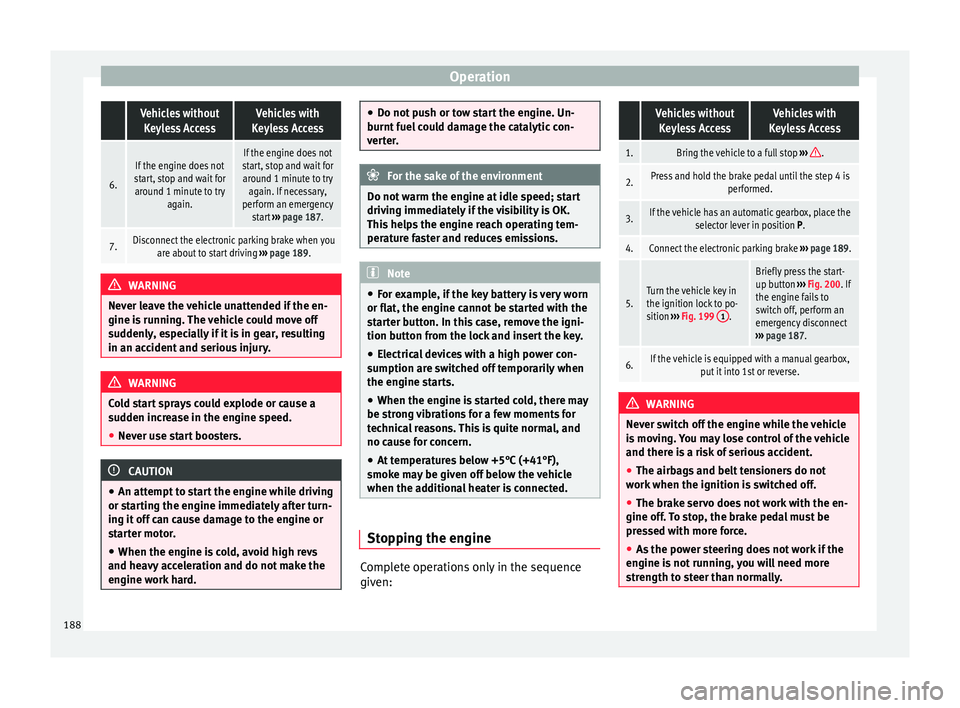
Operation Vehicles without
Keyless AccessVehicles with
Keyless Access
6.
If the engine does not
start, stop and wait for around 1 minute to try again.If the engine does not
start, stop and wait for around 1 minute to try again. If necessary,
perform an emergency start ››› page 187.
7.Disconnect the electronic parking brake when you
are about to start driving ››› page 189. WARNING
Never leave the vehicle unattended if the en-
gine is ru
nning. The vehicle could move off
suddenly, especially if it is in gear, resulting
in an accident and serious injury. WARNING
Cold start sprays could explode or cause a
sud den inc
rease in the engine speed.
● Never use start boosters. CAUTION
● An attempt t
o start the engine while driving
or starting the engine immediately after turn-
ing it off can cause damage to the engine or
starter motor.
● When the engine is cold, avoid high revs
and heavy ac
celeration and do not make the
engine work hard. ●
Do not p u
sh or tow start the engine. Un-
burnt fuel could damage the catalytic con-
verter. For the sake of the environment
Do not warm the engine at idle speed; start
driv ing immedi
ately if the visibility is OK.
This helps the engine reach operating tem-
perature faster and reduces emissions. Note
● For e x
ample, if the key battery is very worn
or flat, the engine cannot be started with the
starter button. In this case, remove the igni-
tion button from the lock and insert the key.
● Electrical devices with a high power con-
sumption are sw
itched off temporarily when
the engine starts.
● When the engine is started cold, there may
be stron
g vibrations for a few moments for
technical reasons. This is quite normal, and
no cause for concern.
● At temperatures below +5°C (+41°F),
smoke ma
y be given off below the vehicle
when the additional heater is connected. Stopping the engine
Complete operations only in the sequence
giv
en:
Vehicles without
Keyless AccessVehicles with
Keyless Access
1.Bring the vehicle to a full stop ››› .
2.Press and hold the brake pedal until the step 4 is
performed.
3.If the vehicle has an automatic gearbox, place theselector lever in position P.
4.Connect the electronic parking brake ››› page 189.
5.Turn the vehicle key in
the ignition lock to po-
sition ››› Fig. 199 1
.
Briefly press the start-
up button
››› Fig. 200. If
the engine fails to
switch off, perform an
emergency disconnect
››› page 187.
6.If the vehicle is equipped with a manual gearbox,
put it into 1st or reverse. WARNING
Never switch off the engine while the vehicle
is mo
ving. You may lose control of the vehicle
and there is a risk of serious accident.
● The airbags and belt tensioners do not
work when the ignition i
s switched off.
● The brake servo does not work with the en-
gine off. T
o stop, the brake pedal must be
pressed with more force.
● As the power steering does not work if the
engine is
not running, you will need more
strength to steer than normally. 188
Page 194 of 324

Operation
● The c ontr
o
l lamps on the button and
on the instrument panel go out.
Automatic release of the electronic parking
brake on starting the engine
The electronic parking brake is automatically
released when the vehicle starts moving, if
the driver door is closed and the driver is
wearing his/her seat belt. In addition, in ve-
hicles with a manual gearbox the clutch ped-
al should also be pressed to the floor before
starting the engine so that the system recog-
nises that the parking brake should be re-
leased.
Emergency braking function
Only use the emergency braking function if
the vehicle cannot be stopped with the brake
pedal ››› !
● Pull button h
ard to stop the vehicle. The
w arnin
g display will be accompanied by the
corresponding audible warning.
● To stop the braking process, release the
button or pr
ess the accelerator. WARNING
The incorrect use of the electronic parking
brak e m
ay result in serious accident.
● Never use the electronic parking brake to
brake the
vehicle except in an emergency.
The braking distance is considerably longer, because braking is only applied to the rear
wheels. A
lw
ays use the foot brake.
● Never accelerate from the engine compart-
ment with the en
gine running and a gear or a
gear range engaged. The vehicle could move,
even if the parking brake is applied. Note
● In vehic
les with a manual gearbox: when
the clutch pedal is released and the accelera-
tor pressed at the same time, the electronic
parking brake is automatically released.
● If the vehicle battery is flat, it will not be
poss
ible to disconnect the electronic parking
brake. Use the jump-start ›››
page 51.
● When the electronic parking brake is ap-
plied or rel
eased, noises may be heard.
● If the electronic parking brake has not been
used for a lon
g while, the system sometimes
performs automatic and audible checks while
the vehicle is at a standstill. Parking
When parking your vehicle, all legal require-
ments
shou
l
d be observed.
To park the vehicle
Complete operations only in the sequence
given. ● Park the vehicle on a suitable surface ›››
.●
Pr e
s
s and hold the brake pedal until the ve-
hicle comes to a standstill.
● Connect the electronic parking brake
›››
page 191.
● For an automatic gearbox, move the selec-
tor lev
er to position P.
● Switch off the engine and release the brake
pedal.
● R
emove the key from the ignition.
● If necessary, turn the steering wheel slight-
ly to loc
k the steering.
● With a manual gearbox, engage 1st gear on
flat gr
ound and slopes, or even reverse gear
on hills, and release the clutch pedal.
● Ensure that all passengers leave the vehi-
cle, e
specially children.
● When leaving the vehicle, take all keys with
you.
● Loc
k the vehicle.
Additiona
l information for steep slopes and
hills
Before switching off the engine, rotate the
steering wheel so that if the vehicle should
move, it will be held by the kerb.
● On slopes, turn the front wheels so that
they are ag
ainst the edge of the kerb.
● Uphill, turn the wheels towards the centre
of the r o
ad.
192
Page 197 of 324

Driving
WARNING
Rapid acceleration can cause loss of traction
and skid din
g, especially on slippery ground.
This could cause loss of control of the vehicle
resulting in an accident and considerable
damage.
● Only use the kick-down function or rapid
accel
eration if visibility, weather, road and
traffic conditions so permit. WARNING
Do not allow the brakes to “rub” for a pro-
long ed period of
time, or brake frequently or
for long periods of time. Continuous braking
heats up the brakes. This could significantly
reduce braking power, increase braking dis-
tance or even result in the total failure of the
brake system. Control and warning lamps
It lights up red
Brake pedal not
pressed!Press brake pedal to the floor.
It lights up green
Brake pedal not
pressed.To select a range of gears, press
the brake pedal.
Please also see "Electronic park-
ing brake"
››› page 189.
Flashes green
The selector lever
locking button has
not engaged. The
vehicle does not
start to move.
Engage the selector lever lock
››› page 196. Several warning and indication lamps light
up for a f
ew sec
onds when the ignition is
switched on, signalling that the function is
being verified. They will switch off after a few
seconds. WARNING
Observe the safety warnings ›››
in Warning
and indication l amp
s on page 105. Manual gear change
Read the additional information carefully
› ›
›
page 34
In some countries, it is necessary to press the
clutch pedal to the floor to start the engine.
Selecting reverse gear
Engage reverse gear only when the vehicle is
stopped. WARNING
When the engine is running, the vehicle will
st ar
t to move as soon as a gear is engaged and the clutch released. This is also the case
with the el
ectr
onic parking brake on.
● Never engage the reverse gear when a vehi-
cle i
s moving forward. CAUTION
To prevent damage and avoid premature
w ear
, please observe the following:
● While driving, do not leave your hand rest-
ing on the ge
ar stick. The pressure applied by
your hand is transmitted to the gearbox se-
lector forks.
● Always ensure that the vehicle is complete-
ly st
opped before engaging the reverse gear.
● When changing gear, always make sure the
clutc
h pedal is pushed right to the floor.
● Never hold the vehicle “on the clutch” on
hill
s with the engine on. 195
Technical data
Advice
Operation
Emergencies
Safety
Page 201 of 324

Driving
WARNING
Rapid acceleration can cause loss of traction
and skid din
g, especially on slippery ground.
This could cause loss of control of the vehicle
resulting in an accident and considerable
damage.
● Only use kick-down and rapid acceleration
when weather c
onditions, surface conditions
and traffic conditions permit; accelerate and
drive in a manner that does not endanger
other road users.
● Please remember that the driven wheels
can slip and the
vehicle can skid if the ASR is
turned off, especially on slippery ground.
● Turn on the ASR after accelerating! CAUTION
● If y
ou stop on a hill with a gear range en-
gaged, do not try to prevent the vehicle from
rolling back by pressing on the accelerator.
This could cause overheating and damage the
automatic gearbox.
● Never allow the vehicle to move with the
gear sel
ector lever in N, especially with the
engine turned off. The automatic gearbox will
not be lubricated and could be damaged. Recommended gear display
In some vehicles, the recommended gear for
r
educ
in
g fuel consumption is displayed on
the instrument panel:
DisplayMeaning
Optimum gear.
Recommendation to change up a gear.
Recommendation to change down a
gear.
Information for “cleaning” the diesel partic-
ul
at
e filter
The exhaust gas system control recognises
when the diesel particulate filter is blocked,
and helps to clean it by recommending a spe-
cific gear for driving. It may therefore be nec-
essary to drive with the engine at an excep-
tionally high speed ›››
page 202. WARNING
The recommended gear display is intended as
a guideline only; it shou
ld never replace the
driver's attention to driving carefully.
● Responsibility for selecting the correct gear
for eac
h situation continues to lie with the
driver, for example when overtaking, climb-
ing a hill or towing a trailer. For the sake of the environment
Selecting the most appropriate gear for the
sit uation w
ill help you to save fuel. Note
The recommended gear display is switched
off when the c lut
ch pedal is pressed. Run-in and economical driving
Ru nnin
g in Please observe the instructions for running-in
new components.
R u
nning-in the engine
The engine needs to be run-in over the first
1500 km (1000 miles). During its first few
hours of running, the internal friction in the
engine is greater than later on when all the
moving parts have bedded down.
How the vehicle is driven for the first
1500 km (1000 miles) influences the future
engine performance. Throughout the life of
the vehicle, it should be driven at a moderate
speed – especially when the engine is cold –
this will reduce engine wear and increase its
useful life. Never drive at extremely low en-
gine speeds. Always engage a lower gear
when the engine works “irregularly”. For the
first 1000 km or 600 miles, please note:
● Do not use full throttle.
● Do not force the engine above two thirds of
its m ax
imum speed. »
199
Technical data
Advice
Operation
Emergencies
Safety