Page 136 of 328

2.28
DRIVER CORRECTION DEVICES AND AIDS (1/12)ABS (anti-lock braking
system)
Under heavy braking, the ABS prevents
the wheels from locking, allowing the
stopping distance to be managed and
keeping control of the vehicle.
Under these circumstances, the vehi-
cle can be steered to avoid an obstacle
whilst braking. In addition, this system
can increase stopping distances, par-
ticularly on roads with low surface grip
(wet ground etc.).
You will feel a pulsation through the
brake pedal each time the system is
activated. The ABS does not in any way
improve the vehicle's physical perform-
ance relating to the road surface and
roadholding. It is still essential to follow
the rules of good driving practice (such
as driving at a safe distance from the
vehicle in front etc.).
– ABS (anti-lock braking system) ;
– ESC
(electronic stability control)
with understeer control and trac-
tion control;
– emergency brake assist;
– active emergency braking;
– driver assistance with a trailer;
– hill start assistance;
– rear wheel steering.
Other driving assistance systems are
detailed on the following pages.
In an emergency, apply firm and
continuous pressure to the brake
pedal. There is no need to pump
it repeatedly. The ABS will modu-
late the force applied in the braking
system.
These functions are an ad-
ditional aid in the event of
critical driving conditions,
enabling the vehicle behav-
iour to be adapted to suit the driving
conditions.
However, the functions do not take
the place of the driver. They do
not increase the vehicle’s limits
and should not encourage you
to drive more quickly. Therefore,
they can under no circumstances
replace the vigilance or responsibil-
ity of the driver when manoeuvring
the vehicle (the driver must always
be ready for sudden incidents which
may occur when driving).
Page 139 of 328

2.31
DRIVER CORRECTION DEVICES AND AIDS (4/12)
Disabling the function
(depending on vehicle)
In some situations (driving on very wet
ground: snow, mud, etc. or driving with
snow chains fitted), the system may
reduce the engine output to limit wheel-
spin.
If this is not required, it is possible to
deactivate the function by pressing
switch 1.
The message “Auto Advanced Traction
Control” is displayed on the instrument
panel to inform you.
1
The traction control system offers ad-
ditional safety. It is recommended that
you do not drive with the function di-
sabled. Correct this as soon as pos-
sible by pressing the switch 1 again.
Note: The function is reactivated auto-
matically when the ignition is switched
on or when a speed of approximately
24 mph (40 km/h) is exceeded.
These functions are an ad-
ditional aid in the event of
critical driving conditions,
enabling the vehicle behav-
iour to be adapted to suit the driving
conditions.
However, the functions do not take
the place of the driver. They do
not increase the vehicle’s limits
and should not encourage you
to drive more quickly. Therefore,
they can under no circumstances
replace the vigilance or responsibil-
ity of the driver when manoeuvring
the vehicle (the driver must always
be ready for sudden incidents which
may occur when driving).
Page 144 of 328

Active emergency braking
Limitation of the system operation
– The system will only respond to vehicles which are moving or which have \
been sensed as")
2.36
DRIVER CORRECTION DEVICES AND AIDS (9/12)
Active emergency braking
Limitation of the system operation
– The system will only respond to vehicles which are moving or which have \
been sensed as moving.
– A vehicle travelling in the opposite direction will not trigger any alert\
or any action on the system operation.
– The sensor area should be kept clean and free of any modifications in or\
der to ensure the proper operation of the system.
– The system cannot respond to small vehicles such as motorbikes or bicycl\
es as effectively as to other vehicles.
Deactivating the function
The function should be deactivated if:
– the brake lights are not functioning;
– the front of the vehicle has undergone an impact or been damaged;
– the vehicle is being towed (breakdowns).
Halting the function
You can halt the active braking function at any time by tapping the accel\
erator pedal or by turning the steering wheel in a avo id-
ance manoeuvre.
If the driver notices any unusual behaviour in the system, please consul\
t an authorised dealer.
Page 148 of 328

This function is a driving aid in the event of the accidental crossing o\
f
a continuous or broken line in the road. However, the function is not in-
tended to repla")
2.40
LANE DEPARTURE WARNING (1/3)
This function is a driving aid in the event of the accidental crossing o\
f
a continuous or broken line in the road. However, the function is not in-
tended to replace the driver. The function can be disrupted under certain
conditions, including:
– poor visibility (rain, snow, fog, dirty windscreen, glare of the sun, partially ob- scured road lines, etc.);
– roads with tight bends;
– closely following a vehicle in the same lane;
– worn road markings, difficult to distinguish or spaced very widely apart;
– narrow roads;
– ...
In this case, the line visibility indicators remain uncoloured on the in\
strument
panel to indicate that the function will not operate (lines not detecte\
d).
Under no circumstances should this function replace the driver’s care or respon-
sibility whilst performing manoeuvres.
This system notifies the driver when
they accidentally cross a continuous or
broken line.
This function uses a camera attached
to the windscreen, behind the rear-view
mirror.
On equipped vehicles, some infor-
mation is given on the head-up dis-
play.
Page 151 of 328
2.43
BLIND SPOT WARNING (1/4)
1
A
A
This system alerts the driver to other
vehicles in the detection zone A.
The system is activated when the vehi-
cle’s speed is between approximately
30 km/h (19 mph) and 140 km/h
(87 mph).
This function uses sensors 1 installed in
the front and rear bumper of both sides.Special feature
Make sure that the sensors are not obs-
cured (by dirt, mud, snow, etc.).
If a sensor is obscured, the message
“Blind spotclean sensor” will appear on
the instrument panel. Clean the sen-
sors.
This function is an addi-
tional aid which indicates
other vehicles in the blind
spot area.
It can never in any case be a subs-
titute for care nor for the driver’s
responsibility while in charge of his
vehicle.
The driver should always be ready
for sudden incidents while driving:
always ensure that there are no
moving obstacles (such as a child,
animal, pushchair, bicycle, etc.)
or small, narrow objects such as
stones or posts in the blind spot
when manoeuvring.
Page 155 of 328
2.47
SAFE DISTANCE ALERT (1/2)
Activating/deactivating the
function
From the multifunction screen 2, select
menu “Vehicle”, “Driving assistance”,
“Distance warning” then choose “ON”
or “OFF”.
1
Using the sensor 1 , this function noti-
fies the driver about the time interval
separating them from the vehicle in
front, so they can respect a safe dis-
tance between the two vehicles.
Note: make sure that the sensor 1 is
not obscured (by dirt, mud, snow, etc.).
The function is activated when the vehi-
cle speed is between about 18.6 and
124 mph (30 and 200 km/h).
When the engine is started, the func-
tion maintains the same status that was
active when the engine was last stop-
ped.
You can access menu “Driving as-
sistance” directly from button 3
.
23
This function is an additio-
nal driving aid. However,
this function is not under
any circumstances in-
tended to replace the due care and
attention of the driver, who should at
all times be in control of the vehicle.
Page 163 of 328
2.55
CRUISE CONTROL/SPEED LIMITER: cruise control function (1/4)
The cruise control function
is in no way linked to the
braking system.
This function is an addi-
tional driving aid. However,
the function does not take
the place of the driver.
Therefore, it can under no circum-
stances replace the driver’s respon-
sibility to respect speed limits and to
be vigilant (the driver must always
be ready to brake). Cruise control
must not be used in heavy traffic, on
undulating or slippery roads (black
ice, aquaplaning, gravel) and during
bad weather (fog, rain, side winds
etc.).
There is a risk of accidents.
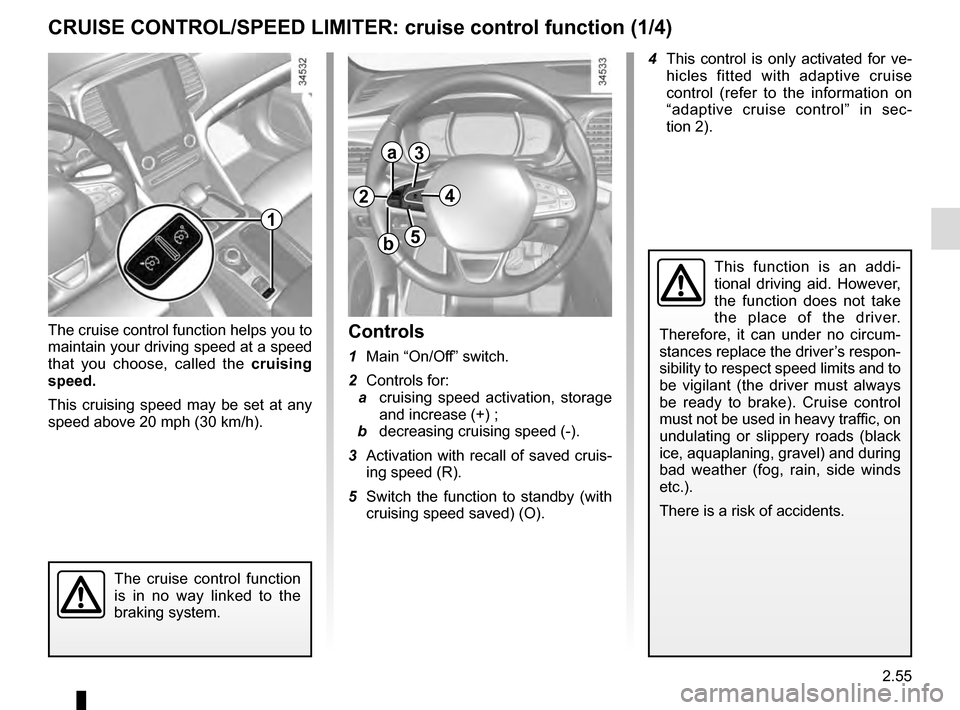
Controls
1 Main “On/Off” switch.
2 Controls for:
a cruising speed activation, storage
and increase (+) ;
b decreasing cruising speed (-).
3 Activation with recall of saved cruis- ing speed (R).
5 Switch the function to standby (with cruising speed saved) (O).
1
2
a
b
3
5
The cruise control function helps you to
maintain your driving speed at a speed
that you choose, called the cruising
speed.
This cruising speed may be set at any
speed above 20 mph (30 km/h). 4 This control is only activated for ve-
hicles fitted with adaptive cruise
control (refer to the information on
“adaptive cruise control” in sec-
tion 2).
4
Page 167 of 328

2.59
ADAPTIVE CRUISE CONTROL (1/7)
When traffic conditions permit (large
free-flowing road or motorway), the
adaptive cruise control gives you the
option of maintaining a chosen speed,
known as cruise control, adjusta-
ble from 30 mph to 85 mph (50 and
140 km/h), while keeping a following
distance from the vehicle in front in the
same lane.
The sensor has a range of 120 metres.
Note: The driver should take into ac-
count the maximum speed limit in their
location.
Note: the adaptive cruise control can
brake the vehicle up to a third of the
braking capacity. Depending on the
situation, the driver may need to brake
harder.
This function is an addi-
tional driving aid. However,
the function does not take
the place of the driver.
Therefore, it can under no circum-
stances replace the driver’s respon-
sibility to respect speed limits and to
be vigilant (the driver must always
be ready to brake).
The adaptive cruise control should
not be used in heavy traffic, on
winding or slippery roads (black ice,
aquaplaning, gravel) and during bad
weather (fog, rain, side winds etc.).
There is a risk of accidents.
Sensor location
Make sure that the sensor 1 is not ob-
scured (by dirt, mud, snow, etc.).
1
On equipped vehicles, some infor-
mation is given on the head-up dis-
play.

