2016 RENAULT MEGANE HATCHBACK door lock
[x] Cancel search: door lockPage 91 of 242

stopping the engine .............................. (up to the end of the DU)
engine start/stop button ........................ (up to the end of the DU)
2.5
ENG_UD18930_1
Arret du moteur (X95 - B95 - D95 - K95 - Renault)
ENG_NU_837-8_BDK95_Renault_2
Stopping the engine
STOPPING THE ENGINE
Never leave your vehicle
with the RENAULT card
inside and never leave a
child (or a pet) unsuper-
vised, even for a short while.
There is a risk that they could start
the engine or operate electrical
equipment (electric windows etc.)
and trap part of their body (neck,
arms, hands, etc.).
Risk of serious injury.
Never switch off the ignition before
the vehicle has stopped completely.
Once the engine has stopped, the
brake servo, power-assisted steer-
ing, etc. and the passive safety de-
vices such as air bags and preten-
sioners will no longer operate.
When you leave your vehi-
cle, especially if you have
your RENAULT card with
you, check that the engine
is completely switched off.
Special note
If the card is no longer in the reader
when you try to switch the engine off,
the message “No keycard Press and
hold” appears on the instrument panel:
press button
1 for longer than two sec-
onds.
Hands-free RENAULT card
With the card in the vehicle, press
button 1: the engine will stop. The steer-
ing column is locked when the driver’s
door is opened or the vehicle is locked.
If the card is no longer in the passenger
compartment when you try to switch the
engine off, the message “No keycard
Press and hold” appears on the instru-
ment panel: press button
1
for longer
than two seconds.
With the engine switched off, any ac-
cessories being used (radio, etc.) will
continue to function for approximately
10 minutes.
When the driver’s door is opened, the
accessories stop working.
Conditions for stopping the
engine
The vehicle must stationary, with the
lever positioned in N or P for vehicles
with an automatic transmission.
Remote control RENAULT
card
With the card in reader 2 , press
button 1: the engine will stop. Removing
the card from the reader locks the steer-
ing column.
12
Page 95 of 242

driving ................................................... (up to the end of the DU)
electronic parking brake ....................... (up to the end of the DU)
2.9
ENG_UD11746_2
Frein de parking assisté (X95 - B95 - D95 - Renault)
ENG_NU_837-8_BDK95_Renault_2
Electronic parking brake
Before leaving the vehicle,
check that the electronic
parking brake is fully ap-
plied. Indicator light
2
on
switch
3
and indicator light
}
on the instrument panel light up to
show that the parking brake is ap-
plied but go out when the doors are
locked.
Note:
To indicate that the electronic parking
brake is applied or released, a beep
sounds and the message “Apply park-
ing brake” appears on the instrument
panel:
–
w
ith the engine running: when the
driver’s door is opened;
–
w
ith the engine switched off (eg.
when the engine stalls): when a front
door is opened.
In this case, pull and release switch
3 to
apply the electronic parking brake.
Automatic releasing of the
electronic parking brake
The brake will be released as soon as
the vehicle moves, by accelerating with
a gear selected and the engine running.
Automatic operation
The electronic parking brake en-
sures vehicle immobilisation when the
engine is stopped and engine Start/
Stop button
1 is pressed.
In all other instances, e.g. engine stall-
ing, the electronic parking brake is not
applied automatically. Manual mode
must be used.
For certain country-specific model ver-
sions, the automatic brake application
function is not activated. Refer to the in-
formation on “Manual operation”.
ELECTRONIC PARkING bRAkE (1/3)
To confirm that the electronic parking
brake is applied, the message “Parking
brake on” and indicator light
}
on the instrument panel and indicator
light
2 on switch
3 light up.
After the engine is switched off, indi-
cator light
2
goes out several minutes
after the electronic parking brake has
been applied and indicator light
}
goes out when the vehicle is locked.
1
2
3
Page 134 of 242
electric windows ................................... (up to the end of the DU)
child safety............................................................. (current page)
children (safety) ..................................................... (current page)
sunroof.................................................. (up to the end of the DU)
3.12
ENG_UD18900_4
Lève-vitres électriques (X95 - B95 - D95 - Renault)
ENG_NU_837-8_BDK95_Renault_3
Jaune NoirNoir texte
These systems operate with the igni-
tion on or off, until one of the front doors
is opened (limited to about 3 minutes).
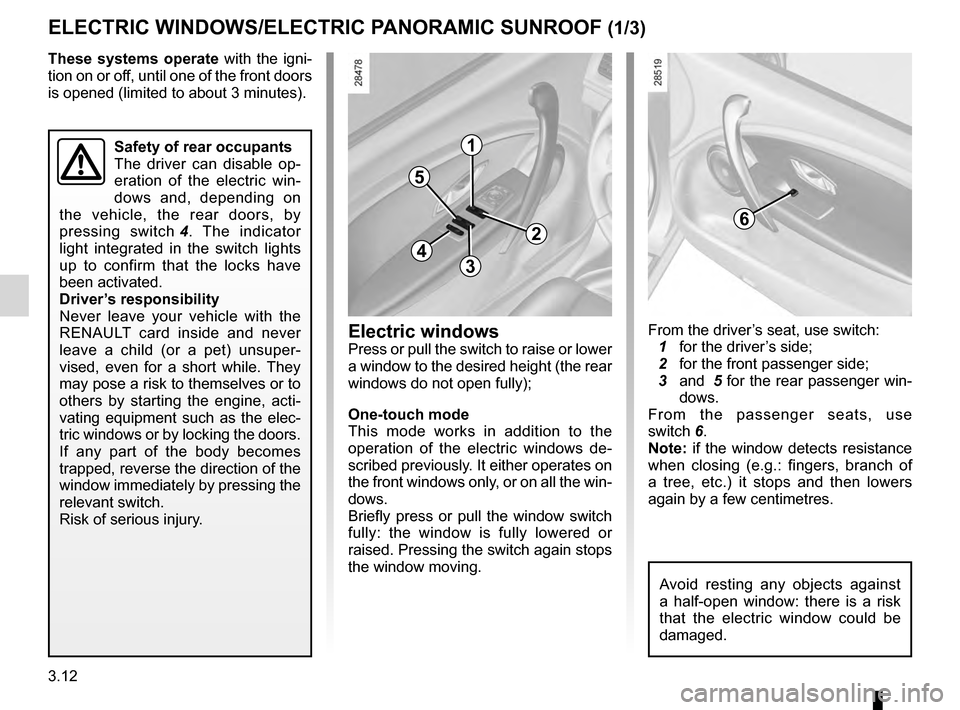
From the driver’s seat, use switch: 1
for the driver ’s side;
2
for the front passenger side; 3
and
5 for the rear passenger win-
dows.
From the passenger seats, use
switch
6.
Note: if the window detects resistance
when closing (e.g.: fingers, branch of
a tree, etc.) it stops and then lowers
again by a few centimetres.
Electric windows/Electric sunroof
ElEcTRIc wINDowS/ElEcTRIc PANoRAMIc SuNRooF (1/3)
Electric windows
Press or pull the switch to raise or lower
a window to the desired height (the rear
windows do not open fully);
o
ne-touch mode
This mode works in addition to the
operation of the electric windows de-
scribed previously. It either operates on
the front windows only, or on all the win-
dows.
Briefly press or pull the window switch
fully: the window is fully lowered or
raised. Pressing the switch again stops
the window moving.
1
2
34
5
6
Safety of rear occupants
The driver can disable op-
eration of the electric win-
dows and, depending on
the vehicle, the rear doors, by
pressing switch
4 .
The indicator
light integrated in the switch lights
up to confirm that the locks have
been activated.
Driver’s responsibility
Never leave your vehicle with the
RENAULT card inside and never
leave a child (or a pet) unsuper-
vised, even for a short while. They
may pose a risk to themselves or to
others by starting the engine, acti-
vating equipment such as the elec-
tric windows or by locking the doors.
If any part of the body becomes
trapped, reverse the direction of the
window immediately by pressing the
relevant switch.
Risk of serious injury.
Avoid resting any objects against
a half-open window: there is a risk
that the electric window could be
damaged.
Page 135 of 242

JauneNoirNoir texte
3.13
ENG_UD18900_4
Lève-vitres électriques (X95 - B95 - D95 - Renault)
ENG_NU_837-8_BDK95_Renault_3
ElEcTRIc wINDowS/ElEcTRIc PANoRAMIc SuNRooF (2/3)
Sunroof
– open the sun blind
–
T
o open slightly: turn button
9
to
position
A
;
–
T
o open fully: turn button
9
to po-
sition
B , C
or
D,
depending on the
opening position required;
–
T
o close: turn button 9 to position 0.
Sun blind
– to open: push handle 7 upwards
and guide the blind as it retracts;
–
to
close: pull handle
7
until it clicks
into the catch.
Special noteYour vehicle is equipped with an antip-
inch facility: when the sunroof encoun-
ters resistance whilst closing, (some-
body’s fingers, etc.) it stops and then
moves back several centimetres.
Driver’s responsibility
Never leave your vehicle
with the RENAULT card
inside and never leave a
child (or a pet) unsupervised, even
for a short while.
The reason for this is that the child
may endanger himself or others by
starting the engine, activating equip-
ment such as the window winders
for example, or locking the doors.
If a body part gets trapped, reverse
the direction of travel as soon as
possible by turning button
9 fully to
the right (position
D
).
Risk of serious injury.
70
AB
c
D
98
Page 136 of 242

3.14
ENG_UD18900_4
Lève-vitres électriques (X95 - B95 - D95 - Renault)
ENG_NU_837-8_BDK95_Renault_3
ElEcTRIc wINDowS/ElEcTRIc PANoRAMIc SuNRooF (3/3)
Precautions during use
– check that the sunroof is properly
closed before leaving your vehicle;
–
c
lean the seal every three months
using products recommended by our
Technical Department;
–
d
o not open the sunroof immedi-
ately after the vehicle has been in
the rain or after your car has been
washed.
–
V
ehicle with roof bars
As a general rule, if there is a load
on the roof, use of the sunroof is not
recommended.
Before using the sunroof, check the
objects and/or accessories (bike
racks, roof boxes, etc.) attached to
the roof bars: they should be prop-
erly arranged and secured and
should not interfere with the opera-
tion of the sunroof.
Contact your approved Dealer for
details of possible conversions.
operating faults
Electric windows
In case of a fault when closing a window,
the system reverts to normal mode:
pull the switch concerned up as often
as necessary to fully close the window
(the window will close gradually), hold
the switch (still on the closure side) for
three seconds then lower and raise the
window fully to reinitialise the system.
If necessary, contact your approved
Dealer.
Electric sunroof
If the roof does not close, turn button
9
to the position 0
and then press button 8
until the roof is fully closed: consult an
approved Dealer.
Remote control window
closing
(for vehicles with one-touch windows
on all windows).
When you lock the doors from the out-
side, press the locking button on the
RENA
u
l
T
card twice in quick suc-
cession, or on the driver's door in
hands-free mode, and all the windows
will close automatically.
It is recommended that the user only
operates the system when the vehi-
cle can be seen clearly and no one is
inside.
Note: locking the doors using the
RENAULT card deactivates hands-free
mode.
Closing windows can cause
serious injury.
If the vehicle is equipped
with this function, this action
will activate deadlocking.
Check that there is no-one
still inside the vehicle
Important: during this operation,
the sunroof anti-pinch facility is de-
activated. Contact your approved
dealer as soon as possible.
Page 137 of 242

lighting:interior ............................................. (up to the end of the DU)
courtesy light ........................................ (up to the end of the DU)
map reading lights ................................ (up to the end of the DU)
3.15
ENG_UD18902_3
Eclairage intérieur (X95 - B95 - D95 - Renault)
ENG_NU_837-8_BDK95_Renault_3
Manual window winders
Interior lighting
MANuAl w IND ow w INDERS/I NTERI o R l I gh TIN g (1/2)
When the doors or luggage com-
partment are unlocked and opened
the courtesy and footwell lights
come on temporarily.
234
courtesy light
Tilt switch 3 to move it to the position
for:
–
permanent lighting;
–
i
ntermittent lighting, which comes
on when a door is opened. This
switches off after a time delay, once
the doors concerned have been
closed correctly;
–
immediate switching of
f.
Map reading lights(depending on vehicle)
Tilt switches 2 or 4.
Front door lights
Light 5 comes on when the door is
opened.
5
Manual window winders
Turn handle 1 .
1
Page 141 of 242

glove box ............................................................... (current page)
Jaune NoirNoir texte
3.19
ENG_UD11880_3
Rangements / aménagements habitacle (X95 - B95 - D95 - Renault)
ENG_NU_837-8_BDK95_Renault_3
Door pockets 8 Storage compartment 9
PASSENg ER co MPARTMENT STo RA g E SPA c E AND FITTIN g S (3/4)
11
12
Rear armrest storage
Lower armrest 12 and, depending on
the vehicle, lift cover 1 1 using unlock-
ing handle
10
.
8
10
9
Page 145 of 242

JauneNoirNoir texte
3.23
ENG_UD21546_6
Banquette arrière (X95 - B95 - D95 - Renault)
ENG_NU_837-8_BDK95_Renault_3
REAR BENch SEAT functions (2/3)
luggage compartment carpet level
adjustment
T
o adjust the level of the luggage com-
partment carpet in line with the seat-
backs, lift carpet
4
via the rear door;
height adjuster
5
is deployed auto-
matically. Fit the luggage compartment
carpet and unfold blanking covers
6
.
When refitting the bench seat, push the
booster seat in at the same time as fit-
ting the luggage compartment carpet.
when refitting the seat-
back , make sure it is cor-
rectly locked in place.
If seat covers are fitted ,
make sure these do not prevent the
seatback latch from locking in.
Make sure that the seat belts are
positioned correctly.
Reposition the headrests.
4
5
6
6