2016 RENAULT MEGANE COUPE lock
[x] Cancel search: lockPage 102 of 274

2.4
STARTING, STOPPING THE ENGINE (2/3)
Accessories function(switching on the ignition)
Once you have gained access to your
vehicle, you may use some of its func-
tions (radio, navigation, wipers, etc.).
Operating faults
In certain cases, the hands-free
RENAULT card may not work:
– when the RENAULT card battery is drained, flat battery, etc.
– near to appliances operating on the same frequency as the card (moni-
tor, mobile phone, video game, etc.);
– vehicle located in a high electroma- gnetic radiation zone.
The message “Please insert keycard”
appears on the instrument panel.
Insert the RENAULT card fully into card
reader 2.
1
2
For other functions:
– vehicles with remote control
RENAULT card, insert the card into
reader 2;
– vehicles with a RENAULT “hands-
free” card, with the card in the pas-
senger compartment or inserted in
the card reader 2, press button 1 wi-
thout depressing the pedals.
Note: if there is a card in the reader,
pressing button 1 starts the engine.
Driver’s responsibility when parking or stopping the vehicle
Never leave an animal, child or adult who is not self-sufficient alone in
your vehicle, even for a short time.
They may pose a risk to themselves or to others by starting the engine, \
activating
equipment such as the electric windows or locking the doors, for example\
.
Also, in hot and/or sunny weather, please remember that the temperature inside
the passenger compartment increases very quickly.
RISK OF DEATH OR SERIOUS INJURY.
Page 103 of 274
2.5
STARTING, STOPPING THE ENGINE (3/3)
When you leave your vehi-
cle, especially if you have
your RENAULT card with
you, check that the engine
is completely switched off.Special note
If the card is no longer in the reader
when you try to switch the engine off,
the message “No keycard Press and
hold” will appear on the instrument
panel: press the button 1 for longer
than two seconds.
Hands-free RENAULT card
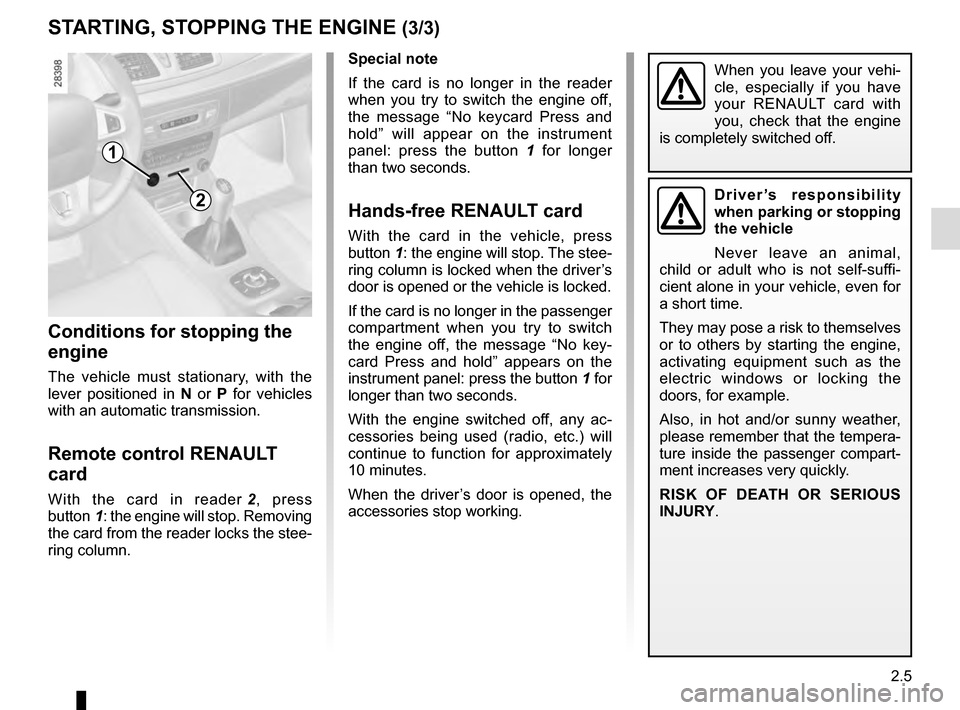
With the card in the vehicle, press
button 1: the engine will stop. The stee-
ring column is locked when the driver’s
door is opened or the vehicle is locked.
If the card is no longer in the passenger
compartment when you try to switch
the engine off, the message “No key-
card Press and hold” appears on the
instrument panel: press the button 1 for
longer than two seconds.
With the engine switched off, any ac-
cessories being used (radio, etc.) will
continue to function for approximately
10 minutes.
When the driver’s door is opened, the
accessories stop working.
Conditions for stopping the
engine
The vehicle must stationary, with the
lever positioned in N or P for vehicles
with an automatic transmission.
Remote control RENAULT
card
With the card in reader 2, press
button 1: the engine will stop. Removing
the card from the reader locks the stee-
ring column.
1
2Driver’s responsibility
when parking or stopping
the vehicle
Never leave an animal,
child or adult who is not self-suffi-
cient alone in your vehicle, even for
a short time.
They may pose a risk to themselves
or to others by starting the engine,
activating equipment such as the
electric windows or locking the
doors, for example.
Also, in hot and/or sunny weather,
please remember that the tempera-
ture inside the passenger compart-
ment increases very quickly.
RISK OF DEATH OR SERIOUS
INJURY.
Page 105 of 274

2.7
FUNCTION STOP AND START (2/3)
To fill up with fuel, the engine must
be stopped (and not on standby):
always stop the engine by pressing
the engine stop button (please see
“Starting, stopping the engine)”.
Conditions preventing the
standby of the engine
Certain conditions prevent the system
from using the engine standby function,
including when:
– reverse gear is engaged;
– the bonnet is not locked;
– the driver’s door is not closed;
– the driver’s seatbelt is not fastened;
– the outdoor temperature is too low or too high (less than around 0 °C or
higher than around 30 °C);
– the battery is not sufficiently char- ged;
– the difference between the vehicle interior temperature and the automa-
tic climate control instruction is too
high;
– the “Clear View” function is activa- ted (please see “Automatic Climate
Control” in Section 3); – the engine temperature is too low;
– the anti-pollution system is required;
or
– ...
The message “Auto Stop Unavailable”
on the instrument panel indicates that
the engine is on standby.
Special cases
With the engine on standby (traffic jam,
traffic lights, etc.), if the driver unfastens
their seat belt, opens the driver’s door
or gets out of their seat, the ignition will
be switched off.
To restart and reactivate the Stop and
Start system, press the start button
(please see “Starting, stopping the
engine” in Section 2).
Page 110 of 274

2.12
Before leaving the vehicle,
check that the electronic
parking brake is fully ap-
plied. Indicator light 2 on
switch 3 and indicator light
}
on the instrument panel light up to
show that the parking brake is ap-
plied but go out when the doors are
locked.
Note:
To indicate that the electronic parking
brake is released, a beep sounds and
the message “Apply parking brake” ap-
pears on the instrument panel:
– with the engine running: when the driver’s door is opened;
– with the engine switched off (eg. when the engine stalls): when a front
door is opened.
In this case, pull and release switch 3 to
apply the electronic parking brake.
Automatic releasing of the
electronic parking brake
The brake will be released as soon as
the vehicle moves, by accelerating with
a gear selected and the engine running.
Automatic operation
The electronic parking brake en-
sures vehicle immobilisation when the
engine is stopped and engine Start/
Stop button 1 is pressed.
In all other instances, e.g. engine stal-
ling, the electronic parking brake is not
applied automatically. Manual mode
must be used.
For certain country-specific model ver-
sions, the automatic brake application
function is not activated. Refer to the in-
formation on “Manual operation”.
ELECTRONIC PARKING BRAKE (1/3)
To confirm that the electronic parking
brake is applied, the message “Parking
brake on” and warning light
}
on the instrument panel and warning
light 2 on the switch 3 light up.
After the engine is switched off, indi-
cator light 2 goes out several minutes
after the electronic parking brake has
been applied and indicator light
}
goes out when the vehicle is locked.
1
2
3
Page 122 of 274

2.24
DRIVER CORRECTION DEVICES AND AIDS (1/4)
Depending on the vehicle, this is com-
posed of:
– the ABS (anti-lock braking
system);
– electronic stability control ESC
with understeer control and trac-
tion control;
– emergency brake assist with, de- pending on the vehicle, braking
anticipation;
– hill start assistance.
In an emergency, apply firm and
continuous pressure to the brake
pedal. There is no need to pump
it repeatedly. The ABS will modu-
late the force applied in the braking
system.
These functions are an ad-
ditional aid in the event of
critical driving conditions,
enabling the vehicle behav-
iour to be adapted to suit the driving
conditions.
However, the functions do not take
the place of the driver. They do
not increase the vehicle’s limits
and should not encourage you
to drive more quickly. Therefore,
they can under no circumstances
replace the vigilance or responsibil-
ity of the driver when manoeuvring
the vehicle (the driver must always
be ready for sudden incidents which
may occur when driving).
Your braking systems
are partially operational.
However, it is dangerous
to brake suddenly and
it is essential to stop immediately,
as soon as traffic conditions allow.
Contact an approved dealer.
Operating faults:
–
© and x lit on the instru-
ment panel with the messages
“Check ABS”, “Check braking
system” and “Check ESC”: ABS,
ESC and the emergency brake
assist are deactivated. Braking is
always enabled;
–
x, D, © and ® lit
up on the instrument panel alongside
the message “Braking system fault”:
this indicates a fault in the braking
system.
In both cases, consult an approved
Dealer.
ABS (anti-lock braking
system)
Under heavy braking, the ABS prevents
the wheels from locking, allowing the
stopping distance to be managed and
keeping control of the vehicle.
Under these circumstances, the vehi-
cle can be steered to avoid an obstacle
whilst braking. In addition, this system
can increase stopping distances, par-
ticularly on roads with low surface grip
(wet ground etc.).
You will feel a pulsation through the
brake pedal each time the system is
activated. The ABS does not in any
way improve the vehicle’s physical per-
formance relating to the road surface
and road-holding. It is still essential to
follow the rules of good driving practice
(such as driving at a safe distance from
the vehicle in front, etc.).
Page 141 of 274
2.43
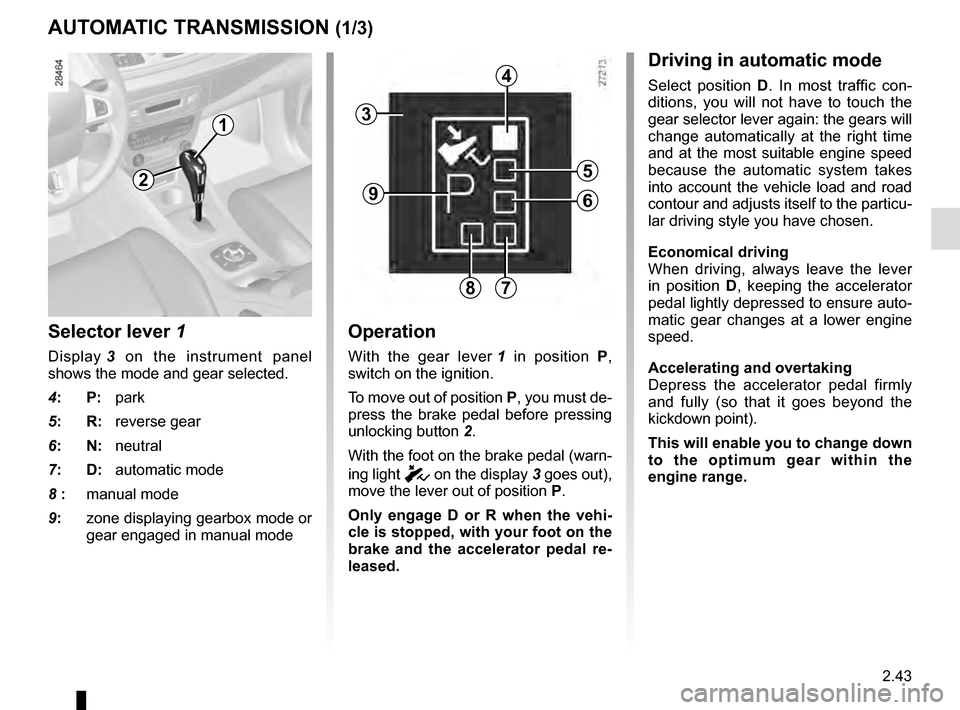
Selector lever 1
Display 3 on the instrument panel
shows the mode and gear selected.
4: P: park
5: R: reverse gear
6: N: neutral
7: D: automatic mode
8 : manual mode
9: zone displaying gearbox mode or
gear engaged in manual mode
Operation
With the gear lever 1 in position P,
switch on the ignition.
To move out of position P, you must de-
press the brake pedal before pressing
unlocking button 2.
With the foot on the brake pedal (warn-
ing light
c on the display 3 goes out),
move the lever out of position P.
Only engage D or R when the vehi-
cle is stopped, with your foot on the
brake and the accelerator pedal re-
leased.
AUTOMATIC TRANSMISSION (1/3)
Driving in automatic mode
Select position D. In most traffic con-
ditions, you will not have to touch the
gear selector lever again: the gears will
change automatically at the right time
and at the most suitable engine speed
because the automatic system takes
into account the vehicle load and road
contour and adjusts itself to the particu-
lar driving style you have chosen.
Economical driving
When driving, always leave the lever
in position D, keeping the accelerator
pedal lightly depressed to ensure auto-
matic gear changes at a lower engine
speed.
Accelerating and overtaking
Depress the accelerator pedal firmly
and fully (so that it goes beyond the
kickdown point).
This will enable you to change down
to the optimum gear within the
engine range.
3
2
1
4
5
6
78
9
Page 142 of 274

2.44
Parking the vehicle
When the vehicle is stopped, move the
lever to position P while keeping your
foot on the brake pedal: the gearbox is
in neutral and the drive wheels are me-
chanically locked by the driveshaft.
Apply the handbrake or, depending
on the vehicle, ensure that the elec-
tronic parking brake is applied.
Special circumstances
– If the road contours and bends
do not allow you to stay in auto-
matic mode (e.g.: in the mountains),
we recommend that you change to
manual mode.
This will prevent the automatic gear-
box from changing gears repeatedly
when climbing, and permit engine
braking on long descents.
– In cold weather, to prevent the
engine from stalling, wait a few mo-
ments before shifting the selector
lever from position P or N and en-
gaging D or R.
Driving in manual mode
With the selector lever in position D,
move the lever to the left. Shifting the
lever repeatedly allows you to change
gears manually:
– To move down through the gears, push the lever backwards;
– To move up through the gears, push the lever forwards.
The gear selected is displayed on the
instrument panel.
Special cases
Under certain driving conditions (e.g.
engine protection, or electronic stabil-
ity program (ESP) operational etc.): the
automatic system may change gear au-
tomatically.
Likewise, to prevent incorrect manoeu-
vres, a gear change may be refused by
the automatic system: in this case the
gear display flashes for a few seconds
as a warning.
AUTOMATIC TRANSMISSION (2/3)
In very cold weather, the system
may prevent the gears from being
shifted in manual mode until the
gearbox reaches the right tempera-
ture.
An impact to the under-
side of the vehicle while
manoeuvring (e.g.: strik-
ing a post, raised kerb or
other street furniture) may result in
damage to the vehicle (e.g.: defor-
mation of an axle).
To avoid any risk of accident, have
your vehicle checked by an ap-
proved Dealer.
Page 143 of 274
2.45
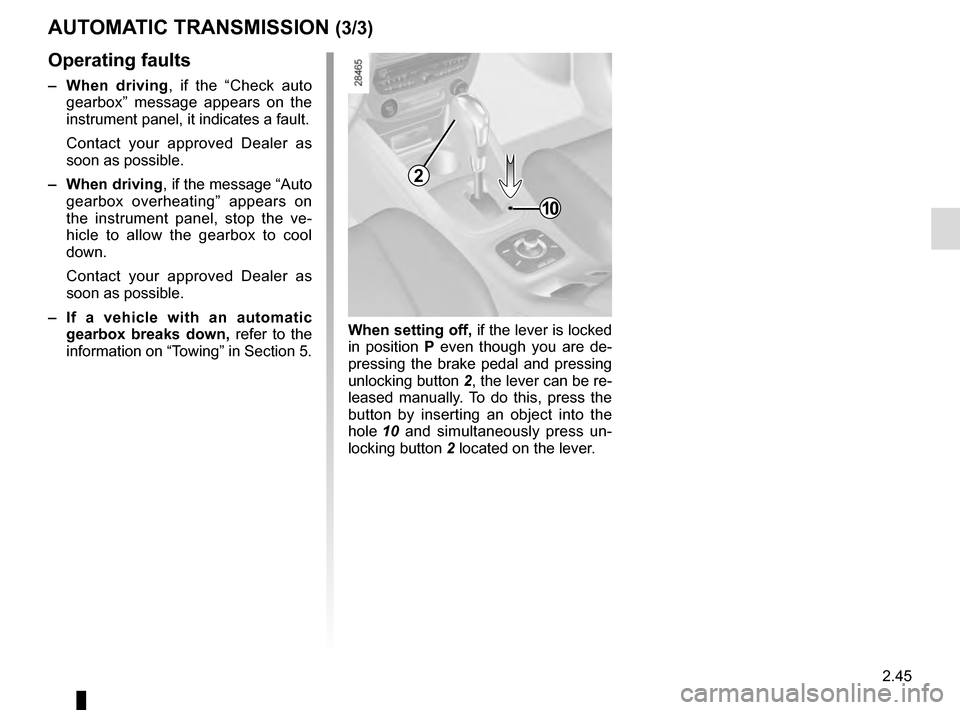
When setting off, if the lever is locked
in position P even though you are de-
pressing the brake pedal and pressing
unlocking button 2, the lever can be re-
leased manually. To do this, press the
button by inserting an object into the
hole 10 and simultaneously press un-
locking button 2 located on the lever.
AUTOMATIC TRANSMISSION (3/3)
Operating faults
– When driving , if the “Check auto
gearbox” message appears on the
instrument panel, it indicates a fault.
Contact your approved Dealer as
soon as possible.
– When driving , if the message “Auto
gearbox overheating” appears on
the instrument panel, stop the ve-
hicle to allow the gearbox to cool
down.
Contact your approved Dealer as
soon as possible.
– If a vehicle with an automatic
gearbox breaks down, refer to the
information on “Towing” in Section 5.
10
2