Page 142 of 270
3.2
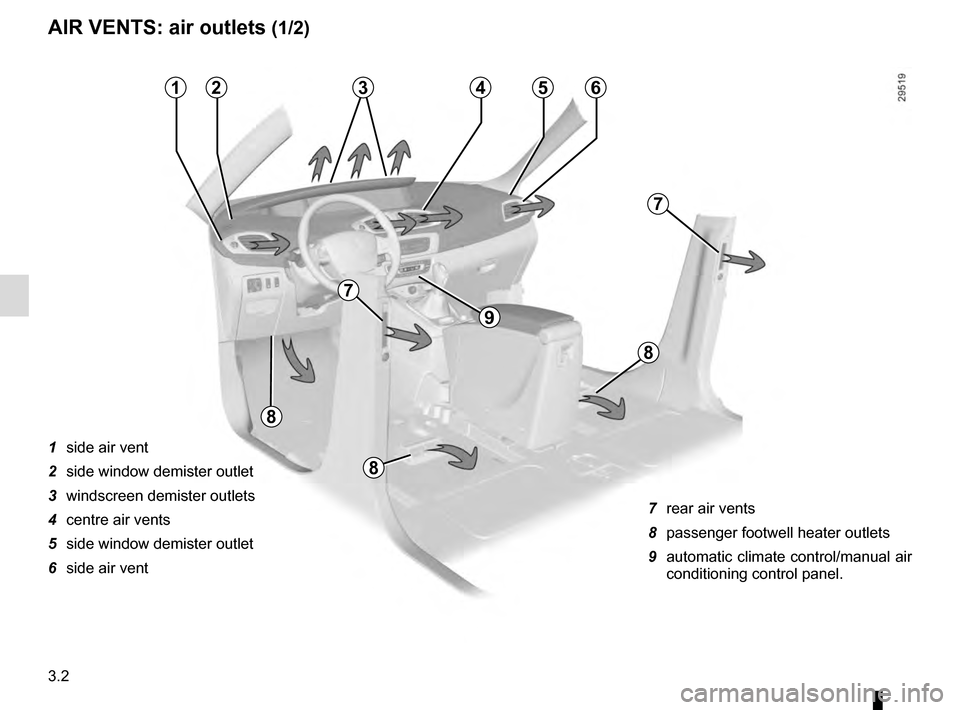
AIR VENTS: air outlets (1/2)
1 side air vent
2 side window demister outlet
3 windscreen demister outlets
4 centre air vents
5 side window demister outlet
6 side air vent 7 rear air vents
8 passenger footwell heater outlets
9 automatic climate control/manual air
conditioning control panel.
213456
8
8
7
7
9
8
Page 144 of 270
3.4
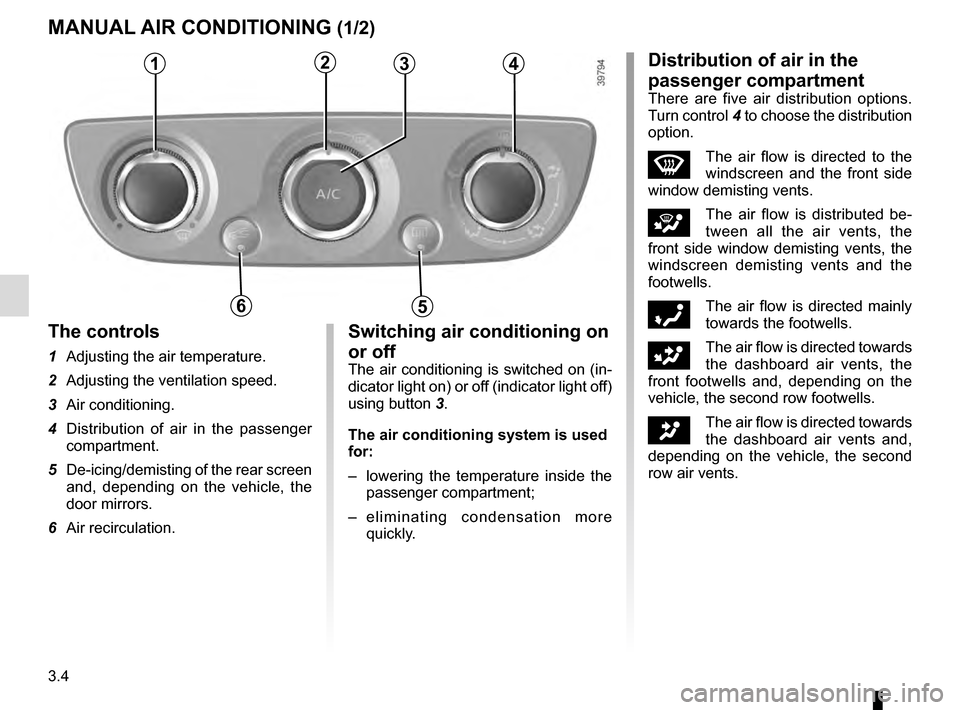
MANUAL AIR CONDITIONING (1/2)
1234
56
The controls
1 Adjusting the air temperature.
2 Adjusting the ventilation speed.
3 Air conditioning.
4 Distribution of air in the passenger compartment.
5 De-icing/demisting of the rear screen and, depending on the vehicle, the
door mirrors.
6 Air recirculation.
Switching air conditioning on
or off
The air conditioning is switched on (in-
dicator light on) or off (indicator light off)
using button 3.
The air conditioning system is used
for:
– lowering the temperature inside the
passenger compartment;
– eliminating condensation more quickly.
Distribution of air in the
passenger compartment
There are five air distribution options.
Turn control 4 to choose the distribution
option.
WThe air flow is directed to the
windscreen and the front side
window demisting vents.
iThe air flow is distributed be-
tween all the air vents, the
front side window demisting vents, the
windscreen demisting vents and the
footwells.
óThe air flow is directed mainly
towards the footwells.
GThe air flow is directed towards
the dashboard air vents, the
front footwells and, depending on the
vehicle, the second row footwells.
JThe air flow is directed towards
the dashboard air vents and,
depending on the vehicle, the second
row air vents.
Page 145 of 270
3.5
Adjusting the ventilation
speed
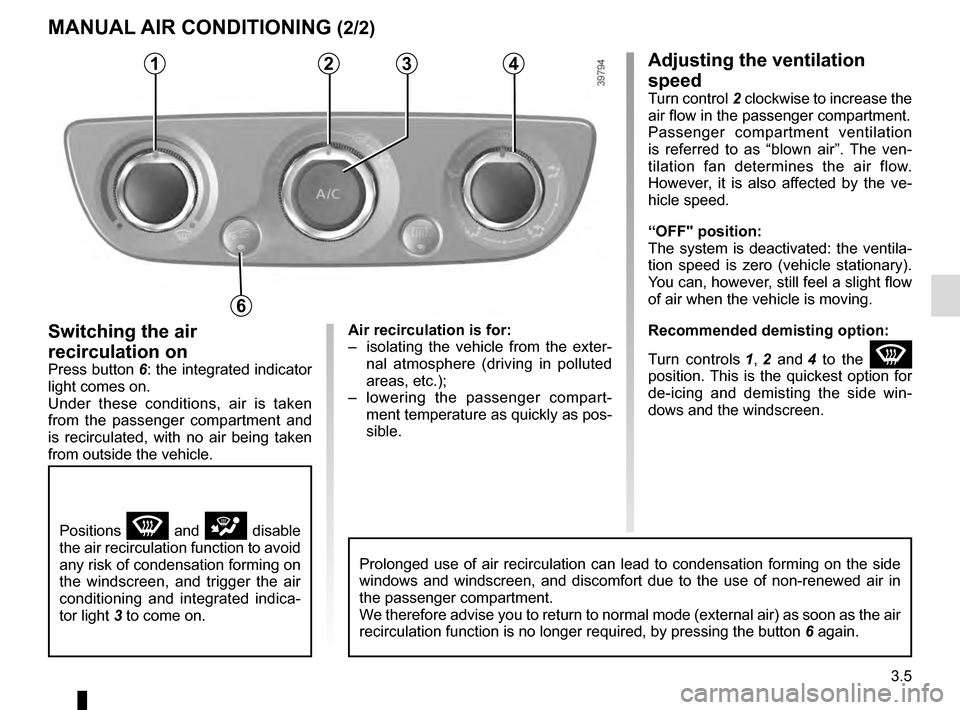
Turn control 2 clockwise to increase the
air flow in the passenger compartment.
Passenger compartment ventilation
is referred to as “blown air”. The ven-
tilation fan determines the air flow.
However, it is also affected by the ve-
hicle speed.
“OFF" position:
The system is deactivated: the ventila-
tion speed is zero (vehicle stationary).
You can, however, still feel a slight flow
of air when the vehicle is moving.
Recommended demisting option:
Turn controls 1, 2 and 4 to the
W
position. This is the quickest option for
de-icing and demisting the side win-
dows and the windscreen.
Switching the air
recirculation on
Press button 6: the integrated indicator
light comes on.
Under these conditions, air is taken
from the passenger compartment and
is recirculated, with no air being taken
from outside the vehicle.
MANUAL AIR CONDITIONING (2/2)
1234
6
Positions W and i disable
the air recirculation function to avoid
any risk of condensation forming on
the windscreen, and trigger the air
conditioning and integrated indica-
tor light 3 to come on.
Air recirculation is for:
– isolating the vehicle from the exter- nal atmosphere (driving in polluted
areas, etc.);
– lowering the passenger compart- ment temperature as quickly as pos-
sible.
Prolonged use of air recirculation can lead to condensation forming on t\
he side
windows and windscreen, and discomfort due to the use of non-renewed air\
in
the passenger compartment.
We therefore advise you to return to normal mode (external air) as soon\
as the air
recirculation function is no longer required, by pressing the button 6 again.
Page 146 of 270
3.6
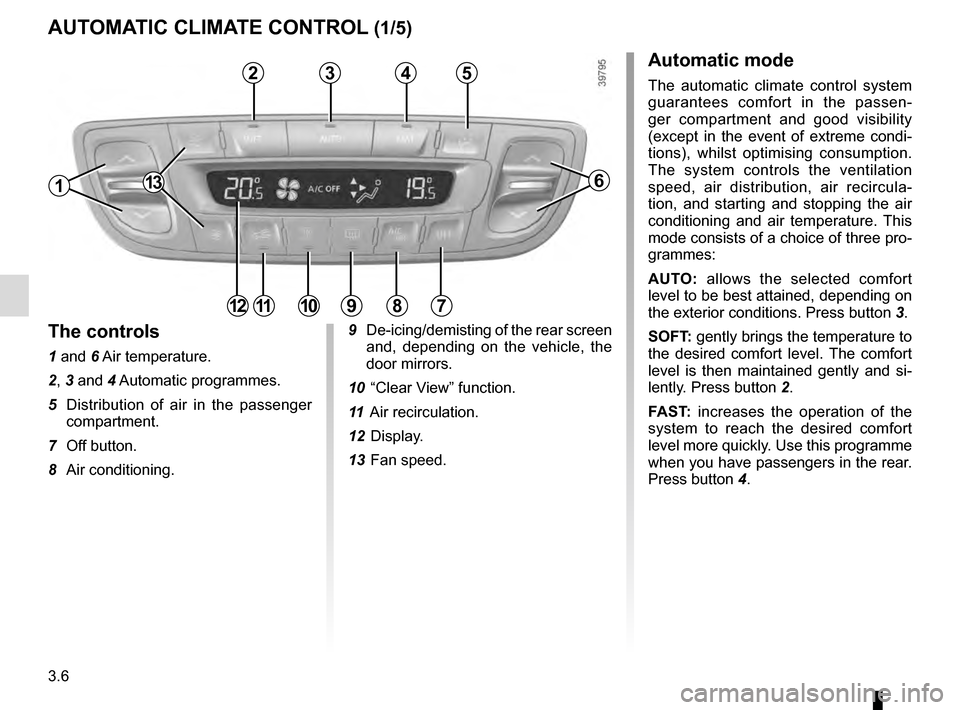
AUTOMATIC CLIMATE CONTROL (1/5)Automatic mode
The automatic climate control system
guarantees comfort in the passen-
ger compartment and good visibility
(except in the event of extreme condi-
tions), whilst optimising consumption.
The system controls the ventilation
speed, air distribution, air recircula-
tion, and starting and stopping the air
conditioning and air temperature. This
mode consists of a choice of three pro-
grammes:
AUTO: allows the selected comfort
level to be best attained, depending on
the exterior conditions. Press button 3.
SOFT: gently brings the temperature to
the desired comfort level. The comfort
level is then maintained gently and si-
lently. Press button 2.
FAST: increases the operation of the
system to reach the desired comfort
level more quickly. Use this programme
when you have passengers in the rear.
Press button 4.
13
4
9 De-icing/demisting of the rear screen
and, depending on the vehicle, the
door mirrors.
10 “Clear View” function.
11 Air recirculation.
12 Display.
13 Fan speed.
6
7891011
32
The controls
1 and 6 Air temperature.
2, 3 and 4 Automatic programmes.
5 Distribution of air in the passenger compartment.
7 Off button.
8 Air conditioning.
12
5
1
Page 147 of 270
3.7
AUTOMATIC CLIMATE CONTROL (2/5)
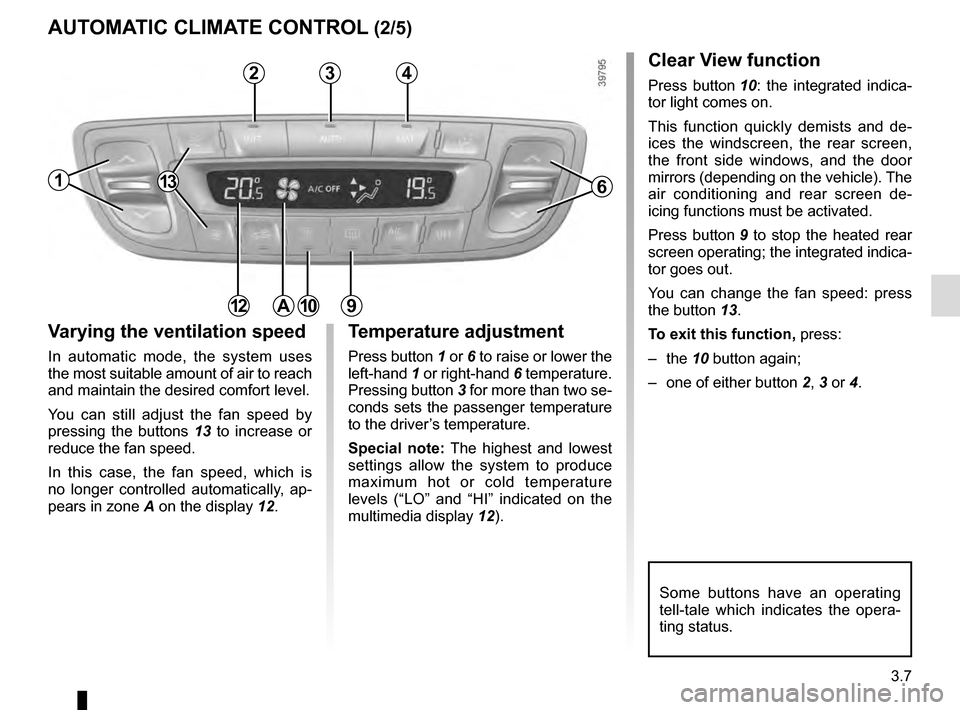
Varying the ventilation speed
In automatic mode, the system uses
the most suitable amount of air to reach
and maintain the desired comfort level.
You can still adjust the fan speed by
pressing the buttons 13 to increase or
reduce the fan speed.
In this case, the fan speed, which is
no longer controlled automatically, ap-
pears in zone A on the display 12.
Some buttons have an operating
tell-tale which indicates the opera-
ting status.
1
3
Temperature adjustment
Press button 1 or 6 to raise or lower the
left-hand 1 or right-hand 6 temperature.
Pressing button 3 for more than two se-
conds sets the passenger temperature
to the driver’s temperature.
Special note: The highest and lowest
settings allow the system to produce
maximum hot or cold temperature
levels (“LO” and “HI” indicated on the
multimedia display 12).
6
12
Clear View function
Press button 10: the integrated indica-
tor light comes on.
This function quickly demists and de-
ices the windscreen, the rear screen,
the front side windows, and the door
mirrors (depending on the vehicle). The
air conditioning and rear screen de-
icing functions must be activated.
Press button 9 to stop the heated rear
screen operating; the integrated indica-
tor goes out.
You can change the fan speed: press
the button 13.
To exit this function, press:
– the 10 button again;
– one of either button 2, 3 or 4.
109
24
A
13
Page 149 of 270
3.9
AUTOMATIC CLIMATE CONTROL (4/5)
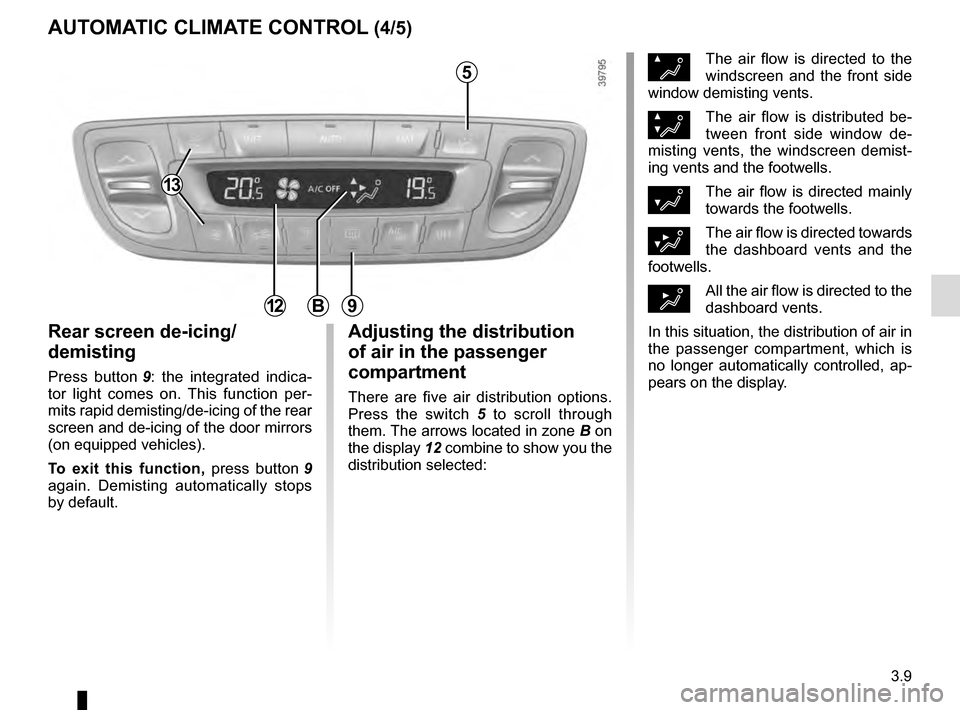
Rear screen de-icing/
demisting
Press button 9: the integrated indica-
tor light comes on. This function per-
mits rapid demisting/de-icing of the rear
screen and de-icing of the door mirrors
(on equipped vehicles).
To exit this function, press button 9
again. Demisting automatically stops
by default.
ØThe air flow is directed to the
windscreen and the front side
window demisting vents.
×The air flow is distributed be-
tween front side window de-
misting vents, the windscreen demist-
ing vents and the footwells.
¿The air flow is directed mainly
towards the footwells.
¾The air flow is directed towards
the dashboard vents and the
footwells.
½All the air flow is directed to the
dashboard vents.
In this situation, the distribution of air in
the passenger compartment, which is
no longer automatically controlled, ap-
pears on the display.9
Adjusting the distribution
of air in the passenger
compartment
There are five air distribution options.
Press the switch 5 to scroll through
them. The arrows located in zone B on
the display 12 combine to show you the
distribution selected:
5
B12
13
Page 151 of 270
3.11
AIR CONDITIONING: information and advice on use
Fuel consumption
You will normally notice an increase
in fuel consumption (especially
when driving in town) when the air
conditioning is operating.
For vehicles fitted with manual air
conditioning, switch off the system
when it is not required.
Advice for reducing
consumption and therefore
helping to preserve the
environment:
Drive with the air vents open and
the windows closed.
If the vehicle has been parked in
the sun, open the doors for a few
moments to let the hot air escape
before starting the engine.
Maintenance
Refer to the Maintenance Document
for your vehicle for the inspection
frequency.Operating faults
As a general rule, contact your ap-
proved dealer in the event of an op-
erating fault.
– Reduction in de-icing, demist-
ing or air conditioning per-
formance. This may be caused
by the passenger compartment
filter cartridge becoming clogged.
– No cold air is being produced.
Check that the controls are set
correctly and that the fuses are
sound. Otherwise, switch off the
system.
Advice on use
In some situations, (air conditioning
off, air recirculation activated, venti-
lation speed at zero or low, etc.) you
may notice that condensation starts
to form on the windows and wind-
screen.
If there is condensation, use the
“Clear View” function to remove it,
then use the air conditioning in auto-
matic mode to stop it forming again.
If the condensation does not clear,
use the FAST programme.
Do not open the refriger-
ant fluid circuit. The fluid
may damage eyes or skin.
Note
Presence of water under the ve-
hicle. After prolonged use of the air
conditioning system, it is normal for
water to be present under the vehi-
cle. This is caused by condensation.
Page 157 of 270
3.17
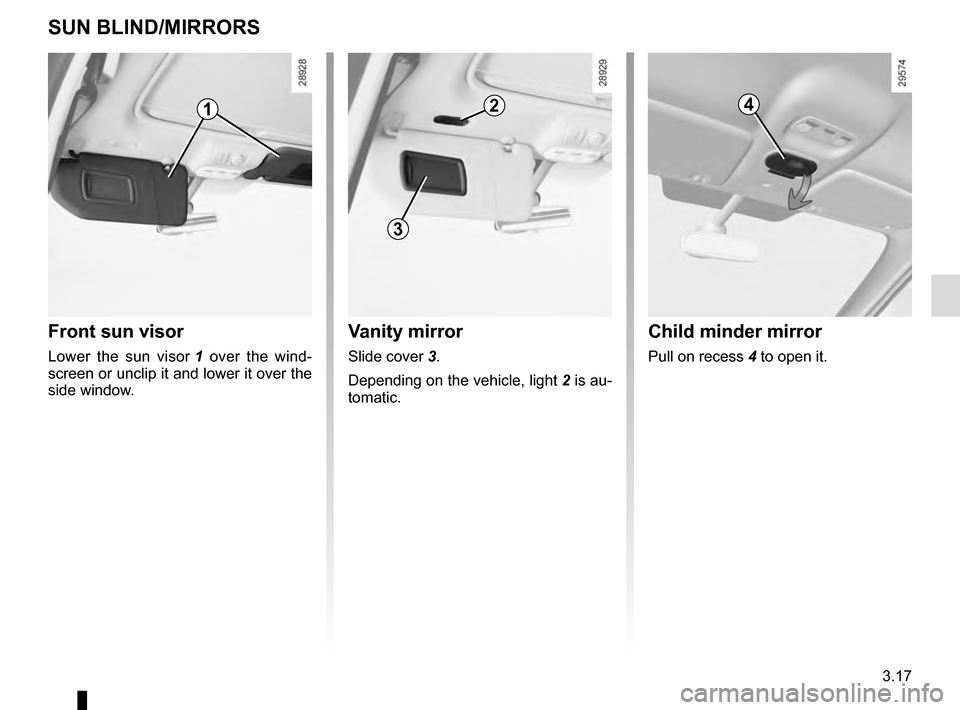
Vanity mirror
Slide cover 3.
Depending on the vehicle, light 2 is au-
tomatic.
SUN BLIND/MIRRORS
Child minder mirror
Pull on recess 4 to open it.
Front sun visor
Lower the sun visor 1 over the wind-
screen or unclip it and lower it over the
side window.
1
3
24