Page 184 of 318
2.76
AUTOMATIC GEARBOX (3/6)
Driving in automatic mode
With the vehicle at a standstill, engine
running, position P, N or R, depress the
brake pedal and move the selector to
the left then back, and release.
If one of the conditions is not applied,
D flashes for around 5 seconds and
the message “Push brake pedal” is dis-
played on the instrument panel for ap-
proximately 15 seconds.
In most road conditions you will en-
counter, you will not need to touch your
lever again: the gears will change au-
tomatically at the right time and at the
most suitable engine speed because
the automatic system takes into ac-
count the vehicle load and road contour
and adjusts itself to the particular driv-
ing style you have chosen.
Note: With the engine running and
the vehicle travelling between 0 and
6 mph (0 and 10 km/h), position N or
R , it is not necessary to depress the
brake pedal to engage position D. This
is useful during parking manoeuvres
requiring a number of alternate forward
and reverse movements. Economical driving
When driving, always leave the lever
in position
D, keeping the accelerator
pedal lightly depressed to ensure auto-
matic gear changes at a lower engine
speed.
Accelerating and overtaking
Depress the accelerator pedal briskly
and fully (so that it goes beyond the
point of resistance).
It is also possible to change down at
any time for overtaking purposes, by
pushing the selector to position “ -”.
To select reverse gear
With the vehicle at a standstill, engine
running, position P, N or D, depress the
brake pedal and move the selector to
the left then forwards, and release.
If the brake pedal is not depressed, a
beep will sound, the display of position
R flashes for around 5 seconds in the
grid shown on the instrument panel,
and a message “Push brake pedal” is
displayed for around 15 seconds.
Note: With the engine running, and
the vehicle travelling between 0 and
6 mph (0 and 10 km/h), position N or
D , it is not necessary to depress the
brake pedal to engage R. This is useful
during parking manoeuvres requiring
a number of alternate forward and re-
verse movements.
Page 186 of 318

2.78
AUTOMATIC GEARBOX (5/6)
Special cases
As position P is automatically en-
gaged when the engine is stopped, it is
sometimes necessary to place the vehi-
cle in position N for some car washes,
for example.
Position N can be engaged before
opening the driver’s door, and a maxi-
mum of around 25 seconds after the
engine is stopped.
After this time or after opening the
driver’s door, it will be necessary to turn
on the ignition again to disengage posi-
tion P.
In the event of a loss of in-
formation on the instrument
panel, stop and immobilise
the vehicle using the elec-
tronic parking brake or button P.
Special cases
In certain driving cases (eg: protect-
ing the engine), a gear change can be
performed automatically in the event of
over-revving or approaching under-rev-
ving. Permanent manual mode remains
activated. Similarly, to avoid making the
"wrong move", a gear change may be
refused by the gearbox. In this case,
the display for the requested gear + or –
flashes for a few seconds to warn you.
Parking the vehicleUpon stopping the engine by press-
ing the engine stop button, position P
is automatically engaged, along with
the electronic parking brake for vehi-
cles equipped with this device. P is dis-
played on the instrument panel and the
warning light on button P comes on.
Never leave the vehicle with
the engine running without
previously engaging the
Park position P.
With the engine running, the automatic
gearbox in D or R or N or M and with-
out your foot on the brake, messages
“P not engaged” and “Select P” are dis-
played on the instrument panel as soon
as the driver’s door is open.
With the engine stopped, the automatic
gearbox in N (neutral), the message “P
not engaged” is displayed on the instru-
ment panel.
Special feature related to the Stop and Start function: if you are going\
to unfasten the driver's seat belt before the
engine goes into standby due to the Stop and Start function, make sure t\
he gearbox is in position P. The P warning
light will light up on the instrument panel to confirm this. Risk of loss of immobilisation.
Page 187 of 318

2.79
AUTOMATIC GEARBOX (6/6)
Special circumstances
– If the bends and road surface
do not allow you to stay in auto-
matic mode (e.g. in the mountains),
we recommend that you change
to either temporary or permanent
manual mode.
This will prevent the automatic gear-
box from changing gear repeatedly
when climbing, and permit engine
braking on long descents.
– In cold weather, wait a few seconds
before disengaging position P or N
and engage the lever in D or R to
prevent the engine stalling.
Operating faults
– When driving , if the “Check auto
gearbox” message appears on the
instrument panel, it indicates a fault.
Contact your approved Dealer as
soon as possible.
– When driving , if the message
“Gearbox overheating” appears on
the instrument panel, stop the ve-
hicle to allow the gearbox to cool
down.
Contact your approved Dealer as
soon as possible.
– If a vehicle with an automatic
gearbox breaks down, please refer
to the information on “Towing” in
Section 5.
An impact to the under-
side of the vehicle while
manoeuvring (e.g.: strik-
ing a post, raised kerb or
other street furniture) may result in
damage to the vehicle (e.g.: defor-
mation of an axle).
To avoid any risk of accident, have
your vehicle checked by an ap-
proved Dealer.
In very cold weather, the system
may prevent the gears from being
shifted in manual mode until the
gearbox reaches the right tempera-
ture.
Page 199 of 318

3.11
AUTOMATIC CLIMATE CONTROL (5/5)
Automatic usage
Press button 16 (a warning light comes
on in zone 14).
Manual use
Press button 5 to force air recirculation.
Prolonged use of this position may lead
to odours, caused by non-renewal of
air, and the formation of condensation
on the windows.
We advise you to return to automatic
mode as soon as air recirculation is no
longer needed, by pressing key 16 or
button 5 again.
To exit this function, press key 16 or
button 5 again.
Adjusting the distribution
of air in the passenger
compartment
Press buttons 12 to select the desired
distribution (a warning light is displayed
in zone 14):
ØThe air flow is mainly directed
to the demisting vents for the
windscreen and the side windows.
½The air flow is mainly directed
to the dashboard air vents.
¿The air flow is directed mainly
towards the footwells.
The demisting/de-icing will still take
priority over the air recirculation.
53
1216
14
Air recirculation
This function is managed automatically
but you can also activate it manually.
Note:
– during recirculation, air is taken from the passenger compartment and
is recycled, with no air being taken
from outside the vehicle;
– air recirculation allows the exter- nal atmosphere to be cut off (when
driving in polluted areas, etc.) and
to cool the passenger compartment
temperature more quickly.
Page 206 of 318
3.18
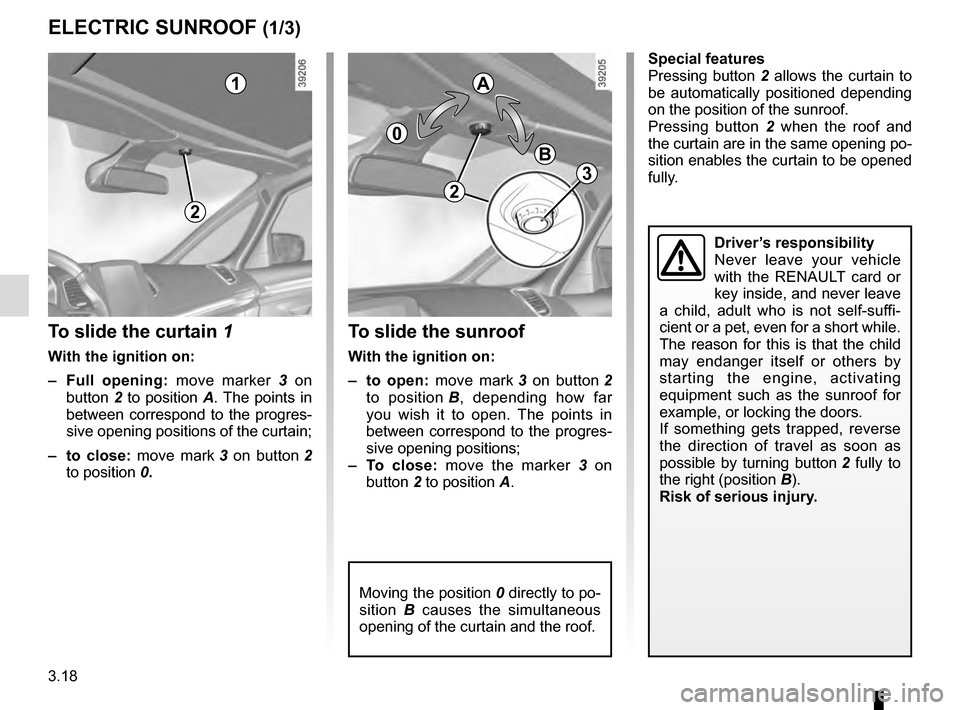
ELECTRIC SUNROOF (1/3)
To slide the curtain 1
With the ignition on:
– Full opening: move marker 3 on
button 2 to position A. The points in
between correspond to the progres-
sive opening positions of the curtain;
– to close: move mark 3 on button 2
to position 0.
To slide the sunroof
With the ignition on:
– to open: move mark 3 on button 2
to position B, depending how far
you wish it to open. The points in
between correspond to the progres-
sive opening positions;
– To close: move the marker 3 on
button 2 to position A.
1
2
0
A
B
Moving the position 0 directly to po-
sition B causes the simultaneous
opening of the curtain and the roof.
Driver’s responsibility
Never leave your vehicle
with the RENAULT card or
key inside, and never leave
a child, adult who is not self-suffi-
cient or a pet, even for a short while.
The reason for this is that the child
may endanger itself or others by
starting the engine, activating
equipment such as the sunroof for
example, or locking the doors.
If something gets trapped, reverse
the direction of travel as soon as
possible by turning button 2 fully to
the right (position B).
Risk of serious injury.
Special features
Pressing button 2 allows the curtain to
be automatically positioned depending
on the position of the sunroof.
Pressing button 2 when the roof and
the curtain are in the same opening po-
sition enables the curtain to be opened
fully.
2
3
Page 208 of 318
3.20
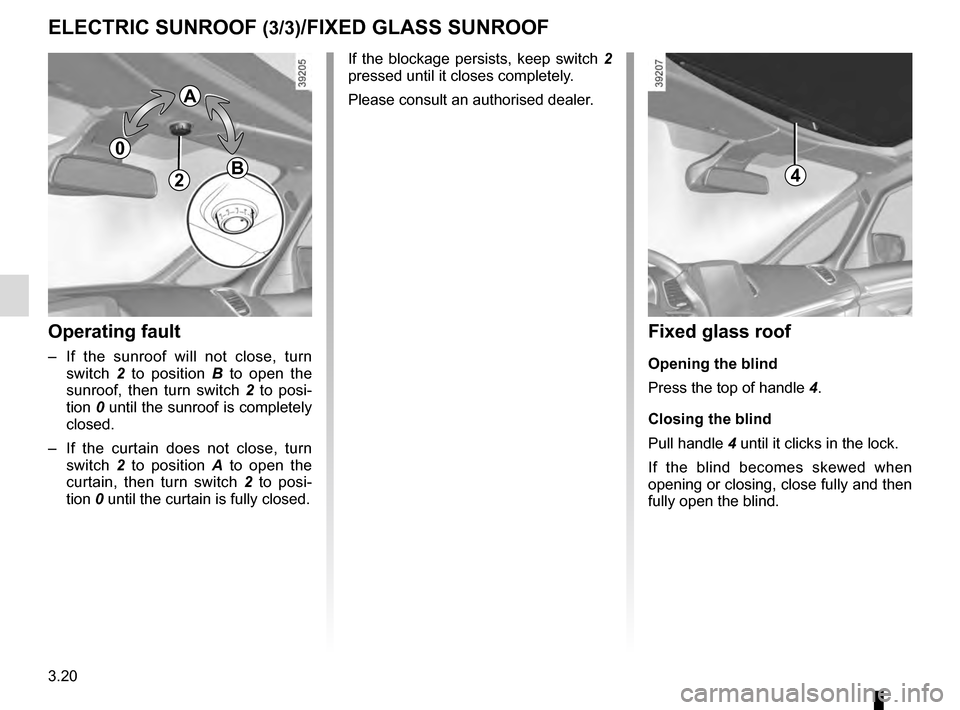
Operating fault
– If the sunroof will not close, turn switch 2 to position B to open the
sunroof, then turn switch 2 to posi-
tion 0 until the sunroof is completely
closed.
– If the curtain does not close, turn switch 2 to position A to open the
curtain, then turn switch 2 to posi-
tion 0 until the curtain is fully closed.
2
ELECTRIC SUNROOF (3/3)/FIXED GLASS SUNROOF
If the blockage persists, keep switch 2
pressed until it closes completely.
Please consult an authorised dealer.
0
A
B
Fixed glass roof
Opening the blind
Press the top of handle 4.
Closing the blind
Pull handle 4 until it clicks in the lock.
If the blind becomes skewed when
opening or closing, close fully and then
fully open the blind.
4
Page 211 of 318
3.23
SUN VISOR, BLINDS
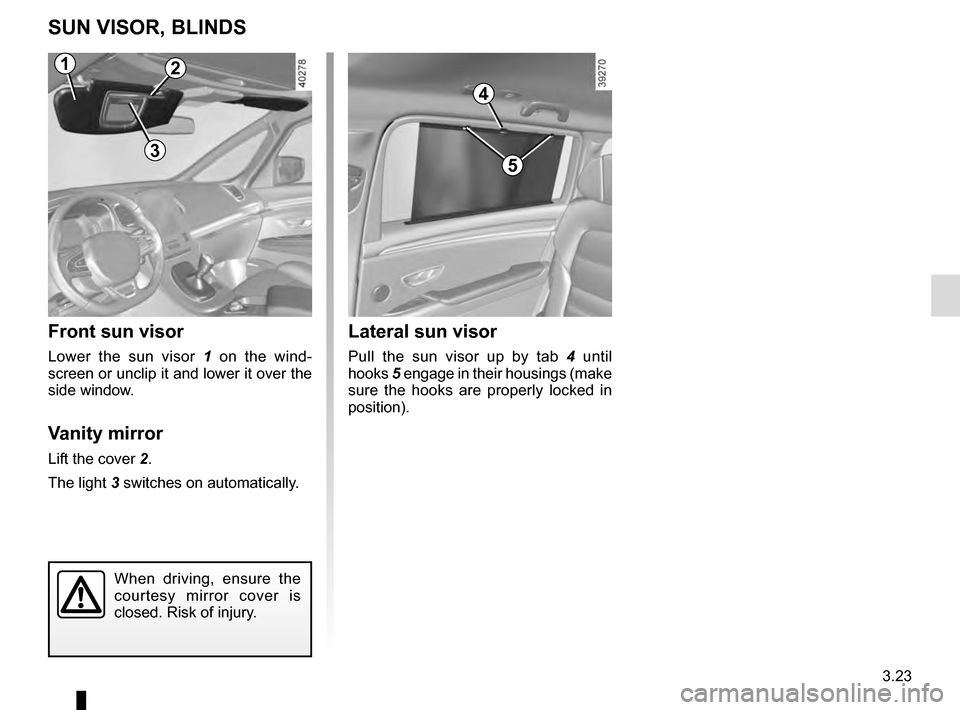
Front sun visor
Lower the sun visor 1 on the wind-
screen or unclip it and lower it over the
side window.
Vanity mirror
Lift the cover 2.
The light 3 switches on automatically.
Lateral sun visor
Pull the sun visor up by tab 4 until
hooks 5 engage in their housings (make
sure the hooks are properly locked in
position).
4
5
2
3
When driving, ensure the
courtesy mirror cover is
closed. Risk of injury.
1
Page 218 of 318
3.30
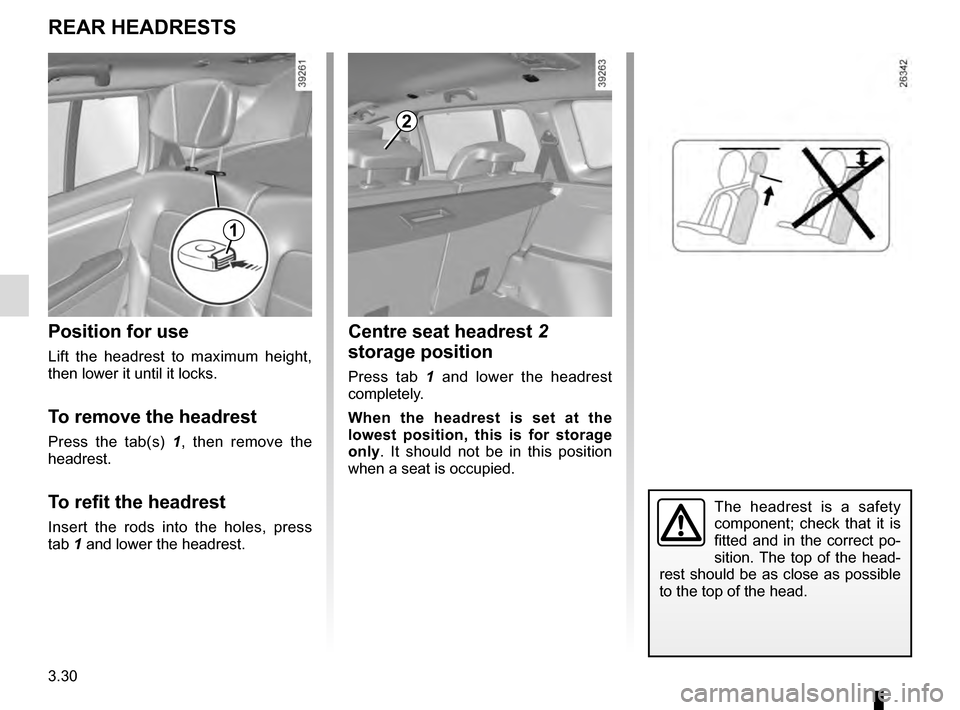
Centre seat headrest 2
storage position
Press tab 1 and lower the headrest
completely.
When the headrest is set at the
lowest position, this is for storage
only. It should not be in this position
when a seat is occupied.
REAR HEADRESTS
Position for use
Lift the headrest to maximum height,
then lower it until it locks.
To remove the headrest
Press the tab(s) 1 , then remove the
headrest.
To refit the headrest
Insert the rods into the holes, press
tab 1 and lower the headrest.
2
The headrest is a safety
component; check that it is
fitted and in the correct po-
sition. The top of the head-
rest should be as close as possible
to the top of the head.
1