Page 115 of 256

2.39
Exceeding the limit speed
It is possible to exceed the limit speed
at any time. To do this: press the accel-
erator pedal firmly and fully (beyond
the resistance point).
While the speed is being exceeded, the
programmed speed displayed on the
instrument panel flashes.
Then, release the accelerator: the
speed limiter function will return as
soon as you reach a speed lower than
the stored speed.
Limited speed cannot be maintained
If driving up or down a steep gradient,
the system is unable to maintain the
limit speed: the stored speed will flash
on the instrument panel information dis-
play to inform you of this situation.
Varying the limit speed
The limit speed may be changed by re-
peatedly pressing:
– switch 2 (+) to increase speed;
– switch 3 (-) to reduce speed.
Driving
When a limited speed has been stored
and this speed is not reached, driving is
similar to driving a vehicle without the
speed limiter function.
Once you have reached the stored
speed, no effort on the accelera-
tor pedal will allow you to exceed
the programmed speed except in an
emergency (refer to information on
“Exceeding the limit speed”).
CRUISE CONTROL/SPEED LIMITER: speed limiter function (2/3)
The speed limiter function is
in no way linked to the brak-
ing system.
23
Page 116 of 256
2.40
CRUISE CONTROL/SPEED LIMITER: speed limiter function (3/3)
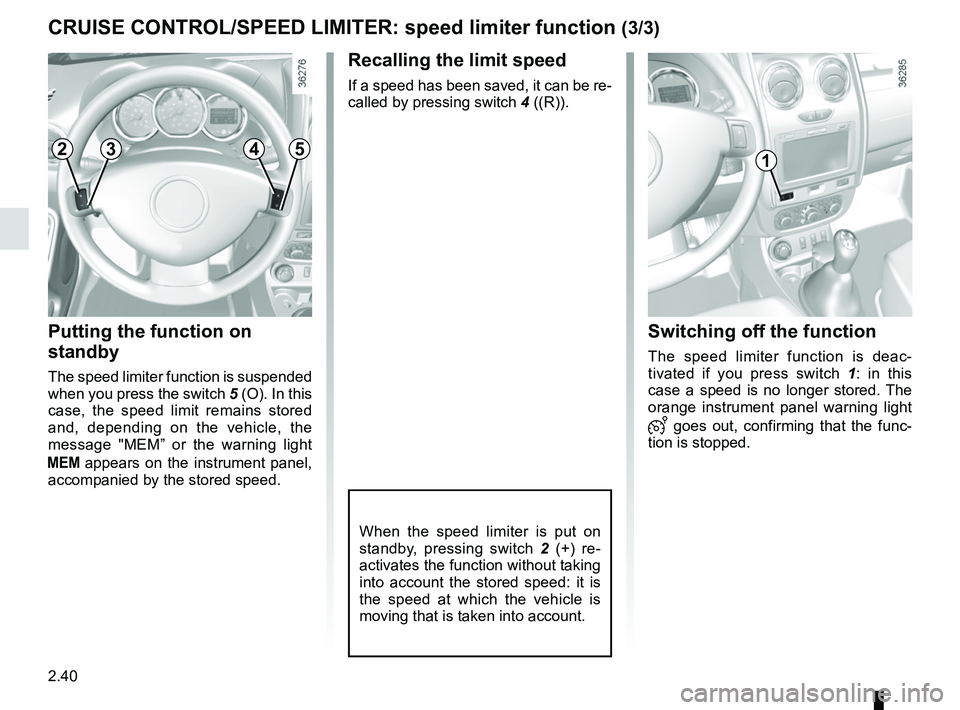
Recalling the limit speed
If a speed has been saved, it can be re-
called by pressing switch 4 ((R)).
Putting the function on
standby
The speed limiter function is suspended
when you press the switch 5 (O). In this
case, the speed limit remains stored
and, depending on the vehicle, the
message "MEM” or the warning light
appears on the instrument panel,
accompanied by the stored speed.
Switching off the function
The speed limiter function is deac-
tivated if you press switch 1 : in this
case a speed is no longer stored. The
orange instrument panel warning light
goes out, confirming that the func-
tion is stopped.
When the speed limiter is put on
standby, pressing switch 2 (+) re-
activates the function without taking
into account the stored speed: it is
the speed at which the vehicle is
moving that is taken into account.
12345
Page 117 of 256
2.41
The cruise control function helps you to
maintain your driving speed at a speed
that you choose, called the cruising
speed.
This cruising speed may be set at any
speed above 20 mph (30 km/h).
This function is an addi-
tional driving aid. However,
the function does not take
the place of the driver.
Therefore, it can under no circum-
stances replace the driver’s respon-
sibility to respect speed limits and to
be vigilant (the driver must always
be ready to brake).
Cruise control must not be used in
heavy traffic, on undulating or slip-
pery roads (black ice, aquaplan-
ing, gravel) and during bad weather
(fog, rain, side winds etc.).
There is a risk of accidents.
The cruise control function
is in no way linked to the
braking system.
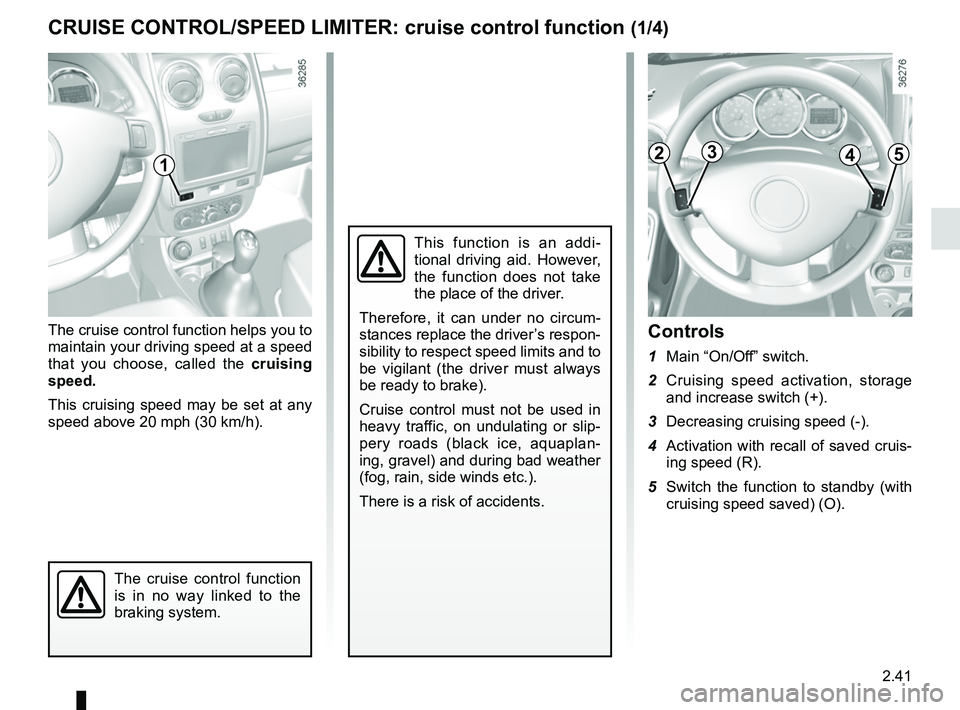
Controls
1 Main “On/Off” switch.
2 Cruising speed activation, storage and increase switch (+).
3 Decreasing cruising speed (-).
4 Activation with recall of saved cruis- ing speed (R).
5 Switch the function to standby (with cruising speed saved) (O).
CRUISE CONTROL/SPEED LIMITER: cruise control function (1/4)
12345
Page 118 of 256
2.42
Driving
Once a cruising speed is stored and
the cruise control function is active,
you may lift your foot off the accelera-
tor pedal.
Important: you are never-
theless advised to keep
your feet close to the pedals
in order to react if neces-
sary.
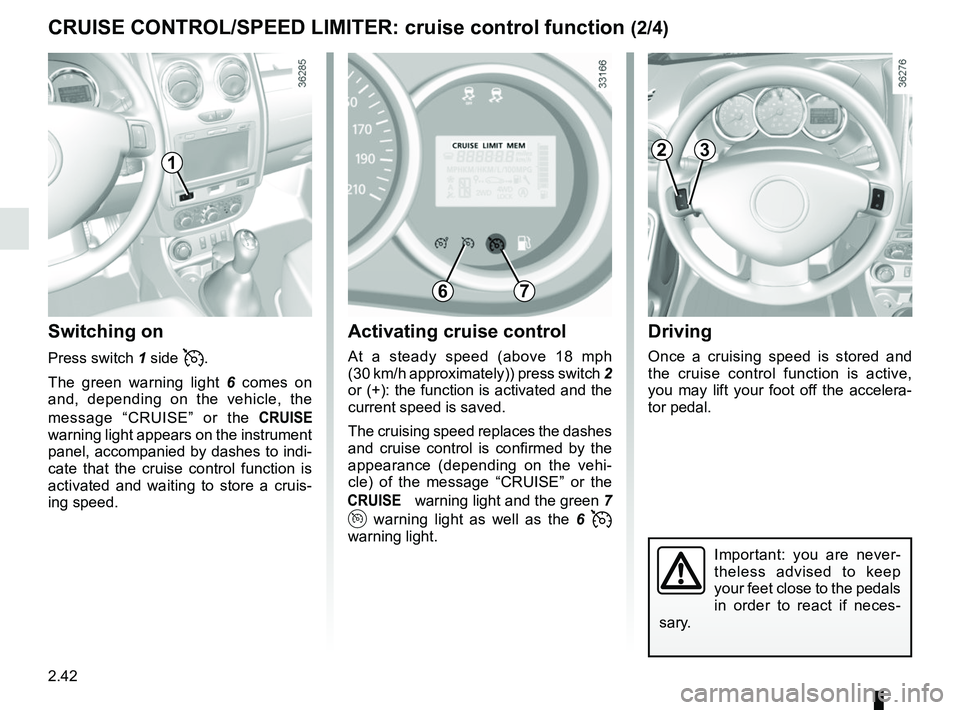
Activating cruise control
At a steady speed (above 18 mph
(30 km/h approximately)) press switch 2
or (+): the function is activated and the
current speed is saved.
The cruising speed replaces the dashes
and cruise control is confirmed by the
appearance (depending on the vehi-
cle) of the message “CRUISE” or the
warning light and the green 7
warning light as well as the 6
warning light.
Switching on
Press switch 1 side .
The green warning light 6 comes on
and, depending on the vehicle, the
message “CRUISE” or the
warning light appears on the instrument
panel, accompanied by dashes to indi-
cate that the cruise control function is
activated and waiting to store a cruis-
ing speed.
CRUISE CONTROL/SPEED LIMITER: cruise control function (2/4)
1
6
23
7
Page 119 of 256
2.43
CRUISE CONTROL/SPEED LIMITER: cruise control function (3/4)
Exceeding the cruising speed
The cruising speed may be exceeded
at any time by depressing the accelera-
tor pedal. While it is being exceeded,
the cruising speed flashes on the in-
strument panel.
Then, release the accelerator: after a
few seconds, the vehicle will automati-
cally return to its set cruising speed.
Cruising speed cannot be
maintained
When driving down a steep gradient,
the system is unable to maintain the
cruising speed: the stored speed will
flash on the instrument panel informa-
tion display to inform you of this situ-
ation.
Adjusting the cruising speed
The cruising speed may be changed by
pressing the following repeatedly:
– switch 2 (+) to increase the speed,
– switch 3 (-) to decrease the speed.
The cruise control function
is in no way linked to the
braking system.
23
Page 120 of 256
2.44
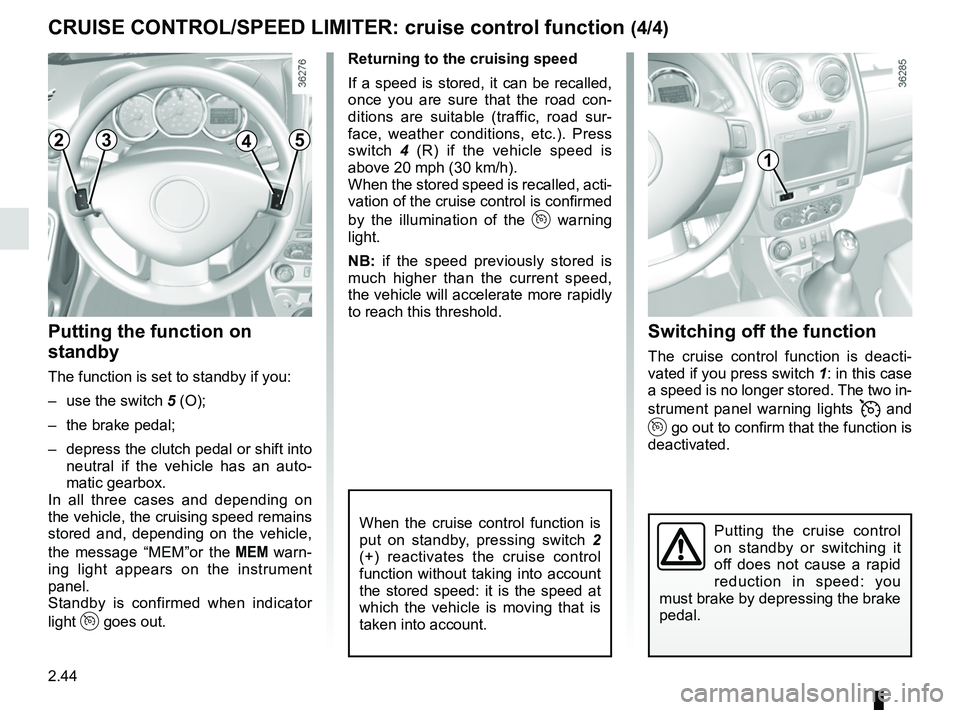
Switching off the function
The cruise control function is deacti-
vated if you press switch 1: in this case
a speed is no longer stored. The two in-
strument panel warning lights
and
go out to confirm that the function is
deactivated.
Returning to the cruising speed
If a speed is stored, it can be recalled,
once you are sure that the road con-
ditions are suitable (traffic, road sur-
face, weather conditions, etc.). Press
switch
4 (R) if the vehicle speed is
above 20 mph (30 km/h).
When the stored speed is recalled, acti-
vation of the cruise control is confirmed
by the illumination of the
warning
light.
NB: if the speed previously stored is
much higher than the current speed,
the vehicle will accelerate more rapidly
to reach this threshold.
When the cruise control function is
put on standby, pressing switch 2
(+) reactivates the cruise control
function without taking into account
the stored speed: it is the speed at
which the vehicle is moving that is
taken into account.
Putting the function on
standby
The function is set to standby if you:
– use the switch 5 (O);
– the brake pedal;
– depress the clutch pedal or shift into neutral if the vehicle has an auto-
matic gearbox.
In all three cases and depending on
the vehicle, the cruising speed remains
stored and, depending on the vehicle,
the message “MEM”or the
warn-
ing light appears on the instrument
panel.
Standby is confirmed when indicator
light
goes out.
CRUISE CONTROL/SPEED LIMITER: cruise control function (4/4)
Putting the cruise control
on standby or switching it
off does not cause a rapid
reduction in speed: you
must brake by depressing the brake
pedal.
2345
1
Page 121 of 256

2.45
AUTOMATIC GEARBOX (1/4)
Selector lever 1
Display 3 on the instrument panel
shows the mode and gear selected.
P: Park
R: Reverse
N: Neutral
D: Automatic mode
M: Manual mode
4: zone displaying gearbox mode or
gear engaged in manual mode.
Operation
With the selection lever 1 in position P,
switch on the ignition.
With your foot on the brake pedal, move
the lever out of position P.
Only engage D or R when the vehi-
cle is stopped, with your foot on the
brake and the accelerator pedal re-
leased.
To move out of position P the brake
pedal must be depressed before
pressing the unlocking button .2
For safety reasons, do not
switch off the ignition before
the vehicle has come to a
complete standstill.
1
2
3
4
Driving in automatic modePlace the lever into position D.
In the majority of driving conditions, you
will no longer have to use your gear
lever: the gears change automatically,
at the right time, to a suitable engine
speed because “automatic” takes the
vehicle’s load, road profile and driving
style into account.
2
1
Page 122 of 256

2.46
AUTOMATIC GEARBOX (2/4)
Driving in manual modeWhen the selector lever is in position D,
move the lever to the left.
Shifting the lever repeatedly allows you
to change gears manually:
– To move down through the gears, push the lever backwards;
– to move up through the gears, push the lever forwards.
Depending on the vehicle:
– to move down through the gears, push the lever forwards; – to move up through the gears, push
the lever backwards.
The gear selected is displayed on the
instrument panel.
Special cases
In certain driving conditions (e.g.: to
protect the engine) the “automated
system” may change the gear automa-
tically.
Likewise, to prevent incorrect ma-
noeuvres, a gear change may be re-
fused by the automatic system: in this
case the gear display flashes for a few
seconds as a warning.
Economical driving
When driving, always leave the lever
in position D, keeping the accelerator
pedal lightly depressed to ensure auto-
matic gear changes at a lower engine
speed.
Accelerating and overtaking
Depress the accelerator pedal firmly
and fully (so that it goes beyond the
kickdown point).
This will enable you to change down
to the optimum gear within the
engine range.