Page 60 of 256

1.54
ON-BOARD COMPUTER (5/6)
Examples of display selections by
repeatedly pressing 2Interpreting the display selected
Display A Display B
j) Mileage before service
Distance remaining until the next oil change.
There are several scenarios:
– mileage before oil change service less than 1000 miles Warning light
Ê on the instrument panel comes on accompanied by the message
“1000 miles”.
– mileage before oil change service 0 miles. Warning light
Ê on the
instrument panel comes on accompanied by the message “--- miles”.
The distance appears on the display for approximately 8 seconds when
the ignition is switched on as soon as the distance is less than or equa\
l
to 1000 miles. The vehicle requires an oil change as soon as possible.
Note: depending on the vehicle, the mileage before an oil change varies accor\
ding to the driving style (frequent driving at low
speed, door-to-door journeys, extensive use at idle speed, towing a trai\
ler etc.). The distance remaining until the next oil ch ange
can therefore decrease more quickly in some cases than the actual distan\
ce travelled.
The oil change intervals are independent of the vehicle’s maintenance schedule: please refer to your vehicle’s maintenance do-
cument.
Resetting: to reset the mileage before an oil change, press and hold the display r\
eset button for approximately 10 seconds until
the display shows the range permanently.
The display of information shown below DEPENDS ON THE VEHICLE EQUIPMENT \
AND COUNTRY.
Page 62 of 256
1.56
STEERING WHEEL, POWER-ASSISTED STEERING
Power Assisted Steering
With the engine running, do not leave
the steering wheel at full lock while sta-
tionary as this may damage the power-
assisted steering pump.
With the engine switched off, or if there
is a system fault, it is still possible to
turn the steering wheel. The force re-
quired will be greater.
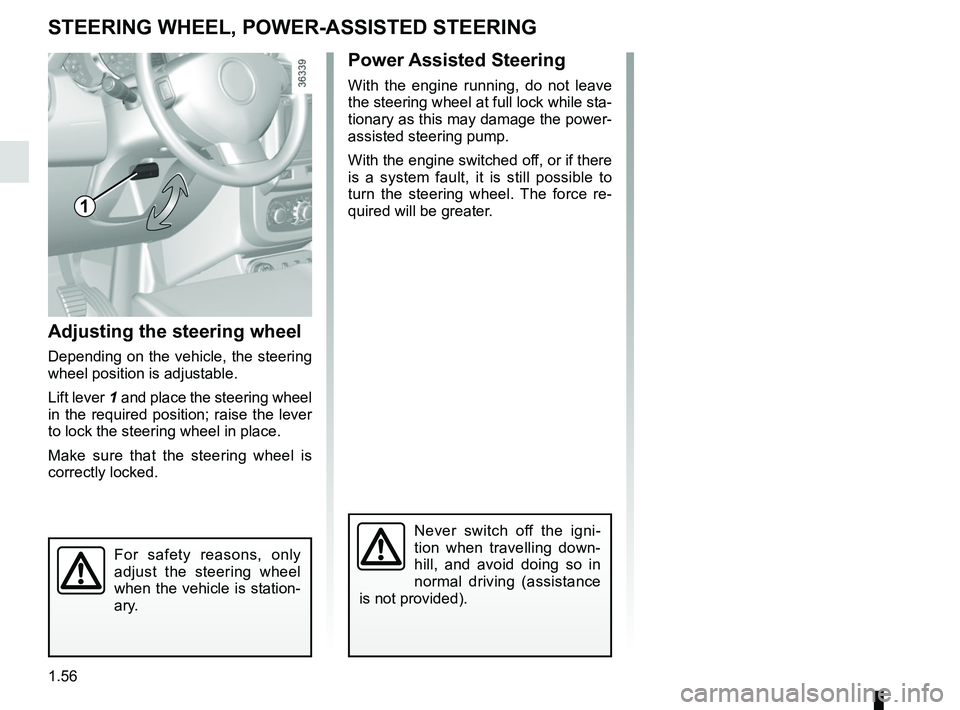
Adjusting the steering wheel
Depending on the vehicle, the steering
wheel position is adjustable.
Lift lever 1 and place the steering wheel
in the required position; raise the lever
to lock the steering wheel in place.
Make sure that the steering wheel is
correctly locked.
For safety reasons, only
adjust the steering wheel
when the vehicle is station-
ary.
Never switch off the igni-
tion when travelling down-
hill, and avoid doing so in
normal driving (assistance
is not provided).
1
Page 63 of 256
1.57
CLOCK
Setting the time
Display A
Display the “Clock” display on the ins-
trument panel by pressing the button 1.
If the electrical supply is cut (battery
disconnected, broken supply wire,
etc.), the clock will lose its time set-
ting.
The clock must be reset.
For your safety, we recom-
mend that you do not adjust
the clock while driving.
Press and hold button 1 to enter the
hour setting mode.
When only the hours flash, press
button 1 briefly, to scroll through them.
Press and hold button 1 to enter the
minute setting mode.
When only the minutes flash, press
button 1 briefly, to scroll through them.
Confirm by pressing and holding
button 1.
1
A
Page 64 of 256
1.58
AUDIBLE AND VISUAL SIGNALS
Horn
Press the end of the stalk 1.
Depending on the vehicle, press on one
of areas 2.
Headlight flasher
Pull stalk 1 towards you to flash the
headlights.
Direction indicators
Move stalk 1 parallel to the steering
wheel and in the direction you are going
to turn it.
One-touch mode
When driving, it is possible that the
steering wheel may not be turned suf-
ficiently to return the stalk automatically
to its starting position.
In this case, briefly turn stalk 1 to the in-
termediate position, then release it: the
stalk returns to its original point and the
indicator light flashes three times.
1
2
1
éHazard warning lights
Press switch 3.
This switch activates all four direction
indicators and the side indicator lights
simultaneously.
It must only be used in an emergency to
warn drivers of other vehicles that you
have had to stop in an area where stop-
ping is prohibited or unexpected, or that
you are obliged to drive under special
conditions.
3
Page 65 of 256

1.59
eSwitching off the lightsFrom the main beam head-
lights position, pull the stalk 1 towards
you, then turn the end of the stalk 1
until the
e symbol appears by the
mark 2.
From the dipped beam headlights posi-
tion, turn the end of the stalk 1 until the
e symbol appears by the mark 2.
EXTERIOR LIGHTING AND SIGNALS (1/2)
šSide lights
Turn the end of stalk 1 until the
symbol is opposite mark 2.
kDipped beam
headlights
Turn the end of stalk 1 until the symbol
is opposite mark 2.
An indicator light on the instrument
panel will come on.
áMain beam headlightsWith the dipped beam head-
lights lit, push stalk 1 . This indicator
light on the instrument panel comes on.
To return to the dipped headlight posi-
tion, pull the stalk 1 towards you again.
Before driving at night, check that the electrical equipment is operatin\
g
correctly and adjust the headlight beams (if your vehicle is not carryi\
ng
its normal load). As a general precaution, check that the lights are not ob-
scured (by dirt, mud, snow or objects being transported).
112
Page 68 of 256
1.62
ADJUSTING THE HEADLIGHT BEAM HEIGHT (2/2)
Temporary adjustment
Open the bonnet and identify the mark-
ing B next to one of the front headlight
projectors.
For each headlight, using a screw-
driver, turn the screw 1 by a quarter
turn towards the - symbol to lower the
beams.
Return to the starting point once your
trip is over: turn the screw 1 by a quar-
ter turn towards the + symbol to raise
the beams.
When driving on the left in a left-
hand drive vehicle (or vice versa),
you must adjust your lights tempo-
rarily during your stay.
1
B
Page 77 of 256

Running in, Ignition switch . . . . . . . . . . . . . . . . . . . . . . . . . . . . . . . . . . . . \
. . . . . . .")
2.1
Section 2: Driving
(Advice on use relating to fuel economy and the environment)
Running in, Ignition switch . . . . . . . . . . . . . . . . . . . . . . . . . . . . . . . . . . . . \
. . . . . . . . . . . . . . . . . . . . . 2.2
Starting/stopping the engine . . . . . . . . . . . . . . . . . . . . . . . . . . . . . . . . . . . .\
. . . . . . . . . . . . . . . . . . . 2.3
Stop and Start Function . . . . . . . . . . . . . . . . . . . . . . . . . . . . . . . . . . . . \
. . . . . . . . . . . . . . . . . . . . . . . 2.7
Special features of petrol versions . . . . . . . . . . . . . . . . . . . . . . . . . . . . . . . . . . . .\
. . . . . . . . . . . . . . 2.10
Special features of diesel versions . . . . . . . . . . . . . . . . . . . . . . . . . . . . . . . . . . . .\
. . . . . . . . . . . . . . 2.11
Special features of LPG versions . . . . . . . . . . . . . . . . . . . . . . . . . . . . . . . . . . . .\
. . . . . . . . . . . . . . . 2.12
Driving advice, eco-driving . . . . . . . . . . . . . . . . . . . . . . . . . . . . . . . . . . . .\
. . . . . . . . . . . . . . . . . . . . 2.15
Maintenance and antipollution advice . . . . . . . . . . . . . . . . . . . . . . . . . . . . . . . . . . . . \
. . . . . . . . . . . . 2.20
Environment . . . . . . . . . . . . . . . . . . . . . . . . . . . . . . . . . . . .\
. . . . . . . . . . . . . . . . . . . . . . . . . . . . . . . 2.21
Tyre pressure loss warning . . . . . . . . . . . . . . . . . . . . . . . \
. . . . . . . . . . . . . . . . . . . . . . . . . . . . . . . . . 2.22
Gear lever, Handbrake . . . . . . . . . . . . . . . . . . . . . . . . . . . . . . . . . . . .\
. . . . . . . . . . . . . . . . . . . . . . . 2.29
Transmission: 4-wheel drive (4WD) . . . . . . . . . . . . . . . . . . . . . . . . . . . . . . . . . . . .\
. . . . . . . . . . . . . 2.30
Driver correction devices/aids . . . . . . . . . . . . . . . . . . . . . . . . . . . . . . . . . . . . \
. . . . . . . . . . . . . . . . . . 2.34
Speed limiter . . . . . . . . . . . . . . . . . . . . . . . . . . . . . \
. . . . . . . . . . . . . . . . . . . . . . . . . . . . . . . . . . . . . . 2.38
Cruise control . . . . . . . . . . . . . . . . . . . . . . . . . . . . . . . . . . . .\
. . . . . . . . . . . . . . . . . . . . . . . . . . . . . . 2.41
Automatic gearbox. . . . . . . . . . . . . . . . . . . . . . . . . . . .\
. . . . . . . . . . . . . . . . . . . . . . . . . . . . . . . . . . . 2.45
Parking distance control . . . . . . . . . . . . . . . . . . . . . . . . . . . . . . . . . . . .\
. . . . . . . . . . . . . . . . . . . . . . 2.49
Reversing camera . . . . . . . . . . . . . . . . . . . . . . . . . . . . . . . . . . . . \
. . . . . . . . . . . . . . . . . . . . . . . . . . . 2.51
Page 79 of 256

2.3
LPG versions
The engine is always started using
petrol:
– activate the starter without accelerat-ing;
– release the key as soon as the engine starts.
The system will automatically deter-
mine the switchover from petrol to LPG.
When operating on LPG, the fuel gauge
may indicate a drop in the petrol level
and the on-board computer will not op-
erate.
Under certain winter conditions the
system may delay or disable operation
with LPG.
After stopping the engine, if the envi-
ronmental conditions are once again
suitable, the system may once again
permit LPG mode.
Starting the engineIn very cold conditions (temperatures
below –20°C): so that it is easier to
start the engine, switch on the ignition
for several seconds before starting the
engine.
When starting the engine, if the outdoor
temperature is very low (below -10°C):
hold down the clutch pedal until the
engine starts.
Make sure the engine immobiliser is not
activated. Refer to the information on
the “Engine immobiliser” in Section 1.
Petrol injection
– Turn the key to the start position without depressing the accelera-
tor.
– Release the key as soon as the engine starts.
ÉDiesel injection
Turn the ignition key to ignition “On” po-
sition M, and hold this position until the
preheating warning light goes out.
Turn the key to starter position D with-
out depressing the accelerator
pedal.
Release the key as soon as the engine
starts.
STARTING, STOPPING THE ENGINE (1/4)
At temperatures close to 0°C or less, it
is recommended to use ECO mode to
maximise the use of LPG. Please refer
to the information on “Driving advice,
Eco-driving” in Section 2.
To enable the system to operate
smoothly and to prevent any wear to
the vehicle’s electric petrol pump, the
petrol tank should always be around
1/4 full.