Page 50 of 256
1.44
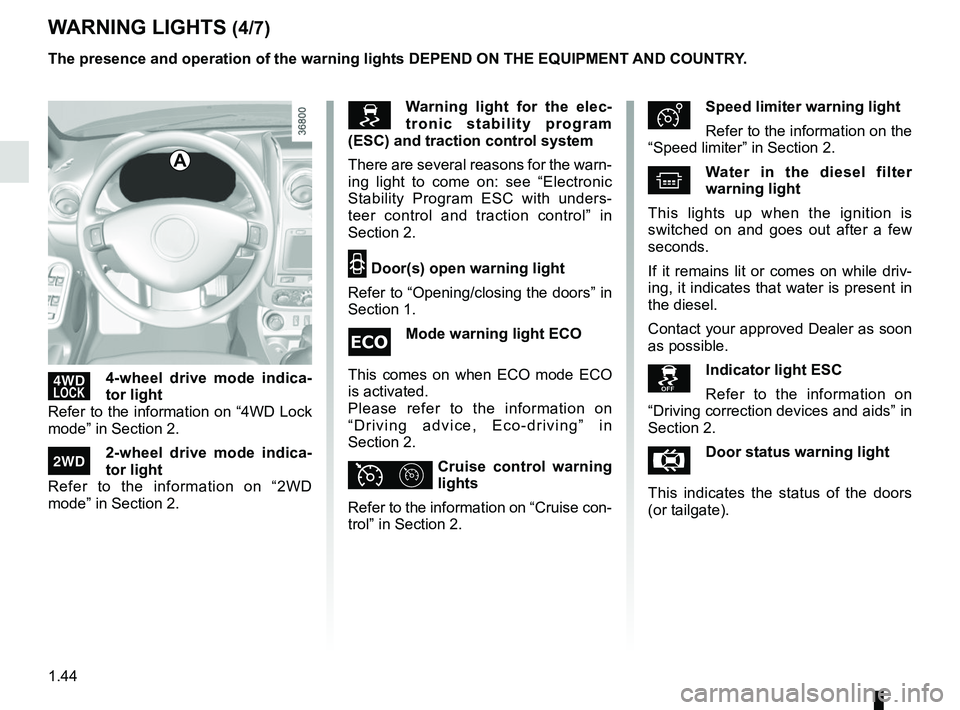
’4-wheel drive mode indica-
tor light
Refer to the information on “4WD Lock
mode” in Section 2.
‘2-wheel drive mode indica-
tor light
Refer to the information on “2WD
mode” in Section 2.
ÐSpeed limiter warning light
Refer to the information on the
“Speed limiter” in Section 2.
^Water in the diesel filter
warning light
This lights up when the ignition is
switched on and goes out after a few
seconds.
If it remains lit or comes on while driv-
ing, it indicates that water is present in
the diesel.
Contact your approved Dealer as soon
as possible.
Indicator light ESC
Refer to the information on
“Driving correction devices and aids” in
Section 2.
ÅDoor status warning light
This indicates the status of the doors
(or tailgate).
WARNING LIGHTS (4/7)
A
Warning light for the elec-
tronic stability program
(ESC) and traction control system
There are several reasons for the warn-
ing light to come on: see “Electronic
Stability Program ESC with unders-
teer control and traction control” in
Section 2.
2 Door(s) open warning light
Refer to “Opening/closing the doors” in
Section 1.
Mode warning light ECO
This comes on when ECO mode ECO
is activated.
Please refer to the information on
“Driving advice, Eco-driving” in
Section 2.
ϦCruise control warning
lights
Refer to the information on “Cruise con-
trol” in Section 2.
The presence and operation of the warning lights DEPEND ON THE EQUIPMENT\
AND COUNTRY.
Page 62 of 256
1.56
STEERING WHEEL, POWER-ASSISTED STEERING
Power Assisted Steering
With the engine running, do not leave
the steering wheel at full lock while sta-
tionary as this may damage the power-
assisted steering pump.
With the engine switched off, or if there
is a system fault, it is still possible to
turn the steering wheel. The force re-
quired will be greater.
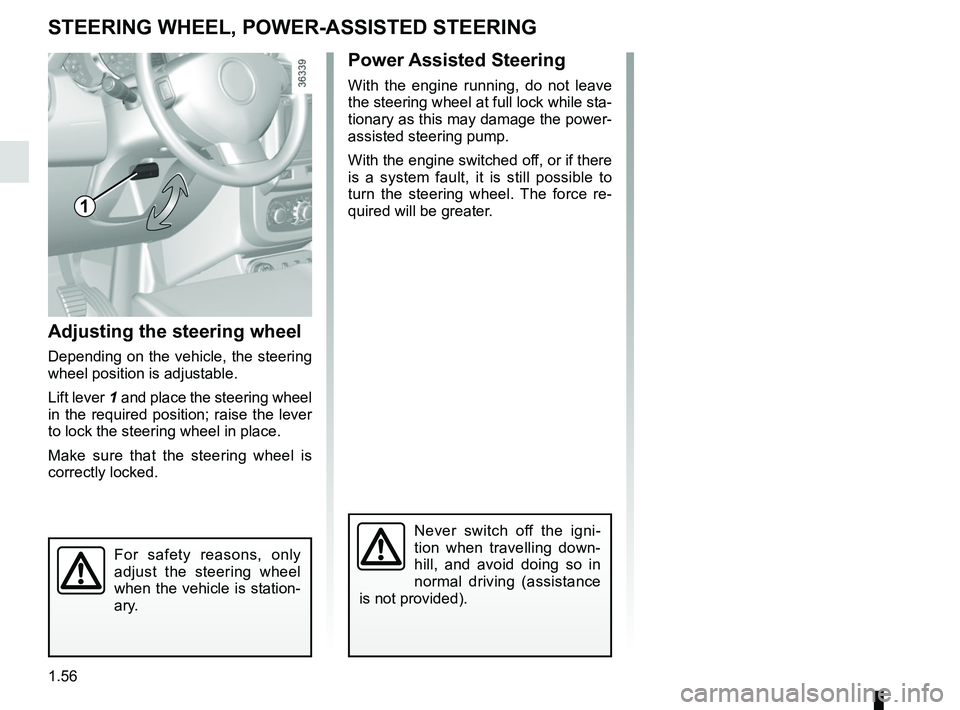
Adjusting the steering wheel
Depending on the vehicle, the steering
wheel position is adjustable.
Lift lever 1 and place the steering wheel
in the required position; raise the lever
to lock the steering wheel in place.
Make sure that the steering wheel is
correctly locked.
For safety reasons, only
adjust the steering wheel
when the vehicle is station-
ary.
Never switch off the igni-
tion when travelling down-
hill, and avoid doing so in
normal driving (assistance
is not provided).
1
Page 63 of 256
1.57
CLOCK
Setting the time
Display A
Display the “Clock” display on the ins-
trument panel by pressing the button 1.
If the electrical supply is cut (battery
disconnected, broken supply wire,
etc.), the clock will lose its time set-
ting.
The clock must be reset.
For your safety, we recom-
mend that you do not adjust
the clock while driving.
Press and hold button 1 to enter the
hour setting mode.
When only the hours flash, press
button 1 briefly, to scroll through them.
Press and hold button 1 to enter the
minute setting mode.
When only the minutes flash, press
button 1 briefly, to scroll through them.
Confirm by pressing and holding
button 1.
1
A
Page 67 of 256
1.61
Examples of positions for adjusting control A according to the load
Control A
4x2 4x4
Driver alone or with front passenger 00
Driver with one front passenger and
three rear passengers 11
Driver with one front passenger,
three rear passengers and luggage 32
Driver only and luggage 43
The control A is used to adjust the
height of the headlight beams accord-
ing to the load.
Turn control A anticlockwise to lower
the beams and clockwise to raise them.
ADJUSTING THE HEADLIGHT BEAM HEIGHT (1/2)
A
Page 71 of 256

1.65
FUEL TANK (1/6)
Petrol and diesel versions
Usable capacity of the fuel tank:
50 litres approximately.
Depending on the vehicle, to open the
fuel filler flap A, place your finger in
opening B and pull.
To close, push the fuel filler flap A by
hand as far as it will go. Depending
on the vehicle, the cap 1 is unlocked
using the ignition key. If not, it will be
connected to the vehicle by a strip of
plastic. For details on filling the fuel
tank, please refer to the information on
“Filling with fuel”.
Fuel filler cap: this is spe-
cific to the vehicle type. If
you have to replace it, make
sure the new cap is of the
same type. Contact an approved
dealer.
Never place the cap near a source
of heat or flame.
Do not wash the filler area with a
high-pressure washer.
A
3
C
B
There is a cap holder 3 on the fuel filler
flap for holding the cap when the tank is
being filled.
Depending on the vehicle, lift lever 2 to
unlock the fuel filler flap A. Open it, then
unscrew fuel filler cap 1.
1
2
Page 78 of 256

2.2
Petrol version
For the first 600 miles (1,000 km), do
not exceed 78 mph (130 km/h) in the
highest gear, or 3,000 to 3,500 rpm.
You may only expect top performance
from your vehicle after approximately
1,800 miles (3,000 km).
Service intervals: refer to the
Maintenance Document for the vehicle.
Diesel version
For the first 1,000 miles (1,500 km),
do not exceed 80 mph (130 km/h) in
the highest gear, or 2,500 rpm. After
completing this mileage you may drive
faster, although you may only expect
top performance after approximately
3,600 miles (6,000 km).
During the running in period, do not ac-
celerate hard while the engine is still
cold and do not let the engine over-rev.
Service intervals: refer to the
Maintenance Document for your vehi-
cle.
RUNNING IN, IGNITION SWITCH
Stop and steering lock
position St
To lock: remove the key and turn the
steering wheel until the steering column
locks.
To unlock: turn the key and the steering
wheel slightly.
Accessories position A
When the ignition is switched off, any
accessories (radio, etc.) will continue to
function.
Ignition on position M
The ignition is switched on:
– petrol version: the engine may be
started.
– diesel version: the engine is pre-
heating.
Start position D
If the engine fails to start at the first at-
tempt, turn the key back before activat-
ing the starter again.
Release the key as soon as the engine
starts.
Special note on vehicles with
an automatic gearbox
Refer to the information on the
“Automatic gearbox” in Section 2.
Page 80 of 256

2.4
vehicles with an automatic
gearbox
Before starting, move the lever to posi-
tion P.
Refer to the information on the
“Automatic gearbox” in Section 2.
Stopping the engine
With the engine idling, turn the key
back to “Stop” position St.
Special note
Depending on the vehicle, accessories
(e.g. radio) stop working either when
the engine is switched off or when the
driver’s door is opened or when the
doors are locked.Driver’s responsibility
Never leave an animal,
child or adult who is not
self-sufficient alone on your
vehicle, even for a short time.
They may pose a risk to themselves
or to others by starting the engine,
activating equipment such as the
electric windows or locking the
doors, for example.
Also, in hot and/or sunny weather,
please remember that the tempera-
ture inside the passenger compart-
ment increases very quickly.
Never switch off the ignition
before the vehicle has stopped
completely . Switching off the
engine disables the assistance
equipment: brakes, steering, etc.,
and additional seatbelt devices.
The steering is locked when the key
is removed.
RISK OF DEATH OR SERIOUS
INJURY.
STARTING, STOPPING THE ENGINE (2/4)
Do not park the vehicle or
run the engine in locations
where combustible sub-
stances or materials such
as grass or leaves can come into
contact with a hot exhaust system.
Page 81 of 256

2.5
STARTING, STOPPING THE ENGINE (3/4)
Remote engine start-up
Activation
If the vehicle is so equipped, press the
unlocking button 1 briefly, then press
the remote start button 3 twice for about
3 seconds each time.
Operation
This function allows remote starting of
the engine.
To do this, press the locking button 2,
followed by the remote start button 3
for about 3 seconds.
2
3
The remote engine start-up operates if:
– the lever is in neutral for vehicles with a manual or sequential gearbox;
– the lever is in position P for vehicles
with an automatic gearbox;
– the ignition is off and no key is in- serted into the ignition switch;
– the bonnet is closed;
– all of the opening elements (doors and luggage compartment) are
closed and locked when you leave
the vehicle.
This function also lets you programme
the engine to start, in order to heat or
ventilate the passenger compartment
up to 24 hours before using the vehicle.
The configuration and the program-
ming are done using the multimedia
display 4, : refer to the multimedia in-
structions for your vehicle.
1
4
Special note for vehicles fitted
with the “Wake up every 2 hours ”
function.
In the event of use of the function
two days in succession, you must
drive at least 10 minutes between
the two uses. Risk of engine oil
wear.
Please see your vehicle’s multime-
dia instructions.