Page 60 of 256

1.54
ON-BOARD COMPUTER (5/6)
Examples of display selections by
repeatedly pressing 2Interpreting the display selected
Display A Display B
j) Mileage before service
Distance remaining until the next oil change.
There are several scenarios:
– mileage before oil change service less than 1000 miles Warning light
Ê on the instrument panel comes on accompanied by the message
“1000 miles”.
– mileage before oil change service 0 miles. Warning light
Ê on the
instrument panel comes on accompanied by the message “--- miles”.
The distance appears on the display for approximately 8 seconds when
the ignition is switched on as soon as the distance is less than or equa\
l
to 1000 miles. The vehicle requires an oil change as soon as possible.
Note: depending on the vehicle, the mileage before an oil change varies accor\
ding to the driving style (frequent driving at low
speed, door-to-door journeys, extensive use at idle speed, towing a trai\
ler etc.). The distance remaining until the next oil ch ange
can therefore decrease more quickly in some cases than the actual distan\
ce travelled.
The oil change intervals are independent of the vehicle’s maintenance schedule: please refer to your vehicle’s maintenance do-
cument.
Resetting: to reset the mileage before an oil change, press and hold the display r\
eset button for approximately 10 seconds until
the display shows the range permanently.
The display of information shown below DEPENDS ON THE VEHICLE EQUIPMENT \
AND COUNTRY.
Page 65 of 256

1.59
eSwitching off the lightsFrom the main beam head-
lights position, pull the stalk 1 towards
you, then turn the end of the stalk 1
until the
e symbol appears by the
mark 2.
From the dipped beam headlights posi-
tion, turn the end of the stalk 1 until the
e symbol appears by the mark 2.
EXTERIOR LIGHTING AND SIGNALS (1/2)
šSide lights
Turn the end of stalk 1 until the
symbol is opposite mark 2.
kDipped beam
headlights
Turn the end of stalk 1 until the symbol
is opposite mark 2.
An indicator light on the instrument
panel will come on.
áMain beam headlightsWith the dipped beam head-
lights lit, push stalk 1 . This indicator
light on the instrument panel comes on.
To return to the dipped headlight posi-
tion, pull the stalk 1 towards you again.
Before driving at night, check that the electrical equipment is operatin\
g
correctly and adjust the headlight beams (if your vehicle is not carryi\
ng
its normal load). As a general precaution, check that the lights are not ob-
scured (by dirt, mud, snow or objects being transported).
112
Page 66 of 256

1.60
EXTERIOR LIGHTING AND SIGNALS (2/2)
gFront fog lights
Turn the centre ring 3 of
the stalk until the symbol is opposite
mark 2.
The fog lights only light up if the exterior
lights have been switched on. An indi-
cator light on the instrument panel then
lights up.
Do not forget to switch off the fog lights
when they are no longer needed, to
avoid inconveniencing other road
users.
hRear fog lights
Turn the centre ring 3 on
the stalk until the symbol faces mark 2.
The fog lights only light up if the exterior
lights have been switched on. An indi-
cator light on the instrument panel then
lights up.
Remember to switch off the these
lights when they are no longer required
to avoid inconveniencing other road
users.
eTurning off the fog
lights
Turn the centre ring 3 of the stalk until
the symbol is opposite mark 2.
The corresponding indicator light goes
out on the instrument panel.
The front and rear fog lights switch off
when the exterior lights are switched
off.23
Daytime running lights
function
(front lights only)
The daytime running lights come on
automatically with no action on stalk 1
when the engine is started, and they go
off once the engine is switched off. They
are deactivated when the main beams,
dipped beams or side lights are lit.
Lights-on warning buzzerIf the lights are on, a warning beep
sounds when the driver’s door is
opened to warn you that the lights are
still on.
1
Page 83 of 256

2.7
For manual gearboxes:
– the gearbox is in neutral;
and
– the clutch pedal is released.If the
warning light flashes,
this means that the clutch pedal is
not sufficiently released;
and
– the vehicle speed is less than ap- proximately 7 mph (3 km/h).
In all vehicles, the
warning light
appears on the instrument panel to warn
you when the engine is on standby.
The vehicle equipment remain opera-
tional while the engine is stopped.
STOP AND START function (1/3)
This system enables a reduced fuel
consumption and lower greenhouse
gas emissions.
The system is activated automatically
when the vehicle is started.
While driving, the system stops the
engine (standby) when the vehicle is
at a standstill (traffic jam, traffic lights,
etc).
Conditions for engine
standby
The vehicle has set off from where it
was parked;
For automatic or sequential gear-
box:
– The gearbox is in position D, M or N;
and
– the brake pedal is depressed (suffi- ciently hard);
and
– the accelerator pedal is not de- pressed;
and
– the vehicle’s speed is zero for around one second.
The engine remains on standby if posi-
tion P is selected, or if position N is se-
lected with the handbrake engaged and
the brake pedal released.
Engine on standby - braking
assistance is no longer op-
erational.
The ignition must be
switched off before leaving
the vehicle (please see sec-
tion on “Starting, stopping
the engine”).
Keep your vehicle station-
ary when the engine is
on standby (shown by the
warning light
on the
instrument panel).
If you get out of the vehicle, a beep
notifies you that the engine is on
standby and has not been switched
off.
If the engine stalls while the system
is in operation, pressing the clutch
pedal right down will start it again.
Page 84 of 256

2.8
STOP AND START function (2/3)
Conditions preventing the
standby of the engine
Certain conditions prevent the system
from using the engine standby function,
including when:
– reverse gear is engaged;
– the bonnet is not locked;
– the outdoor temperature is too low or too high (less than around 0 °C or
higher than around 30 °C);
– the battery is not sufficiently char- ged;
– if available, the vehicle is in “4WD Lock” mode (please see the section
“Transmission: 4-wheel drive (4WD)”
in Section 2);
– for vehicles with an automatic or sequential gearbox, the gradient is
steeper than approximately 12%;
– the engine temperature is too low;
– the anti-pollution system is required;
or
– ...
The warning light
lights up on
the instrument panel to alert you that
engine standby is not available.
To fill up with fuel, the engine must
be stopped (and not on standby):
always stop the engine (please see
“Starting, stopping the engine”).
Deactivate the Stop and
Start function for any opera-
tion performed in the engine
compartment.
Preventing the engine from
standing by
In certain situations, when negotiating
a junction for instance, it is possible to
keep the engine running so as to be
ready to move off quickly.
Automatic or sequential gearbox
Keep the vehicle stationary without
pressing too hard on the brake pedal.
Manual gearbox
Keep the clutch pedal pressed right
down.
Conditions for coming out of
engine standby
For automatic or sequential gear-
box:
– The brake pedal is released, position D or M engaged or,
– the brake pedal is released with the gear lever in position N and the
handbrake off, or
– the brake pedal is pressed again, with position N engaged and the
handbrake applied, or
– position R is engaged, or
– the accelerator pedal is pressed.
For manual gearboxes:
– The gearbox is in neutral and the clutch pedal is slightly depressed, or
– the engine is in gear and the clutch pedal is pressed right down.
Page 91 of 256
2.15
Fuel consumption is accredited in ac-
cordance with a standard regulatory
method. Identical for all manufactur-
ers, this enables vehicles to be com-
pared with one another. Consumption
in real time depends on vehicle usage
conditions, the equipment fitted and the
user’s driving style. To optimise fuel
consumption, please refer to the follow-
ing advice.
Depending on the vehicle, you will have
various functions which enable you to
lower your fuel consumption:
– the rev counter;
– gear change indicator;
– ECO mode – activated by the ECO button.
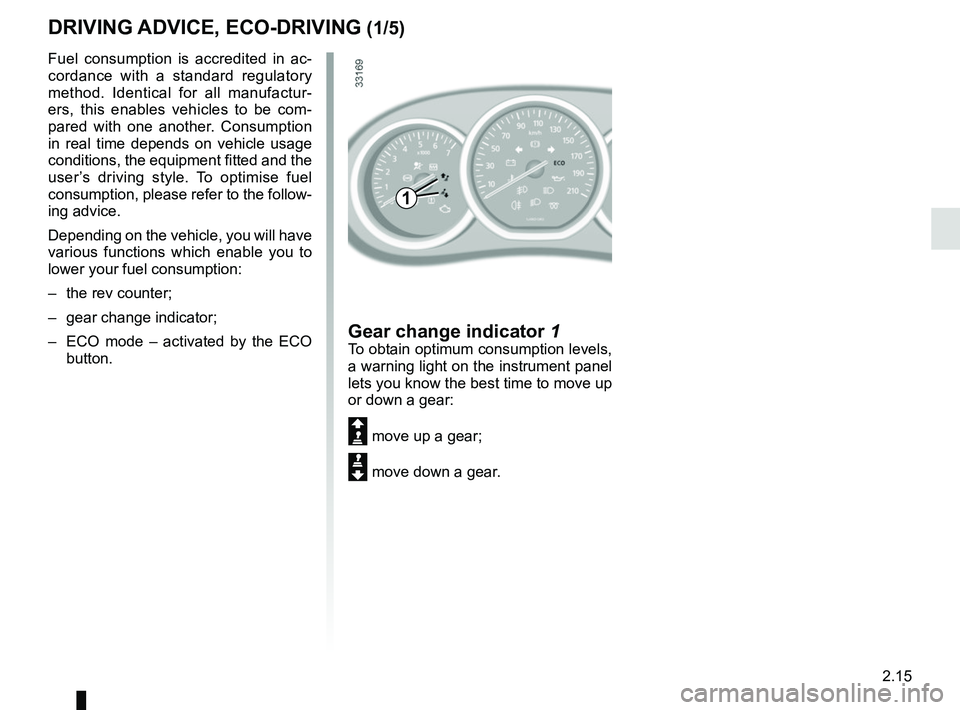
Gear change indicator 1To obtain optimum consumption levels,
a warning light on the instrument panel
lets you know the best time to move up
or down a gear:
Š move up a gear;
‰ move down a gear.
DRIVING ADVICE, ECO-DRIVING (1/5)
1
Page 92 of 256
2.16
DRIVING ADVICE, ECO-DRIVING (2/5)
ECO mode
ECO mode is a function which opti-
mises fuel consumption. This acts on
certain consumption components, such
as the engine.
Activating the function
Press switch 3.
The 2
warning light comes on on
the instrument panel to confirm activa-
tion.
While driving, it is possible to leave the
ECO mode temporarily in order to im-
prove engine performance.
To do this, press the accelerator pedal
firmly and fully.
ECO mode is reactivated when you
take pressure off the accelerator pedal.
Disabling the function
Press switch 3.
The 2
light goes out on the in-
strument panel to confirm deactivation.
2
3
Page 105 of 256
2.29
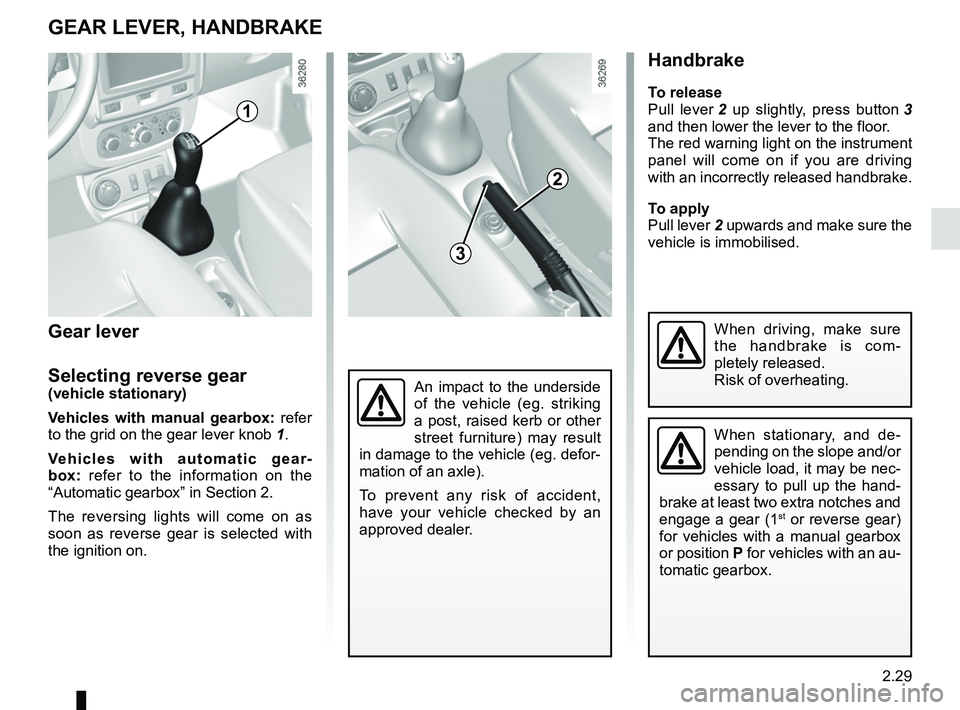
Handbrake
To release
Pull lever 2 up slightly, press button 3
and then lower the lever to the floor.
The red warning light on the instrument
panel will come on if you are driving
with an incorrectly released handbrake.
To apply
Pull lever 2 upwards and make sure the
vehicle is immobilised.
An impact to the underside
of the vehicle (eg. striking
a post, raised kerb or other
street furniture) may result
in damage to the vehicle (eg. defor-
mation of an axle).
To prevent any risk of accident,
have your vehicle checked by an
approved dealer.
GEAR LEVER, HANDBRAKE
When stationary, and de-
pending on the slope and/or
vehicle load, it may be nec-
essary to pull up the hand-
brake at least two extra notches and
engage a gear (1
st or reverse gear)
for vehicles with a manual gearbox
or position P for vehicles with an au-
tomatic gearbox.
When driving, make sure
the handbrake is com-
pletely released.
Risk of overheating.
1
2
3
Gear lever
Selecting reverse gear
(vehicle stationary)
Vehicles with manual gearbox: refer
to the grid on the gear lever knob 1.
Vehicles with automatic gear-
box: refer to the information on the
“Automatic gearbox” in Section 2.
The reversing lights will come on as
soon as reverse gear is selected with
the ignition on.