Page 71 of 145
Warning Buzzers
To provide awareness, a warning buzzer sounds when
the vehicle is parked with the transmission in NEUTRAL
(N) (the warning sounds when the ignition is turned to
the off position).
The warning buzzer also sounds to indicate an inconsis-
tent shift lever position (i.e. when the shift lever position
does not match the actual transmission gear position).
This can occur, for example, if the driver moves the shift
lever to request a transmission gear that is not allowed
under the current operating conditions.
With the vehicle at a standstill, engine running and the
shift lever in DRIVE (D), REVERSE (R), or MANUAL
(M), the buzzer sounds and the transmission automati-
cally shifts to NEUTRAL (N) when:
•The accelerator and/or brake pedals are not operated
for at least three minutes. •
The brake pedal is pressed for longer than 10 minutes.
• The driver ’s door is opened and the accelerator and
brake are not operated for at least 1.5 seconds.
• The driver selected gear does not match the engaged
transmission gear.
• A fault has been detected in the transmission.
A Blinking Warning:
• The driver selected gear does not match the engaged
transmission gear, the gear information in the cluster
and on the bezel will blink.
When To Use TOW/HAUL Mode
When driving in hilly areas, towing a trailer, carrying a
heavy load, etc., and frequent transmission shifting oc-
curs, press the TOW/HAUL switch to activate TOW/
HAUL mode. This will improve performance and reduce
the potential for transmission overheating or failure due
5
STARTING AND OPERATING 69
Page 72 of 145
to excessive shifting. When operating in TOW/HAUL
mode, the transmission shift calibration is modified to
accommodate steep grades in the smoothest possible
manner. TOW/HAUL mode is only applicable in the
DRIVE (D) position.
Parking The Vehicle
WARNING!
You or others could be injured if you leave the
vehicle unattended without fully applying the park-
ing brake. The parking brake should always be
applied when the driver is not in the vehicle.
To ensure proper parking performance, it is essential to
engage MANUAL (1st) gear, DRIVE (D) or REVERSE (R)
gear while your foot is on the brake pedal. Once
MANUAL (1st) gear, DRIVE (D) or REVERSE (R) gear is
displayed in the EVIC, turn the engine off and engage the parking brake. It is essential to wait until the gear
engaged appears in the display before turning the engine
off and releasing the brake pedal. Always remember to
set your parking brake.
NOTE:
NEVER leave your vehicle with the gearbox in
NEUTRAL (N) without the parking brake engaged. Al-
ways remember to fully apply your parking brake.
Always remember to set the parking brake when the “Set
Park Brake” message is displayed.
General Warnings
• With the vehicle at a standstill and a gear engaged,
keep the brake pedal pressed until you decide to drive
away. Then release the brake and accelerate gradually.
• When parked for long periods with the engine run-
ning, it is advisable to place the transmission in
NEUTRAL (N) and apply the parking brake.
70 STARTING AND OPERATING
Page 74 of 145
Instrument Cluster Messages
Messages will be displayed in the instrument cluster to
alert the driver when certain unusual conditions occur.
These messages are described below.
MESSAGEDESCRIPTION
Service Transmission When the ignition key is turned to ON/RUN/MAR, the Transmis-
sion Fault Indicator light turns on and should go off after a few sec- onds.
The Transmission Fault Indicator illuminates either steady or blinking (together with this message and a buzzer) to indicate a transmission fault.
Contact your authorized dealer if the message continues to appear.
Reduce Gear Changes This message indicates that the driver is operating the transmission
incorrectly.
Incorrect use (by the driver) could automatically activate a procedure for protecting the system.
Contact you authorized dealer if the message continues to appear.
72 STARTING AND OPERATING
Page 75 of 145

MESSAGEDESCRIPTION
Manual Unavailable MANUAL (M) mode is not available, due to a fault or other condi-
tion. Use the DRIVE (D) position to operate the vehicle.
Contact your authorized dealer if the message continues to appear.
Automatic Unavailable Automatic (DRIVE) mode is not available due to a fault or other con-
dition. Use MANUAL (M) mode to operate the vehicle.
Contact your authorized dealer if the message continues to appear.
Transmission Temperature High This message appears, together with a buzzer, when the clutch over- heats.
In this situation, limit stop and go driving and gear shifts or if neces- sary stop the vehicle and turn the engine off to allow the clutch to cool.
If the message continues to appear, contact your Authorized Dealer. To avoid clutch malfunction, do not use the accelerator to keep the
vehicle at a standstill (for example holding on a hill); the clutch could be damaged by overheating. Use the brake pedal instead and operate the accelerator only when you are ready to drive away.
5
STARTING AND OPERATING 73
Page 76 of 145
MESSAGEDESCRIPTION
Press Brake Pedal / Startup Delayed
This messages appears when the key is first turned ON, if the brake
pedal is not depressed and/or the shift lever is not in NEUTRAL (N). The shift lever must be in the NEUTRAL (N) position, and the brake
pedal must be pressed, to allow engine cranking. Place the shift lever in NEUTRAL (N) and apply the brake pedal BEFORE turning the key to
the START/AVV position; otherwise, the engine will not crank and the key must be cycled OFF, then back on, before cranking is allowed.
Gear Unavailable This message appears, along with a warning buzzer:
•When it is not possible to change gear due to a fault in the system.
• When, due a fault in the system, it is only possible to engage 1st
(1), 2nd (2), 3rd (3) or REVERSE (R).
Contact your authorized dealer if the message continues to appear.
Shift Not Allowed This message may appear when starting the engine at low tempera-
ture. In this case the Automated Manual transmission isn’t able to engage first gear, in this situation either use the engine block/
transmission heater or allow the engine to idle in NEUTRAL (N) un- til the transmission has warmed.
74 STARTING AND OPERATING
Page 77 of 145
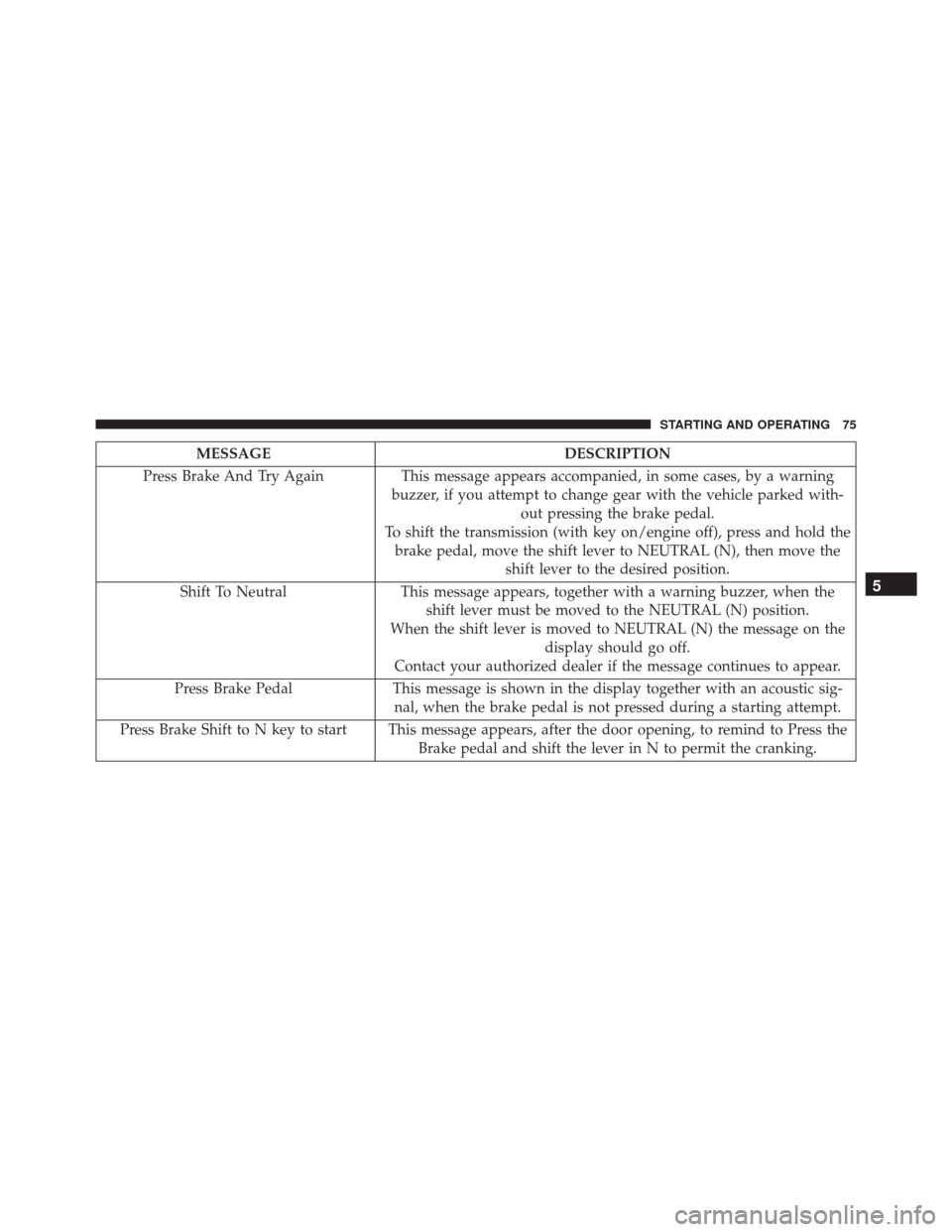
MESSAGEDESCRIPTION
Press Brake And Try Again This message appears accompanied, in some cases, by a warning
buzzer, if you attempt to change gear with the vehicle parked with- out pressing the brake pedal.
To shift the transmission (with key on/engine off), press and hold the brake pedal, move the shift lever to NEUTRAL (N), then move the shift lever to the desired position.
Shift To Neutral This message appears, together with a warning buzzer, when the
shift lever must be moved to the NEUTRAL (N) position.
When the shift lever is moved to NEUTRAL (N) the message on the display should go off.
Contact your authorized dealer if the message continues to appear.
Press Brake Pedal This message is shown in the display together with an acoustic sig-
nal, when the brake pedal is not pressed during a starting attempt.
Press Brake Shift to N key to start This message appears, after the door opening, to remind to Press the Brake pedal and shift the lever in N to permit the cranking.
5
STARTING AND OPERATING 75
Page 78 of 145

Towing The Vehicle
•The manufacturer recommends towing your vehicle
with all four wheels OFFthe ground using a flatbed.
• Automated Manual transmission vehicles can also be
flat towed (all four wheels on the ground) with the
transmission in NEUTRAL. Ensure the transmission is
in NEUTRAL (N) (by checking that the vehicle moves
when pushed) and tow in the same way as a normal
vehicle with a manual transmission.
CAUTION!
• DO NOT flat tow any disabled vehicle if condition
is related to the clutch, transmission or driveline.
Additional damage to the drivetrain could result.
• Towing this vehicle in violation of the above re-
quirements can cause severe engine, transmission,
(Continued)
CAUTION! (Continued)
or drivetrain damage. Damage from improper tow-
ing is not covered under the New Vehicle Limited
Warranty.
If it is not possible to shift the transmission to NEUTRAL
(N), do not flat tow the vehicle and contact your autho-
rized dealer.
FUEL REQUIREMENTS
Use good quality diesel fuel from a reputable supplier in
your vehicle. Federal law requires that you must fuel this
vehicle with Ultra Low Sulfur Highway Diesel fuel (15
ppm Sulfur maximum) and prohibits the use of Low
Sulfur Highway Diesel fuel (500 ppm Sulfur maximum)
to avoid damage to the emissions control system.
76 STARTING AND OPERATING
Page 96 of 145

WARNING!
Improper towing can lead to a collision. Follow these
guidelines to make your trailer towing as safe as
possible:
•
Make certain that the load is secured in the trailer
and will not shift during travel. When trailering
cargo that is not fully secured, dynamic load shifts
can occur that may be difficult for the driver to
control. You could lose control of your vehicle and
have a collision.
• When hauling cargo or towing a trailer, do not
overload your vehicle or trailer. Overloading can
cause a loss of control, poor performance or dam-
age to brakes, axle, engine, transmission, steering,
suspension, chassis structure or tires.
• Safety chains must always be used between your
vehicle and trailer. Always connect the chains to
(Continued)
WARNING! (Continued)
the hook retainers of the vehicle hitch. Cross the
chains under the trailer tongue and allow enough
slack for turning corners.
• Vehicles with trailers should not be parked on a
grade. When parking, apply the parking brake on
the tow vehicle. For four-wheel drive vehicles,
make sure the transfer case is not in NEUTRAL.
Always, block or �chock�the trailer wheels.
• GCWR must not be exceeded.
• Total weight must be distributed between the tow
vehicle and the trailer such that the following four
ratings are not exceeded:
1. GVWR
2. GTW
3. GAWR
4. Tongue weight rating for the trailer hitch utilized
94 STARTING AND OPERATING