2016 Peugeot 308 steering
[x] Cancel search: steeringPage 167 of 398

165
308_en_Chap06_conduite_ed02-2015
Automatic gearbox
Six speed automatic gearbox which offers a
choice between the comfort of fully automatic
operation, enhanced by sport and snow
programmes, or manual gear changing.
two d
riving modes are offered:
-
au
tomatic operation for electronic
management of the gears by the gearbox,
●
wi
th the sport programme for a more
dynamic style of driving,
●
or t
he snow programme to improve
driving when traction is poor,
-
man
ual operation for sequential changing
of the gears by the driver.
Gear selector
1. " S " (spor t) programme switch.
2. " T " (s
now) programme switch.
Gear selection gate
P. Park.
- Im
mobilisation of the vehicle, parking brake
on or off.
-
St
arting the engine.
R.
Re
verse.
-
Re
versing manoeuvres, vehicle stationary,
engine at idle.
N.
Ne
utral.
-
Im
mobilisation of the vehicle, parking brake
on.
-
St
arting the engine.
D.
Au
tomatic operation.
M.+ / - Manual operation
Sequential changing of the six gears.
F
Pu
ll towards the + sign and release to
change up through the gears.
or
F
Pu
sh towards the - sign and release to
change down through the gears.
Steering mounted controls*
Pull on the right hand steering mounted
control paddle to change up.
Pull on the left hand steering mounted control
paddle to change down.
the s
teering mounted control paddles
cannot be used to select neutral or to
select or come out of reverse.
* Depending on version.
6
Driving
Page 171 of 398
169
308_en_Chap06_conduite_ed02-2015
Dynamic pack
this pack conditions:
- th e visual ambience, with specific back-
lighting for the instrument panel,
-
th
e acoustic ambience of the engine,
-
th
e power assistance for the steering,
-
a
cceleration,
-
in
formation to the driver in the instrument
panel on dynamic settings.
thi
s function is only available when
Park Assist is not selected and snow
mode in the automatic gearbox is not
selected.
If Park Assist
i
s switched on, this
automatically deactivates the function.
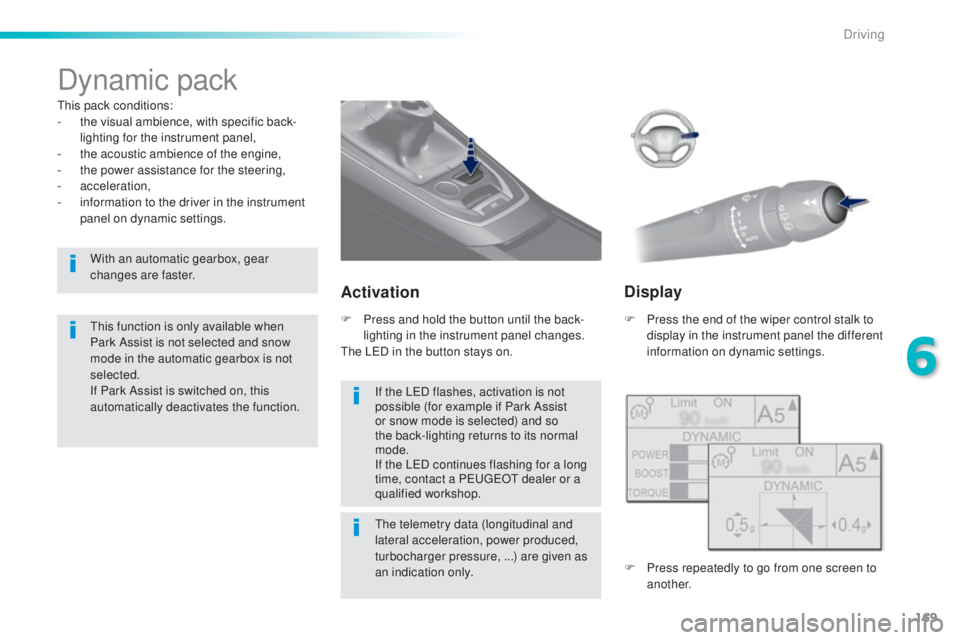
Activation
F Press the end of the wiper control stalk to
d isplay in the instrument panel the different
information on dynamic settings.
the
telemetry data (longitudinal and
lateral acceleration, power produced,
turbocharger pressure, ...) are given as
an indication only.
F Pr
ess and hold the button until the back-
lighting in the instrument panel changes.
the LeD in t
he button stays on.
Display
F Press repeatedly to go from one screen to
a nother.
If the L
eD fl
ashes, activation is not
possible (for example if Park Assist
or snow mode is selected) and so
the back-lighting returns to its normal
mode.
If the L
eD co
ntinues flashing for a long
time, contact a P
eu
ge
Ot d
ealer or a
qualified workshop.
With an automatic gearbox, gear
changes are faster.
6
Driving
Page 172 of 398

170
308_en_Chap06_conduite_ed02-2015
Stop & Start
Operation
Going into engine STOP mode
the "ECO" warning lamp comes on
in the instrument panel and the engine
goes into standby automatically:
-
Wi
th a manual gearbox , at speeds below
12 mph (20 km/h) or vehicle stationary
(depending on the engine), when you place
the gear lever in neutral, and you release
the clutch pedal.
Never refuel with the engine in S
tOP
m
ode; you must switch off the ignition
with the button. For your comfort, during parking
manoeuvres, S
tOP m
ode is not
available for a few seconds after
coming out of reverse gear.
S
tOP m
ode does not affect the
functionality of the vehicle, such as for
example, braking, power steering...
A slight delay between the vehicle
stopping and the engine cutting out may
be noticed.
Special cases: STOP mode not
available
StOP mode is not invoked principally when:
- th e vehicle is on a steep slope (up or down),
-
the
driver's door is open,
-
th
e driver's seat belt is not fastened,
-
th
e vehicle has not exceeded 6 mph
(10
k
m/h) since the last engine start by the
driver,
-
th
e electric parking brake is applied or
being applied,
-
th
e engine is needed to maintain a
comfortable temperature in the passenger
compartment,
-
dem
isting is active,
-
som
e special conditions (battery charge,
engine temperature, braking assistance,
ambient temperature...) where the engine is
needed to assure control of a system.
If your vehicle is fitted with Stop & Start,
a time counter calculates the time spent
in S
tOP m
ode during a journey.In this case, the "ECO" warning
lamp flashes for a few seconds then
goes
o
ff.
This operation is perfectly normal.
the S
top & Start
s
ystem puts the engine temporarily into standby - S
tOP m
ode - during stops in the traffic (red lights, traffic jams, or other...).
the e
ngine restarts automatically - S
tARt m
ode - as soon as you want to move off.
the r
estart takes place instantly, quickly and
silently.
Per fect for urban use, the Stop & Start system reduces fuel consumption and exhaust emissions as well as the noise level when stationary.
Stop & Start time
counter
(minutes / seconds or hours / minutes) -
Wi
th an automatic gearbox
, vehicle
stationary, when you press the brake
pedal or place the gear selector lever in
position
N .
I
t resets to zero every time the ignition is
switched on.
Driving
Page 176 of 398
174
308_en_Chap06_conduite_ed02-2015
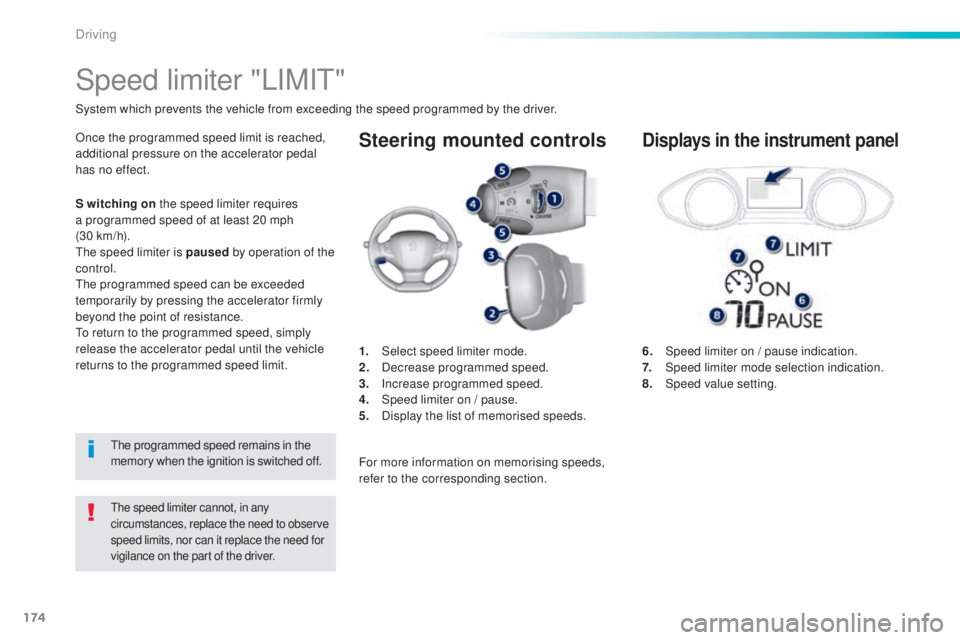
Steering mounted controls
6. Speed limiter on / pause indication.
7. Speed limiter mode selection indication.
8.
Speed
value setting.
Speed limiter "LIMIt"
System which prevents the vehicle from exceeding the speed programmed by the driver.
the speed limiter cannot, in any
c ircumstances, replace the need to observe
speed limits, nor can it replace the need for
vigilance on the part of the driver.
Once the programmed speed limit is reached,
additional pressure on the accelerator pedal
has no effect.
1.
Selec
t speed limiter mode.
2.
Dec
rease programmed speed.
3.
Inc
rease programmed speed.
4.
Sp
eed limiter on / pause.
5.
Di
splay the list of memorised speeds.Displays in the instrument panel
S witching on the speed limiter requires
a programmed speed of at least 20 mph
(30
k
m/h).
the s
peed limiter is paused by operation of the
control.
the
programmed speed can be exceeded
temporarily by pressing the accelerator firmly
beyond the point of resistance.
to re
turn to the programmed speed, simply
release the accelerator pedal until the vehicle
returns to the programmed speed limit.
the p
rogrammed speed remains in the
memory when the ignition is switched off. For more information on memorising speeds,
refer to the corresponding section.
Driving
Page 179 of 398

177
308_en_Chap06_conduite_ed02-2015
Steering mounted controls
6. Cruise control pause / resume indication.
7. Cr uise control mode selection indication.
8.
Speed
value setting.
Cruise control
System which automatically maintains the speed of the vehicle at the value programmed by the driver, without any action on the accelerator pedal.
the cruise control system cannot, in any circumstances,
r eplace the need to observe speed limits, nor can it
replace the need for vigilance on the part of the driver.
You are advised to keep your feet near the pedals at
all times.
the cruise control is switched on m anually: it
requires a minimum vehicle speed of 25 mph
(40 km/h).
1.
Selec
t cruise control mode.
2.
De
crease value or speed setting on the fly.
3.
In
crease value or speed setting on the fly.
4.
Pa
use / resume cruise control.
5.
Dis
play the list of memorised speeds.Displays in the instrument panel
Switching off the ignition cancels any
programmed speed value.
the c
ruise control is paused
manually or
by pressing the brake or clutch pedal or
on triggering of the
eS
C system for safety
reasons.
It is possible to exceed the programmed speed
temporarily by pressing the accelerator pedal.
to re
turn to the programmed speed, simply
release the accelerator pedal until the
programmed cruise speed is reached again. With a manual gearbox, third or fourth gear
(depending on engine) or higher must be
engaged.
For more information on memorising speeds,
refer to the corresponding section.
With an automatic gearbox, second gear or
higher must be engaged.
6
Driving
Page 183 of 398
181
308_en_Chap06_conduite_ed02-2015
the active cruise control is switched on m anually,
it requires that the speed of the vehicle be between
25 mph (40 km/h) and 90 mph (150 km/h).
General points
the active cruise control can be paused
m anually with the control, or automatically:
-
by p
ressing the brake or clutch pedal,
-
in t
he event of operation of the
eS
C, for
safety reasons,
-
in t
he event of an action of the electric
parking brake control,
-
wh
en an inter-vehicle time threshold is
reached (calculated according to the
relative speeds of your vehicle and the
vehicle in front and the inter-vehicle time
setting chosen),
-
wh
en the distance between your vehicle
and the one in front becomes to small,
-
wh
en the speed of the vehicle in front is
to
l
ow,
-
wh
en the speed of your vehicle becomes
too low.
the a
ctive cruise control cannot in any
circumstances replace the observation
of speed limits, nor the need for the
vigilance on the part of the driver.
It is recommended that you always keep
your feet close to the pedals.
the i
nter-vehicle time setting is
memorised when switching off the
ignition.
With a manual gearbox, third or fourth gear
(depending on engine) or higher must be
engaged.
With an automatic gearbox, second gear or
higher must be engaged.
If the cruise speed setting is above 90 mph
(150 km/h), the active cruise control switches to
normal cruise control mode (without automatic
adjustment of the safety inter-vehicle distance).
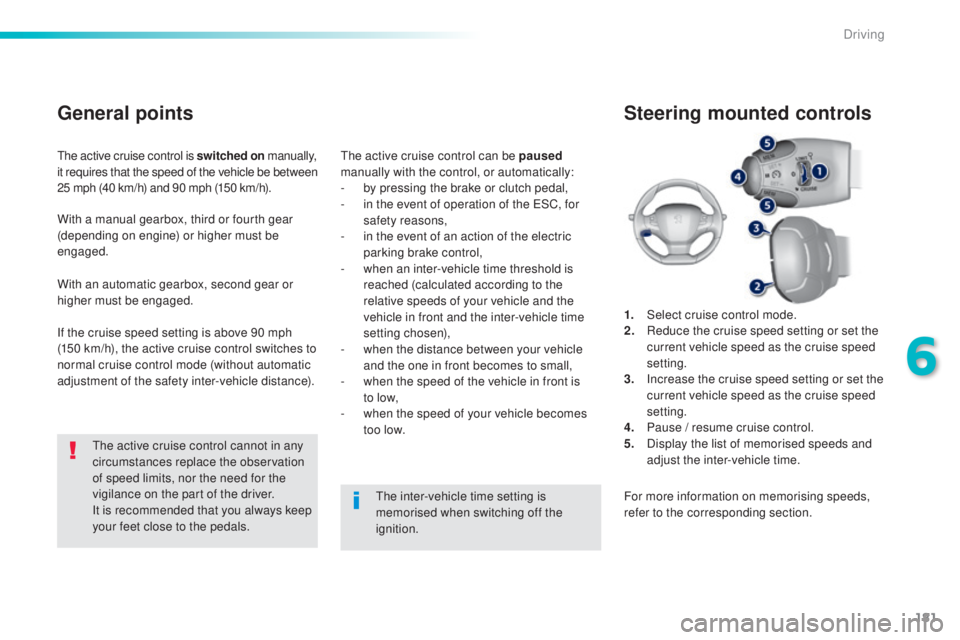
1.
Selec
t cruise control mode.
2.
Re
duce the cruise speed setting or set the
current vehicle speed as the cruise speed
setting.
3.
In
crease the cruise speed setting or set the
current vehicle speed as the cruise speed
setting.
4.
Pa
use / resume cruise control.
5.
Di
splay the list of memorised speeds and
adjust the inter-vehicle time.
Steering mounted controls
For more information on memorising speeds,
refer to the corresponding section.
6
Driving
Page 203 of 398
201
308_en_Chap06_conduite_ed02-2015
Park Assist
this system provides active assistance with
par king, detecting a parking space then
controlling the steering to park in the space.
It controls the steering while the driver
manages the accelerator, brakes, gears and
clutch (manual gearbox). During phases of
entry into and exit from a parking space, the
system provides visual and audible information
to the driver in order to make the manoeuvres
safe. It may be necessary to move for wards
and backwards more than once. During a manoeuvre the steering wheel
turns quickly: do not hold the steering
wheel, do not place your hand between
the spokes of the steering wheel and
take care with loose and bulky clothing,
scarves, handbags...
the
re is a risk of
injury.
When Park Assist is activated, it
prevents a change to S
tOP m
ode of
Stop & Start. In S
tOP m
ode, activation
of Park Assist restarts the engine.
the P
ark Assist system cannot in any
circumstances replace the need for
vigilance on the part of the driver.
the d
river must remain in control
of their vehicle ensuring that the
space remains clear throughout the
manoeuvre.
In some circumstances, the sensors
may not detect small obstacles located
in their blind spots.
the d
river can take control at any time by
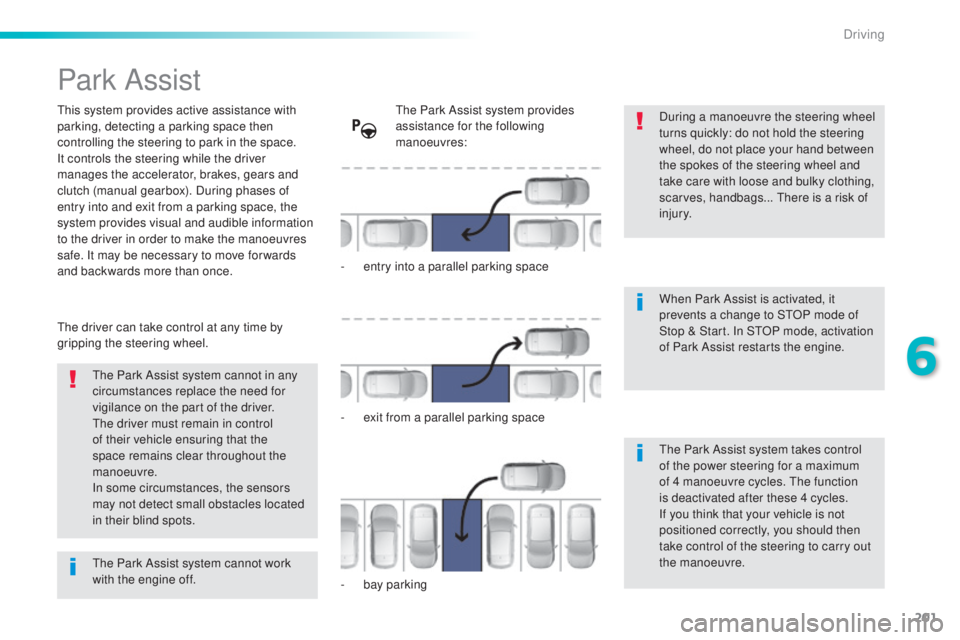
gripping the steering wheel.the P ark Assist system provides
assistance for the following
manoeuvres:
-
en
try into a parallel parking space
-
ex
it from a parallel parking space
-
ba
y parking
the P
ark Assist system takes control
of the power steering for a maximum
of 4 manoeuvre cycles.
the f
unction
is deactivated after these 4 cycles.
If you think that your vehicle is not
positioned correctly, you should then
take control of the steering to carry out
the manoeuvre.
the P
ark Assist system cannot work
with the engine off.
6
Driving
Page 204 of 398
202
308_en_Chap06_conduite_ed02-2015
the sequence of manoeuvres and the
d riving instructions are displayed in the
instrument panel. You should always check the
surroundings of your vehicle before
starting a manoeuvre.
the a
ssistance is
deactivated: the display of
this symbol indicates that
the steering manoeuvres
are no longer controlled by
the system: you must take
control of the steering.
the a
ssistance is
activated: the display of this
symbol and a speed limit
indicate that the steering
manoeuvres are controlled
by the system: do not touch
the steering wheel.the p ark sensors function is not
available during parking space
measurement. It intervenes later when
manoeuvring to warn you that your
vehicle is approaching an obstacle: the
audible signal becomes continuous
when the obstacle is less than thirty
centimetres away.
If you have deactivated the parking
sensors, they are automatically
reactivated during assisted parking
manoeuvres.
Activation of Park Assist inhibits the
blind spot monitoring function.
Driving