Page 270 of 398
268
308_en_Chap08_en-cas-de-panne_ed02-2015
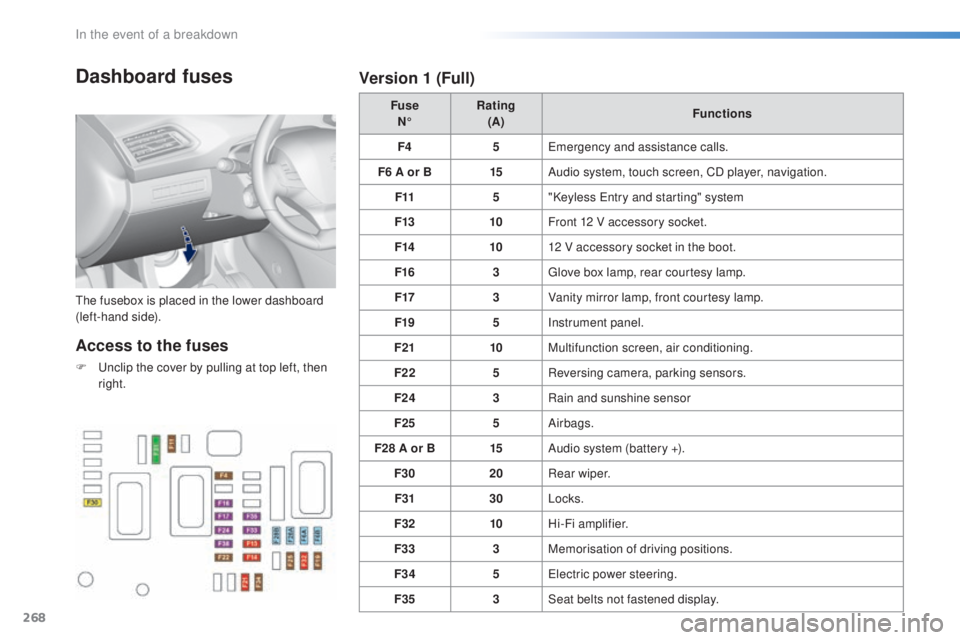
Dashboard fuses
the fusebox is placed in the lower dashboard
( left-hand side). Fuse
N° Rating
(A) Functions
F4 5
eme
rgency and assistance calls.
F6 A or B 15Audio system, touch screen, CD player, navigation.
F11 5"Keyless
ent
ry and starting" system
F13 10Front 12 V accessory socket.
F14 1012 V accessory socket in the boot.
F16 3
glov
e box lamp, rear courtesy lamp.
F17 3Vanity mirror lamp, front courtesy lamp.
F19 5Instrument panel.
F21 10Multifunction screen, air conditioning.
F22 5Reversing camera, parking sensors.
F24 3Rain and sunshine sensor
F25 5Airbags.
F28 A or B 15Audio system (battery +).
F30 20Rear wiper.
F31 30Locks.
F32 10Hi-Fi amplifier.
F33 3Memorisation of driving positions.
F34 5
ele
ctric power steering.
F35 3Seat belts not fastened display.
Access to the fuses
F unclip the cover by pulling at top left, then
r ight.
Version 1 (Full)
In the event of a breakdown
Page 302 of 398
300
308_en_Chap10c_SMegplus_ed02-2015
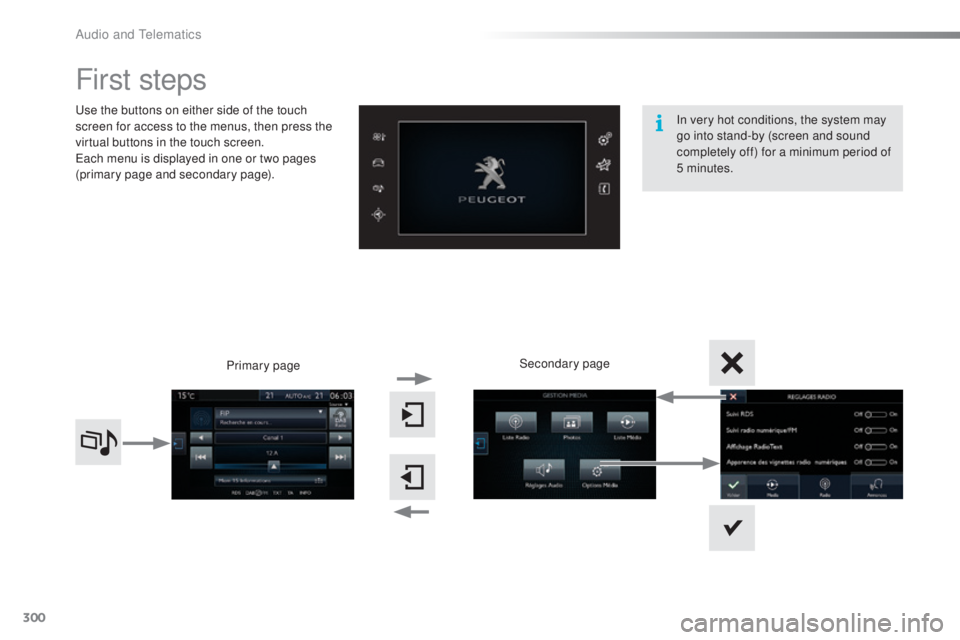
First steps
use the buttons on either side of the touch
s creen for access to the menus, then press the
virtual buttons in the touch screen.
eac
h menu is displayed in one or two pages
(primary page and secondary page).
Secondary page
Primary page In very hot conditions, the system may
go into stand-by (screen and sound
completely off) for a minimum period of
5 minutes.
Audio and telematics
Page 305 of 398
303
308_en_Chap10c_SMegplus_ed02-2015
Steering mounted controls
Press: mute on / off.
Increase volume.
Change audio source: radio, media.Radio, rotate: automatic search for
the previous / next station.
Radio, press: preset stations.
Media, rotate: previous / next track.
Press: confirm a selection.
Decrease volume.tel ephone: start or answer a call.
Call in progress: telephone menu
(end call, secret mode, hands-free
m o d e).
tel
ephone, press and hold: reject an
incoming call, end a call in progress;
other than call in progress, telephone
menu.
Radio: display the list of stations.
Media: display the list of tracks.
Radio, press and hold: update the list
of stations received.
.
Audio and telematics
Page 306 of 398
304
308_en_Chap10c_SMegplus_ed02-2015
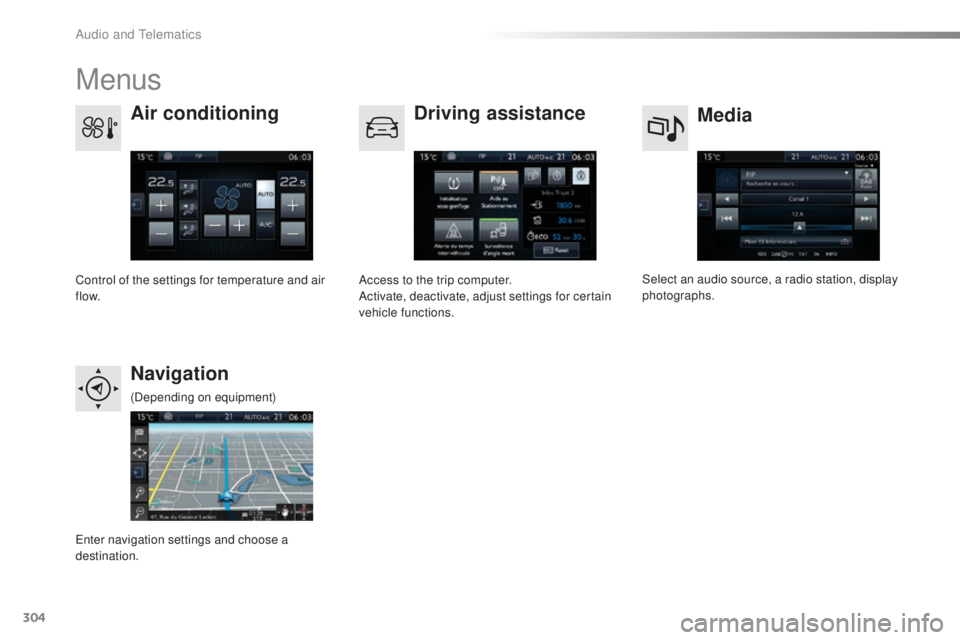
Menus
Media
Air conditioning
Driving assistance
Navigation
Select an audio source, a radio station, display
photographs.
Control of the settings for temperature and air
f low. Access to the trip computer.
Activate, deactivate, adjust settings for certain
vehicle functions.
ent
er navigation settings and choose a
destination. (Depending on equipment)
Audio and telematics
Page 307 of 398
305
308_en_Chap10c_SMegplus_ed02-2015
Telephone
Configuration Connected services
Connect a telephone by Bluetooth®.
Adjust settings for audio (balance, ambience, ...),
colour scheme, brightness of the instruments and
controls, display (language, units, date, time, ...)
and access the interactive help for the vehicle's
main systems and warning lamps. Peu
geOt CO
NNeCt AP
PS
Connect to an applications portal to facilitate,
make safe and personalise journeys by means
of a connection key available on subscription
from a P
eu
ge
Ot d
ealer.
(Depending on equipment)
.
Audio and telematics
Page 311 of 398
309
308_en_Chap10c_SMegplus_ed02-2015
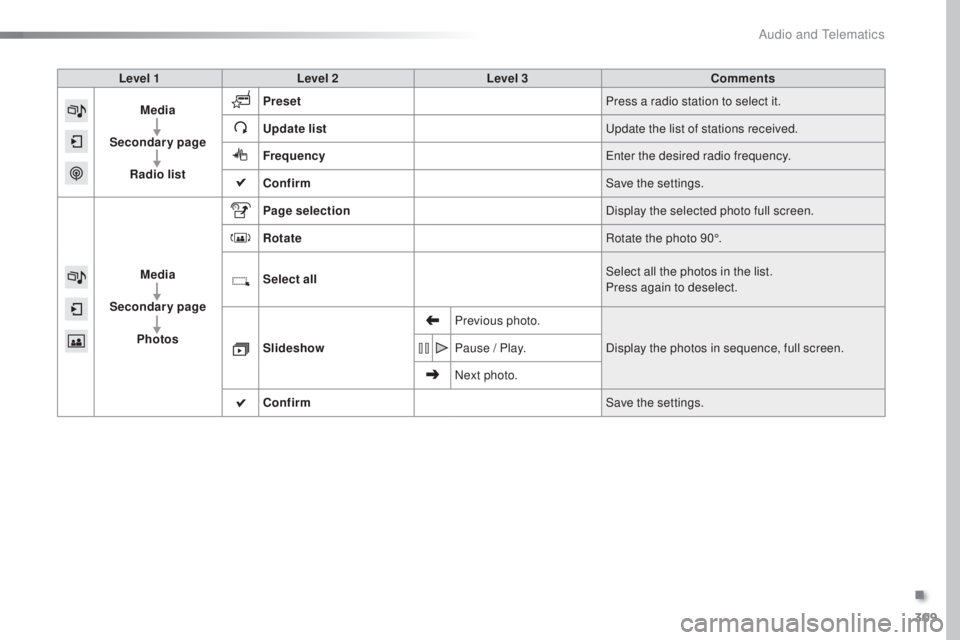
Level 1Level 2 Level 3 Comments
Media
Secondary page Radio list Preset
Press a radio station to select it.
Update list
upd
ate the list of stations received.
Frequency
ent
er the desired radio frequency.
Confirm Save the settings.
Media
Secondary page Photos Page selection
Display the selected photo full screen.
Rotate Rotate the photo 90°.
Select all Select all the photos in the list.
Press again to deselect.
Slideshow Previous photo.
Display the photos in sequence, full screen.
Pause / Play.
Next photo.
Confirm Save the settings.
.
Audio and telematics
Page 313 of 398
311
308_en_Chap10c_SMegplus_ed02-2015
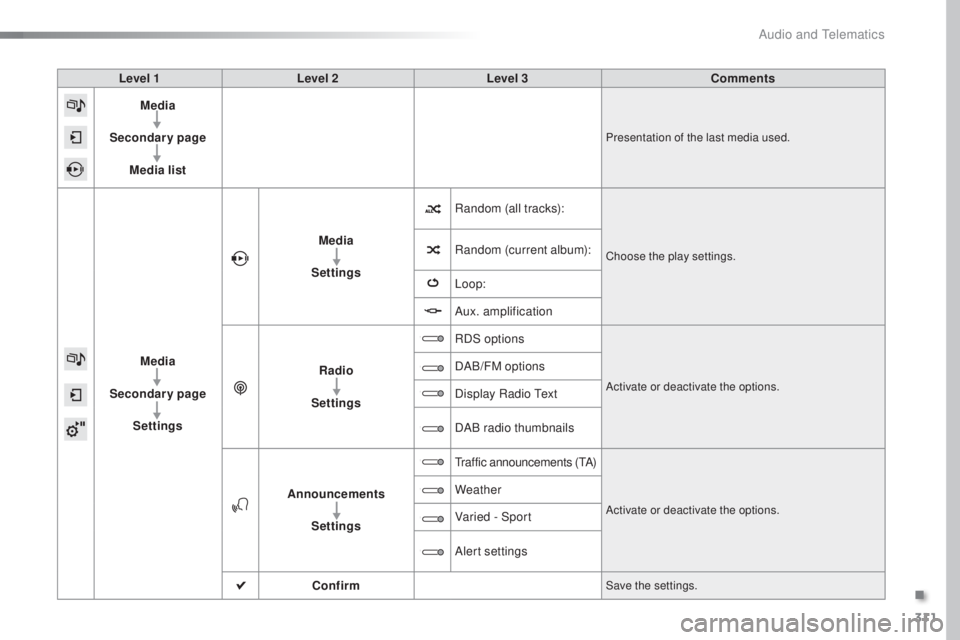
Level 1Level 2 Level 3 Comments
Media
Secondary page Media list
Presentation of the last media used.
Media
Secondary page Settings Media
Settings Random (all tracks):
Choose the play settings.Random (current album):
Loop:
Aux. amplification
Radio
Settings RDS options
Activate or deactivate the options.
DAB/FM options
Display Radio
tex
t
DAB radio thumbnails
Announcements Settings
traffic announcements (tA)
Activate or deactivate the options.
Weather
Varied - Sport
Alert settings
Confirm
Save the settings.
.
Audio and telematics
Page 314 of 398

312
308_en_Chap10c_SMegplus_ed02-2015
Press on Media to display the
primary page. Press Media to display the primary
page then select " Preset".
If necessary, select change of
source. Press on Media
to display the
primary page.
By automatic frequency search
Select " Radio list " in the secondary
page. Select a preset radio station
in the list.
Select " FM Radio " or "AM Radio ".
Select a radio station from
the list offered.
Select " Update list " to refresh
the
l
ist.
Press on Media
to display the
primary page then go to the
secondary page.
Select " List" in the primary page.
Radio
Changing a radio frequency
Selecting a station
OR
orOR
the exterior environment (hills, buildings,
t unnel, car park, below ground...) may
prevent reception, even in RDS station
tracking mode.
thi
s phenomenon is
normal in the propagation of radio waves
and is in no way indicative of a fault with
the audio system.
or
Press 3 or 4 to move the cursor for an
automatic search down or up for a radio
frequency.Press on Media to display the
primary page then press on the
secondary page.
Press on " Enter frequency " to
display the primary page then press
on the secondary page.
Audio and telematics