Page 198 of 636
CARD HOLDER (driver’s side only)
To access the card holder, slide card in the card
holder. Do not view information while operating
the vehicle.
MANUAL ANTI-GLARE REARVIEW
MIRROR (if so equipped)
Use the night position�1to reduce glare from
the headlights of vehicles behind you at night.
Use the day position
�2when driving in daylight
hours.
WARNING
Use the night position only when neces-
sary, because it reduces rear view clarity.
AUTOMATIC ANTI-GLARE
REARVIEW MIRROR (if so equipped)
The inside mirror is designed so that it automati-
cally dims during night time conditions and ac-
cording to the intensity of the headlights of the
vehicle following you. The automatic anti-glare
feature is activated when the ignition switch is in
the ON position.
The indicator light
�2will illuminate when the
automatic anti-glare feature is operating.
NOTE:
Do not hang any objects over the sensors
�1or apply glass cleaner to the sensors.
Doing so will reduce the sensitivity of the
sensors, resulting in improper operation.LPD2436WPD0126
MIRRORS
Pre-driving checks and adjustments3-27
Page 199 of 636
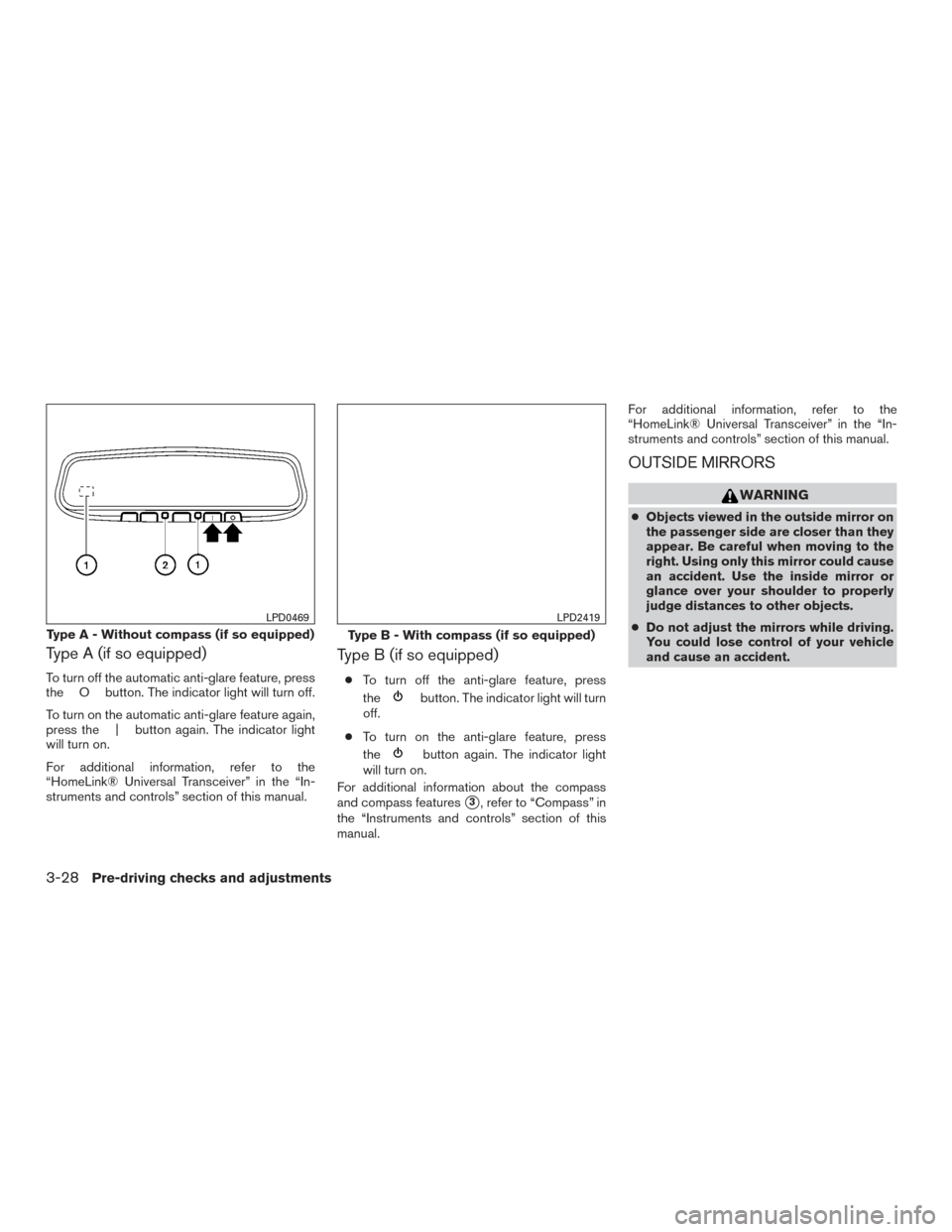
Type A (if so equipped)
To turn off the automatic anti-glare feature, press
the O button. The indicator light will turn off.
To turn on the automatic anti-glare feature again,
press the | button again. The indicator light
will turn on.
For additional information, refer to the
“HomeLink® Universal Transceiver” in the “In-
struments and controls” section of this manual.
Type B (if so equipped)
●To turn off the anti-glare feature, press
the
button. The indicator light will turn
off.
● To turn on the anti-glare feature, press
the
button again. The indicator light
will turn on.
For additional information about the compass
and compass features
�3, refer to “Compass” in
the “Instruments and controls” section of this
manual. For additional information, refer to the
“HomeLink® Universal Transceiver” in the “In-
struments and controls” section of this manual.
OUTSIDE MIRRORS
WARNING
●
Objects viewed in the outside mirror on
the passenger side are closer than they
appear. Be careful when moving to the
right. Using only this mirror could cause
an accident. Use the inside mirror or
glance over your shoulder to properly
judge distances to other objects.
● Do not adjust the mirrors while driving.
You could lose control of your vehicle
and cause an accident.
Type A - Without compass (if so equipped)
LPD0469
Type B - With compass (if so equipped)
LPD2419
3-28Pre-driving checks and adjustments
Page 200 of 636
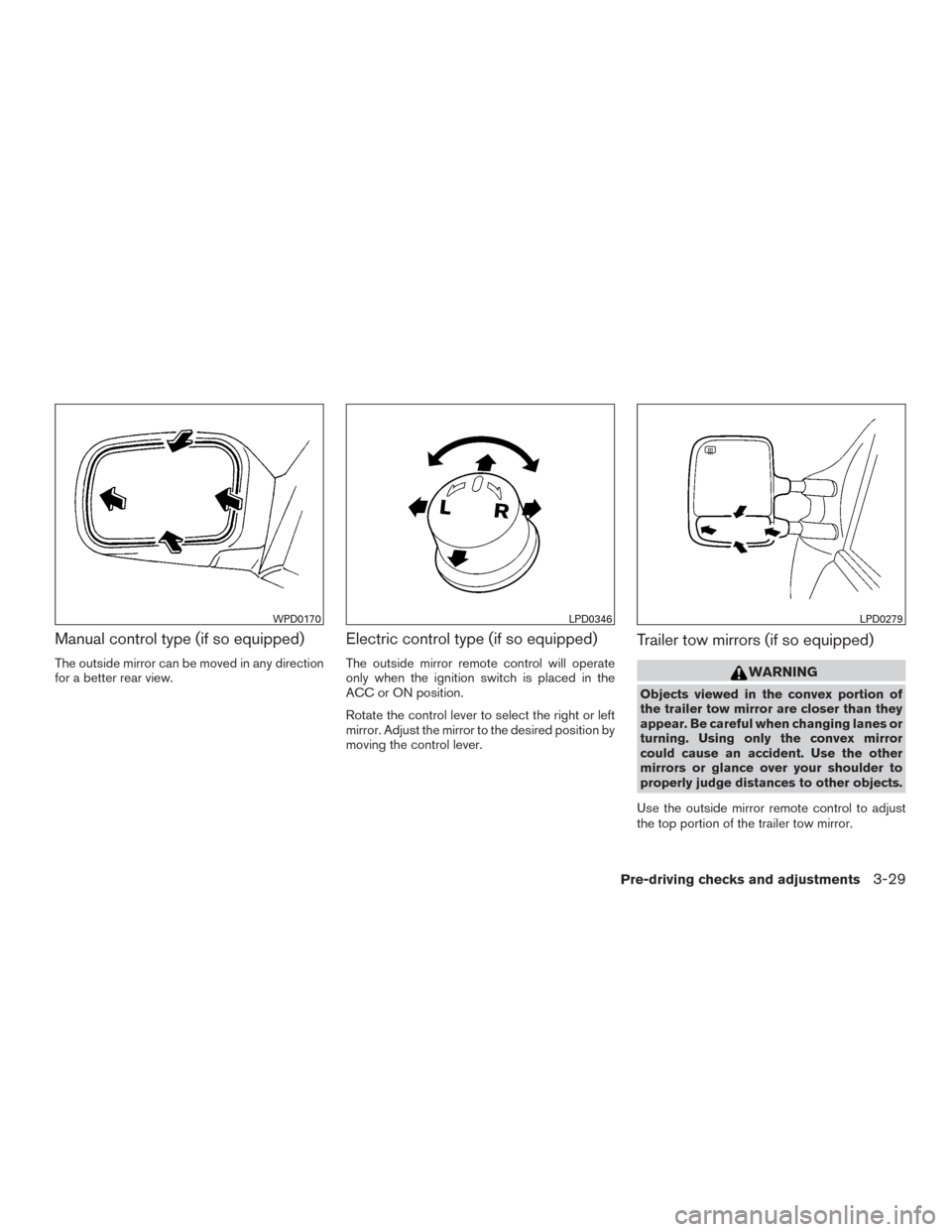
Manual control type (if so equipped)
The outside mirror can be moved in any direction
for a better rear view.
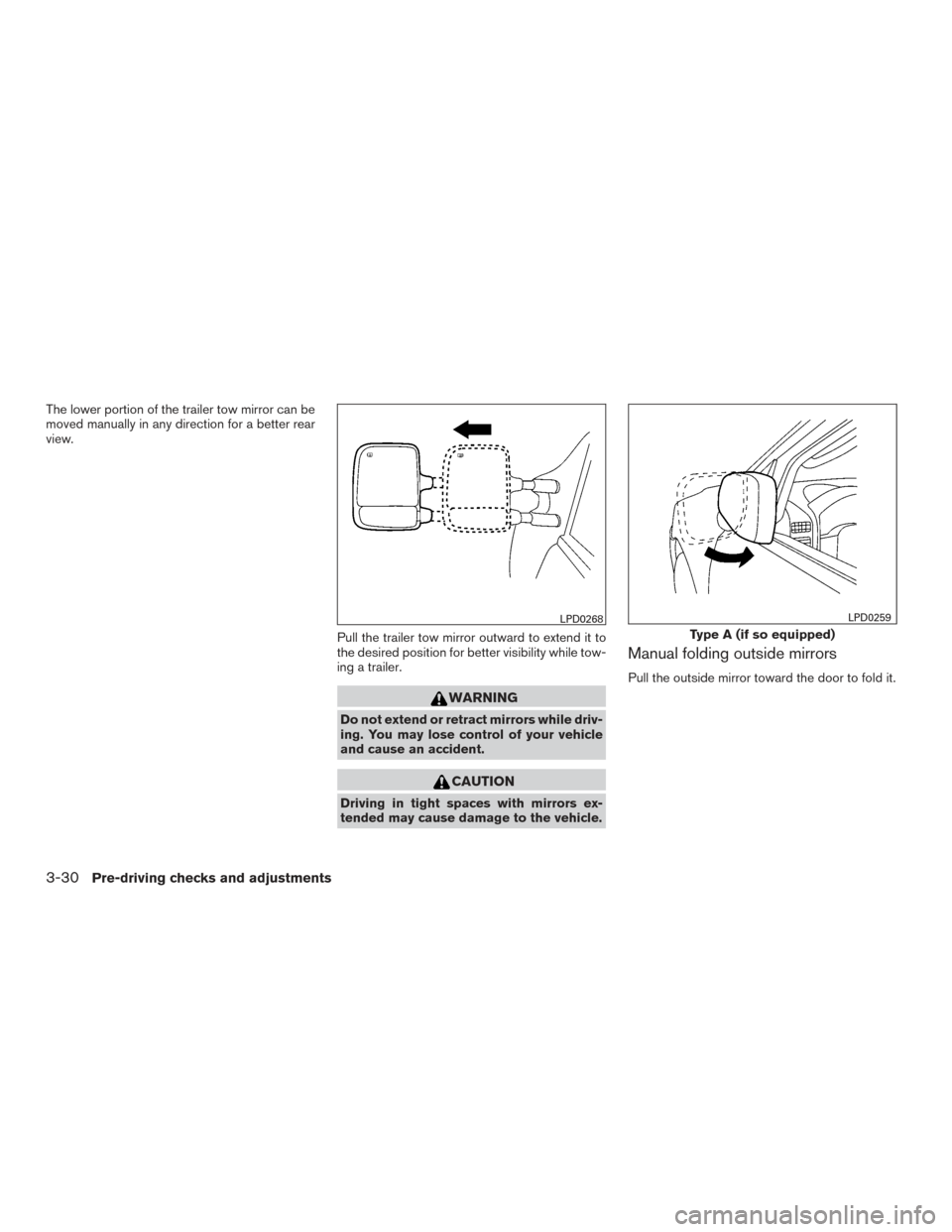
Electric control type (if so equipped)
The outside mirror remote control will operate
only when the ignition switch is placed in the
ACC or ON position.
Rotate the control lever to select the right or left
mirror. Adjust the mirror to the desired position by
moving the control lever.
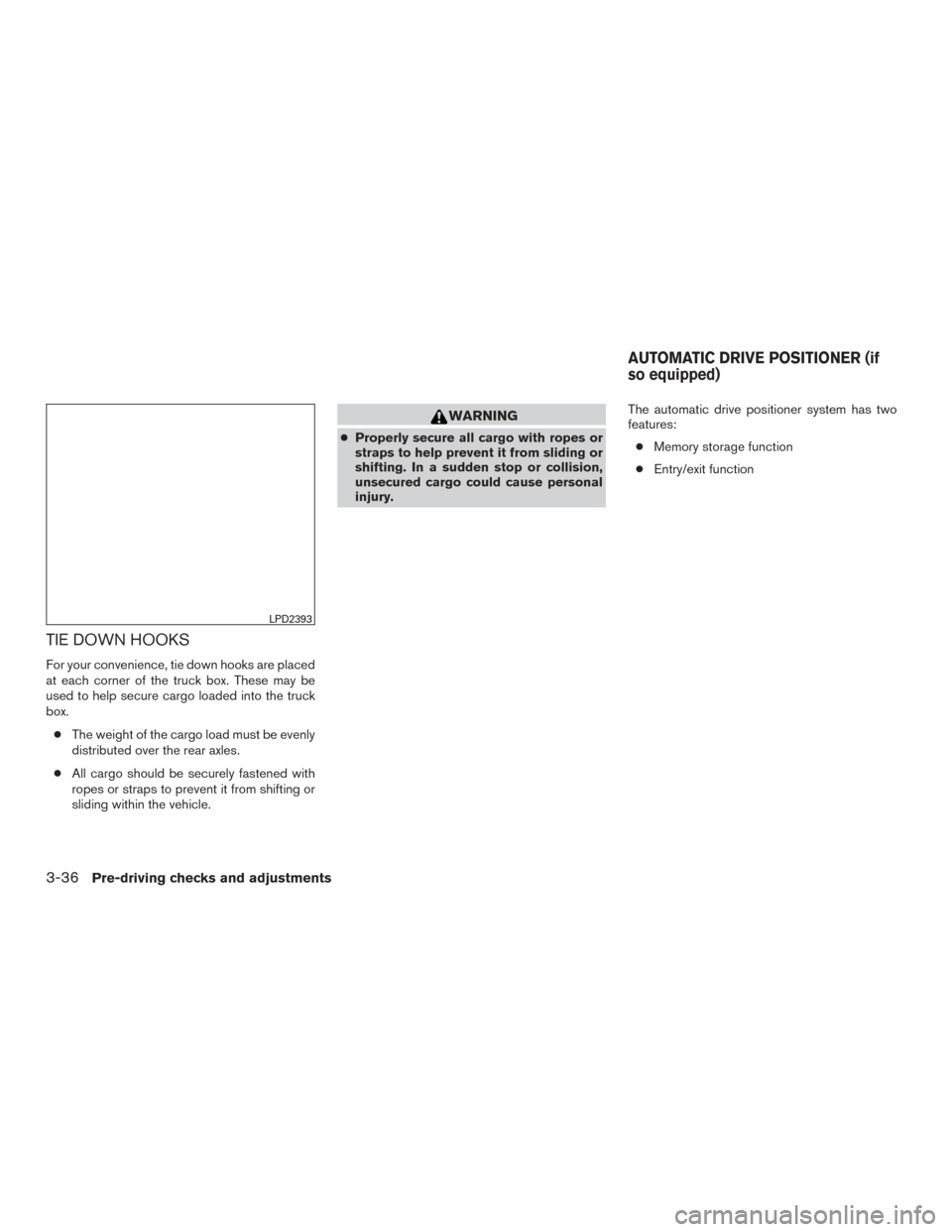
Trailer tow mirrors (if so equipped)
WARNING
Objects viewed in the convex portion of
the trailer tow mirror are closer than they
appear. Be careful when changing lanes or
turning. Using only the convex mirror
could cause an accident. Use the other
mirrors or glance over your shoulder to
properly judge distances to other objects.
Use the outside mirror remote control to adjust
the top portion of the trailer tow mirror.
WPD0170LPD0346LPD0279
Pre-driving checks and adjustments3-29
Page 201 of 636
The lower portion of the trailer tow mirror can be
moved manually in any direction for a better rear
view.Pull the trailer tow mirror outward to extend it to
the desired position for better visibility while tow-
ing a trailer.
WARNING
Do not extend or retract mirrors while driv-
ing. You may lose control of your vehicle
and cause an accident.
CAUTION
Driving in tight spaces with mirrors ex-
tended may cause damage to the vehicle.
Manual folding outside mirrors
Pull the outside mirror toward the door to fold it.
LPD0268
Type A (if so equipped)
LPD0259
3-30Pre-driving checks and adjustments
Page 203 of 636
Heated mirrors (if so equipped)
Some outside mirrors can be heated to defrost,
defog, or de-ice for improved visibility. For addi-
tional information, refer to “Rear window and
outside mirror (if so equipped) defroster switch”
in the “Instruments and controls” section of this
manual.
TAILGATE
Opening the tailgate
Pull the tailgate handle upward and lower the
tailgate. The support cables hold the tailgate
open.
When closing the tailgate, make sure the latches
are securely locked.
Do not drive the vehicle with the tailgate
down, unless equipped with NISSAN’s Bed
Extender (accessory) or equivalent in the
extended position.For additional information on proper truck box
loading, refer to “Vehicle loading information” in
the “Technical and consumer information” sec-
tion of this manual.
WARNING
●
Never allow anyone to ride in the cargo
area or on the rear seat when it is in the
folded position. Use of these areas by
passengers without proper restraints
could result in serious injury or death in
an accident or sudden stop.
● It is extremely dangerous to ride in a
cargo area inside a vehicle. In a colli-
sion, people riding in these areas are
more likely to be seriously injured or
killed.
● Do not allow people to ride in any area
of your vehicle that is not equipped with
seats and seat belts.
● Be sure everyone in your vehicle is in a
seat and using a seat belt properly.
LPD2334
TRUCK BOX
3-32Pre-driving checks and adjustments
Page 207 of 636
TIE DOWN HOOKS
For your convenience, tie down hooks are placed
at each corner of the truck box. These may be
used to help secure cargo loaded into the truck
box.● The weight of the cargo load must be evenly
distributed over the rear axles.
● All cargo should be securely fastened with
ropes or straps to prevent it from shifting or
sliding within the vehicle.
WARNING
● Properly secure all cargo with ropes or
straps to help prevent it from sliding or
shifting. In a sudden stop or collision,
unsecured cargo could cause personal
injury. The automatic drive positioner system has two
features:
● Memory storage function
● Entry/exit function
LPD2393
AUTOMATIC DRIVE POSITIONER (if
so equipped)
3-36Pre-driving checks and adjustments
Page 213 of 636
Playing a CD................................. 4-104
Playing Audio Files ........................... 4-105
Playing Image Files ........................... 4-106
Playing Video Files ............................ 4-108
Charging a USB Device ....................... 4-109
Connecting an External Auxiliary A/V Source
— Input ...................................... 4-109
Connecting an External A/V Monitor —
Output ...................................... 4-109
Selecting Monitor A or B as the Source .........4-109
Troubleshooting Guide ........................ 4-110
Specifications ................................ 4-111
FCC Notice .................................. 4-111
FCC Warning ................................ 4-112
ITE Notice ................................... 4-112
WEEE Notice ................................ 4-112
Macrovision Notice ........................... 4-113
Dolby Digital ................................. 4-113
Car phone or CB radio ........................... 4-113
Bluetooth® Hands-Free Phone System without
Navigation System (if so equipped) ................4-114
Regulatory Information ........................ 4-116
Using the system ............................. 4-116
Control buttons .............................. 4-118Connecting procedure
........................ 4-118
Voice commands ............................. 4-120
Making a call . ................................ 4-121
Receiving a call .............................. 4-122
During a call ................................. 4-122
Ending a call ................................. 4-122
Text messaging (if so equipped) ................4-122
Bluetooth® settings .......................... 4-124
Manual control . . ............................. 4-125
Troubleshooting guide ........................ 4-126
Bluetooth® Hands-Free Phone System with
Navigation System (if so equipped) ................4-127
Regulatory Information ........................ 4-129
V
oice commands ............................. 4-129
Connecting Procedure ........................ 4-129
Vehicle phonebook ........................... 4-130
Making a call . ................................ 4-130
Receiving a call .............................. 4-130
During a call ................................. 4-130
Ending a call ................................. 4-130
Text messaging. . ............................. 4-131
Bluetooth® settings .......................... 4-133
Phone settings ............................... 4-134
Page 215 of 636
WARNING
●Positioning of the heating or air condi-
tioning controls and display controls
should not be done while driving in or-
der that full attention may be given to
the driving operation.
● Do not disassemble or modify this sys-
tem. If you do, it may result in accidents,
fire, or electrical shock.
● Do not use this system if you notice any
abnormality, such as a frozen screen or
lack of sound. Continued use of the
system may result in accident, fire or
electric shock.
● In case you notice any foreign object in
the system hardware, spill liquid on it,
or notice smoke or smell coming from it,
stop using the system immediately. Ig-
noring such conditions may lead to ac-
cidents, fire or electrical shock. It is rec-
ommended that you visit a NISSAN
dealer for servicing.
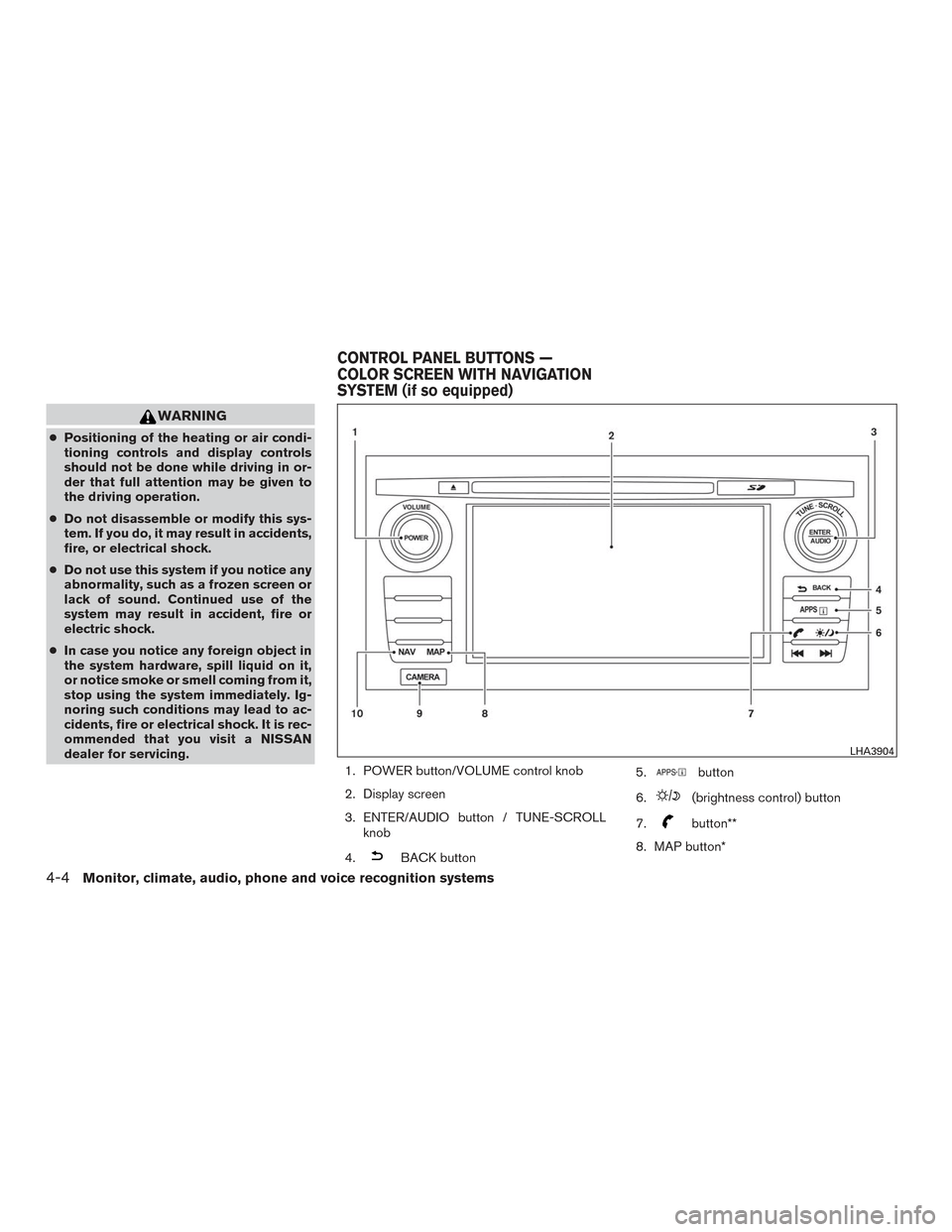
1. POWER button/VOLUME control knob
2. Display screen
3. ENTER/AUDIO button / TUNE-SCROLLknob
4.
BACK button 5.
button
6.
(brightness control) button
7.
button**
8. MAP button*
LHA3904
CONTROL PANEL BUTTONS —
COLOR SCREEN WITH NAVIGATION
SYSTEM (if so equipped)
4-4Monitor, climate, audio, phone and voice recognition systems