2016 NISSAN NV PASSENGER VAN manual radio set
[x] Cancel search: manual radio setPage 99 of 380
Tire and Loading Information label located
in the driver’s door opening. The low tire
pressure warning light does not automati-
cally turn off when the tire pressure is ad-
justed. After the tire is inflated to the rec-
ommended pressure, the vehicle must be
driven at speeds above 16 mph (25 km/h) to
activate the TPMS and turn off the low tire
pressure warning light. Use a tire pressure
gauge to check the tire pressure.
The CHECK TIRE pressure warning is active as
long as the low tire pressure warning light re-
mains illuminated.
For additional information, refer to “Vehicle infor-
mation display” in this section and “Tire Pressure
Monitoring System (TPMS)” in the “Starting and
driving” section and in the “In case of emergency”
section of this manual.
TPMS malfunction
If the TPMS is not functioning properly, the low
tire pressure warning light will flash for approxi-
mately 1 minute when the ignition switch is
placed in the ON position. The light will remain on
after the 1 minute. Have the system checked by a
NISSAN dealer. The CHECK TIRE pressure
warning does not appear if the low tire pressure
warning light illuminates to indicate a TPMS mal-
function.For additional information, refer to “Tire Pressure
Monitoring System (TPMS)” in the “Starting and
driving” section and “Tire pressure” in the “Main-
tenance and do-it-yourself” section of this
manual.
WARNING
●
Radio waves could adversely affect
electric medical equipment. Those who
use a pacemaker should contact the
electrical medical equipment manufac-
turer for the possible influences before
use.
● If the light does not illuminate with the
ignition switch in the ON position, have
the vehicle checked by a NISSAN dealer
as soon as possible.
● If the light illuminates while driving,
avoid sudden steering maneuvers or
abrupt braking, reduce vehicle speed,
pull off the road to a safe location and
stop the vehicle as soon as possible.
Driving with under-inflated tires may
permanently damage the tires and in-
crease the likelihood of tire failure. Se-
rious vehicle damage could occur and
may lead to an accident and could result
in serious personal injury or death.
Check the tire pressure for all four tires. Adjust the tire pressure to the recom-
mended COLD tire pressure shown on
the Tire and Loading Information label
located in the driver’s door opening to
turn the low tire pressure warning light
OFF. If the light still illuminates while
driving after adjusting the tire pressure,
a tire may be flat or the TPMS may be
malfunctioning. If you have a flat tire,
replace it with a spare tire as soon as
possible. If no tire is flat and all tires are
properly inflated, have the vehicle
checked by a NISSAN dealer.
● Since the spare tire if not equipped with
TPMS, when a spare tire is mounted or a
wheel is replaced, tire pressure will not
be indicated, the TPMS will not function
and the low tire pressure warning light
will flash for approximately 1 minute.
The light will remain on after 1 minute.
Contact a NISSAN dealer as soon as
possible for tire replacement and/or
system resetting.
● Replacing tires with those not originally
specified by NISSAN could affect the
proper operation of the TPMS.
2-14Instruments and controls
Page 157 of 380
FM/AM/SAT radio with compact disc (CD)
player (if so equipped)......................... 4-45
USB (Universal Serial Bus) Connection Port
(models with Navigation System) ................4-51
iPod®* player operation with Navigation
System (if so equipped) ........................ 4-53
Bluetooth® streaming audio with Navigation
System (if so equipped) ........................ 4-56
CD care and cleaning .......................... 4-58
Steering wheel switch for audio control
(if so equipped) ............................... 4-58
Antenna ...................................... 4-59
NissanConnect
SMMobile Apps (if so equipped) .....4-60
Registering with NissanConnectSMMobile
Apps ......................................... 4-60
Connect Phone ............................... 4-60
Application Download .......................... 4-60
Car phone or CB radio ............................ 4-61
Bluetooth® Hands-Free Phone System without
Navigation System (if so equipped) .................4-61
Regulatory Information ......................... 4-63
Using the system .............................. 4-63
Control buttons ............................... 4-65
Getting started ................................ 4-66List of voice commands
........................ 4-68
Voice Adaptation (VA) mode ....................4-72
Manual control . . .............................. 4-73
Troubleshooting guide ......................... 4-74
Bluetooth® Hands-Free Phone System with
Navigation System (if so equipped) .................4-75
Regulatory Information ......................... 4-76
Voice commands .............................. 4-77
Connecting Procedure ......................... 4-77
Vehicle phonebook ............................ 4-78
Making a call . ................................. 4-78
Receiving a call ............................... 4-78
During a call .................................. 4-78
Ending a call .................................. 4-78
Text messaging. . .............................. 4-79
Bluetooth® settings ........................... 4-80
Phone settings ................................ 4-82
NISSAN Voice Recognition System
(if so equipped) .................................. 4-82
Using the system .............................. 4-82
System features ............................... 4-84
Bluetooth® Hands-Free Phone System
voice commands .............................. 4-84
Navigation System voice commands .............4-85
Page 184 of 380
When the temperature control dial is turned all
the way to the cold setting, the air flows only from
the ceiling vents. When the temperature control
dial is turned all the way to the hot setting, the air
flows only from the floor vents beneath the sec-
ond and third row of seats. When the tempera-
ture control dial is turned to a point between the
coldest and hottest settings, the air flows from
both the floor and ceiling vents.The air conditioner system in your NISSAN ve-
hicle is charged with a refrigerant designed with
the environment in mind.
This refrigerant does not harm the earth’s
ozone layer.
Special charging equipment and lubricant is re-
quired when servicing your NISSAN air condi-
tioner. Using improper refrigerants or lubricants
will cause severe damage to your air conditioner
system. For additional information, refer to “Air
conditioner system refrigerant and oil recommen-
dations” in the “Technical and consumer informa-
tion” section of this manual.
A NISSAN dealer is able to service your “environ-
mentally friendly” air conditioning system.
WARNING
The air conditioner system contains refrig-
erant under high pressure. To avoid per-
sonal injury, any air conditioner service
should be done only by an experienced
technician with proper equipment.
RADIO
Place the ignition switch in the ACC or ON
position and press the PWR (power) button/VOL
(volume) knob to turn the radio on. If you listen to
the radio with the engine not running, the ignition
switch should be placed in the ACC position.
Radio reception is affected by station signal
strength, distance from radio transmitter, build-
ings, bridges, mountains and other external influ-
ences. Intermittent changes in reception quality
normally are caused by these external influences.
Using a cellular phone in or near the vehicle
may influence radio reception quality.
Radio reception
Your NISSAN radio system is equipped with
state-of-the-art electronic circuits to enhance ra-
dio reception. These circuits are designed to
extend reception range, and to enhance the qual-
ity of that reception.
However, there are some general characteristics
of both FM and AM radio signals that can affect
radio reception quality in a moving vehicle, even
when the finest equipment is used. These char-
acteristics are completely normal in a given re-
ception area and do not indicate any malfunction
in your NISSAN radio system.
SERVICING AIR CONDITIONER AUDIO SYSTEM
Monitor, climate, audio, phone and voice recognition systems4-29
Page 194 of 380
display will be reset to 9:00. At the same time the
display will return to the audio.
FM/AM radio operation
FM·AM button
Press the FM·AM button to change the band as
follows:
FM1→FM2 →AM →FM1
The FM stereo indicator, ST (STEREO) , illumi-
nates during FM stereo reception. When the
stereo broadcast signal is weak, the radio auto-
matically changes from stereo to monaural re-
ception.
TUNE buttons
Manual tuning
Press the TUNE
orbutton for less
than 0.5 seconds for manual tuning.
To move quickly through the channels, press and
hold either TUNE
orbutton down
for more than 1.5 seconds.
SEEK buttons
SEEK tuning
Press the SEEK
orbutton to seek
through the frequencies. Seek tuning begins from low to high frequencies, or high to low
frequencies, depending on which button is
pressed, and stops at the next broadcasting sta-
tion. Once the highest broadcasting station is
reached, the radio continues in the seek mode at
the lowest broadcasting station.
Station memory operations
Twelve stations can be set for the FM band (6 for
FM1 and 6 for FM2) and 6 stations can be set for
the AM band to the preset buttons.
1. Press the FM-AM button to change to the desired band.
2. Tune to the desired station using manual TUNE or SEEK tuning. Press and hold any of
the desired station memory buttons (1 – 6)
until a beep sound is heard. (The radio mutes
when the select button is pressed.)
3. The channel indicator will then come on and the sound will resume. Programming is now
complete.
4. Other buttons can be set in the same man- ner.
If the battery cable is disconnected, or if the fuse
opens, the radio memory will be canceled. In that
case, reset the desired stations.
Compact disc (CD) player operation
If the radio is already operating, it automatically
turns off and the compact disc begins to play.
CD button
When the CD button is pressed with a compact
disc loaded and the radio playing, the radio turns
off and the last used compact disc starts to play.
TUNE (rewind and fast forward) buttons
When the TUNE
orbutton is
pressed while the compact disc is playing, the
compact disc plays at an increased speed while
rewinding or fast forwarding. When the button is
released, the compact disc returns to normal play
speed.
SEEK buttons
When
is pressed while the compact disc
is playing, the next track following the present
one starts to play from the beginning.
Press
several times to skip several tracks.
Each time the button is pressed, the CD ad-
vances 1 additional track. The track number ap-
pears in the display window. (When the last track
on the compact disc is skipped, the first track is
played.)
Monitor, climate, audio, phone and voice recognition systems4-39
Page 198 of 380
The FM stereo indicator (ST) illuminates during
FM stereo reception. When the stereo broadcast
signal is weak, the radio automatically changes
from stereo to monaural reception.
TUNE button (Tuning)
Press the TUNE/FF-REW/FOLDER
button
orfor manual tuning.
SEEK tuning
Press the SEEK/TRACK button
orto tune from low to high or high to low frequen-
cies and to stop at the next broadcasting station.
SCAN tuning
Press the SCAN button to stop at each broad-
casting station for 5 seconds. Pressing the but-
ton again during this 5 second period will stop
SCAN tuning and the radio will remain tuned to
that station. If the SCAN button is not pressed
within 5 seconds, SCAN tuning moves to the next
station.
1 to 6 Station memory operations
Twelve stations can be set for the FM band (6 for
FM1, 6 for FM2) and six stations can be set for
the AM band. 1. Choose the radio band AM, FM1 or FM2 using the AM or FM button. 2. Tune to the desired station using manual,
SEEK or SCAN tuning. Press and hold any
of the desired station memory buttons (1 –
6) until a beep sound is heard.
3. The channel indicator will then come on and the sound will resume. Programming is now
complete.
4. Other buttons can be set in the same man- ner.
If the battery cable is disconnected or if the fuse
opens, the radio memory will be canceled. In that
case, reset the desired stations.Compact disc (CD) player operation
If the radio is already operating, it automatically
turns off and the compact disc begins to play.
CD button
When the CD button is pressed with the system
off and the compact disc loaded, the system will
turn on and the compact disc will start to play.
When the CD button is pressed with a compact
disc loaded and the radio playing, the radio will
automatically be turned off and the compact disc
will start to play. DISP/TEXT button
When the DISP/TEXT button is pressed while a
CD is playing, the display will change as follows:
CD:
Track number
→Disc title →Song title →Track
number
CD with MP3 or WMA:
Track number →Folder title →Album title →
Artist →Song title →Track number
TUNE/FF-REW/FOLDER
(Reverse or Fast Forward)
button
CD:
When the TUNE/FF-REW/FOLDER button
(fast forward) or(reverse) is pressed while
the compact disc is playing, the compact disc
plays at an increased speed while reversing or fast
forwarding. When the button is released, the com-
pact disc returns to normal play speed.
CD with MP3 or WMA:
When the TUNE/FF-REW/FOLDER button
(fast forward) or(reverse) is pressed for less
than 1.5 seconds while the compact disc is play-
ing, the folders in the CD will change.
Monitor, climate, audio, phone and voice recognition systems4-43
Page 202 of 380
![NISSAN NV PASSENGER VAN 2016 Owners Manual SXM settings
To view the SXM settings:1. Press the [
] button.
2. Touch the “Settings” key.
3. Touch the “SXM” key.
The signal strength, activation status and other
information are displayed o](/manual-img/5/58179/w960_58179-201.png "NISSAN NV PASSENGER VAN 2016 Owners Manual SXM settings
To view the SXM settings:1. Press the [
] button.
2. Touch the “Settings” key.
3. Touch the “SXM” key.
The signal strength, activation status and other
information are displayed o")
SXM settings
To view the SXM settings:1. Press the [
] button.
2. Touch the “Settings” key.
3. Touch the “SXM” key.
The signal strength, activation status and other
information are displayed on the screen.
FM/AM/SAT radio operation
FM·AM button
Press the FM·AM button to change the band as
follows:
AM →FM1 →FM2 →AM
If another audio source is playing when the
FM·AM button is pressed, the audio source play-
ing will automatically be turned off and the last
radio station played will begin playing.
The FM stereo indicator (ST) is shown on the
screen during FM stereo reception. When the
stereo broadcast signal is weak, the radio auto-
matically changes from stereo to monaural re-
ception.
SXM band select
Pressing the SXM button will change the band as
follows: SXM1*
→SXM2* →SXM3* →SXM1* (satellite,
if so equipped)
When the SXM button is pressed while the igni-
tion switch is in the ACC or ON position, the
radio will come on at the last station played.
The last station played will also come on when
the ON-OFF button is pressed to turn the radio
on.
*When the SXM button is pressed, the satellite
radio mode will be skipped unless an optional
satellite receiver and antenna are installed and a
SiriusXM® Satellite Radio service subscription is
active. Satellite radio is not available in Alaska,
Hawaii and Guam.
If a compact disc is playing when the SXM button
is pressed, the compact disc will automatically be
turned off and the last radio station played will
come on.
While the radio is in SXM mode, the operation
can be controlled through the touch-screen.
Touch the “Channels” key to display a list of
channels. Touch a channel displayed on the list to
change to that channel. Touch the “Categories”
key to display a list of categories. Touch a cat-
egory displayed on the list to display options
within that category. Tuning with the touch-screen
When in AM or FM mode, the radio can be tuned
using the touch-screen. To bring up the visual
tuner, touch the “Tune” key on the lower right
corner of the screen. A screen appears with a bar
running from low frequencies on the left to high
frequencies on the right. Touch the screen at the
location of the frequency you wish to tune and the
station will change to that frequency. To return to
the regular radio display screen, touch the “OK”
key.
Tuning with the TUNE knob
The radio can also be manually tuned using the
TUNE knob. When in FM or AM mode, turn the
TUNE knob to the left for lower frequencies or to
the right for higher frequencies. When in SXM
mode, turn the TUNE knob to change the chan-
nel.
SEEK tuning
When in FM or AM mode, press the seek
buttons
orto tune from low to high
or high to low frequencies and to stop at the next
broadcasting station.
When in SXM mode, press the seek
buttons
orto change the category.
Monitor, climate, audio, phone and voice recognition systems4-47
Page 203 of 380
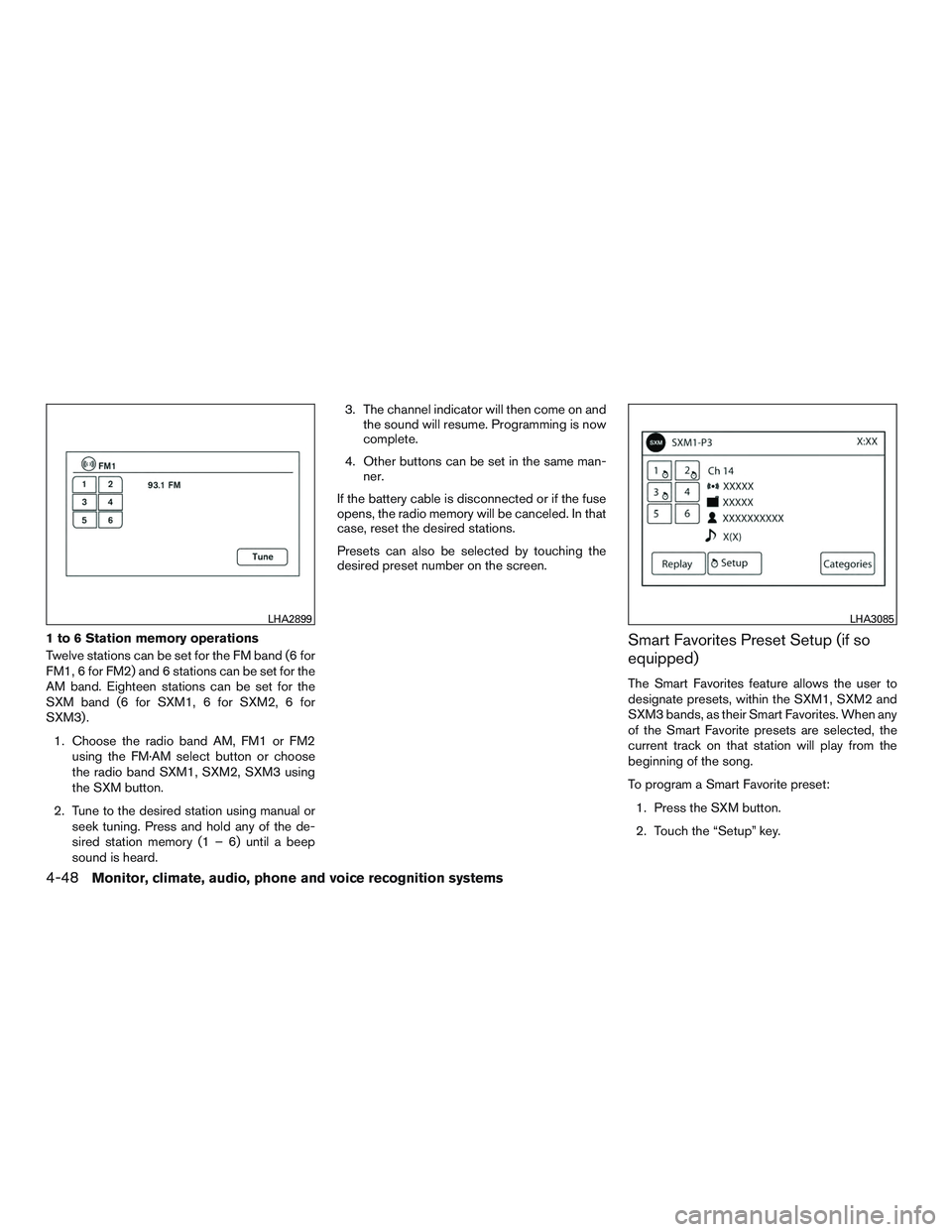
1 to 6 Station memory operations
Twelve stations can be set for the FM band (6 for
FM1, 6 for FM2) and 6 stations can be set for the
AM band. Eighteen stations can be set for the
SXM band (6 for SXM1, 6 for SXM2, 6 for
SXM3) .1. Choose the radio band AM, FM1 or FM2 using the FM·AM select button or choose
the radio band SXM1, SXM2, SXM3 using
the SXM button.
2. Tune to the desired station using manual or seek tuning. Press and hold any of the de-
sired station memory (1 – 6) until a beep
sound is heard. 3. The channel indicator will then come on and
the sound will resume. Programming is now
complete.
4. Other buttons can be set in the same man- ner.
If the battery cable is disconnected or if the fuse
opens, the radio memory will be canceled. In that
case, reset the desired stations.
Presets can also be selected by touching the
desired preset number on the screen.Smart Favorites Preset Setup (if so
equipped)
The Smart Favorites feature allows the user to
designate presets, within the SXM1, SXM2 and
SXM3 bands, as their Smart Favorites. When any
of the Smart Favorite presets are selected, the
current track on that station will play from the
beginning of the song.
To program a Smart Favorite preset:
1. Press the SXM button.
2. Touch the “Setup” key.
LHA2899LHA3085
4-48Monitor, climate, audio, phone and voice recognition systems
Page 231 of 380
phone module when the ignition switch is placed
in the ON position with the connected cellular
phone turned on and carried in the vehicle.
You can register up to five different Bluetooth®
cellular phones to the in-vehicle phone module.
However, you can talk on only one cellular phone
at a time.
NISSAN Voice Recognition system supports the
phone commands, so dialing a phone number
using your voice is possible. For additional infor-
mation, refer to “NISSAN Voice Recognition Sys-
tem” in this section.
Before using the Bluetooth® Hands-Free Phone
System, refer to the following notes.● Set up the wireless connection between a
cellular phone and the in-vehicle phone
module before using the hands-free phone
system.
● Some Bluetooth® enabled cellular phones
may not be recognized by the in-vehicle
phone module. Please visit
www.nissanusa.com/bluetooth or
www.nissan.ca/bluetooth for a recom-
mended phone list and connecting instruc-
tions.
● You will not be able to use a hands-free
phone under the following conditions: – Your vehicle is outside of the cellular ser-
vice area.
– Your vehicle is in an area where it is difficult to receive cellular signal; such as
in a tunnel, in an underground parking
garage, near a tall building or in a moun-
tainous area.
– Your cellular phone is locked to prevent it from being dialed.
● When the radio wave condition is not ideal
or ambient sound is too loud, it may be
difficult to hear the other person’s voice dur-
ing a call.
● Immediately after the ignition switch is
placed in the ON position, it may be impos-
sible to receive a call for a short period of
time.
● Do not place the cellular phone in an area
surrounded by metal or far away from the
in-vehicle phone module to prevent tone
quality degradation and wireless connection
disruption.
● While a cellular phone is connected through
the Bluetooth® wireless connection, the
battery power of the cellular phone may dis-
charge quicker than usual. The Bluetooth®
Hands-Free Phone System cannot charge
cellular phones. ●
For additional information, refer to “Trouble-
shooting guide” in this section if the hands-
free phone system seems to be malfunction-
ing.
● Some cellular phones or other devices may
cause interference or a buzzing noise to
come from the audio system speakers. Stor-
ing the device in a different location may
reduce or eliminate the noise.
● For additional information, refer to the cellu-
lar phone owner’s manual regarding the tele-
phone charges, cellular phone antenna and
body, etc.
● The signal strength display on the monitor
will not coincide with the signal strength
display of some cellular phones.
REGULATORY INFORMATION
FCC Regulatory information
– CAUTION: To maintain compliance with FCC’s RF exposure guidelines, use only the
supplied antenna. Unauthorized antenna,
modification, or attachments could damage
the transmitter and may violate FCC regula-
tions.
– Operation is subject to the following two con- ditions:
1. This device may not cause interference and
4-76Monitor, climate, audio, phone and voice recognition systems