2016 NISSAN NOTE ign relay
[x] Cancel search: ign relayPage 677 of 3641
DEF-26
< DTC/CIRCUIT DIAGNOSIS >
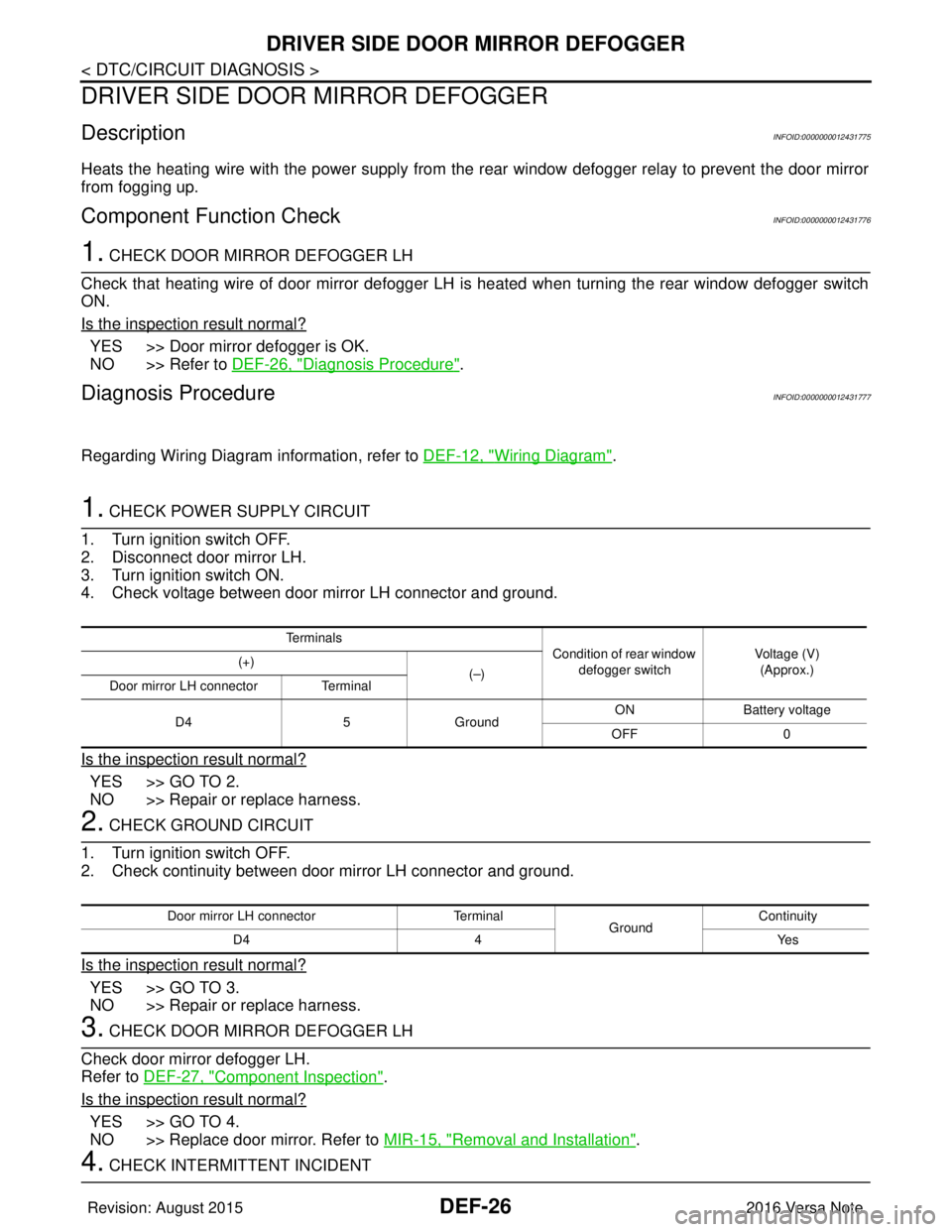
DRIVER SIDE DOOR MIRROR DEFOGGER
DRIVER SIDE DOOR MIRROR DEFOGGER
DescriptionINFOID:0000000012431775
Heats the heating wire with the power supply from the rear window defogger relay to prevent the door mirror
from fogging up.
Component Function CheckINFOID:0000000012431776
1. CHECK DOOR MIRROR DEFOGGER LH
Check that heating wire of door mirror defogger LH is heated when turning the rear window defogger switch
ON.
Is the inspection result normal?
YES >> Door mirror defogger is OK.
NO >> Refer to DEF-26, "
Diagnosis Procedure".
Diagnosis ProcedureINFOID:0000000012431777
Regarding Wiring Diagram information, refer to DEF-12, "Wiring Diagram".
1. CHECK POWER SUPPLY CIRCUIT
1. Turn ignition switch OFF.
2. Disconnect door mirror LH.
3. Turn ignition switch ON.
4. Check voltage between door mirror LH connector and ground.
Is the inspection result normal?
YES >> GO TO 2.
NO >> Repair or replace harness.
2. CHECK GROUND CIRCUIT
1. Turn ignition switch OFF.
2. Check continuity between door mirror LH connector and ground.
Is the inspection result normal?
YES >> GO TO 3.
NO >> Repair or replace harness.
3. CHECK DOOR MIRROR DEFOGGER LH
Check door mirror defogger LH.
Refer to DEF-27, "
Component Inspection".
Is the inspection result normal?
YES >> GO TO 4.
NO >> Replace door mirror. Refer to MIR-15, "
Removal and Installation".
4. CHECK INTERMITTENT INCIDENT
Te r m i n a l s
Condition of rear window
defogger switch Voltage (V)
(Approx.)
(+)
(–)
Door mirror LH connector Terminal
D4 5Ground ON
Battery voltage
OFF 0
Door mirror LH connector Terminal
GroundContinuity
D4 4 Yes
Revision: August 2015 2016 Versa Note
cardiagn.com
Page 679 of 3641
DEF-28
< DTC/CIRCUIT DIAGNOSIS >
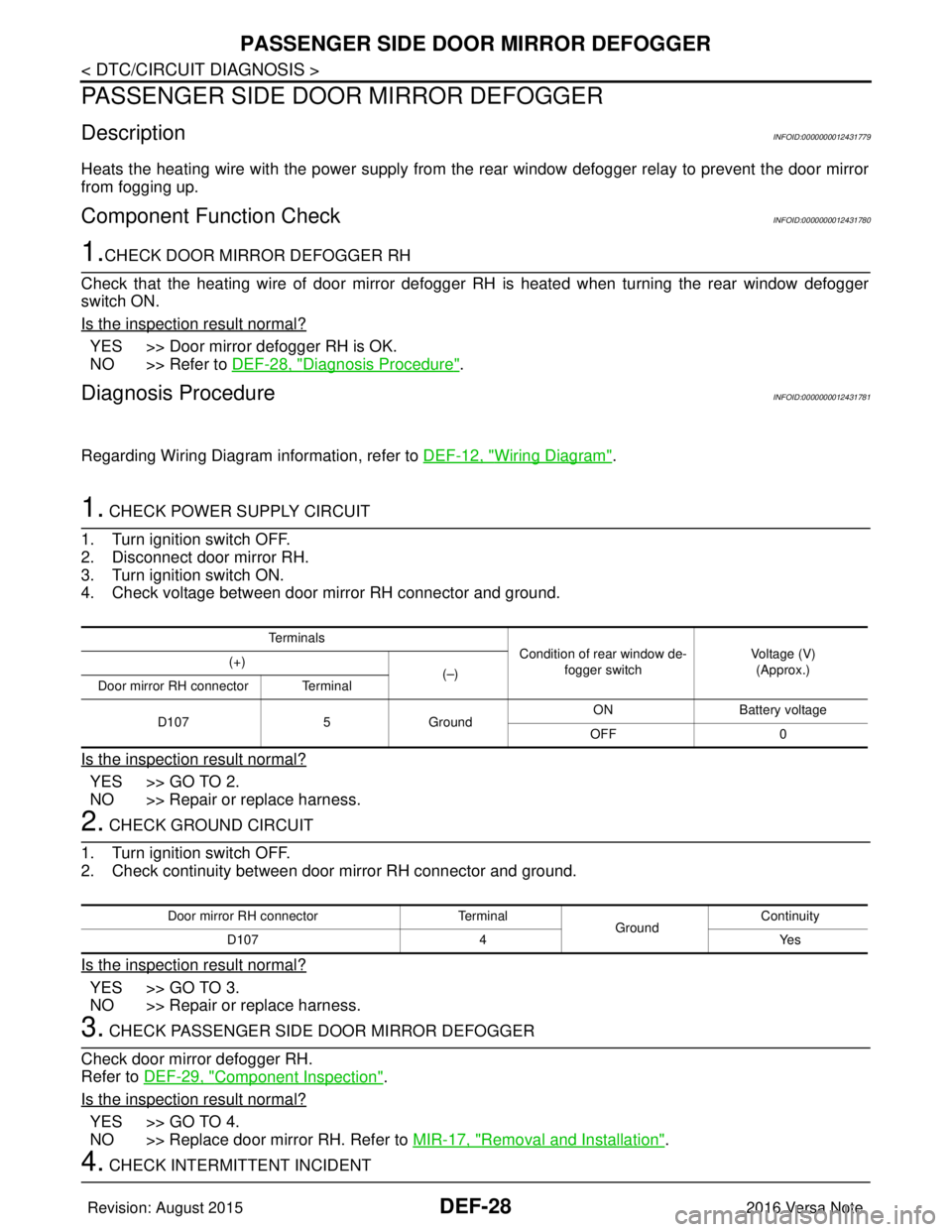
PASSENGER SIDE DOOR MIRROR DEFOGGER
PASSENGER SIDE DOOR MIRROR DEFOGGER
DescriptionINFOID:0000000012431779
Heats the heating wire with the power supply from the rear window defogger relay to prevent the door mirror
from fogging up.
Component Function CheckINFOID:0000000012431780
1.CHECK DOOR MIRROR DEFOGGER RH
Check that the heating wire of door mirror defogger RH is heated when turning the rear window defogger
switch ON.
Is the inspection result normal?
YES >> Door mirror defogger RH is OK.
NO >> Refer to DEF-28, "
Diagnosis Procedure".
Diagnosis ProcedureINFOID:0000000012431781
Regarding Wiring Diagram information, refer to DEF-12, "Wiring Diagram".
1. CHECK POWER SUPPLY CIRCUIT
1. Turn ignition switch OFF.
2. Disconnect door mirror RH.
3. Turn ignition switch ON.
4. Check voltage between door mirror RH connector and ground.
Is the inspection result normal?
YES >> GO TO 2.
NO >> Repair or replace harness.
2. CHECK GROUND CIRCUIT
1. Turn ignition switch OFF.
2. Check continuity between door mirror RH connector and ground.
Is the inspection result normal?
YES >> GO TO 3.
NO >> Repair or replace harness.
3. CHECK PASSENGER SIDE DOOR MIRROR DEFOGGER
Check door mirror defogger RH.
Refer to DEF-29, "
Component Inspection".
Is the inspection result normal?
YES >> GO TO 4.
NO >> Replace door mirror RH. Refer to MIR-17, "
Removal and Installation".
4. CHECK INTERMITTENT INCIDENT
Te r m i n a l s
Condition of rear window de-
fogger switch Voltage (V)
(Approx.)
(+)
(–)
Door mirror RH connector Terminal
D107 5Ground ON
Battery voltage
OFF 0
Door mirror RH connector Terminal
GroundContinuity
D107 4 Yes
Revision: August 2015 2016 Versa Note
cardiagn.com
Page 721 of 3641
![NISSAN NOTE 2016 Service Repair Manual DLK-32
< SYSTEM DESCRIPTION >[WITH INTELLIGENT KEY SYSTEM]
DIAGNOSIS SYSTEM (BCM)
DATA MONITOR
ACTIVE TEST
Monitor Item [Unit]
Main Description
REQ SW -DR [On/Off] ×Indicates condition of door reques](/manual-img/5/57363/w960_57363-720.png "NISSAN NOTE 2016 Service Repair Manual DLK-32
< SYSTEM DESCRIPTION >[WITH INTELLIGENT KEY SYSTEM]
DIAGNOSIS SYSTEM (BCM)
DATA MONITOR
ACTIVE TEST
Monitor Item [Unit]
Main Description
REQ SW -DR [On/Off] ×Indicates condition of door reques")
DLK-32
< SYSTEM DESCRIPTION >[WITH INTELLIGENT KEY SYSTEM]
DIAGNOSIS SYSTEM (BCM)
DATA MONITOR
ACTIVE TEST
Monitor Item [Unit]
Main Description
REQ SW -DR [On/Off] ×Indicates condition of door request switch LH.
REQ SW -AS [On/Off] ×Indicates condition of door request switch RH.
REQ SW -BD/TR [On/Off] ×Indicates condition of back door request switch.
PUSH SW [On/Off] Indicates condition of push-button ignition switch.
CLUCH SW [On/Off] ×Indicates condition of clutch interlock switch.
BRAKE SW 1 [On/Off] ×Indicates condition of brake switch.
BRAKE SW 2 [On/Off] Indicates condition of brake switch.
DETE/CANCL SW [On/Off] ×Indicates condition of P (park) position.
SFT PN/N SW [On/Off] ×Indicates condition of P (park) or N (neutral) position.
UNLK SEN -DR [On/Off] ×Indicates condition of door unlock sensor.
PUSH SW -IPDM [On/Off] Indicates condition of push-button ignition switch received from IPDM E/R on
CAN communication line.
IGN RLY1 -F/B [On/Off] Indicates condition of ignition relay 1 received from IPDM E/R on CAN commu-
nication line.
DETE SW -IPDM [On/Off] Indicates condition of detent switch received from TCM on CAN communication
line.
SFT PN -IPDM [On/Off] Indicates condition of P (park) or N (neutral) position from TCM on CAN com-
munication line.
SFT P -MET [On/Off] Indicates condition of P (park) position from TCM on CAN communication line.
SFT N -MET [On/Off] Indicates condition of N (neutral) position from IPDM E/R on CAN communica-
tion line.
ENGINE STATE [Stop/Start/Crank/Run] ×Indicates condition of engine state from ECM on CAN communication line.
VEH SPEED 1 [mph/km/h] ×Indicates condition of ve
hicle speed signal receiv ed from ABS on CAN commu-
nication line.
VEH SPEED 2 [mph/km/h] ×Indicates condition of vehicle speed signal received from combination meter on
CAN communication line.
DOOR STAT -DR [LOCK/READY/UNLK] ×Indicates condition of driver side door status.
DOOR STAT -AS [LOCK/READY/UNLK] ×Indicates condition of passenger side door status.
ID OK FLAG [Set/Reset] Indicates condition of Intelligent Key ID.
PRMT ENG STRT [Set/Reset] Indicates condition of engine start possibility.
RKE OPE COUN1 [0-19] ×When remote keyless entry receiver receives the signal transmitted while oper-
ating on Intelligent Key, the numerical value start changing.
RKE OPE COUN2 [0-19] ×When remote keyless entry receiver receives the signal transmitted while oper-
ating on Intelligent Key, the numerical value start changing.
RKE-LOCK [On/Off] Indicates condition of lock signal from Intelligent Key.
RKE-UNLOCK [On/Off] Indicates condition of unlock signal from Intelligent Key.
RKE-PANIC [On/Off] Indicates condition of panic signal from Intelligent Key.
RKE-MODE CHG [On/Off] Indicates condition of mode change signal from Intelligent Key.
Test Item Description
INSIDE BUZZER This test is able to check combination meter warning chime operation [Take Out/Knob/Key/
Off].
LCD This test is able to check combination meter display in
formation [Off/LK WN/OUTKEY/NO
KY/BATT/INSRT/SFT P/ROTAT/ID NG/B&P I/B&P N].
BATTERY SAVER This test is able to check battery saver operation [On/Off].
Revision: August 2015 2016 Versa Note
cardiagn.com
Page 773 of 3641
![NISSAN NOTE 2016 Service Repair Manual DLK-84
< DTC/CIRCUIT DIAGNOSIS >[WITH INTELLIGENT KEY SYSTEM]
DOOR LOCK ACTUATOR
YES >> Back door lock actuator is OK.
NO >> Refer to
DLK-84, "
BACK DOOR : Diagnosis Procedure".
BACK DOOR : Diagnosis](/manual-img/5/57363/w960_57363-772.png "NISSAN NOTE 2016 Service Repair Manual DLK-84
< DTC/CIRCUIT DIAGNOSIS >[WITH INTELLIGENT KEY SYSTEM]
DOOR LOCK ACTUATOR
YES >> Back door lock actuator is OK.
NO >> Refer to
DLK-84, \"
BACK DOOR : Diagnosis Procedure\".
BACK DOOR : Diagnosis")
DLK-84
< DTC/CIRCUIT DIAGNOSIS >[WITH INTELLIGENT KEY SYSTEM]
DOOR LOCK ACTUATOR
YES >> Back door lock actuator is OK.
NO >> Refer to
DLK-84, "
BACK DOOR : Diagnosis Procedure".
BACK DOOR : Diagnosis ProcedureINFOID:0000000012430022
Regarding Wiring Diagram information, refer to DLK-36, "Wiring Diagram".
1.CHECK BACK DOOR LOCK ACTUATOR INPUT SIGNAL
1. Turn ignition switch OFF.
2. Disconnect back door lock actuator connector.
3. Check voltage between back door lock actuator harness connector and ground.
Is the inspection result normal?
YES >> Replace back door lock actuator. Refer to DLK-176, "BACK DOOR LOCK : Removal and Installa-
tion".
NO-1 >> GO TO 2 (lock signal).
NO-2 >> GO TO 3 (unlock signal).
2.CHECK BACK DOOR LOCK ACTUATOR LOCK CIRCUIT
1. Disconnect BCM connector and all door lock actuator connectors.
2. Check continuity between BCM harness connecto r and back door lock actuator harness connector.
3. Check continuity between BCM harness connector and ground.
Is the inspection result normal?
YES >> Replace BCM. Refer to BCS-74, "Removal and Installation".
NO >> Repair or replace harness.
3.CHECK BACK DOOR LOCK ACTUATOR UNLOCK CIRCUIT
1. Disconnect back door lock actuator relay connector.
2. Check continuity between back door lock actuator relay harness connector and back door lock actuator
harness connector.
3. Check continuity between BCM harness connector and ground.
(+)
(–) Condition Voltage (V)
(Approx.)
Back door lock actuator
Connector Terminal
D505 1
Ground Door lock and unlock switch Unlock
Battery voltage
2L ock
BCM Back door lock actuator
Continuity
Connector TerminalConnector Terminal
M99 65D505 2Yes
BCM GroundContinuity
Connector Terminal
M99 65 No
Back door lock actuator relayBack door lock actuator
Continuity
Connector TerminalConnector Terminal
M41 3D505 1Yes
Revision: August 2015 2016 Versa Note
cardiagn.com
Page 775 of 3641
![NISSAN NOTE 2016 Service Repair Manual DLK-86
< DTC/CIRCUIT DIAGNOSIS >[WITH INTELLIGENT KEY SYSTEM]
BACK DOOR LOCK ACTUATOR RELAY
BACK DOOR LOCK ACTUATOR RELAY
DescriptionINFOID:0000000012430023
Controls back door lock actuator lock/unloc](/manual-img/5/57363/w960_57363-774.png "NISSAN NOTE 2016 Service Repair Manual DLK-86
< DTC/CIRCUIT DIAGNOSIS >[WITH INTELLIGENT KEY SYSTEM]
BACK DOOR LOCK ACTUATOR RELAY
BACK DOOR LOCK ACTUATOR RELAY
DescriptionINFOID:0000000012430023
Controls back door lock actuator lock/unloc")
DLK-86
< DTC/CIRCUIT DIAGNOSIS >[WITH INTELLIGENT KEY SYSTEM]
BACK DOOR LOCK ACTUATOR RELAY
BACK DOOR LOCK ACTUATOR RELAY
DescriptionINFOID:0000000012430023
Controls back door lock actuator lock/unlock operation.
Component Function CheckINFOID:0000000012430024
1.CHECK FUNCTION
1. Perform “DOOR LOCK” in “Active Test” using CONSULT.
2. Touch “ALL LOCK” or “ALL UNLK” to check that it works normally.
Is the inspection result normal?
YES >> Back door lock actuator relay is OK.
NO >> Refer to DLK-86, "
Diagnosis Procedure".
Diagnosis ProcedureINFOID:0000000012430025
Regarding Wiring Diagram information, refer to DLK-36, "Wiring Diagram".
1.CHECK FUSE
1. Turn ignition switch OFF.
2. Check 10 A fuse, No. 8, located in fuse block (J/B).
Is the inspection result normal?
YES >> GO TO 2.
NO >> Replace the blown fuse after repairing the affected circuit if a fuse is blown.
2.CHECK BACK DOOR LOCK ACTUATOR RELAY POWER CIRCUIT
1. Remove back door lock actuator relay.
2. Check voltage between back door lock actuator relay harness connector and ground.
Is the inspection result normal?
YES >> GO TO 3.
NO >> Repair or replace harness.
3.CHECK BACK DOOR LOCK ACTUATOR RELAY CIRCUIT 1
1. Install the back door lock actuator relay.
2. Check voltage between BCM harness connector and ground.
Is the inspection result normal?
YES >> GO TO 6.
NO-1 (when voltage is fixed at 12V)>>Replace BCM. Refer to BCS-74, "
Removal and Installation".
NO-2 (when voltage is fixed at 0V)>>GO TO 4.
(+)
(–)Voltage (V)
(Approx.)
Back door lock actuator relay
Connector Terminal
M41 1
Ground Battery voltage
5
(+)
(–) Condition Voltage (V)
(Approx.)
BCM
Connector Terminal
M100 50GroundDoor lock and un-
lock switch LOCK Battery voltage
UNLOCK 0
Revision: August 2015 2016 Versa Note
cardiagn.com
Page 777 of 3641
![NISSAN NOTE 2016 Service Repair Manual DLK-88
< DTC/CIRCUIT DIAGNOSIS >[WITH INTELLIGENT KEY SYSTEM]
BACK DOOR LOCK ACTUATOR RELAY
1. Turn ignition switch OFF.
2. Remove back door lock actuator relay.
3. Check continuity between back door](/manual-img/5/57363/w960_57363-776.png "NISSAN NOTE 2016 Service Repair Manual DLK-88
< DTC/CIRCUIT DIAGNOSIS >[WITH INTELLIGENT KEY SYSTEM]
BACK DOOR LOCK ACTUATOR RELAY
1. Turn ignition switch OFF.
2. Remove back door lock actuator relay.
3. Check continuity between back door")
DLK-88
< DTC/CIRCUIT DIAGNOSIS >[WITH INTELLIGENT KEY SYSTEM]
BACK DOOR LOCK ACTUATOR RELAY
1. Turn ignition switch OFF.
2. Remove back door lock actuator relay.
3. Check continuity between back door
lock actuator relay terminals.
Is the inspection result normal?
YES >> Inspection End.
NO >> Replace back door lock actuator relay.
Back door lock actuator relay Condition Continuity
Te r m i n a l
3 4
12 V direct current supply between terminals 1 and 2
No
No current supply Yes
5 12 V direct current supply between terminals 1 and 2
Yes
No current supply No
Revision: August 2015 2016 Versa Note
cardiagn.com
Page 941 of 3641
![NISSAN NOTE 2016 Service Repair Manual DLK-252
< DTC/CIRCUIT DIAGNOSIS >[WITHOUT INTELLIGENT KEY SYSTEM]
HORN FUNCTION
HORN FUNCTION
DescriptionINFOID:0000000012430215
Perform answer-back for each operation with horn.
Component Function Ch](/manual-img/5/57363/w960_57363-940.png "NISSAN NOTE 2016 Service Repair Manual DLK-252
< DTC/CIRCUIT DIAGNOSIS >[WITHOUT INTELLIGENT KEY SYSTEM]
HORN FUNCTION
HORN FUNCTION
DescriptionINFOID:0000000012430215
Perform answer-back for each operation with horn.
Component Function Ch")
DLK-252
< DTC/CIRCUIT DIAGNOSIS >[WITHOUT INTELLIGENT KEY SYSTEM]
HORN FUNCTION
HORN FUNCTION
DescriptionINFOID:0000000012430215
Perform answer-back for each operation with horn.
Component Function CheckINFOID:0000000012430216
1.CHECK FUNCTION
1. Select “HORN” in “Active Test” using CONSULT.
2. Check the horn operation.
Is the operation normal?
YES >> Inspection End.
NO >> Refer to DLK-252, "
DiagnosisProcedure".
Diagnosis ProcedureINFOID:0000000012430217
Regarding Wiring Diagram information, refer to DLK-216, "Wiring Diagram".
1.CHECK HORN FUNCTION
Check horn function with horn switch.
Does the horn sound?
YES >> GO TO 2.
NO >> Refer to HRN-3, "
Wiring Diagram".
2.CHECK HORN RELAY POWER SUPPLY
1. Turn ignition switch ON.
2. Perform “Active Test”“HORN” using CONSULT.
3. Using an oscilloscope or analog voltmeter to check voltage between IPDM E/R connector and ground.
Is the inspection result normal?
YES >> GO TO 3.
NO >> Replace IPDM E/R. Refer to PCS-30, "
Removal and Installation".
3.CHECK HORN RELAY CIRCUIT
1. Turn ignition switch OFF.
2. Disconnect IPDM E/R and horn relay connector.
3. Check continuity between IPDM E/R har ness connector and horn relay harness connector.
4. Check continuity between IP DM E/R harness connector and ground.
Test item Description
HORN ON Horn relay ON (for 20 ms)
IPDM E/R
Ground Test item Voltage (V)
(Approx.)
Connector Terminal
E46 73Ground HORN ON
Battery voltage → 0 → Battery voltage
Other than above Battery voltage
IPDM E/R Horn relay
Continuity
Connector TerminalConnector Terminal
E46 73E39 1Yes
Revision: August 2015 2016 Versa Note
cardiagn.com
Page 1128 of 3641

EC-1
ENGINE
C
DE
F
G H
I
J
K L
M
SECTION EC
A
EC
N
O P
CONTENTS
ENGINE CONTROL SYSTEM
HR16DE
PRECAUTION ....... ........................................
8
PRECAUTIONS .............................................. .....8
Precaution for Supplemental Restraint System
(SRS) "AIR BAG" and "SEAT BELT PRE-TEN-
SIONER" ............................................................. ......
8
On Board Diagnostic (OBD) System of Engine
and CVT ....................................................................
8
General Precautions .................................................9
PREPARATION ...........................................12
PREPARATION .............................................. ....12
Special Service Tools .......................................... ....12
Commercial Service Tools ......................................12
SYSTEM DESCRIPTION .............................14
COMPONENT PARTS ................................... ....14
ENGINE CONTROL SYSTEM ............................... ....14
ENGINE CONTROL SYSTEM :
Component Parts Location ....................................
14
ENGINE CONTROL SYSTEM : Component De-
scription ............................................................... ....
17
Accelerator Pedal Position Sensor ..........................18
Air Fuel Ratio Sensor 1 ...........................................19
Air Fuel Ratio Sensor 1 Heater ...............................19
Camshaft Position Sensor .......................................19
Clutch Pedal Position Switch ..................................20
Cooling Fan .............................................................20
Crankshaft Position Sensor .....................................20
ECM .................................................................... ....20
Electric Throttle Control Actuator ............................21
Engine Coolant Temperature Sensor ......................21
Engine Oil Pressure Sensor ....................................21
Engine Oil Temperature Sensor ..............................21
EVAP Canister Purge Volume Control Solenoid
Valve ................................................................... ....
22
EVAP Canister Vent Control Valve .........................22
EVAP Control System Pressure Sensor ..................22
Exhaust Valve Timing Cont rol Solenoid Valve ........23
Fuel Injector ......................................................... ....23
Fuel Pump ...............................................................23
Heated Oxygen Sensor 2 ........................................24
Heated Oxygen Sensor 2 Heater ............................24
Ignition Coil With Power Transistor .........................24
Intake Air Temperature Sensor ...............................24
Intake Valve Timing Control Solenoid Valve ...........25
Knock Sensor ...................................................... ....25
Battery Current Sensor (With Battery Tempera-
ture Sensor) .............................................................
25
Malfunction Indicator Lamp (MIL) ............................26
Mass Air Flow Sensor ..............................................26
Oil Pressure Warning Lamp ....................................26
Refrigerant Pressure Sensor ............................... ....27
Stop Lamp Switch & ASCD Brake Switch ...............27
Throttle Control Motor .......................................... ....27
Throttle Control Motor Relay ...................................27
Throttle Position Sensor ..........................................27
ASCD Steering Switch .............................................27
STRUCTURE AND OPERATION .....................28
Positive Crankcase Ventilation ................................28
On Board Refueling Vapor Recovery (ORVR) ........29
SYSTEM ............................................................30
ENGINE CONTROL SYSTEM ........................ ...........30
ENGINE CONTROL SYSTEM : System Diagram ....30
ENGINE CONTROL SYSTEM : System Descrip-
tion ...........................................................................
31
MULTIPORT FUEL INJECTION SYSTEM ................31
MULTIPORT FUEL INJECTION SYSTEM :
System Diagram ................................................. ....
32
MULTIPORT FUEL INJECTION SYSTEM : Sys-
tem Description ........................................................
32
ELECTRIC IGNITION SYSTEM .................................35
ELECTRIC IGNITION SYSTEM :
System Diagram ................................................. ....
35
Revision: August 2015 2016 Versa Note
cardiagn.com