2016 MITSUBISHI SHOGUN battery
[x] Cancel search: batteryPage 152 of 404

CAUTIONlDo not remove the ignition key from the ig-
nition switch while driving. The steeringwheel will be locked, causing loss of con-
trol.
l If the engine is stopped while driving, the
brake servomechanism will cease to function and braking efficiency will deteriorate. Also,
the power steering system will not function
and it will require greater manual effort to
operate the steering.
l Do not leave the key in the “ON” position
for a long time when the engine is not run-
ning, doing so will cause the battery to be discharged.
l Do not turn the key to the “START” position
when the engine is running, doing so could damage the starter motor.Steering wheel lock
E00601500298
To lock
Remove the key at the “LOCK” position.
Turn the steering wheel until it is locked.
To unlock
Turn the key to the “ACC” position while
moving the steering wheel slightly right and left.
CAUTIONl Remove the key when leaving the vehicle.
In some countries, it is prohibited to leave the key in the vehicle when parked.Starting
E00601600811
Tips for starting
l Do not operate the starter motor continu-
ously longer than 10 seconds; doing so
could run down the battery. If the engine
does not start, turn the ignition key back to “LOCK” position, wait a few seconds,and then try again. Trying repeatedly with the starter motor still turning will
damage the starter mechanism.
WARNINGl Never run the engine in a closed or poorly
ventilated area any longer than is needed to move your vehicle in or out of the area.Carbon monoxide gases are odourless and
can be fatal.CAUTIONl Never attempt to start the engine by pushing
or pulling the vehicle.
l Do not run the engine at high rpm or drive
the vehicle at high speed until the engine has had a chance to warm up.
l Release the ignition key as soon as the en-
gine starts to avoid damaging the starter mo-
tor.
Steering wheel lock
6-13OVWE16E1Starting and driving6
Page 158 of 404

Possible driving speed
E00610802767
Avoid shifting down at high speed, as this may cause excessive engine speed (the tachometer needle into the red zone) and damage the engine.Shift pointSpeed limit2H, 4H, 4HLc4LLc1 st
gear35 km/h (22 mph)15 km/h (9 mph)2nd
gear65 km/h (40 mph)35 km/h (22 mph)3rd
gear105 km/h (65 mph)55 km/h (34 mph)4th
gear150 km/h (93 mph)80 km/h (50 mph)
5th
gear is an overdrive ratio and its use reduces engine speed below that of the 4th
gear . Use 5th
gear whenever vehicle speed allows, for maxi-
mum fuel economy.
Automatic transmission
INVECS-II Sports Mode5A/T (Intelligent &
Innovative Vehicle
Electronic Control System
II) E00603200736
Automatic transmission will automatically
change its gear depending on road and driv- ing conditions. This helps achieve smooth
driving and excellent fuel efficiency.Also you can manually shift up and shift
down the transmission. Refer to “Sports
mode” on page 6-21.NOTEl During running-in period or immediately af-
ter reconnection of the battery cable, there may be a case where gear shifts are not
made smoothly. This does not indicate a faulty transmission.
Gear shifts will become smooth after the transmission has been shifted several times
by the electronic control system.Selector lever operation
E00603300522
The transmission has 5 forward gears and 1
reverse gear.
The individual gears are selected automati- cally, depending on the position of the gear selector lever, the speed of the vehicle and
the position of the accelerator pedal.
Automatic transmission INVECS-II Sports Mode 5A/T (Intelligent & Innovative Vehicle Electronic Control System II)
6-19OVWE16E1Starting and driving6
Page 182 of 404
ABS warning lamp
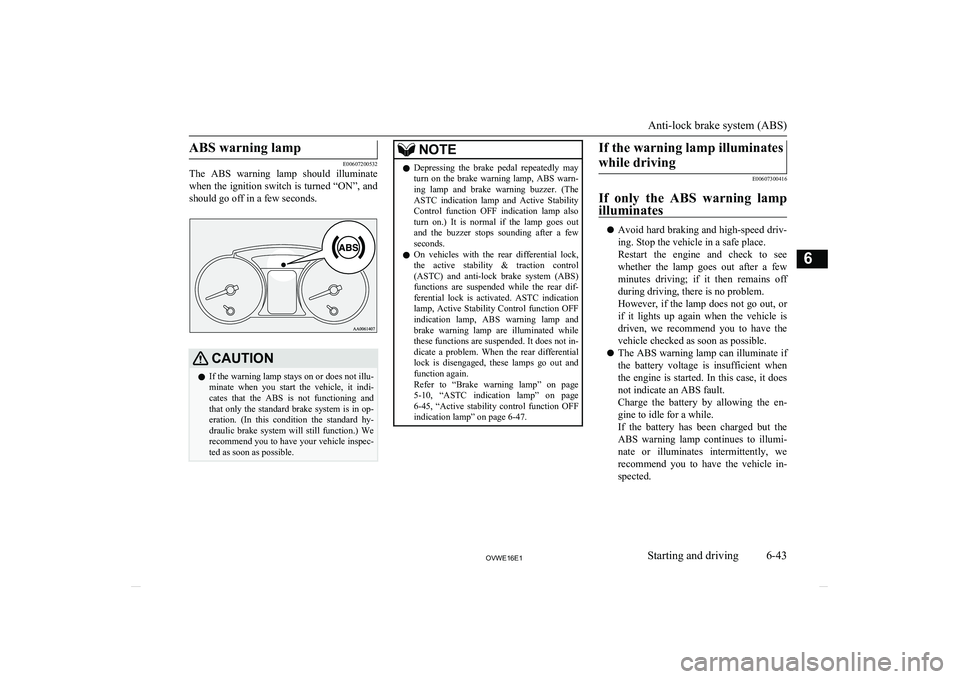
E00607200532
The ABS warning lamp should illuminate
when the ignition switch is turned “ON”, and should go off in a few seconds.
CAUTIONl If the warning lamp stays on or does not illu-
minate when you start the vehicle, it indi-
cates that the ABS is not functioning and
that only the standard brake system is in op-
eration. (In this condition the standard hy- draulic brake system will still function.) We
recommend you to have your vehicle inspec- ted as soon as possible.NOTEl Depressing the brake pedal repeatedly may
turn on the brake warning lamp, ABS warn-ing lamp and brake warning buzzer. (The
ASTC indication lamp and Active Stability
Control function OFF indication lamp also
turn on.) It is normal if the lamp goes out and the buzzer stops sounding after a few
seconds.
l On vehicles with the rear differential lock,
the active stability & traction control
(ASTC) and anti-lock brake system (ABS)
functions are suspended while the rear dif- ferential lock is activated. ASTC indication
lamp, Active Stability Control function OFF indication lamp, ABS warning lamp and
brake warning lamp are illuminated while these functions are suspended. It does not in-
dicate a problem. When the rear differential lock is disengaged, these lamps go out and
function again.
Refer to “Brake warning lamp” on page
5-10 , “ASTC indication lamp” on page
6-45 , “Active stability control function OFF
indication lamp” on page 6-47.If the warning lamp illuminates
while driving
E00607300416
If only the ABS warning lamp illuminates
l Avoid hard braking and high-speed driv-
ing. Stop the vehicle in a safe place.
Restart the engine and check to see whether the lamp goes out after a few
minutes driving; if it then remains off during driving, there is no problem.
However, if the lamp does not go out, or if it lights up again when the vehicle is
driven, we recommend you to have the
vehicle checked as soon as possible.
l The ABS warning lamp can illuminate if
the battery voltage is insufficient when the engine is started. In this case, it doesnot indicate an ABS fault.
Charge the battery by allowing the en- gine to idle for a while.
If the battery has been charged but the
ABS warning lamp continues to illumi-
nate or illuminates intermittently, we recommend you to have the vehicle in-
spected.
Anti-lock brake system (ABS)
6-43OVWE16E1Starting and driving6
Page 186 of 404

Active stability control functionindication lamp
E00614000183
Active stability control function in- dication lampActive stability control function
OFF indication lamp
The indication lamps should illuminate when
the ignition switch is turned to the “ON” po- sition and should go off after a few seconds.
If the indication lamps stay on or do not illu-
minate when the ignition switch is turned to the “ON” position, we recommend you to
have your vehicle inspected.
indication lamp blinks when the Active
Stability Control function is operating.
indication lamp illuminates when the Ac-
tive Stability Control function is deactivated by either of the following operations:
l The ASC OFF switch is pressed to deac-
tivate the system.
l The transfer shift lever is placed in the
“4LLc” position.CAUTIONl When indication lamp blinks, the Active
Stability Control function is operating,
which means that the road is slippery or that your vehicle’s wheels are spinning exces- sively. If this happens, drive slower with lessaccelerator input.
l If a fault occurs in the device, the ABS
warning lamp or
and indication lamps
illuminate as warning. Park your vehicle in a
safe place and stop the engine. Then, start the engine again and check whether the ABS
warning lamp or
and indication lamps
go out.
If the ABS warning lamp or
and indi-
cation lamps remains lit even after the en- gine has been started, we recommend you tohave your vehicle checked.
NOTEl Immediately after reconnection of the bat-
tery cable, the indication lamp will illu-
minate and the Active Stability Control
function will stop operating. If the vehicle is
driven and the
indication lamp goes off,
the Active Stability Control function will
again start operating.
If the indication lamp illuminates again or il-
luminates even though the battery has not been disconnected, an insufficient battery
voltage or other problems may be the reason.
We recommend you to have your vehicle in- spected.
Active traction control function
E00614100041
The active traction control function maintains
traction on slippery road surfaces by auto-
matically controlling the engine output and applying the brakes so the driving wheels are prevented from spinning.
The active traction control function automati-
cally turns ON when the ignition switch is
turned to the “ON” position.
Active stability & traction control (ASTC)
6-47OVWE16E1Starting and driving6
Page 189 of 404
NOTElIf the cruise control is on when the ignition
switch is turned to the “LOCK” or “ACC” position, cruise control will be on automati- cally the next time you start the engine. The
“CRUISE” indication lamp will also be on.
l If the battery voltage is insufficient, the
memory data for the cruise control may be erased.
As a result, the “CRUISE” indication lamp may not come on when you restart the en-
gine.
If this happens, press the “ON OFF” switch once again to turn on the cruise control.
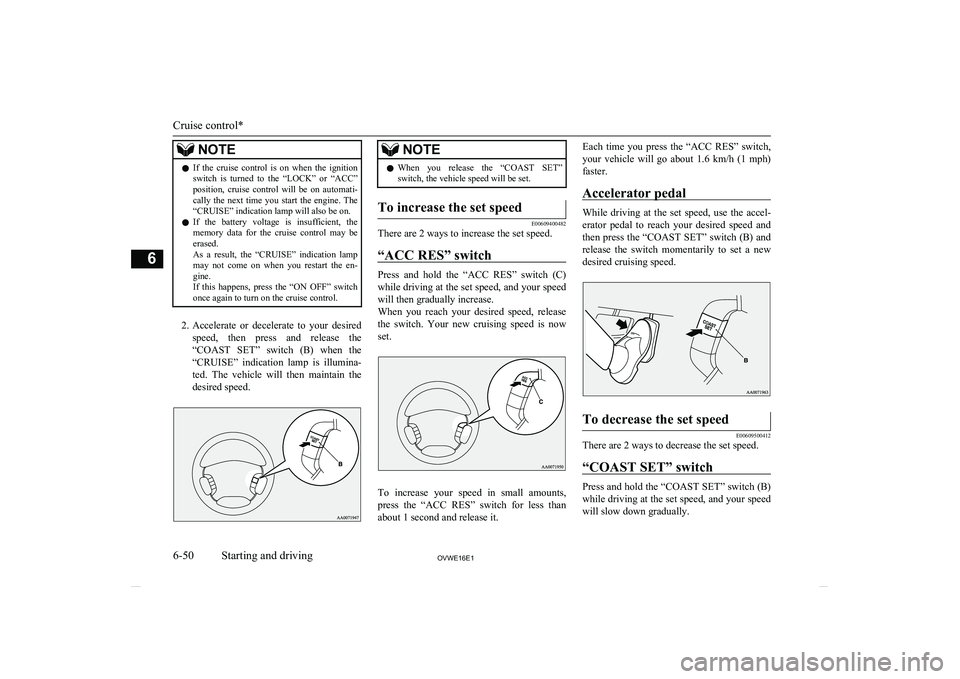
2. Accelerate or decelerate to your desired
speed, then press and release the “COAST SET” switch (B) when the
“CRUISE” indication lamp is illumina- ted. The vehicle will then maintain the
desired speed.
NOTEl When you release the “COAST SET”
switch, the vehicle speed will be set.To increase the set speed
E00609400482
There are 2 ways to increase the set speed.
“ACC RES” switch
Press and hold the “ACC RES” switch (C)while driving at the set speed, and your speed
will then gradually increase.
When you reach your desired speed, release
the switch. Your new cruising speed is now set.
To increase your speed in small amounts,
press the “ACC RES” switch for less than about 1 second and release it.
Each time you press the “ACC RES” switch,
your vehicle will go about 1.6 km/h (1 mph)
faster.
Accelerator pedal
While driving at the set speed, use the accel-
erator pedal to reach your desired speed and
then press the “COAST SET” switch (B) and
release the switch momentarily to set a new desired cruising speed.
To decrease the set speed
E00609500412
There are 2 ways to decrease the set speed.
“COAST SET” switch
Press and hold the “COAST SET” switch (B)
while driving at the set speed, and your speed will slow down gradually.
Cruise control*
6-50OVWE16E1Starting and driving6
Page 243 of 404

NOTElEach time the 1RPT key is pressed, this
switches in the order Repeat OFF, 1 track re-
peat, All track repeat, and Repeat OFF.
Random Playback (RDM)
Press the 2RDM key.
Play the tracks in the Bluetooth Audio device in a random order.
NOTEl Pressing again will cancel.
Scan Playback (SCAN)
Press the PTY/SCAN key.
Play the first 10 seconds of each of the tracks on the whole Bluetooth Audio device in or-
der.
NOTEl Press this button again during playback if
you wish to hear that track, and that trackwill play normally.Use AUX*
E00736901135
By connecting external input cables and AUX devices to this product, you can play
back tracks on these devices through the
product.
Hold down the MEDIA key.
Switch to the AUX mode, and “AUX” is dis- played.
Auxiliary Video connector (RCA) A- Left audio input connector (white)B- Right audio input connector (red)
C- Video input connector (yellow)
CAUTIONl Connect an audio device with external sound
input mode cancelled, or with the soundturned down.
l Even if not inserted, the product will switch
to AUX, therefore take care with volume
levels when not inserted.NOTEl For information on using the Auxiliary Vid-
eo connector (RCA), refer to the separate
owner’s manual for the Video Entertainment System.
l Depending on the audio device to be con-
nected, noise may be emitted.
l For power, use the battery power source in-
cluded in the audio device to be connected.
Using the connected audio device while charging through the cigarette lighter socket
in the vehicle may lead to noise being emit-
ted through the speakers.
l If no audio devices are connected, then do
not select the external sound input mode. If external sound input mode is selected while no audio devices are connected, then sound
may be emitted through the speakers.
Use AUX*
7-38OVWE16E1For pleasant driving7 Auxiliary Video connector
(RCA)
Page 256 of 404

The Bluetooth®
2.0 interface can be used
when the ignition switch is in the “ON” or
“ACC” position.
Before you can use the Bluetooth ®
2.0 inter-
face, you must pair the Bluetooth ®
device
and Bluetooth ®
2.0 interface. Refer to “Con-
necting the Bluetooth® 2.0 interface and
Bluetooth® device” on page 7-56.
Bluetooth ®
is a registered trademark of
BLUETOOTH SIG, INC.WARNINGl Although the Bluetooth ®
2.0 interface al-
lows you to make hands-free calls, if you choose to use the cellular phone while
driving, you must not allow yourself to be
distracted from the safe operation of your vehicle. Anything, including cellularphone usage, that distracts you from the safe operation of your vehicle increases
your risk of an accident.
l Refer to and comply with all state and lo-
cal laws in your area regarding cellular phone usage while driving.NOTEl The Bluetooth ®
2.0 interface cannot be used
if the Bluetooth ®
device has a flat battery or
the device power is turned off.
l Hands-free calls will not be possible if your
phone does not have service available.
l If you place the Bluetooth ®
device in the ve-
hicle’s third seat or luggage compartment,
you may not be able to use the Bluetooth ®
2.0 interface.
l Some Bluetooth ®
devices are not compatible
with the Bluetooth ®
2.0 interface.
l You can confirm the Link System software
version by pressing the HANG-UP button 3
times (press and hold 2 times and then press briefly) within 10 seconds.
l For details on the Bluetooth ®
2.0 interface,
you can see them by accessing the
MITSUBISHI MOTORS website.
Please read and agree on the “Warning about
Links to the Web Sites of Other Companies” because it connects to other thanMITSUBISHI MOTORS website.
http://www.mitsubishi-motors.com/en/prod-
ucts/index.html
l Software updates by cellular phone/digital
audio device manufacturers may change/
alter device connectivity.
“Steering control switch and microphone” on
page 7-51
Voice recognition function ® p. 7-52
Useful voice commands ® p. 7-53
Speaker enrollment function ® p. 7-55
Connecting the Bluetooth® 2.0 interface and
Bluetooth® device ® p. 7-56
Operating a music player connected via Blue- tooth® ® p. 7-61
How to make or receive hands-free calls
® p. 7-61
Phone book function ® p. 7-64Steering control switch and mi-
crophone
E00727200265
1- Volume up button
2- Volume down button
3- SPEECH button
4- PICK-UP button
5- HANG-UP button
6- Microphone
Bluetooth ®
2.0 interface*
7-51OVWE16E1For pleasant driving7
Page 257 of 404

Volume up button
Press this button to increase the volume.
Volume down button
Press this button to decrease the volume.
SPEECH button
l Press this button to change to voice rec-
ognition mode.
While the system is in voice recognition
mode, “Listening” will appear on the au- dio display.
l If you press the button briefly while in
voice recognition mode, it will interrupt
prompting and allow voice command in- put.
Pressing the button longer will deacti-
vate the voice recognition mode.
l Pressing this button briefly during a call
will enable voice recognition and allow
voice command input.
PICK-UP button
l Press this button when an incoming call
is received to answer the telephone.
l When another call is received during a
call, press this button to put the first call-
er on hold and talk to the new caller.
• In such circumstances, you can press
the button briefly to switch between
callers. You will switch to the first
caller and the other caller will be put on hold.
• To establish a three-way call in such
situations, press the SPEECH button
to enter voice recognition mode and then say “Join calls”.
HANG-UP button
l Press this button when an incoming call
is received to refuse the call.
l Press this button during a call to end the
current call.
When another call is on hold, you will
switch to that call.
l If this button is pressed in the voice rec-
ognition mode, the voice recognition mode will be deactivated.
NOTEl When you press the SPEECH button to enter
voice recognition mode with a cellular
phone paired to the system, current informa- tion on the cellular phone, such as “remain- ing battery life,” “signal strength” or “roam-
ing,” will be displayed on the audio dis-
play.*
*: Some cellular phones will not send this
information to the Bluetooth ®
2.0 interface.NOTEl Call waiting and three-way calls can be used
by the Bluetooth ®
2.0 interface, only if it is
possible to use those services with your cel- lular phone.
Microphone
Your voice will be recognized by a micro-
phone in the overhead console, allowing you to make hands-free calls with voice com-
mands.
NOTEl If a cellular phone is brought close to the mi-
crophone, it may create noise in the voice on
the phone. In such a case, take the cellular phone at a place as far as possible from the
microphone.Voice recognition function
E00727300527
The Bluetooth ®
2.0 interface is equipped
with a voice recognition function.
Simply say voice commands and you can
perform various operations and make or re- ceive hands-free calls.
With the Bluetooth ®
2.0 interface, voice rec-
ognition is possible for English, French,
Spanish, Italian, German, Dutch, Portuguese and Russian. The factory setting is English or “Russian.”
Bluetooth ®
2.0 interface*
7-52OVWE16E1For pleasant driving7