2016 MITSUBISHI OUTLANDER SPORT light
[x] Cancel search: lightPage 69 of 398
Keyless entry system (if so equipped)
Features and controls 5-7
5
N0056230
1111
Your electronic immobilizer operates on a radio frequency subject to Federal Communi-cations Commission (FCC) Rules (For vehi- cles sold in U.S.A.) and Industry Canada Rules (For vehicles sold in Canada). Thisdevice complies with part 15 of FCC Rules and Industry Canada licence-exempt RSS standard(s).Operation is subject to the following two con-ditions. This device may not cause harmful inter- ference. This device must accept any interference received, including interference that may cause undesired operation.
N00509001988
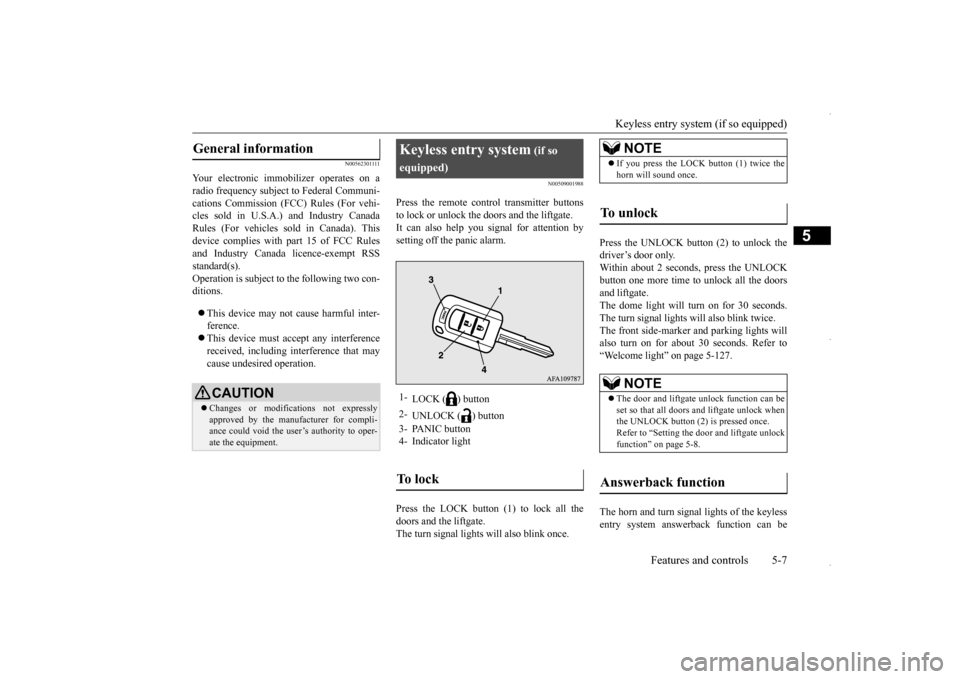
Press the remote control transmitter buttons to lock or unlock the doors and the liftgate. It can also help you signal for attention by setting off the panic alarm. Press the LOCK button (1) to lock all the doors and the liftgate.The turn signal lights will also blink once.
Press the UNLOCK button (2) to unlock the driver’s door only. Within about 2 seconds, press the UNLOCKbutton one more time to unlock all the doorsand liftgate. The dome light will turn on for 30 seconds. The turn signal lights will also blink twice.The front side-marker and parking lights will also turn on for about 30 seconds. Refer to “Welcome light” on page 5-127. The horn and turn signal lights of the keyless entry system answerback function can be
General information
CAUTION Changes or modifications not expressly approved by the manufacturer for compli-ance could void the user’s authority to oper- ate the equipment.
Keyless entry system
(if so
equipped)1-
LOCK ( ) button
2-
UNLOCK ( ) button
3- PANIC button 4- Indicator lightTo l o c k
NOTE
If you press the LOCK button (1) twice the horn will sound once.
To u n l o c k
NOTE
The door and liftgate unlock function can be set so that all doors and liftgate unlock when the UNLOCK button (2) is pressed once.Refer to “Setting the door and liftgate unlock function” on page 5-8.
Answerback function
BK0229600US.bo
ok 7 ページ 2015年10月1日 木曜日 午後2時29分
Page 70 of 398
Keyless entry system (if so equipped) 5-8 Features and controls
5
changed as required. This is done with the key removed from the ignition switch. The answerback function can be set in the following three ways. Each time the answerback function is set, achime will sound to tell
you the condition of
the answerback function. 1. Remove the key from the ignition switch. 2. Open the driver’s door and turn the com- bination headlights and dimmer switch tothe “OFF” position. 3. Press and hold the LOCK button (1) for 4 to 10 seconds and then press and hold theUNLOCK button (2) during this time.
4. Within 10 seconds of pressing the UNLOCK button in step 3, release the UNLOCK button first, and then release the LOCK button.
The answerback function can be turned ON or OFF separately. 1. Remove the key from the ignition switch. 2. Open the driver’s door and turn the com- bination headlights and dimmer switch tothe “OFF” position. 3. Press and hold the UNLOCK button (2) for 4 to 10 seconds and then press andhold the LOCK button (1) during this time. 4. Within 10 seconds of pressing the LOCKbutton in step 3, release the UNLOCK button first, and then release the LOCK button.
N00543601128
The door and liftgate unlock function can be set to the following two conditions. Each time the door and liftgate unlock func-tion is set, a chime will sound to tell you the condition of the door and liftgate unlock function. 1. Remove the key from the ignition switch. 2. Open the driver’s door and turn the com- bination headlights and dimmer switch tothe “OFF” position.
NOTE
The answerback function will not operate if any of the doors are open.
Horn deactivation/reactivation
One chime:
The horn will not sound.
Tw o chimes:
The horn will sound.
Four chimes:
The horn will sound if the LOCK button is pressed twice within 1second.
Turn signal lights deactiva- tion/reactivation
Number of chimes
To l o c k
To u n l o c k
One chime One flash Two flashes Two chimes One flash No flashThree chimes No flash Two flashesFour chimes Two flashes One flash
Five chimes No flash One flashSix chimes Two flashes No flashSeven chimes
No flash No flash
Setting the door and liftgate unlock function
Number of chimes
Condition
One chime
All doors and the liftgate unlock
Tw o chimes
Driver’s door unlock only
Number of chimes
To l o c k
To u n l o c k
BK0229600US.bo
ok 8 ページ 2015年10月1日 木曜日 午後2時29分
Page 71 of 398

Keyless entry system (if so equipped)
Features and controls 5-9
5
3. Press and hold the LOCK button (1) for 4 to 10 seconds and then press and hold the UNLOCK button (2) during this time. 4. Within 10 seconds of pressing theUNLOCK button in step 3, release the LOCK button first, and then release the UNLOCK button.
N00543701073
If you are near your vehicle and feel threat- ened, you may activate the alarm to call atten- tion as follows: 1. Press the PANIC button (3) for more than 1 second. 2. The headlights will blink on and off and the horn will sound intermittently forabout 3 minutes. 3. To turn off the alarm, press any button on the remote control transmitter.
N00543800051
Only remote control transmitters pro-grammed with the vehicle’s electronics can lock or unlock all doors and the liftgate. If you lose the remote control transmitter, you can order a remote control transmitter from
your authorized Mitsubishi Motors dealer by referring to the key number. To prevent vehicle theft, the ID code for the remote control transmitter must be changed.Take your vehicle and all remote control transmitters to your authorized Mitsubishi Motors dealer to have your ID code changed.
N00543900049
To add a remote control transmitter, you mustalready have 1 registered remote controltransmitter. Registering the ID code can be done by your- self or by your authorized Mitsubishi Motorsdealer. For you to register the ID code your- self, follow the “Customer remote control transmitter programming” procedure below.If you choose to have your authorized Mitsubishi Motors dealer register the ID code, take your vehicle and any remainingkeys to your authorized Mitsubishi Motors dealer.
N00544001187
You can program new remote control trans-mitters to the system if you have one valid (already registered) remote control transmit-ter by doing the following: 1. Have available all (current and new) remote control transmitters you wish to register. 2. With a valid (already registered) remotecontrol transmitter, press and hold the UNLOCK button (2) for 4 to 10 seconds. Then press and hold the LOCK button (1)during this time. 3. Within 10 seconds of pressing the LOCK button, release the LOCK
button first, and
then release the UNLOCK button. At this time, ID codes for all remote con- trol transmitters except for the transmitterused in steps 2 and 3 are erased and the answerback function (door is locked and unlocked) informs you
that the registra-
tion mode has been activated. 4. Within 60 seconds after step 3, complete the following ID code registration opera-tion using the next remote control trans- mitter you wish to register within 4 seconds.
Using the panic alarm
Replacement remote control transmitters
Additional remote control transmitters
NOTE
You are provided with 2 remote control transmitters, but you may register up to 8 remote control transmitters.
Customer remote control trans- mitter programming (Except for vehicles sold in Canada)
BK0229600US.bo
ok 9 ページ 2015年10月1日 木曜日 午後2時29分
Page 72 of 398
Keyless entry system (if so equipped) 5-10 Features and controls
5
i) Press and hold both the LOCK and UNLOCK buttons for 2 seconds. ii) Release both the LOCK and UNLOCK buttons simultaneously for 1 second.iii) Press the UNLOCK button. The answerback function informs you that the ID code registration of the transmitter iscompleted. 5. To register the ID codes of additional remote control transmitters, repeat step 4within 60 seconds after step 4.6. If no ID code of a remote control trans- mitter is registered within 60 seconds after step 4, the registration mode is can-celed and the normal mode returns.
N00546101137
Your keyless entry system operates on a radiofrequency subject to Federal Communica-tions Commission (FCC) Rules (For vehicles sold in U.S.A.) and Industry Canada Rules (For vehicles sold in Canada). This devicecomplies with part 15 of FCC Rules and Industry Canada licence-exempt RSS stan- dard(s).Operation is subject to the following two con-ditions. This device may not cause harmful inter- ference. This device must accept any interference received, including interference that may cause undesired operation.
NOTE
For verification purposes, try to lock and unlock the doors with the re-coded remote control transmitters after the registration is completed. The indicator light (4) comes on each time a button is pressed. The keyless entry system does not work if the key is in the ignition switch. The remote control transmitter can be used from about 40 feet (12 m) away. However, this distance may change if your vehicle is near a TV transmitting tower, a power sta-tion, or a radio station.
If the UNLOCK button (2) is pressed when all doors and the liftgate are locked and no doors or the liftgate are opened within about 30 seconds, the doors and the liftgate will automatically re-lock. If the following conditions are observed after pressing the LOCK (1) or UNLOCK (2) but-ton on the remote control transmitter, the battery in the remote control transmitter may need to be replaced. • The doors and the liftgate cannot be locked or unlocked. • The panic alarm cannot be operated. • The indicator light (4) is dim or does not come on.
If you lose your remote control transmitter, please contact an authorized Mitsubishi Motors dealer for a replacement. If you wish to obtain an additional remote control transmitter, please contact an autho-rized Mitsubishi Motors dealer. A maximum of 8 remote control transmitters can be pro- grammed for your vehicle. To use the new remote control transmitters, it is necessary to regi
ster the key with both
the electronic immobilizer and keyless entry system. Also refer to “Electr
onic immobilizer (Anti-
theft starting system): Customer key pro- gramming” on page 5-6.NOTE
General information
CAUTION Changes or modifications not expressly approved by the manufacturer for compli-ance could void the user’s authority to oper- ate the equipment.
BK0229600US.bo
ok 10 ページ 2015年10月1日 木曜日 午後2時29分
Page 76 of 398
Free-hand Advanced Security Transmitte
r (F.A.S.T.-key) (if so equipped)
5-14 Features and controls
5
N00503300067
The operating range is the interior of the vehicle.
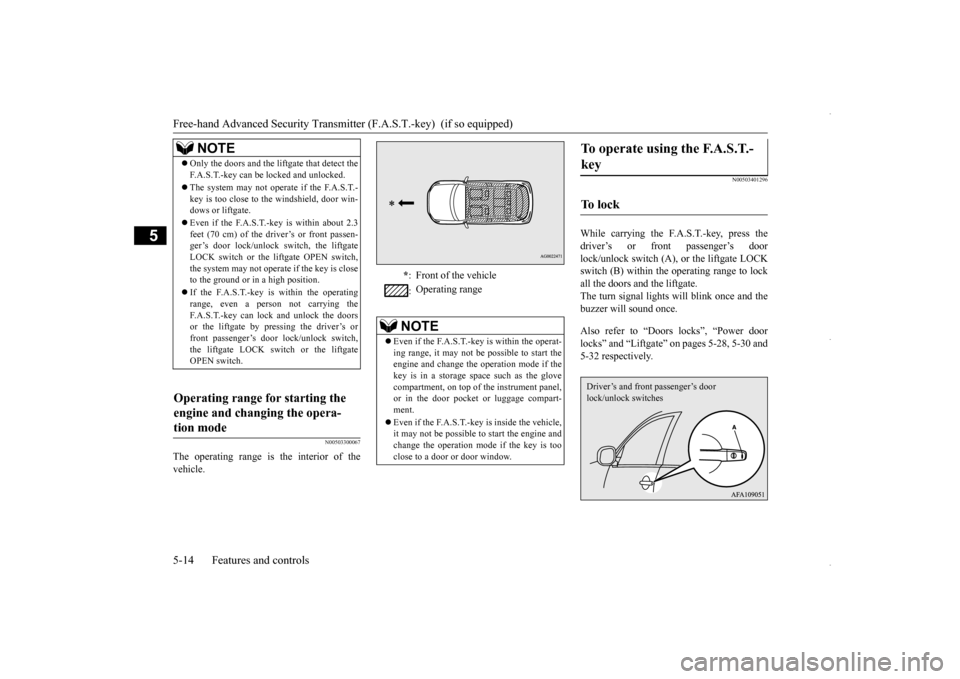
N00503401296
While carrying the F.A.S.T.-key, press thedriver’s or front passenger’s door lock/unlock switch (A), or the liftgate LOCK switch (B) within the operating range to lockall the doors and the liftgate.The turn signal lights will blink once and the buzzer will sound once. Also refer to “Doors locks”, “Power door locks” and “Liftgate” on pages 5-28, 5-30 and5-32 respectively.
NOTE
Only the doors and the liftgate that detect the F.A.S.T.-key can be locked and unlocked. The system may not operate if the F.A.S.T.- key is too close to the windshield, door win-dows or liftgate. Even if the F.A.S.T.-key is within about 2.3 feet (70 cm) of the driver’s or front passen- ger’s door lock/unlock switch, the liftgate LOCK switch or the liftgate OPEN switch,the system may not operate if the key is close to the ground or in a high position. If the F.A.S.T.-key is within the operating range, even a person not carrying the F.A.S.T.-key can lock and unlock the doorsor the liftgate by pressing the driver’s or front passenger’s door lock/unlock switch, the liftgate LOCK switch or the liftgateOPEN switch.
Operating range for starting the engine and changing the opera- tion mode
* : Front of the vehicle : Operating range
NOTE
Even if the F.A.S.T.-key is within the operat- ing range, it may not be possible to start the engine and change the operation mode if thekey is in a storage space such as the glove compartment, on top of
the instrument panel,
or in the door pocket or luggage compart-ment. Even if the F.A.S.T.-key is inside the vehicle, it may not be possible to start the engine and change the operation mode if the key is too close to a door or door window.
To operate using the F.A.S.T.- key
To l o c k
Driver’s and front passenger’s door lock/unlock switches
BK0229600US.bo
ok 14 ページ 2015年10月1日 木曜日 午後2時29分
Page 77 of 398
Free-hand Advanced Security Transmitt
er (F.A.S.T.-key) (if so equipped)
Features and controls 5-15
5
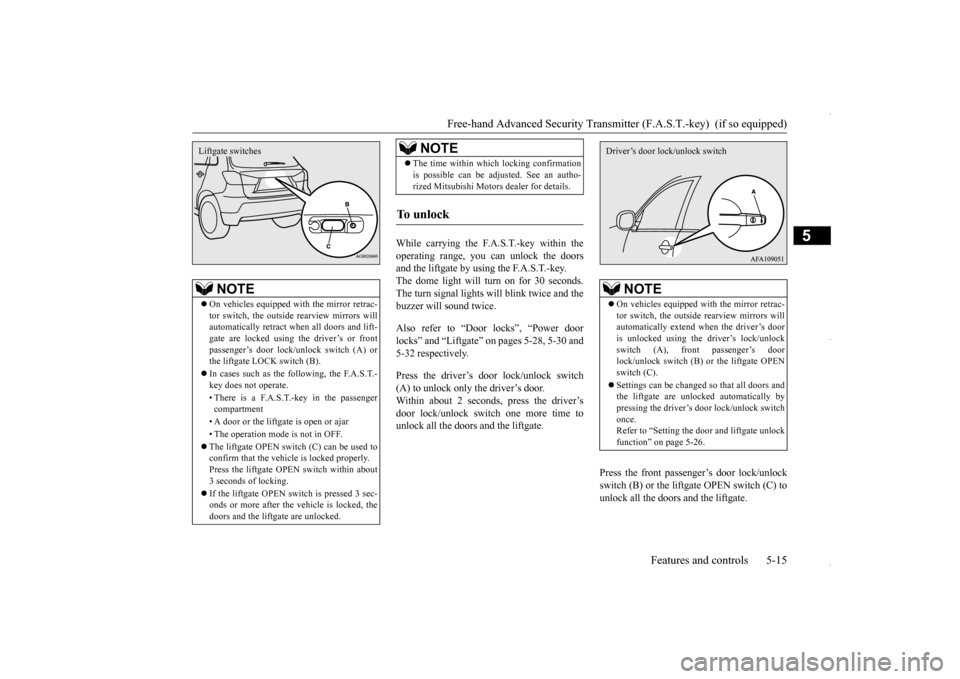
While carrying the F.A.S.T.-key within the operating range, you can unlock the doorsand the liftgate by using the F.A.S.T.-key.The dome light will turn on for 30 seconds. The turn signal lights will blink twice and the buzzer will sound twice. Also refer to “Door locks”, “Power door locks” and “Liftgate” on pages 5-28, 5-30 and 5-32 respectively. Press the driver’s door lock/unlock switch (A) to unlock only the driver’s door.Within about 2 seconds, press the driver’s door lock/unlock switch one more time to unlock all the doors and the liftgate.
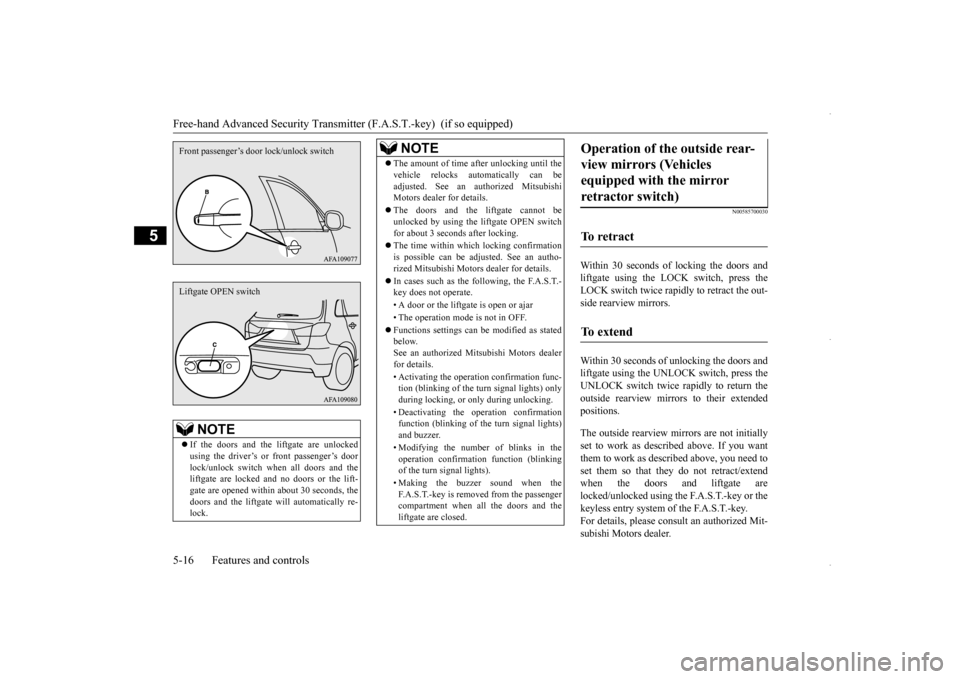
Press the front passenger’s door lock/unlock switch (B) or the liftgate OPEN switch (C) tounlock all the doors and the liftgate.
NOTE
On vehicles equipped with the mirror retrac- tor switch, the outside rearview mirrors will automatically retract when all doors and lift-gate are locked using the driver’s or front passenger’s door lock/unlock switch (A) or the liftgate LOCK switch (B). In cases such as the following, the F.A.S.T.- key does not operate. • There is a F.A.S.T.-key in the passenger compartment • A door or the liftga
te is open or ajar
• The operation mode is not in OFF. The liftgate OPEN switch (C) can be used to confirm that the vehicle is locked properly. Press the liftgate OPEN switch within about 3 seconds of locking. If the liftgate OPEN switch is pressed 3 sec- onds or more after the vehicle is locked, thedoors and the liftgate are unlocked.Liftgate switches
The time within which locking confirmation is possible can be adjusted. See an autho- rized Mitsubishi Motors dealer for details.
To u n l o c k
NOTE
NOTE
On vehicles equipped with the mirror retrac- tor switch, the outside rearview mirrors will automatically extend when the driver’s dooris unlocked using the driver’s lock/unlock switch (A), front passenger’s door lock/unlock switch (B) or the liftgate OPENswitch (C). Settings can be changed so that all doors and the liftgate are unlocked automatically by pressing the driver’s door lock/unlock switch once.Refer to “Setting the door and liftgate unlock function” on page 5-26.Driver’s door lock/unlock switch
BK0229600US.bo
ok 15 ページ 2015年10月1日 木曜日 午後2時29分
Page 78 of 398
Free-hand Advanced Security Transmitte
r (F.A.S.T.-key) (if so equipped)
5-16 Features and controls
5
N00585700030
Within 30 seconds of
locking the doors and
liftgate using the LOCK switch, press theLOCK switch twice rapidly to retract the out-side rearview mirrors. Within 30 seconds of unlocking the doors and liftgate using the UNLOCK switch, press the UNLOCK switch twice rapidly to return the outside rearview mirrors to their extendedpositions. The outside rearview mirrors are not initially set to work as described above. If you want them to work as described above, you need toset them so that they do not retract/extend when the doors and liftgate are locked/unlocked using the F.A.S.T.-key or thekeyless entry system of the F.A.S.T.-key. For details, please consult an authorized Mit- subishi Motors dealer.
NOTE
If the doors and the liftgate are unlocked using the driver’s or front passenger’s door lock/unlock switch when all doors and the liftgate are locked and no doors or the lift-gate are opened within about 30 seconds, the doors and the liftgate will automatically re- lock.Front passenger’s door
lock/unlock switch
Liftgate OPEN switch
The amount of time after unlocking until the vehicle relocks automatically can be adjusted. See an au
thorized Mitsubishi
Motors dealer for details. The doors and the liftgate cannot be unlocked by using the liftgate OPEN switch for about 3 seconds after locking. The time within which locking confirmation is possible can be adjusted. See an autho-rized Mitsubishi Motors dealer for details. In cases such as the following, the F.A.S.T.- key does not operate. • A door or the liftgate is open or ajar• The operation mode is not in OFF. Functions settings can be modified as stated below. See an authorized Mitsubishi Motors dealerfor details. • Activating the operation confirmation func- tion (blinking of the turn signal lights) only during locking, or only during unlocking. • Deactivating the operation confirmation function (blinking of the turn signal lights) and buzzer. • Modifying the number of blinks in the operation confirmation function (blinking of the turn signal lights). • Making the buzzer sound when the F.A.S.T.-key is removed from the passenger compartment when all the doors and theliftgate are closed.NOTE
Operation of the outside rear- view mirrors (Vehicles equipped with the mirror retractor switch)
To retract
To e x t e n d
BK0229600US.bo
ok 16 ページ 2015年10月1日 木曜日 午後2時29分
Page 79 of 398
Free-hand Advanced Security Transmitt
er (F.A.S.T.-key) (if so equipped)
Features and controls 5-17
5
N00513500075
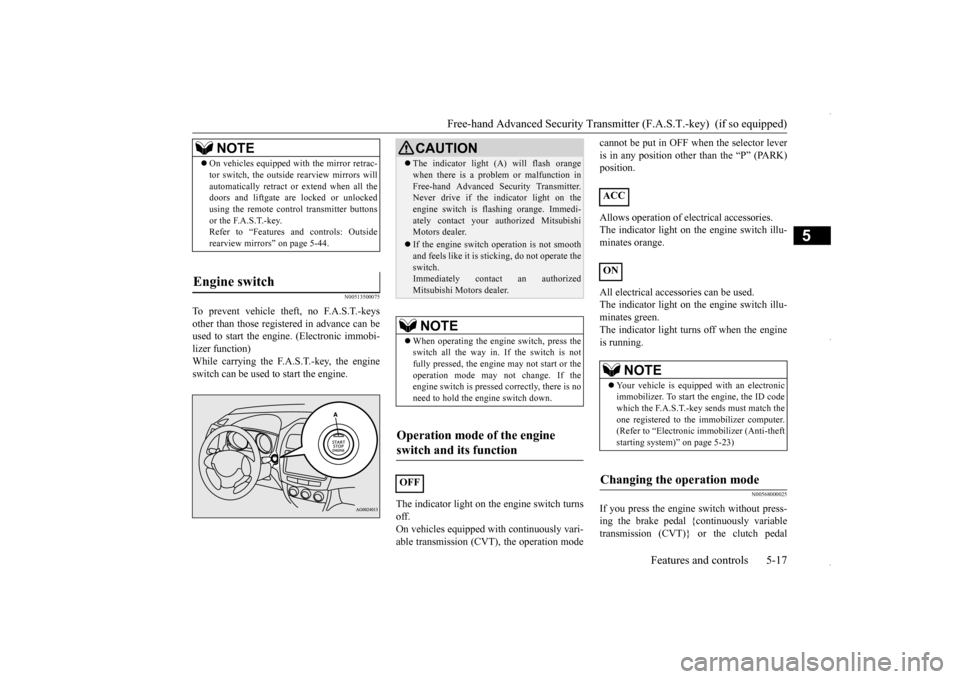
To prevent vehicle theft, no F.A.S.T.-keys other than those registered in advance can be used to start the engine. (Electronic immobi- lizer function)While carrying the F.A.S.T.-key, the engine switch can be used to start the engine.
The indicator light on the engine switch turns off.On vehicles equipped with continuously vari- able transmission (CVT), the operation mode
cannot be put in OFF when the selector lever is in any position other than the “P” (PARK) position. Allows operation of electrical accessories. The indicator light on the engine switch illu-minates orange. All electrical accessories can be used. The indicator light on the engine switch illu- minates green. The indicator light turn
s off when the engine
is running.
N00568000025
If you press the engine switch without press- ing the brake pedal {continuously variable transmission (CVT)} or the clutch pedal
NOTE
On vehicles equipped with the mirror retrac- tor switch, the outside rearview mirrors will automatically retract or extend when all the doors and liftgate are locked or unlocked using the remote control transmitter buttonsor the F.A.S.T.-key. Refer to “Features and controls: Outside rearview mirrors” on page 5-44.
Engine switch
CAUTION The indicator light (A) will flash orange when there is a problem or malfunction in Free-hand Advanced Security Transmitter. Never drive if the indicator light on the engine switch is flashing orange. Immedi-ately contact your authorized Mitsubishi Motors dealer. If the engine switch operation is not smooth and feels like it is sticking, do not operate the switch.Immediately contact an authorized Mitsubishi Motors dealer.NOTE
When operating the engine switch, press the switch all the way in. If the switch is not fully pressed, the engine may not start or the operation mode may not change. If theengine switch is pressed correctly, there is no need to hold the engine switch down.
Operation mode of the engine switch and its function
OFF
ACC ON
NOTE
Your vehicle is equipped with an electronic immobilizer. To start the engine, the ID code which the F.A.S.T.-key sends must match the one registered to the immobilizer computer.(Refer to “Electronic immobilizer (Anti-theft starting system)” on page 5-23)
Changing the operation mode
BK0229600US.bo
ok 17 ページ 2015年10月1日 木曜日 午後2時29分