2016 MITSUBISHI OUTLANDER ad blue
[x] Cancel search: ad bluePage 329 of 464
7
Comfort controlsVents ................................................................................................7-2 Automatic climate control air conditioner
..............
...........
.........
.....7-5
Important air conditioning operating tips ..
...........
...........
.........
.....7-14
Air purifier .....................................................................................7-15 AM/FM radio/CD player (if so equipped) .....................................7-15 Handling of Discs ..........................................................................7-18Audio Files (MP3/WMA/AAC) ....................................................7-20 Important Points on Safety for the Customer ................................7-24 Operation Keys ..............................................................................7-24Listen to Radio ...............................................................................7-28 Listen to Satellite Radio (if so equipped) .......................................7-29 Listen to CDs .................................................................................7-31Listen to MP3s ...............................................................................7-32 Listen to an iPod ............................................................................7-33 Listen to Audio Files on a USB Device .........................................7-35To play iPod/USB memory devi
ce tracks via
voice operation
(vehicles with Bluetooth
® 2.0 interface) ...................................7-38
Listen to Bluetooth Audio (if so equipped) ....................................7-41Display Indicator ...........................................................................7-43 Audio Quality and Volume Balance Adjustment ...........................7-44 System Settings ..............................................................................7-45Troubleshooting ..........
...........
...........
...........
...........
.........
.........
.....7-49
Antenna ..........................................................................................7-51 Clock (if so equipped) ....................................................................7-51General information about your radio .....
...........
...........
...........
.....7-52
BK0223400US.book 1 ページ 2015年2月13日 金曜日 午後12時15分
Page 344 of 464

AM/FM radio/CD player (if so equipped) 7-16 Comfort controls
7
N00715200023
If the product becomes dirty, wipe with a soft cloth. If very dirty, use a soft cloth dipped in neutral detergent diluted in water, and then wrung out. Do not use benzene, thin- ners, or other chemic
al wipes. This may
harm the surface.
N00715300053
Product names and other proper names are the trademarks or registered trade- marks of their respective owners. Furthermore, even if there is no specific denotation of trademarks or registered trademarks, these are to be observed intheir entirety. “Made for iPod”, “Made for iPhone” mean that an electronic accessory has been designed to connect specifically to iPod or iPhone, respec
tively, and has been
certified by the devel
oper to meet Apple
performance standards. iPhone, iPod, iPod clas
sic, iPod nano, and
iPod touch are trademarks of Apple Inc., registered in the U.S. and other countries.
Apple is not responsible for the operation of this device or its compliance withsafety and regulatory standards.
How to Clean
Trademarks
NOTE
iPod and iTunes licensi
ng allows individual
users to privately re
produce and play back
non- copyrighted material
as well as material
that may be legally copied and reproduced. Infringement of copyr
ight is prohibited.
For vehicles w
ith a Bluetooth
® 2.0 interface,
the types of devices
that can be connected
may vary.[For vehicles sold in U.S.A.] For details, access the Mitsubishi Motors North America website.[For vehicles sold in Canada and Mexico] For details, access the Mitsubishi Motors website. Please read and agree to the “Warn-ing about Links to the Web Sites of OtherCompanies”. The webs
ites mentioned above
may connect you to websites other than the Mitsubishi Motors website.http://www.mitsubishi-motors.com/en/prod- ucts/index.html
BK0223400US.book 16 ページ 2015年2月13日 金曜日 午後12時15分
Page 355 of 464
Operation Keys
Comfort controls 7-27
7
N00716800042
13-
5 key Play/Pause Bluetooth Audio
*2, and use
as preset key 5 for radio.
14-
6 key Return during audio track search, and stop Bluetooth Audio
*2.
For radio, use as preset key 6.
15-
key/ key
For audio, select a
udio track/file; for
radio, perform auto
matic station selec-
tion. Select channels in the satellite radio*
1.
16- MENU key
Switch to Menu mode.
17- /SEL key
Adjust audio quality and select items. For radio, manually select stations. Select channels in the satellite radio*
1.
*1: Requires a satellite
tuner connection.
*2: Requires a separate
ly-purchased Blue-
tooth-capable audio
device in equip-
ment by type (vehicles with a Bluetooth
® 2.0 interface).
Steering wheel audio remote control switch 1- Vol + key, - key
Adjust audio functions and the mobile phone function volume.
2-
CH key, key Select CD and other
audio source tracks
and radio stations. Hold down to skip up and down through tracks.Hold down to switch the satellite radio band during satellit
e radio reception.
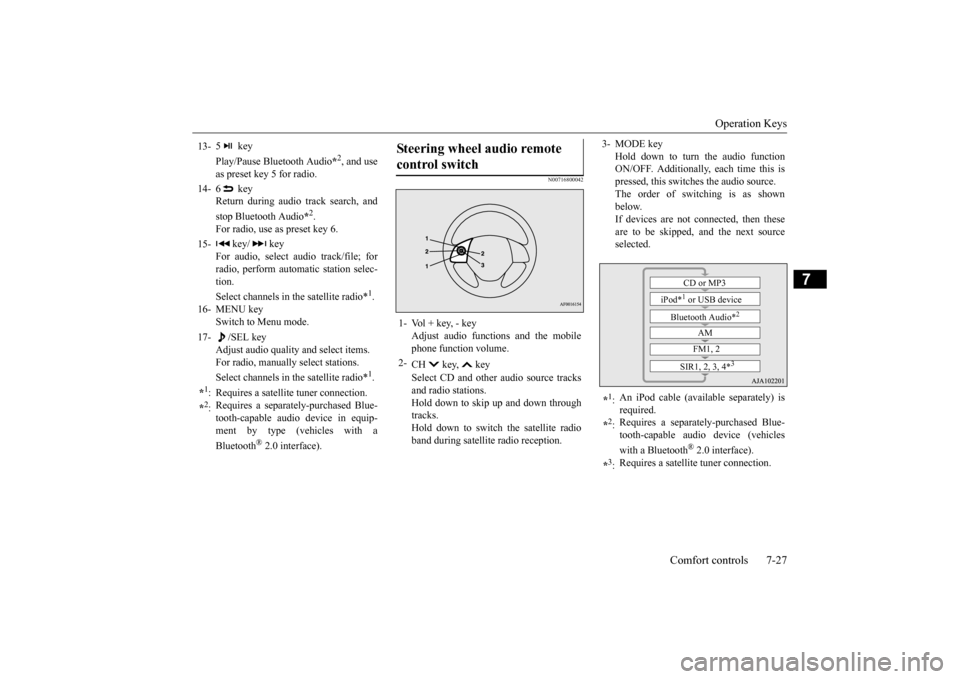
3- MODE key
Hold down to turn the audio function ON/OFF. Additionally, each time this ispressed, this switches the audio source. The order of switching is as shown below.If devices are not connected, then these are to be skipped, and the next source selected.
*1: An iPod cable (availa
ble separately) is
required.
*2: Requires a separately
-purchased Blue-
tooth-capable audio device (vehicles with a Bluetooth
® 2.0 interface).
*3: Requires a satellit
e tuner connection.CD or MP3
iPod*
1 or USB device
Bluetooth Audio*
2
AM FM1, 2
SIR1, 2, 3, 4*
3
BK0223400US.book 27 ページ 2015年2月13日 金曜日 午後12時15分
Page 362 of 464

Listen to an iPod 7-34 Comfort controls
7
Press the MEDIA key to set the iPod as the source. The selected source is
indicated on the dis-
play.
Press the key or key to select the track. This enables selection of
the next or previous
track. Hold down the 3 key or the 4 key. Fast forward/rewind is possible. Repeat playback and
shuffle playback are
possible. Press the 1RPT key. Repeat playback of th
e track currently being
played.
For vehicles with a Bluetooth
® 2.0 interface,
the types of devices
that can be connected
may vary. [For vehicles sold in U.S.A.]For details, access the Mitsubishi Motors North America website. [For vehicles sold in
Canada and Mexico]
For details, access the Mitsubishi Motors website. Please read and agree to the “Warn- ing about Links to the Web Sites of OtherCompanies”. The webs
ites mentioned above
may connect you to websites other than the Mitsubishi Motors website.http://www.mitsubishi
-motors.com/en/prod-
ucts/index.html Regarding how to c
onnect the iPod/iPhone,
refer to “How to c
onnect an iPod” on page
5-216. When connecting th
e iPod/iPhone, use a
commercially-available iPod connection cable. Set up the device in order that no unsafe actions, such as pluggi
ng in the connection
cable are taken while driving. When inserting and removing the iPod/iPhone, for safety’s
sake first stop the
vehicle. Depending on the status
of the iPod/iPhone,
it may take some time
until the device is rec-
ognized, or playback starts. Buttons on the product will not operate while iPod/iPhone is
connected.
NOTE
iPod/iPhone specificati
ons and settings may
mean that connection is not possible, orresult in differences
in operation or display.
Depending on audio data in the iPod/iPhone, track information may
not be displayed cor-
rectly. Depending on the status of the vehicle and device, the iPod/iPhone
may not play back
after starting the engine. Data containing copyri
ght information may
not play back. It is recommended
that the iPod/iPhone
equalizer settings be set to flat. Operate the iPod/iPhone while connected to this product. If the iPod/iPhone is
connected via Bluetooth
as a Bluetooth-capable
audio device, then do
not connect the iPod/iP
hone using an iPod
cable. Connection us
ing both methods will
result in erroneous operation. If an iPod/iPhone does
not operate
correctly,
then remove the iPod/iPhone from the prod- uct, reset, then reconnect.
Play iPod
NOTE
Select the Track (File) Fast Forward or Rewind Switch Playback Mode Repeat Playback (RPT)
NOTE
Pressing again will cancel.
BK0223400US.book 34 ページ 2015年2月13日 金曜日 午後12時15分
Page 364 of 464

Listen to Audio Files on a USB Device 7-36 Comfort controls
7
Press the MEDIA key to set USB as the source. The selected source is
indicated on the dis-
play.
Press the key or key to select the track. This enables selection of
the next or previous
track. Hold down the 3 key or the 4 key. Fast forward/rewind is possible. Repeat playback, random
playback, and scan
playback are possible. Press the 1RPT key. Repeat playback of th
e track currently being
played.
NOTE
Digital audio players that support the mass storage class specifications can be con-nected. For details regarding the types of USB devices that can be c
onnected and the types
of files that can be pl
ayed back in vehicles
with a Bluetooth
® 2.0 interface, refer to
“Types of connectable
devices and supported
file specifications” on page 5-217. Regarding how to c
onnect USB devices,
refer to “How to
connect a USB memory
device” on page 5-215. When connecting a US
B device, use a con-
nection cable. Failure to use a connection cable when connecti
ng may place undue load
on, or damage th
e USB connector.
Set up the device in order that no unsafe actions, such as pluggi
ng in the connection
cable are taken while driving. When inserting and removing the USB device, for safety’s sa
ke first stop the vehi-
cle. Do not insert other than audio devices into the USB port. Damage
to the device or
equipment may result. Depending on the status
of the USB device,
it may take some time
until the device is rec-
ognized, or playback starts. Depending on USB device
s, buttons on the
product will not operate while the USBdevice is connected.
USB device specificati
ons and settings may
mean that connection is not possible, orresult in differences
in operation or display.
Depending on audio data
in the USB device,
track information may
not be displayed cor-
rectly. Depending on the status of the vehicle and device, the iPod/iPhone
may not play back
after starting the engine. Data containing copyri
ght information may
not play back. This product can play
back MP3, WMA, and
AAC format audio files. Depending on the type of USB device, usage may not be possible, or
functions that can be
used may be restricted. The recommended file system for USB memory is FAT32. The maximum supported capacity for USB memory is 32GB. Operate the USB device containing recorded audio files while conne
cted to this product.
Play Back of Audio Files on a USB Device
NOTE
Select the Track (File) Fast Forward or Rewind Switch Playback Mode Repeat Playback (RPT)
NOTE
Pressing again will cancel.
BK0223400US.book 36 ページ 2015年2月13日 金曜日 午後12時15分
Page 365 of 464

Listen to Audio Files on a USB Device
Comfort controls 7-37
7
Hold down the 1RPT key. Repeat playback of the tracks within the folder currently being played. Press the 2RDM key. Play tracks in the folder currently being played in a random order.
Hold down the 2RDM key. Play the tracks in all folders in a random order. Press the SCAN key. Play the first 10 seconds of each of the tracks on the whole USB device in order.
Hold down the SCAN key. Play the first 10 seconds of the first track in each folder on the USB device in order. Search folders and files, and select a track. 1. Turn the /SEL key to select the folder. 2. Press the /SEL key. Files within the selected folder are dis- played. 3. Turn the /SEL key to select the file.4. Press the /SEL key.
Selecting a file will cancel this. However, it will not be
cancelled in vehicles
with a Bluetooth
® 2.0 interface.
Folder Repeat Playback
NOTE
Pressing again will cancel. Selecting a folder will cancel this. Cycling up/down thr
ough files will cancel
this. Even if the file is selected, folder repeat playback will not
be cancelled.
Folder Random Playback (RDM)
NOTE
Pressing again will cancel. Selecting a folder will cancel this.NOTE
Cycling up/down through files will cancel this. Even if the file is selected, folder random playback will not
be cancelled.
All Folder Random Playback
NOTE
Pressing again will cancel. Selecting a folder will cancel this. Cycling up/down through files will cancel this. Even if the file is se
lected, all folder random
playback will not
be cancelled.
Scan Playback (SCAN)
NOTE
NOTE
Press this button again during playback if you wish to hear that track, and that trackwill play normally.
Folder Scan Playback
NOTE
Press this button again during playback if you wish to hear that track, and that trackwill play normally.
Search Tracks
BK0223400US.book 37 ページ 2015年2月13日 金曜日 午後12時15分
Page 366 of 464
To play iPod/USB memory device tracks via voice op
eration (vehicles with
Bluetooth® 2.0 interface)
7-38 Comfort controls
7
This plays the selected file (track).
N00772001038
When connected to the USB input terminal desired tracks on the iPod/USB memory device can be selected
and played via voice
operation.
For information concerning the voice recog- nition function or spea
ker registration func-
tion, refer to “Bluetooth
® 2.0 interface” on
page 5-192. The following explains how to prepare forvoice operation and play the tracks.
N00772101039
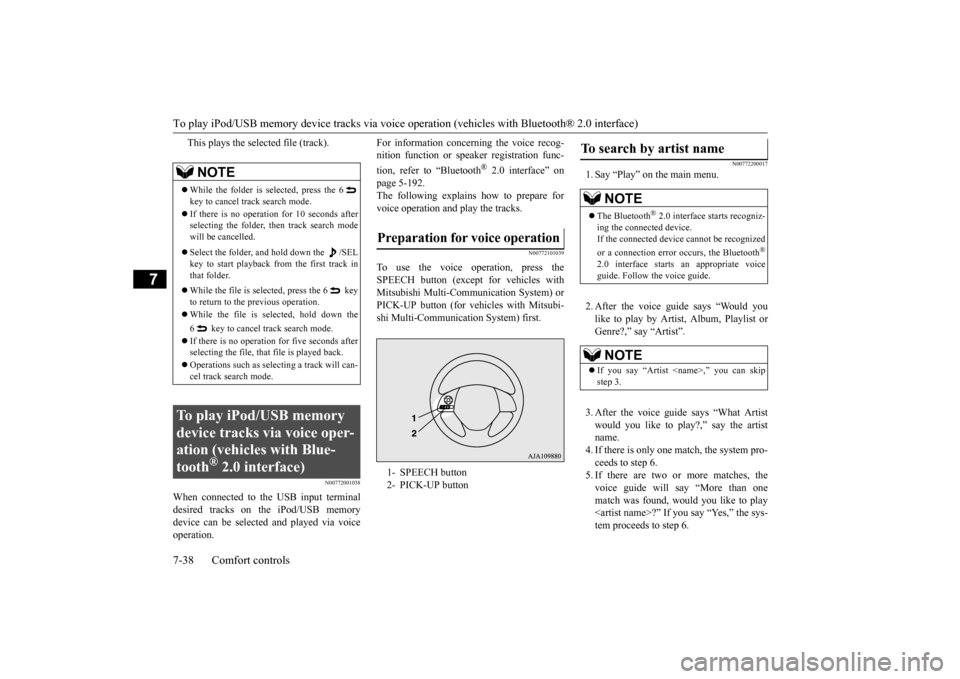
To use the voice operation, press the SPEECH button (except
for vehicles with
Mitsubishi Multi-Communication System) orPICK-UP button (for vehicles with Mitsubi- shi Multi-Communication System) first.
N00772200017
1. Say “Play” on the main menu. 2. After the voice guide says “Would you like to play by Artist, Album, Playlist or Genre?,” say “Artist”. 3. After the voice guide
says “What Artist
would you like to play?,” say the artistname. 4. If there is only one ma
tch, the system pro-
ceeds to step 6.5. If there are two or more matches, the voice guide will say “More than one match was found, would you like to play
say “Yes,” the sys-
tem proceeds to step 6.
NOTE
While the folder is selected, press the 6 key to cancel track search mode. If there is no operation for 10 seconds after selecting the folder, then track search mode will be cancelled. Select the folder, and hold down the /SEL key to start playback from the first track inthat folder. While the file is selected, press the 6 key to return to the
previous operation.
While the file is se
lected, hold down the
6 key to cancel track search mode. If there is no operation for five seconds after selecting the file, that file is played back. Operations such as sele
cting a trac
k will can-
cel track search mode.
To play iPod/USB memory device tracks via voice oper-ation (vehicles with Blue-tooth
® 2.0 interface)
Preparation for voice operation 1- SPEECH button 2- PICK-UP button
To search by artist name
NOTE
The Bluetooth
® 2.0 interface starts recogniz-
ing the connect
ed device.
If the connected device
cannot be recognized
or a connection error occurs, the Bluetooth
®
2.0 interface starts
an appropriate voice
guide. Follow the voice guide.NOTE
If you say “Artist
BK0223400US.book 38 ページ 2015年2月13日 金曜日 午後12時15分
Page 367 of 464

To play iPod/USB memory device tr
acks via voice operation (vehicles with Bluetooth® 2.0 interface)
Comfort controls 7-39
7
If you say “No,” the next matching artist is uttered by the system. 6. After the voice guide
says “Playing
the voice recognition
mode and starts playback.
N00772300018
1. Say “Play” on the main menu.
2. After the voice guide says “Would you like to play by Artist, Album, Playlist orGenre?,” say “Album”. 3. After the voice gui
de says “What Album
would you like to play?” say the album title.4. If there is only one match, the system pro- ceeds to step 6. 5. If there are two or more matches, thevoice guide will say “More than one match was found, would you like to play
u say “Yes,” the sys-
tem proceeds to step 6. If you say “No,” the name of the next matching album is uttered by the system.
6. After the voice guide says “Playing
N00772400019
1. Say “Play” on the main menu.
NOTE
If you say “No” to th
ree or all artist names
uttered by the system, the voice guide will say “Artist not found, pl
ease try again” and
the system returns to step 2. Search time depends on the number of songs on your connected devi
ce. Devices contain-
ing a large number of
songs may take longer
to return search results.NOTE
If the confirmation f
unction is active, the
voice guide confirms if
the artist name is
correct. If the artist name is correct, say“Yes”. If not, say “No”. After the voice guide says “Artist not found, please try again,” the system returns to step 2.
To search by album title
NOTE
The Bluetooth
® 2.0 interface starts recogniz-
ing the connect
ed device.
If the connected device
cannot be recognized
or a connection error occurs, the Bluetooth
®
2.0 interface starts
an appropriate voice
guide. Follow the voice guide.NOTE
If you say “Album
step 3.
NOTE
If you say “No” to thre
e or all album titles
uttered by the system, the voice guide willsay “Album not found, pl
ease try again” and
the system returns to step 2.NOTE
If the confirmation f
unction is active, the
voice guide confirms if
the album title is cor-
rect. If the album title is correct, say “Yes”. If not, say “No”. Afte
r the voice guide says
“Album not found, please
try again,” the sys-
tem returns to step 2.
To search by playlist
BK0223400US.book 39 ページ 2015年2月13日 金曜日 午後12時15分