2016 MITSUBISHI OUTLANDER All
[x] Cancel search: AllPage 325 of 464
Trailer towing
Driving safety 6-13
6
Tongue loads can be adjusted by proper dis- tribution of the load in the trailer. This can bechecked by separately
weighing the loaded
trailer and then the tongue. The GAWRs are printed on the certification label which is riveted on the door sill on the driver’s side. Refer to “Vehicle labeling” on page 11-2. Choose a proper hitch and ball, and make sure it is installed at a height that is compati- ble with the trailer.Use a good equalizing hitch which uniformly distributes the trailer tongue load throughout the frame.
A safety chain must al
ways be used between
the towing vehicle and the trailer. Leave suf-ficient slack in the chain for turns. The chain should cross under the trailer tongue to pre- vent the tongue from dropping to the groundin case it becomes damaged or separated. For correct safety chai
n procedures, consult
your authorized Mitsub
ishi Motors dealer.
Your vehicle will need service more often when you’re towing a trailer. Refer to “WAR-RANTY AND MAINTENANCE MAN- UAL”. Especially important in trailer operation are manual transaxle oil, automatictransaxle fluid, engine oi
l, rear axle oil, belt,
cooling system and brake system. Each of these is covered in this manual. For details, please refer to the “Vehicle care and maintenance” section.Check periodically to see that all hitch nuts and bolts are tight. Mitsubishi Motors recommends that any trailer having a total we
ight of 1,250 lbs (567
kg) or more (2400 models), 1,400 lbs (635kg) or more (3000 mode
ls) be equipped with
its own electric or surge-type brakes. If you choose electric br
akes, be sure they are
electrically actuated. Do not attempt to tapinto your vehicle’s hydraulic system. No mat- ter how successful it
may seem, any attempt
to attach trailer brakes to your vehicle’shydraulic system will lower braking effec- tiveness and create a potential hazard.
Gross axle weight rating (GAWR) Trailer hitches
WA R N I N G If you make any holes in the body of your vehicle for installing
a trailer hitch, be
sure to seal the holes later when youremove the hitch. If
you don’t seal them,
deadly carbon monoxide (CO) from your exhaust can enter your vehicle. Refer to“Exhaust system” on page 9-24.
NOTE
Mitsubishi Motors recommends that sway control be used whenever you are towing, toimprove towing stability.For further informati
on, please contact your
authorized Mitsubishi Motors dealer.
Safety chains
CAUTION Never tow a trailer wi
thout using a safety
chain securely attached to both the trailer and the vehicle. If the
coupling unit or hitch
ball experiences a probl
em, the trailer may
separate from
your vehicle.
Maintenance when trailer tow- ing Trailer brakes
BK0223400US.book 13 ページ 2015年2月13日 金曜日 午後12時15分
Page 326 of 464
Trailer towing 6-14 Driving safety
6
Trailer lights and equipment must comply with federal, state,
and local regulations.
Check with your loca
l recreational vehicle
dealer for the requirements in your area, and use only equipment designed for your vehi- cle. Since lighting and wiring
vary by trailer type
and brand, you should have a qualified tech- nician install a suitable connector between thevehicle and the trailer.
Improper equipment or
installation can cause da
mage to your vehi-
cle’s electrical system
and affect your vehicle
warranty. Many states and Canadi
an provinces require
special outside mirrors when towing a trailer. Even if not required,
you should install spe-
cial mirrors if you ca
nnot clearly see behind
you, or if the trailer
creates a blind spot.
Ask your trailer sales or
rental agency if any
other items are recomm
ended or required for
your towing situation.
Towing a trailer requires a certain amount of experience. Before setting out for the open road, you’ll want to get to know your trailer. Acquaint
yourself with the feel of handling and braking with the added weight of the trailer. Alwayskeep in mind that the vehicle you are driving is now a good deal longer and not nearly as responsive as your vehicl
e is without a trailer.
Before you start, check the trailer hitch, safety chains, tires
and mirror adjustment.
Be sure your vehicle’s ti
res are inflated to the
cold inflation pressure listed in the manual. You’ll find these numbe
rs on the tire and
loading information placard at the sill of thedriver’s door. Refer to “Tire inflati
on pressures” on page
9-18. Stay at least twice as far behind the vehicle ahead as you would when driving your vehi- cle without a trailer.
This can help you avoid
situations that require
heavy braking and sud-
den turns.
Trailer lights Additional trailer equipment
Operating hints
WA R N I N G If you have a rear window open and you tow a trailer with
your vehicle, carbon
monoxide gas which
you cannot see or
smell could come into your vehicle. It can cause unconsciousness or death. Refer to“Exhaust system” on page 9-24. To maximize your safe
ty when towing a
trailer: Have your exhaust system inspected for leaks, and make necessary repairs beforestarting on your trip. Keep the rear windows closed.If exhaust does come into your vehicle through a window or
another opening,
drive with your front, main heating or cooling system on an
d with the blower on
any speed. This will
bring fresh, outside
air into your vehicle. Do not use recircula- tion because it only recirculates the air inside your vehicle. Refer to “Air selectionswitch” on page 7-9.
Driver preparation
Vehicle preparation Tire Following distance
BK0223400US.book 14 ページ 2015年2月13日 金曜日 午後12時15分
Page 330 of 464
Vents 7-2 Comfort controls
7
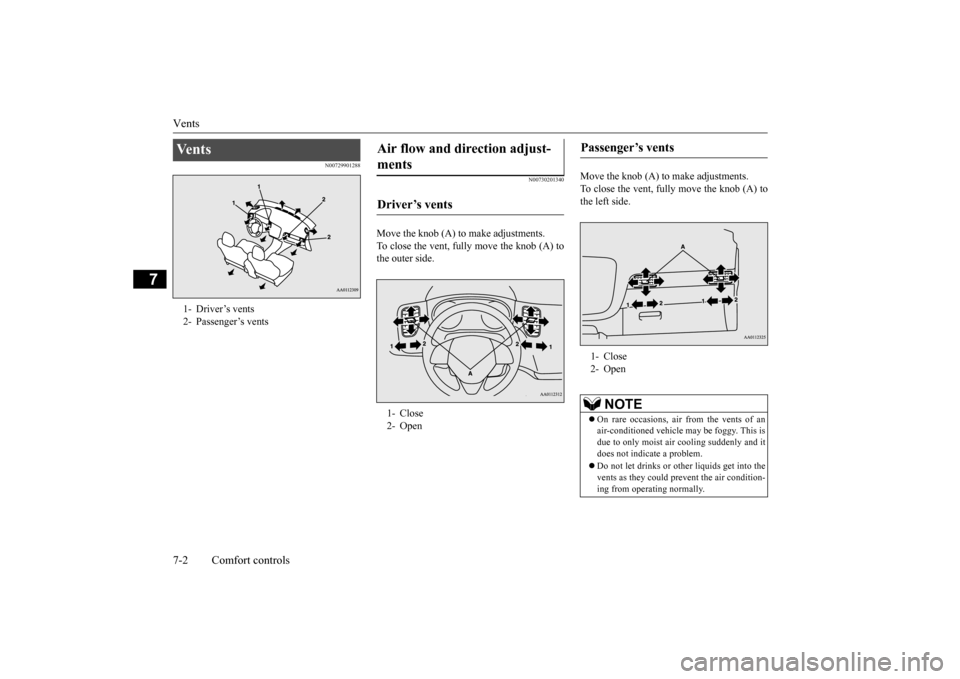
N00729901288
N00730201340
Move the knob (A) to make adjustments. To close the vent, fully move the knob (A) tothe outer side.
Move the knob (A) to make adjustments. To close the vent, fully move the knob (A) to the left side.
Ve n t s 1- Driver’s vents2- Passenger’s vents
Air flow and direction adjust- ments Driver’s vents 1- Close 2- Open
Passenger’s vents 1- Close 2- Open
NOTE
On rare occasions, air from the vents of an air-conditioned vehicle
may be foggy. This is
due to only moist air
cooling suddenly and it
does not indica
te a problem.
Do not let drinks or ot
her liquids get into the
vents as they could pr
event the air condition-
ing from operating normally.
BK0223400US.book 2 ページ 2015年2月13日 金曜日 午後12時15分
Page 331 of 464
Vents
Comfort controls 7-3
7
N00736401605
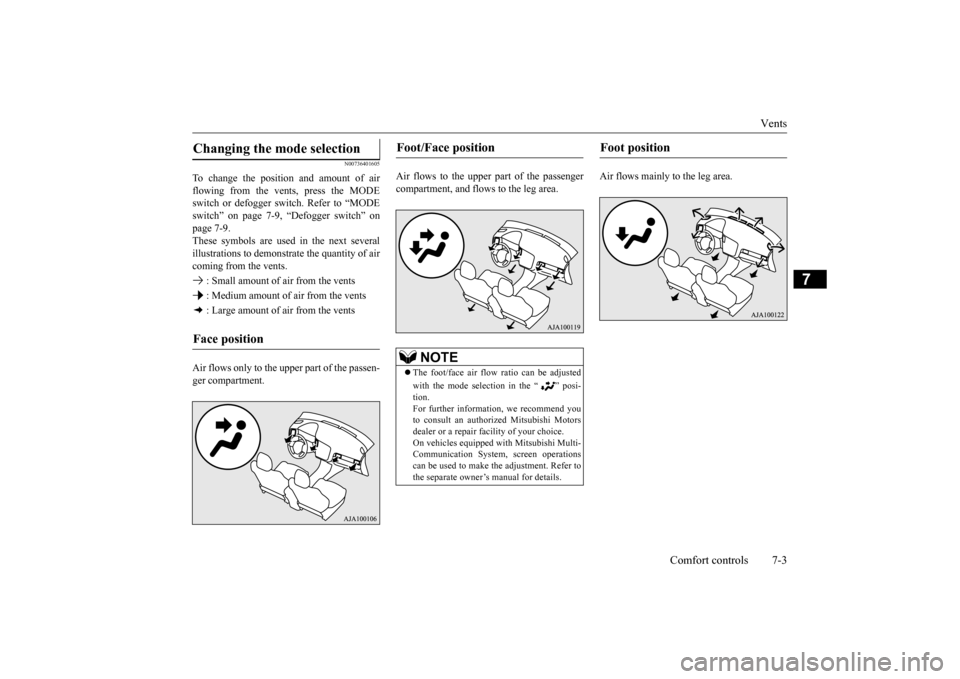
To change the position and amount of air flowing from the vents, press the MODE switch or defogger sw
itch. Refer to “MODE
switch” on page 7-9, “Defogger switch” on page 7-9. These symbols are used in the next severalillustrations to demonstr
ate the quantity of air
coming from the vents. : Small amount of air from the vents : Medium amount of air from the vents : Large amount of air from the vents Air flows only to the upper part of the passen- ger compartment.
Air flows to the upper part of the passenger compartment, and flows to the leg area.
Air flows mainly to the leg area.
Changing the mode selection Face position
Foot/Face position
NOTE
The foot/face air flow ratio can be adjusted with the mode selection in the “ ” posi- tion.For further information, we recommend you to consult an authorized Mitsubishi Motors dealer or a repair fa
cility of your choice.
On vehicles equipped
with Mitsubishi Multi-
Communication System, screen operations can be used to make
the adjustment. Refer to
the separate owner’s manual for details.
Foot position
BK0223400US.book 3 ページ 2015年2月13日 金曜日 午後12時15分
Page 336 of 464
Automatic climate cont
rol air conditioner
7-8 Comfort controls
7
The above indicates the
factory settings. You
can personalize the air
selection switch and
air conditioning switch to match your per- sonal preferences.Contact your Mitsubishi
Motors dealer or a
repair facility of your
choice for assistance.
Refer to “Personalizi
ng the air conditioning
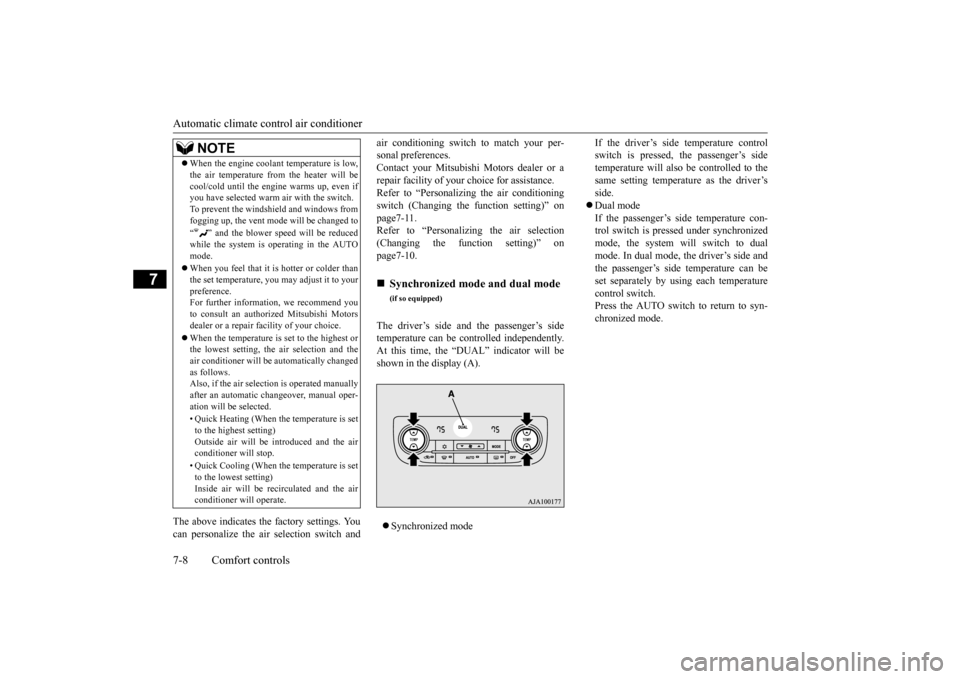
switch (Changing the function setting)” on page7-11. Refer to “Personalizing the air selection(Changing the function setting)” on page7-10. The driver’s side and the passenger’s side temperature can be controlled independently.At this time, the “
DUAL” indicator will be
shown in the display (A). Synchronized mode
If the driver’s side temperature control switch is pressed, the passenger’s sidetemperature will also be controlled to the same setting temperat
ure as the driver’s
side. Dual mode If the passenger’s side temperature con- trol switch is pressed under synchronizedmode, the system will switch to dual mode. In dual mode, the driver’s side and the passenger’s side
temperature can be
set separately by usi
ng each temperature
control switch.Press the AUTO switch to return to syn- chronized mode.
When the engine coolan
t temperature is low,
the air temperature from the heater will becool/cold until the engi
ne warms up, even if
you have selected warm
air with the switch.
To prevent the windshield and windows from fogging up, the vent mode
will be changed to
“ ” and the blower speed will be reduced while the system is operating in the AUTO mode. When you feel that it is hotter or colder than the set temperature, you may adjust it to yourpreference. For further information, we recommend you to consult an authorized Mitsubishi Motorsdealer or a repair fa
cility of your choice.
When the temperature is set to the highest or the lowest setting, the air selection and the air conditioner will be
automatically changed
as follows.Also, if the air selection is operated manually after an automatic ch
angeover, manual oper-
ation will be selected. • Quick Heating (When th
e temperature is set
to the highest setting)Outside air will be introduced and the air conditioner will stop. • Quick Cooling (When th
e temperature is set
to the lowest setting) Inside air will be recirculated and the airconditioner wi
ll operate.
NOTE
Synchronized mode and dual mode
(if so equipped)
BK0223400US.book 8 ページ 2015年2月13日 金曜日 午後12時15分
Page 337 of 464
Automatic climate cont
rol air conditioner
Comfort controls 7-9
7
N00737101221
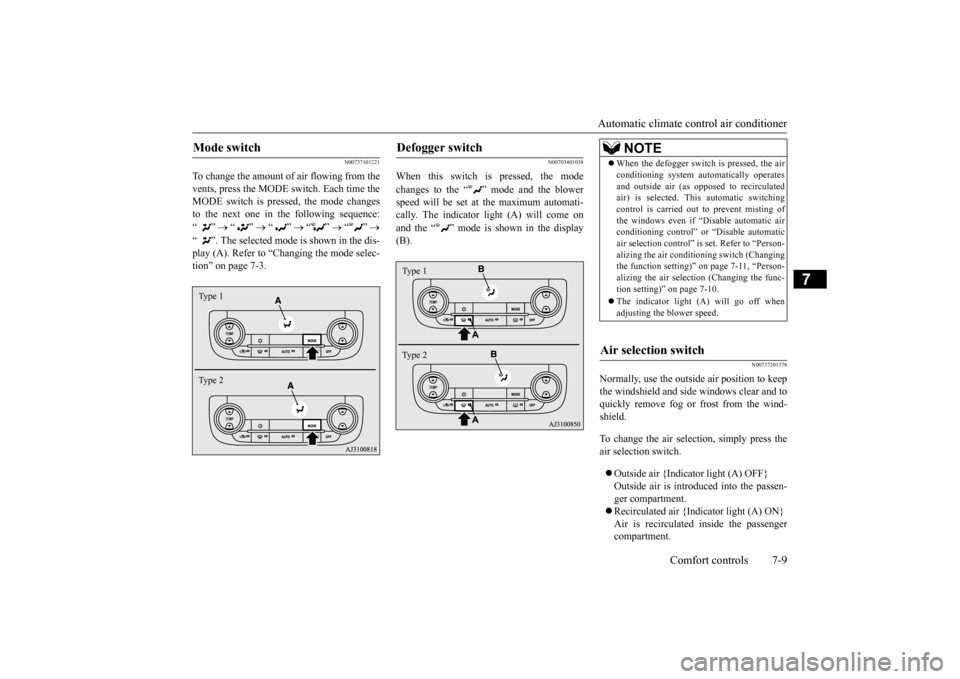
To change the amount of air flowing from the vents, press the MODE switch. Each time the MODE switch is pressed, the mode changesto the next one in the following sequence: “”
“”
“”
“”
“”
“ ”. The selected mode is shown in the dis- play (A). Refer to “C
hanging the mode selec-
tion” on page 7-3.
N00703401038
When this switch is pressed, the mode changes to the “ ”
mode and the blower
speed will be set at the maximum automati- cally. The indicator light (A) will come on and the “ ” mode is shown in the display (B).
N00737201378
Normally, use the outside
air position to keep
the windshield and side
windows clear and to
quickly remove fog or frost from the wind-shield. To change the air selection, simply press the air selection switch. Outside air {Indicator light (A) OFF} Outside air is introduced into the passen-ger compartment. Recirculated air {Indicator light (A) ON} Air is recirculated
inside the passenger
compartment.
Mode switch Type 1 Type 2
Defogger switch Type 1 Type 2
NOTE
When the defogger switch
is pressed, the air
conditioning system au
tomatically operates
and outside air (as opposed to recirculatedair) is selected. This automatic switching control is carried out to prevent misting of the windows even if “D
isable automatic air
conditioning control” or
“Disable
automatic
air selection control” is
set. Refer to “Person-
alizing the air conditi
oning switch (Changing
the function setting)”
on page 7-11, “Person-
alizing the air selecti
on (Changing the func-
tion setting)” on page 7-10. The indicator light
(A) will go off when
adjusting the blower speed.
Air selection switch
BK0223400US.book 9 ページ 2015年2月13日 金曜日 午後12時15分
Page 338 of 464
Automatic climate cont
rol air conditioner
7-10 Comfort controls
7
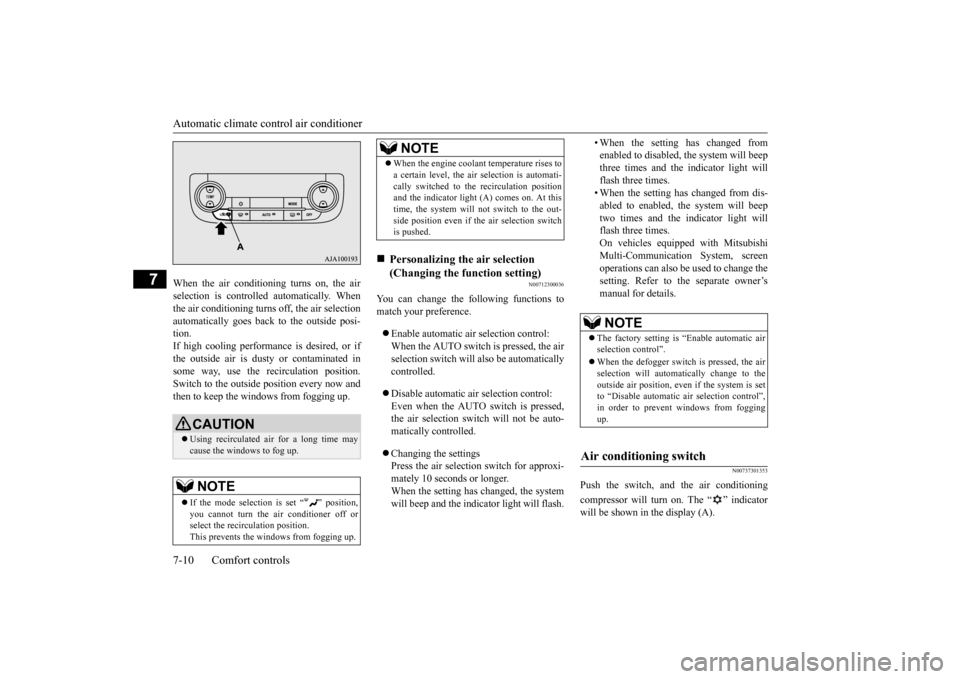
When the air conditioning turns on, the air selection is controlled automatically. Whenthe air conditioning turns
off, the air selection
automatically goes back
to the outside posi-
tion.If high cooling performanc
e is desired, or if
the outside air is dusty
or contaminated in
some way, use the
recirculat
ion position.
Switch to the outside position every now and then to keep the windows from fogging up.
N00712300036
You can change the following functions tomatch your preference. Enable automatic air selection control: When the AUTO switch is pressed, the airselection switch will also be automatically controlled. Disable automatic air selection control: Even when the AUTO switch is pressed,the air selection switch will not be auto- matically controlled. Changing the settings Press the air selection switch for approxi-mately 10 seconds or longer. When the setting has changed, the system will beep and the indi
cator light will flash.
• When the setting has changed from enabled to disabled, the system will beepthree times and the indicator light will flash three times. • When the setting has changed from dis-abled to enabled, the system will beep two times and the i
ndicator light will
flash three times.On vehicles equippe
d with Mitsubishi
Multi-Communication System, screen operations can also be used to change the setting. Refer to th
e separate owner’s
manual for details.
N00737301353
Push the switch, and the air conditioning compressor will turn on. The “ ” indicator will be shown in the display (A).
CAUTION Using recirculated air for a long time may cause the windows to fog up.NOTE
If the mode selection
is set “ ” position,
you cannot turn the ai
r conditioner off or
select the recirc
ulation position.
This prevents the windows from fogging up.
When the engine coolan
t temperature rises to
a certain level, the air selection is automati-cally switched to the recirculation positionand the indicator light (A) comes on. At this time, the system will not switch to the out- side position even if th
e air selection switch
is pushed.
Personalizing the air selection (Changing the function setting) NOTE
NOTE
The factory setting is “Enable automatic air selection control”. When the defogger switch is pressed, the air selection will automati
cally change to the
outside air position, even if the system is setto “Disable automatic air selection control”, in order to prevent windows from fogging up.
Air conditioning switch
BK0223400US.book 10 ページ 2015年2月13日 金曜日 午後12時15分
Page 339 of 464
Automatic climate cont
rol air conditioner
Comfort controls 7-11
7
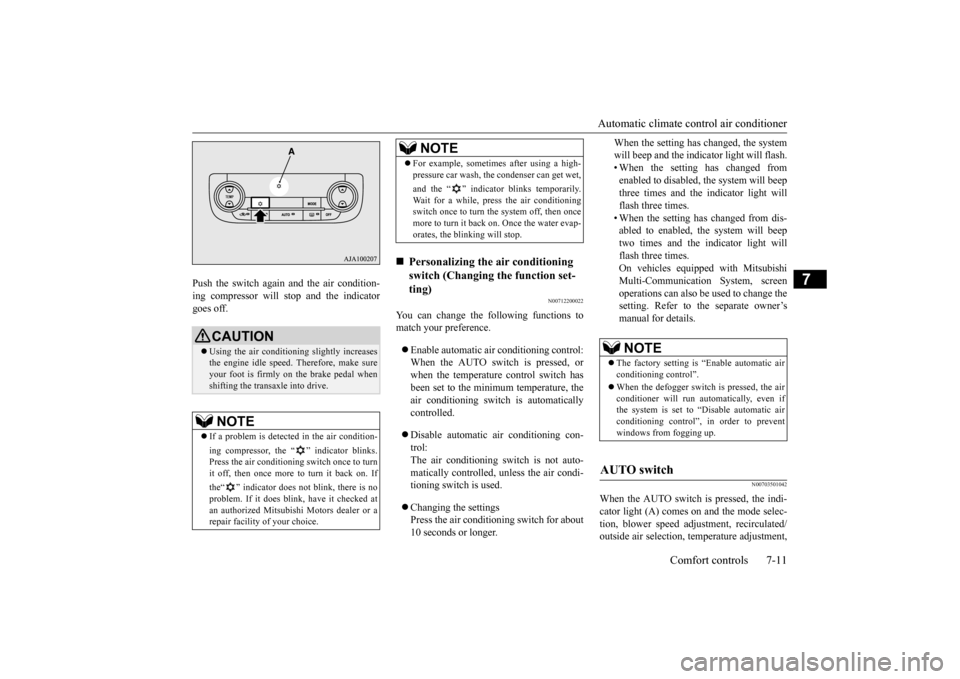
Push the switch again and the air condition- ing compressor will stop and the indicatorgoes off.
N00712200022
You can change the following functions tomatch your preference. Enable automatic air conditioning control: When the AUTO switch is pressed, or when the temperature control switch has been set to the minimum temperature, theair conditioning switch is automatically controlled. Disable automatic air conditioning con- trol:The air conditioning switch is not auto- matically controlled,
unless the air condi-
tioning switch is used. Changing the settings Press the air conditioning switch for about 10 seconds or longer.
When the setting has changed, the system will beep and the indi
cator light will flash.
• When the setting has changed from enabled to disabled,
the system will beep
three times and the indicator light willflash three times. • When the setting has changed from dis- abled to enabled, the system will beeptwo times and the indicator light will flash three times. On vehicles equippe
d with Mitsubishi
Multi-Communication System, screen operations can also be used to change thesetting. Refer to the separate owner’s manual for details.
N00703501042
When the AUTO switch is pressed, the indi-cator light (A) comes on and the mode selec- tion, blower speed adju
stment, reci
rculated/
outside air selection, temperature adjustment,
CAUTION Using the air conditioni
ng slightly increases
the engine idle speed. Therefore, make sure your foot is firmly on the brake pedal when shifting the transaxle into drive.NOTE
If a problem is detect
ed in the air condition-
ing compressor, the “ ” indicator blinks. Press the air conditioning
switch once to turn
it off, then once more to turn it back on. If the“ ” indicator does not blink, there is no problem. If it does blink,
have it checked at
an authorized Mitsubish
i Motors dealer or a
repair facility of your choice.
For example, sometimes after using a high- pressure car wash, the
condenser can get wet,
and the “ ” indicator blinks temporarily. Wait for a while, press the air conditioning switch once to turn the system off, then once more to turn it back on. Once the water evap-orates, the blinking will stop.
Personalizing the air conditioning switch (Changing the function set-ting) NOTE
NOTE
The factory setting is
“Enable automatic air
conditioning control”. When the defogger switch
is pressed, the air
conditioner will run au
tomatically, even if
the system is set to “Disable automatic air conditioning control”, in order to prevent windows from fogging up.
AUTO switch
BK0223400US.book 11 ページ 2015年2月13日 金曜日 午後12時15分