2016 MITSUBISHI OUTLANDER III ECO mode
[x] Cancel search: ECO modePage 62 of 464
Supplemental Restraint System (SRS) - airbag 4-36 Seat and restraint systems
4
N00407801532
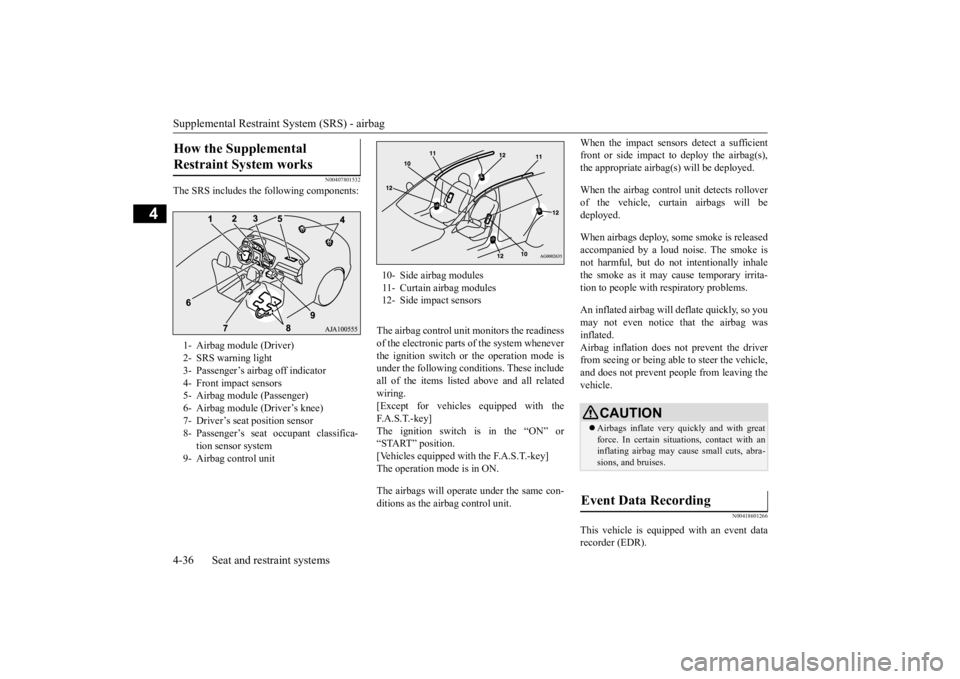
The SRS includes the following components:
The airbag control unit monitors the readiness of the electronic parts of the system whenever the ignition switch or the operation mode is under the following conditions. These include all of the items listed
above and all related
wiring.[Except for vehicles
equipped with the
F. A . S . T. - k e y ] The ignition switch is in the “ON” or“START” position. [Vehicles equipped with the F.A.S.T.-key] The operation mode is in ON. The airbags will opera
te under the same con-
ditions as the airbag control unit.
When the impact sensors detect a sufficient front or side impact to deploy the airbag(s),the appropriate airbag
(s) will be deployed.
When the airbag control unit detects rollover of the vehicle, curtain airbags will be deployed. When airbags deploy, so
me smoke is released
accompanied by a loud noise. The smoke is not harmful, but do not intentionally inhale the smoke as it may ca
use temporary irrita-
tion to people with respiratory problems. An inflated airbag will deflate quickly, so you may not even notice that the airbag wasinflated. Airbag inflation does not prevent the driver from seeing or being able to steer the vehicle,and does not prevent people from leaving the vehicle.
N00418601266
This vehicle is equipped with an event data recorder (EDR).
How the Supplemental Restraint System works 1- Airbag module (Driver) 2- SRS warning light 3- Passenger’s airbag off indicator 4- Front impact sensors5- Airbag module (Passenger) 6- Airbag module (Driver’s knee) 7- Driver’s seat position sensor8- Passenger’s seat oc
cupant classifica-
tion sensor system
9- Airbag control unit
10- Side airbag modules11- Curtain airbag modules12- Side impact sensors
CAUTION Airbags inflate very quickly and with great force. In certain situ
ations, contact with an
inflating airbag may cause small cuts, abra- sions, and bruises.
Event Data Recording
BK0223400US.book 36 ページ 2015年2月13日 金曜日 午後12時15分
Page 64 of 464

Supplemental Restraint System (SRS) - airbag 4-38 Seat and restraint systems
4
bag control unit controls deployment of the passenger’s front airbag in accordance withthe information it receives from this system. The passenger’s front airbag will not deploy in an impact when the system senses no occu-pant on the front passenger’s seat or a child in a child restraint system. In this case, the pas- senger airbag off indi
cator will come on.
Refer to “Passenger’s ai
rbag off indicator” on
page 4-38. If there is a problem involving the passen- ger’s seat occupant cl
assification sensor sys-
tem, the SRS warning light in the instrumentpanel will come on. Refer to “SRS warning light/display” on page 4-39.
N00418101346
The passenger’s airbag off indicator is located in the instrument panel. The indicator normally comes on when the ignition switch is turned to the “ON” position or the operation mode is put in ON, and goes out a few seconds later.
In the following situ-
ations, the indicator will stay on to show that the passenger front airb
ag is not operational.
The front passenger’s seat is not occupied.
WA R N I N GIf any of the follow
ing conditions occur,
you should immediatel
y have your vehicle
inspected by an au
thorized Mitsubishi
Motors dealer as soon as possible:• The SRS warning light does not initiallycome on when the ignition switch or the operation mode is under the followingconditions. [Except for vehicles equipped with the F. A . S . T. - k e y ]The ignition switch is in the “ON” or “START” position. [Vehicles equipped with the F.A.S.T.-key]The operation mode is in ON.• The SRS warning light does not go outafter several seconds.
• The SRS warning li
ght comes on while
you are driving.
To ensure that the passenger’s seat occu- pant classification sensor system can sense correctly, observe the following instruc-tions. Failure to follow these instructions can adversely affect
the performance of
the passenger’s airbag system.• Adjust the seat to the correct position,and sit well back
against the seatback.
Refer to “Front seats” on page 4-4.• Do not recline the seatback more thannecessary.• Never have more th
an one person (adult
or child) sitting on the seat.• Do not place anything between the seatand the floor console.• When attaching a child restraint system,secure it firmly.• Do not place luggage or other objects onthe seat.• Do not use a seat cover or a cushion.• Do not modify or re
place the seat and
seat belt.• Do not place luggage or other objectsunder the seat.• Do not place and use
an electronic device
such as a computer on the seat.• Do not place heavy obje
cts on the seat or
stick pins, needles, or other objects intoit.• Do not remove the seat cushion skin.WA R N I N G
• If any liquid is spilled on the seat, wipe itand dry the seat immediately.
If the vehicle is involved in a severe impact, have the SRS sensors inspected by an authorized
Mitsubishi Motors dealer as
soon as possible.
Passenger’s airbag off indicator
WA R N I N G
BK0223400US.book 38 ページ 2015年2月13日 金曜日 午後12時15分
Page 78 of 464

5
Features and controlsECO mode switch ........................................................................ 5-184 Front fog light switch (if so equipped) ......................................... 5-184 Wiper and washer switch ............................................................ 5-185Wiper deicer switch (if so equipped)............................................ 5-190 Electric rear window def
ogger switch ......
...........
...........
............. 5-190
Horn switch ................................................................................. 5-191Link System (if so equipped) ....................................................... 5-192 Bluetooth
® 2.0 interface (if so equipped) .................................... 5-192
USB input terminal (if so equipped) ............................................ 5-215Sun visors .................................................................................... 5-218 12 V power outlets ...................................................................... 5-219 HomeLink
® Wireless Control System (if so equipped) ............... 5-220
Interior lights ............................................................................... 5-225 Storage spaces ............................................................................. 5-228 Cup holders ................................................................................. 5-232Bottle holders .............................................................................. 5-233 Cargo area cover (if so equipped) ............................................... 5-233 Assist grips .................................................................................. 5-235Coat hooks ................................................................................... 5-235 Luggage hooks ............................................................................ 5-236BK0223400US.book 2 ページ 2015年2月13日 金曜日 午後12時15分
Page 86 of 464

Keyless entry system (if so equipped) 5-10 Features and controls
5
N00543701060
If you are near your vehicle and feel threat- ened, you may activate the alarm to call atten- tion as follows: 1. Press the PANIC button (3) for more than 1 second.2. The headlights will blink on and off and the horn will sound intermittently for about 3 minutes.3. To turn off the alarm, press any button on the remote control transmitter.
N00543801087
Only remote control transmitters pro- grammed with the vehicle’s electronics canlock or unlock all doors and the liftgate. If you lose the remote control transmitter, you can order a remote control transmitter from
your authorized Mitsubishi Motors dealer by referring to the key number.To prevent vehicle theft, the ID code for the remote control transmitter must be changed. Take your vehicle and
all remote control
transmitters to your authorized Mitsubishi Motors dealer to have your ID code changed.
N00543900049
To add a remote control transmitter, you must already have 1 regist
ered remote control
transmitter. Registering the ID code can be done by your-self or by your authorized Mitsubishi Motors dealer. For you to regist
er the ID code your-
self, follow the “Customer remote controltransmitter programming” procedure below. If you choose to have your authorized Mitsubishi Motors dealer register the IDcode, take your vehi
cle and any remaining
keys to your authorized Mitsubishi Motors dealer.
N00544001158
You can program new re
mote control trans-
mitters to the system
if you have one valid
(already registered) re
mote control transmit-
ter by doing the following. The driver’s doormust be opened while you follow the steps below: 1. Have available al
l (current and new)
remote control transmitters you wish to register. 2. With a valid (already registered) remotecontrol transmitter, press the UNLOCK button (2) for 4 to 10 seconds. Then press and hold the LOCK button (1).3. Within 5 seconds of pressing the LOCK button, release the LOCK and UNLOCK buttons in sequence.At this time, ID codes for all remote con- trol transmitters except for the transmitter used in steps 2 and 3 are erased and theanswerback function (door is locked and unlocked) informs you that the registra- tion mode has been activated.
NOTE
On a vehicle equippe
d with a Mitsubishi
Multi-Communication System, the functionscan be adjusted on the screen. For details,refer to the separate operation manual.
Using the panic alarm
Replacement remote control transmitters
Additional remote control transmitters
NOTE
You are provided with
2 remote control
transmitters, but you may register up to 8 remote control transmitters.
Customer remote control trans- mitter programming (Except for vehicles sold in Canada)
BK0223400US.book 10 ページ 2015年2月13日 金曜日 午後12時15分
Page 87 of 464

Keyless entry system (if so equipped)
Features and controls 5-11
5
4. Within 60 seconds after step 3, complete the following ID code
registration opera-
tion using the next remote control trans- mitter you wish to register within 4 seconds.i) Press both the LOCK and UNLOCK buttons for 2 seconds. ii) Release both the LOCK and UNLOCKbuttons for 1 second. iii) Press the UNLOCK button. The answerback function informs you that the ID code registration of the transmitter is completed.5. To register the ID codes of additional remote control transmitters, repeat step 4 within 60 seconds after step 4.6. If no ID code of a remote control trans- mitter is registered within 60 seconds after step 4, the regi
stration mode is can-
celed and the normal mode returns.
N00546101124
Your keyless entry system operates on a radio frequency subject to
Federal Communica-
tions Commission (FCC)
Rules (For vehicles
sold in U.S.A.) and Industry Canada Rules (For vehicles sold in Canada). This device complies with Part 15 of FCC Rules andIndustry Canada licenc
e-exempt RSS stan-
dard(s). Operation is subject to the following two con- ditions. This device may not
cause harmful inter-
ference. This device must ac
cept any interference
received, including interference that may cause undesired operation.
NOTE
For verification purposes, try to lock and unlock the doors after the registration is completed. The indicator light (4)
comes on each time a
button is pressed. The keyless entry system does not work if the key is in the ignition switch.
The remote control transmitter can be used from about 40 feet (12 m) away. However,this distance may cha
nge if your vehicle is
near a TV transmitti
ng tower, a power sta-
tion, or a radio station. If the following conditi
ons are observed after
pressing the LOCK (1) or UNLOCK (2) but- ton on the remote control transmitter, thebattery in the remote control transmitter may need to be replaced. • The doors and the lift
gate cannot be locked
or unlocked. • The panic alarm cannot be operated. • The indicator light
(4) is dim or does not
come on.
If you lose your remote control transmitter, please contact an au
thorized Mitsubishi
Motors dealer for a replacement. If you wish to obtain
an additional remote
control transmitter, please contact an autho- rized Mitsubishi Moto
rs dealer. A maximum
of 8 remote control tr
ansmitters can be pro-
grammed for your vehicle. To use the new remote control transmitters, it is necessary to register
the key with both the
electronic immobilizer and keyless entry sys-tem. Also refer to “Electronic immobilizer (Anti- theft starting system): Customer key pro-gramming” on page 5-6.NOTE
General information
CAUTION Changes or modifica
tions not expressly
approved by the manufacturer for compli- ance could void the user
’s authority to oper-
ate the equipment.
BK0223400US.book 11 ページ 2015年2月13日 金曜日 午後12時15分
Page 92 of 464

Free-hand Advanced
Security Transmitter (F.A.S
.T.-key) (if so equipped)
5-16 Features and controls
5
While carrying the F.A.S.T.-key within the operating range, you can unlock the doors and the liftgate by using the F.A.S.T.-keyoperation. The dome light will turn on for 30 seconds. The turn signal lights will blink twice and thebuzzer will
sound twice.
Also refer to “Door locks”, “Power door locks”, “Liftgate” and “Power liftgate” on pages 5-33, 5-35, 5-36 and 5-38 respectively.
Press the driver’s door lock/unlock switch (A) to unlock only the driver’s door.Within about 2 seconds, press the driver’s door lock/unlock switch one more time to unlock all the doors and the liftgate.
Press the front passenger’s door lock/unlock switch (B) or the liftgate OPEN switch (C) tounlock all the doors and the liftgate.
• There is a F.A.S.T.-key in the passenger compartment • A door or the liftgate is open or ajar • The operation mode
is not in OFF.
The liftgate OPEN switch (C) can be used to confirm that the vehicl
e is locked properly.
Press the liftgate OP
EN switch within about
3 seconds of locking. If the liftgate OPEN switch is pressed 3 sec- onds or more after the
vehicle is locked, the
doors and the liftga
te are unlocked.
The time within which locking confirmation is possible can be adjusted. See an autho-rized Mitsubishi Motors
dealer for details.
On a vehicle equippe
d with a Mitsubishi
Multi-Communication System, the functioncan be adjusted on the screen. For details, refer to the separate operation manual.
To unlock
NOTE
NOTE
On the vehicles equipped with the mirror retractor switch, the outside rearview mirrors automatically extend wh
en the driver’s door
is unlocked using the driver’s lock/unlock switch (A), front passenger’s door lock/unlock switch (B)
or the liftgate open
switch (C). Settings can be changed so that all doors and the liftgate are unlocked automatically by pressing the driver’s door lock/unlock switch once.Refer to “Setting of door
and liftgate unlock
function” on page 5-30.Driver’s door lock/unlock switch
Front passenger’s door lock/unlock switchLiftgate OPEN switch
BK0223400US.book 16 ページ 2015年2月13日 金曜日 午後12時15分
Page 93 of 464

Free-hand Advanced Securi
ty Transmitter (F.A.S.T.-key) (if so equipped)
Features and controls 5-17
5
N00585700027
Within 30 seconds of locking the doors and liftgate using the LOCK switch, press the LOCK switch twice rapidly to retract the out- side rearview mirrors. Within 30 seconds of unlocking the doors and liftgate using the UNLOCK switch, press the UNLOCK switch twice rapidly to return theoutside rearview mirrors to their extended positions. The outside rearview mi
rrors are not initially
set to work as described above. If you wantthem to work as described above, you need to set them so that they do not retract/extend when the doors and liftgate arelocked/unlocked using the F.A.S.T.-key or the keyless entry system of the F.A.S.T.-key. For details, please consult an authorized Mit-subishi Motors dealer.
NOTE
If the doors and the liftgate are unlocked using the driver’s or front passenger’s doorlock/unlock switch when all doors and theliftgate are locked and no doors or the lift- gate are opened within
about 30 seconds, the
doors and the liftgate wi
ll automatically re-
lock. The amount of time after unlocking until the vehicle re-locks au
tomatically can be
adjusted. See an authorized Mitsubishi Motors dealer for details.On a vehicle equippe
d with a Mitsubishi
Multi-Communication System, the functions can be adjusted on the screen. For details,refer to the separa
te operation manual.
In cases such as the following, the F.A.S.T.- key does not operate. • A door or the liftgate is open or ajar• The operation mode is not in OFF. The doors and the liftgate cannot be unlocked by using the li
ftgate OPEN switch
for about 3 seconds after locking. The time within which locking confirmation is possible can be adjusted. See an autho-rized Mitsubishi Motors
dealer for details.
On a vehicle equippe
d with a Mitsubishi
Multi-Communication System, the functioncan be adjusted on the screen. For details, refer to the separa
te operation manual.
Functions settings can
be modified as stated
below.See an authorized Mitsubishi Motors dealerfor details. On a vehicle equippe
d with a Mitsubishi
Multi-Communication System, the functionscan be adjusted on the screen. For details, refer to the separate operation manual. • Activating the operati
on confirmation func-
tion (blinking of the turn signal lights) only during locking, or only during unlocking. • Deactivating the operation confirmation function (blinking of the turn signal lights)and buzzer. • Modifying the number of blinks in the operation confirmati
on function (blinking
of the turn signal lights). • Making the buzzer sound when the F.A.S.T.-key is removed from the passenger compartment when all the doors and theliftgate are closed.NOTE
Operation of the outside rear- view mirrors (Vehicles equipped with the mirror retractor switch)
To r e t r a c t
To e x t e n d
BK0223400US.book 17 ページ 2015年2月13日 金曜日 午後12時15分
Page 95 of 464

Free-hand Advanced Securi
ty Transmitter (F.A.S.T.-key) (if so equipped)
Features and controls 5-19
5
The indicator light on th
e engine switch illu-
minates orange. All electrical access
ories can be used.
The indicator light on th
e engine switch illu-
minates green.The indicator light turns off when the engine is running.
N00568001035
If you press the engine
switch without press-
ing the brake pedal while the vehicle is sta- tionary, you can change the operation modein the order of OFF, ACC, ON, OFF.
N00568101023
After approximately 30
minutes has elapsed
with the operation mode in ACC, the function automatically cuts out the power for the audiosystem and other electr
ic devices that can be
operated with that mode. When the engine switch is pressed while theoperation mode is in ACC, the power is sup- plied again to
those devices.
ON NOTE
Your vehicle is equippe
d with an electronic
immobilizer. To start
the engine, the ID code
which the F.A.S.T.-key sends must match theone registered to the immobilizer computer. (Refer to “Electronic immobilizer (Anti-theft starting system)” on page 5-18)
Changing the operation mode
CAUTION When the engine is not running, put the oper- ation mode in OFF. Leaving the operationmode in ON or ACC for a long time when the engine is not running may cause the bat- tery to be discharged, making it impossibleto start the engine. When the battery is disconnected, the current operation mode is memorized. After recon- necting the battery, the memorized mode is selected auto
matically. Before disconnect-
ing the battery for repair or replacement, make sure to put the operation mode in OFF. Be careful if you are not sure which opera-tion mode the vehicle is
in when the battery
is run down. The operation mode ca
nnot be changed from
OFF to ACC or ON if the F.A.S.T.-key is not detected to be in the vehicle. Refer to “Oper-ating range for starting the engine and changing the operation mode” on page 5-15.
ACC power auto-cutout function
NOTE
It is possible to modi
fy functions as follows:
• The time until the
power cuts out can be
changed to approxi
mately 60 minutes.
• The ACC power auto-c
utout function can
be deactivated. For details, we reco
mmend you to consult an
authorized Mitsubish
i Motors dealer.
On vehicles equipped with Mitsubishi Motors Multi-Communication System,screen operations can be used to make the adjustment. Refer to the separate Mitsubishi Multi-Com-munications System
manual for details.
BK0223400US.book 19 ページ 2015年2月13日 金曜日 午後12時15分